Qt Data


Andreas Jakl
Senior Technical Consultant
Forum Nokia

                              20 September, 2010
                                          v3.0.0
Contents
  – Properties
  – Data Types
  – Settings
  – Resource Files
Properties
Property System
• Add data to meta-object of class instances
    – Behaves like class property member
    – Define in class header file
    – Or add dynamically at runtime
      (any property to any class)
    – Used by Qt Designer for widget setup
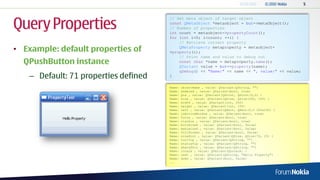
Query Properties
                                       // Get meta object of target object
                                       const QMetaObject *metaobject = but->metaObject();
                                       // Number of properties
                                       int count = metaobject->propertyCount();
                                       for (int i=0; i<count; ++i) {
                                           // Retrieve current property
• Example: default properties of           QMetaProperty metaproperty = metaobject-
                                       >property(i);
                                           // Print name and value to debug out
  QPushButton instance                     const char *name = metaproperty.name();
                                           QVariant value = but->property(name);
                                           qDebug() << "Name:" << name << ", value:" << value;
    – Default: 71 properties defined   }

                                       Name:   objectName , value: QVariant(QString, "")
                                       Name:   enabled , value: QVariant(bool, true)
                                       Name:   pos , value: QVariant(QPoint, QPoint(0,0) )
                                       Name:   size , value: QVariant(QSize, QSize(200, 100) )
                                       Name:   width , value: QVariant(int, 200)
                                       Name:   height , value: QVariant(int, 100)
                                       Name:   rect , value: QVariant(QRect, QRect(0,0 200x100) )
                                       Name:   isActiveWindow , value: QVariant(bool, true)
                                       Name:   focus , value: QVariant(bool, true)
                                       Name:   visible , value: QVariant(bool, true)
                                       Name:   minimized , value: QVariant(bool, false)
                                       Name:   maximized , value: QVariant(bool, false)
                                       Name:   fullScreen , value: QVariant(bool, false)
                                       Name:   sizeHint , value: QVariant(QSize, QSize(76, 23) )
                                       Name:   toolTip , value: QVariant(QString, "")
                                       Name:   statusTip , value: QVariant(QString, "")
                                       Name:   whatsThis , value: QVariant(QString, "")
                                       Name:   locale , value: QVariant(QLocale, )
                                       Name:   text , value: QVariant(QString, "Hello Property")
                                       Name:   down , value: QVariant(bool, false)
                                       ...
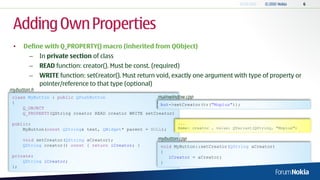
Adding Own Properties
 •   Define with Q_PROPERTY() macro (inherited from QObject)
        –    In private section of class
        –    READ function: creator(). Must be const. (required)
        –    WRITE function: setCreator(). Must return void, exactly one argument with type of property or
             pointer/reference to that type (optional)
mybutton.h
 class MyButton : public QPushButton                   mainwindow.cpp
 {                                                       but->setCreator(tr("Mopius"));
     Q_OBJECT
     Q_PROPERTY(QString creator READ creator WRITE setCreator)

 public:                                                       ...
     MyButton(const QString& text, QWidget* parent = NULL);    Name: creator , value: QVariant(QString, "Mopius")


     void setCreator(QString aCreator);                mybutton.cpp
     QString creator() const { return iCreator; }        void MyButton::setCreator(QString aCreator)
                                                         {
 private:                                                   iCreator = aCreator;
     QString iCreator;                                   }
 };
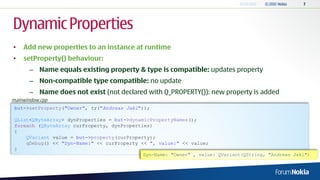
Dynamic Properties
•   Add new properties to an instance at runtime
•   setProperty() behaviour:
       – Name equals existing property & type is compatible: updates property
       – Non-compatible type compatible: no update
       – Name does not exist (not declared with Q_PROPERTY()): new property is added
mainwindow.cpp
 but->setProperty("Owner", tr("Andreas Jakl"));

 QList<QByteArray> dynProperties = but->dynamicPropertyNames();
 foreach (QByteArray curProperty, dynProperties)
 {
     QVariant value = but->property(curProperty);
     qDebug() << "Dyn-Name:" << curProperty << ", value:" << value;
 }
                                             Dyn-Name: "Owner" , value: QVariant(QString, "Andreas Jakl")
Data Types
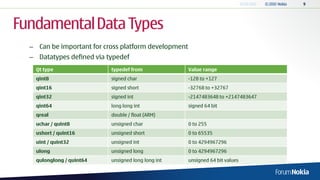
Fundamental Data Types
  – Can be important for cross platform development
  – Datatypes defined via typedef
    Qt type                typedef from               Value range
    qint8                  signed char                -128 to +127
    qint16                 signed short               -32768 to +32767
    qint32                 signed int                 -2147483648 to +2147483647
    qint64                 long long int              signed 64 bit
    qreal                  double / float (ARM)
    uchar / quint8         unsigned char              0 to 255
    ushort / quint16       unsigned short             0 to 65535
    uint / quint32         unsigned int               0 to 4294967296
    ulong                  unsigned long              0 to 4294967296
    qulonglong / quint64   unsigned long long int     unsigned 64 bit values
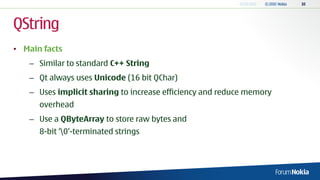
QString
• Main facts
   – Similar to standard C++ String
   – Qt always uses Unicode (16 bit QChar)
   – Uses implicit sharing to increase efficiency and reduce memory
      overhead
   – Use a QByteArray to store raw bytes and
      8-bit „0‟-terminated strings
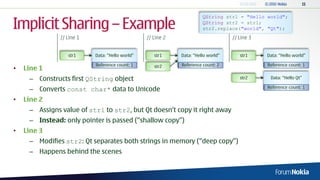
Implicit Sharing – Example
                                                                       QString str1 = "Hello world";
                                                                       QString str2 = str1;
                                                                       str2.replace("world", "Qt");
               // Line 1                         // Line 2                         // Line 3


                  str1     Data: “Hello world”      str1     Data: “Hello world”      str1     Data: “Hello world”

                           Reference count: 1       str2     Reference count: 2                Reference count: 1
•   Line 1
     – Constructs first QString object                                                str2      Data: “Hello Qt”

                                                                                               Reference count: 1
     – Converts const char* data to Unicode
•   Line 2
     – Assigns value of str1 to str2, but Qt doesn„t copy it right away
     – Instead: only pointer is passed (“shallow copy”)
•   Line 3
     – Modifies str2: Qt separates both strings in memory (“deep copy”)
     – Happens behind the scenes
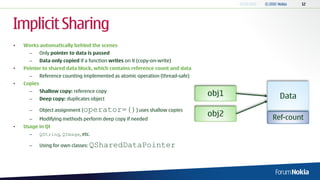
Implicit Sharing
•   Works automatically behind the scenes
      –      Only pointer to data is passed
      –      Data only copied if a function writes on it (copy-on-write)
•   Pointer to shared data block, which contains reference count and data
      –      Reference counting implemented as atomic operation (thread-safe)
•   Copies
             Shallow copy: reference copy
      –
                                                                                obj1     Data
      –      Deep copy: duplicates object

      –      Object assignment (   operator=()) uses shallow copies
                                                                                obj2   Ref-count
      –      Modifying methods perform deep copy if needed
•   Usage in Qt
      –      QString, QImage, etc.

      –      Using for own classes:   QSharedDataPointer
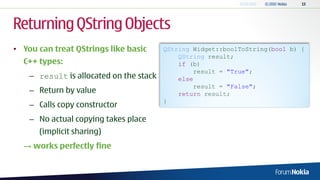
Returning QString Objects
• You can treat QStrings like basic      QString Widget::boolToString(bool b) {
                                             QString result;
  C++ types:                                 if (b)
                                                 result = "True";
    – result is allocated on the stack       else
                                                 result = "False";
    – Return by value                        return result;
                                         }
    – Calls copy constructor
    – No actual copying takes place
      (implicit sharing)
  → works perfectly fine
QVariant
  – Acts like a union for most common Qt data types
  – Stores one type of data
  – Converts between different types
      QDataStream out(...);
      QVariant v(123);               //   The variant now contains an int
      int x = v.toInt();             //   x = 123
      out << v;                      //   Writes a type tag and an int to out
      v = QVariant("hello");         //   The variant now contains a QByteArray
      v = QVariant(tr("hello"));     //   The variant now contains a QString
      int y = v.toInt();             //   y = 0 since v cannot be converted to an int
      QString s = v.toString();      //   s = tr("hello") (see QObject::tr())
      out << v;                      //   Writes a type tag and a QString to out
      [...]
      QDataStream in(...);           //   (opening the previously written stream)
      in >> v;                       //   Reads an Int variant
      int z = v.toInt();             //   z = 123
      qDebug("Type is %s",           //   prints "Type is int"
      v.typeName());
      v = v.toInt() + 100;           // The variant now hold the value 223
      v = QVariant(QStringList());
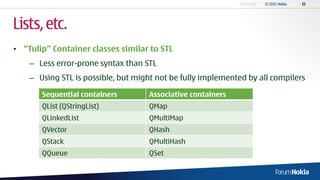
Lists, etc.
• “Tulip” Container classes similar to STL
    – Less error-prone syntax than STL
    – Using STL is possible, but might not be fully implemented by all compilers

       Sequential containers        Associative containers
       QList (QStringList)          QMap
       QLinkedList                  QMultiMap
       QVector                      QHash
       QStack                       QMultiHash
       QQueue                       QSet
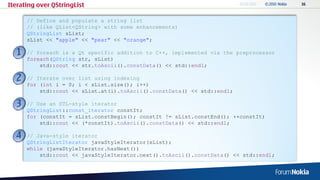
Iterating over QStringList

      // Define and populate a string list
      // (like QList<QString> with some enhancements)
      QStringList sList;
      sList << "apple" << "pear" << "orange";

      // foreach is a Qt specific addition to C++, implemented via the preprocessor
      foreach(QString str, sList)
          std::cout << str.toAscii().constData() << std::endl;

      // Iterate over list using indexing
      for (int i = 0; i < sList.size(); i++)
          std::cout << sList.at(i).toAscii().constData() << std::endl;

      // Use an STL-style iterator
      QStringList::const_iterator constIt;
      for (constIt = sList.constBegin(); constIt != sList.constEnd(); ++constIt)
          std::cout << (*constIt).toAscii().constData() << std::endl;

      // Java-style iterator
      QStringListIterator javaStyleIterator(sList);
      while (javaStyleIterator.hasNext())
          std::cout << javaStyleIterator.next().toAscii().constData() << std::endl;
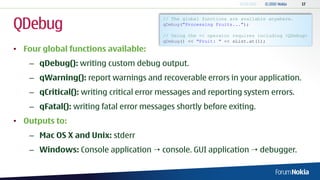
QDebug
                                         // The global functions are available anywhere.
                                         qDebug("Processing Fruits...");

                                         // Using the << operator requires including <QDebug>
                                         qDebug() << "Fruit: " << sList.at(1);
• Four global functions available:
    – qDebug(): writing custom debug output.
    – qWarning(): report warnings and recoverable errors in your application.
    – qCritical(): writing critical error messages and reporting system errors.
    – qFatal(): writing fatal error messages shortly before exiting.
• Outputs to:
    – Mac OS X and Unix: stderr
    – Windows: Console application  console. GUI application  debugger.
Settings
QSettings
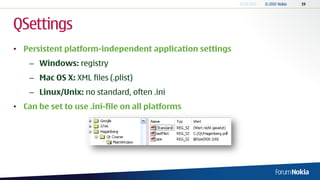
• Persistent platform-independent application settings
    – Windows: registry
    – Mac OS X: XML files (.plist)
    – Linux/Unix: no standard, often .ini
• Can be set to use .ini-file on all platforms
Application Properties
• Define properties in main():
   QCoreApplication::setOrganizationName("Hagenberg");
   QCoreApplication::setApplicationName("Qt Course");

    – Alternative: specify each time when creating a QSettings object
• Corresponds to:
    – Windows (user context):
      HKEY_CURRENT_USERSoftwareHagenbergQt Course
    – Unix: file ~/.config/Hagenberg/Qt Course.conf
• API based on QVariant  easy to store values
Saving Settings
     – Keys should be kept case-sensitive and not contain slashes („/‟ and „‟)
 void MainWindow::closeEvent(QCloseEvent *event) {
     QSettings settings;
     // Store the current size to the settings
     settings.beginGroup("MainWindow");
     settings.setValue("size", size());
     settings.setValue("lastFile1", "C:/Qt/Hagenberg.pdf");
     settings.endGroup();
     // Instead, we could also write: settings.setValue("MainWindow/size", size());

      // Accept the close event so that the window is shut down
      event->accept();
 }

.ini-file                                           Windows Registry
 [MainWindow]
 lastFile1=/home/qtexample/main.cpp
 size=@Size(508 320)
Loading Settings
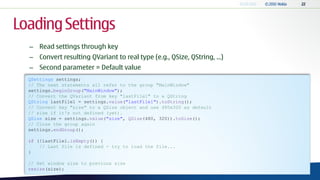
  – Read settings through key
  – Convert resulting QVariant to real type (e.g., QSize, QString, ...)
  – Second parameter = Default value
  QSettings settings;
  // The next statements all refer to the group "MainWindow"
  settings.beginGroup("MainWindow");
  // Convert the QVariant from key "lastFile1" to a QString
  QString lastFile1 = settings.value("lastFile1").toString();
  // Convert key "size" to a QSize object and use 480x320 as default
  // size if it's not defined (yet).
  QSize size = settings.value("size", QSize(480, 320)).toSize();
  // Close the group again
  settings.endGroup();

  if (!lastFile1.isEmpty()) {
      // Last file is defined - try to load the file...
  }

  // Set window size to previous size
  resize(size);
Resource Files
External Application Data
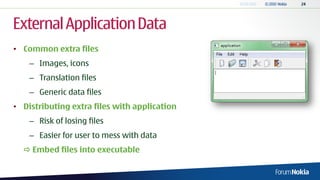
• Common extra files
    – Images, icons
    – Translation files
    – Generic data files
• Distributing extra files with application
    – Risk of losing files
    – Easier for user to mess with data
   Embed files into executable
Resource Collection Files
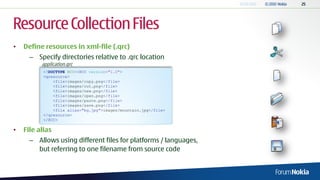
•   Define resources in xml-file (.qrc)
      – Specify directories relative to .qrc location
          application.qrc
           <!DOCTYPE RCC><RCC version="1.0">
           <qresource>
               <file>images/copy.png</file>
               <file>images/cut.png</file>
               <file>images/new.png</file>
               <file>images/open.png</file>
               <file>images/paste.png</file>
               <file>images/save.png</file>
               <file alias="bg.jpg">images/mountain.jpg</file>
           </qresource>
           </RCC>

•   File alias
      – Allows using different files for platforms / languages,
        but referring to one filename from source code
Compiled-In Resources                                        <<lists>>   Data (icons, etc.)
                                                                          Data (icons, etc.)


• Add to project file (.pro)                         application.qrc                           qrc_application.cpp
                                                                               RCC
   application.pro
   RESOURCES             = icons.qrc

• Invokes resource compiler (RCC)                                                                   Compiler


    – Generates C++ source files
    – Data specified as static C++ arrays                                                      qrc_application.obj


   qrc_application.cpp
   #include <QtCore/qglobal.h>

   static const unsigned char qt_resource_data[] = {
     // C:/Qt/2009.05/qt/examples/mainwindows/application/images/new.png
     0x0,0x0,0x3,0x54,0x89,
     […]
Accessing Resources
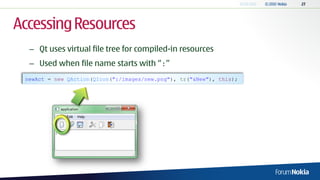
  – Qt uses virtual file tree for compiled-in resources
  – Used when file name starts with “:”
 newAct = new QAction(QIcon(":/images/new.png"), tr("&New"), this);
Resource Paths and Localization
•   Change path prefix for group of items
          <qresource prefix="/myresources">
              <file alias="cut-img.png">images/cut.png</file>
          </qresource>

      – Access file through:
         :/myresources/cut-img.png
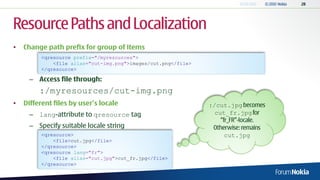
•   Different files by user’s locale                            :/cut.jpg
      – lang-attribute to qresource tag                           cut_fr.jpg

      – Specify suitable locale string
          <qresource>                                               cut.jpg
              <file>cut.jpg</file>
          </qresource>
          <qresource lang="fr">
              <file alias="cut.jpg">cut_fr.jpg</file>
          </qresource>
External Resources
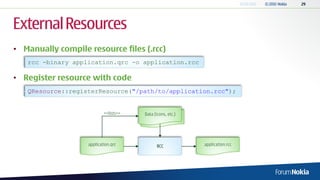
• Manually compile resource files (.rcc)
   rcc -binary application.qrc -o application.rcc

• Register resource with code
   QResource::registerResource("/path/to/application.rcc");


                           <<lists>>   Data (icons, etc.)
                                        Data (icons, etc.)


                   application.qrc           RCC             application.rcc
Thank You.

04 - Qt Data

  • 1.
    Qt Data Andreas Jakl SeniorTechnical Consultant Forum Nokia 20 September, 2010 v3.0.0
  • 2.
    Contents –Properties – Data Types – Settings – Resource Files
  • 3.
  • 4.
    Property System • Adddata to meta-object of class instances – Behaves like class property member – Define in class header file – Or add dynamically at runtime (any property to any class) – Used by Qt Designer for widget setup
  • 5.
    Query Properties // Get meta object of target object const QMetaObject *metaobject = but->metaObject(); // Number of properties int count = metaobject->propertyCount(); for (int i=0; i<count; ++i) { // Retrieve current property • Example: default properties of QMetaProperty metaproperty = metaobject- >property(i); // Print name and value to debug out QPushButton instance const char *name = metaproperty.name(); QVariant value = but->property(name); qDebug() << "Name:" << name << ", value:" << value; – Default: 71 properties defined } Name: objectName , value: QVariant(QString, "") Name: enabled , value: QVariant(bool, true) Name: pos , value: QVariant(QPoint, QPoint(0,0) ) Name: size , value: QVariant(QSize, QSize(200, 100) ) Name: width , value: QVariant(int, 200) Name: height , value: QVariant(int, 100) Name: rect , value: QVariant(QRect, QRect(0,0 200x100) ) Name: isActiveWindow , value: QVariant(bool, true) Name: focus , value: QVariant(bool, true) Name: visible , value: QVariant(bool, true) Name: minimized , value: QVariant(bool, false) Name: maximized , value: QVariant(bool, false) Name: fullScreen , value: QVariant(bool, false) Name: sizeHint , value: QVariant(QSize, QSize(76, 23) ) Name: toolTip , value: QVariant(QString, "") Name: statusTip , value: QVariant(QString, "") Name: whatsThis , value: QVariant(QString, "") Name: locale , value: QVariant(QLocale, ) Name: text , value: QVariant(QString, "Hello Property") Name: down , value: QVariant(bool, false) ...
  • 6.
    Adding Own Properties • Define with Q_PROPERTY() macro (inherited from QObject) – In private section of class – READ function: creator(). Must be const. (required) – WRITE function: setCreator(). Must return void, exactly one argument with type of property or pointer/reference to that type (optional) mybutton.h class MyButton : public QPushButton mainwindow.cpp { but->setCreator(tr("Mopius")); Q_OBJECT Q_PROPERTY(QString creator READ creator WRITE setCreator) public: ... MyButton(const QString& text, QWidget* parent = NULL); Name: creator , value: QVariant(QString, "Mopius") void setCreator(QString aCreator); mybutton.cpp QString creator() const { return iCreator; } void MyButton::setCreator(QString aCreator) { private: iCreator = aCreator; QString iCreator; } };
  • 7.
    Dynamic Properties • Add new properties to an instance at runtime • setProperty() behaviour: – Name equals existing property & type is compatible: updates property – Non-compatible type compatible: no update – Name does not exist (not declared with Q_PROPERTY()): new property is added mainwindow.cpp but->setProperty("Owner", tr("Andreas Jakl")); QList<QByteArray> dynProperties = but->dynamicPropertyNames(); foreach (QByteArray curProperty, dynProperties) { QVariant value = but->property(curProperty); qDebug() << "Dyn-Name:" << curProperty << ", value:" << value; } Dyn-Name: "Owner" , value: QVariant(QString, "Andreas Jakl")
  • 8.
  • 9.
    Fundamental Data Types – Can be important for cross platform development – Datatypes defined via typedef Qt type typedef from Value range qint8 signed char -128 to +127 qint16 signed short -32768 to +32767 qint32 signed int -2147483648 to +2147483647 qint64 long long int signed 64 bit qreal double / float (ARM) uchar / quint8 unsigned char 0 to 255 ushort / quint16 unsigned short 0 to 65535 uint / quint32 unsigned int 0 to 4294967296 ulong unsigned long 0 to 4294967296 qulonglong / quint64 unsigned long long int unsigned 64 bit values
  • 10.
    QString • Main facts – Similar to standard C++ String – Qt always uses Unicode (16 bit QChar) – Uses implicit sharing to increase efficiency and reduce memory overhead – Use a QByteArray to store raw bytes and 8-bit „0‟-terminated strings
  • 11.
    Implicit Sharing –Example QString str1 = "Hello world"; QString str2 = str1; str2.replace("world", "Qt"); // Line 1 // Line 2 // Line 3 str1 Data: “Hello world” str1 Data: “Hello world” str1 Data: “Hello world” Reference count: 1 str2 Reference count: 2 Reference count: 1 • Line 1 – Constructs first QString object str2 Data: “Hello Qt” Reference count: 1 – Converts const char* data to Unicode • Line 2 – Assigns value of str1 to str2, but Qt doesn„t copy it right away – Instead: only pointer is passed (“shallow copy”) • Line 3 – Modifies str2: Qt separates both strings in memory (“deep copy”) – Happens behind the scenes
  • 12.
    Implicit Sharing • Works automatically behind the scenes – Only pointer to data is passed – Data only copied if a function writes on it (copy-on-write) • Pointer to shared data block, which contains reference count and data – Reference counting implemented as atomic operation (thread-safe) • Copies Shallow copy: reference copy – obj1 Data – Deep copy: duplicates object – Object assignment ( operator=()) uses shallow copies obj2 Ref-count – Modifying methods perform deep copy if needed • Usage in Qt – QString, QImage, etc. – Using for own classes: QSharedDataPointer
  • 13.
    Returning QString Objects •You can treat QStrings like basic QString Widget::boolToString(bool b) { QString result; C++ types: if (b) result = "True"; – result is allocated on the stack else result = "False"; – Return by value return result; } – Calls copy constructor – No actual copying takes place (implicit sharing) → works perfectly fine
  • 14.
    QVariant –Acts like a union for most common Qt data types – Stores one type of data – Converts between different types QDataStream out(...); QVariant v(123); // The variant now contains an int int x = v.toInt(); // x = 123 out << v; // Writes a type tag and an int to out v = QVariant("hello"); // The variant now contains a QByteArray v = QVariant(tr("hello")); // The variant now contains a QString int y = v.toInt(); // y = 0 since v cannot be converted to an int QString s = v.toString(); // s = tr("hello") (see QObject::tr()) out << v; // Writes a type tag and a QString to out [...] QDataStream in(...); // (opening the previously written stream) in >> v; // Reads an Int variant int z = v.toInt(); // z = 123 qDebug("Type is %s", // prints "Type is int" v.typeName()); v = v.toInt() + 100; // The variant now hold the value 223 v = QVariant(QStringList());
  • 15.
    Lists, etc. • “Tulip”Container classes similar to STL – Less error-prone syntax than STL – Using STL is possible, but might not be fully implemented by all compilers Sequential containers Associative containers QList (QStringList) QMap QLinkedList QMultiMap QVector QHash QStack QMultiHash QQueue QSet
  • 16.
    Iterating over QStringList // Define and populate a string list // (like QList<QString> with some enhancements) QStringList sList; sList << "apple" << "pear" << "orange"; // foreach is a Qt specific addition to C++, implemented via the preprocessor foreach(QString str, sList) std::cout << str.toAscii().constData() << std::endl; // Iterate over list using indexing for (int i = 0; i < sList.size(); i++) std::cout << sList.at(i).toAscii().constData() << std::endl; // Use an STL-style iterator QStringList::const_iterator constIt; for (constIt = sList.constBegin(); constIt != sList.constEnd(); ++constIt) std::cout << (*constIt).toAscii().constData() << std::endl; // Java-style iterator QStringListIterator javaStyleIterator(sList); while (javaStyleIterator.hasNext()) std::cout << javaStyleIterator.next().toAscii().constData() << std::endl;
  • 17.
    QDebug // The global functions are available anywhere. qDebug("Processing Fruits..."); // Using the << operator requires including <QDebug> qDebug() << "Fruit: " << sList.at(1); • Four global functions available: – qDebug(): writing custom debug output. – qWarning(): report warnings and recoverable errors in your application. – qCritical(): writing critical error messages and reporting system errors. – qFatal(): writing fatal error messages shortly before exiting. • Outputs to: – Mac OS X and Unix: stderr – Windows: Console application  console. GUI application  debugger.
  • 18.
  • 19.
    QSettings • Persistent platform-independentapplication settings – Windows: registry – Mac OS X: XML files (.plist) – Linux/Unix: no standard, often .ini • Can be set to use .ini-file on all platforms
  • 20.
    Application Properties • Defineproperties in main(): QCoreApplication::setOrganizationName("Hagenberg"); QCoreApplication::setApplicationName("Qt Course"); – Alternative: specify each time when creating a QSettings object • Corresponds to: – Windows (user context): HKEY_CURRENT_USERSoftwareHagenbergQt Course – Unix: file ~/.config/Hagenberg/Qt Course.conf • API based on QVariant  easy to store values
  • 21.
    Saving Settings – Keys should be kept case-sensitive and not contain slashes („/‟ and „‟) void MainWindow::closeEvent(QCloseEvent *event) { QSettings settings; // Store the current size to the settings settings.beginGroup("MainWindow"); settings.setValue("size", size()); settings.setValue("lastFile1", "C:/Qt/Hagenberg.pdf"); settings.endGroup(); // Instead, we could also write: settings.setValue("MainWindow/size", size()); // Accept the close event so that the window is shut down event->accept(); } .ini-file Windows Registry [MainWindow] lastFile1=/home/qtexample/main.cpp size=@Size(508 320)
  • 22.
    Loading Settings – Read settings through key – Convert resulting QVariant to real type (e.g., QSize, QString, ...) – Second parameter = Default value QSettings settings; // The next statements all refer to the group "MainWindow" settings.beginGroup("MainWindow"); // Convert the QVariant from key "lastFile1" to a QString QString lastFile1 = settings.value("lastFile1").toString(); // Convert key "size" to a QSize object and use 480x320 as default // size if it's not defined (yet). QSize size = settings.value("size", QSize(480, 320)).toSize(); // Close the group again settings.endGroup(); if (!lastFile1.isEmpty()) { // Last file is defined - try to load the file... } // Set window size to previous size resize(size);
  • 23.
  • 24.
    External Application Data •Common extra files – Images, icons – Translation files – Generic data files • Distributing extra files with application – Risk of losing files – Easier for user to mess with data  Embed files into executable
  • 25.
    Resource Collection Files • Define resources in xml-file (.qrc) – Specify directories relative to .qrc location application.qrc <!DOCTYPE RCC><RCC version="1.0"> <qresource> <file>images/copy.png</file> <file>images/cut.png</file> <file>images/new.png</file> <file>images/open.png</file> <file>images/paste.png</file> <file>images/save.png</file> <file alias="bg.jpg">images/mountain.jpg</file> </qresource> </RCC> • File alias – Allows using different files for platforms / languages, but referring to one filename from source code
  • 26.
    Compiled-In Resources <<lists>> Data (icons, etc.) Data (icons, etc.) • Add to project file (.pro) application.qrc qrc_application.cpp RCC application.pro RESOURCES = icons.qrc • Invokes resource compiler (RCC) Compiler – Generates C++ source files – Data specified as static C++ arrays qrc_application.obj qrc_application.cpp #include <QtCore/qglobal.h> static const unsigned char qt_resource_data[] = { // C:/Qt/2009.05/qt/examples/mainwindows/application/images/new.png 0x0,0x0,0x3,0x54,0x89, […]
  • 27.
    Accessing Resources – Qt uses virtual file tree for compiled-in resources – Used when file name starts with “:” newAct = new QAction(QIcon(":/images/new.png"), tr("&New"), this);
  • 28.
    Resource Paths andLocalization • Change path prefix for group of items <qresource prefix="/myresources"> <file alias="cut-img.png">images/cut.png</file> </qresource> – Access file through: :/myresources/cut-img.png • Different files by user’s locale :/cut.jpg – lang-attribute to qresource tag cut_fr.jpg – Specify suitable locale string <qresource> cut.jpg <file>cut.jpg</file> </qresource> <qresource lang="fr"> <file alias="cut.jpg">cut_fr.jpg</file> </qresource>
  • 29.
    External Resources • Manuallycompile resource files (.rcc) rcc -binary application.qrc -o application.rcc • Register resource with code QResource::registerResource("/path/to/application.rcc"); <<lists>> Data (icons, etc.) Data (icons, etc.) application.qrc RCC application.rcc
  • 30.