





Advanced techniques for the development of 2D
Windows 8 games using Direct X and C++
Markus Jost
CEO, Lead Programmer, Codebox GmbH
markus.jost@codebox.ch
Agenda
Recap first Session 5’
Cross-Device UI Design 5’
Performance tuning 15’
Advanced Techniques 15’
Questions 5’
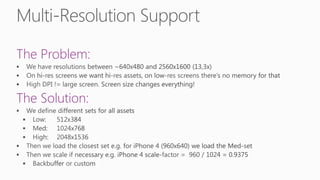
Cross-Device UI Design
Chapter 1/4
The Problem:
The Solution:
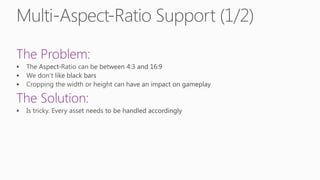
The Problem:
The Solution:
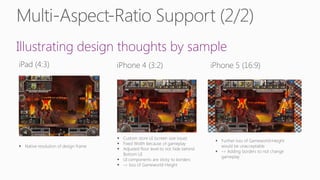
Illustrating design thoughts by sample
Performance tuning
Chapter 2/4
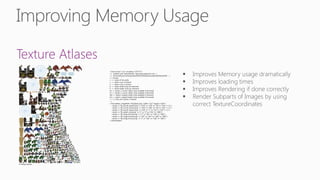
Texture Atlases
© Gango Games
<?xml version="1.0" encoding="UTF-8"?>
<!-- Created with TexturePacker http://texturepacker.com-->
<!-- $TexturePacker:SmartUpdate:963678140e0adc4acab0c90e39ea3d54$ -->
<!--Format:
n => name of the sprite
x => sprite x pos in texture
y => sprite y pos in texture
w => sprite width (may be trimmed)
h => sprite height (may be trimmed)
oX => sprite's x-corner offset (only available if trimmed)
oY => sprite's y-corner offset (only available if trimmed)
oW => sprite's original width (only available if trimmed)
oH => sprite's original height (only available if trimmed)
r => 'y' only set if sprite is rotated
-->
<TextureAtlas imagePath="FlySplash.png" width="512" height="1024">
<sprite n="fly_mouth_frame1.png" x="416" y="210" w="56" h="102" r="y"/>
<sprite n="fly_mouth_frame2.png" x="416" y="106" w="56" h="102" r="y"/>
<sprite n="fly_mouth_frame3.png" x="416" y="2" w="56" h="102" r="y"/>
<sprite n="fly_splash_solid.png" x="2" y="2" w="412" h="298"/>
<sprite n="fly_wings_frame1.png" x="2" y="412" w="228" h="108"/>
<sprite n="fly_wings_frame2.png" x="232" y="314" w="228" h="108"/>
<sprite n="fly_wings_frame3.png" x="2" y="302" w="228" h="108"/>
</TextureAtlas>
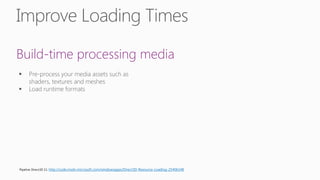
Build-time processing media
Pipeline Direct3D 11: http://code.msdn.microsoft.com/windowsapps/Direct3D-Resource-Loading-25406148
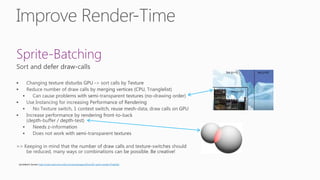
Sprite-Batching
SpriteBatch Sample: http://code.msdn.microsoft.com/windowsapps/Direct3D-sprite-sample-97ae6262
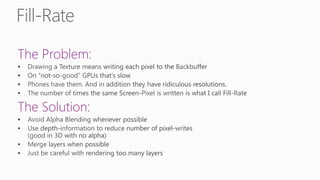
The Problem:
The Solution:
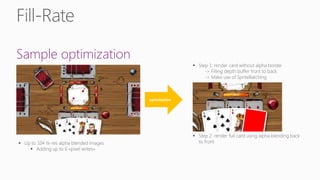
Sample optimization
optimization
Advanced Techniques
Chapter 3/4
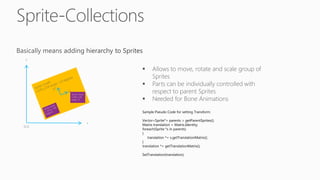
Sample Pseudo Code for setting Transform:
Vector<Sprite*> parents = getParentSprites();
Matrix translation = Matrix.Identity;
foreach(Sprite *s in parents)
{
translation *= s.getTranslationMatrix();
}
translation *= getTranslationMatrix();
SetTranslation(translation);
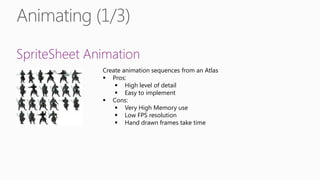
SpriteSheet Animation
Create animation sequences from an Atlas
 Pros:
 High level of detail
 Easy to implement
 Cons:
 Very High Memory use
 Low FPS resolution
 Hand drawn frames take time
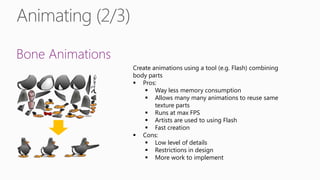
Bone Animations
Create animations using a tool (e.g. Flash) combining
body parts
 Pros:
 Way less memory consumption
 Allows many many animations to reuse same
texture parts
 Runs at max FPS
 Artists are used to using Flash
 Fast creation
 Cons:
 Low level of details
 Restrictions in design
 More work to implement
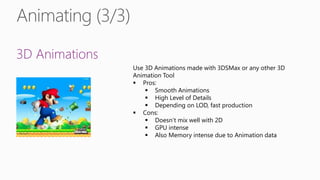
3D Animations
Use 3D Animations made with 3DSMax or any other 3D
Animation Tool
 Pros:
 Smooth Animations
 High Level of Details
 Depending on LOD, fast production
 Cons:
 Doesn’t mix well with 2D
 GPU intense
 Also Memory intense due to Animation data
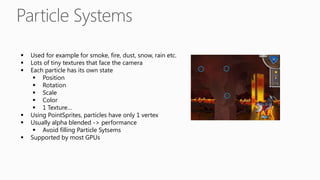
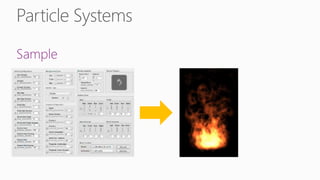
 Used for example for smoke, fire, dust, snow, rain etc.
 Lots of tiny textures that face the camera
 Each particle has its own state
 Position
 Rotation
 Scale
 Color
 1 Texture…
 Using PointSprites, particles have only 1 vertex
 Usually alpha blended -> performance
 Avoid filling Particle Sytsems
 Supported by most GPUs
Sample
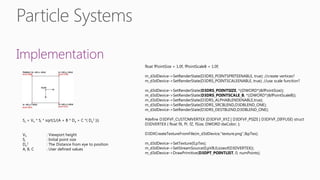
Implementation
Ss = Vh * Si * sqrt(1/(A + B * De + C *( De
2 )))
Vh : Viewport height
Si : Initial point size
De
2 : The Distance from eye to position
A, B, C : User defined values
float fPointSize = 1.0f, fPointScaleB = 1.0f;
m_d3dDevice->SetRenderState(D3DRS_POINTSPRITEENABLE, true); //create vertices?
m_d3dDevice->SetRenderState(D3DRS_POINTSCALEENABLE, true); //use scale function?
m_d3dDevice->SetRenderState(D3DRS_POINTSIZE, *((DWORD*)&fPointSize));
m_d3dDevice->SetRenderState(D3DRS_POINTSCALE_B, *((DWORD*)&fPointScaleB));
m_d3dDevice->SetRenderState(D3DRS_ALPHABLENDENABLE,true);
m_d3dDevice->SetRenderState(D3DRS_SRCBLEND,D3DBLEND_ONE);
m_d3dDevice->SetRenderState(D3DRS_DESTBLEND,D3DBLEND_ONE);
#define D3DFVF_CUSTOMVERTEX (D3DFVF_XYZ | D3DFVF_PSIZE | D3DFVF_DIFFUSE) struct
D3DVERTEX { float fX, fY, fZ, fSize; DWORD dwColor; };
D3DXCreateTextureFromFile(m_d3dDevice,"texture.png",&pTex);
m_d3dDevice->SetTexture(0,pTex);
m_d3dDevice->SetStreamSource(0,pVB,0,sizeof(D3DVERTEX));
m_d3dDevice->DrawPrimitive(D3DPT_POINTLIST, 0, numPoints);
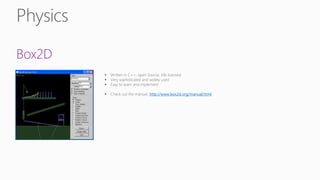
Box2D
http://www.box2d.org/manual.html
On Windows 8
http://code.msdn.microsoft.com/windowsapps/DWriteHelloWorld-760793d2
On Windows Phone 8
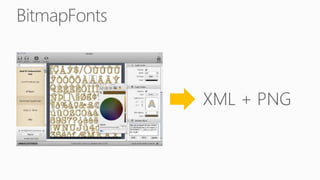
Or use BitmapFonts
http://directxtk.codeplex.com/
http://www.71squared.com/en/glyphdesigner
Questions?
Chapter 4/4
Advanced techniques for development of 2D Windows 8 games

Advanced techniques for development of 2D Windows 8 games

  • 1.
    Advanced techniques forthe development of 2D Windows 8 games using Direct X and C++ Markus Jost CEO, Lead Programmer, Codebox GmbH markus.jost@codebox.ch
  • 2.
    Agenda Recap first Session5’ Cross-Device UI Design 5’ Performance tuning 15’ Advanced Techniques 15’ Questions 5’
  • 3.
  • 4.
  • 5.
  • 6.
  • 7.
  • 9.
    Texture Atlases © GangoGames <?xml version="1.0" encoding="UTF-8"?> <!-- Created with TexturePacker http://texturepacker.com--> <!-- $TexturePacker:SmartUpdate:963678140e0adc4acab0c90e39ea3d54$ --> <!--Format: n => name of the sprite x => sprite x pos in texture y => sprite y pos in texture w => sprite width (may be trimmed) h => sprite height (may be trimmed) oX => sprite's x-corner offset (only available if trimmed) oY => sprite's y-corner offset (only available if trimmed) oW => sprite's original width (only available if trimmed) oH => sprite's original height (only available if trimmed) r => 'y' only set if sprite is rotated --> <TextureAtlas imagePath="FlySplash.png" width="512" height="1024"> <sprite n="fly_mouth_frame1.png" x="416" y="210" w="56" h="102" r="y"/> <sprite n="fly_mouth_frame2.png" x="416" y="106" w="56" h="102" r="y"/> <sprite n="fly_mouth_frame3.png" x="416" y="2" w="56" h="102" r="y"/> <sprite n="fly_splash_solid.png" x="2" y="2" w="412" h="298"/> <sprite n="fly_wings_frame1.png" x="2" y="412" w="228" h="108"/> <sprite n="fly_wings_frame2.png" x="232" y="314" w="228" h="108"/> <sprite n="fly_wings_frame3.png" x="2" y="302" w="228" h="108"/> </TextureAtlas>
  • 10.
    Build-time processing media PipelineDirect3D 11: http://code.msdn.microsoft.com/windowsapps/Direct3D-Resource-Loading-25406148
  • 12.
  • 13.
  • 14.
  • 15.
  • 16.
    Sample Pseudo Codefor setting Transform: Vector<Sprite*> parents = getParentSprites(); Matrix translation = Matrix.Identity; foreach(Sprite *s in parents) { translation *= s.getTranslationMatrix(); } translation *= getTranslationMatrix(); SetTranslation(translation);
  • 17.
    SpriteSheet Animation Create animationsequences from an Atlas  Pros:  High level of detail  Easy to implement  Cons:  Very High Memory use  Low FPS resolution  Hand drawn frames take time
  • 18.
    Bone Animations Create animationsusing a tool (e.g. Flash) combining body parts  Pros:  Way less memory consumption  Allows many many animations to reuse same texture parts  Runs at max FPS  Artists are used to using Flash  Fast creation  Cons:  Low level of details  Restrictions in design  More work to implement
  • 19.
    3D Animations Use 3DAnimations made with 3DSMax or any other 3D Animation Tool  Pros:  Smooth Animations  High Level of Details  Depending on LOD, fast production  Cons:  Doesn’t mix well with 2D  GPU intense  Also Memory intense due to Animation data
  • 20.
     Used forexample for smoke, fire, dust, snow, rain etc.  Lots of tiny textures that face the camera  Each particle has its own state  Position  Rotation  Scale  Color  1 Texture…  Using PointSprites, particles have only 1 vertex  Usually alpha blended -> performance  Avoid filling Particle Sytsems  Supported by most GPUs
  • 21.
  • 22.
    Implementation Ss = Vh* Si * sqrt(1/(A + B * De + C *( De 2 ))) Vh : Viewport height Si : Initial point size De 2 : The Distance from eye to position A, B, C : User defined values float fPointSize = 1.0f, fPointScaleB = 1.0f; m_d3dDevice->SetRenderState(D3DRS_POINTSPRITEENABLE, true); //create vertices? m_d3dDevice->SetRenderState(D3DRS_POINTSCALEENABLE, true); //use scale function? m_d3dDevice->SetRenderState(D3DRS_POINTSIZE, *((DWORD*)&fPointSize)); m_d3dDevice->SetRenderState(D3DRS_POINTSCALE_B, *((DWORD*)&fPointScaleB)); m_d3dDevice->SetRenderState(D3DRS_ALPHABLENDENABLE,true); m_d3dDevice->SetRenderState(D3DRS_SRCBLEND,D3DBLEND_ONE); m_d3dDevice->SetRenderState(D3DRS_DESTBLEND,D3DBLEND_ONE); #define D3DFVF_CUSTOMVERTEX (D3DFVF_XYZ | D3DFVF_PSIZE | D3DFVF_DIFFUSE) struct D3DVERTEX { float fX, fY, fZ, fSize; DWORD dwColor; }; D3DXCreateTextureFromFile(m_d3dDevice,"texture.png",&pTex); m_d3dDevice->SetTexture(0,pTex); m_d3dDevice->SetStreamSource(0,pVB,0,sizeof(D3DVERTEX)); m_d3dDevice->DrawPrimitive(D3DPT_POINTLIST, 0, numPoints);
  • 23.
  • 24.
    On Windows 8 http://code.msdn.microsoft.com/windowsapps/DWriteHelloWorld-760793d2 OnWindows Phone 8 Or use BitmapFonts http://directxtk.codeplex.com/ http://www.71squared.com/en/glyphdesigner
  • 26.