St. Pölten University of Applied SciencesSt. Pölten University of Applied Sciences
Platzhalter für möglichen
Bildeinsatz
AR / VR Interaction Development with Unity
Andreas Jakl
WS 2018, v1.2
AR / VR Master Class
FH St. Pölten
Course Contents
▪ Scripting: Frameworks, APIs and Languages
▪ GameObjects: Behind the Scenes
▪ Coroutines
▪ Gaze & Raycasting
▪ Delegates, Events & Actions
▪ Reticle / Cursor for Raycasts, based on a Canvas
AR / VR Interaction Development with Unity | 2018 | Andreas Jakl | FH St. Pölten 2
SCRIPTING IN UNITY
Frameworks, APIs and Languages
AR / VR Interaction Development with Unity | 2018 | Andreas Jakl | FH St. Pölten 3
Review C# Basics for Unity
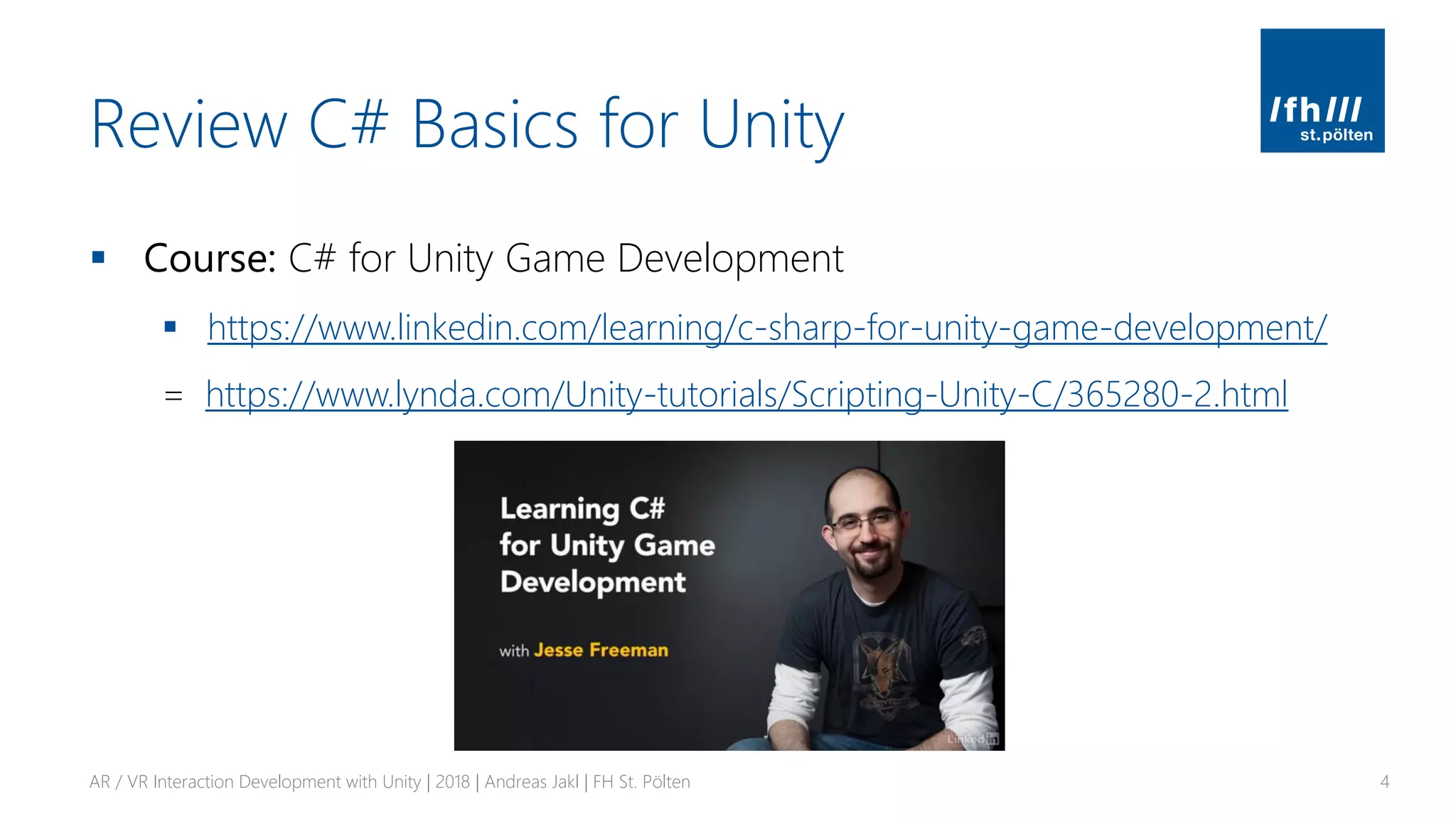
▪ Course: C# for Unity Game Development
▪ https://www.linkedin.com/learning/c-sharp-for-unity-game-development/
= https://www.lynda.com/Unity-tutorials/Scripting-Unity-C/365280-2.html
AR / VR Interaction Development with Unity | 2018 | Andreas Jakl | FH St. Pölten 4
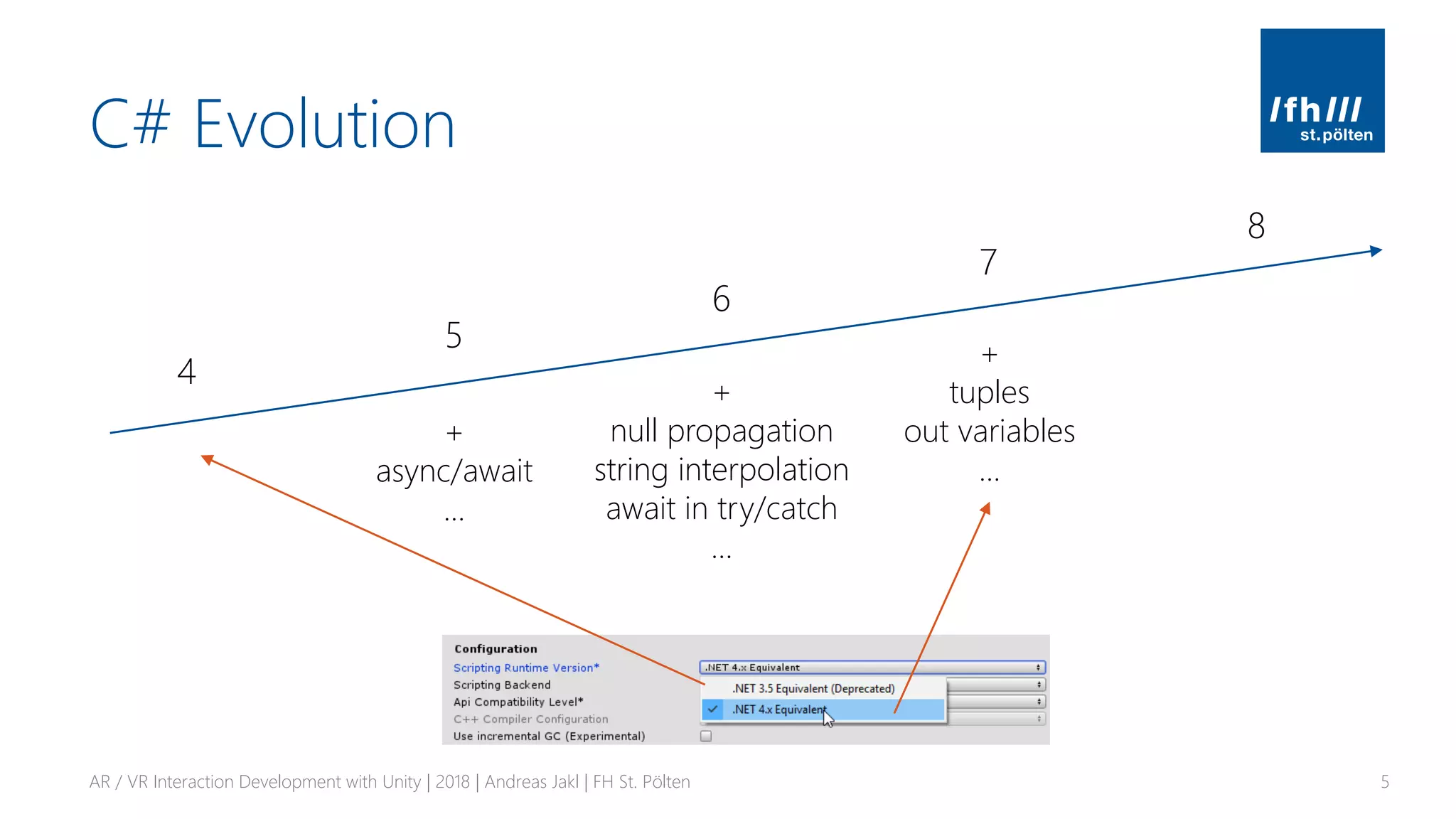
C# Evolution
AR / VR Interaction Development with Unity | 2018 | Andreas Jakl | FH St. Pölten 5
4
5
6
7
8
+
async/await
…
+
null propagation
string interpolation
await in try/catch
…
+
tuples
out variables
…
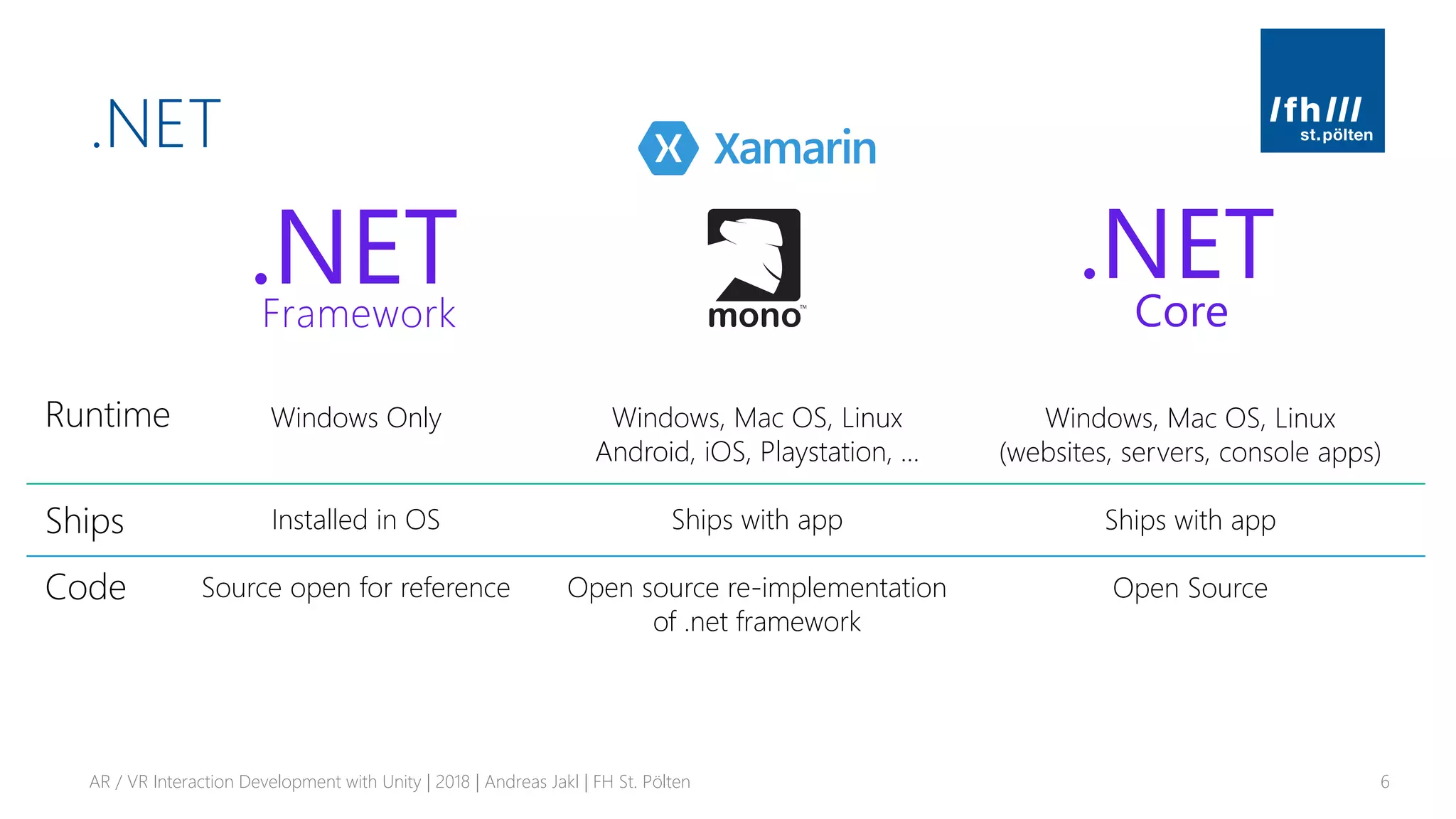
.NET
AR / VR Interaction Development with Unity | 2018 | Andreas Jakl | FH St. Pölten 6
Windows Only
Installed in OS
Source open for reference
Windows, Mac OS, Linux
(websites, servers, console apps)
Ships with app
Open Source
Windows, Mac OS, Linux
Android, iOS, Playstation, …
Ships with app
Open source re-implementation
of .net framework
Runtime
Ships
Code
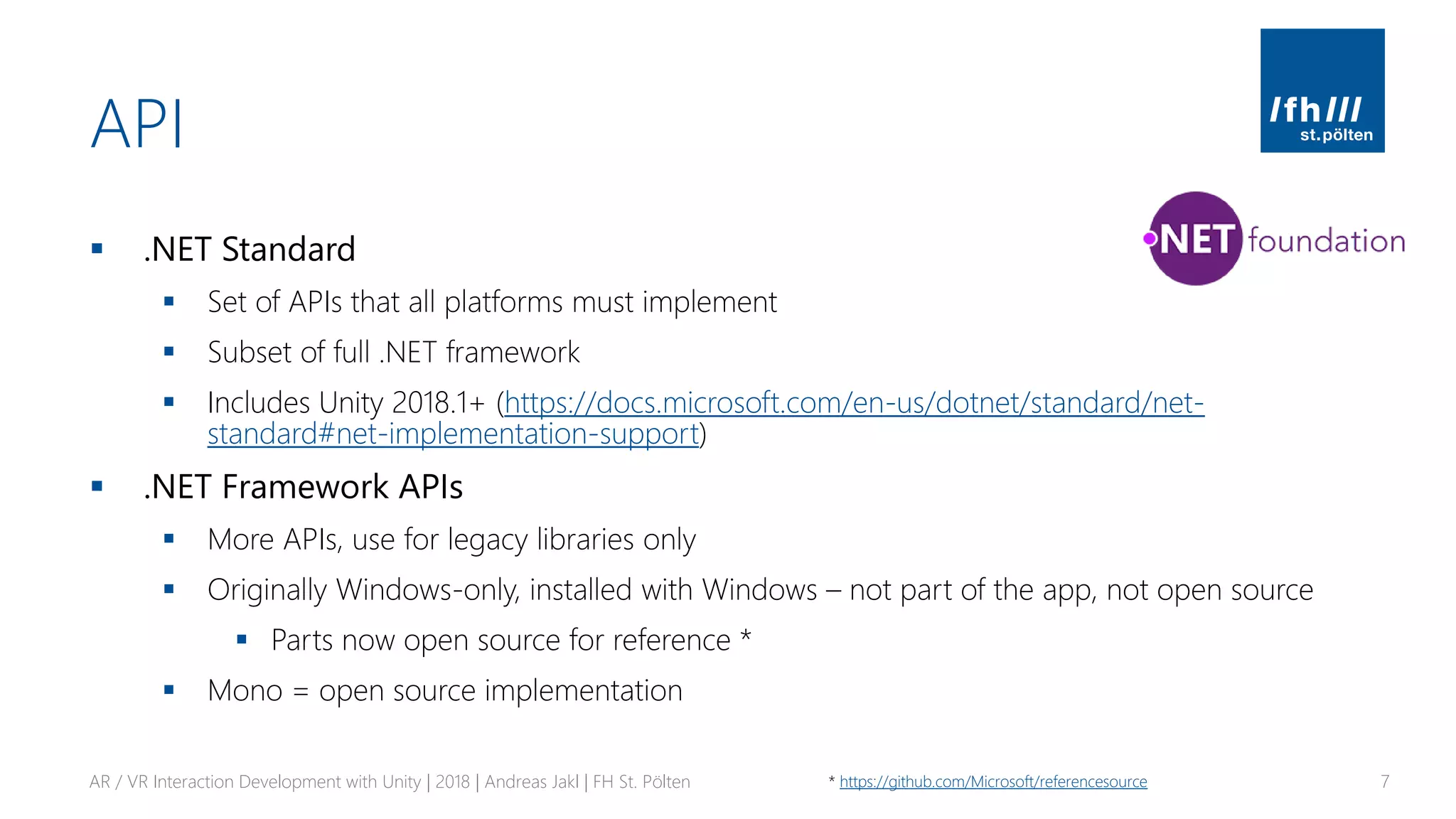
API
▪ .NET Standard
▪ Set of APIs that all platforms must implement
▪ Subset of full .NET framework
▪ Includes Unity 2018.1+ (https://docs.microsoft.com/en-us/dotnet/standard/net-
standard#net-implementation-support)
▪ .NET Framework APIs
▪ More APIs, use for legacy libraries only
▪ Originally Windows-only, installed with Windows – not part of the app, not open source
▪ Parts now open source for reference *
▪ Mono = open source implementation
AR / VR Interaction Development with Unity | 2018 | Andreas Jakl | FH St. Pölten 7* https://github.com/Microsoft/referencesource
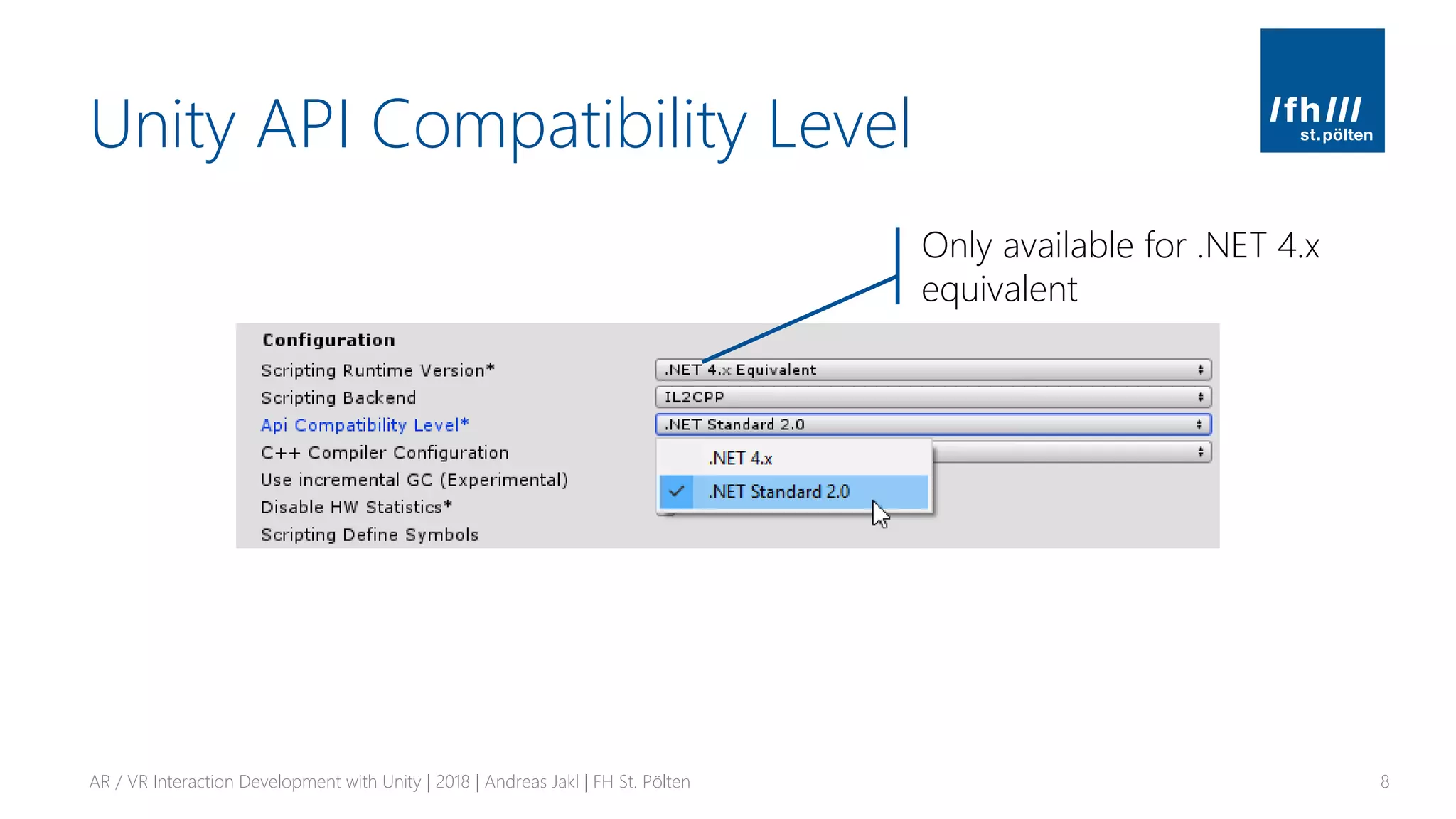
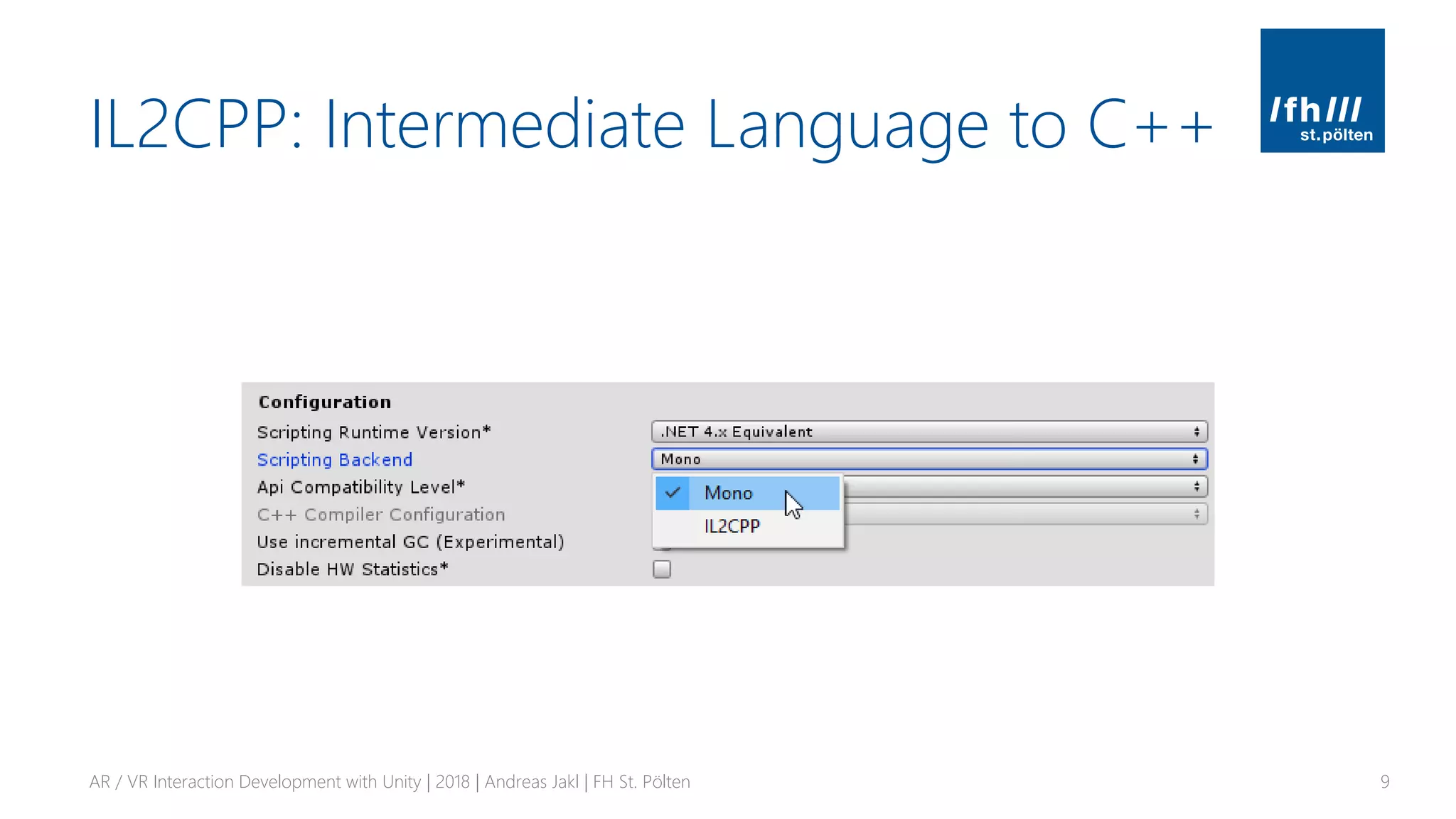
Unity API Compatibility Level
AR / VR Interaction Development with Unity | 2018 | Andreas Jakl | FH St. Pölten 8
Only available for .NET 4.x
equivalent
IL2CPP: Intermediate Language to C++
AR / VR Interaction Development with Unity | 2018 | Andreas Jakl | FH St. Pölten 9
IL2CPP: Intermediate Language to C++
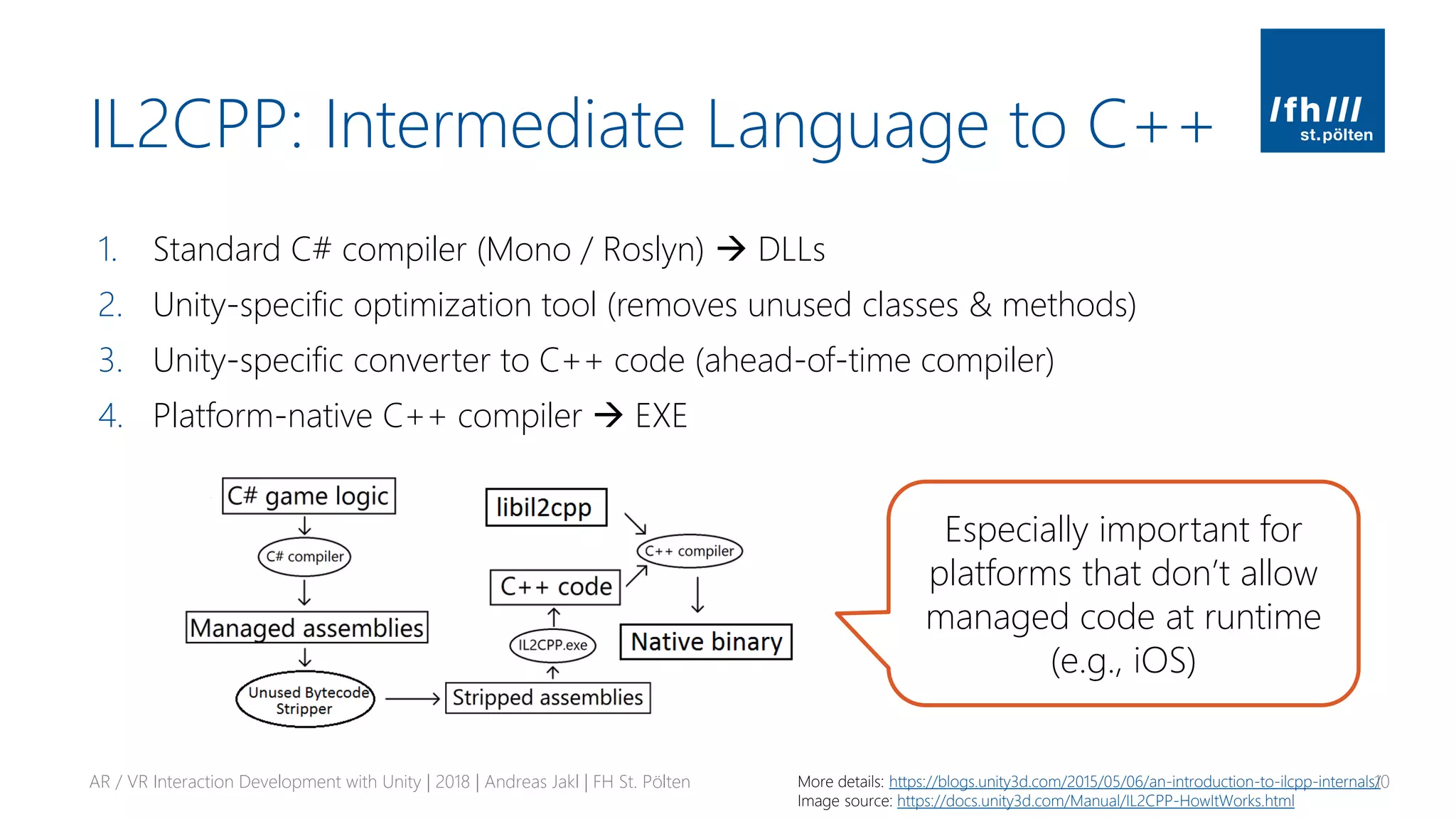
1. Standard C# compiler (Mono / Roslyn) → DLLs
2. Unity-specific optimization tool (removes unused classes & methods)
3. Unity-specific converter to C++ code (ahead-of-time compiler)
4. Platform-native C++ compiler → EXE
AR / VR Interaction Development with Unity | 2018 | Andreas Jakl | FH St. Pölten 10More details: https://blogs.unity3d.com/2015/05/06/an-introduction-to-ilcpp-internals/
Image source: https://docs.unity3d.com/Manual/IL2CPP-HowItWorks.html
Especially important for
platforms that don’t allow
managed code at runtime
(e.g., iOS)
.NET Core
▪ Open source, cross-platform runtime
▪ Not currently planned for Unity
▪ Not enough platforms, hooks missing for Unity
▪ https://blogs.unity3d.com/2018/03/28/updated-scripting-runtime-in-unity-
2018-1-what-does-the-future-hold/
AR / VR Interaction Development with Unity | 2018 | Andreas Jakl | FH St. Pölten 11
BEHIND THE SCENES
Behaviors, Game Objects, Scripts
AR / VR Interaction Development with Unity | 2018 | Andreas Jakl | FH St. Pölten 12
Behaviors
▪ Scripts describe behaviors that get attached to game objects
▪ Behaviors: move, …
▪ Main methods
▪ Start – first load scene
▪ Update – once per frame (VR: 60, 90, 120)
▪ Time.deltaTime – time it took to render previous frame. Important for
framerate-independent code
AR / VR Interaction Development with Unity | 2018 | Andreas Jakl | FH St. Pölten 13
Classes
AR / VR Interaction Development with Unity | 2018 | Andreas Jakl | FH St. Pölten 14
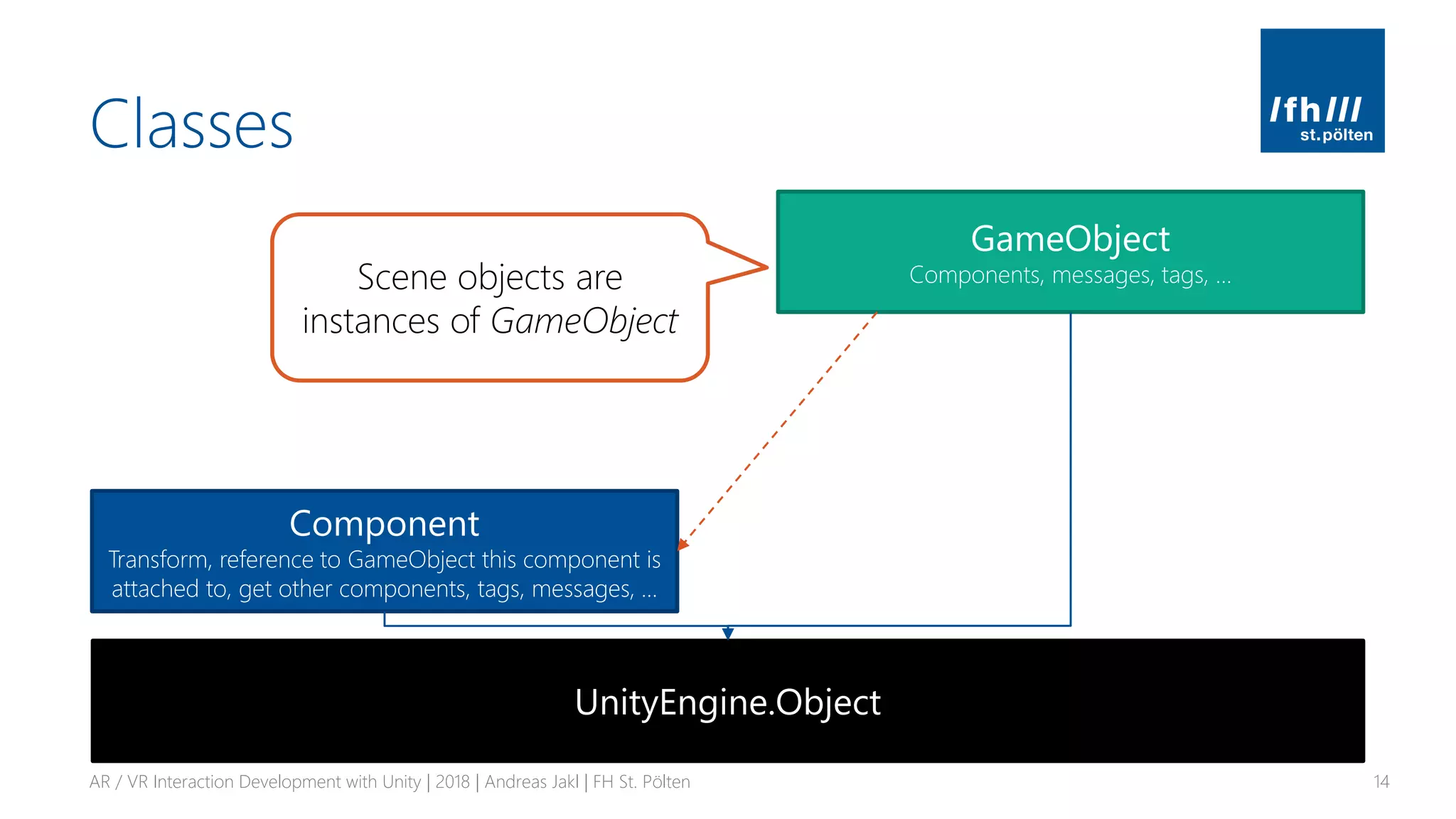
Component
Transform, reference to GameObject this component is
attached to, get other components, tags, messages, …
UnityEngine.Object
GameObject
Components, messages, tags, …Scene objects are
instances of GameObject
Classes
AR / VR Interaction Development with Unity | 2018 | Andreas Jakl | FH St. Pölten 15
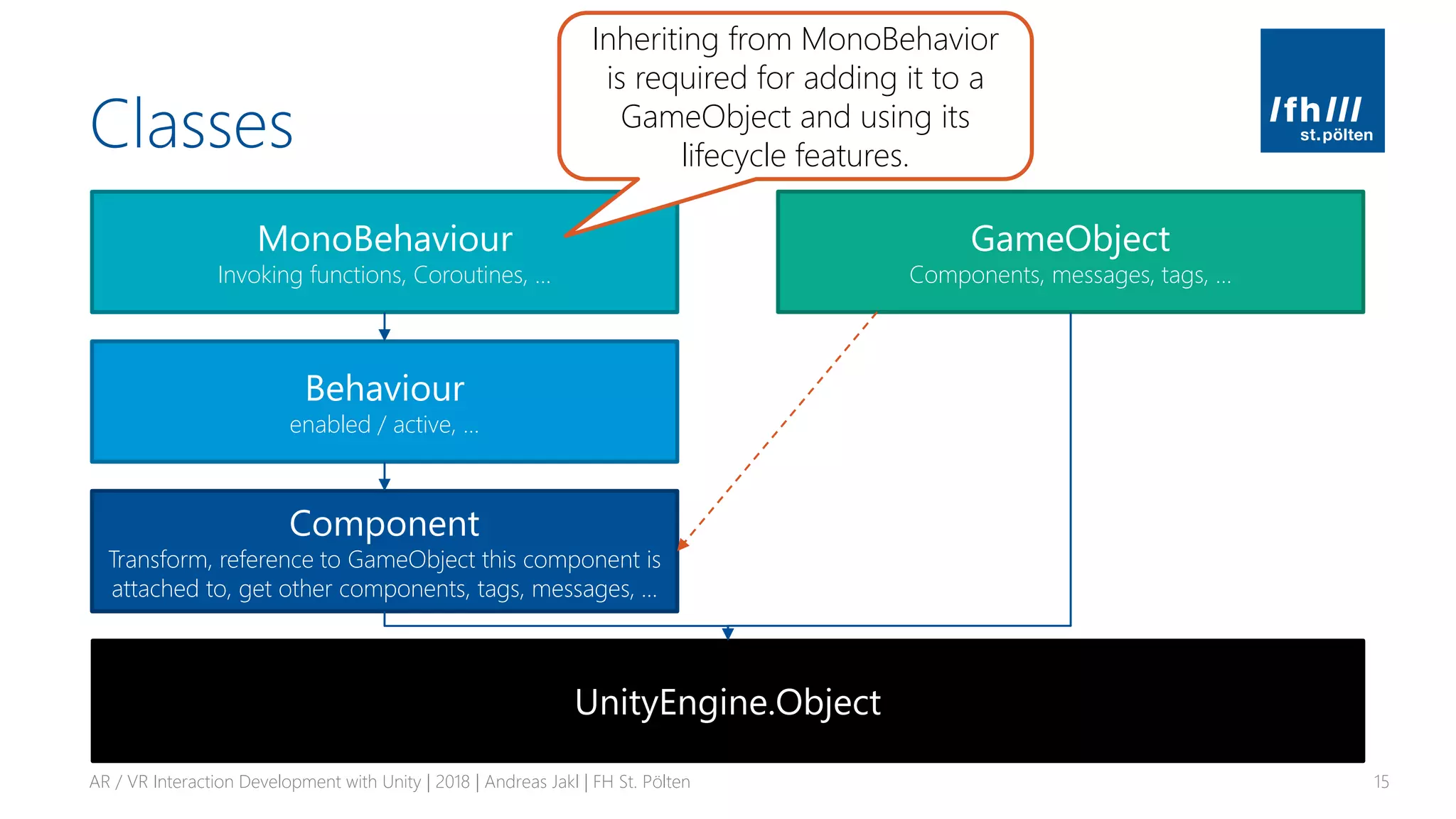
MonoBehaviour
Invoking functions, Coroutines, …
Behaviour
enabled / active, …
Component
Transform, reference to GameObject this component is
attached to, get other components, tags, messages, …
UnityEngine.Object
GameObject
Components, messages, tags, …
Inheriting from MonoBehavior
is required for adding it to a
GameObject and using its
lifecycle features.
Classes
AR / VR Interaction Development with Unity | 2018 | Andreas Jakl | FH St. Pölten 16
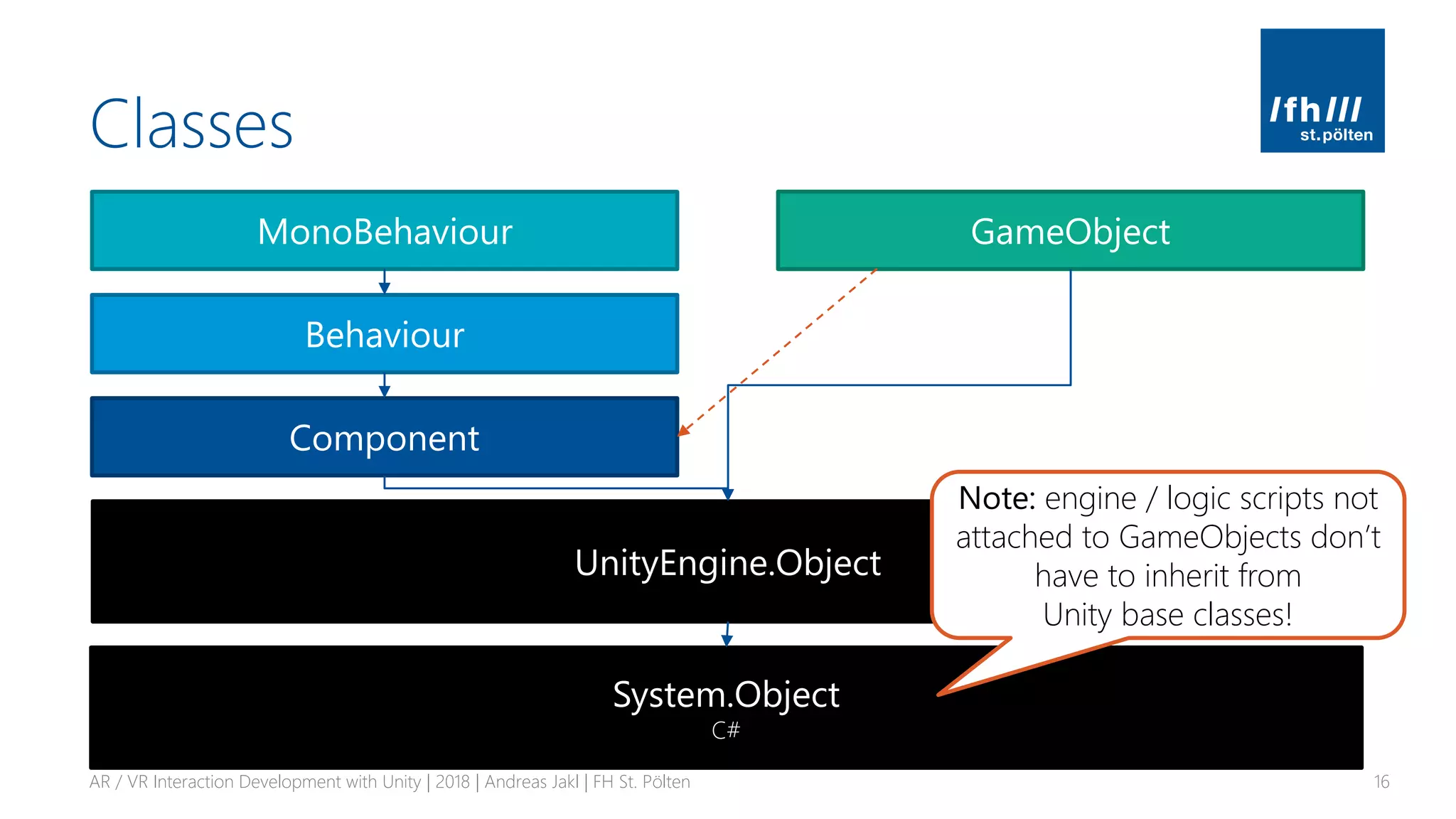
MonoBehaviour
Behaviour
Component
UnityEngine.Object
GameObject
System.Object
C#
Note: engine / logic scripts not
attached to GameObjects don’t
have to inherit from
Unity base classes!
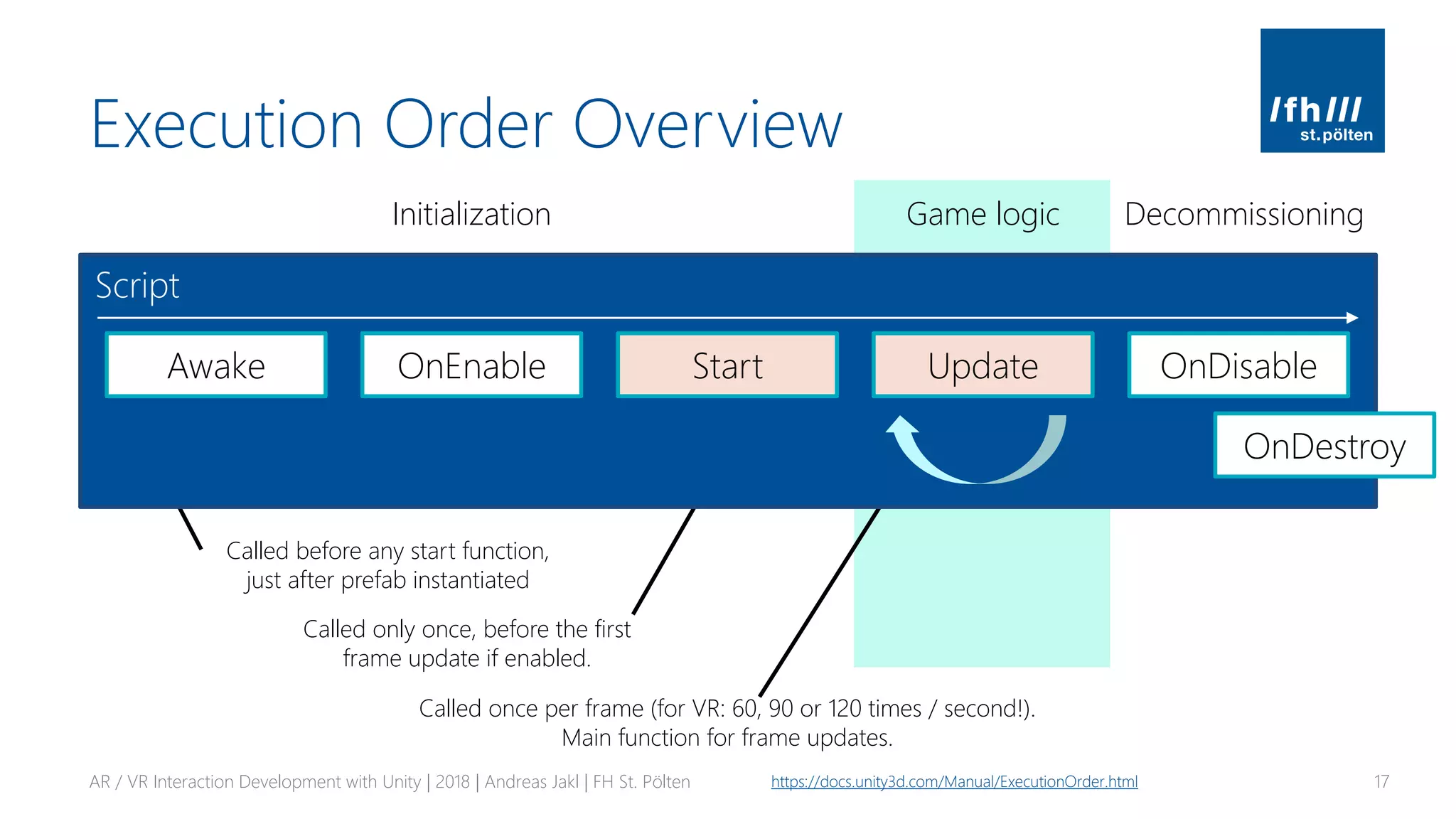
Execution Order Overview
AR / VR Interaction Development with Unity | 2018 | Andreas Jakl | FH St. Pölten 17https://docs.unity3d.com/Manual/ExecutionOrder.html
Initialization Game logic Decommissioning
Called before any start function,
just after prefab instantiated
Called only once, before the first
frame update if enabled.
Called once per frame (for VR: 60, 90 or 120 times / second!).
Main function for frame updates.
Script
Awake OnEnable Start Update OnDisable
OnDestroy
Fields & References
▪ Public fields (member variables)
▪ Assignable through Unity editor
▪ Private fields
▪ Generally preferred – information encapsulation!
▪ Add [SerializeField] attribute for visibility in the Unity Editor
AR / VR Interaction Development with Unity | 2018 | Andreas Jakl | FH St. Pölten 18
Serialization in Unity: https://docs.unity3d.com/ScriptReference/SerializeField.html
public class PlayerManager : MonoBehaviour
{
public int PlayerHealth;
[SerializeField]
private bool _rechargeEnabled;
private int _rechargeCounter = 0;
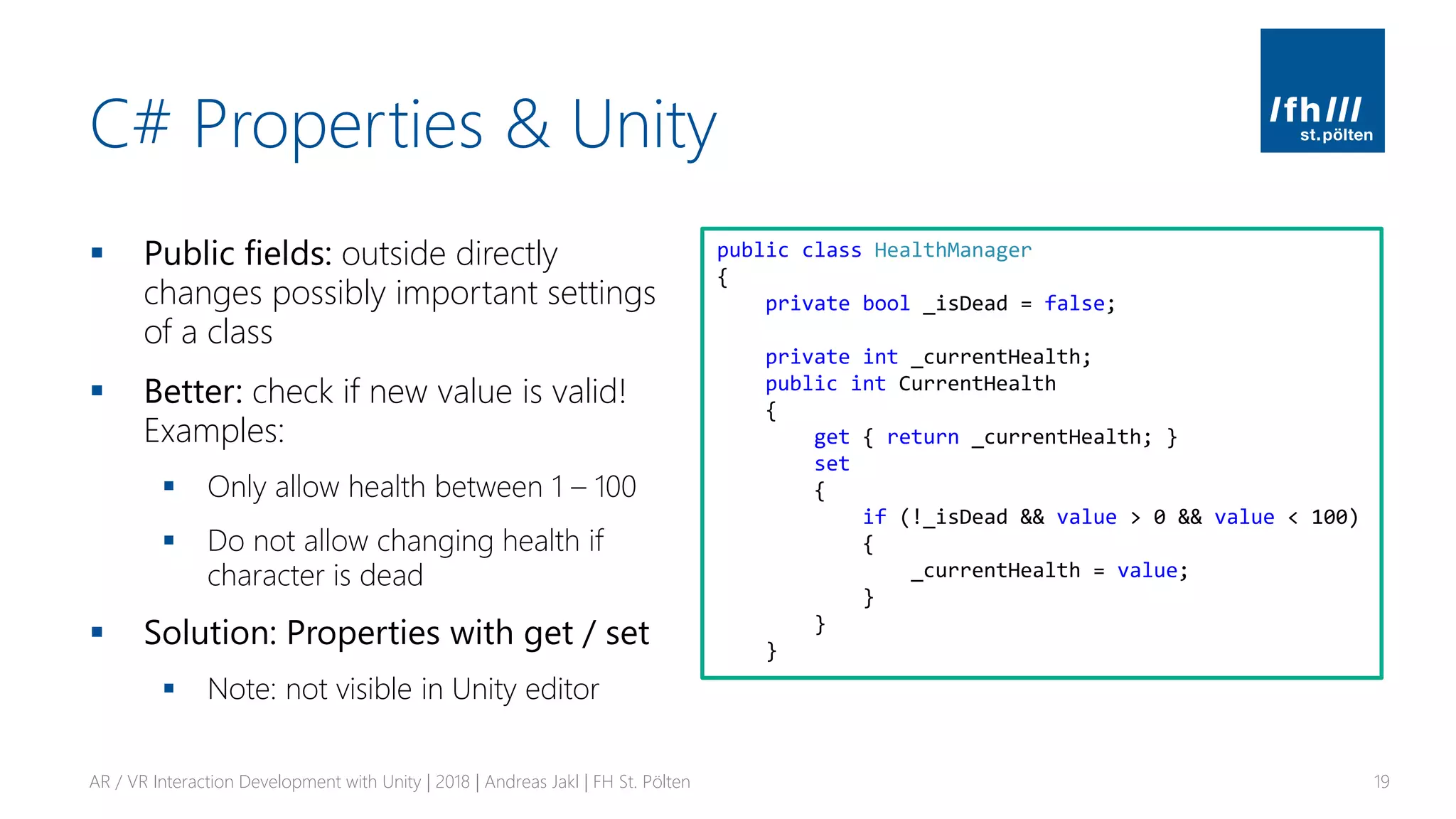
C# Properties & Unity
▪ Public fields: outside directly
changes possibly important settings
of a class
▪ Better: check if new value is valid!
Examples:
▪ Only allow health between 1 – 100
▪ Do not allow changing health if
character is dead
▪ Solution: Properties with get / set
▪ Note: not visible in Unity editor
AR / VR Interaction Development with Unity | 2018 | Andreas Jakl | FH St. Pölten 19
public class HealthManager
{
private bool _isDead = false;
private int _currentHealth;
public int CurrentHealth
{
get { return _currentHealth; }
set
{
if (!_isDead && value > 0 && value < 100)
{
_currentHealth = value;
}
}
}
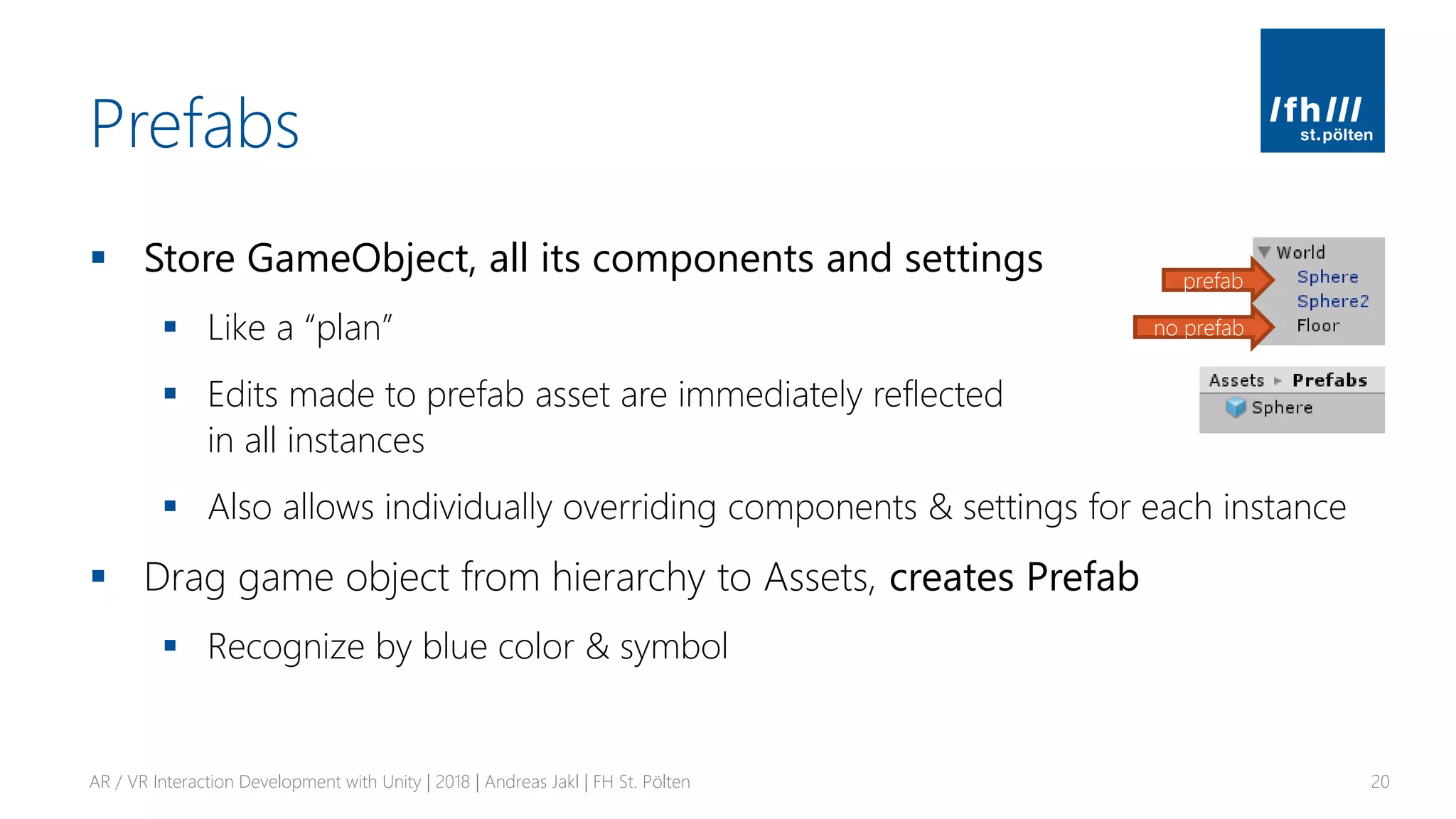
Prefabs
▪ Store GameObject, all its components and settings
▪ Like a “plan”
▪ Edits made to prefab asset are immediately reflected
in all instances
▪ Also allows individually overriding components & settings for each instance
▪ Drag game object from hierarchy to Assets, creates Prefab
▪ Recognize by blue color & symbol
AR / VR Interaction Development with Unity | 2018 | Andreas Jakl | FH St. Pölten 20
prefab
no prefab
COROUTINES
Independent Execution
AR / VR Interaction Development with Unity | 2018 | Andreas Jakl | FH St. Pölten 21
Coroutines
▪ Function that can run independently from where it was called
▪ Complex set of behaviors that needs to run over multiple frames
▪ E.g., fade in game object, HTTP requests, artificial intelligence algorithm
▪ “Cooperative multitasking”, no real asynchronous threads!
▪ More information
▪ https://docs.unity3d.com/Manual/Coroutines.html
▪ https://gamedev.stackexchange.com/questions/143454/unity-coroutine-vs-
threads
AR / VR Interaction Development with Unity | 2018 | Andreas Jakl | FH St. Pölten 22
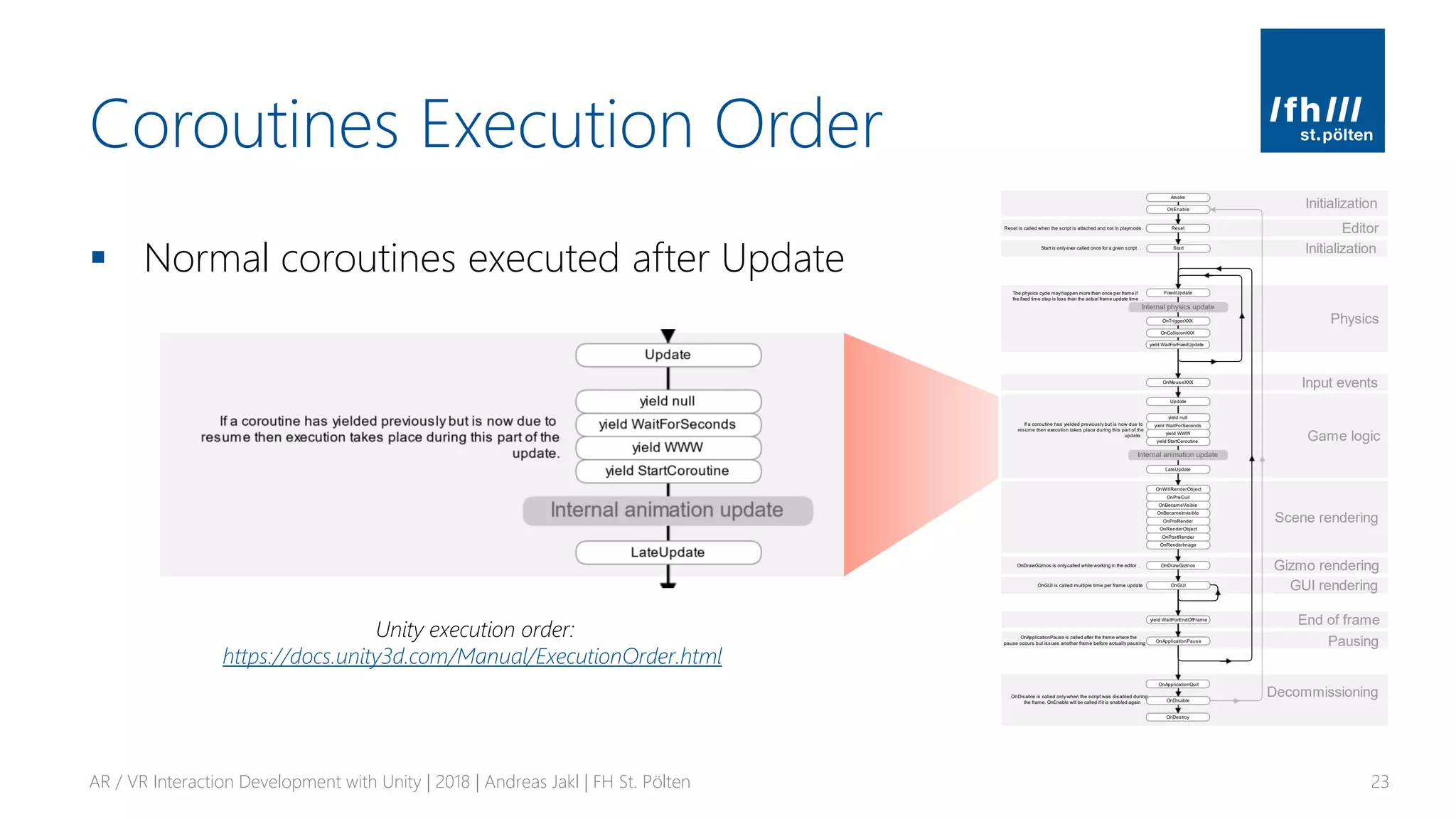
Coroutines Execution Order
▪ Normal coroutines executed after Update
AR / VR Interaction Development with Unity | 2018 | Andreas Jakl | FH St. Pölten 23
Unity execution order:
https://docs.unity3d.com/Manual/ExecutionOrder.html
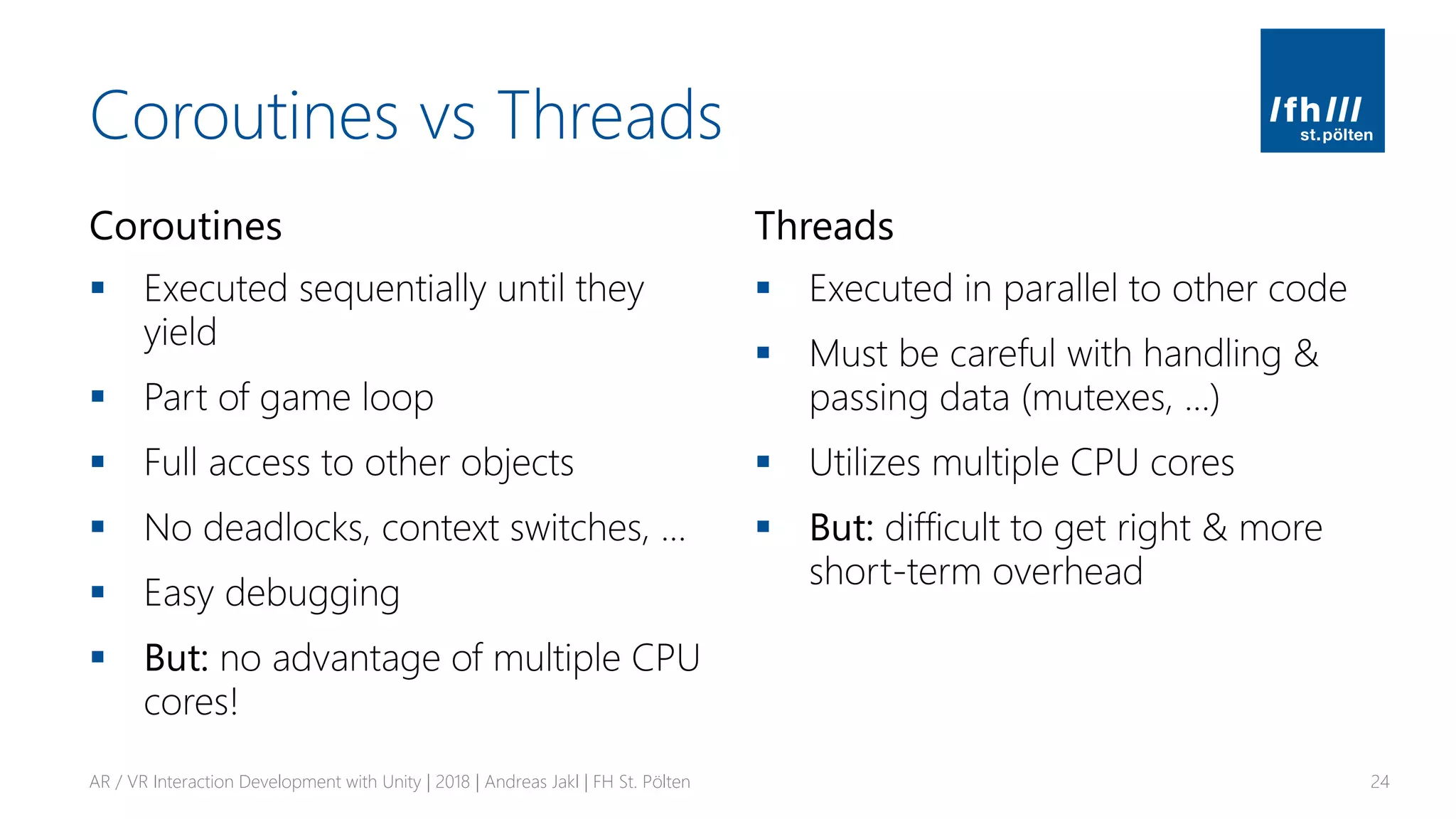
Coroutines vs Threads
Coroutines
▪ Executed sequentially until they
yield
▪ Part of game loop
▪ Full access to other objects
▪ No deadlocks, context switches, …
▪ Easy debugging
▪ But: no advantage of multiple CPU
cores!
Threads
▪ Executed in parallel to other code
▪ Must be careful with handling &
passing data (mutexes, …)
▪ Utilizes multiple CPU cores
▪ But: difficult to get right & more
short-term overhead
AR / VR Interaction Development with Unity | 2018 | Andreas Jakl | FH St. Pölten 24
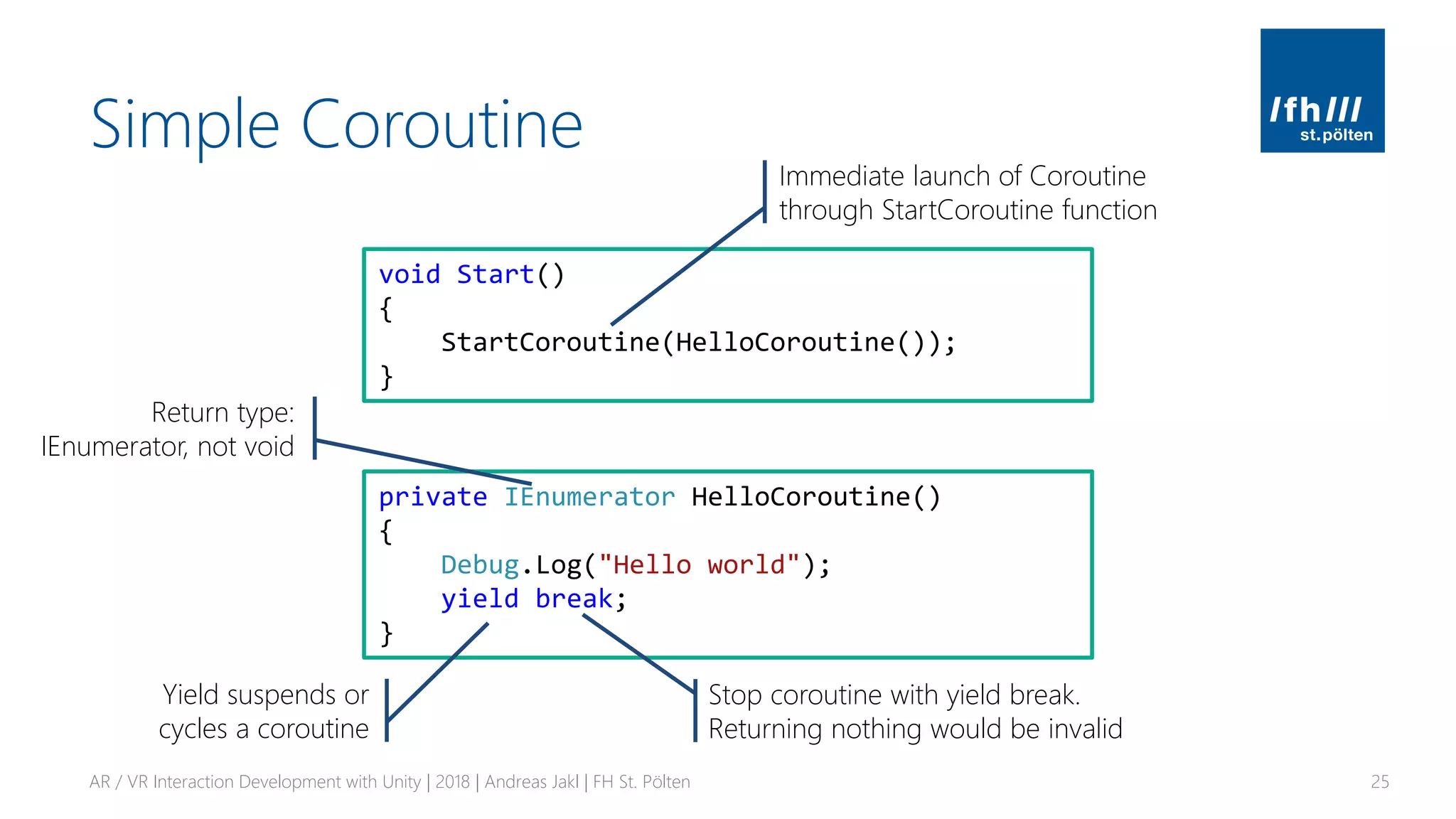
Simple Coroutine
AR / VR Interaction Development with Unity | 2018 | Andreas Jakl | FH St. Pölten 25
private IEnumerator HelloCoroutine()
{
Debug.Log("Hello world");
yield break;
}
void Start()
{
StartCoroutine(HelloCoroutine());
}
Return type:
IEnumerator, not void
Stop coroutine with yield break.
Returning nothing would be invalid
Immediate launch of Coroutine
through StartCoroutine function
Yield suspends or
cycles a coroutine
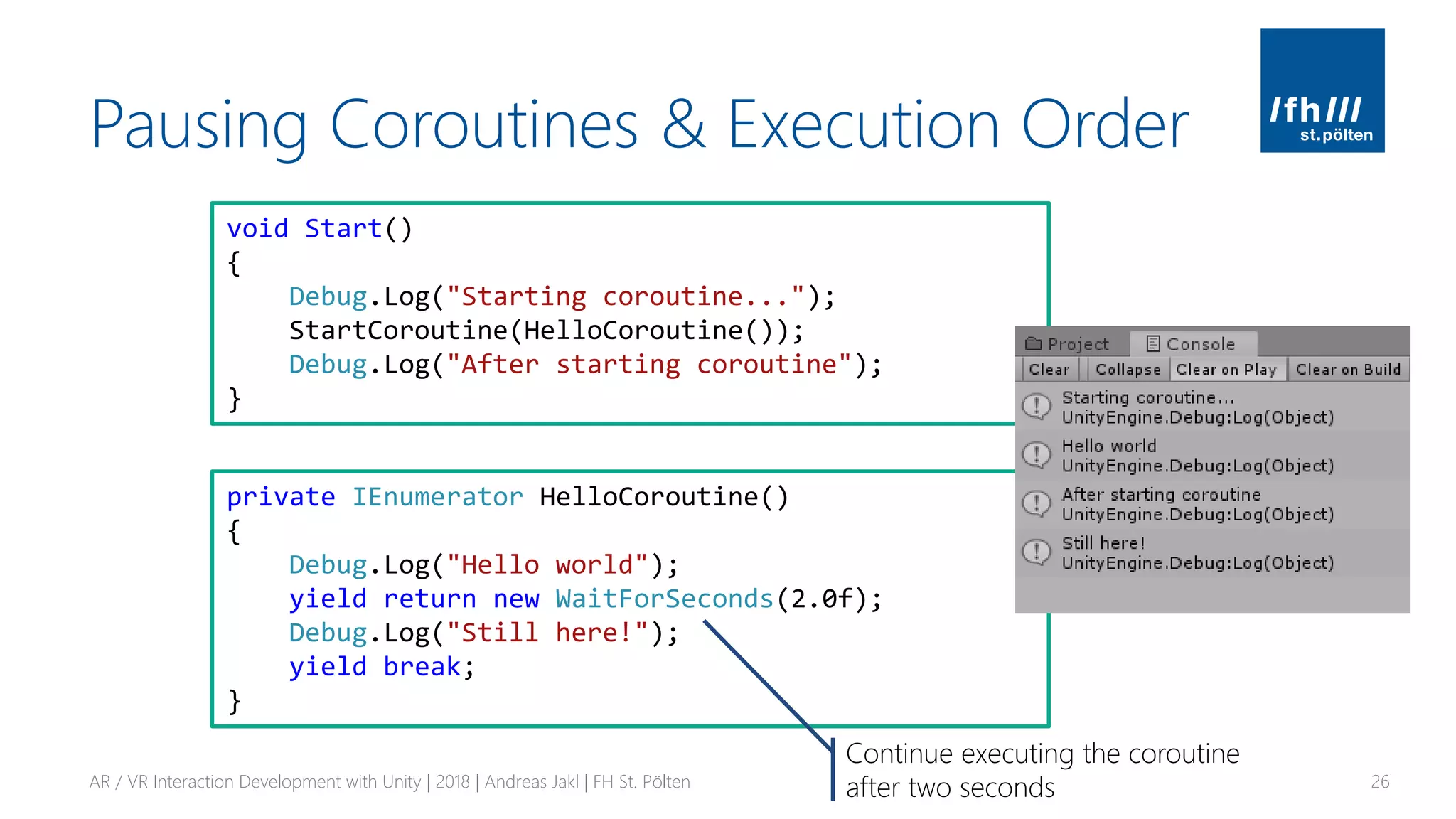
Pausing Coroutines & Execution Order
AR / VR Interaction Development with Unity | 2018 | Andreas Jakl | FH St. Pölten 26
private IEnumerator HelloCoroutine()
{
Debug.Log("Hello world");
yield return new WaitForSeconds(2.0f);
Debug.Log("Still here!");
yield break;
}
void Start()
{
Debug.Log("Starting coroutine...");
StartCoroutine(HelloCoroutine());
Debug.Log("After starting coroutine");
}
Continue executing the coroutine
after two seconds
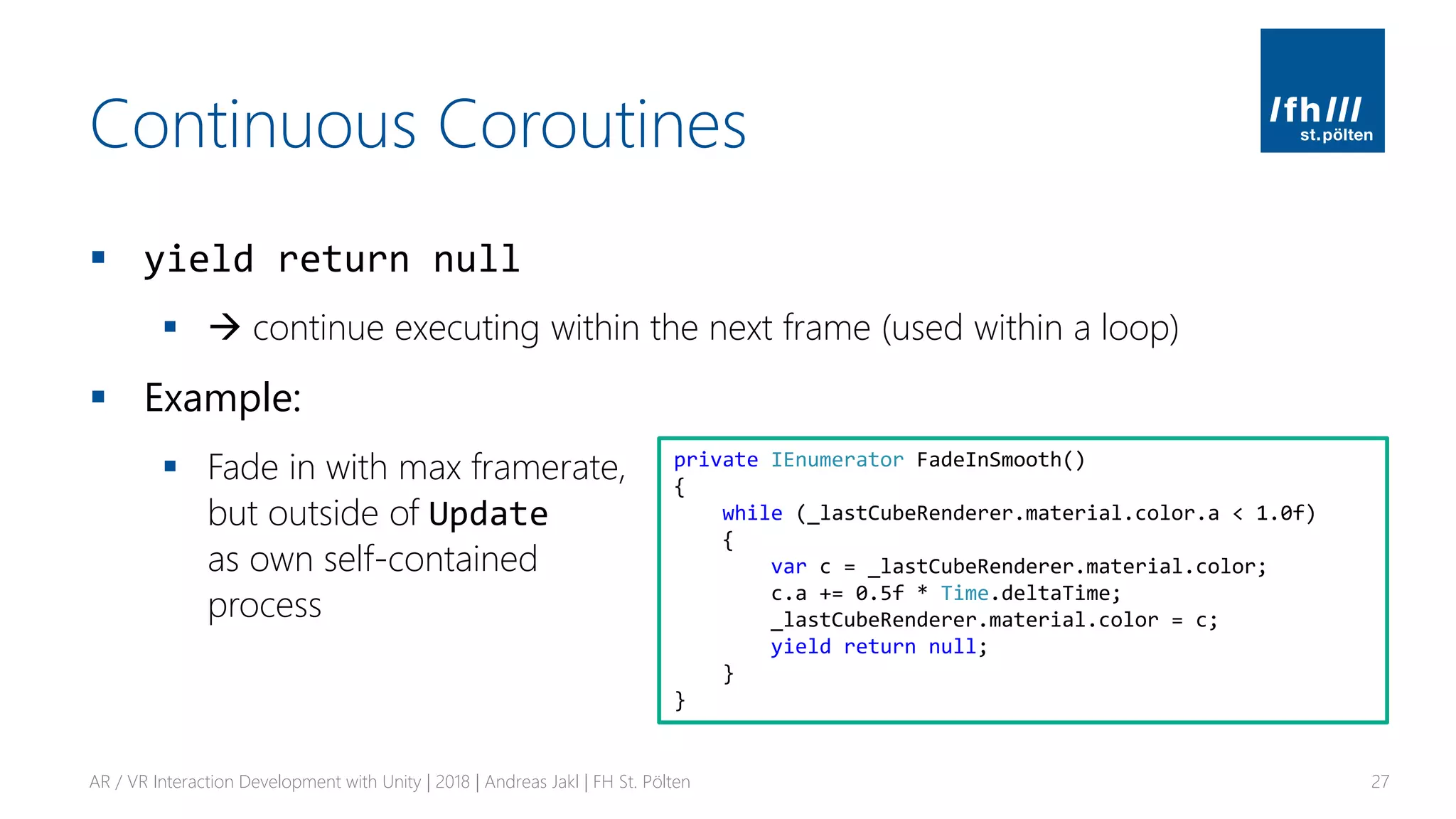
Continuous Coroutines
▪ yield return null
▪ → continue executing within the next frame (used within a loop)
▪ Example:
▪ Fade in with max framerate,
but outside of Update
as own self-contained
process
AR / VR Interaction Development with Unity | 2018 | Andreas Jakl | FH St. Pölten 27
private IEnumerator FadeInSmooth()
{
while (_lastCubeRenderer.material.color.a < 1.0f)
{
var c = _lastCubeRenderer.material.color;
c.a += 0.5f * Time.deltaTime;
_lastCubeRenderer.material.color = c;
yield return null;
}
}
Exercise 1: Scripts & Instantiating
▪ Aim:
▪ Use fields, references, public, private, lists, instantiate,
frame update times
▪ Goal:
▪ Instantiate a total of [x] game objects (e.g., cubes)
▪ [x] is configurable in the Unity editor
▪ Create a new cube after a random amount of time passed and apply a random color.
You can store a target time in a variable and check in Update() or use Invoke()
▪ Fade the game object in by modifying its alpha with a coroutine.
Make sure you use a material / shader that supports transparency. Test two variants:
1. Use yield return new WaitForSeconds(.05f)
2. Use Time.deltaTime & yield return null
AR / VR Interaction Development with Unity | 2018 | Andreas Jakl | FH St. Pölten 28
GAZE & RAYCASTING
AR / VR User Interfaces
AR / VR Interaction Development with Unity | 2018 | Andreas Jakl | FH St. Pölten 29
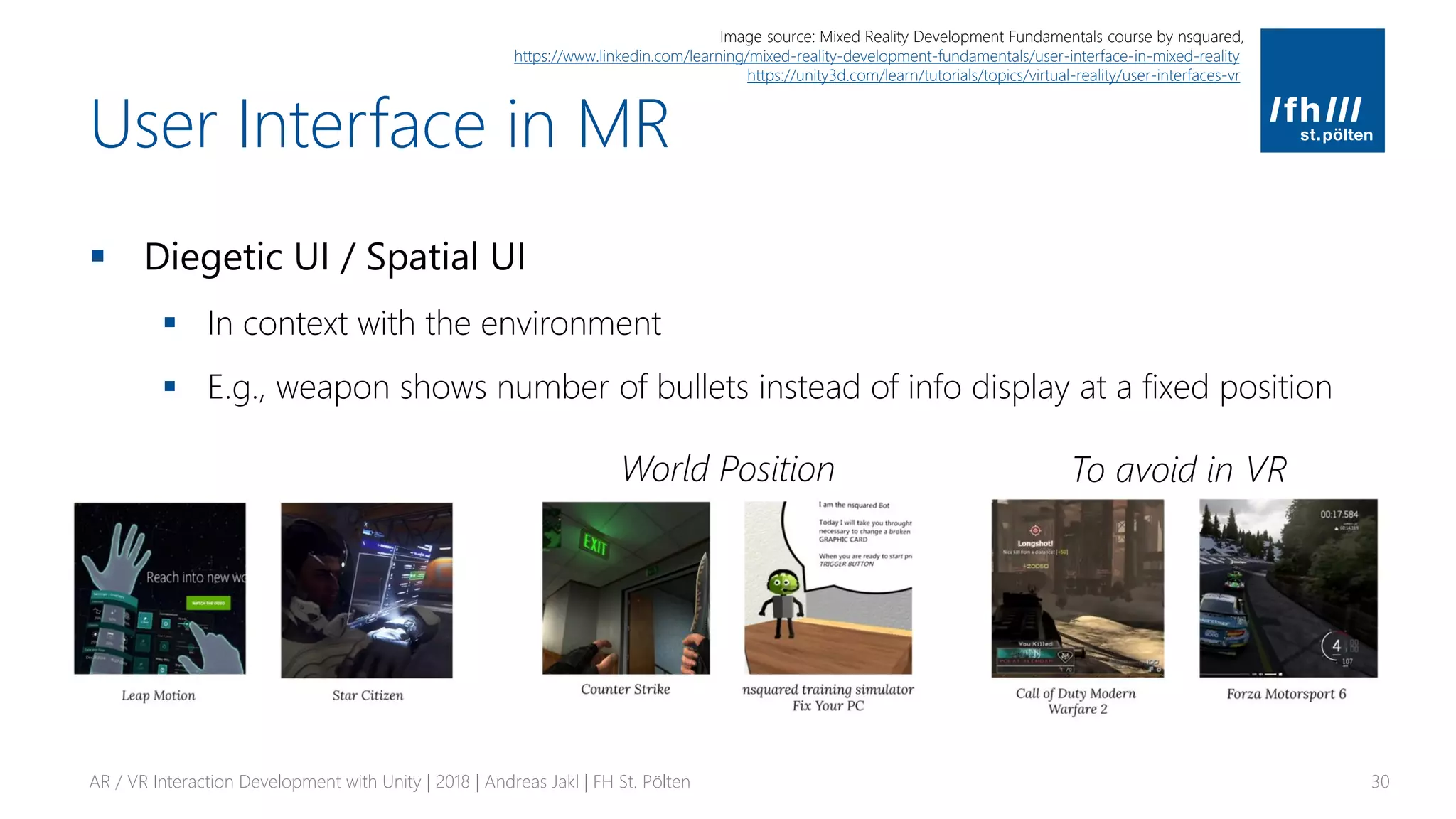
User Interface in MR
▪ Diegetic UI / Spatial UI
▪ In context with the environment
▪ E.g., weapon shows number of bullets instead of info display at a fixed position
AR / VR Interaction Development with Unity | 2018 | Andreas Jakl | FH St. Pölten 30
World Position
Image source: Mixed Reality Development Fundamentals course by nsquared,
https://www.linkedin.com/learning/mixed-reality-development-fundamentals/user-interface-in-mixed-reality
https://unity3d.com/learn/tutorials/topics/virtual-reality/user-interfaces-vr
To avoid in VR
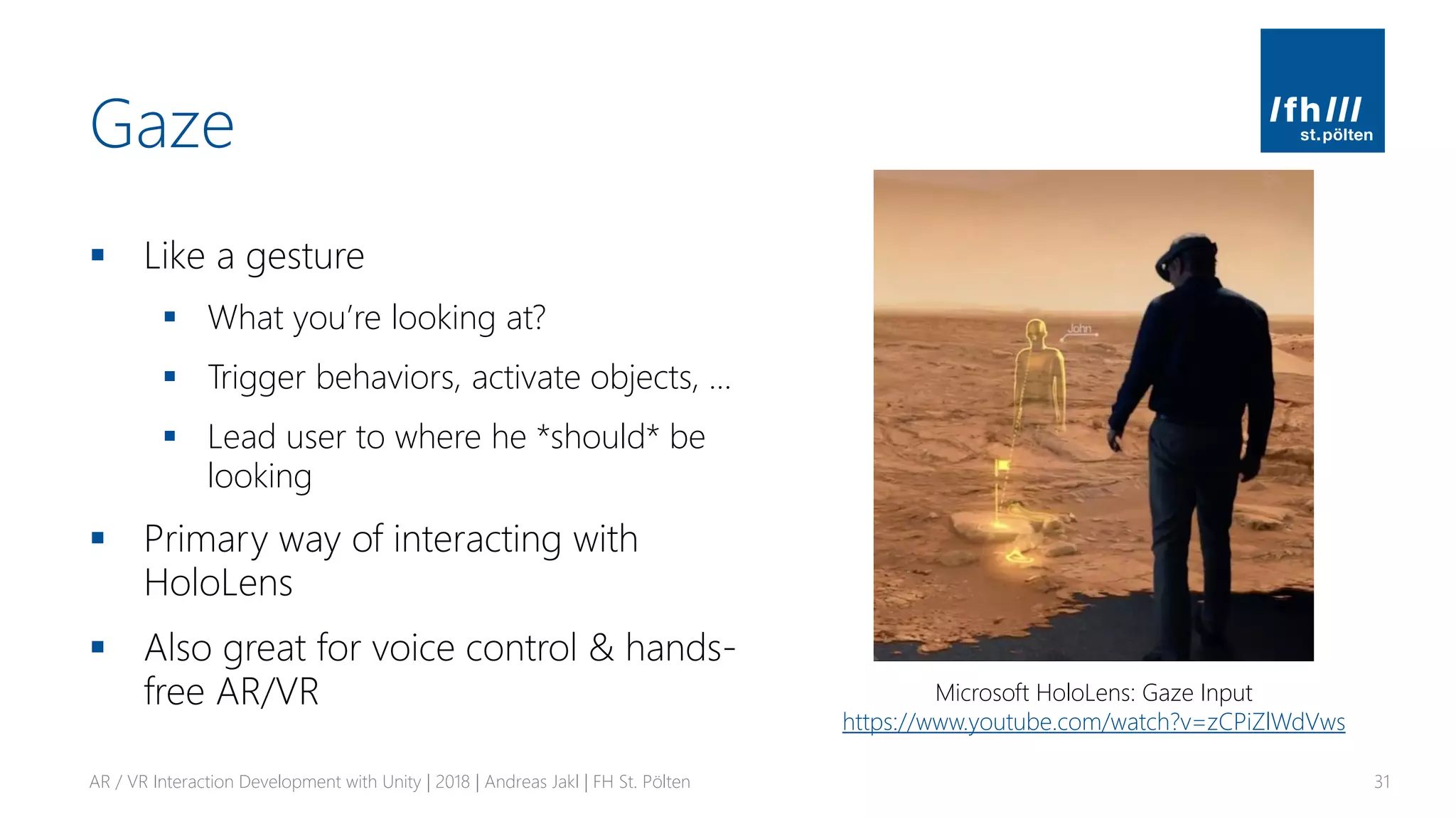
Gaze
▪ Like a gesture
▪ What you’re looking at?
▪ Trigger behaviors, activate objects, …
▪ Lead user to where he *should* be
looking
▪ Primary way of interacting with
HoloLens
▪ Also great for voice control & hands-
free AR/VR
AR / VR Interaction Development with Unity | 2018 | Andreas Jakl | FH St. Pölten 31
Microsoft HoloLens: Gaze Input
https://www.youtube.com/watch?v=zCPiZlWdVws
Raycast
AR / VR Interaction Development with Unity | 2018 | Andreas Jakl | FH St. Pölten 32
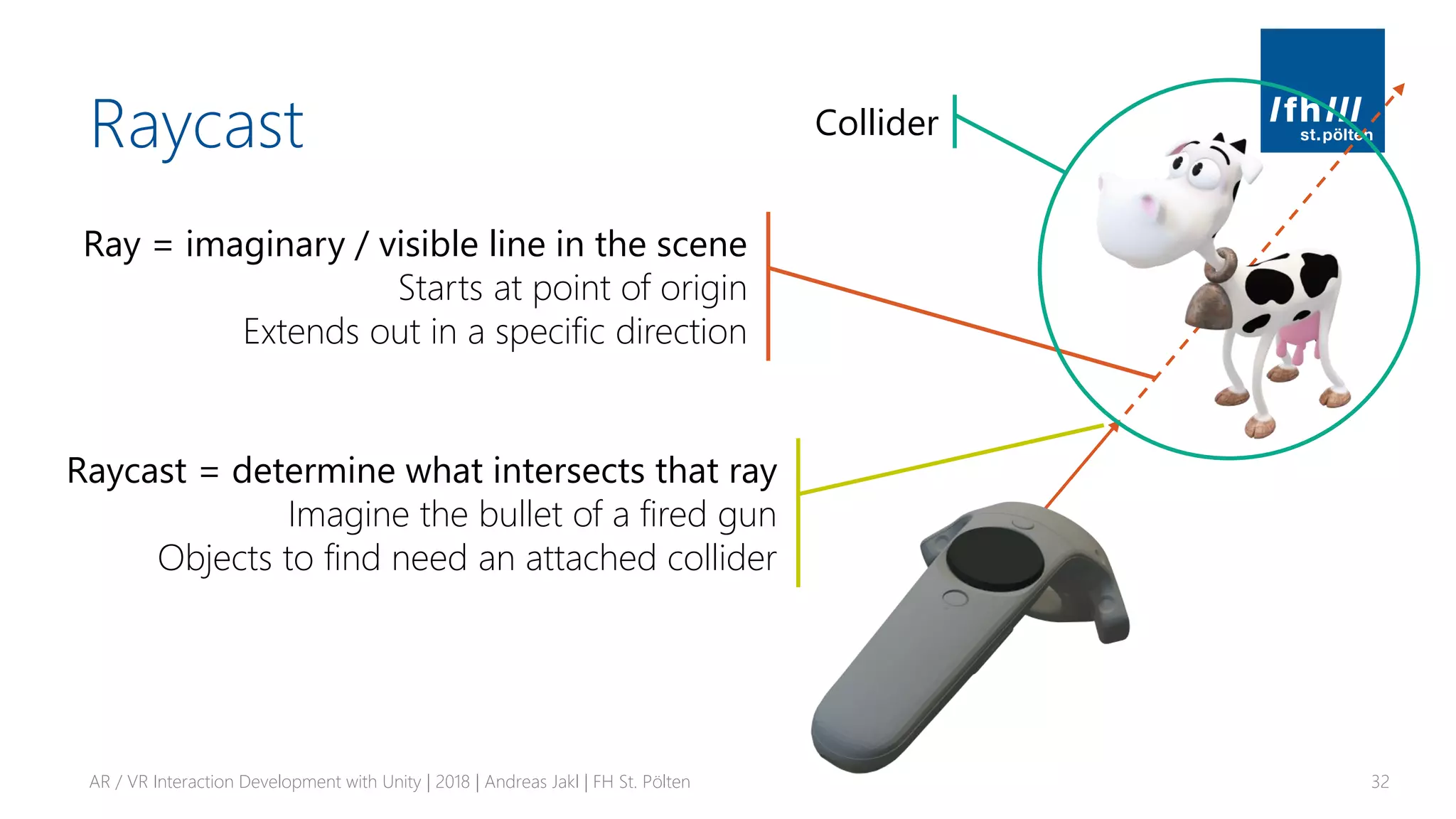
Ray = imaginary / visible line in the scene
Starts at point of origin
Extends out in a specific direction
Raycast = determine what intersects that ray
Imagine the bullet of a fired gun
Objects to find need an attached collider
Collider
Raycasting
AR / VR Interaction Development with Unity | 2018 | Andreas Jakl | FH St. Pölten 33
Script as component of the raycasting camera
public class EyeRaycast : MonoBehaviour {
private Transform _cameraTransform;
[SerializeField] private float _rayLength = 50f;
void Start()
{
// Retrieve transform of the camera component
// (which is on the same GameObject as this script)
_cameraTransform = GetComponent<Camera>().transform;
}
Performance tip
Cache GetComponent calls you need every frame
https://unity3d.com/learn/tutorials/topics/performance-optimization/optimizing-scripts-unity-games
http://chaoscultgames.com/2014/03/unity3d-mythbusting-performance/
Perform Raycast
AR / VR Interaction Development with Unity | 2018 | Andreas Jakl | FH St. Pölten 34
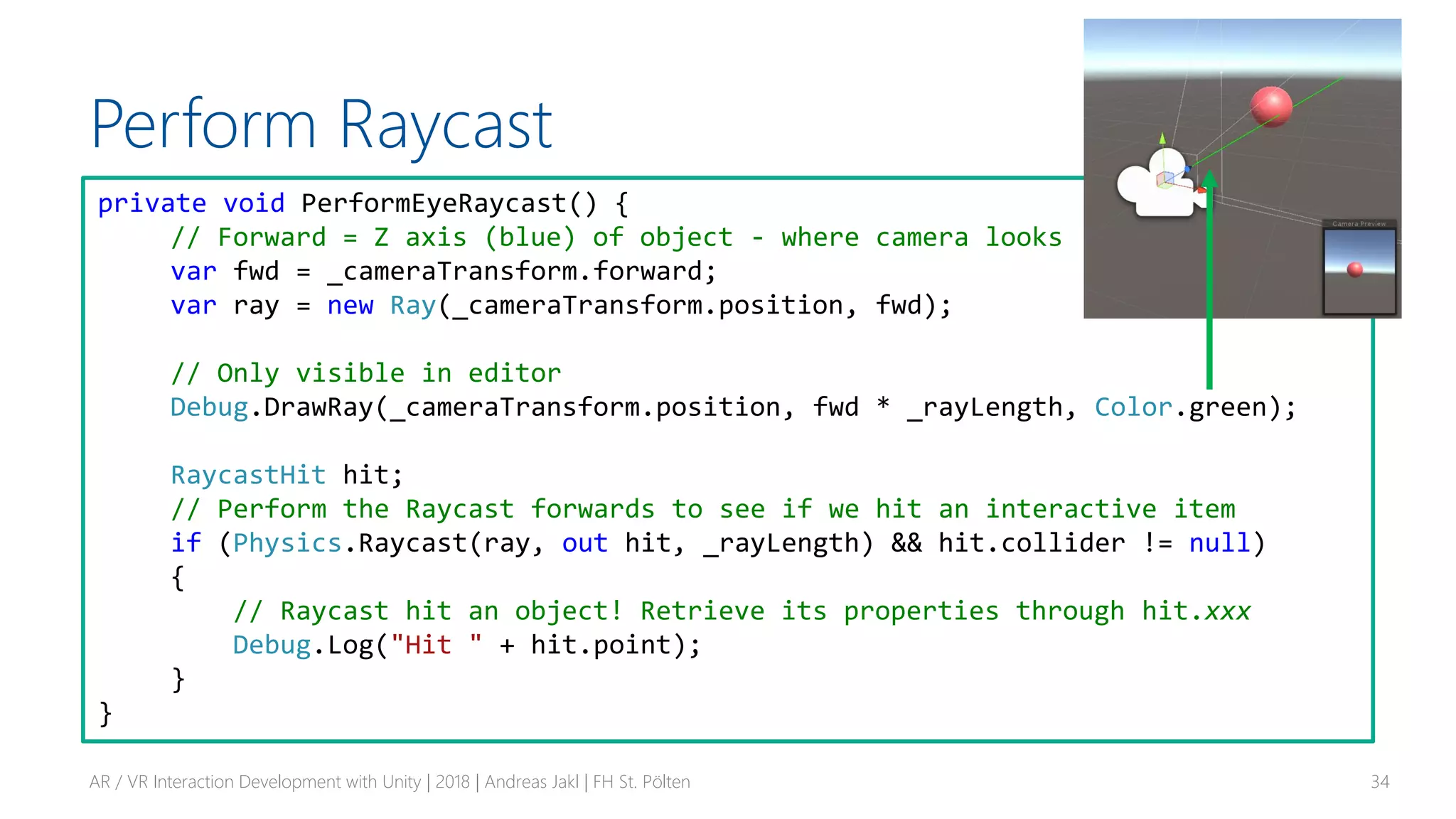
private void PerformEyeRaycast() {
// Forward = Z axis (blue) of object - where camera looks
var fwd = _cameraTransform.forward;
var ray = new Ray(_cameraTransform.position, fwd);
// Only visible in editor
Debug.DrawRay(_cameraTransform.position, fwd * _rayLength, Color.green);
RaycastHit hit;
// Perform the Raycast forwards to see if we hit an interactive item
if (Physics.Raycast(ray, out hit, _rayLength) && hit.collider != null)
{
// Raycast hit an object! Retrieve its properties through hit.xxx
Debug.Log("Hit " + hit.point);
}
}
Perform Raycast
AR / VR Interaction Development with Unity | 2018 | Andreas Jakl | FH St. Pölten 35
private void PerformEyeRaycast() {
// Forward = Z axis (blue) of object - where camera looks
var fwd = _cameraTransform.forward;
var ray = new Ray(_cameraTransform.position, fwd);
// Only visible in editor
Debug.DrawRay(_cameraTransform.position, fwd * _rayLength, Color.green);
RaycastHit hit;
// Perform the Raycast forwards to see if we hit an interactive item
if (Physics.Raycast(ray, out hit, _rayLength) && hit.collider != null)
{
// Raycast hit an object! Retrieve its properties through hit.xxx
Debug.Log("Hit " + hit.point);
}
}
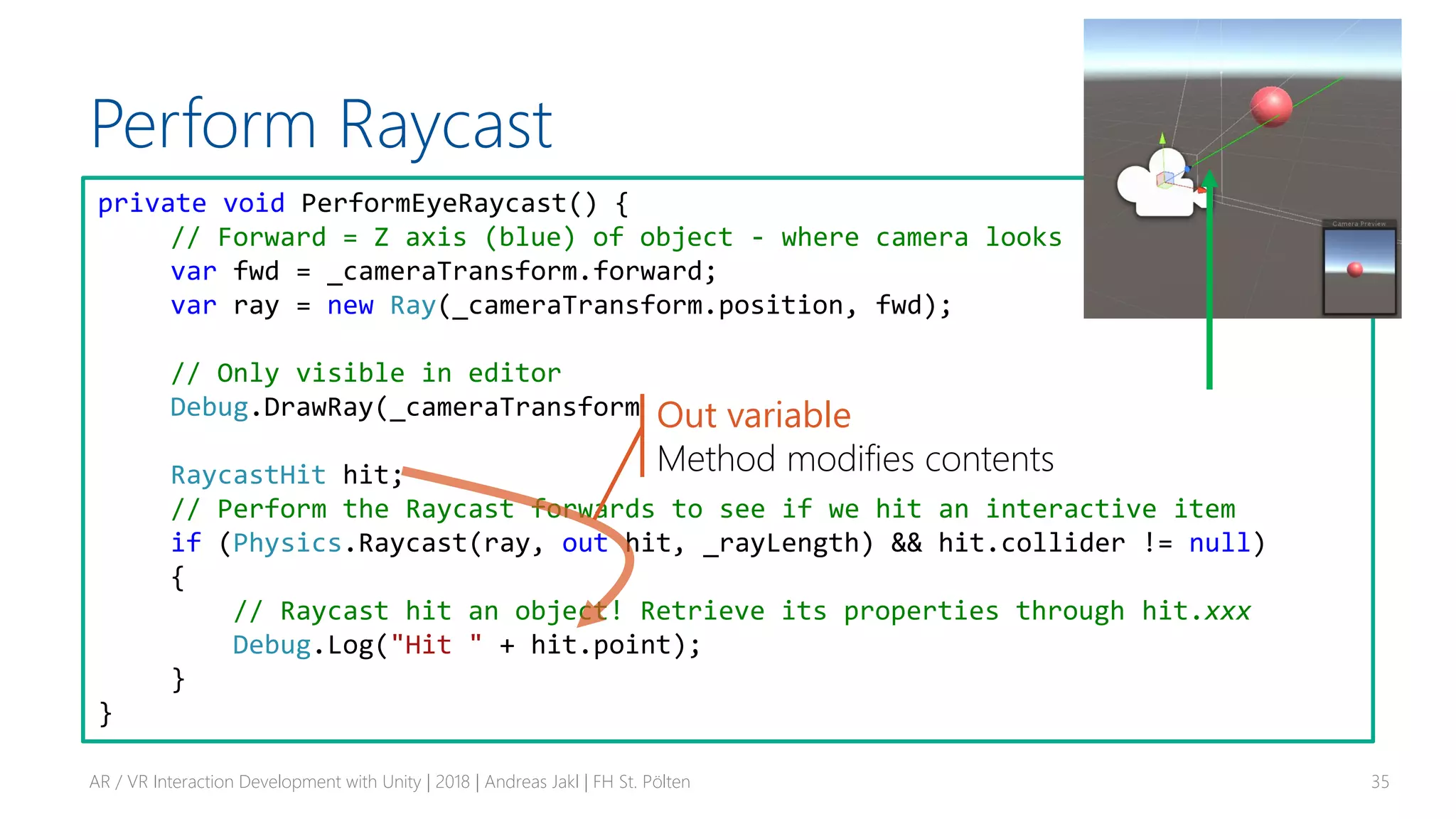
Out variable
Method modifies contents
Inform Target of Raycast Hit
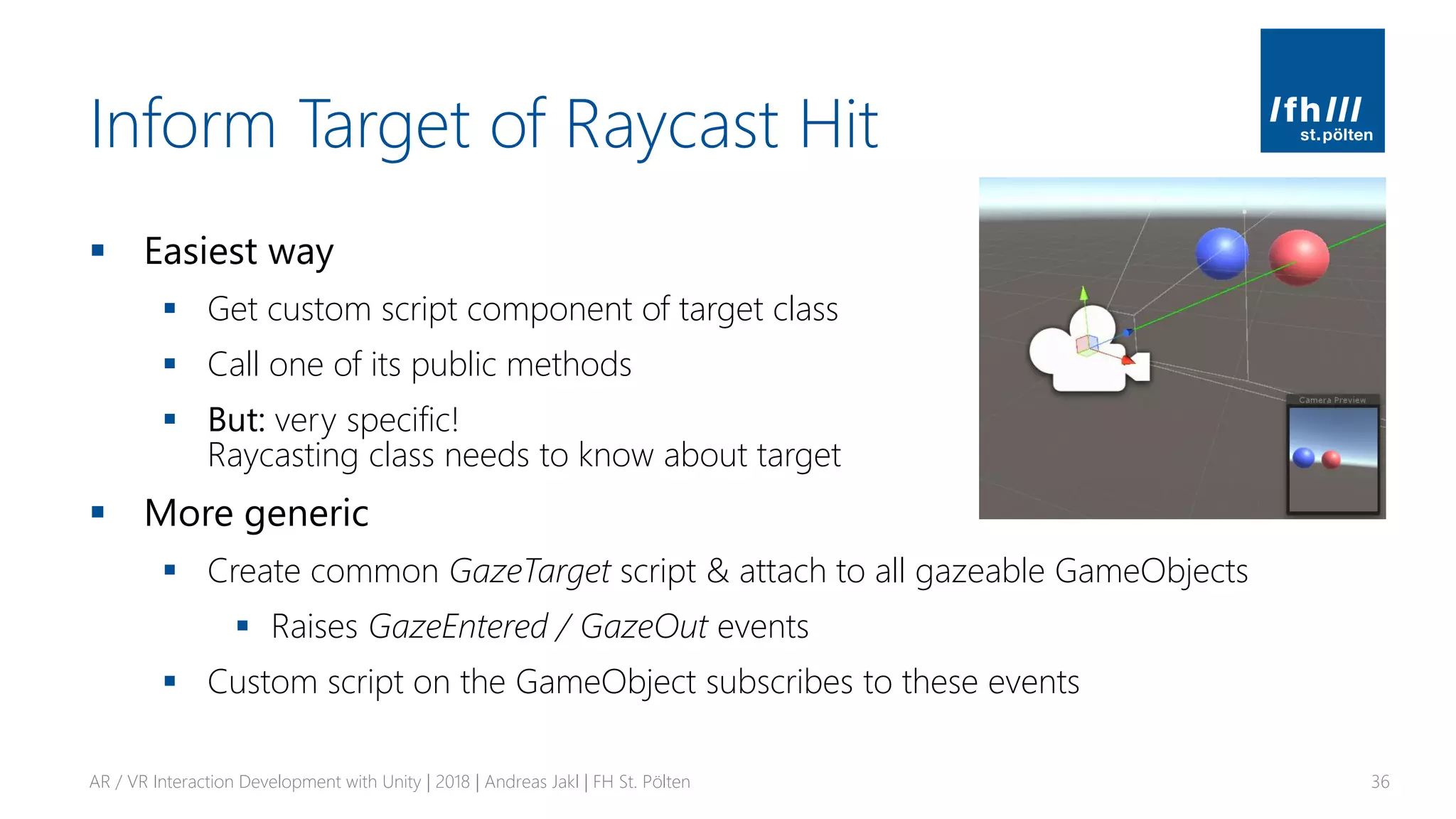
▪ Easiest way
▪ Get custom script component of target class
▪ Call one of its public methods
▪ But: very specific!
Raycasting class needs to know about target
▪ More generic
▪ Create common GazeTarget script & attach to all gazeable GameObjects
▪ Raises GazeEntered / GazeOut events
▪ Custom script on the GameObject subscribes to these events
AR / VR Interaction Development with Unity | 2018 | Andreas Jakl | FH St. Pölten 36
DELEGATES & EVENTS
Communicating in your Scene
AR / VR Interaction Development with Unity | 2018 | Andreas Jakl | FH St. Pölten 37
Event System
▪ Commonly used for UI
▪ Button click, mouse move, …
▪ Also useful whenever entities that are dependent on each other
▪ E.g., racing game: weather system raises event that rain starts. Cars
switch on window wipe animation, headlights, modify properties of
engine that calculates grip of the tires, …
AR / VR Interaction Development with Unity | 2018 | Andreas Jakl | FH St. Pölten 38
C# / .NET Events
▪ Observer design pattern
▪ Based on delegate model
▪ Subscribers register with and receive notifications from provider
▪ Publisher triggers event
▪ E.g., in response to being gazed, having been created, etc.
AR / VR Interaction Development with Unity | 2018 | Andreas Jakl | FH St. Pölten 39
Quick overview: https://www.youtube.com/watch?v=ihIOVj9t0_E
In-depth explanation: https://docs.microsoft.com/en-us/dotnet/csharp/delegates-events
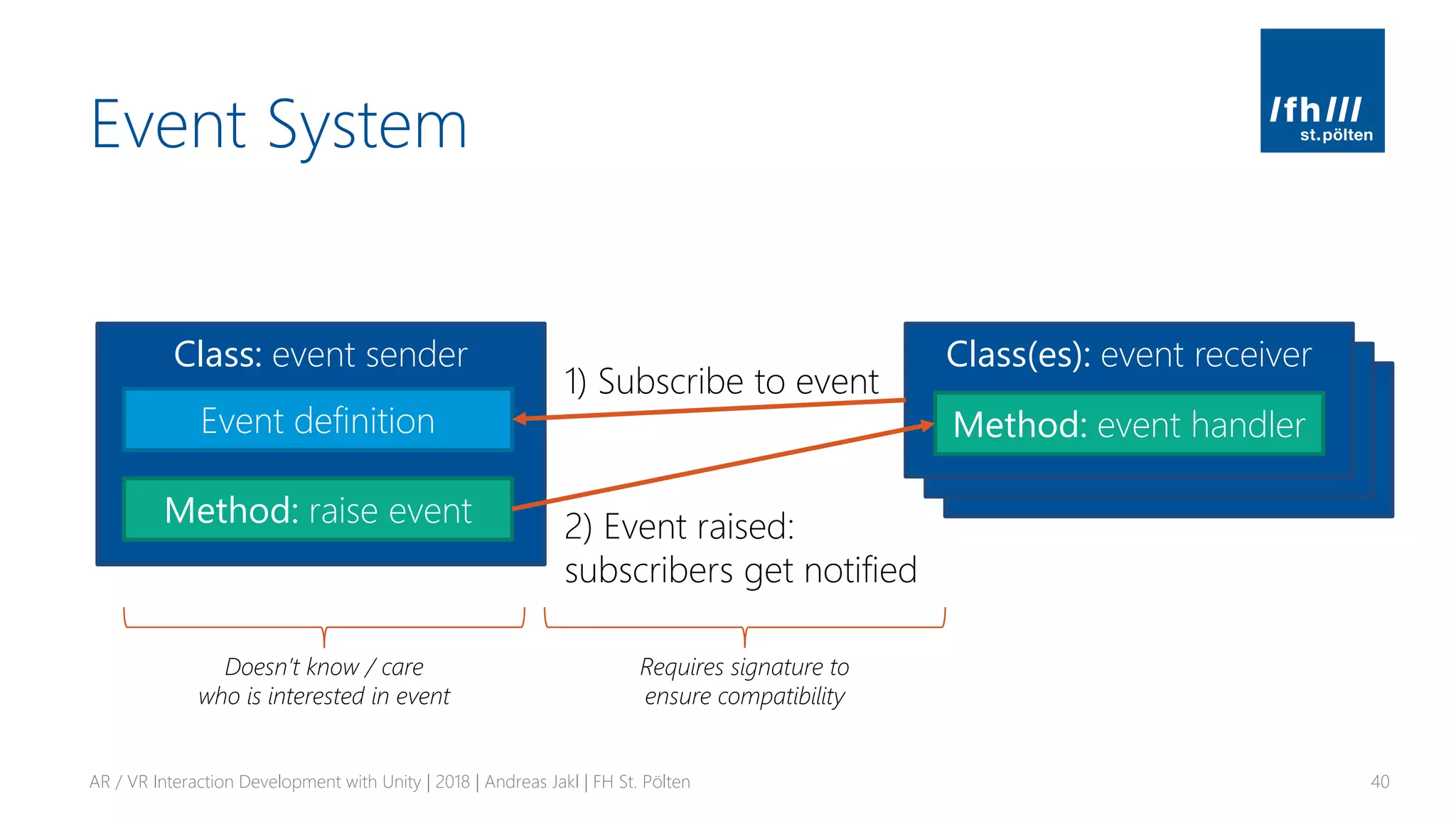
Class: event receiver
Method: event handler
Class: event receiver
Method: event handler
Event System
AR / VR Interaction Development with Unity | 2018 | Andreas Jakl | FH St. Pölten 40
Class: event sender Class(es): event receiver
Method: event handler
Method: raise event
Event definition
1) Subscribe to event
2) Event raised:
subscribers get notified
Requires signature to
ensure compatibility
Doesn’t know / care
who is interested in event
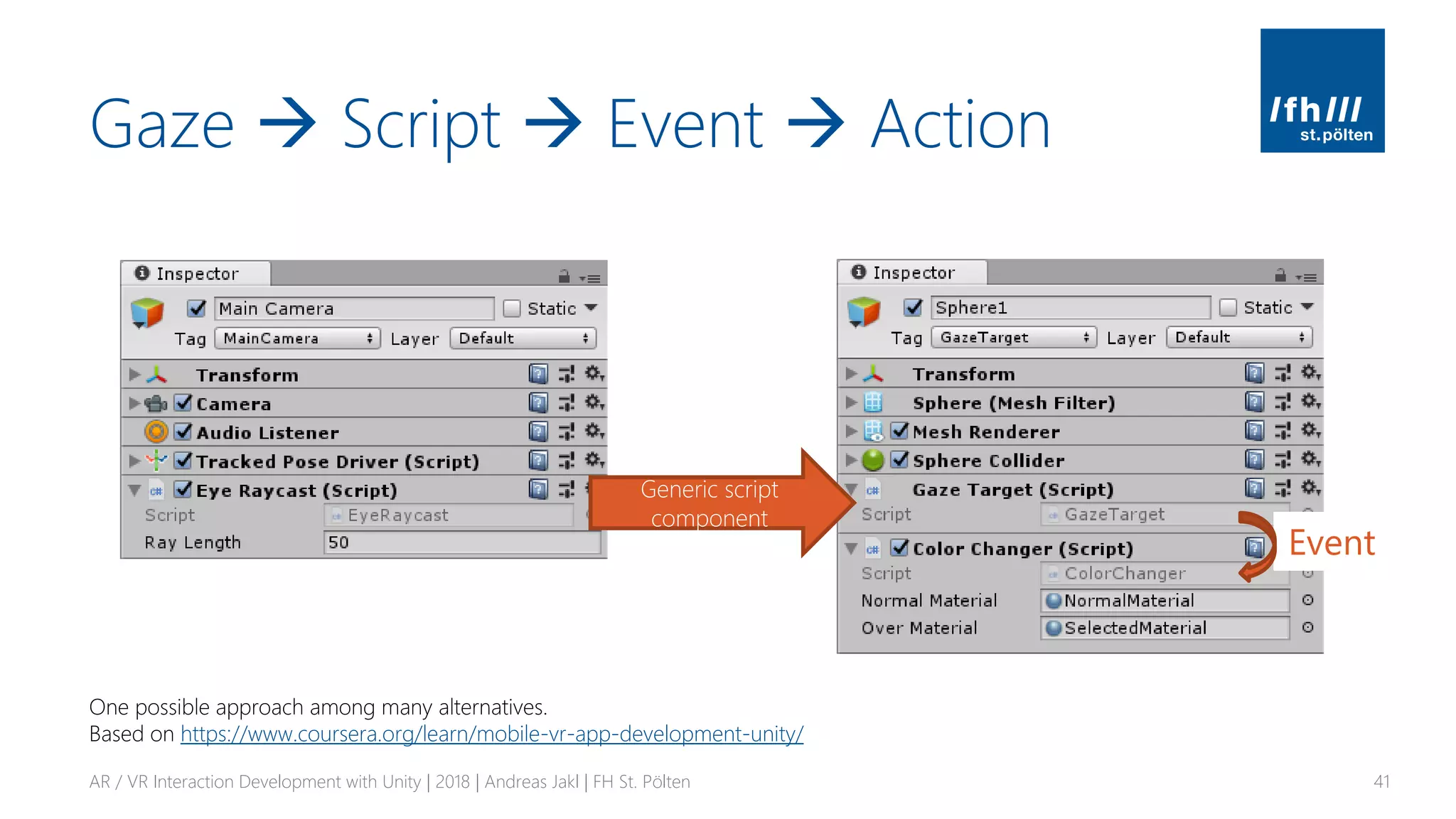
Gaze → Script → Event → Action
AR / VR Interaction Development with Unity | 2018 | Andreas Jakl | FH St. Pölten 41
Generic script
component
Event
One possible approach among many alternatives.
Based on https://www.coursera.org/learn/mobile-vr-app-development-unity/
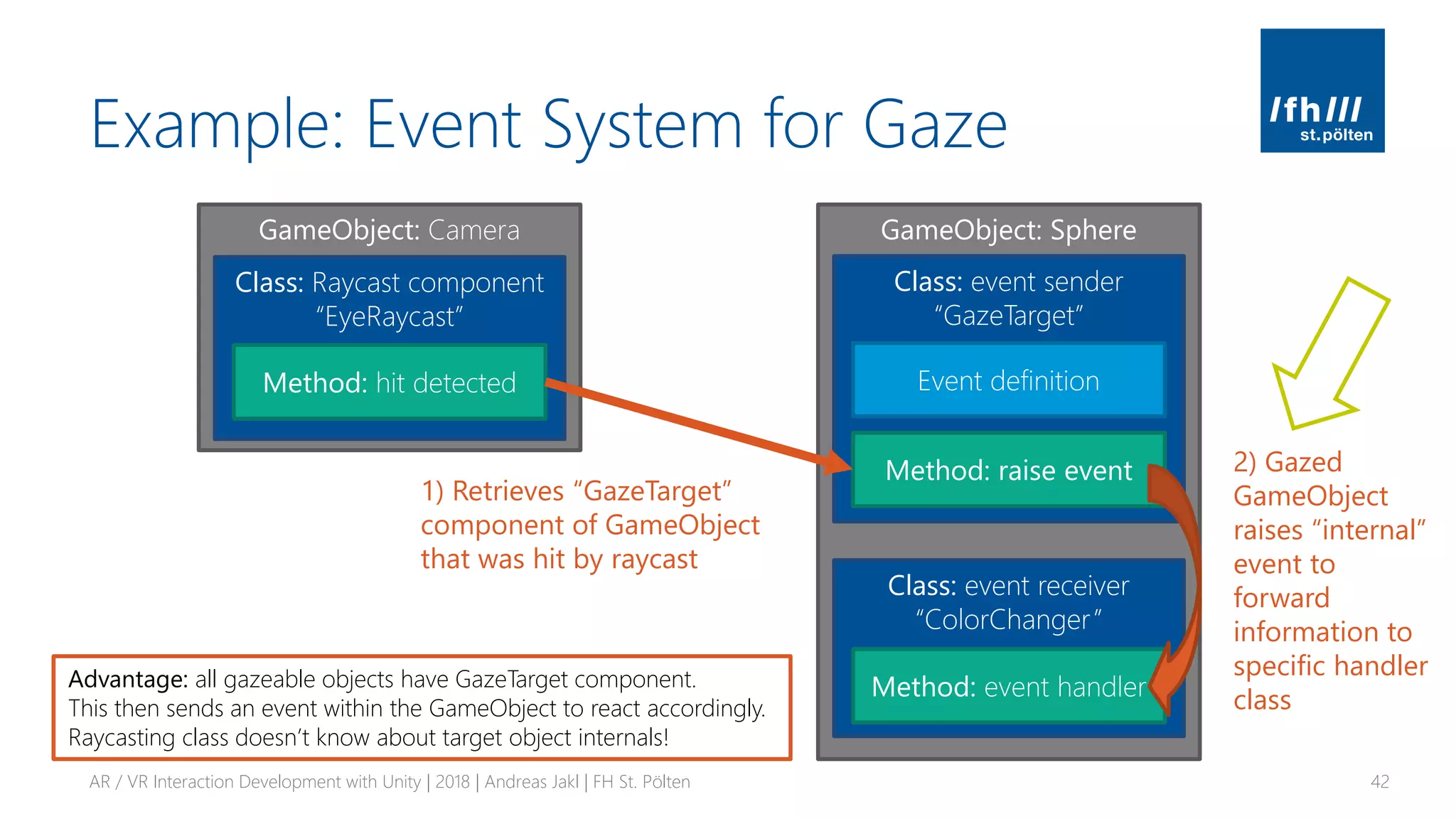
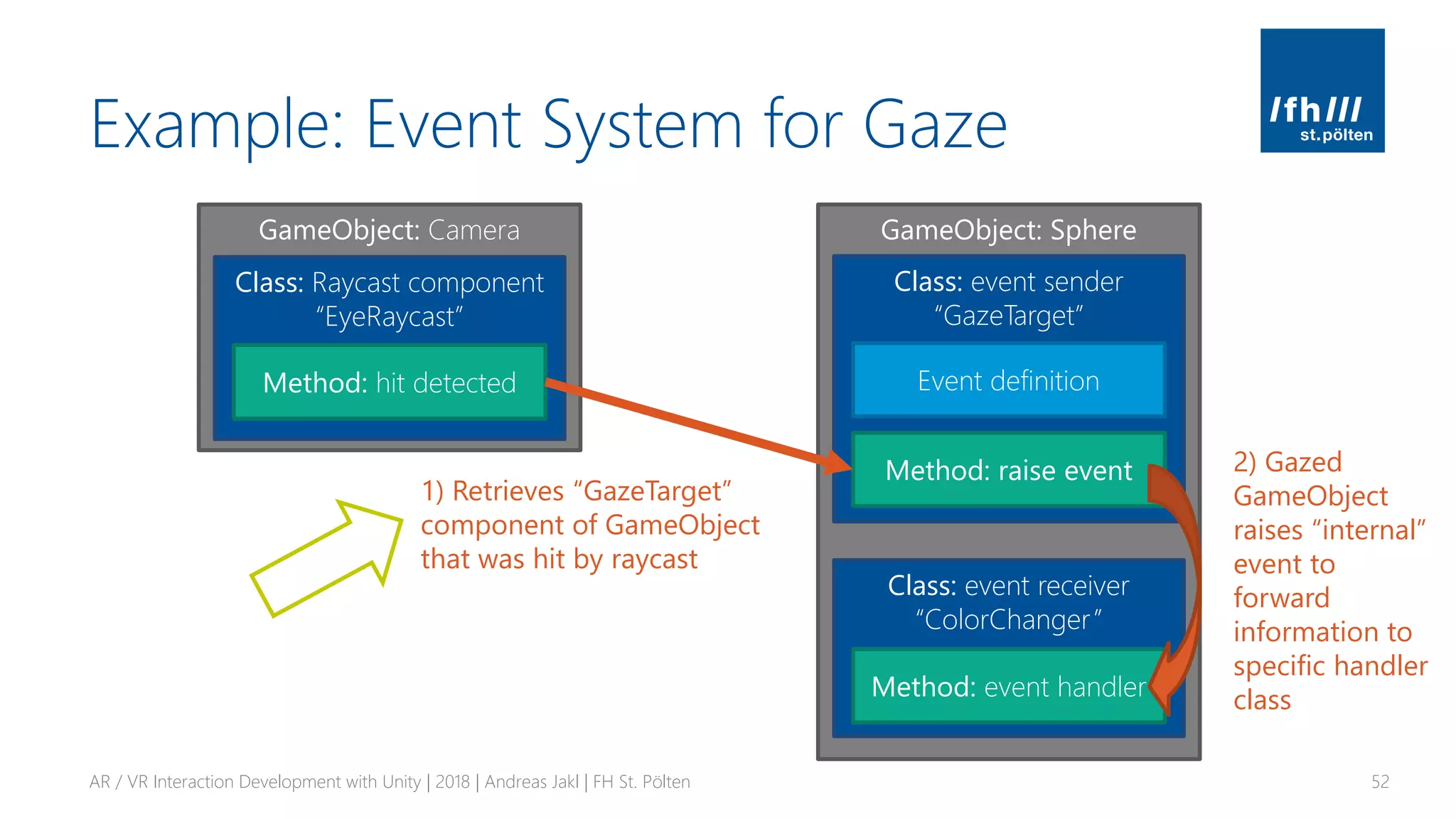
GameObject: Sphere
Example: Event System for Gaze
AR / VR Interaction Development with Unity | 2018 | Andreas Jakl | FH St. Pölten 42
Class: event sender
“GazeTarget”
Class: event receiver
“ColorChanger”
Method: event handler
Method: raise event
Event definition
GameObject: Camera
Class: Raycast component
“EyeRaycast”
Method: hit detected
1) Retrieves “GazeTarget”
component of GameObject
that was hit by raycast
Advantage: all gazeable objects have GazeTarget component.
This then sends an event within the GameObject to react accordingly.
Raycasting class doesn’t know about target object internals!
2) Gazed
GameObject
raises “internal”
event to
forward
information to
specific handler
class
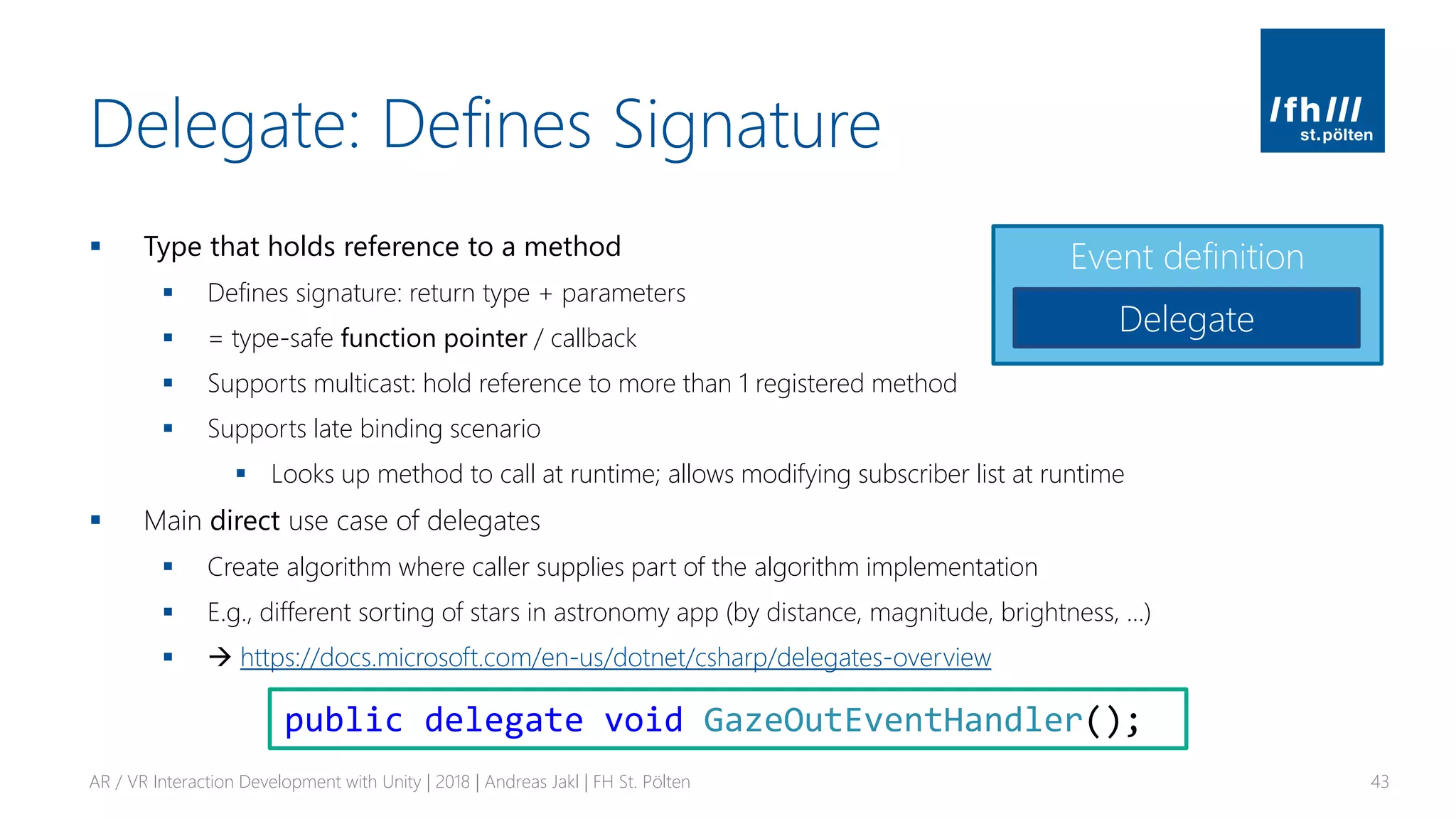
Delegate: Defines Signature
▪ Type that holds reference to a method
▪ Defines signature: return type + parameters
▪ = type-safe function pointer / callback
▪ Supports multicast: hold reference to more than 1 registered method
▪ Supports late binding scenario
▪ Looks up method to call at runtime; allows modifying subscriber list at runtime
▪ Main direct use case of delegates
▪ Create algorithm where caller supplies part of the algorithm implementation
▪ E.g., different sorting of stars in astronomy app (by distance, magnitude, brightness, …)
▪ → https://docs.microsoft.com/en-us/dotnet/csharp/delegates-overview
AR / VR Interaction Development with Unity | 2018 | Andreas Jakl | FH St. Pölten 43
Event definition
Delegate
public delegate void GazeOutEventHandler();
C# Event System
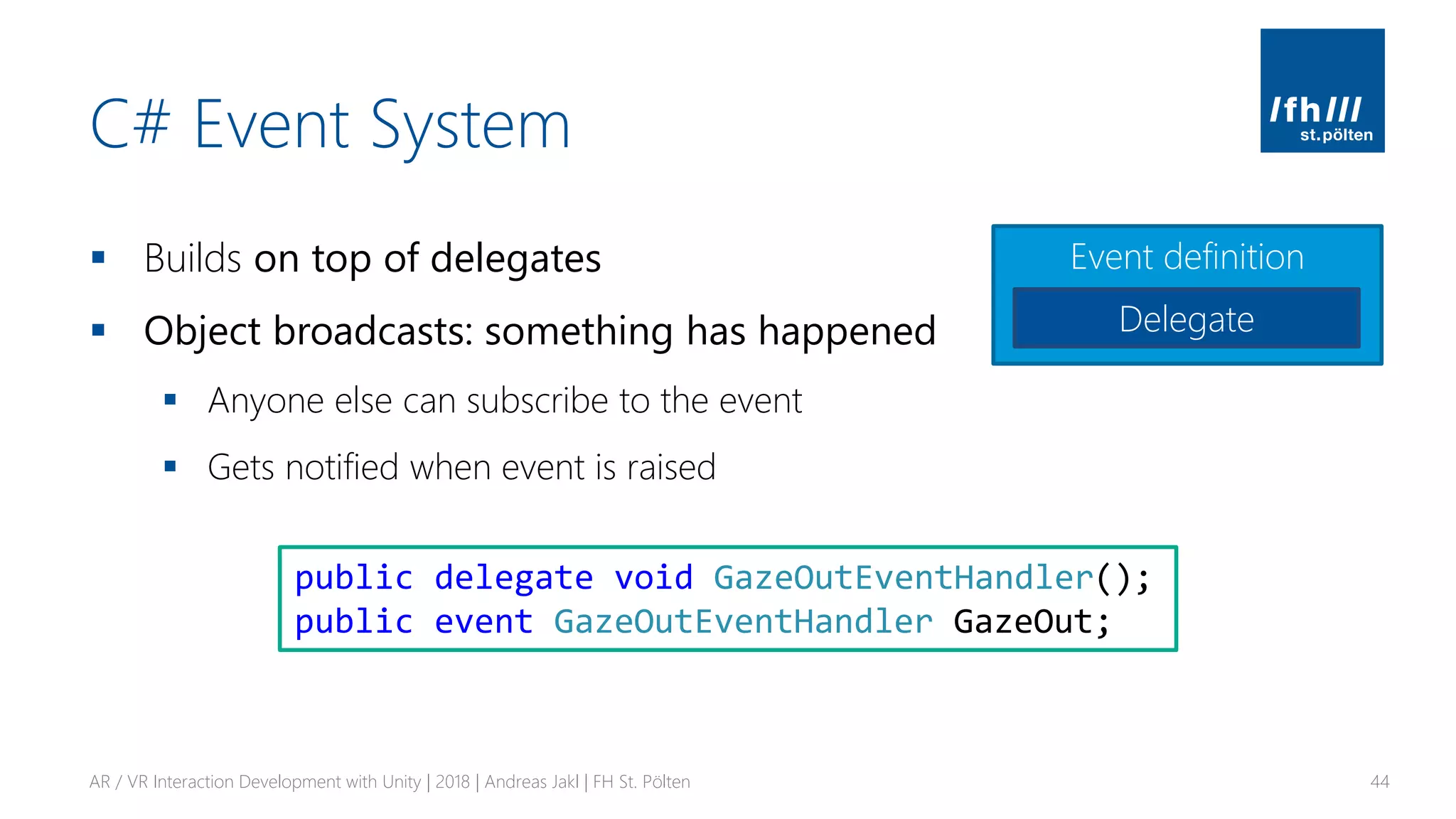
▪ Builds on top of delegates
▪ Object broadcasts: something has happened
▪ Anyone else can subscribe to the event
▪ Gets notified when event is raised
AR / VR Interaction Development with Unity | 2018 | Andreas Jakl | FH St. Pölten 44
public delegate void GazeOutEventHandler();
public event GazeOutEventHandler GazeOut;
Event definition
Delegate
Default Delegates: EventHandler
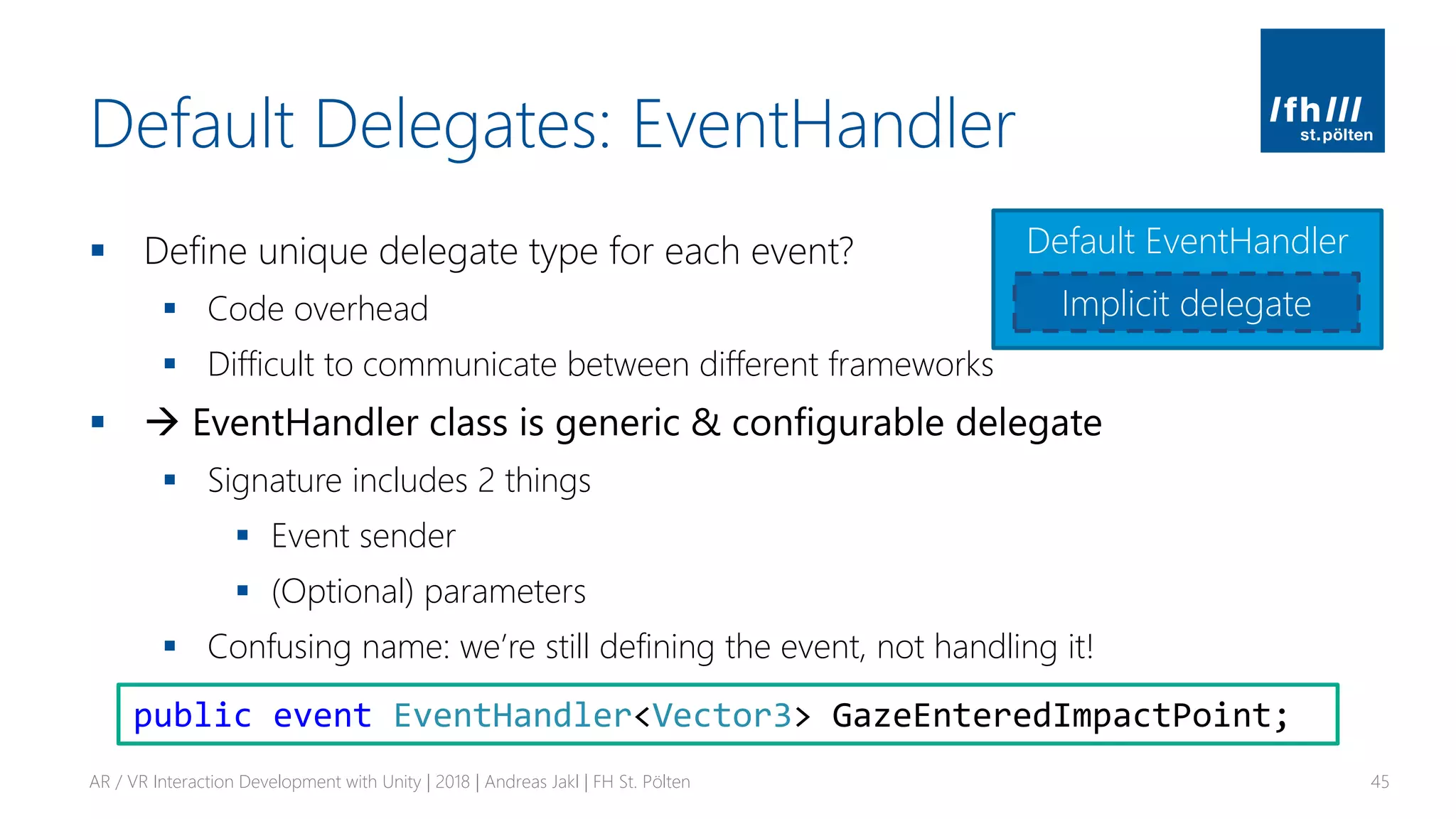
▪ Define unique delegate type for each event?
▪ Code overhead
▪ Difficult to communicate between different frameworks
▪ → EventHandler class is generic & configurable delegate
▪ Signature includes 2 things
▪ Event sender
▪ (Optional) parameters
▪ Confusing name: we’re still defining the event, not handling it!
AR / VR Interaction Development with Unity | 2018 | Andreas Jakl | FH St. Pölten 45
public event EventHandler<Vector3> GazeEnteredImpactPoint;
Default EventHandler
Implicit delegate
GazeTarget Script
AR / VR Interaction Development with Unity | 2018 | Andreas Jakl | FH St. Pölten 46
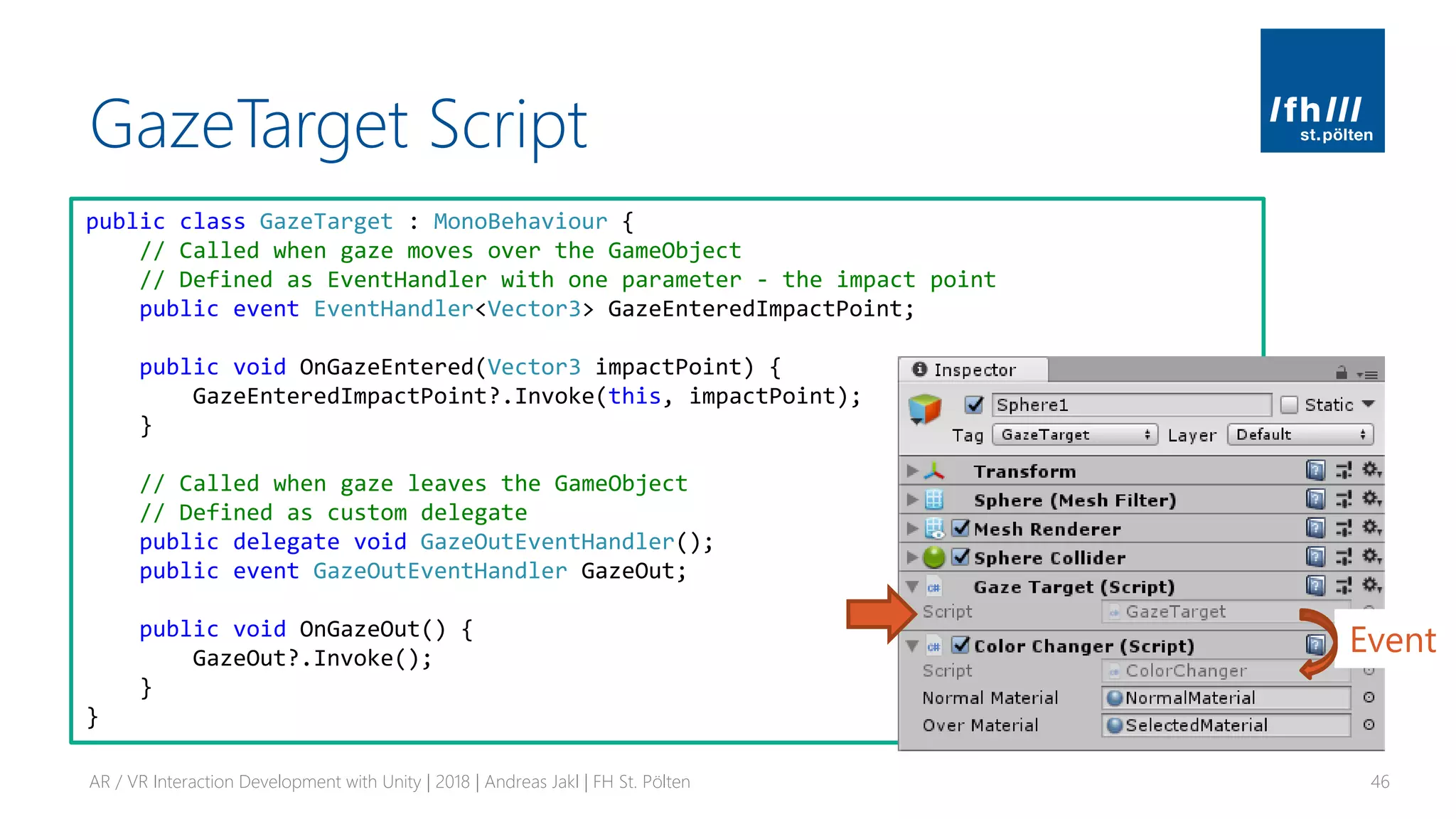
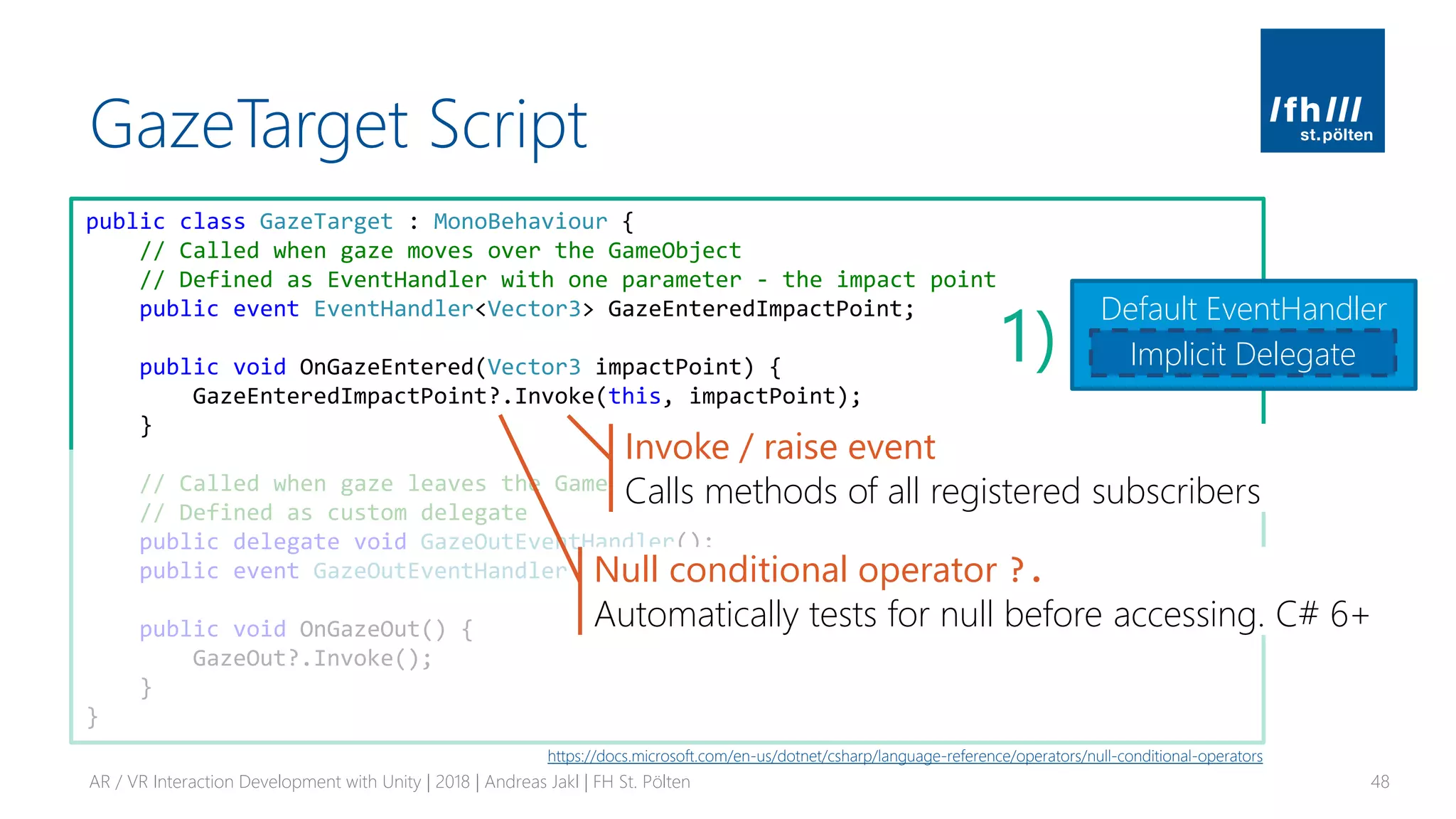
public class GazeTarget : MonoBehaviour {
// Called when gaze moves over the GameObject
// Defined as EventHandler with one parameter - the impact point
public event EventHandler<Vector3> GazeEnteredImpactPoint;
public void OnGazeEntered(Vector3 impactPoint) {
GazeEnteredImpactPoint?.Invoke(this, impactPoint);
}
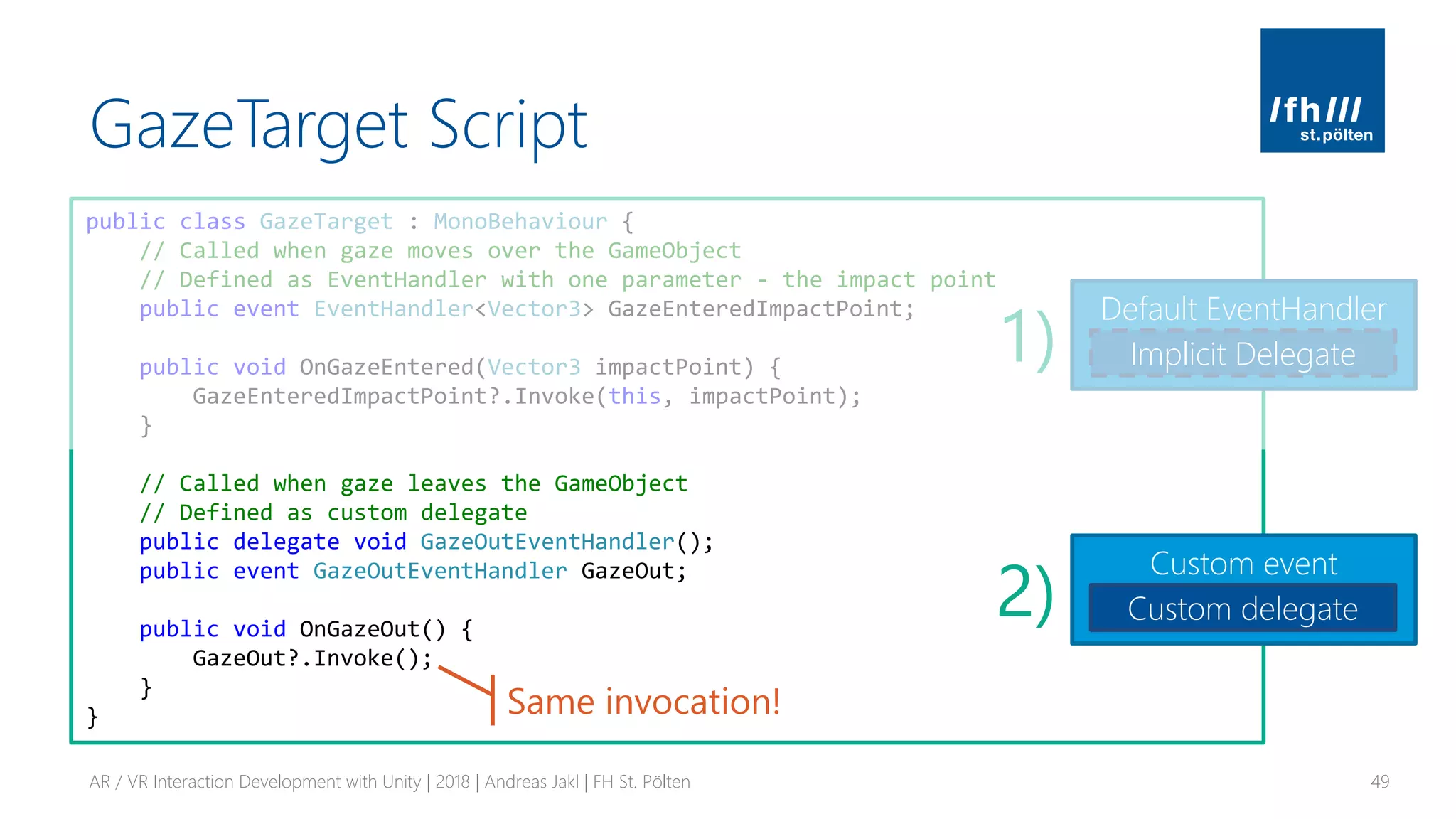
// Called when gaze leaves the GameObject
// Defined as custom delegate
public delegate void GazeOutEventHandler();
public event GazeOutEventHandler GazeOut;
public void OnGazeOut() {
GazeOut?.Invoke();
}
}
Event
GazeTarget Script
AR / VR Interaction Development with Unity | 2018 | Andreas Jakl | FH St. Pölten 47
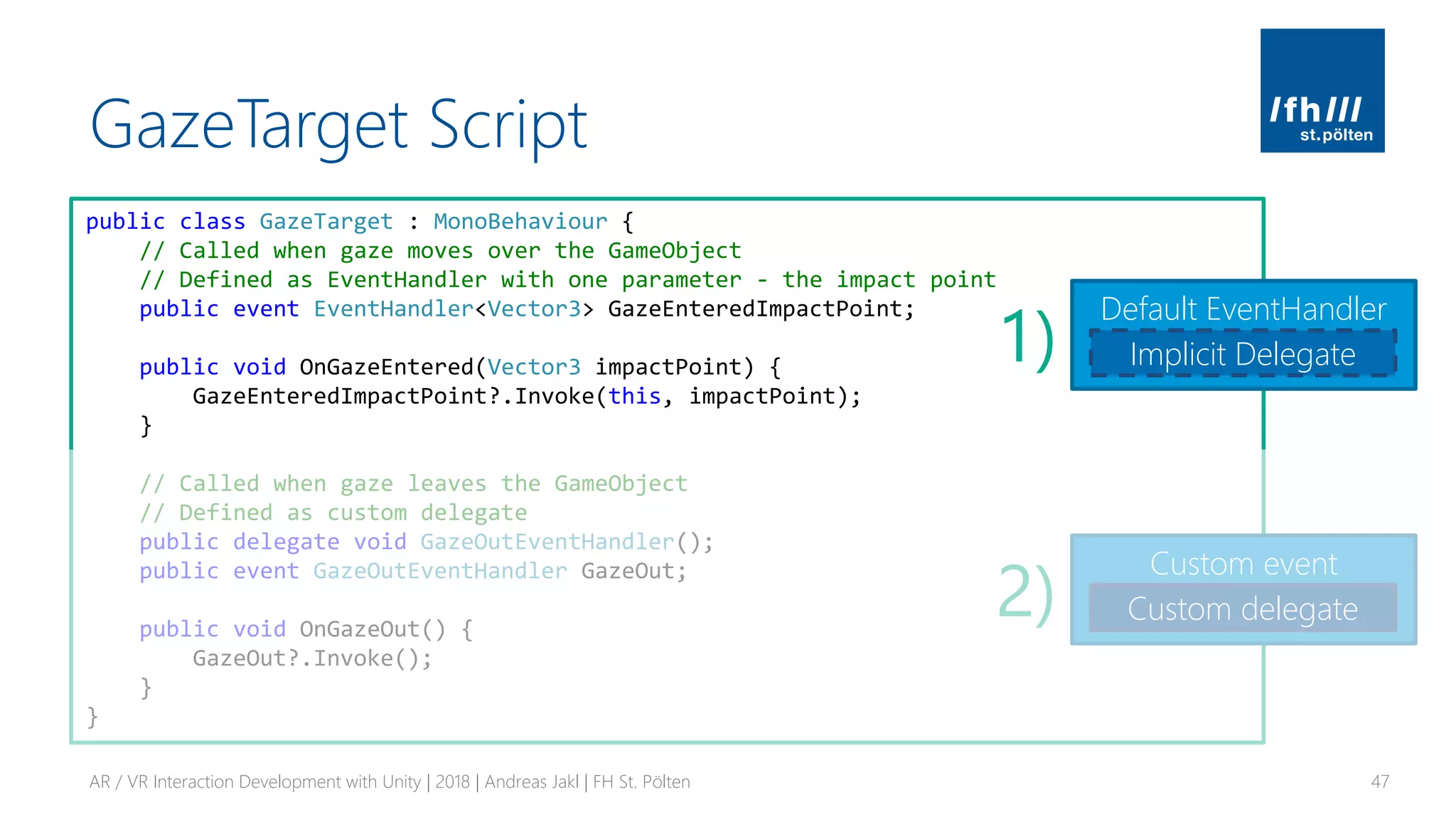
public class GazeTarget : MonoBehaviour {
// Called when gaze moves over the GameObject
// Defined as EventHandler with one parameter - the impact point
public event EventHandler<Vector3> GazeEnteredImpactPoint;
public void OnGazeEntered(Vector3 impactPoint) {
GazeEnteredImpactPoint?.Invoke(this, impactPoint);
}
// Called when gaze leaves the GameObject
// Defined as custom delegate
public delegate void GazeOutEventHandler();
public event GazeOutEventHandler GazeOut;
public void OnGazeOut() {
GazeOut?.Invoke();
}
}
Default EventHandler
Implicit Delegate
Custom event
Custom delegate
1)
2)
GazeTarget Script
AR / VR Interaction Development with Unity | 2018 | Andreas Jakl | FH St. Pölten 48
public class GazeTarget : MonoBehaviour {
// Called when gaze moves over the GameObject
// Defined as EventHandler with one parameter - the impact point
public event EventHandler<Vector3> GazeEnteredImpactPoint;
public void OnGazeEntered(Vector3 impactPoint) {
GazeEnteredImpactPoint?.Invoke(this, impactPoint);
}
// Called when gaze leaves the GameObject
// Defined as custom delegate
public delegate void GazeOutEventHandler();
public event GazeOutEventHandler GazeOut;
public void OnGazeOut() {
GazeOut?.Invoke();
}
}
Default EventHandler
Implicit Delegate1)
Null conditional operator ?.
Automatically tests for null before accessing. C# 6+
Invoke / raise event
Calls methods of all registered subscribers
https://docs.microsoft.com/en-us/dotnet/csharp/language-reference/operators/null-conditional-operators
GazeTarget Script
AR / VR Interaction Development with Unity | 2018 | Andreas Jakl | FH St. Pölten 49
public class GazeTarget : MonoBehaviour {
// Called when gaze moves over the GameObject
// Defined as EventHandler with one parameter - the impact point
public event EventHandler<Vector3> GazeEnteredImpactPoint;
public void OnGazeEntered(Vector3 impactPoint) {
GazeEnteredImpactPoint?.Invoke(this, impactPoint);
}
// Called when gaze leaves the GameObject
// Defined as custom delegate
public delegate void GazeOutEventHandler();
public event GazeOutEventHandler GazeOut;
public void OnGazeOut() {
GazeOut?.Invoke();
}
}
Default EventHandler
Implicit Delegate
Custom event
Custom delegate
1)
2)
Same invocation!
Event Subscription
AR / VR Interaction Development with Unity | 2018 | Andreas Jakl | FH St. Pölten 50
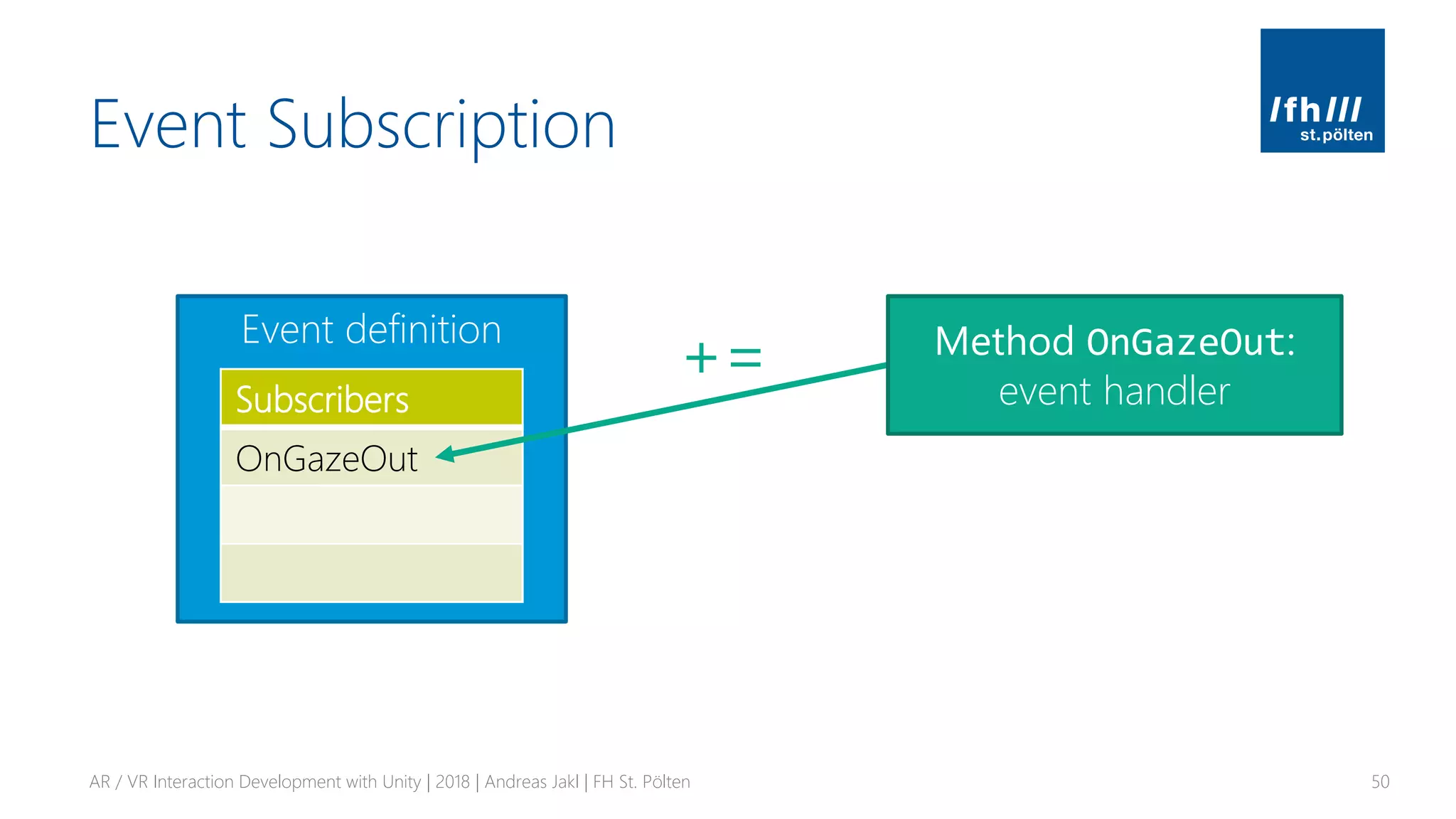
Event definition
Subscribers
+=
OnGazeOut
Method OnGazeOut:
event handler
Event Subscription
AR / VR Interaction Development with Unity | 2018 | Andreas Jakl | FH St. Pölten 51
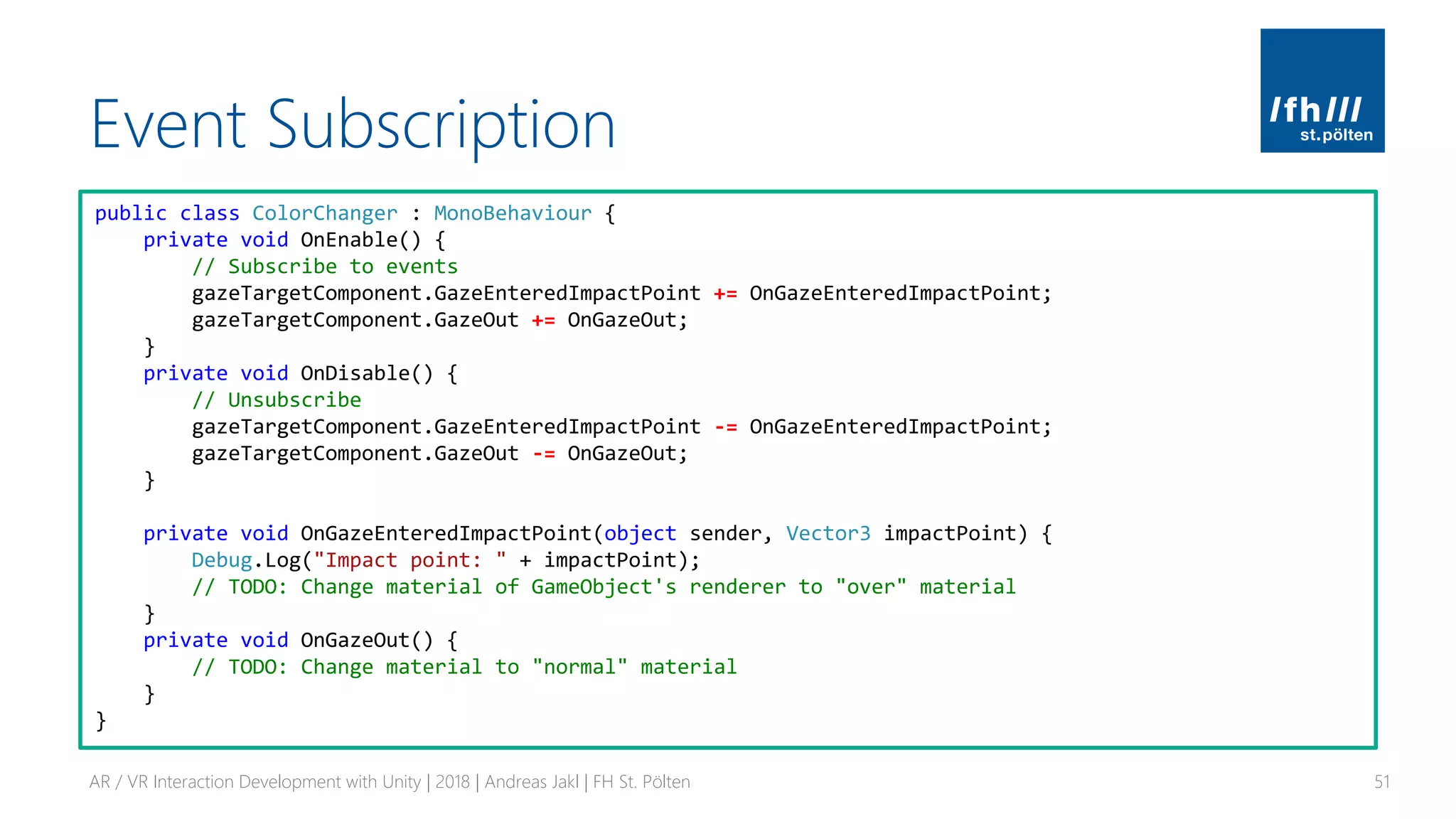
public class ColorChanger : MonoBehaviour {
private void OnEnable() {
// Subscribe to events
gazeTargetComponent.GazeEnteredImpactPoint += OnGazeEnteredImpactPoint;
gazeTargetComponent.GazeOut += OnGazeOut;
}
private void OnDisable() {
// Unsubscribe
gazeTargetComponent.GazeEnteredImpactPoint -= OnGazeEnteredImpactPoint;
gazeTargetComponent.GazeOut -= OnGazeOut;
}
private void OnGazeEnteredImpactPoint(object sender, Vector3 impactPoint) {
Debug.Log("Impact point: " + impactPoint);
// TODO: Change material of GameObject's renderer to "over" material
}
private void OnGazeOut() {
// TODO: Change material to "normal" material
}
}
GameObject: Sphere
Example: Event System for Gaze
AR / VR Interaction Development with Unity | 2018 | Andreas Jakl | FH St. Pölten 52
Class: event sender
“GazeTarget”
Class: event receiver
“ColorChanger”
Method: event handler
Method: raise event
Event definition
GameObject: Camera
Class: Raycast component
“EyeRaycast”
Method: hit detected
1) Retrieves “GazeTarget”
component of GameObject
that was hit by raycast
2) Gazed
GameObject
raises “internal”
event to
forward
information to
specific handler
class
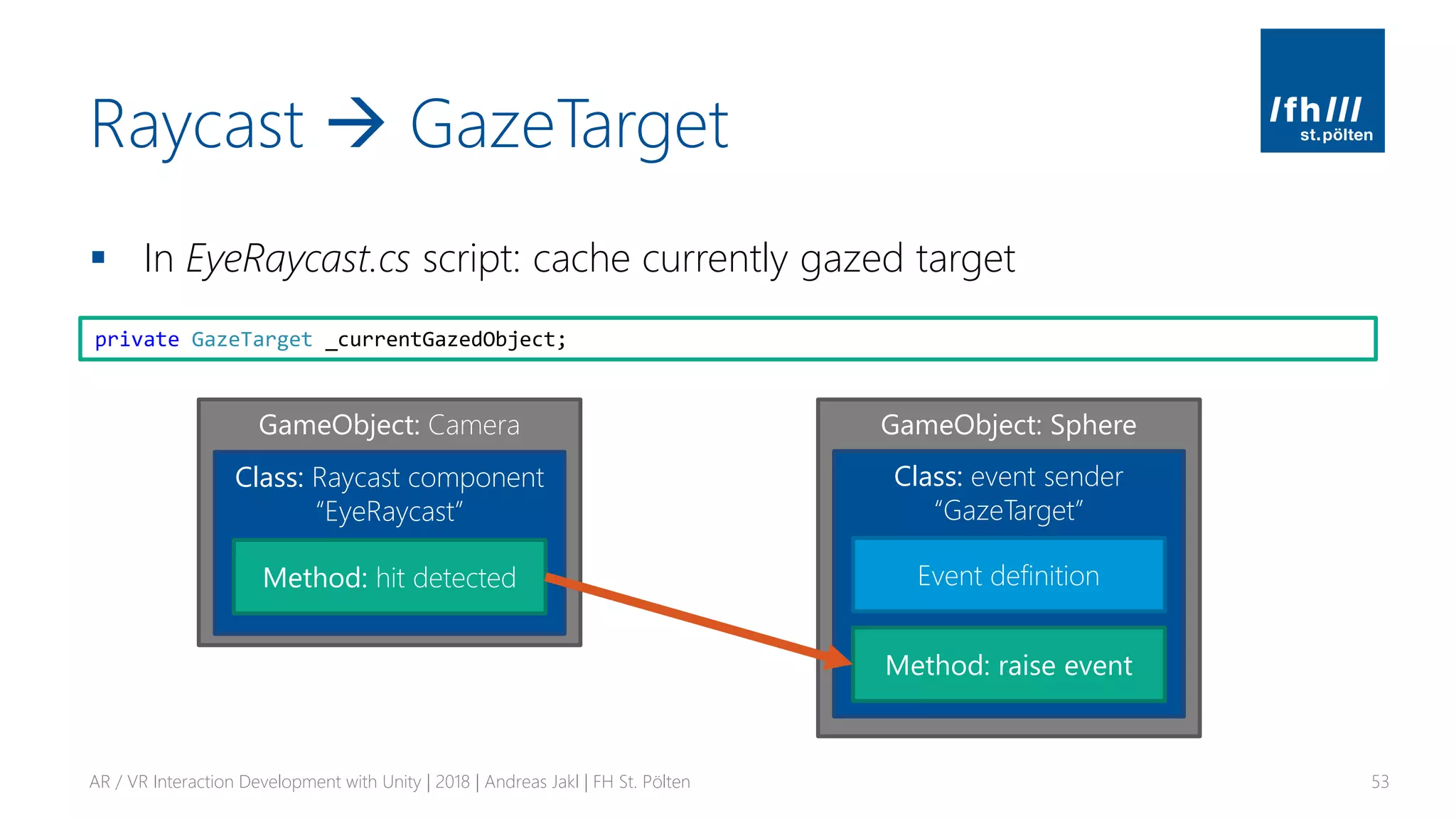
Raycast → GazeTarget
▪ In EyeRaycast.cs script: cache currently gazed target
AR / VR Interaction Development with Unity | 2018 | Andreas Jakl | FH St. Pölten 53
private GazeTarget _currentGazedObject;
GameObject: Sphere
Class: event sender
“GazeTarget”
Method: raise event
Event definition
GameObject: Camera
Class: Raycast component
“EyeRaycast”
Method: hit detected
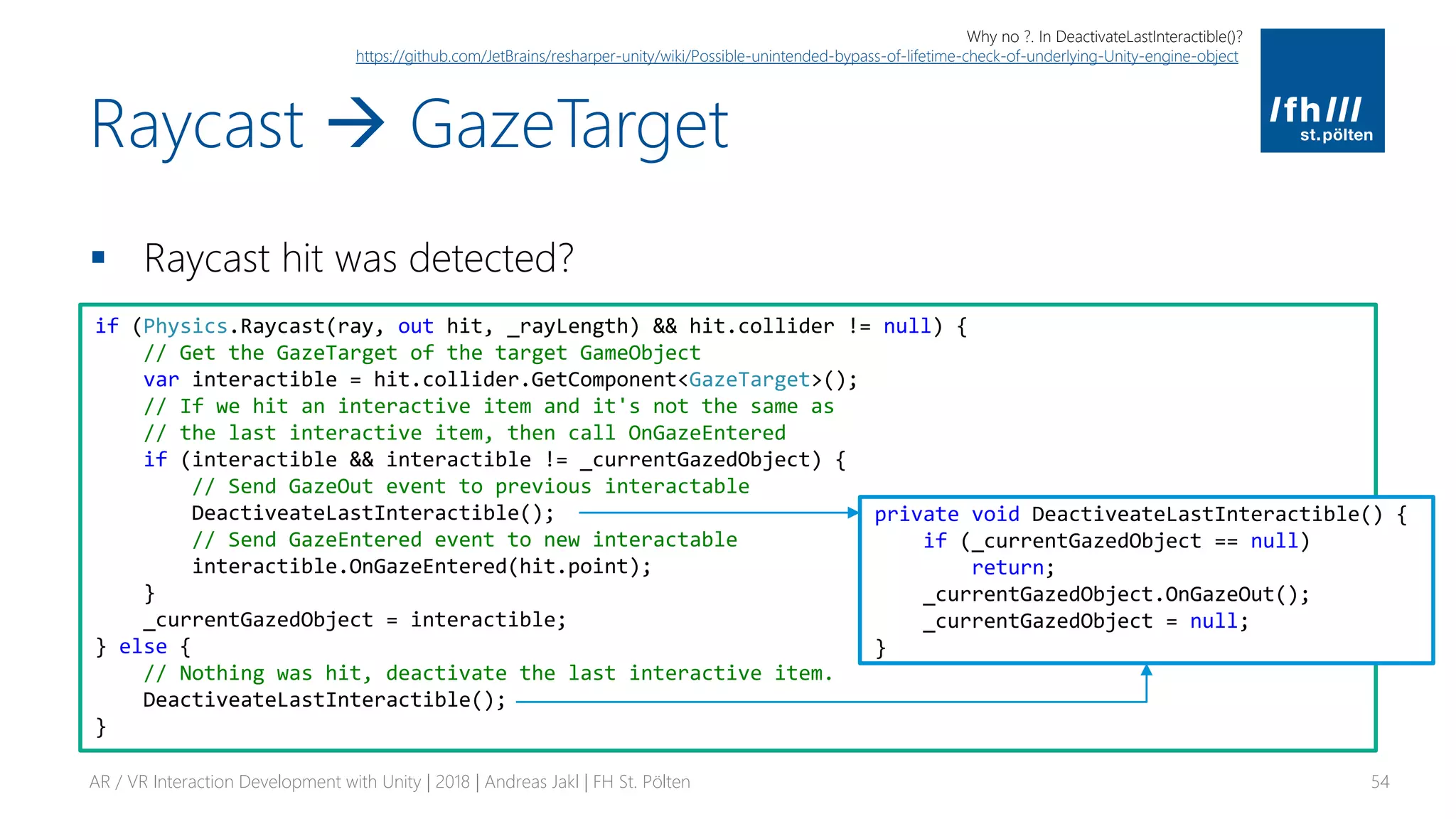
Raycast → GazeTarget
▪ Raycast hit was detected?
AR / VR Interaction Development with Unity | 2018 | Andreas Jakl | FH St. Pölten 54
if (Physics.Raycast(ray, out hit, _rayLength) && hit.collider != null) {
// Get the GazeTarget of the target GameObject
var interactible = hit.collider.GetComponent<GazeTarget>();
// If we hit an interactive item and it's not the same as
// the last interactive item, then call OnGazeEntered
if (interactible && interactible != _currentGazedObject) {
// Send GazeOut event to previous interactable
DeactiveateLastInteractible();
// Send GazeEntered event to new interactable
interactible.OnGazeEntered(hit.point);
}
_currentGazedObject = interactible;
} else {
// Nothing was hit, deactivate the last interactive item.
DeactiveateLastInteractible();
}
private void DeactiveateLastInteractible() {
if (_currentGazedObject == null)
return;
_currentGazedObject.OnGazeOut();
_currentGazedObject = null;
}
Why no ?. In DeactivateLastInteractible()?
https://github.com/JetBrains/resharper-unity/wiki/Possible-unintended-bypass-of-lifetime-check-of-underlying-Unity-engine-object
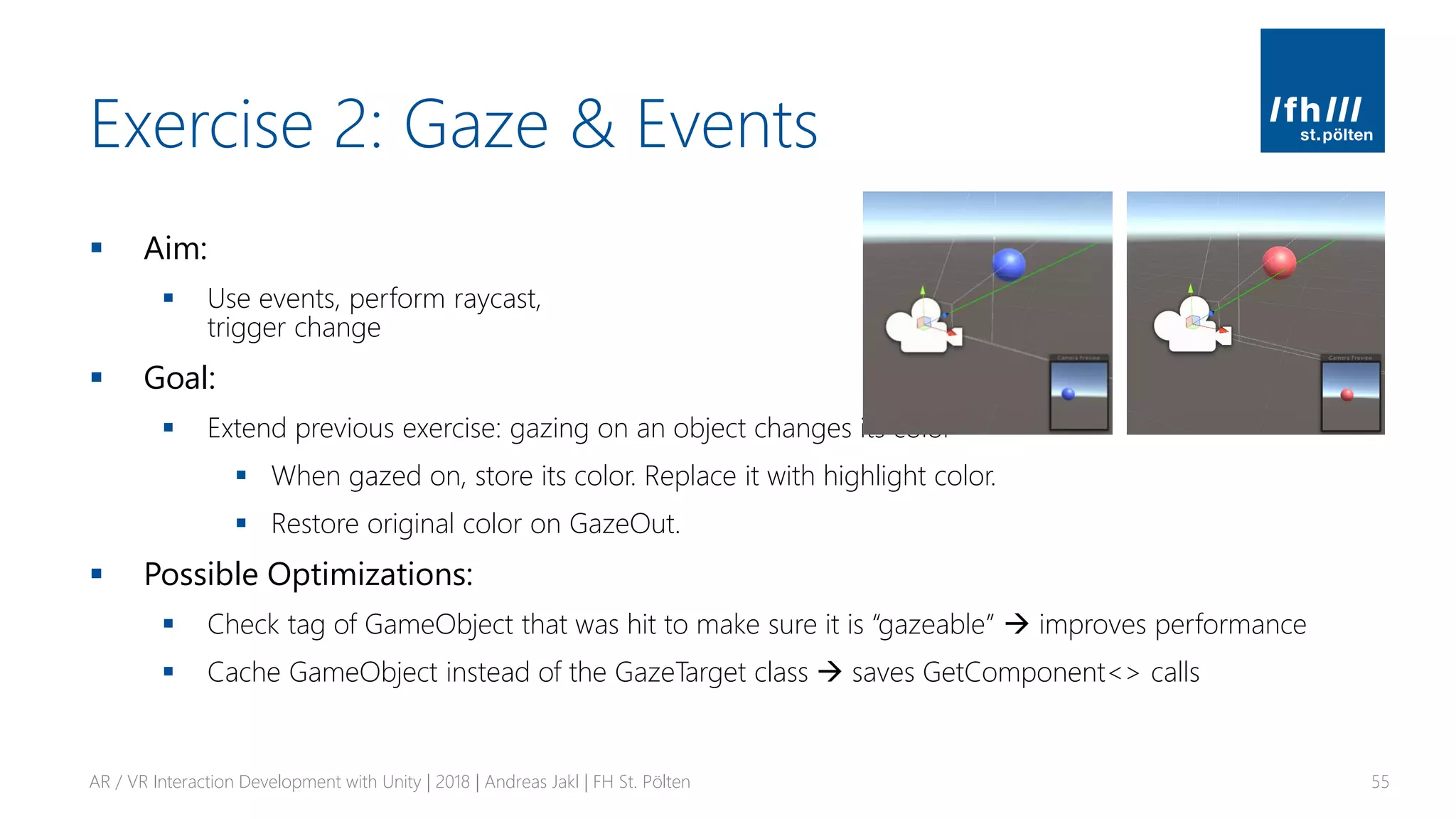
Exercise 2: Gaze & Events
▪ Aim:
▪ Use events, perform raycast,
trigger change
▪ Goal:
▪ Extend previous exercise: gazing on an object changes its color
▪ When gazed on, store its color. Replace it with highlight color.
▪ Restore original color on GazeOut.
▪ Possible Optimizations:
▪ Check tag of GameObject that was hit to make sure it is “gazeable” → improves performance
▪ Cache GameObject instead of the GazeTarget class → saves GetComponent<> calls
AR / VR Interaction Development with Unity | 2018 | Andreas Jakl | FH St. Pölten 55
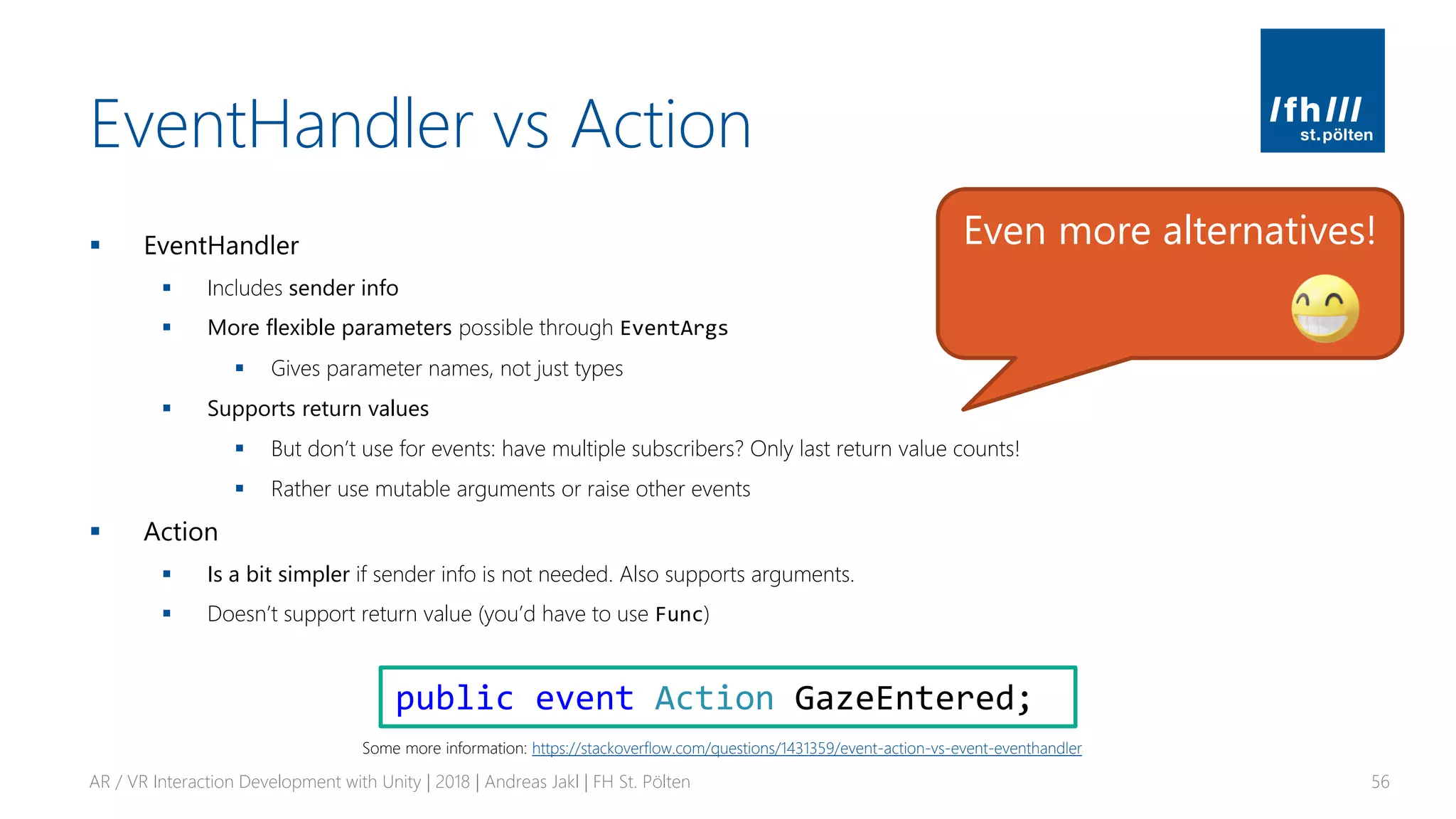
EventHandler vs Action
▪ EventHandler
▪ Includes sender info
▪ More flexible parameters possible through EventArgs
▪ Gives parameter names, not just types
▪ Supports return values
▪ But don’t use for events: have multiple subscribers? Only last return value counts!
▪ Rather use mutable arguments or raise other events
▪ Action
▪ Is a bit simpler if sender info is not needed. Also supports arguments.
▪ Doesn’t support return value (you’d have to use Func)
AR / VR Interaction Development with Unity | 2018 | Andreas Jakl | FH St. Pölten 56
public event Action GazeEntered;
Even more alternatives!
Some more information: https://stackoverflow.com/questions/1431359/event-action-vs-event-eventhandler
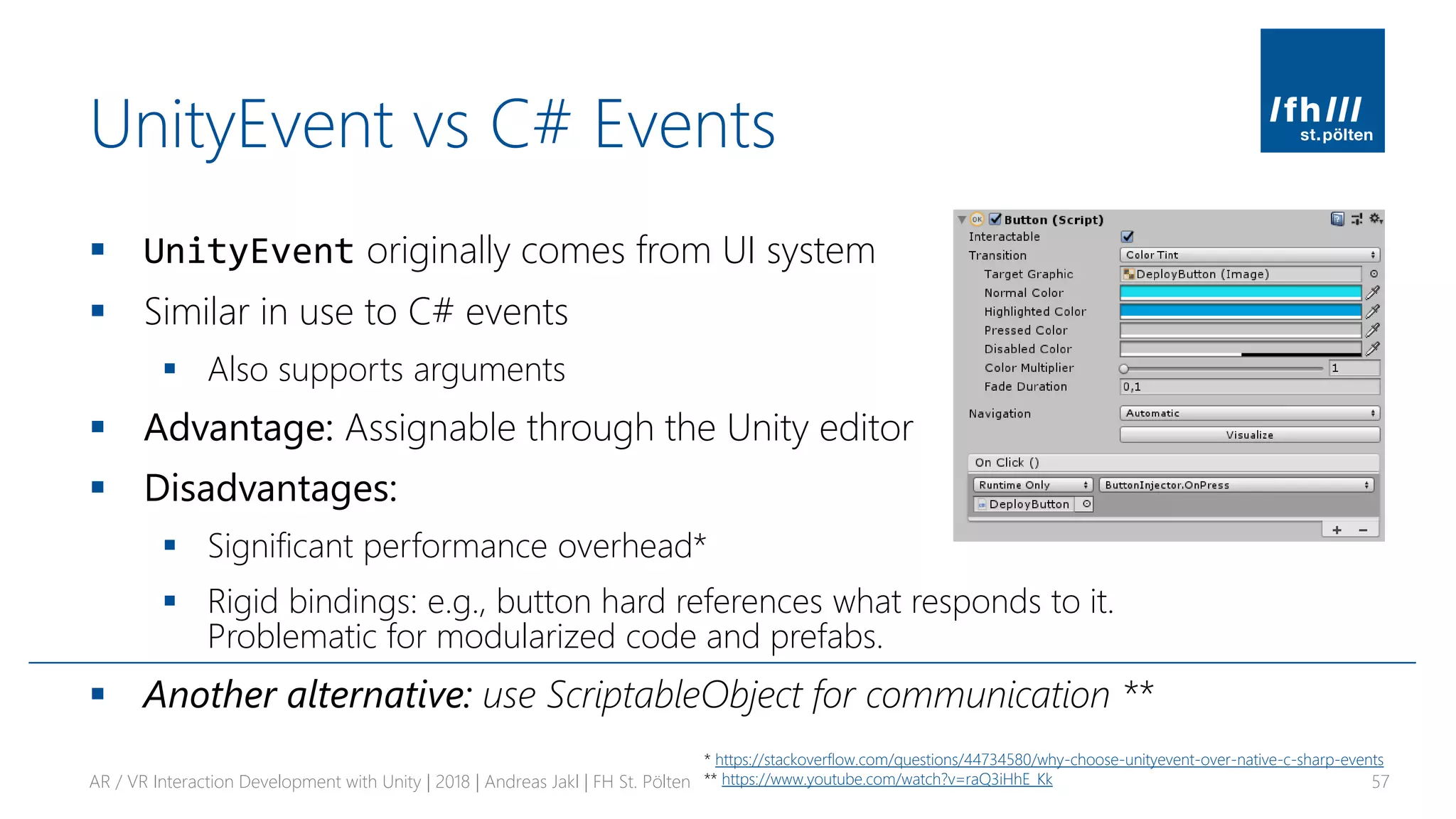
UnityEvent vs C# Events
▪ UnityEvent originally comes from UI system
▪ Similar in use to C# events
▪ Also supports arguments
▪ Advantage: Assignable through the Unity editor
▪ Disadvantages:
▪ Significant performance overhead*
▪ Rigid bindings: e.g., button hard references what responds to it.
Problematic for modularized code and prefabs.
▪ Another alternative: use ScriptableObject for communication **
AR / VR Interaction Development with Unity | 2018 | Andreas Jakl | FH St. Pölten 57
* https://stackoverflow.com/questions/44734580/why-choose-unityevent-over-native-c-sharp-events
** https://www.youtube.com/watch?v=raQ3iHhE_Kk
RETICLE / CURSOR
Show where the user is gazing
AR / VR Interaction Development with Unity | 2018 | Andreas Jakl | FH St. Pölten 58
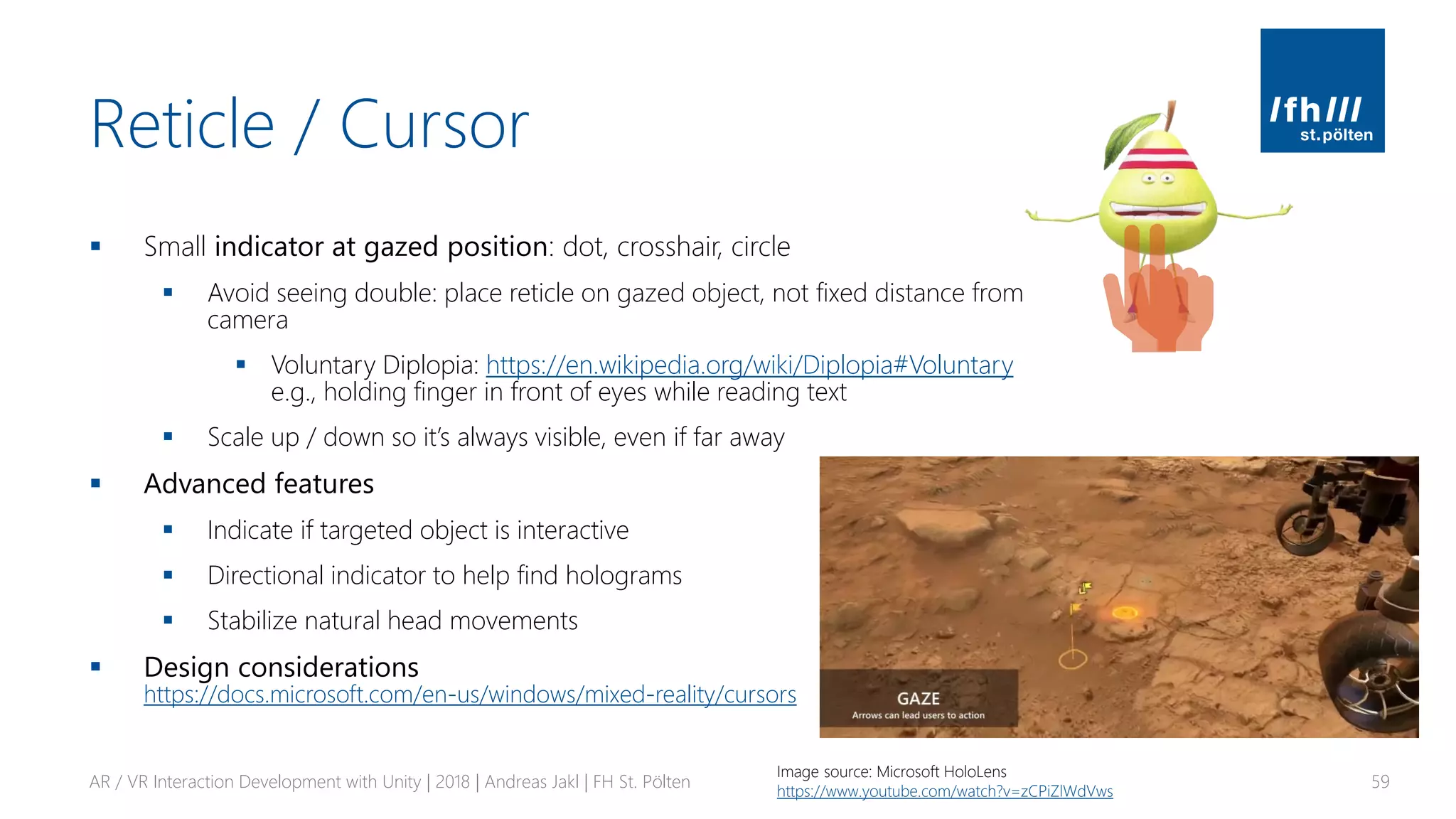
Reticle / Cursor
▪ Small indicator at gazed position: dot, crosshair, circle
▪ Avoid seeing double: place reticle on gazed object, not fixed distance from
camera
▪ Voluntary Diplopia: https://en.wikipedia.org/wiki/Diplopia#Voluntary
e.g., holding finger in front of eyes while reading text
▪ Scale up / down so it’s always visible, even if far away
▪ Advanced features
▪ Indicate if targeted object is interactive
▪ Directional indicator to help find holograms
▪ Stabilize natural head movements
▪ Design considerations
https://docs.microsoft.com/en-us/windows/mixed-reality/cursors
AR / VR Interaction Development with Unity | 2018 | Andreas Jakl | FH St. Pölten 59
Image source: Microsoft HoloLens
https://www.youtube.com/watch?v=zCPiZlWdVws
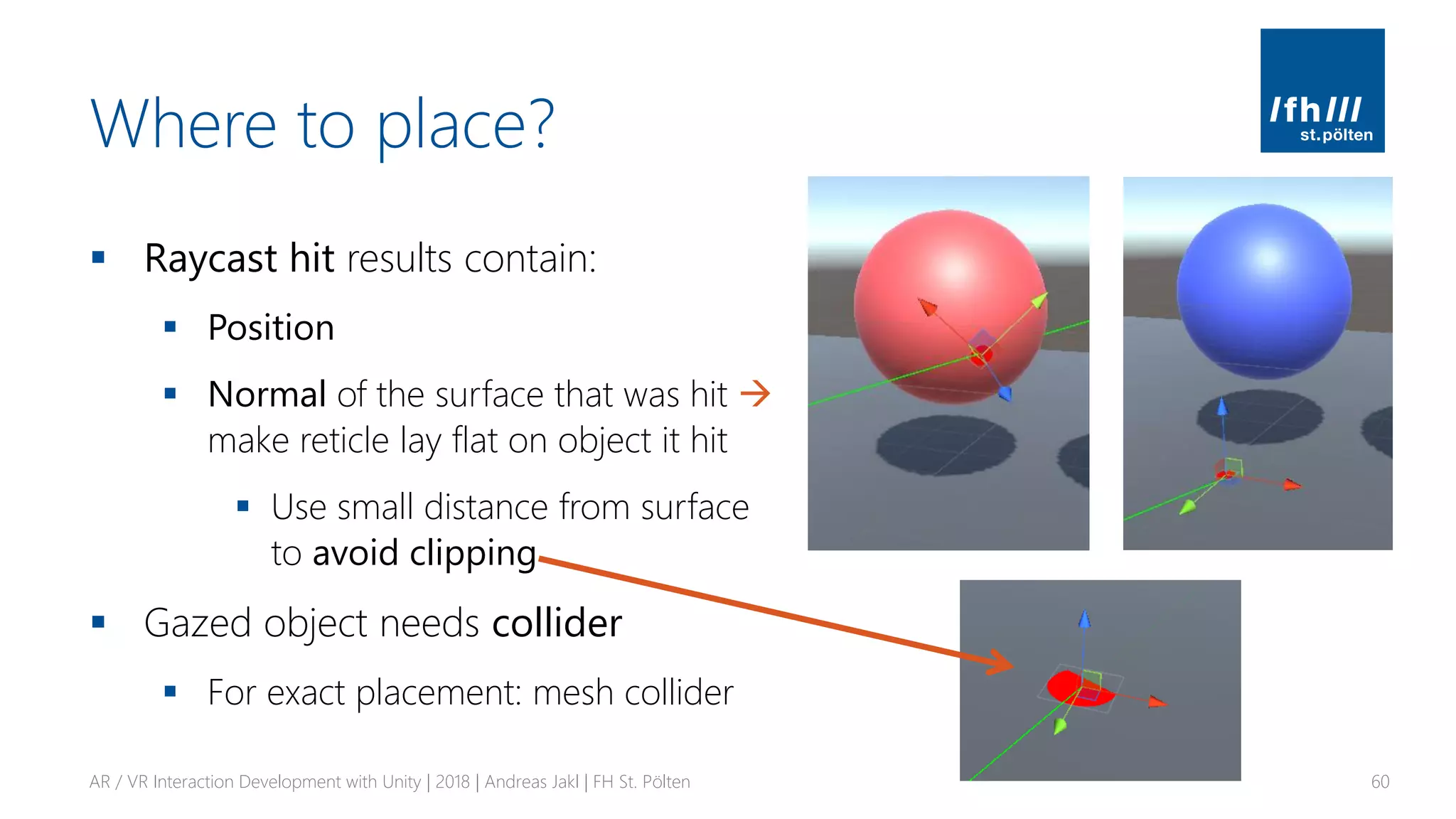
Where to place?
▪ Raycast hit results contain:
▪ Position
▪ Normal of the surface that was hit →
make reticle lay flat on object it hit
▪ Use small distance from surface
to avoid clipping
▪ Gazed object needs collider
▪ For exact placement: mesh collider
AR / VR Interaction Development with Unity | 2018 | Andreas Jakl | FH St. Pölten 60
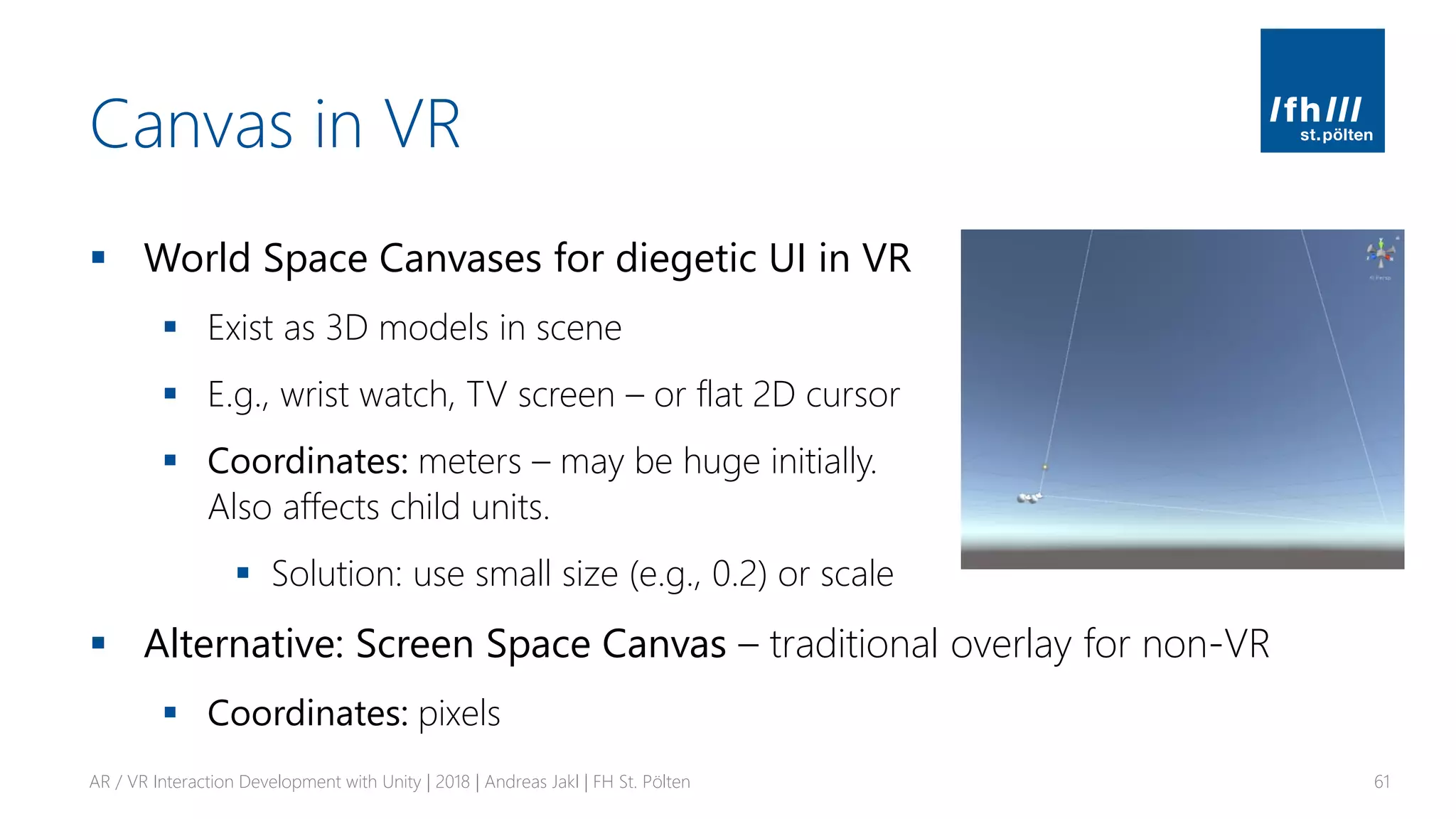
Canvas in VR
▪ World Space Canvases for diegetic UI in VR
▪ Exist as 3D models in scene
▪ E.g., wrist watch, TV screen – or flat 2D cursor
▪ Coordinates: meters – may be huge initially.
Also affects child units.
▪ Solution: use small size (e.g., 0.2) or scale
▪ Alternative: Screen Space Canvas – traditional overlay for non-VR
▪ Coordinates: pixels
AR / VR Interaction Development with Unity | 2018 | Andreas Jakl | FH St. Pölten 61
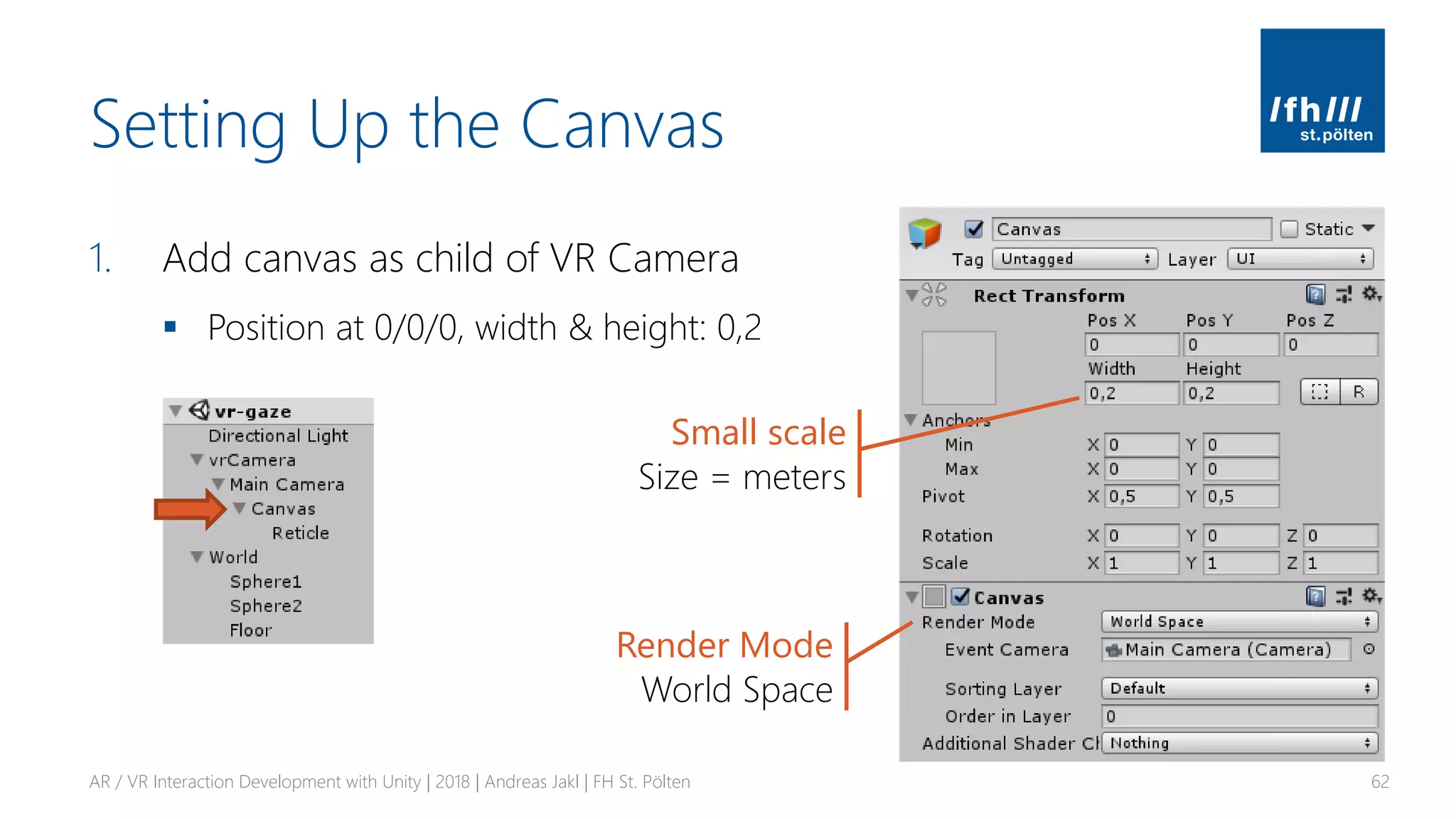
Setting Up the Canvas
1. Add canvas as child of VR Camera
▪ Position at 0/0/0, width & height: 0,2
AR / VR Interaction Development with Unity | 2018 | Andreas Jakl | FH St. Pölten 62
Small scale
Size = meters
Render Mode
World Space
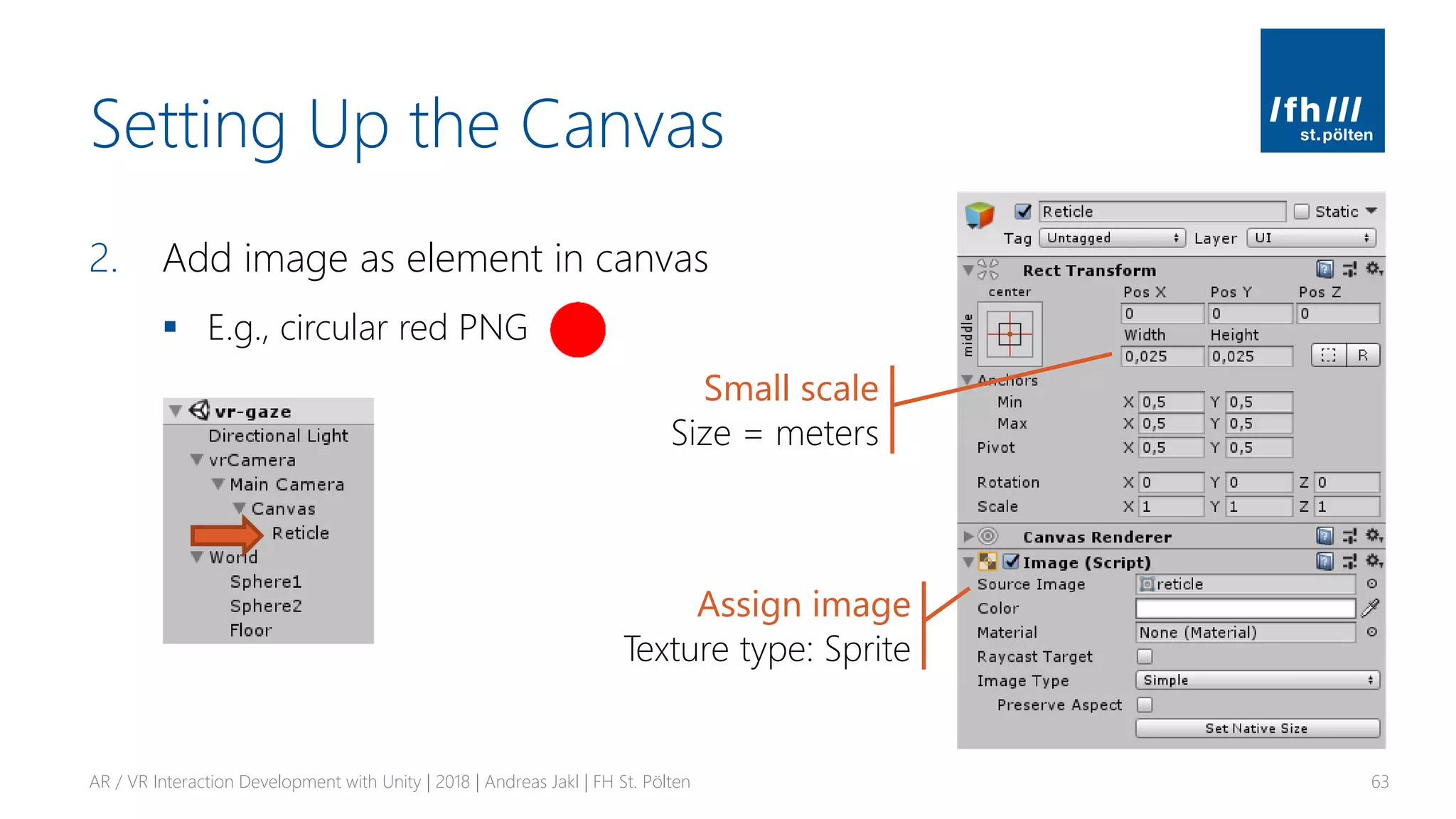
Setting Up the Canvas
2. Add image as element in canvas
▪ E.g., circular red PNG
AR / VR Interaction Development with Unity | 2018 | Andreas Jakl | FH St. Pölten 63
Small scale
Size = meters
Assign image
Texture type: Sprite
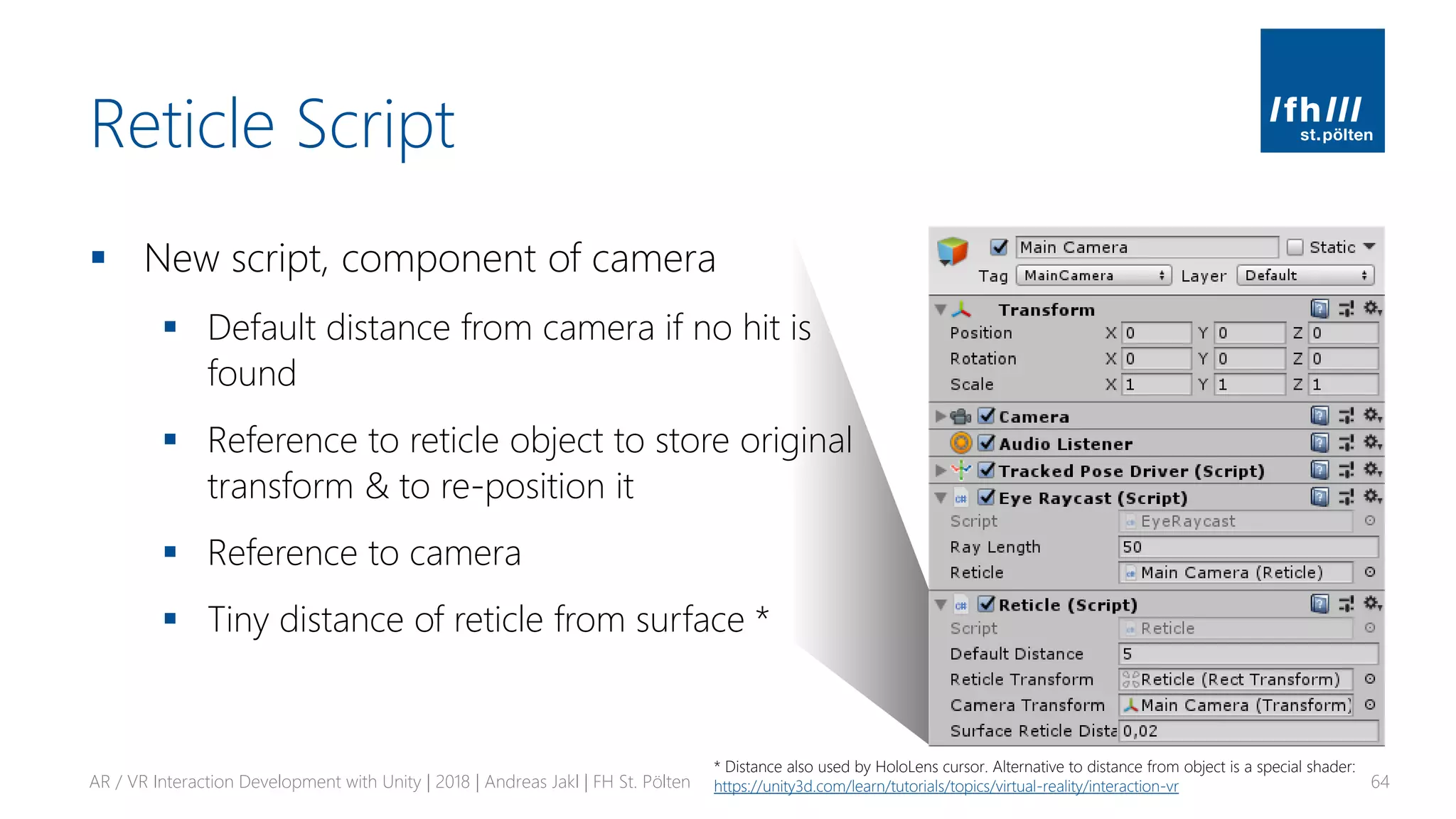
Reticle Script
▪ New script, component of camera
▪ Default distance from camera if no hit is
found
▪ Reference to reticle object to store original
transform & to re-position it
▪ Reference to camera
▪ Tiny distance of reticle from surface *
AR / VR Interaction Development with Unity | 2018 | Andreas Jakl | FH St. Pölten 64
* Distance also used by HoloLens cursor. Alternative to distance from object is a special shader:
https://unity3d.com/learn/tutorials/topics/virtual-reality/interaction-vr
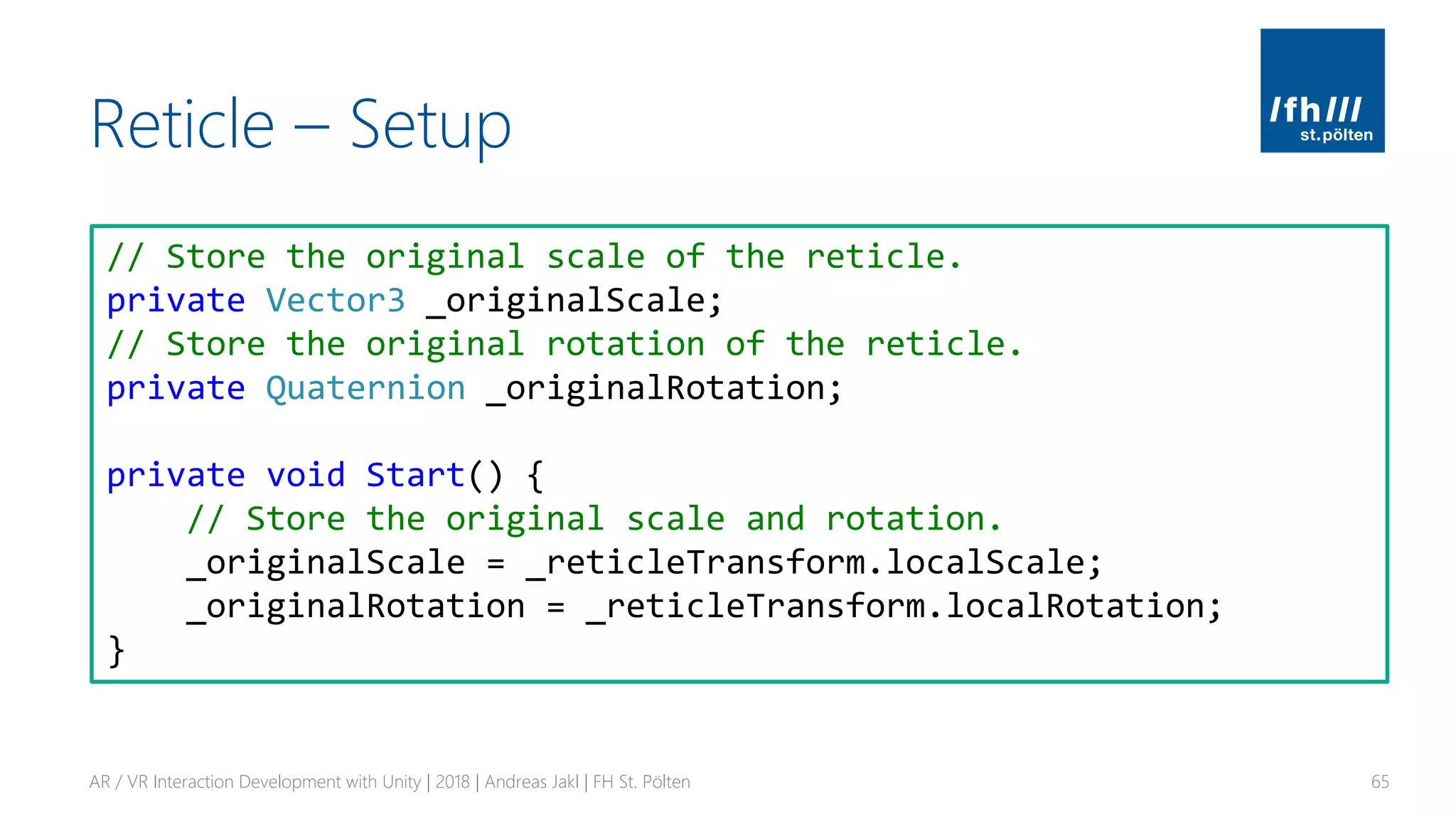
Reticle – Setup
AR / VR Interaction Development with Unity | 2018 | Andreas Jakl | FH St. Pölten 65
// Store the original scale of the reticle.
private Vector3 _originalScale;
// Store the original rotation of the reticle.
private Quaternion _originalRotation;
private void Start() {
// Store the original scale and rotation.
_originalScale = _reticleTransform.localScale;
_originalRotation = _reticleTransform.localRotation;
}
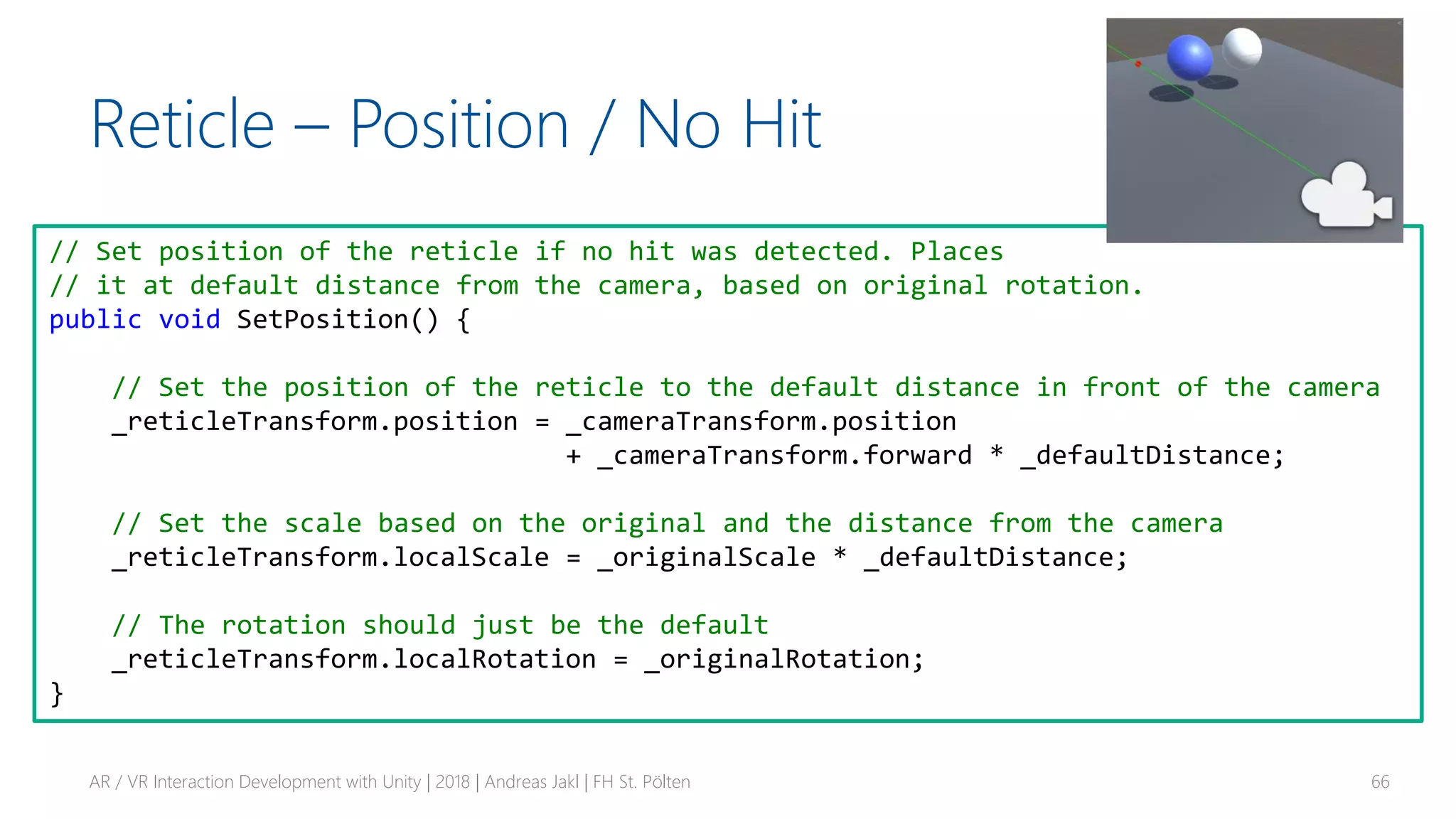
Reticle – Position / No Hit
AR / VR Interaction Development with Unity | 2018 | Andreas Jakl | FH St. Pölten 66
// Set position of the reticle if no hit was detected. Places
// it at default distance from the camera, based on original rotation.
public void SetPosition() {
// Set the position of the reticle to the default distance in front of the camera
_reticleTransform.position = _cameraTransform.position
+ _cameraTransform.forward * _defaultDistance;
// Set the scale based on the original and the distance from the camera
_reticleTransform.localScale = _originalScale * _defaultDistance;
// The rotation should just be the default
_reticleTransform.localRotation = _originalRotation;
}
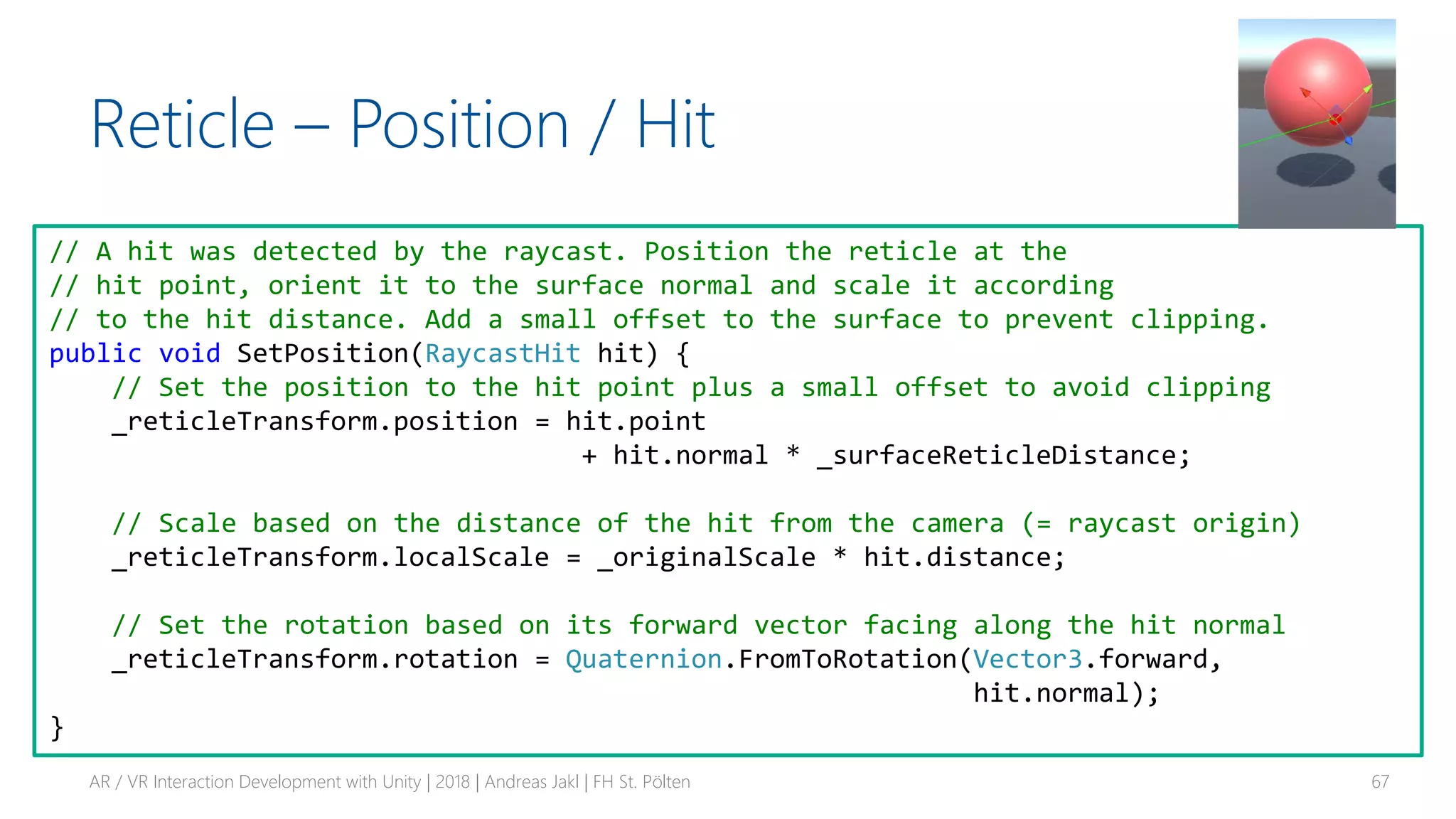
Reticle – Position / Hit
AR / VR Interaction Development with Unity | 2018 | Andreas Jakl | FH St. Pölten 67
// A hit was detected by the raycast. Position the reticle at the
// hit point, orient it to the surface normal and scale it according
// to the hit distance. Add a small offset to the surface to prevent clipping.
public void SetPosition(RaycastHit hit) {
// Set the position to the hit point plus a small offset to avoid clipping
_reticleTransform.position = hit.point
+ hit.normal * _surfaceReticleDistance;
// Scale based on the distance of the hit from the camera (= raycast origin)
_reticleTransform.localScale = _originalScale * hit.distance;
// Set the rotation based on its forward vector facing along the hit normal
_reticleTransform.rotation = Quaternion.FromToRotation(Vector3.forward,
hit.normal);
}
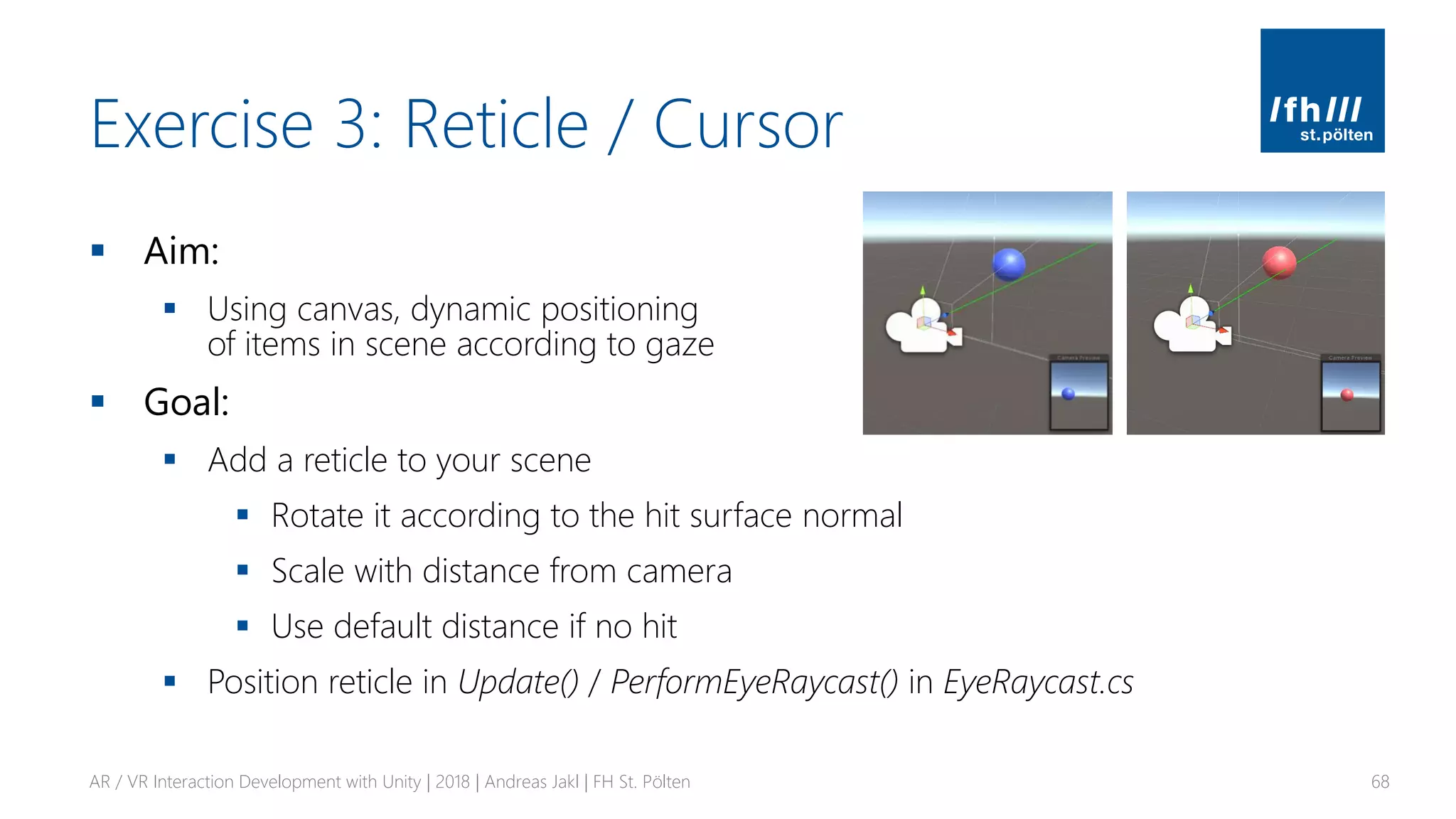
Exercise 3: Reticle / Cursor
▪ Aim:
▪ Using canvas, dynamic positioning
of items in scene according to gaze
▪ Goal:
▪ Add a reticle to your scene
▪ Rotate it according to the hit surface normal
▪ Scale with distance from camera
▪ Use default distance if no hit
▪ Position reticle in Update() / PerformEyeRaycast() in EyeRaycast.cs
AR / VR Interaction Development with Unity | 2018 | Andreas Jakl | FH St. Pölten 68
THANK YOU!
Contact:
andreas.jakl@fhstp.ac.at
https://www.andreasjakl.com/
AR / VR Interaction Development with Unity | 2018 | Andreas Jakl | FH St. Pölten 69

AR / VR Interaction Development with Unity

  • 1.
    St. Pölten Universityof Applied SciencesSt. Pölten University of Applied Sciences Platzhalter für möglichen Bildeinsatz AR / VR Interaction Development with Unity Andreas Jakl WS 2018, v1.2 AR / VR Master Class FH St. Pölten
  • 2.
    Course Contents ▪ Scripting:Frameworks, APIs and Languages ▪ GameObjects: Behind the Scenes ▪ Coroutines ▪ Gaze & Raycasting ▪ Delegates, Events & Actions ▪ Reticle / Cursor for Raycasts, based on a Canvas AR / VR Interaction Development with Unity | 2018 | Andreas Jakl | FH St. Pölten 2
  • 3.
    SCRIPTING IN UNITY Frameworks,APIs and Languages AR / VR Interaction Development with Unity | 2018 | Andreas Jakl | FH St. Pölten 3
  • 4.
    Review C# Basicsfor Unity ▪ Course: C# for Unity Game Development ▪ https://www.linkedin.com/learning/c-sharp-for-unity-game-development/ = https://www.lynda.com/Unity-tutorials/Scripting-Unity-C/365280-2.html AR / VR Interaction Development with Unity | 2018 | Andreas Jakl | FH St. Pölten 4
  • 5.
    C# Evolution AR /VR Interaction Development with Unity | 2018 | Andreas Jakl | FH St. Pölten 5 4 5 6 7 8 + async/await … + null propagation string interpolation await in try/catch … + tuples out variables …
  • 6.
    .NET AR / VRInteraction Development with Unity | 2018 | Andreas Jakl | FH St. Pölten 6 Windows Only Installed in OS Source open for reference Windows, Mac OS, Linux (websites, servers, console apps) Ships with app Open Source Windows, Mac OS, Linux Android, iOS, Playstation, … Ships with app Open source re-implementation of .net framework Runtime Ships Code
  • 7.
    API ▪ .NET Standard ▪Set of APIs that all platforms must implement ▪ Subset of full .NET framework ▪ Includes Unity 2018.1+ (https://docs.microsoft.com/en-us/dotnet/standard/net- standard#net-implementation-support) ▪ .NET Framework APIs ▪ More APIs, use for legacy libraries only ▪ Originally Windows-only, installed with Windows – not part of the app, not open source ▪ Parts now open source for reference * ▪ Mono = open source implementation AR / VR Interaction Development with Unity | 2018 | Andreas Jakl | FH St. Pölten 7* https://github.com/Microsoft/referencesource
  • 8.
    Unity API CompatibilityLevel AR / VR Interaction Development with Unity | 2018 | Andreas Jakl | FH St. Pölten 8 Only available for .NET 4.x equivalent
  • 9.
    IL2CPP: Intermediate Languageto C++ AR / VR Interaction Development with Unity | 2018 | Andreas Jakl | FH St. Pölten 9
  • 10.
    IL2CPP: Intermediate Languageto C++ 1. Standard C# compiler (Mono / Roslyn) → DLLs 2. Unity-specific optimization tool (removes unused classes & methods) 3. Unity-specific converter to C++ code (ahead-of-time compiler) 4. Platform-native C++ compiler → EXE AR / VR Interaction Development with Unity | 2018 | Andreas Jakl | FH St. Pölten 10More details: https://blogs.unity3d.com/2015/05/06/an-introduction-to-ilcpp-internals/ Image source: https://docs.unity3d.com/Manual/IL2CPP-HowItWorks.html Especially important for platforms that don’t allow managed code at runtime (e.g., iOS)
  • 11.
    .NET Core ▪ Opensource, cross-platform runtime ▪ Not currently planned for Unity ▪ Not enough platforms, hooks missing for Unity ▪ https://blogs.unity3d.com/2018/03/28/updated-scripting-runtime-in-unity- 2018-1-what-does-the-future-hold/ AR / VR Interaction Development with Unity | 2018 | Andreas Jakl | FH St. Pölten 11
  • 12.
    BEHIND THE SCENES Behaviors,Game Objects, Scripts AR / VR Interaction Development with Unity | 2018 | Andreas Jakl | FH St. Pölten 12
  • 13.
    Behaviors ▪ Scripts describebehaviors that get attached to game objects ▪ Behaviors: move, … ▪ Main methods ▪ Start – first load scene ▪ Update – once per frame (VR: 60, 90, 120) ▪ Time.deltaTime – time it took to render previous frame. Important for framerate-independent code AR / VR Interaction Development with Unity | 2018 | Andreas Jakl | FH St. Pölten 13
  • 14.
    Classes AR / VRInteraction Development with Unity | 2018 | Andreas Jakl | FH St. Pölten 14 Component Transform, reference to GameObject this component is attached to, get other components, tags, messages, … UnityEngine.Object GameObject Components, messages, tags, …Scene objects are instances of GameObject
  • 15.
    Classes AR / VRInteraction Development with Unity | 2018 | Andreas Jakl | FH St. Pölten 15 MonoBehaviour Invoking functions, Coroutines, … Behaviour enabled / active, … Component Transform, reference to GameObject this component is attached to, get other components, tags, messages, … UnityEngine.Object GameObject Components, messages, tags, … Inheriting from MonoBehavior is required for adding it to a GameObject and using its lifecycle features.
  • 16.
    Classes AR / VRInteraction Development with Unity | 2018 | Andreas Jakl | FH St. Pölten 16 MonoBehaviour Behaviour Component UnityEngine.Object GameObject System.Object C# Note: engine / logic scripts not attached to GameObjects don’t have to inherit from Unity base classes!
  • 17.
    Execution Order Overview AR/ VR Interaction Development with Unity | 2018 | Andreas Jakl | FH St. Pölten 17https://docs.unity3d.com/Manual/ExecutionOrder.html Initialization Game logic Decommissioning Called before any start function, just after prefab instantiated Called only once, before the first frame update if enabled. Called once per frame (for VR: 60, 90 or 120 times / second!). Main function for frame updates. Script Awake OnEnable Start Update OnDisable OnDestroy
  • 18.
    Fields & References ▪Public fields (member variables) ▪ Assignable through Unity editor ▪ Private fields ▪ Generally preferred – information encapsulation! ▪ Add [SerializeField] attribute for visibility in the Unity Editor AR / VR Interaction Development with Unity | 2018 | Andreas Jakl | FH St. Pölten 18 Serialization in Unity: https://docs.unity3d.com/ScriptReference/SerializeField.html public class PlayerManager : MonoBehaviour { public int PlayerHealth; [SerializeField] private bool _rechargeEnabled; private int _rechargeCounter = 0;
  • 19.
    C# Properties &Unity ▪ Public fields: outside directly changes possibly important settings of a class ▪ Better: check if new value is valid! Examples: ▪ Only allow health between 1 – 100 ▪ Do not allow changing health if character is dead ▪ Solution: Properties with get / set ▪ Note: not visible in Unity editor AR / VR Interaction Development with Unity | 2018 | Andreas Jakl | FH St. Pölten 19 public class HealthManager { private bool _isDead = false; private int _currentHealth; public int CurrentHealth { get { return _currentHealth; } set { if (!_isDead && value > 0 && value < 100) { _currentHealth = value; } } }
  • 20.
    Prefabs ▪ Store GameObject,all its components and settings ▪ Like a “plan” ▪ Edits made to prefab asset are immediately reflected in all instances ▪ Also allows individually overriding components & settings for each instance ▪ Drag game object from hierarchy to Assets, creates Prefab ▪ Recognize by blue color & symbol AR / VR Interaction Development with Unity | 2018 | Andreas Jakl | FH St. Pölten 20 prefab no prefab
  • 21.
    COROUTINES Independent Execution AR /VR Interaction Development with Unity | 2018 | Andreas Jakl | FH St. Pölten 21
  • 22.
    Coroutines ▪ Function thatcan run independently from where it was called ▪ Complex set of behaviors that needs to run over multiple frames ▪ E.g., fade in game object, HTTP requests, artificial intelligence algorithm ▪ “Cooperative multitasking”, no real asynchronous threads! ▪ More information ▪ https://docs.unity3d.com/Manual/Coroutines.html ▪ https://gamedev.stackexchange.com/questions/143454/unity-coroutine-vs- threads AR / VR Interaction Development with Unity | 2018 | Andreas Jakl | FH St. Pölten 22
  • 23.
    Coroutines Execution Order ▪Normal coroutines executed after Update AR / VR Interaction Development with Unity | 2018 | Andreas Jakl | FH St. Pölten 23 Unity execution order: https://docs.unity3d.com/Manual/ExecutionOrder.html
  • 24.
    Coroutines vs Threads Coroutines ▪Executed sequentially until they yield ▪ Part of game loop ▪ Full access to other objects ▪ No deadlocks, context switches, … ▪ Easy debugging ▪ But: no advantage of multiple CPU cores! Threads ▪ Executed in parallel to other code ▪ Must be careful with handling & passing data (mutexes, …) ▪ Utilizes multiple CPU cores ▪ But: difficult to get right & more short-term overhead AR / VR Interaction Development with Unity | 2018 | Andreas Jakl | FH St. Pölten 24
  • 25.
    Simple Coroutine AR /VR Interaction Development with Unity | 2018 | Andreas Jakl | FH St. Pölten 25 private IEnumerator HelloCoroutine() { Debug.Log("Hello world"); yield break; } void Start() { StartCoroutine(HelloCoroutine()); } Return type: IEnumerator, not void Stop coroutine with yield break. Returning nothing would be invalid Immediate launch of Coroutine through StartCoroutine function Yield suspends or cycles a coroutine
  • 26.
    Pausing Coroutines &Execution Order AR / VR Interaction Development with Unity | 2018 | Andreas Jakl | FH St. Pölten 26 private IEnumerator HelloCoroutine() { Debug.Log("Hello world"); yield return new WaitForSeconds(2.0f); Debug.Log("Still here!"); yield break; } void Start() { Debug.Log("Starting coroutine..."); StartCoroutine(HelloCoroutine()); Debug.Log("After starting coroutine"); } Continue executing the coroutine after two seconds
  • 27.
    Continuous Coroutines ▪ yieldreturn null ▪ → continue executing within the next frame (used within a loop) ▪ Example: ▪ Fade in with max framerate, but outside of Update as own self-contained process AR / VR Interaction Development with Unity | 2018 | Andreas Jakl | FH St. Pölten 27 private IEnumerator FadeInSmooth() { while (_lastCubeRenderer.material.color.a < 1.0f) { var c = _lastCubeRenderer.material.color; c.a += 0.5f * Time.deltaTime; _lastCubeRenderer.material.color = c; yield return null; } }
  • 28.
    Exercise 1: Scripts& Instantiating ▪ Aim: ▪ Use fields, references, public, private, lists, instantiate, frame update times ▪ Goal: ▪ Instantiate a total of [x] game objects (e.g., cubes) ▪ [x] is configurable in the Unity editor ▪ Create a new cube after a random amount of time passed and apply a random color. You can store a target time in a variable and check in Update() or use Invoke() ▪ Fade the game object in by modifying its alpha with a coroutine. Make sure you use a material / shader that supports transparency. Test two variants: 1. Use yield return new WaitForSeconds(.05f) 2. Use Time.deltaTime & yield return null AR / VR Interaction Development with Unity | 2018 | Andreas Jakl | FH St. Pölten 28
  • 29.
    GAZE & RAYCASTING AR/ VR User Interfaces AR / VR Interaction Development with Unity | 2018 | Andreas Jakl | FH St. Pölten 29
  • 30.
    User Interface inMR ▪ Diegetic UI / Spatial UI ▪ In context with the environment ▪ E.g., weapon shows number of bullets instead of info display at a fixed position AR / VR Interaction Development with Unity | 2018 | Andreas Jakl | FH St. Pölten 30 World Position Image source: Mixed Reality Development Fundamentals course by nsquared, https://www.linkedin.com/learning/mixed-reality-development-fundamentals/user-interface-in-mixed-reality https://unity3d.com/learn/tutorials/topics/virtual-reality/user-interfaces-vr To avoid in VR
  • 31.
    Gaze ▪ Like agesture ▪ What you’re looking at? ▪ Trigger behaviors, activate objects, … ▪ Lead user to where he *should* be looking ▪ Primary way of interacting with HoloLens ▪ Also great for voice control & hands- free AR/VR AR / VR Interaction Development with Unity | 2018 | Andreas Jakl | FH St. Pölten 31 Microsoft HoloLens: Gaze Input https://www.youtube.com/watch?v=zCPiZlWdVws
  • 32.
    Raycast AR / VRInteraction Development with Unity | 2018 | Andreas Jakl | FH St. Pölten 32 Ray = imaginary / visible line in the scene Starts at point of origin Extends out in a specific direction Raycast = determine what intersects that ray Imagine the bullet of a fired gun Objects to find need an attached collider Collider
  • 33.
    Raycasting AR / VRInteraction Development with Unity | 2018 | Andreas Jakl | FH St. Pölten 33 Script as component of the raycasting camera public class EyeRaycast : MonoBehaviour { private Transform _cameraTransform; [SerializeField] private float _rayLength = 50f; void Start() { // Retrieve transform of the camera component // (which is on the same GameObject as this script) _cameraTransform = GetComponent<Camera>().transform; } Performance tip Cache GetComponent calls you need every frame https://unity3d.com/learn/tutorials/topics/performance-optimization/optimizing-scripts-unity-games http://chaoscultgames.com/2014/03/unity3d-mythbusting-performance/
  • 34.
    Perform Raycast AR /VR Interaction Development with Unity | 2018 | Andreas Jakl | FH St. Pölten 34 private void PerformEyeRaycast() { // Forward = Z axis (blue) of object - where camera looks var fwd = _cameraTransform.forward; var ray = new Ray(_cameraTransform.position, fwd); // Only visible in editor Debug.DrawRay(_cameraTransform.position, fwd * _rayLength, Color.green); RaycastHit hit; // Perform the Raycast forwards to see if we hit an interactive item if (Physics.Raycast(ray, out hit, _rayLength) && hit.collider != null) { // Raycast hit an object! Retrieve its properties through hit.xxx Debug.Log("Hit " + hit.point); } }
  • 35.
    Perform Raycast AR /VR Interaction Development with Unity | 2018 | Andreas Jakl | FH St. Pölten 35 private void PerformEyeRaycast() { // Forward = Z axis (blue) of object - where camera looks var fwd = _cameraTransform.forward; var ray = new Ray(_cameraTransform.position, fwd); // Only visible in editor Debug.DrawRay(_cameraTransform.position, fwd * _rayLength, Color.green); RaycastHit hit; // Perform the Raycast forwards to see if we hit an interactive item if (Physics.Raycast(ray, out hit, _rayLength) && hit.collider != null) { // Raycast hit an object! Retrieve its properties through hit.xxx Debug.Log("Hit " + hit.point); } } Out variable Method modifies contents
  • 36.
    Inform Target ofRaycast Hit ▪ Easiest way ▪ Get custom script component of target class ▪ Call one of its public methods ▪ But: very specific! Raycasting class needs to know about target ▪ More generic ▪ Create common GazeTarget script & attach to all gazeable GameObjects ▪ Raises GazeEntered / GazeOut events ▪ Custom script on the GameObject subscribes to these events AR / VR Interaction Development with Unity | 2018 | Andreas Jakl | FH St. Pölten 36
  • 37.
    DELEGATES & EVENTS Communicatingin your Scene AR / VR Interaction Development with Unity | 2018 | Andreas Jakl | FH St. Pölten 37
  • 38.
    Event System ▪ Commonlyused for UI ▪ Button click, mouse move, … ▪ Also useful whenever entities that are dependent on each other ▪ E.g., racing game: weather system raises event that rain starts. Cars switch on window wipe animation, headlights, modify properties of engine that calculates grip of the tires, … AR / VR Interaction Development with Unity | 2018 | Andreas Jakl | FH St. Pölten 38
  • 39.
    C# / .NETEvents ▪ Observer design pattern ▪ Based on delegate model ▪ Subscribers register with and receive notifications from provider ▪ Publisher triggers event ▪ E.g., in response to being gazed, having been created, etc. AR / VR Interaction Development with Unity | 2018 | Andreas Jakl | FH St. Pölten 39 Quick overview: https://www.youtube.com/watch?v=ihIOVj9t0_E In-depth explanation: https://docs.microsoft.com/en-us/dotnet/csharp/delegates-events
  • 40.
    Class: event receiver Method:event handler Class: event receiver Method: event handler Event System AR / VR Interaction Development with Unity | 2018 | Andreas Jakl | FH St. Pölten 40 Class: event sender Class(es): event receiver Method: event handler Method: raise event Event definition 1) Subscribe to event 2) Event raised: subscribers get notified Requires signature to ensure compatibility Doesn’t know / care who is interested in event
  • 41.
    Gaze → Script→ Event → Action AR / VR Interaction Development with Unity | 2018 | Andreas Jakl | FH St. Pölten 41 Generic script component Event One possible approach among many alternatives. Based on https://www.coursera.org/learn/mobile-vr-app-development-unity/
  • 42.
    GameObject: Sphere Example: EventSystem for Gaze AR / VR Interaction Development with Unity | 2018 | Andreas Jakl | FH St. Pölten 42 Class: event sender “GazeTarget” Class: event receiver “ColorChanger” Method: event handler Method: raise event Event definition GameObject: Camera Class: Raycast component “EyeRaycast” Method: hit detected 1) Retrieves “GazeTarget” component of GameObject that was hit by raycast Advantage: all gazeable objects have GazeTarget component. This then sends an event within the GameObject to react accordingly. Raycasting class doesn’t know about target object internals! 2) Gazed GameObject raises “internal” event to forward information to specific handler class
  • 43.
    Delegate: Defines Signature ▪Type that holds reference to a method ▪ Defines signature: return type + parameters ▪ = type-safe function pointer / callback ▪ Supports multicast: hold reference to more than 1 registered method ▪ Supports late binding scenario ▪ Looks up method to call at runtime; allows modifying subscriber list at runtime ▪ Main direct use case of delegates ▪ Create algorithm where caller supplies part of the algorithm implementation ▪ E.g., different sorting of stars in astronomy app (by distance, magnitude, brightness, …) ▪ → https://docs.microsoft.com/en-us/dotnet/csharp/delegates-overview AR / VR Interaction Development with Unity | 2018 | Andreas Jakl | FH St. Pölten 43 Event definition Delegate public delegate void GazeOutEventHandler();
  • 44.
    C# Event System ▪Builds on top of delegates ▪ Object broadcasts: something has happened ▪ Anyone else can subscribe to the event ▪ Gets notified when event is raised AR / VR Interaction Development with Unity | 2018 | Andreas Jakl | FH St. Pölten 44 public delegate void GazeOutEventHandler(); public event GazeOutEventHandler GazeOut; Event definition Delegate
  • 45.
    Default Delegates: EventHandler ▪Define unique delegate type for each event? ▪ Code overhead ▪ Difficult to communicate between different frameworks ▪ → EventHandler class is generic & configurable delegate ▪ Signature includes 2 things ▪ Event sender ▪ (Optional) parameters ▪ Confusing name: we’re still defining the event, not handling it! AR / VR Interaction Development with Unity | 2018 | Andreas Jakl | FH St. Pölten 45 public event EventHandler<Vector3> GazeEnteredImpactPoint; Default EventHandler Implicit delegate
  • 46.
    GazeTarget Script AR /VR Interaction Development with Unity | 2018 | Andreas Jakl | FH St. Pölten 46 public class GazeTarget : MonoBehaviour { // Called when gaze moves over the GameObject // Defined as EventHandler with one parameter - the impact point public event EventHandler<Vector3> GazeEnteredImpactPoint; public void OnGazeEntered(Vector3 impactPoint) { GazeEnteredImpactPoint?.Invoke(this, impactPoint); } // Called when gaze leaves the GameObject // Defined as custom delegate public delegate void GazeOutEventHandler(); public event GazeOutEventHandler GazeOut; public void OnGazeOut() { GazeOut?.Invoke(); } } Event
  • 47.
    GazeTarget Script AR /VR Interaction Development with Unity | 2018 | Andreas Jakl | FH St. Pölten 47 public class GazeTarget : MonoBehaviour { // Called when gaze moves over the GameObject // Defined as EventHandler with one parameter - the impact point public event EventHandler<Vector3> GazeEnteredImpactPoint; public void OnGazeEntered(Vector3 impactPoint) { GazeEnteredImpactPoint?.Invoke(this, impactPoint); } // Called when gaze leaves the GameObject // Defined as custom delegate public delegate void GazeOutEventHandler(); public event GazeOutEventHandler GazeOut; public void OnGazeOut() { GazeOut?.Invoke(); } } Default EventHandler Implicit Delegate Custom event Custom delegate 1) 2)
  • 48.
    GazeTarget Script AR /VR Interaction Development with Unity | 2018 | Andreas Jakl | FH St. Pölten 48 public class GazeTarget : MonoBehaviour { // Called when gaze moves over the GameObject // Defined as EventHandler with one parameter - the impact point public event EventHandler<Vector3> GazeEnteredImpactPoint; public void OnGazeEntered(Vector3 impactPoint) { GazeEnteredImpactPoint?.Invoke(this, impactPoint); } // Called when gaze leaves the GameObject // Defined as custom delegate public delegate void GazeOutEventHandler(); public event GazeOutEventHandler GazeOut; public void OnGazeOut() { GazeOut?.Invoke(); } } Default EventHandler Implicit Delegate1) Null conditional operator ?. Automatically tests for null before accessing. C# 6+ Invoke / raise event Calls methods of all registered subscribers https://docs.microsoft.com/en-us/dotnet/csharp/language-reference/operators/null-conditional-operators
  • 49.
    GazeTarget Script AR /VR Interaction Development with Unity | 2018 | Andreas Jakl | FH St. Pölten 49 public class GazeTarget : MonoBehaviour { // Called when gaze moves over the GameObject // Defined as EventHandler with one parameter - the impact point public event EventHandler<Vector3> GazeEnteredImpactPoint; public void OnGazeEntered(Vector3 impactPoint) { GazeEnteredImpactPoint?.Invoke(this, impactPoint); } // Called when gaze leaves the GameObject // Defined as custom delegate public delegate void GazeOutEventHandler(); public event GazeOutEventHandler GazeOut; public void OnGazeOut() { GazeOut?.Invoke(); } } Default EventHandler Implicit Delegate Custom event Custom delegate 1) 2) Same invocation!
  • 50.
    Event Subscription AR /VR Interaction Development with Unity | 2018 | Andreas Jakl | FH St. Pölten 50 Event definition Subscribers += OnGazeOut Method OnGazeOut: event handler
  • 51.
    Event Subscription AR /VR Interaction Development with Unity | 2018 | Andreas Jakl | FH St. Pölten 51 public class ColorChanger : MonoBehaviour { private void OnEnable() { // Subscribe to events gazeTargetComponent.GazeEnteredImpactPoint += OnGazeEnteredImpactPoint; gazeTargetComponent.GazeOut += OnGazeOut; } private void OnDisable() { // Unsubscribe gazeTargetComponent.GazeEnteredImpactPoint -= OnGazeEnteredImpactPoint; gazeTargetComponent.GazeOut -= OnGazeOut; } private void OnGazeEnteredImpactPoint(object sender, Vector3 impactPoint) { Debug.Log("Impact point: " + impactPoint); // TODO: Change material of GameObject's renderer to "over" material } private void OnGazeOut() { // TODO: Change material to "normal" material } }
  • 52.
    GameObject: Sphere Example: EventSystem for Gaze AR / VR Interaction Development with Unity | 2018 | Andreas Jakl | FH St. Pölten 52 Class: event sender “GazeTarget” Class: event receiver “ColorChanger” Method: event handler Method: raise event Event definition GameObject: Camera Class: Raycast component “EyeRaycast” Method: hit detected 1) Retrieves “GazeTarget” component of GameObject that was hit by raycast 2) Gazed GameObject raises “internal” event to forward information to specific handler class
  • 53.
    Raycast → GazeTarget ▪In EyeRaycast.cs script: cache currently gazed target AR / VR Interaction Development with Unity | 2018 | Andreas Jakl | FH St. Pölten 53 private GazeTarget _currentGazedObject; GameObject: Sphere Class: event sender “GazeTarget” Method: raise event Event definition GameObject: Camera Class: Raycast component “EyeRaycast” Method: hit detected
  • 54.
    Raycast → GazeTarget ▪Raycast hit was detected? AR / VR Interaction Development with Unity | 2018 | Andreas Jakl | FH St. Pölten 54 if (Physics.Raycast(ray, out hit, _rayLength) && hit.collider != null) { // Get the GazeTarget of the target GameObject var interactible = hit.collider.GetComponent<GazeTarget>(); // If we hit an interactive item and it's not the same as // the last interactive item, then call OnGazeEntered if (interactible && interactible != _currentGazedObject) { // Send GazeOut event to previous interactable DeactiveateLastInteractible(); // Send GazeEntered event to new interactable interactible.OnGazeEntered(hit.point); } _currentGazedObject = interactible; } else { // Nothing was hit, deactivate the last interactive item. DeactiveateLastInteractible(); } private void DeactiveateLastInteractible() { if (_currentGazedObject == null) return; _currentGazedObject.OnGazeOut(); _currentGazedObject = null; } Why no ?. In DeactivateLastInteractible()? https://github.com/JetBrains/resharper-unity/wiki/Possible-unintended-bypass-of-lifetime-check-of-underlying-Unity-engine-object
  • 55.
    Exercise 2: Gaze& Events ▪ Aim: ▪ Use events, perform raycast, trigger change ▪ Goal: ▪ Extend previous exercise: gazing on an object changes its color ▪ When gazed on, store its color. Replace it with highlight color. ▪ Restore original color on GazeOut. ▪ Possible Optimizations: ▪ Check tag of GameObject that was hit to make sure it is “gazeable” → improves performance ▪ Cache GameObject instead of the GazeTarget class → saves GetComponent<> calls AR / VR Interaction Development with Unity | 2018 | Andreas Jakl | FH St. Pölten 55
  • 56.
    EventHandler vs Action ▪EventHandler ▪ Includes sender info ▪ More flexible parameters possible through EventArgs ▪ Gives parameter names, not just types ▪ Supports return values ▪ But don’t use for events: have multiple subscribers? Only last return value counts! ▪ Rather use mutable arguments or raise other events ▪ Action ▪ Is a bit simpler if sender info is not needed. Also supports arguments. ▪ Doesn’t support return value (you’d have to use Func) AR / VR Interaction Development with Unity | 2018 | Andreas Jakl | FH St. Pölten 56 public event Action GazeEntered; Even more alternatives! Some more information: https://stackoverflow.com/questions/1431359/event-action-vs-event-eventhandler
  • 57.
    UnityEvent vs C#Events ▪ UnityEvent originally comes from UI system ▪ Similar in use to C# events ▪ Also supports arguments ▪ Advantage: Assignable through the Unity editor ▪ Disadvantages: ▪ Significant performance overhead* ▪ Rigid bindings: e.g., button hard references what responds to it. Problematic for modularized code and prefabs. ▪ Another alternative: use ScriptableObject for communication ** AR / VR Interaction Development with Unity | 2018 | Andreas Jakl | FH St. Pölten 57 * https://stackoverflow.com/questions/44734580/why-choose-unityevent-over-native-c-sharp-events ** https://www.youtube.com/watch?v=raQ3iHhE_Kk
  • 58.
    RETICLE / CURSOR Showwhere the user is gazing AR / VR Interaction Development with Unity | 2018 | Andreas Jakl | FH St. Pölten 58
  • 59.
    Reticle / Cursor ▪Small indicator at gazed position: dot, crosshair, circle ▪ Avoid seeing double: place reticle on gazed object, not fixed distance from camera ▪ Voluntary Diplopia: https://en.wikipedia.org/wiki/Diplopia#Voluntary e.g., holding finger in front of eyes while reading text ▪ Scale up / down so it’s always visible, even if far away ▪ Advanced features ▪ Indicate if targeted object is interactive ▪ Directional indicator to help find holograms ▪ Stabilize natural head movements ▪ Design considerations https://docs.microsoft.com/en-us/windows/mixed-reality/cursors AR / VR Interaction Development with Unity | 2018 | Andreas Jakl | FH St. Pölten 59 Image source: Microsoft HoloLens https://www.youtube.com/watch?v=zCPiZlWdVws
  • 60.
    Where to place? ▪Raycast hit results contain: ▪ Position ▪ Normal of the surface that was hit → make reticle lay flat on object it hit ▪ Use small distance from surface to avoid clipping ▪ Gazed object needs collider ▪ For exact placement: mesh collider AR / VR Interaction Development with Unity | 2018 | Andreas Jakl | FH St. Pölten 60
  • 61.
    Canvas in VR ▪World Space Canvases for diegetic UI in VR ▪ Exist as 3D models in scene ▪ E.g., wrist watch, TV screen – or flat 2D cursor ▪ Coordinates: meters – may be huge initially. Also affects child units. ▪ Solution: use small size (e.g., 0.2) or scale ▪ Alternative: Screen Space Canvas – traditional overlay for non-VR ▪ Coordinates: pixels AR / VR Interaction Development with Unity | 2018 | Andreas Jakl | FH St. Pölten 61
  • 62.
    Setting Up theCanvas 1. Add canvas as child of VR Camera ▪ Position at 0/0/0, width & height: 0,2 AR / VR Interaction Development with Unity | 2018 | Andreas Jakl | FH St. Pölten 62 Small scale Size = meters Render Mode World Space
  • 63.
    Setting Up theCanvas 2. Add image as element in canvas ▪ E.g., circular red PNG AR / VR Interaction Development with Unity | 2018 | Andreas Jakl | FH St. Pölten 63 Small scale Size = meters Assign image Texture type: Sprite
  • 64.
    Reticle Script ▪ Newscript, component of camera ▪ Default distance from camera if no hit is found ▪ Reference to reticle object to store original transform & to re-position it ▪ Reference to camera ▪ Tiny distance of reticle from surface * AR / VR Interaction Development with Unity | 2018 | Andreas Jakl | FH St. Pölten 64 * Distance also used by HoloLens cursor. Alternative to distance from object is a special shader: https://unity3d.com/learn/tutorials/topics/virtual-reality/interaction-vr
  • 65.
    Reticle – Setup AR/ VR Interaction Development with Unity | 2018 | Andreas Jakl | FH St. Pölten 65 // Store the original scale of the reticle. private Vector3 _originalScale; // Store the original rotation of the reticle. private Quaternion _originalRotation; private void Start() { // Store the original scale and rotation. _originalScale = _reticleTransform.localScale; _originalRotation = _reticleTransform.localRotation; }
  • 66.
    Reticle – Position/ No Hit AR / VR Interaction Development with Unity | 2018 | Andreas Jakl | FH St. Pölten 66 // Set position of the reticle if no hit was detected. Places // it at default distance from the camera, based on original rotation. public void SetPosition() { // Set the position of the reticle to the default distance in front of the camera _reticleTransform.position = _cameraTransform.position + _cameraTransform.forward * _defaultDistance; // Set the scale based on the original and the distance from the camera _reticleTransform.localScale = _originalScale * _defaultDistance; // The rotation should just be the default _reticleTransform.localRotation = _originalRotation; }
  • 67.
    Reticle – Position/ Hit AR / VR Interaction Development with Unity | 2018 | Andreas Jakl | FH St. Pölten 67 // A hit was detected by the raycast. Position the reticle at the // hit point, orient it to the surface normal and scale it according // to the hit distance. Add a small offset to the surface to prevent clipping. public void SetPosition(RaycastHit hit) { // Set the position to the hit point plus a small offset to avoid clipping _reticleTransform.position = hit.point + hit.normal * _surfaceReticleDistance; // Scale based on the distance of the hit from the camera (= raycast origin) _reticleTransform.localScale = _originalScale * hit.distance; // Set the rotation based on its forward vector facing along the hit normal _reticleTransform.rotation = Quaternion.FromToRotation(Vector3.forward, hit.normal); }
  • 68.
    Exercise 3: Reticle/ Cursor ▪ Aim: ▪ Using canvas, dynamic positioning of items in scene according to gaze ▪ Goal: ▪ Add a reticle to your scene ▪ Rotate it according to the hit surface normal ▪ Scale with distance from camera ▪ Use default distance if no hit ▪ Position reticle in Update() / PerformEyeRaycast() in EyeRaycast.cs AR / VR Interaction Development with Unity | 2018 | Andreas Jakl | FH St. Pölten 68
  • 69.
    THANK YOU! Contact: andreas.jakl@fhstp.ac.at https://www.andreasjakl.com/ AR /VR Interaction Development with Unity | 2018 | Andreas Jakl | FH St. Pölten 69