
Course Title: Introduction to Computer and
Programming
Course Code: 14B11CI111
08/24/151
Objective
08/24/152
 This class is designed to explore computing and to introduce you to the art
of computer programming.
 You will develop a sense of style and theory of knowledge for programs
that will help your programming. You will be introduced to the design
principles for writing good programs.
 This course teaches not only the mechanics of programming, but also how
to create programs that are easy to read, maintain, and debug.
Learning Outcomes
08/24/153
Knowledge of structured programming in program design
Writing programs in C
Program documentation skills
Program testing skills
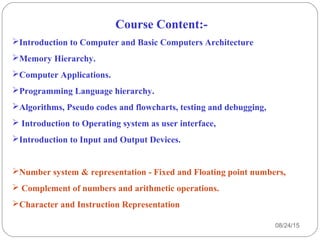
Course Content:-
Introduction to Computer and Basic Computers Architecture
Memory Hierarchy.
Computer Applications.
Programming Language hierarchy.
Algorithms, Pseudo codes and flowcharts, testing and debugging,
 Introduction to Operating system as user interface,
Introduction to Input and Output Devices.
Number system & representation - Fixed and Floating point numbers,
 Complement of numbers and arithmetic operations.
Character and Instruction Representation
08/24/154
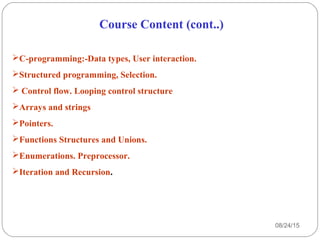
Course Content (cont..)
C-programming:-Data types, User interaction.
Structured programming, Selection.
 Control flow. Looping control structure
Arrays and strings
Pointers.
Functions Structures and Unions.
Enumerations. Preprocessor.
Iteration and Recursion.
08/24/155
08/24/15
6
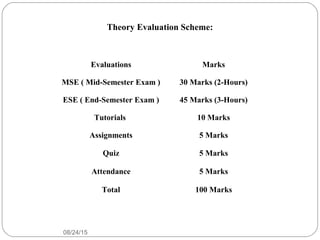
Evaluations Marks
MSE ( Mid-Semester Exam ) 30 Marks (2-Hours)
ESE ( End-Semester Exam ) 45 Marks (3-Hours)
Tutorials 10 Marks
Assignments 5 Marks
Quiz 5 Marks
Attendance 5 Marks
Total 100 Marks
Theory Evaluation Scheme:
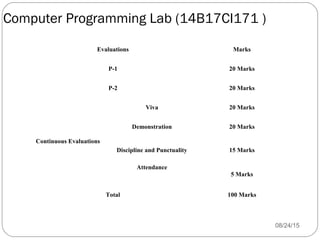
Computer Programming Lab (14B17CI171 )
08/24/157
Evaluations Marks
P-1 20 Marks
P-2 20 Marks
Continuous Evaluations
Viva 20 Marks
Demonstration 20 Marks
Discipline and Punctuality 15 Marks
Attendance
5 Marks
Total 100 Marks
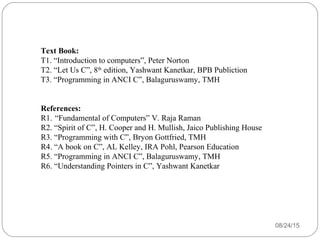
Text Book:
T1. “Introduction to computers”, Peter Norton
T2. “Let Us C”, 8th
edition, Yashwant Kanetkar, BPB Publiction
T3. “Programming in ANCI C”, Balaguruswamy, TMH
References:
R1. “Fundamental of Computers” V. Raja Raman
R2. “Spirit of C”, H. Cooper and H. Mullish, Jaico Publishing House
R3. “Programming with C”, Bryon Gottfried, TMH
R4. “A book on C”, AL Kelley, IRA Pohl, Pearson Education
R5. “Programming in ANCI C”, Balaguruswamy, TMH
R6. “Understanding Pointers in C”, Yashwant Kanetkar
08/24/158
08/24/159
Definitions of Computer
•It is an electronic machine that accepts input
information, processes it according to a list of
instructions and produces the resulting output
information.
•Charles Babbage is considered as the father of
computers.
08/24/1510
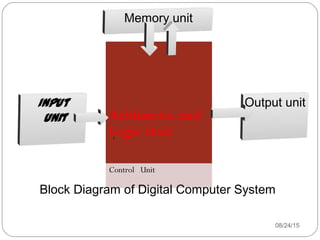
Arithmetic and
Logic Unit
Control Unit
Input
unit
Output unit
Memory unit
Block Diagram of Digital Computer System
08/24/1511
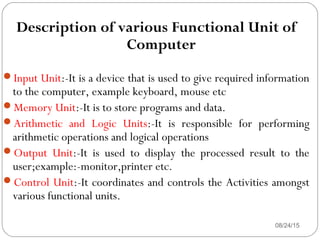
Description of various Functional Unit of
Computer
Input Unit:-It is a device that is used to give required information
to the computer, example keyboard, mouse etc
Memory Unit:-It is to store programs and data.
Arithmetic and Logic Units:-It is responsible for performing
arithmetic operations and logical operations
Output Unit:-It is used to display the processed result to the
user;example:-monitor,printer etc.
Control Unit:-It coordinates and controls the Activities amongst
various functional units.
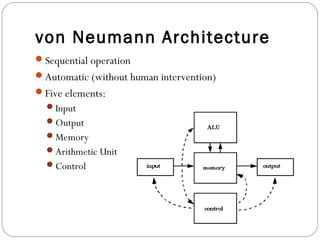
von Neumann Architecture
08/24/1512
Sequential operation
Automatic (without human intervention)
Five elements:
Input
Output
Memory
Arithmetic Unit
Control
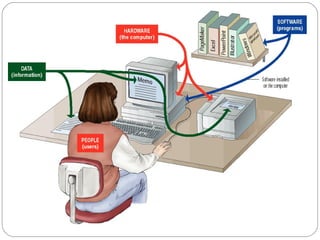
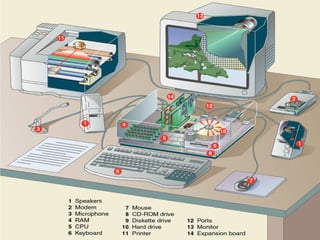
• A complete computer system includes four distinct
parts:
 Hardware
 Software
 Data
 User
The Parts of a Computer System
08/24/1513
08/24/1514
08/24/1515
• A computer's hardware consists of electronic
devices; the parts you can see and touch.
• The term "device" refers to any piece of hardware
used by the computer, such as a keyboard, monitor,
modem, mouse, etc.
The Parts of a Computer System - Hardware
08/24/15Dr.Vishnu Sharma16
Software - Software is a set of electronic instructions that
tells the computer how to do certain tasks. A set of instructions
is often called a program.
Two types:
• System Software
A system software is any computer software which manages and controls
computer hardware so that application software can perform a task.
 Ex:Operating systems, such as Microsoft Windows, Mac OS X or Linux, are
prominent examples of system software.
• Application Software
Application software tells the computer how to accomplish tasks the user
requires, such as creating a document or editing a graphic image.
The Parts of a Computer System - Software
Application Software:
• Word Processing
• Spreadsheets
• Graphics
• Databases
• Entertainment
• Educational
• Communications
• Presentation
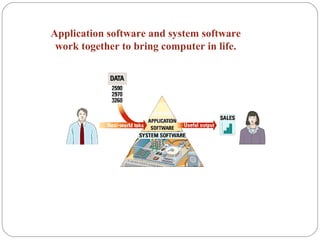
Application software and system software
work together to bring computer in life.
• Data consists of raw facts, which the computer can
manipulate and process into information that is
useful to people.
• Computerized data is digital, meaning that it has
been reduced to digits, or numbers. The computer
stores and reads all data as numbers.
• Although computers use data in digital form, they
convert data into forms that people can
understand, such as text, numerals, sounds, and
images.
The Parts of a Computer System - Data
08/24/1520
08/24/1521
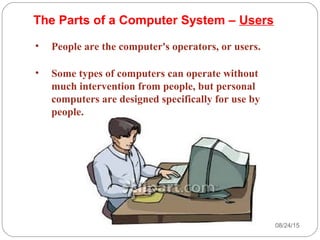
• People are the computer's operators, or users.
• Some types of computers can operate without
much intervention from people, but personal
computers are designed specifically for use by
people.
The Parts of a Computer System – Users
08/24/1522
Looking Inside the Machine
• Types of Hardware
• The CPU
• Memory
• How Memory is Measured
• Input and Output Devices
• Storage Devices
08/24/1523
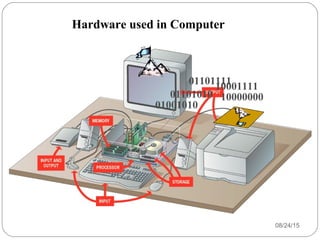
A computer's hardware devices are categorized as
follows:
• Processor
• Memory
• Input and output (I/O) devices
• Storage devices
Looking Inside the Machine –
Types of Hardware
08/24/1524
01001010
01101010
01101111
10001111
10000000
Hardware used in Computer
08/24/1525
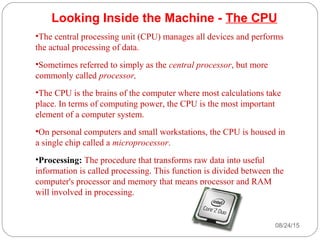
Looking Inside the Machine - The CPU
•The central processing unit (CPU) manages all devices and performs
the actual processing of data.
•Sometimes referred to simply as the central processor, but more
commonly called processor,
•The CPU is the brains of the computer where most calculations take
place. In terms of computing power, the CPU is the most important
element of a computer system.
•On personal computers and small workstations, the CPU is housed in
a single chip called a microprocessor.
•Processing: The procedure that transforms raw data into useful
information is called processing. This function is divided between the
computer's processor and memory that means processor and RAM
will involved in processing.
08/24/1526
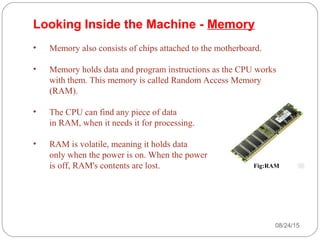
• Memory also consists of chips attached to the motherboard.
• Memory holds data and program instructions as the CPU works
with them. This memory is called Random Access Memory
(RAM).
• The CPU can find any piece of data
in RAM, when it needs it for processing.
• RAM is volatile, meaning it holds data
only when the power is on. When the power
is off, RAM's contents are lost.
Looking Inside the Machine - Memory
Fig:RAM
08/24/1527
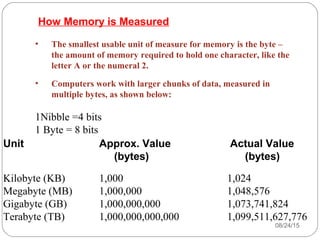
• The smallest usable unit of measure for memory is the byte –
the amount of memory required to hold one character, like the
letter A or the numeral 2.
• Computers work with larger chunks of data, measured in
multiple bytes, as shown below:
1Nibble =4 bits
1 Byte = 8 bits
Unit Approx. Value Actual Value
(bytes) (bytes)
Kilobyte (KB) 1,000 1,024
Megabyte (MB) 1,000,000 1,048,576
Gigabyte (GB) 1,000,000,000 1,073,741,824
Terabyte (TB) 1,000,000,000,000 1,099,511,627,776
How Memory is Measured
08/24/1528
• Input devices accept data and instructions from the
user or from another computer system. The keyboard
and mouse are examples of input devices.
• Output devices return processed data back to the
user or to another computer system. The printer and
monitor are examples.
• Communications devices (such as modems and
network interface cards) perform both input and
output, allowing computers to share information.
Looking Inside the Machine –
Input and Output Devices
08/24/1529
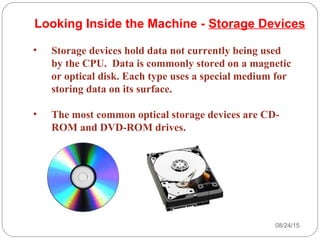
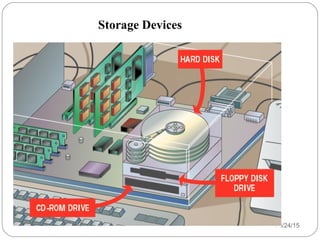
• Storage devices hold data not currently being used
by the CPU. Data is commonly stored on a magnetic
or optical disk. Each type uses a special medium for
storing data on its surface.
• The most common optical storage devices are CD-
ROM and DVD-ROM drives.
Looking Inside the Machine - Storage Devices
08/24/15Dr.Vishnu Sharma30
Storage Devices
Computer Generation
08/24/1531
Generation in computer terminology is a change in technology a
computer is/was being used.
 Initially, the generation term was used to distinguish between
varying hardware technologies.
But nowadays, generation includes both hardware and software,
which together make up an entire computer system.
There are totally five computer generations known till date:
 Generation 1 ( the first digital computer)
 Generation 2
 Generation 3
 Generation 4
 Generation 5
First Generation (1940-1956)
08/24/1532
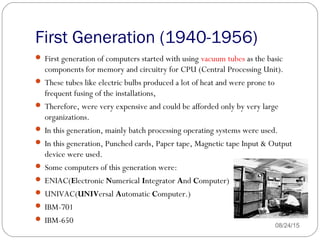
 First generation of computers started with using vacuum tubes as the basic
components for memory and circuitry for CPU (Central Processing Unit).
 These tubes like electric bulbs produced a lot of heat and were prone to
frequent fusing of the installations,
 Therefore, were very expensive and could be afforded only by very large
organizations.
 In this generation, mainly batch processing operating systems were used.
 In this generation, Punched cards, Paper tape, Magnetic tape Input & Output
device were used.
 Some computers of this generation were:
 ENIAC(Electronic Numerical Integrator And Computer)
 UNIVAC(UNIVersal Automatic Computer.)
 IBM-701
 IBM-650
First Generation (1940-1956)
08/24/1533
The main features of First Generation are:
Vacuum tube technology
Unreliable
Supported Machine language only
Very costly
Generate lot of heat so need of A.C.
Slow Input/Output device
Huge size
Non-portable
Consumed lot of electricity
Second Generation (1956-63)
08/24/1534
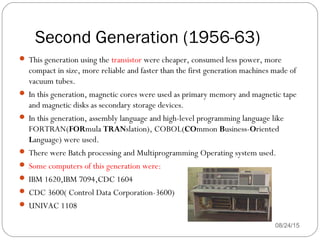
 This generation using the transistor were cheaper, consumed less power, more
compact in size, more reliable and faster than the first generation machines made of
vacuum tubes.
 In this generation, magnetic cores were used as primary memory and magnetic tape
and magnetic disks as secondary storage devices.
 In this generation, assembly language and high-level programming language like
FORTRAN(FORmula TRANslation), COBOL(COmmon Business-Oriented
Language) were used.
 There were Batch processing and Multiprogramming Operating system used.
 Some computers of this generation were:
 IBM 1620,IBM 7094,CDC 1604
 CDC 3600( Control Data Corporation-3600)
 UNIVAC 1108
Second Generation (1956-63)
08/24/1535
The main features of Second Generation are:
Use of transistors
Reliable as compared to First generation computers
Smaller size as compared to First generation computers
Generate less heat as compared to First generation computers
Consumed less electricity as compared to First generation computers
Faster than first generation computers
Still very costly
A.C. needed
Support machine and assembly languages
Third Generation (1964-70)
08/24/1536
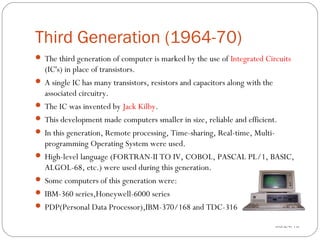
 The third generation of computer is marked by the use of Integrated Circuits
(IC's) in place of transistors.
 A single IC has many transistors, resistors and capacitors along with the
associated circuitry.
 The IC was invented by Jack Kilby.
 This development made computers smaller in size, reliable and efficient.
 In this generation, Remote processing, Time-sharing, Real-time, Multi-
programming Operating System were used.
 High-level language (FORTRAN-II TO IV, COBOL, PASCAL PL/1, BASIC,
ALGOL-68, etc.) were used during this generation.
 Some computers of this generation were:
 IBM-360 series,Honeywell-6000 series
 PDP(Personal Data Processor),IBM-370/168 and TDC-316
Third Generation(1964-70)
08/24/1537
The main features of Third Generation are:
IC used
More reliable
Smaller size
Generate less heat
Faster
Lesser maintenance
Still costly
A.C. needed
Consumed lesser electricity
Support high-level language
Fourth Generation(1971-80)
08/24/1538
 The fourth generation computers started with the invention of Microprocessor.
 The Microprocessor contains thousands of ICs. Ted Hoff produced the first
microprocessor in 1971 for Intel. 
 It was known as Intel 4004.
 The technology of integrated circuits improved rapidly. The LSI (Large Scale
Integration) circuit and VLSI (Very Large Scale Integration) circuit was
designed.
 In this generation, Time sharing, Real time, Networks, Distributed Operating
System were used.
 All the higher level languages like C and C++etc., were used in this
generation.
Some computers of this generation were:
 DEC 10, STAR 1000, PDP 11
 CRAY-1 (Super Computer)
 CRAY-X-MP (Super Computer)
Fourth Generation(1971-80)
08/24/1539
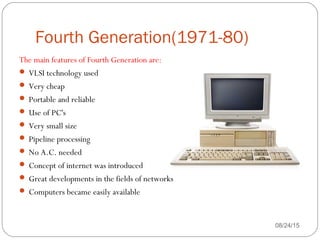
The main features of Fourth Generation are:
 VLSI technology used
 Very cheap
 Portable and reliable
 Use of PC's
 Very small size
 Pipeline processing
 No A.C. needed
 Concept of internet was introduced
 Great developments in the fields of networks
 Computers became easily available
Fifth Generation(1980-till date)
08/24/1540
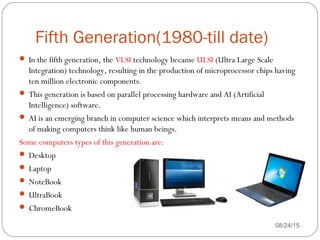
 In the fifth generation, the VLSI technology became ULSI (Ultra Large Scale
Integration) technology, resulting in the production of microprocessor chips having
ten million electronic components.
 This generation is based on parallel processing hardware and AI (Artificial
Intelligence) software.
 AI is an emerging branch in computer science which interprets means and methods
of making computers think like human beings.
Some computers types of this generation are:
 Desktop
 Laptop
 NoteBook
 UltraBook
 ChromeBook
Fifth Generation(1980-till date)
08/24/1541
The main features of Fifth Generation are:
 ULSI technology
 Development of true artificial intelligence
 Development of Natural language processing
 Advancement in Parallel Processing
 More user friendly interfaces with multimedia features
 Availability of very powerful and compact computers at cheaper rates
Classification of Computers
08/24/1542
Classification of Computers
08/24/1543
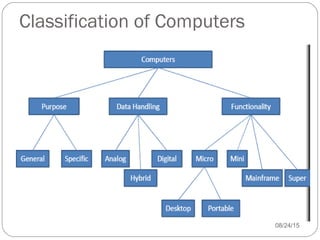
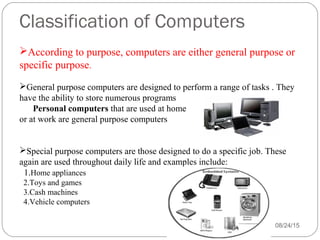
According to purpose, computers are either general purpose or
specific purpose.
General purpose computers are designed to perform a range of tasks . They
have the ability to store numerous programs
Personal computers that are used at home
or at work are general purpose computers
Special purpose computers are those designed to do a specific job. These
again are used throughout daily life and examples include:
1.Home appliances
2.Toys and games
3.Cash machines
4.Vehicle computers
Classification of Computers
08/24/1544
According to data handling, computers are analog, digital or hybrid.
 Analog computers  An analog computer (spelt analogue in British
English) is a form of computer that uses continuous physical
phenomena such as electrical, mechanical, or hydraulic quantities to
model the problem being solved
 Digital computers are those that operate with information, numerical
or otherwise, represented in a digital form. Such computers process
data into a digital value (in 0s and 1s). They give the results with
more accuracy and at a faster rate.
 Hybrid computers (Analog + Digital) A combination of computers
those are capable of inputting and outputting in both digital and analog
signals. A hybrid computer system setup offers a cost effective method
of performing complex simulations.
Classification of Computers
08/24/1545
According to size or functionality, computers are of following types.
 Super Computer is the fastest and most powerful type of computer
Supercomputers are very expensive and are employed for specialized applications
that require immense amounts of mathematical calculations.
 For example, weather forecasting requires a supercomputer. Other uses of
supercomputers include animated graphics, fluid dynamic calculations, nuclear
energy research, and petroleum exploration.
 Mainframe Computer is a very large and expensive computer capable of
supporting hundreds, or even thousands, of users simultaneously.
 In some ways, mainframes are more powerful than supercomputers because they
support more simultaneous programs. But supercomputers can execute a single
program faster than a mainframe.
Classification of Computers
08/24/1546
 Mini Computer is a midsized computer. In size and power, minicomputers lie
between workstations and mainframes. In the past decade, the distinction between
large minicomputers and small mainframes has blurred, however, as has the
distinction between small minicomputers and workstations.
 But in general, a minicomputer is a multiprocessing system capable of supporting
from 4 to about 200 users simultaneously.
 Micro Computer or Personal Computer  
    Desktop Computer: a personal or micro-mini computer sufficient to fit
on a desk.
   Laptop Computer: a portable computer complete with an integrated
screen and keyboard.
    Palmtop Computer/Digital Diary /Notebook /PDAs: a hand-sized
computer. Palmtops have no keyboard but the screen serves both as an input and
output device.
Application of Computers
08/24/1547
 Engineering
 Medical
 Education
 Science
 Banking
 Entertainment
08/24/1548

1 introduction-to-computer

  • 1.
    Course Title: Introductionto Computer and Programming Course Code: 14B11CI111 08/24/151
  • 2.
    Objective 08/24/152  This classis designed to explore computing and to introduce you to the art of computer programming.  You will develop a sense of style and theory of knowledge for programs that will help your programming. You will be introduced to the design principles for writing good programs.  This course teaches not only the mechanics of programming, but also how to create programs that are easy to read, maintain, and debug.
  • 3.
    Learning Outcomes 08/24/153 Knowledge ofstructured programming in program design Writing programs in C Program documentation skills Program testing skills
  • 4.
    Course Content:- Introduction toComputer and Basic Computers Architecture Memory Hierarchy. Computer Applications. Programming Language hierarchy. Algorithms, Pseudo codes and flowcharts, testing and debugging,  Introduction to Operating system as user interface, Introduction to Input and Output Devices. Number system & representation - Fixed and Floating point numbers,  Complement of numbers and arithmetic operations. Character and Instruction Representation 08/24/154
  • 5.
    Course Content (cont..) C-programming:-Datatypes, User interaction. Structured programming, Selection.  Control flow. Looping control structure Arrays and strings Pointers. Functions Structures and Unions. Enumerations. Preprocessor. Iteration and Recursion. 08/24/155
  • 6.
    08/24/15 6 Evaluations Marks MSE (Mid-Semester Exam ) 30 Marks (2-Hours) ESE ( End-Semester Exam ) 45 Marks (3-Hours) Tutorials 10 Marks Assignments 5 Marks Quiz 5 Marks Attendance 5 Marks Total 100 Marks Theory Evaluation Scheme:
  • 7.
    Computer Programming Lab(14B17CI171 ) 08/24/157 Evaluations Marks P-1 20 Marks P-2 20 Marks Continuous Evaluations Viva 20 Marks Demonstration 20 Marks Discipline and Punctuality 15 Marks Attendance 5 Marks Total 100 Marks
  • 8.
    Text Book: T1. “Introductionto computers”, Peter Norton T2. “Let Us C”, 8th edition, Yashwant Kanetkar, BPB Publiction T3. “Programming in ANCI C”, Balaguruswamy, TMH References: R1. “Fundamental of Computers” V. Raja Raman R2. “Spirit of C”, H. Cooper and H. Mullish, Jaico Publishing House R3. “Programming with C”, Bryon Gottfried, TMH R4. “A book on C”, AL Kelley, IRA Pohl, Pearson Education R5. “Programming in ANCI C”, Balaguruswamy, TMH R6. “Understanding Pointers in C”, Yashwant Kanetkar 08/24/158
  • 9.
    08/24/159 Definitions of Computer •Itis an electronic machine that accepts input information, processes it according to a list of instructions and produces the resulting output information. •Charles Babbage is considered as the father of computers.
  • 10.
    08/24/1510 Arithmetic and Logic Unit ControlUnit Input unit Output unit Memory unit Block Diagram of Digital Computer System
  • 11.
    08/24/1511 Description of variousFunctional Unit of Computer Input Unit:-It is a device that is used to give required information to the computer, example keyboard, mouse etc Memory Unit:-It is to store programs and data. Arithmetic and Logic Units:-It is responsible for performing arithmetic operations and logical operations Output Unit:-It is used to display the processed result to the user;example:-monitor,printer etc. Control Unit:-It coordinates and controls the Activities amongst various functional units.
  • 12.
    von Neumann Architecture 08/24/1512 Sequentialoperation Automatic (without human intervention) Five elements: Input Output Memory Arithmetic Unit Control
  • 13.
    • A completecomputer system includes four distinct parts:  Hardware  Software  Data  User The Parts of a Computer System 08/24/1513
  • 14.
  • 15.
    08/24/1515 • A computer'shardware consists of electronic devices; the parts you can see and touch. • The term "device" refers to any piece of hardware used by the computer, such as a keyboard, monitor, modem, mouse, etc. The Parts of a Computer System - Hardware
  • 16.
  • 17.
    Software - Softwareis a set of electronic instructions that tells the computer how to do certain tasks. A set of instructions is often called a program. Two types: • System Software A system software is any computer software which manages and controls computer hardware so that application software can perform a task.  Ex:Operating systems, such as Microsoft Windows, Mac OS X or Linux, are prominent examples of system software. • Application Software Application software tells the computer how to accomplish tasks the user requires, such as creating a document or editing a graphic image. The Parts of a Computer System - Software
  • 18.
    Application Software: • WordProcessing • Spreadsheets • Graphics • Databases • Entertainment • Educational • Communications • Presentation
  • 19.
    Application software andsystem software work together to bring computer in life.
  • 20.
    • Data consistsof raw facts, which the computer can manipulate and process into information that is useful to people. • Computerized data is digital, meaning that it has been reduced to digits, or numbers. The computer stores and reads all data as numbers. • Although computers use data in digital form, they convert data into forms that people can understand, such as text, numerals, sounds, and images. The Parts of a Computer System - Data 08/24/1520
  • 21.
    08/24/1521 • People arethe computer's operators, or users. • Some types of computers can operate without much intervention from people, but personal computers are designed specifically for use by people. The Parts of a Computer System – Users
  • 22.
    08/24/1522 Looking Inside theMachine • Types of Hardware • The CPU • Memory • How Memory is Measured • Input and Output Devices • Storage Devices
  • 23.
    08/24/1523 A computer's hardwaredevices are categorized as follows: • Processor • Memory • Input and output (I/O) devices • Storage devices Looking Inside the Machine – Types of Hardware
  • 24.
  • 25.
    08/24/1525 Looking Inside theMachine - The CPU •The central processing unit (CPU) manages all devices and performs the actual processing of data. •Sometimes referred to simply as the central processor, but more commonly called processor, •The CPU is the brains of the computer where most calculations take place. In terms of computing power, the CPU is the most important element of a computer system. •On personal computers and small workstations, the CPU is housed in a single chip called a microprocessor. •Processing: The procedure that transforms raw data into useful information is called processing. This function is divided between the computer's processor and memory that means processor and RAM will involved in processing.
  • 26.
    08/24/1526 • Memory alsoconsists of chips attached to the motherboard. • Memory holds data and program instructions as the CPU works with them. This memory is called Random Access Memory (RAM). • The CPU can find any piece of data in RAM, when it needs it for processing. • RAM is volatile, meaning it holds data only when the power is on. When the power is off, RAM's contents are lost. Looking Inside the Machine - Memory Fig:RAM
  • 27.
    08/24/1527 • The smallestusable unit of measure for memory is the byte – the amount of memory required to hold one character, like the letter A or the numeral 2. • Computers work with larger chunks of data, measured in multiple bytes, as shown below: 1Nibble =4 bits 1 Byte = 8 bits Unit Approx. Value Actual Value (bytes) (bytes) Kilobyte (KB) 1,000 1,024 Megabyte (MB) 1,000,000 1,048,576 Gigabyte (GB) 1,000,000,000 1,073,741,824 Terabyte (TB) 1,000,000,000,000 1,099,511,627,776 How Memory is Measured
  • 28.
    08/24/1528 • Input devicesaccept data and instructions from the user or from another computer system. The keyboard and mouse are examples of input devices. • Output devices return processed data back to the user or to another computer system. The printer and monitor are examples. • Communications devices (such as modems and network interface cards) perform both input and output, allowing computers to share information. Looking Inside the Machine – Input and Output Devices
  • 29.
    08/24/1529 • Storage deviceshold data not currently being used by the CPU. Data is commonly stored on a magnetic or optical disk. Each type uses a special medium for storing data on its surface. • The most common optical storage devices are CD- ROM and DVD-ROM drives. Looking Inside the Machine - Storage Devices
  • 30.
  • 31.
    Computer Generation 08/24/1531 Generation in computerterminology is a change in technology a computer is/was being used.  Initially, the generation term was used to distinguish between varying hardware technologies. But nowadays, generation includes both hardware and software, which together make up an entire computer system. There are totally five computer generations known till date:  Generation 1 ( the first digital computer)  Generation 2  Generation 3  Generation 4  Generation 5
  • 32.
    First Generation (1940-1956) 08/24/1532 First generation of computers started with using vacuum tubes as the basic components for memory and circuitry for CPU (Central Processing Unit).  These tubes like electric bulbs produced a lot of heat and were prone to frequent fusing of the installations,  Therefore, were very expensive and could be afforded only by very large organizations.  In this generation, mainly batch processing operating systems were used.  In this generation, Punched cards, Paper tape, Magnetic tape Input & Output device were used.  Some computers of this generation were:  ENIAC(Electronic Numerical Integrator And Computer)  UNIVAC(UNIVersal Automatic Computer.)  IBM-701  IBM-650
  • 33.
    First Generation (1940-1956) 08/24/1533 Themain features of First Generation are: Vacuum tube technology Unreliable Supported Machine language only Very costly Generate lot of heat so need of A.C. Slow Input/Output device Huge size Non-portable Consumed lot of electricity
  • 34.
    Second Generation (1956-63) 08/24/1534 This generation using the transistor were cheaper, consumed less power, more compact in size, more reliable and faster than the first generation machines made of vacuum tubes.  In this generation, magnetic cores were used as primary memory and magnetic tape and magnetic disks as secondary storage devices.  In this generation, assembly language and high-level programming language like FORTRAN(FORmula TRANslation), COBOL(COmmon Business-Oriented Language) were used.  There were Batch processing and Multiprogramming Operating system used.  Some computers of this generation were:  IBM 1620,IBM 7094,CDC 1604  CDC 3600( Control Data Corporation-3600)  UNIVAC 1108
  • 35.
    Second Generation (1956-63) 08/24/1535 Themain features of Second Generation are: Use of transistors Reliable as compared to First generation computers Smaller size as compared to First generation computers Generate less heat as compared to First generation computers Consumed less electricity as compared to First generation computers Faster than first generation computers Still very costly A.C. needed Support machine and assembly languages
  • 36.
    Third Generation (1964-70) 08/24/1536 The third generation of computer is marked by the use of Integrated Circuits (IC's) in place of transistors.  A single IC has many transistors, resistors and capacitors along with the associated circuitry.  The IC was invented by Jack Kilby.  This development made computers smaller in size, reliable and efficient.  In this generation, Remote processing, Time-sharing, Real-time, Multi- programming Operating System were used.  High-level language (FORTRAN-II TO IV, COBOL, PASCAL PL/1, BASIC, ALGOL-68, etc.) were used during this generation.  Some computers of this generation were:  IBM-360 series,Honeywell-6000 series  PDP(Personal Data Processor),IBM-370/168 and TDC-316
  • 37.
    Third Generation(1964-70) 08/24/1537 The mainfeatures of Third Generation are: IC used More reliable Smaller size Generate less heat Faster Lesser maintenance Still costly A.C. needed Consumed lesser electricity Support high-level language
  • 38.
    Fourth Generation(1971-80) 08/24/1538  Thefourth generation computers started with the invention of Microprocessor.  The Microprocessor contains thousands of ICs. Ted Hoff produced the first microprocessor in 1971 for Intel.   It was known as Intel 4004.  The technology of integrated circuits improved rapidly. The LSI (Large Scale Integration) circuit and VLSI (Very Large Scale Integration) circuit was designed.  In this generation, Time sharing, Real time, Networks, Distributed Operating System were used.  All the higher level languages like C and C++etc., were used in this generation. Some computers of this generation were:  DEC 10, STAR 1000, PDP 11  CRAY-1 (Super Computer)  CRAY-X-MP (Super Computer)
  • 39.
    Fourth Generation(1971-80) 08/24/1539 The mainfeatures of Fourth Generation are:  VLSI technology used  Very cheap  Portable and reliable  Use of PC's  Very small size  Pipeline processing  No A.C. needed  Concept of internet was introduced  Great developments in the fields of networks  Computers became easily available
  • 40.
    Fifth Generation(1980-till date) 08/24/1540 In the fifth generation, the VLSI technology became ULSI (Ultra Large Scale Integration) technology, resulting in the production of microprocessor chips having ten million electronic components.  This generation is based on parallel processing hardware and AI (Artificial Intelligence) software.  AI is an emerging branch in computer science which interprets means and methods of making computers think like human beings. Some computers types of this generation are:  Desktop  Laptop  NoteBook  UltraBook  ChromeBook
  • 41.
    Fifth Generation(1980-till date) 08/24/1541 Themain features of Fifth Generation are:  ULSI technology  Development of true artificial intelligence  Development of Natural language processing  Advancement in Parallel Processing  More user friendly interfaces with multimedia features  Availability of very powerful and compact computers at cheaper rates
  • 42.
  • 43.
    Classification of Computers 08/24/1543 Accordingto purpose, computers are either general purpose or specific purpose. General purpose computers are designed to perform a range of tasks . They have the ability to store numerous programs Personal computers that are used at home or at work are general purpose computers Special purpose computers are those designed to do a specific job. These again are used throughout daily life and examples include: 1.Home appliances 2.Toys and games 3.Cash machines 4.Vehicle computers
  • 44.
    Classification of Computers 08/24/1544 Accordingto data handling, computers are analog, digital or hybrid.  Analog computers  An analog computer (spelt analogue in British English) is a form of computer that uses continuous physical phenomena such as electrical, mechanical, or hydraulic quantities to model the problem being solved  Digital computers are those that operate with information, numerical or otherwise, represented in a digital form. Such computers process data into a digital value (in 0s and 1s). They give the results with more accuracy and at a faster rate.  Hybrid computers (Analog + Digital) A combination of computers those are capable of inputting and outputting in both digital and analog signals. A hybrid computer system setup offers a cost effective method of performing complex simulations.
  • 45.
    Classification of Computers 08/24/1545 Accordingto size or functionality, computers are of following types.  Super Computer is the fastest and most powerful type of computer Supercomputers are very expensive and are employed for specialized applications that require immense amounts of mathematical calculations.  For example, weather forecasting requires a supercomputer. Other uses of supercomputers include animated graphics, fluid dynamic calculations, nuclear energy research, and petroleum exploration.  Mainframe Computer is a very large and expensive computer capable of supporting hundreds, or even thousands, of users simultaneously.  In some ways, mainframes are more powerful than supercomputers because they support more simultaneous programs. But supercomputers can execute a single program faster than a mainframe.
  • 46.
    Classification of Computers 08/24/1546 Mini Computer is a midsized computer. In size and power, minicomputers lie between workstations and mainframes. In the past decade, the distinction between large minicomputers and small mainframes has blurred, however, as has the distinction between small minicomputers and workstations.  But in general, a minicomputer is a multiprocessing system capable of supporting from 4 to about 200 users simultaneously.  Micro Computer or Personal Computer       Desktop Computer: a personal or micro-mini computer sufficient to fit on a desk.    Laptop Computer: a portable computer complete with an integrated screen and keyboard.     Palmtop Computer/Digital Diary /Notebook /PDAs: a hand-sized computer. Palmtops have no keyboard but the screen serves both as an input and output device.
  • 47.
    Application of Computers 08/24/1547 Engineering  Medical  Education  Science  Banking  Entertainment
  • 48.

Editor's Notes

  • #13 But von Neumann’s original design (see next slide for reference) discussed the concept of parallel computation, independent units synchronizing their work, and did not restrict the computer to sequential execution. Five elements -- Lee’s law of computing -- everything in CS can be grouped in five-tuples -- corollary -- if not fix it.