CSC 101
Introduction to Information and
Communication Technology
1
Dr. Saeeda Usman
 B.Sc. (Computer Engineering)
 MS (Adv. Electrical & Electronics Engineering)
 Ph.D. (Electrical & Computer Engineering)
1A-2
Course Details
 Course Code: CSC 101
 Course Title: Introduction to ICT
 Credit Hours: 2 + 1
1A-3
Course Outline - I
 Introduction to computers and computing
 Classification of computers
 Elements of computers
 Basic Computer Architecture
 Control Unit
 Arithmetic & Logical Unit (ALU operations)
 Main Memory (ROM, RAM, Cache)
 CPU Operations
 The Registers
 Input & Output Devices
 Storage Media
1A-4
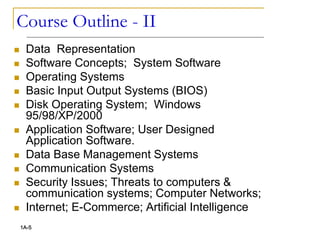
Course Outline - II
 Data Representation
 Software Concepts; System Software
 Operating Systems
 Basic Input Output Systems (BIOS)
 Disk Operating System; Windows
95/98/XP/2000
 Application Software; User Designed
Application Software.
 Data Base Management Systems
 Communication Systems
 Security Issues; Threats to computers &
communication systems; Computer Networks;
 Internet; E-Commerce; Artificial Intelligence
1A-5
Recommended Books
 Textbook: P. Norton, Peter Norton's Introduction to
Computers, 6th Ed., McGraw-Hill, New York, 2006.
 Reference: W. Stallings, Computer Organization and
Architecture , 8th Ed., Pearson Prentice Hall, New
Jersey, 2010
 Excellent World Wide Web address: to look up
computer terminology online http://www.wikipedia.com,
http://www.whatis.com
 Excellent World Wide Web address: to search
companies, products, and events
 http://www.google.com, http://www.yahoo.com,
 http://www.msn.com
1A-6
7
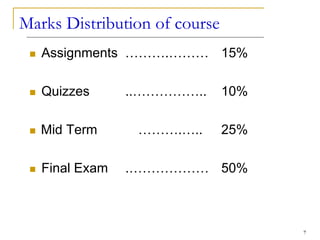
Marks Distribution of course
 Assignments ……….……… 15%
 Quizzes ..…………….. 10%
 Mid Term ……….….. 25%
 Final Exam .……………… 50%
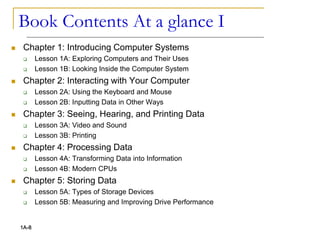
Book Contents At a glance I
 Chapter 1: Introducing Computer Systems
 Lesson 1A: Exploring Computers and Their Uses
 Lesson 1B: Looking Inside the Computer System
 Chapter 2: Interacting with Your Computer
 Lesson 2A: Using the Keyboard and Mouse
 Lesson 2B: Inputting Data in Other Ways
 Chapter 3: Seeing, Hearing, and Printing Data
 Lesson 3A: Video and Sound
 Lesson 3B: Printing
 Chapter 4: Processing Data
 Lesson 4A: Transforming Data into Information
 Lesson 4B: Modern CPUs
 Chapter 5: Storing Data
 Lesson 5A: Types of Storage Devices
 Lesson 5B: Measuring and Improving Drive Performance
1A-8
 Chapter 6: Using Operating Systems
 Lesson 6A: Operating System Basics
 Lesson 6B: Survey of PC and Network Operating Systems
 Chapter 7: Networks
 Lesson 7A: Networking Basics
 Lesson 7B: Data Communications
 Chapter 8: Presenting the Internet
 Lesson 8A: The Internet and the World
 Lesson 8B: E-Mail and Other Internet Services
 Chapter 9: Working in the Online World
 Lesson 9A: Connecting to the Internet
 Lesson 9B: Doing Business in the Online World
 Chapter 10: Working with Application Software
 Lesson 10A: Productivity Software
 Lesson 10B: Graphics and Multimedia
1A-9
Book Contents At a glance II
Book Contents At a glance III
 Chapter 11: Database Management
 Lesson 11A: Database Management Systems
 Lesson 11B: Survey of Database Systems
 Chapter 12: Software Programming and Development
 Lesson 12A: Creating Computer Programs
 Lesson 12B: Programming Languages and the Programming Process
 Chapter 13: Protecting Your Privacy, Your Computer, and
Your Data
 Lesson 13A: Understanding the Need for Security Measures
 Lesson 13B: Taking Protective Measures
 Appendices
 Appendix A: Creating Your own Web Page
 Appendix B: Buying Your first Computers
 Appendix C: Computer Viruses
 Appendix D: History of Microcomputers
1A-10
Accompanying Web Site
 http://highered.mcgraw-hill.com/sites/0072978902/
 Glossary
 Online Topics
 Appendix A (pdf files)
 Appendix B Answers to Self Check Exercises
 For each Chapter
 Multiple Choice Questions
 Power Point Presentations
 Internet Exercises
1A-11
12
I keep 6 honest serving men.
They taught me all I knew.
Their names are:
WHAT and WHY and WHEN and HOW and
WHERE and WHO.
(R. Kipling)
And believe me,
on the road of learning,
these are your best companions.
A nice saying…
13
Lets Start the Course…
Chapter 1A
Introducing Computer Systems
Computers in Our World
 Computers are everywhere
 We can find them in pretty unlikely
places
 Family car
 Home appliances
 Alarm clock
 Market
1A-15
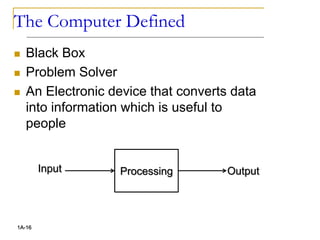
The Computer Defined
 Black Box
 Problem Solver
 An Electronic device that converts data
into information which is useful to
people
1A-16
Processing
Input Output
Anatomy of a Computer
 Every computer has four basic parts, or
units:
 an input unit such as the keyboard, that
feeds information into the computer
 a central processing unit (CPU) that
performs the various tasks of the computer
 an output unit , such as a monitor , that
displays the results;
 a memory that stores information and
instructions.
1A-17
Computer vs Human
 Input - Five senses
 Central Processing Unit (CPU) - brain
 Output - Body Parts
 Memory - Human memory
 Hardware
 Physical components
 Software
 Programs for operations and problem
solving
1A-18
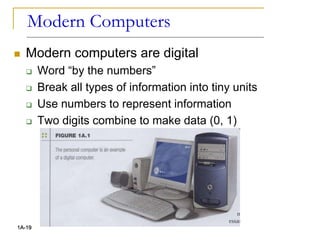
Modern Computers
 Modern computers are digital
 Word “by the numbers”
 Break all types of information into tiny units
 Use numbers to represent information
 Two digits combine to make data (0, 1)
1A-19
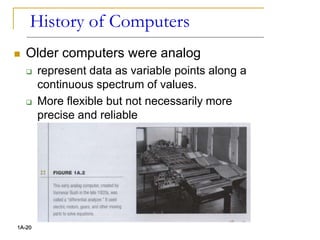
History of Computers
 Older computers were analog
 represent data as variable points along a
continuous spectrum of values.
 More flexible but not necessarily more
precise and reliable
1A-20
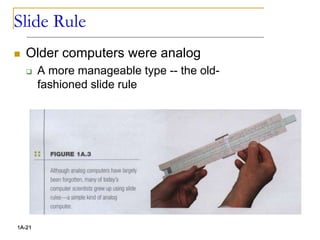
Slide Rule
 Older computers were analog
 A more manageable type -- the old-
fashioned slide rule
1A-21
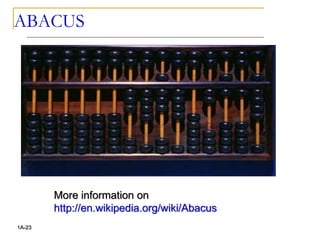
ABACUS
 3000 BC: The first calculating device
ABACUS was invented in Egypt .
 The abacus is still in use in some
countries especially China, Japan
 Operations
 Addition, subtraction, division and
multiplication
 Extract square root and cube root
 User has to memorize certain rules
1A-22
ABACUS
1A-23
More information on
http://en.wikipedia.org/wiki/Abacus
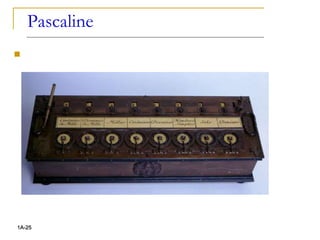
Pascaline
 1642: A Frenchman Blaise Pascal
introduced the first mechanical
calculating device.
 Series of wheels with teeth which could
be turned using hands
 Used to handle 999,999.99
 Perform both addition and subtraction.
1A-24
Pascaline

1A-25
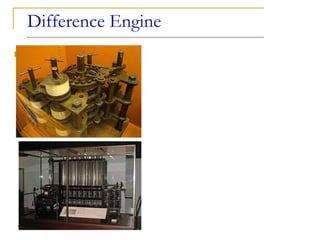
Difference Engine
 1833: Charles Babbage
 Professor of Mathematics
 Cambridge University
 With Assistance of Lady Augusta Ada
Lovelace
 developed a machine that could store
information, calculate numbers and
solve algebraic expression.
1A-26
Difference Engine

1A-27
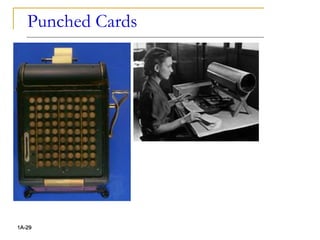
Punched Card
 1890: Herman Hollerith
 American Inventor
 developed devices that were able to
read information which had been
punched into cards automatically
 developed a machine called the census
machine
 US Census Bureau.
 Capable of reading numbers, characters,
and also special symbols.
1A-28
Punched Cards

1A-29
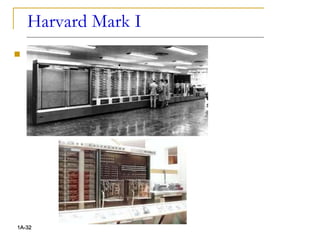
Harvard Mark I
 1944: Howard Aikens and Grace
Hooper developed an
electromechanical machine at IBM
 Called Automatic Sequence Controlled
Calculator (ASCC)
 Called Mark I by Harvard University
 Capable of reading numbers,
characters, and also special symbols
1A-30
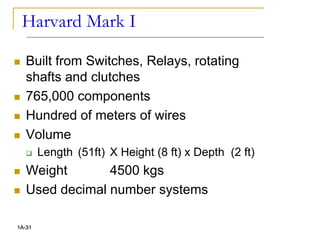
Harvard Mark I
 Built from Switches, Relays, rotating
shafts and clutches
 765,000 components
 Hundred of meters of wires
 Volume
 Length (51ft) X Height (8 ft) x Depth (2 ft)
 Weight 4500 kgs
 Used decimal number systems
1A-31
Harvard Mark I

1A-32
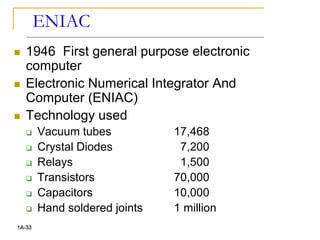
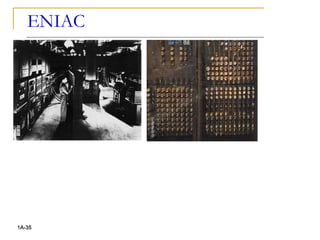
ENIAC
 1946 First general purpose electronic
computer
 Electronic Numerical Integrator And
Computer (ENIAC)
 Technology used
 Vacuum tubes 17,468
 Crystal Diodes 7,200
 Relays 1,500
 Transistors 70,000
 Capacitors 10,000
 Hand soldered joints 1 million
1A-33
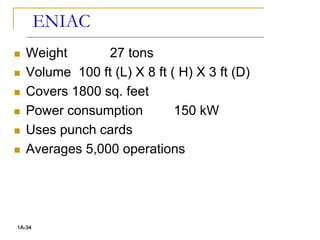
ENIAC
 Weight 27 tons
 Volume 100 ft (L) X 8 ft ( H) X 3 ft (D)
 Covers 1800 sq. feet
 Power consumption 150 kW
 Uses punch cards
 Averages 5,000 operations
1A-34
ENIAC

1A-35
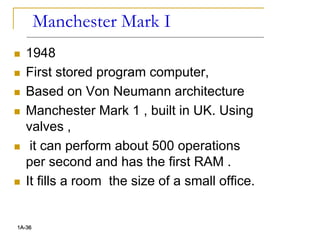
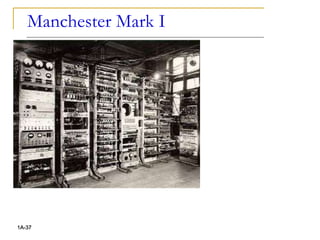
Manchester Mark I
 1948
 First stored program computer,
 Based on Von Neumann architecture
 Manchester Mark 1 , built in UK. Using
valves ,
 it can perform about 500 operations
per second and has the first RAM .
 It fills a room the size of a small office.
1A-36
Manchester Mark I

1A-37
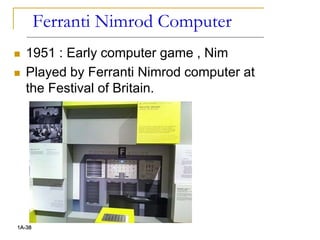
Ferranti Nimrod Computer
 1951 : Early computer game , Nim
 Played by Ferranti Nimrod computer at
the Festival of Britain.
1A-38
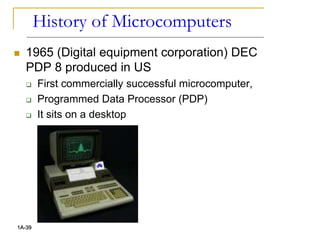
History of Microcomputers
 1965 (Digital equipment corporation) DEC
PDP 8 produced in US
 First commercially successful microcomputer,
 Programmed Data Processor (PDP)
 It sits on a desktop
1A-39
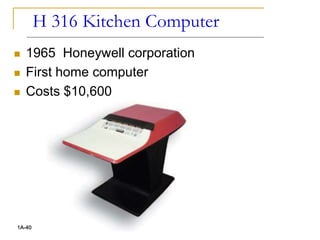
H 316 Kitchen Computer
 1965 Honeywell corporation
 First home computer
 Costs $10,600
1A-40
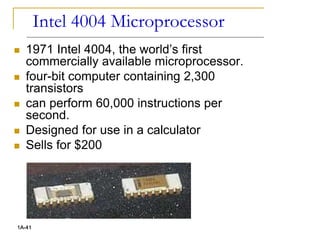
Intel 4004 Microprocessor
 1971 Intel 4004, the world’s first
commercially available microprocessor.
 four-bit computer containing 2,300
transistors
 can perform 60,000 instructions per
second.
 Designed for use in a calculator
 Sells for $200
1A-41
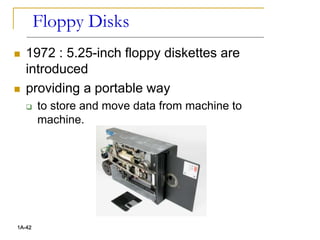
Floppy Disks
 1972 : 5.25-inch floppy diskettes are
introduced
 providing a portable way
 to store and move data from machine to
machine.
1A-42
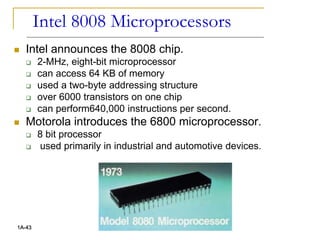
Intel 8008 Microprocessors
 Intel announces the 8008 chip.
 2-MHz, eight-bit microprocessor
 can access 64 KB of memory
 used a two-byte addressing structure
 over 6000 transistors on one chip
 can perform640,000 instructions per second.
 Motorola introduces the 6800 microprocessor.
 8 bit processor
 used primarily in industrial and automotive devices.
1A-43
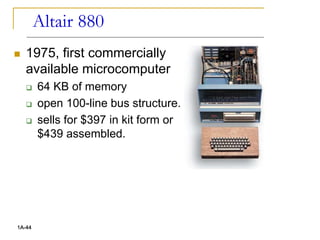
Altair 880
 1975, first commercially
available microcomputer
 64 KB of memory
 open 100-line bus structure.
 sells for $397 in kit form or
$439 assembled.
1A-44
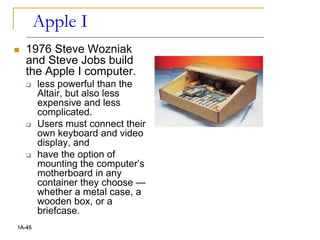
Apple I
 1976 Steve Wozniak
and Steve Jobs build
the Apple I computer.
 less powerful than the
Altair, but also less
expensive and less
complicated.
 Users must connect their
own keyboard and video
display, and
 have the option of
mounting the computer’s
motherboard in any
container they choose —
whether a metal case, a
wooden box, or a
briefcase.
1A-45
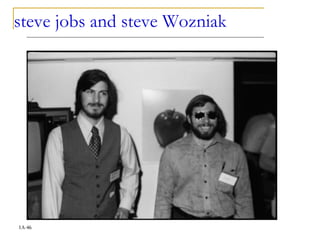
steve jobs and steve Wozniak
1A-46
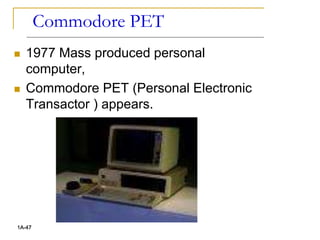
Commodore PET
 1977 Mass produced personal
computer,
 Commodore PET (Personal Electronic
Transactor ) appears.
1A-47
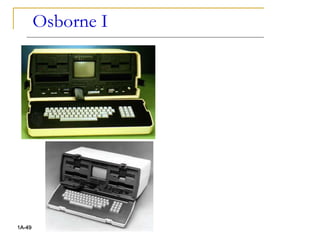
Osborne I
 1981 First portable computer, Osborne 1,
produced.
 At the size and weight of a sewing machine,
 much less convenient than current portable computers.
 weighs about 22 pounds
 Two 5.25-inch floppy drives,
 64 KB of RAM, and
 a five-inch monitor but no hard drive.
 based on the z80 processor, runs the control program
and monitor CP/M operating system, and
 sells for $1,795.
 The Osborne 1 comes with WordStar (a word
processing application) and Super-Calc (a spreadsheet
application).
 It is a huge success.
1A-48
Osborne I
1A-49
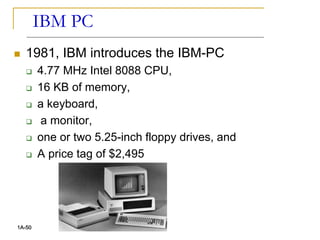
IBM PC
 1981, IBM introduces the IBM-PC
 4.77 MHz Intel 8088 CPU,
 16 KB of memory,
 a keyboard,
 a monitor,
 one or two 5.25-inch floppy drives, and
 A price tag of $2,495
1A-50
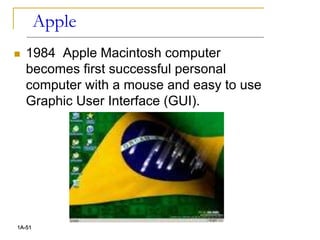
Apple
 1984 Apple Macintosh computer
becomes first successful personal
computer with a mouse and easy to use
Graphic User Interface (GUI).
1A-51
Windows, Laser Jet
 Intel releases the 80386 processor (also
called the 386),
 a 32-bit processor that can address more than four
billion bytes of memory and performs 10 times
faster than the 80286.
 Aldus releases Page-Maker for the Macintosh,
 the first desktop publishing software for
microcomputers.
 Microsoft announces the Windows 1.0
operating environment in
 featuring the first graphical user interface for PCs
mirroring the interface found the previous year on
the Macintosh.
 Hewlett-Packard introduces the LaserJet laser
printer, featuring 300 dpi resolution.
1A-52
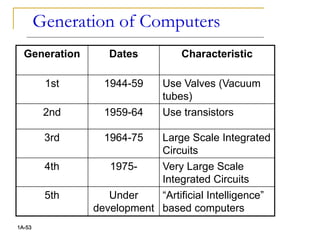
Generation of Computers
1A-53
Generation Dates Characteristic
1st 1944-59 Use Valves (Vacuum
tubes)
2nd 1959-64 Use transistors
3rd 1964-75 Large Scale Integrated
Circuits
4th 1975- Very Large Scale
Integrated Circuits
5th Under
development
“Artificial Intelligence”
based computers
54
Summary
 Course Outline
 What is a computer?
 Comparison of Computer with Human
 History of Computers
 Developments in Microcomputers

Lecture_1.pptx

  • 1.
    CSC 101 Introduction toInformation and Communication Technology 1
  • 2.
    Dr. Saeeda Usman B.Sc. (Computer Engineering)  MS (Adv. Electrical & Electronics Engineering)  Ph.D. (Electrical & Computer Engineering) 1A-2
  • 3.
    Course Details  CourseCode: CSC 101  Course Title: Introduction to ICT  Credit Hours: 2 + 1 1A-3
  • 4.
    Course Outline -I  Introduction to computers and computing  Classification of computers  Elements of computers  Basic Computer Architecture  Control Unit  Arithmetic & Logical Unit (ALU operations)  Main Memory (ROM, RAM, Cache)  CPU Operations  The Registers  Input & Output Devices  Storage Media 1A-4
  • 5.
    Course Outline -II  Data Representation  Software Concepts; System Software  Operating Systems  Basic Input Output Systems (BIOS)  Disk Operating System; Windows 95/98/XP/2000  Application Software; User Designed Application Software.  Data Base Management Systems  Communication Systems  Security Issues; Threats to computers & communication systems; Computer Networks;  Internet; E-Commerce; Artificial Intelligence 1A-5
  • 6.
    Recommended Books  Textbook:P. Norton, Peter Norton's Introduction to Computers, 6th Ed., McGraw-Hill, New York, 2006.  Reference: W. Stallings, Computer Organization and Architecture , 8th Ed., Pearson Prentice Hall, New Jersey, 2010  Excellent World Wide Web address: to look up computer terminology online http://www.wikipedia.com, http://www.whatis.com  Excellent World Wide Web address: to search companies, products, and events  http://www.google.com, http://www.yahoo.com,  http://www.msn.com 1A-6
  • 7.
    7 Marks Distribution ofcourse  Assignments ……….……… 15%  Quizzes ..…………….. 10%  Mid Term ……….….. 25%  Final Exam .……………… 50%
  • 8.
    Book Contents Ata glance I  Chapter 1: Introducing Computer Systems  Lesson 1A: Exploring Computers and Their Uses  Lesson 1B: Looking Inside the Computer System  Chapter 2: Interacting with Your Computer  Lesson 2A: Using the Keyboard and Mouse  Lesson 2B: Inputting Data in Other Ways  Chapter 3: Seeing, Hearing, and Printing Data  Lesson 3A: Video and Sound  Lesson 3B: Printing  Chapter 4: Processing Data  Lesson 4A: Transforming Data into Information  Lesson 4B: Modern CPUs  Chapter 5: Storing Data  Lesson 5A: Types of Storage Devices  Lesson 5B: Measuring and Improving Drive Performance 1A-8
  • 9.
     Chapter 6:Using Operating Systems  Lesson 6A: Operating System Basics  Lesson 6B: Survey of PC and Network Operating Systems  Chapter 7: Networks  Lesson 7A: Networking Basics  Lesson 7B: Data Communications  Chapter 8: Presenting the Internet  Lesson 8A: The Internet and the World  Lesson 8B: E-Mail and Other Internet Services  Chapter 9: Working in the Online World  Lesson 9A: Connecting to the Internet  Lesson 9B: Doing Business in the Online World  Chapter 10: Working with Application Software  Lesson 10A: Productivity Software  Lesson 10B: Graphics and Multimedia 1A-9 Book Contents At a glance II
  • 10.
    Book Contents Ata glance III  Chapter 11: Database Management  Lesson 11A: Database Management Systems  Lesson 11B: Survey of Database Systems  Chapter 12: Software Programming and Development  Lesson 12A: Creating Computer Programs  Lesson 12B: Programming Languages and the Programming Process  Chapter 13: Protecting Your Privacy, Your Computer, and Your Data  Lesson 13A: Understanding the Need for Security Measures  Lesson 13B: Taking Protective Measures  Appendices  Appendix A: Creating Your own Web Page  Appendix B: Buying Your first Computers  Appendix C: Computer Viruses  Appendix D: History of Microcomputers 1A-10
  • 11.
    Accompanying Web Site http://highered.mcgraw-hill.com/sites/0072978902/  Glossary  Online Topics  Appendix A (pdf files)  Appendix B Answers to Self Check Exercises  For each Chapter  Multiple Choice Questions  Power Point Presentations  Internet Exercises 1A-11
  • 12.
    12 I keep 6honest serving men. They taught me all I knew. Their names are: WHAT and WHY and WHEN and HOW and WHERE and WHO. (R. Kipling) And believe me, on the road of learning, these are your best companions. A nice saying…
  • 13.
  • 14.
  • 15.
    Computers in OurWorld  Computers are everywhere  We can find them in pretty unlikely places  Family car  Home appliances  Alarm clock  Market 1A-15
  • 16.
    The Computer Defined Black Box  Problem Solver  An Electronic device that converts data into information which is useful to people 1A-16 Processing Input Output
  • 17.
    Anatomy of aComputer  Every computer has four basic parts, or units:  an input unit such as the keyboard, that feeds information into the computer  a central processing unit (CPU) that performs the various tasks of the computer  an output unit , such as a monitor , that displays the results;  a memory that stores information and instructions. 1A-17
  • 18.
    Computer vs Human Input - Five senses  Central Processing Unit (CPU) - brain  Output - Body Parts  Memory - Human memory  Hardware  Physical components  Software  Programs for operations and problem solving 1A-18
  • 19.
    Modern Computers  Moderncomputers are digital  Word “by the numbers”  Break all types of information into tiny units  Use numbers to represent information  Two digits combine to make data (0, 1) 1A-19
  • 20.
    History of Computers Older computers were analog  represent data as variable points along a continuous spectrum of values.  More flexible but not necessarily more precise and reliable 1A-20
  • 21.
    Slide Rule  Oldercomputers were analog  A more manageable type -- the old- fashioned slide rule 1A-21
  • 22.
    ABACUS  3000 BC:The first calculating device ABACUS was invented in Egypt .  The abacus is still in use in some countries especially China, Japan  Operations  Addition, subtraction, division and multiplication  Extract square root and cube root  User has to memorize certain rules 1A-22
  • 23.
  • 24.
    Pascaline  1642: AFrenchman Blaise Pascal introduced the first mechanical calculating device.  Series of wheels with teeth which could be turned using hands  Used to handle 999,999.99  Perform both addition and subtraction. 1A-24
  • 25.
  • 26.
    Difference Engine  1833:Charles Babbage  Professor of Mathematics  Cambridge University  With Assistance of Lady Augusta Ada Lovelace  developed a machine that could store information, calculate numbers and solve algebraic expression. 1A-26
  • 27.
  • 28.
    Punched Card  1890:Herman Hollerith  American Inventor  developed devices that were able to read information which had been punched into cards automatically  developed a machine called the census machine  US Census Bureau.  Capable of reading numbers, characters, and also special symbols. 1A-28
  • 29.
  • 30.
    Harvard Mark I 1944: Howard Aikens and Grace Hooper developed an electromechanical machine at IBM  Called Automatic Sequence Controlled Calculator (ASCC)  Called Mark I by Harvard University  Capable of reading numbers, characters, and also special symbols 1A-30
  • 31.
    Harvard Mark I Built from Switches, Relays, rotating shafts and clutches  765,000 components  Hundred of meters of wires  Volume  Length (51ft) X Height (8 ft) x Depth (2 ft)  Weight 4500 kgs  Used decimal number systems 1A-31
  • 32.
  • 33.
    ENIAC  1946 Firstgeneral purpose electronic computer  Electronic Numerical Integrator And Computer (ENIAC)  Technology used  Vacuum tubes 17,468  Crystal Diodes 7,200  Relays 1,500  Transistors 70,000  Capacitors 10,000  Hand soldered joints 1 million 1A-33
  • 34.
    ENIAC  Weight 27tons  Volume 100 ft (L) X 8 ft ( H) X 3 ft (D)  Covers 1800 sq. feet  Power consumption 150 kW  Uses punch cards  Averages 5,000 operations 1A-34
  • 35.
  • 36.
    Manchester Mark I 1948  First stored program computer,  Based on Von Neumann architecture  Manchester Mark 1 , built in UK. Using valves ,  it can perform about 500 operations per second and has the first RAM .  It fills a room the size of a small office. 1A-36
  • 37.
  • 38.
    Ferranti Nimrod Computer 1951 : Early computer game , Nim  Played by Ferranti Nimrod computer at the Festival of Britain. 1A-38
  • 39.
    History of Microcomputers 1965 (Digital equipment corporation) DEC PDP 8 produced in US  First commercially successful microcomputer,  Programmed Data Processor (PDP)  It sits on a desktop 1A-39
  • 40.
    H 316 KitchenComputer  1965 Honeywell corporation  First home computer  Costs $10,600 1A-40
  • 41.
    Intel 4004 Microprocessor 1971 Intel 4004, the world’s first commercially available microprocessor.  four-bit computer containing 2,300 transistors  can perform 60,000 instructions per second.  Designed for use in a calculator  Sells for $200 1A-41
  • 42.
    Floppy Disks  1972: 5.25-inch floppy diskettes are introduced  providing a portable way  to store and move data from machine to machine. 1A-42
  • 43.
    Intel 8008 Microprocessors Intel announces the 8008 chip.  2-MHz, eight-bit microprocessor  can access 64 KB of memory  used a two-byte addressing structure  over 6000 transistors on one chip  can perform640,000 instructions per second.  Motorola introduces the 6800 microprocessor.  8 bit processor  used primarily in industrial and automotive devices. 1A-43
  • 44.
    Altair 880  1975,first commercially available microcomputer  64 KB of memory  open 100-line bus structure.  sells for $397 in kit form or $439 assembled. 1A-44
  • 45.
    Apple I  1976Steve Wozniak and Steve Jobs build the Apple I computer.  less powerful than the Altair, but also less expensive and less complicated.  Users must connect their own keyboard and video display, and  have the option of mounting the computer’s motherboard in any container they choose — whether a metal case, a wooden box, or a briefcase. 1A-45
  • 46.
    steve jobs andsteve Wozniak 1A-46
  • 47.
    Commodore PET  1977Mass produced personal computer,  Commodore PET (Personal Electronic Transactor ) appears. 1A-47
  • 48.
    Osborne I  1981First portable computer, Osborne 1, produced.  At the size and weight of a sewing machine,  much less convenient than current portable computers.  weighs about 22 pounds  Two 5.25-inch floppy drives,  64 KB of RAM, and  a five-inch monitor but no hard drive.  based on the z80 processor, runs the control program and monitor CP/M operating system, and  sells for $1,795.  The Osborne 1 comes with WordStar (a word processing application) and Super-Calc (a spreadsheet application).  It is a huge success. 1A-48
  • 49.
  • 50.
    IBM PC  1981,IBM introduces the IBM-PC  4.77 MHz Intel 8088 CPU,  16 KB of memory,  a keyboard,  a monitor,  one or two 5.25-inch floppy drives, and  A price tag of $2,495 1A-50
  • 51.
    Apple  1984 AppleMacintosh computer becomes first successful personal computer with a mouse and easy to use Graphic User Interface (GUI). 1A-51
  • 52.
    Windows, Laser Jet Intel releases the 80386 processor (also called the 386),  a 32-bit processor that can address more than four billion bytes of memory and performs 10 times faster than the 80286.  Aldus releases Page-Maker for the Macintosh,  the first desktop publishing software for microcomputers.  Microsoft announces the Windows 1.0 operating environment in  featuring the first graphical user interface for PCs mirroring the interface found the previous year on the Macintosh.  Hewlett-Packard introduces the LaserJet laser printer, featuring 300 dpi resolution. 1A-52
  • 53.
    Generation of Computers 1A-53 GenerationDates Characteristic 1st 1944-59 Use Valves (Vacuum tubes) 2nd 1959-64 Use transistors 3rd 1964-75 Large Scale Integrated Circuits 4th 1975- Very Large Scale Integrated Circuits 5th Under development “Artificial Intelligence” based computers
  • 54.
    54 Summary  Course Outline What is a computer?  Comparison of Computer with Human  History of Computers  Developments in Microcomputers

Editor's Notes

  • #21 Use mechanical devices, weighs several tons and using motors and gears to perform calculations