Practical File
Of
Information Tecnology
Submitted To: Submitted BY:
INDEX
S.No. Chapter
Name
Page No. Remarks
Introduction to The Project:-
(1) M.S word:-
Creating and editing professional – looking documents
such as letters, papers booklets, reports by using
micro soft office word.
(2) M.S excel :-
Perform calculations, analyze information, and
visualize data in spreadsheet by using Microsoft office
`word .
(3) M.S Power Point :-
Create and editing presentations for slide shows,
meetings, and web pages by using micro soft office
power point.
(4) Internet :-
The internet has emerged from the academic research
world to become one of the most significant driving
force behind bussines change.
(5) Multimedia:-
A multimedia computer system is a computer system,
which has the ability to integrate two or more types of
media(text, graphics, audio, video and animations) for
the purpose of presentation of information.
1. Introductionto Microsoftword
Create and edit professional – lookingdocuments such as
letters, papers, reports booklets by using Microsoft office
word
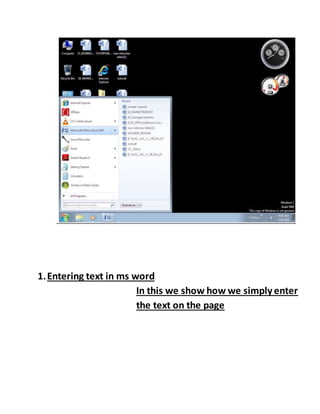
How we open the ms word
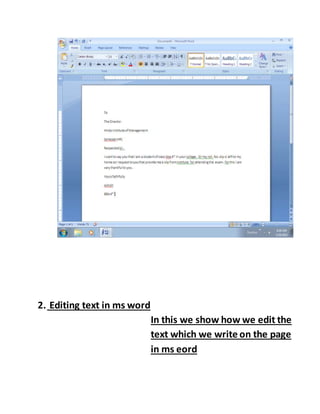
1.Entering text in ms word
In this we show how we simply enter
the text on the page
2. Editing text in ms word
In this we show how we edit the
text which we write on the page
in ms eord
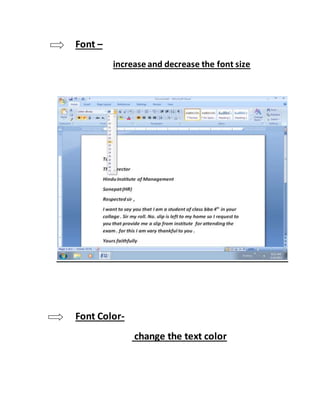
Font –
increase and decrease the font size
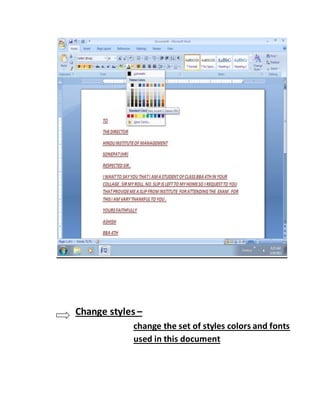
Font Color-
change the text color
Change styles –
change the set of styles colors and fonts
used in this document
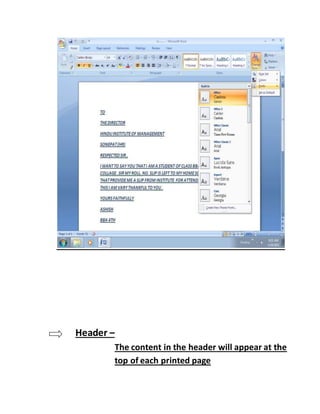
Header –
The content in the header will appear at the
top of each printed page
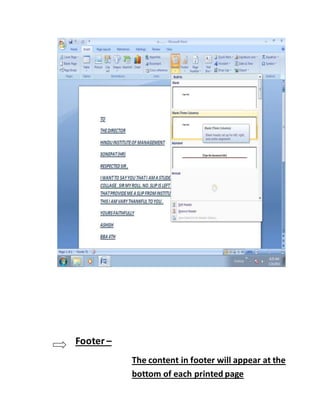
Footer –
The content in footer will appear at the
bottom of each printed page
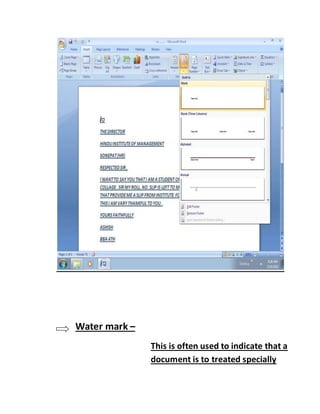
Water mark –
This is often used to indicate that a
document is to treated specially
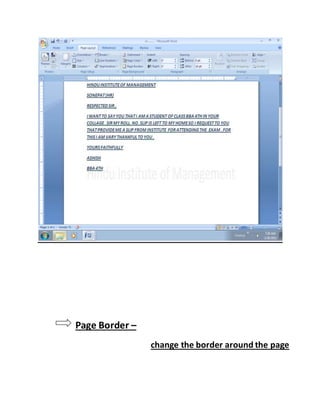
Page Border –
change the border around the page
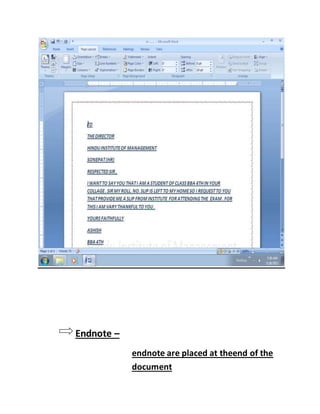
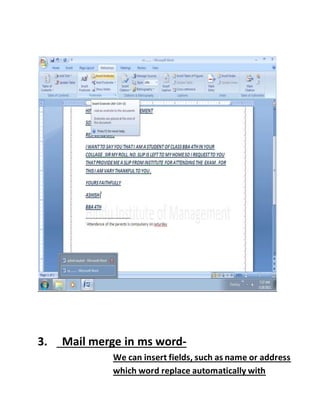
Endnote –
endnote are placed at theend of the
document
3. Mail merge in ms word-
We can insert fields, such as name or address
which word replace automatically with
information from a database or contact list
for each copy of the form letter
Steps taken in mail merge
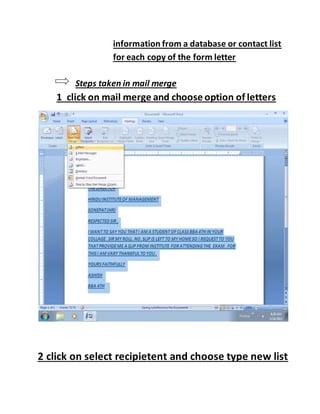
1 click on mail merge and choose option of letters
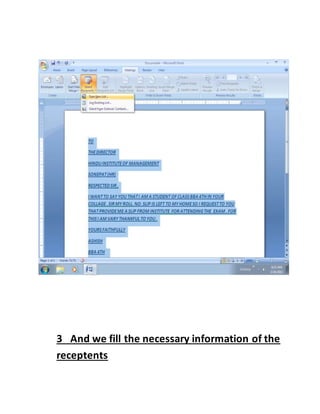
2 click on select recipietent and choose type new list
3 And we fill the necessary information of the
receptents
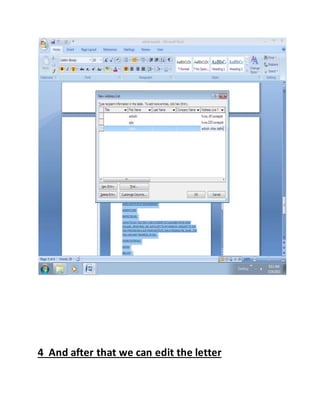
4 And after that we can edit the letter
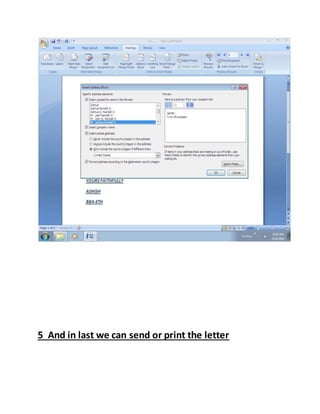
5 And in last we can send or print the letter
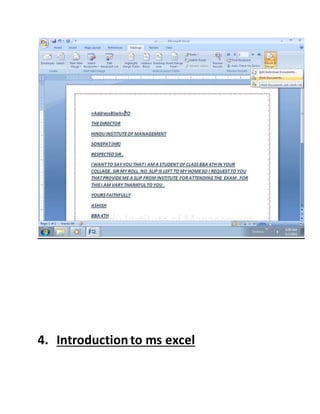
4. Introductionto ms excel
Performacalculation, analize the information and
visualize data in spread sheet by using Microsoft
office excel
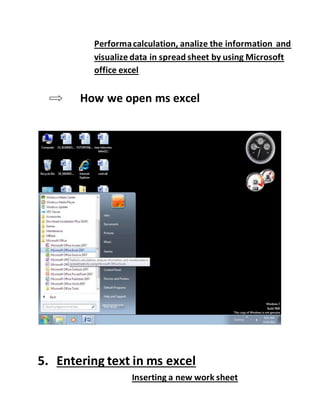
How we open ms excel
5. Entering text in ms excel
Inserting a new work sheet
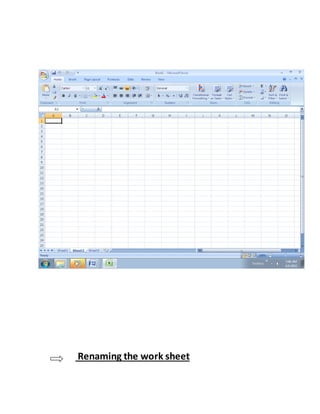
Renaming the work sheet
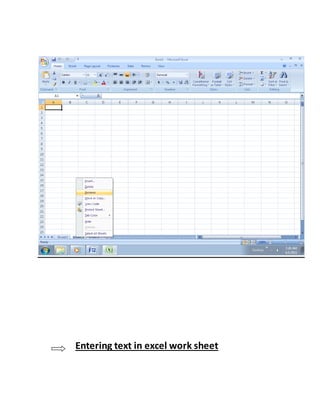
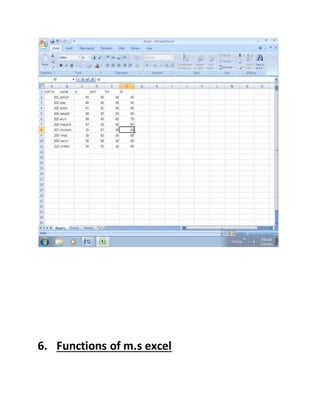
Entering text in excel work sheet
6. Functions of m.s excel
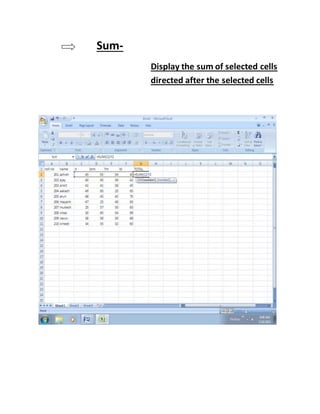
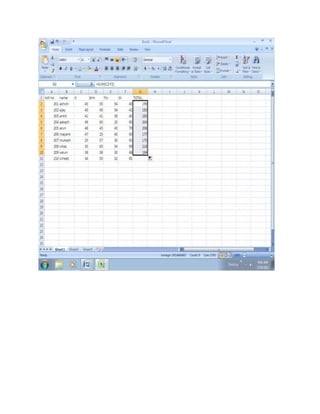
Sum-
Display the sum of selected cells
directed after the selected cells
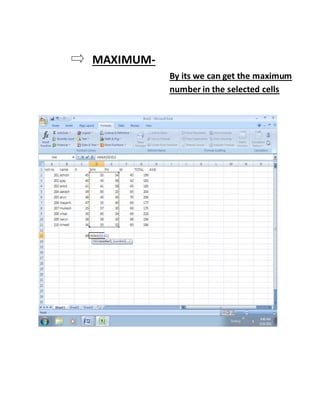
MAXIMUM-
By its we can get the maximum
number in the selected cells
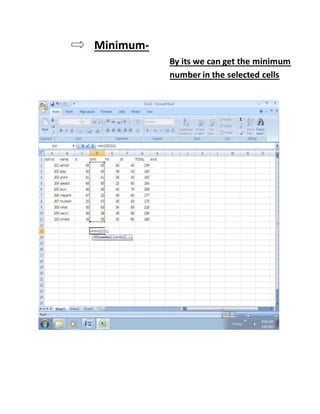
Minimum-
By its we can get the minimum
number in the selected cells
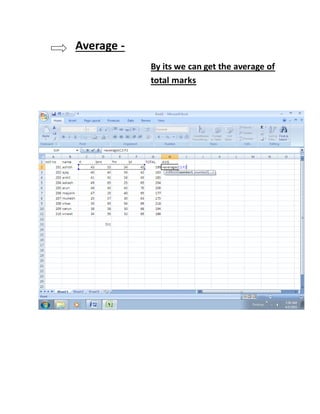
Average -
By its we can get the average of
total marks
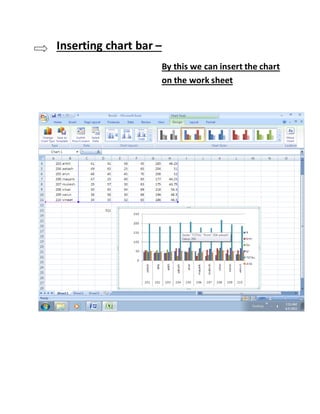
Inserting chart bar –
By this we can insert the chart
on the work sheet
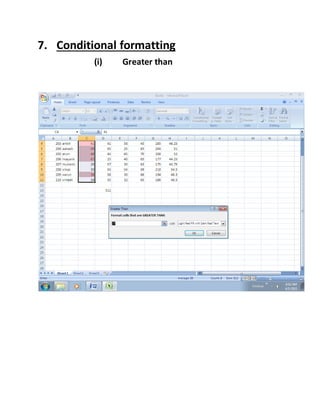
7. Conditional formatting
(i) Greater than
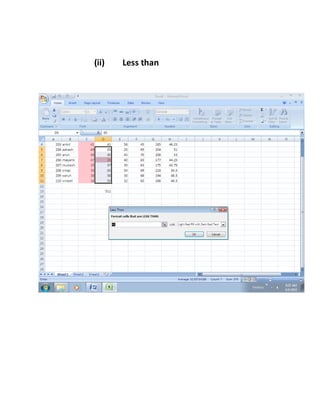
(ii) Less than
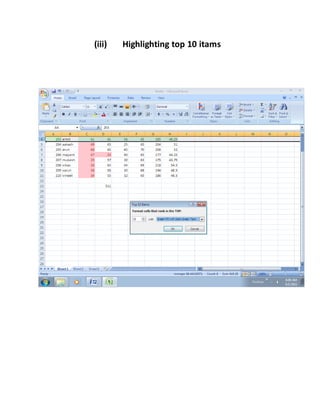
(iii) Highlighting top 10 itams
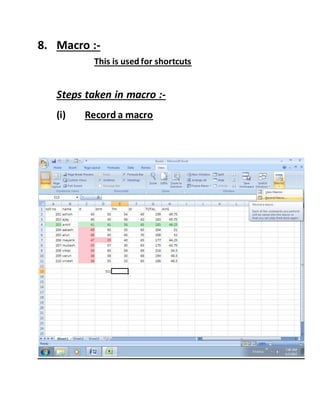
8. Macro :-
This is used for shortcuts
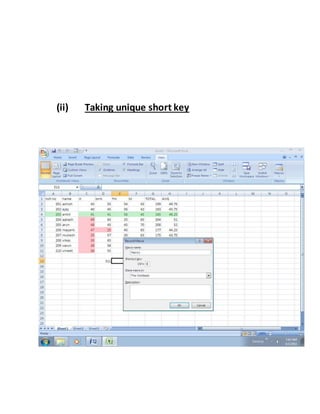
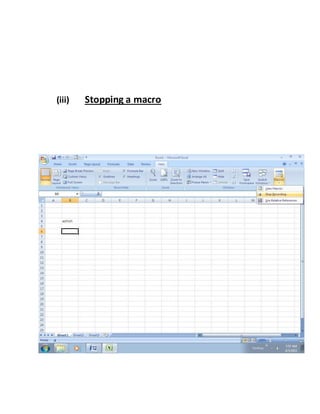
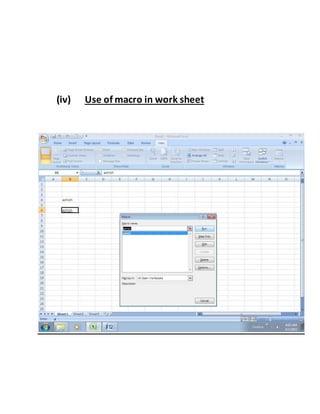
Steps taken in macro :-
(i) Record a macro
(ii) Taking unique short key
(iii) Stopping a macro
(iv) Use of macro in work sheet
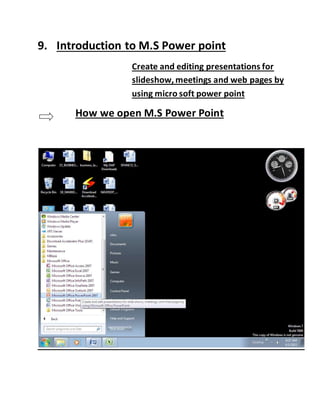
9. Introduction to M.S Power point
Create and editing presentations for
slideshow, meetings and web pages by
using micro soft power point
How we open M.S Power Point
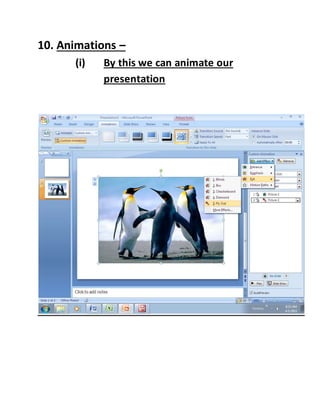
10. Animations –
(i) By this we can animate our
presentation
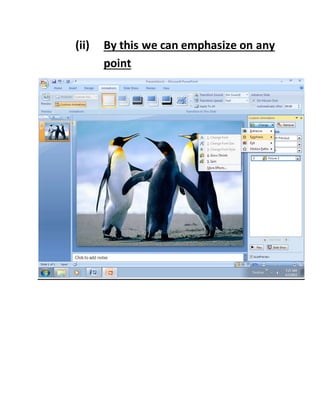
(ii) By this we can emphasize on any
point
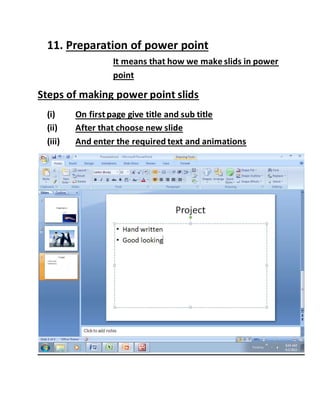
11. Preparation of power point
It means that how we make slids in power
point
Steps of making power point slids
(i) On first page give title and sub title
(ii) After that choose new slide
(iii) And enter the required text and animations
12. Introduction to Internet
:- The internet has emerged from the academic research world to
become one of the most significant driving force behind the business.
There will be estimated , 1 billion users of the internet by the year 2008.
The internet can be used in any field we imagine like the career
advancement, distance learning, e-commerce, e-mail, entertainment, e-
shopping, news etc.
13. Components of internet
(i) IETF :- it means internet engineering take force. It is an
international working group which sets the standards for
software protocol. Let computer communicate with one
another.
(ii) WWW :- (world wide web) WWW is the faster growing and
most popular part of the internet. WWW is inter active, graphic
and multimedia part of the internet . it is an interlinked
collection of hyper text document.
(iii) HTTP :- Hyper Text Transmission Protocol the web page from
one computer to another computer . where a client requests the
server for services and the server provide those services to the
client. In general a web server is a computer.
(iv) URL :- every web page on the internet has a unique address of
each page on the internet is known as URL. (Uniform Resource
Locator). A URL locates a particular web page among the
computers connected to the internet.
(v) Protocol :- it is the way in which the web page accessed . it may
be HTTP, FTP, Gopher.
(vi) Host Name :- it is the name of server on the internet on which
the information is stored.
(vii) Directory name :- it defines the path with in the server where
the requests iteam is stored.
14. Applications of Internet :-
(i) E-Mail :- It means that sending messaging on the internet by
computer. The message sent by sender is first received by the
mail server, which directs this message to the mail box of the
recipients inbox.
(ii) Information Search :- The web contains waste amount of
information. By which we can get any type of necessary
information on the internet.
(iii) Communication :- With the help of internet we an
communicate to any one by messaging and audio, video
conferencing.
(iv) Sharing :- A computer file can be uploaded to a web site or FTP
server for easy download by others . It can put into a shared
location for instant use by colloquies.
(v) Shopping :- The web is the biggest shopping mall of the world.
We can browse and purchase and sell different kind of iteam.
(vi) E-Commerce :- It includes all the business activities that take
place on the internet.
(vii) Entertainment :- By this use we understand that we can take
the games, audio songs , movies and interesting video clips from
the internet.
(viii) Video conferencing :- An internet facility helps us to talk to
other peoples connected on the internet while seeing on screen
to video conferencing.
(ix) Audio Conferencing :- Internet facilitates that while any other
people is on line on the internet we can do audio conferencing
without seeing live video of the person. By this we just listen to
each others not see each others.
(x) Wide Area informationservice :- By this we can choose any
index & WAIS responds by providing a list of documents in that
index. WAIS also allows to read these documents.
(xi) Internet Relay Chat :- It is a system that enables users at
other internet folks to talk each other in real time.
(xii) Access Remote Database :- On the internet there are
thousands of the database which are on remote sites containing
a lot of information on all most every topic or subject.
In the end we can say that internet is applicable at every
where now in these days because of its strong importance’s.
15. Introduction to Multimedia:-
Multimedia is a media which can be used for presentation of
information. Multimedia is most popular technology in this ever
changing world of computer systems. Which has the ability to
integrate two or more types of media (text, graphics audio,
video and animations) for the purpose of manipulation & access
information.
16. Components of Multimedia :-
(i) Text :- Text is any word. For ex. Dwhjgrajfvvgfsdtyg
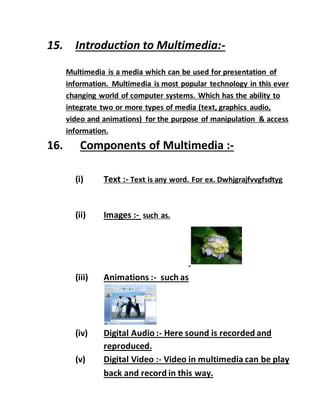
(ii) Images :- such as.
(iii) Animations :- such as
(iv) Digital Audio :- Here sound is recorded and
reproduced.
(v) Digital Video :- Video in multimedia can be play
back and record in this way.

It practical file

  • 1.
  • 2.
  • 3.
    Introduction to TheProject:- (1) M.S word:- Creating and editing professional – looking documents such as letters, papers booklets, reports by using micro soft office word. (2) M.S excel :- Perform calculations, analyze information, and visualize data in spreadsheet by using Microsoft office `word . (3) M.S Power Point :- Create and editing presentations for slide shows, meetings, and web pages by using micro soft office power point. (4) Internet :- The internet has emerged from the academic research world to become one of the most significant driving force behind bussines change. (5) Multimedia:- A multimedia computer system is a computer system, which has the ability to integrate two or more types of
  • 4.
    media(text, graphics, audio,video and animations) for the purpose of presentation of information. 1. Introductionto Microsoftword Create and edit professional – lookingdocuments such as letters, papers, reports booklets by using Microsoft office word How we open the ms word
  • 5.
    1.Entering text inms word In this we show how we simply enter the text on the page
  • 6.
    2. Editing textin ms word In this we show how we edit the text which we write on the page in ms eord
  • 7.
    Font – increase anddecrease the font size Font Color- change the text color
  • 8.
    Change styles – changethe set of styles colors and fonts used in this document
  • 9.
    Header – The contentin the header will appear at the top of each printed page
  • 10.
    Footer – The contentin footer will appear at the bottom of each printed page
  • 11.
    Water mark – Thisis often used to indicate that a document is to treated specially
  • 12.
    Page Border – changethe border around the page
  • 13.
    Endnote – endnote areplaced at theend of the document
  • 14.
    3. Mail mergein ms word- We can insert fields, such as name or address which word replace automatically with
  • 15.
    information from adatabase or contact list for each copy of the form letter Steps taken in mail merge 1 click on mail merge and choose option of letters 2 click on select recipietent and choose type new list
  • 16.
    3 And wefill the necessary information of the receptents
  • 17.
    4 And afterthat we can edit the letter
  • 18.
    5 And inlast we can send or print the letter
  • 19.
  • 20.
    Performacalculation, analize theinformation and visualize data in spread sheet by using Microsoft office excel How we open ms excel 5. Entering text in ms excel Inserting a new work sheet
  • 21.
  • 22.
    Entering text inexcel work sheet
  • 23.
    6. Functions ofm.s excel
  • 24.
    Sum- Display the sumof selected cells directed after the selected cells
  • 26.
    MAXIMUM- By its wecan get the maximum number in the selected cells
  • 27.
    Minimum- By its wecan get the minimum number in the selected cells
  • 28.
    Average - By itswe can get the average of total marks
  • 29.
    Inserting chart bar– By this we can insert the chart on the work sheet
  • 30.
  • 31.
  • 32.
  • 33.
    8. Macro :- Thisis used for shortcuts Steps taken in macro :- (i) Record a macro
  • 34.
  • 35.
  • 36.
    (iv) Use ofmacro in work sheet
  • 37.
    9. Introduction toM.S Power point Create and editing presentations for slideshow, meetings and web pages by using micro soft power point How we open M.S Power Point
  • 38.
    10. Animations – (i)By this we can animate our presentation
  • 39.
    (ii) By thiswe can emphasize on any point
  • 40.
    11. Preparation ofpower point It means that how we make slids in power point Steps of making power point slids (i) On first page give title and sub title (ii) After that choose new slide (iii) And enter the required text and animations
  • 41.
    12. Introduction toInternet :- The internet has emerged from the academic research world to become one of the most significant driving force behind the business. There will be estimated , 1 billion users of the internet by the year 2008. The internet can be used in any field we imagine like the career advancement, distance learning, e-commerce, e-mail, entertainment, e- shopping, news etc. 13. Components of internet (i) IETF :- it means internet engineering take force. It is an international working group which sets the standards for software protocol. Let computer communicate with one another. (ii) WWW :- (world wide web) WWW is the faster growing and most popular part of the internet. WWW is inter active, graphic and multimedia part of the internet . it is an interlinked collection of hyper text document. (iii) HTTP :- Hyper Text Transmission Protocol the web page from one computer to another computer . where a client requests the server for services and the server provide those services to the client. In general a web server is a computer. (iv) URL :- every web page on the internet has a unique address of each page on the internet is known as URL. (Uniform Resource Locator). A URL locates a particular web page among the computers connected to the internet. (v) Protocol :- it is the way in which the web page accessed . it may be HTTP, FTP, Gopher.
  • 42.
    (vi) Host Name:- it is the name of server on the internet on which the information is stored. (vii) Directory name :- it defines the path with in the server where the requests iteam is stored. 14. Applications of Internet :- (i) E-Mail :- It means that sending messaging on the internet by computer. The message sent by sender is first received by the mail server, which directs this message to the mail box of the recipients inbox. (ii) Information Search :- The web contains waste amount of information. By which we can get any type of necessary information on the internet. (iii) Communication :- With the help of internet we an communicate to any one by messaging and audio, video conferencing. (iv) Sharing :- A computer file can be uploaded to a web site or FTP server for easy download by others . It can put into a shared location for instant use by colloquies. (v) Shopping :- The web is the biggest shopping mall of the world. We can browse and purchase and sell different kind of iteam. (vi) E-Commerce :- It includes all the business activities that take place on the internet. (vii) Entertainment :- By this use we understand that we can take the games, audio songs , movies and interesting video clips from the internet.
  • 43.
    (viii) Video conferencing:- An internet facility helps us to talk to other peoples connected on the internet while seeing on screen to video conferencing. (ix) Audio Conferencing :- Internet facilitates that while any other people is on line on the internet we can do audio conferencing without seeing live video of the person. By this we just listen to each others not see each others. (x) Wide Area informationservice :- By this we can choose any index & WAIS responds by providing a list of documents in that index. WAIS also allows to read these documents. (xi) Internet Relay Chat :- It is a system that enables users at other internet folks to talk each other in real time. (xii) Access Remote Database :- On the internet there are thousands of the database which are on remote sites containing a lot of information on all most every topic or subject. In the end we can say that internet is applicable at every where now in these days because of its strong importance’s.
  • 44.
    15. Introduction toMultimedia:- Multimedia is a media which can be used for presentation of information. Multimedia is most popular technology in this ever changing world of computer systems. Which has the ability to integrate two or more types of media (text, graphics audio, video and animations) for the purpose of manipulation & access information. 16. Components of Multimedia :- (i) Text :- Text is any word. For ex. Dwhjgrajfvvgfsdtyg (ii) Images :- such as. (iii) Animations :- such as (iv) Digital Audio :- Here sound is recorded and reproduced. (v) Digital Video :- Video in multimedia can be play back and record in this way.