Prepared by-
Swasat Dutta
CIT/13/AM/004
What is web browser
A web browser (commonly referred to as a
browser) is a software application for
retrieving, presenting and traversing
information resources on the World Wide
Web.
Privacy and security
Most browsers support HTTP Secure and
offer quick and easy ways to delete the
web cache, cookies. and browsing history.
For a comparison of the current security
vulnerabilities of browsers, see comparison
of web browsers.
Function
 The primary purpose of a web browser is to bring
information resources to the user , allowing them to view
the information and then access other information .
 This process begins when the user inputs a Uniform
Resource Locator (URL), for
example http://www.wikipedia.org into the browser. The
prefix of the URL, the Uniform Resource Identifier or URI,
determines how the URL will be interpreted. The most
commonly used kind of URI starts with http: and identifies
a resource to be retrieved over the Hypertext Transfer
Protocol (HTTP)
Different types of web browser
 Google chrome
 Internet explore
 Safari
 Opera
 Mozilla Firefox
 Many more
Google chrome
 Developed by-Google
 Engine- Webkit
 Languages- 50
 Themes
 Written in –C++,Java script
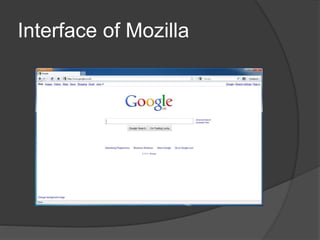
Mozilla firefox
 Developed by-Mozilla corporation
 Written in –C,C++, CSS , Java script
 Engine- Gecko
 Languages-75
 Themes
 Download manager
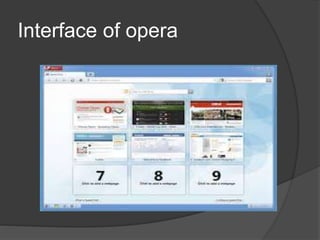
Opera
 Developed by- Opera software
 Written in : C++
 Engine- Presto
 Languages- 45
 Speed dial
 Opera Link
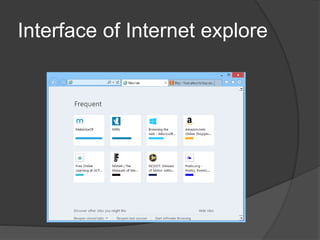
Internet explore
 Developed by-Microsoft
 Languages-33
 Search suggestions
 Smarter address bar
safari
 Developed by-Apple
 Engine- Webkit
 Written in –C++
 Pop up ad blocking
 Text search
 Spell checking
 Disable images
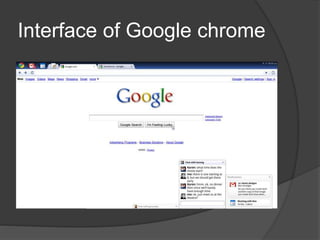
Interface of Google chrome
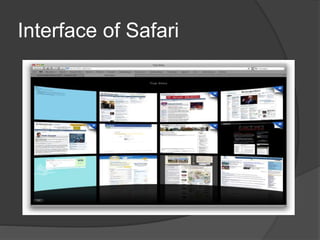
Interface of Safari
Interface of opera
Interface of Mozilla
Interface of Internet explore
THANK
YOU

Presentation on web browser

  • 1.
  • 2.
    What is webbrowser A web browser (commonly referred to as a browser) is a software application for retrieving, presenting and traversing information resources on the World Wide Web.
  • 3.
    Privacy and security Mostbrowsers support HTTP Secure and offer quick and easy ways to delete the web cache, cookies. and browsing history. For a comparison of the current security vulnerabilities of browsers, see comparison of web browsers.
  • 4.
    Function  The primarypurpose of a web browser is to bring information resources to the user , allowing them to view the information and then access other information .  This process begins when the user inputs a Uniform Resource Locator (URL), for example http://www.wikipedia.org into the browser. The prefix of the URL, the Uniform Resource Identifier or URI, determines how the URL will be interpreted. The most commonly used kind of URI starts with http: and identifies a resource to be retrieved over the Hypertext Transfer Protocol (HTTP)
  • 5.
    Different types ofweb browser  Google chrome  Internet explore  Safari  Opera  Mozilla Firefox  Many more
  • 6.
    Google chrome  Developedby-Google  Engine- Webkit  Languages- 50  Themes  Written in –C++,Java script
  • 7.
    Mozilla firefox  Developedby-Mozilla corporation  Written in –C,C++, CSS , Java script  Engine- Gecko  Languages-75  Themes  Download manager
  • 8.
    Opera  Developed by-Opera software  Written in : C++  Engine- Presto  Languages- 45  Speed dial  Opera Link
  • 9.
    Internet explore  Developedby-Microsoft  Languages-33  Search suggestions  Smarter address bar
  • 10.
    safari  Developed by-Apple Engine- Webkit  Written in –C++  Pop up ad blocking  Text search  Spell checking  Disable images
  • 11.
  • 12.
  • 13.
  • 14.
  • 15.
  • 16.