Information Communication Technology
Guide to Data Storage and Protection


                            Stonemasonry Department 2012
What is data?
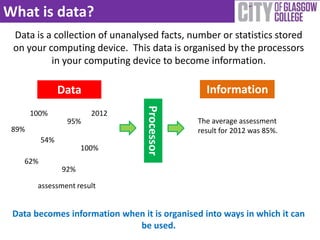
 Data is a collection of unanalysed facts, number or statistics stored
 on your computing device. This data is organised by the processors
          in your computing device to become information.

               Data                             Information


                                 Processor
       100%            2012
                95%                           The average assessment
 89%                                          result for 2012 was 85%.
         54%
                     100%
   62%
               92%

        assessment result


 Data becomes information when it is organised into ways in which it can
                             be used.
Do you input data?
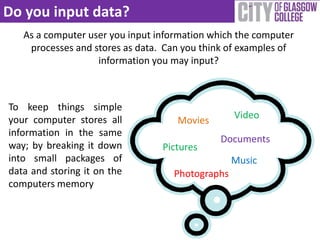
   As a computer user you input information which the computer
    processes and stores as data. Can you think of examples of
                   information you may input?


To keep things simple
your computer stores all                         Video
                                    Movies
information in the same
                                              Documents
way; by breaking it down         Pictures
into small packages of                           Music
data and storing it on the         Photographs
computers memory
How is Data Stored on a PC?
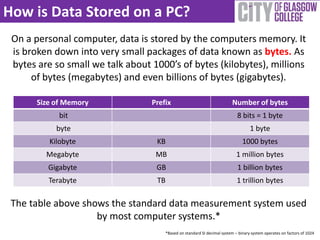
 On a personal computer, data is stored by the computers memory. It
 is broken down into very small packages of data known as bytes. As
 bytes are so small we talk about 1000’s of bytes (kilobytes), millions
      of bytes (megabytes) and even billions of bytes (gigabytes).

       Size of Memory             Prefix                                 Number of bytes
             bit                                                            8 bits = 1 byte
            byte                                                                   1 byte
          Kilobyte                 KB                                          1000 bytes
         Megabyte                  MB                                       1 million bytes
          Gigabyte                 GB                                       1 billion bytes
          Terabyte                 TB                                       1 trillion bytes

 The table above shows the standard data measurement system used
                    by most computer systems.*
                                      *Based on standard SI decimal system – binary system operates on factors of 1024
Back-up Your Data
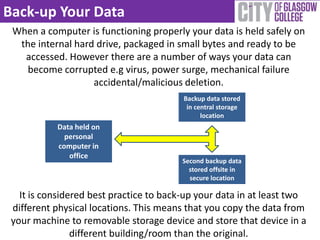
 When a computer is functioning properly your data is held safely on
  the internal hard drive, packaged in small bytes and ready to be
   accessed. However there are a number of ways your data can
    become corrupted e.g virus, power surge, mechanical failure
                   accidental/malicious deletion.
                                         Backup data stored
                                          in central storage
                                               location
           Data held on
             personal
           computer in
              office
                                         Second backup data
                                           stored offsite in
                                           secure location

   It is considered best practice to back-up your data in at least two
 different physical locations. This means that you copy the data from
 your machine to removable storage device and store that device in a
                different building/room than the original.
Forms of Physical Storage
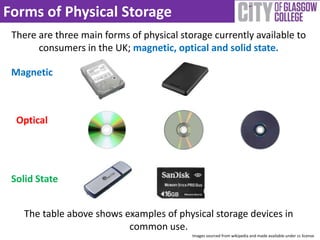
 There are three main forms of physical storage currently available to
       consumers in the UK; magnetic, optical and solid state.

 Magnetic


  Optical


 Solid State


    The table above shows examples of physical storage devices in
                           common use.
                                           Images sourced from wikipedia and made available under cc license
Web Based File Hosting
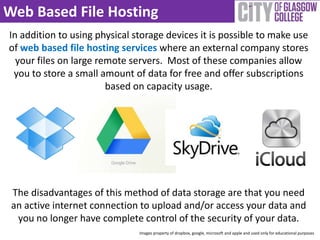
In addition to using physical storage devices it is possible to make use
of web based file hosting services where an external company stores
  your files on large remote servers. Most of these companies allow
 you to store a small amount of data for free and offer subscriptions
                        based on capacity usage.


 The disadvantages of this method of data storage are that you need
 an active internet connection to upload and/or access your data and
  you no longer have complete control of the security of your data.
                               Images property of dropbox, google, microsoft and apple and used only for educational purposes
Protecting Data
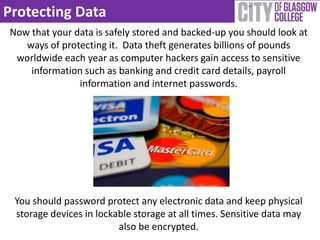
Now that your data is safely stored and backed-up you should look at
   ways of protecting it. Data theft generates billions of pounds
 worldwide each year as computer hackers gain access to sensitive
    information such as banking and credit card details, payroll
               information and internet passwords.


 You should password protect any electronic data and keep physical
 storage devices in lockable storage at all times. Sensitive data may
                         also be encrypted.
Generating an Effective Password
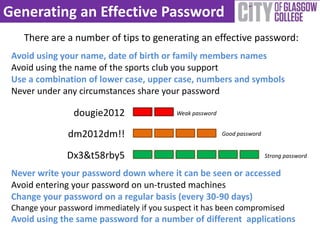
    There are a number of tips to generating an effective password:
 Avoid using your name, date of birth or family members names
 Avoid using the name of the sports club you support
 Use a combination of lower case, upper case, numbers and symbols
 Never under any circumstances share your password

                 dougie2012                Weak password


               dm2012dm!!                                  Good password


               Dx3&t58rby5                                                 Strong password

 Never write your password down where it can be seen or accessed
 Avoid entering your password on un-trusted machines
 Change your password on a regular basis (every 30-90 days)
 Change your password immediately if you suspect it has been compromised
 Avoid using the same password for a number of different applications
Using Security Software
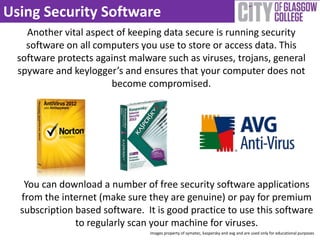
    Another vital aspect of keeping data secure is running security
    software on all computers you use to store or access data. This
  software protects against malware such as viruses, trojans, general
  spyware and keylogger’s and ensures that your computer does not
                       become compromised.


   You can download a number of free security software applications
  from the internet (make sure they are genuine) or pay for premium
  subscription based software. It is good practice to use this software
               to regularly scan your machine for viruses.
                                Images property of symatec, kaspersky and avg and are used only for educational purposes
References
             The image on the title slide of this presentation was sourced from
             and remains the property of:
             http://paolatubaro.files.wordpress.com/2011/07/dataprocessing.j
             pg


             The image on the title slide of this presentation was sourced from :
             http://farm4.static.flickr.com/3050/2919245129_276a62a19d.jpg
             And was made available under creative commons license
Developed by The Stonemasonry Department
          City of Glasgow College
                    2012

IT guide to data storage and protection

  • 1.
    Information Communication Technology Guideto Data Storage and Protection Stonemasonry Department 2012
  • 2.
    What is data? Data is a collection of unanalysed facts, number or statistics stored on your computing device. This data is organised by the processors in your computing device to become information. Data Information Processor 100% 2012 95% The average assessment 89% result for 2012 was 85%. 54% 100% 62% 92% assessment result Data becomes information when it is organised into ways in which it can be used.
  • 3.
    Do you inputdata? As a computer user you input information which the computer processes and stores as data. Can you think of examples of information you may input? To keep things simple your computer stores all Video Movies information in the same Documents way; by breaking it down Pictures into small packages of Music data and storing it on the Photographs computers memory
  • 4.
    How is DataStored on a PC? On a personal computer, data is stored by the computers memory. It is broken down into very small packages of data known as bytes. As bytes are so small we talk about 1000’s of bytes (kilobytes), millions of bytes (megabytes) and even billions of bytes (gigabytes). Size of Memory Prefix Number of bytes bit 8 bits = 1 byte byte 1 byte Kilobyte KB 1000 bytes Megabyte MB 1 million bytes Gigabyte GB 1 billion bytes Terabyte TB 1 trillion bytes The table above shows the standard data measurement system used by most computer systems.* *Based on standard SI decimal system – binary system operates on factors of 1024
  • 5.
    Back-up Your Data When a computer is functioning properly your data is held safely on the internal hard drive, packaged in small bytes and ready to be accessed. However there are a number of ways your data can become corrupted e.g virus, power surge, mechanical failure accidental/malicious deletion. Backup data stored in central storage location Data held on personal computer in office Second backup data stored offsite in secure location It is considered best practice to back-up your data in at least two different physical locations. This means that you copy the data from your machine to removable storage device and store that device in a different building/room than the original.
  • 6.
    Forms of PhysicalStorage There are three main forms of physical storage currently available to consumers in the UK; magnetic, optical and solid state. Magnetic Optical Solid State The table above shows examples of physical storage devices in common use. Images sourced from wikipedia and made available under cc license
  • 7.
    Web Based FileHosting In addition to using physical storage devices it is possible to make use of web based file hosting services where an external company stores your files on large remote servers. Most of these companies allow you to store a small amount of data for free and offer subscriptions based on capacity usage. The disadvantages of this method of data storage are that you need an active internet connection to upload and/or access your data and you no longer have complete control of the security of your data. Images property of dropbox, google, microsoft and apple and used only for educational purposes
  • 8.
    Protecting Data Now thatyour data is safely stored and backed-up you should look at ways of protecting it. Data theft generates billions of pounds worldwide each year as computer hackers gain access to sensitive information such as banking and credit card details, payroll information and internet passwords. You should password protect any electronic data and keep physical storage devices in lockable storage at all times. Sensitive data may also be encrypted.
  • 9.
    Generating an EffectivePassword There are a number of tips to generating an effective password: Avoid using your name, date of birth or family members names Avoid using the name of the sports club you support Use a combination of lower case, upper case, numbers and symbols Never under any circumstances share your password dougie2012 Weak password dm2012dm!! Good password Dx3&t58rby5 Strong password Never write your password down where it can be seen or accessed Avoid entering your password on un-trusted machines Change your password on a regular basis (every 30-90 days) Change your password immediately if you suspect it has been compromised Avoid using the same password for a number of different applications
  • 10.
    Using Security Software Another vital aspect of keeping data secure is running security software on all computers you use to store or access data. This software protects against malware such as viruses, trojans, general spyware and keylogger’s and ensures that your computer does not become compromised. You can download a number of free security software applications from the internet (make sure they are genuine) or pay for premium subscription based software. It is good practice to use this software to regularly scan your machine for viruses. Images property of symatec, kaspersky and avg and are used only for educational purposes
  • 11.
    References The image on the title slide of this presentation was sourced from and remains the property of: http://paolatubaro.files.wordpress.com/2011/07/dataprocessing.j pg The image on the title slide of this presentation was sourced from : http://farm4.static.flickr.com/3050/2919245129_276a62a19d.jpg And was made available under creative commons license
  • 12.
    Developed by TheStonemasonry Department City of Glasgow College 2012