Computer Applications
Computer Software
and Organization Information System
OVERVIEW
• Computer Software
• System Software & Application Software
• Elements of an Information System
• Enterprise Productivity Suite
• Enterprise Knowledge Management
Computer Software
What is Software?
• Also known as a “program”, tells the computer
what tasks to perform and how to perform
them.
1. System Software
2. Application Software
What is Installing?
• “Refer to the process of setting up software to
work with the computer, printer, and other
hardware.”
A programmer develops software or writes the
instructions that direct the computer to process
data into information
Information System
“Information system (IS) is a system of
communication between people which is
involved in the gathering, processing,
distribution and use of information.”
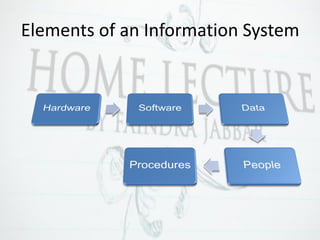
Elements of an Information System
Enterprise Productivity Suite
“Enterprise Productivity Suite is a collection of
productivity programs intended to be used by
knowledge workers.”
Enterprise Productivity Suite
Used to create, share and collaborate:
1. Office productivity: Word processor,
spreadsheets, presentation
2. Collaboration: Document Management
3. Unified Communication: Email, Instant
Messaging.
4. Project & Process: Project Management tools
Enterprise Productivity Suite
Create
Microsoft
Office
Share
PDF, Google
Drive
Collaborate
Facebook,
Youtube
Web Conferencing
Involves participants interacting at the same
time in a virtual conference environment, even
though they are may be physically apart,
through text-based chat, audio, video
conferencing, web-conferencing and sharing of
desktop documents.
Web Conferencing
• Utilize virtual conference which often use a
mix of communication technologies.
• For example, web conferencing software that
enables participants to communicate with
each others via webcam, microphone, and
real time chatting in a group setting.
Enterprise Knowledge Management
• Enterprise knowledge management is
comprised of a set of strategies, practices and
tools to promote learning process and
facilitate documentation, sharing and
collaboration on knowledge.
Enterprise Knowledge Management
Knowledge management efforts typically focus
on organizational objectives such as improved
performance, competitive advantages,
innovation, the sharing of lessons, integration
and continuous improvement of the
organization.
Benefits of Enterprise Knowledge
Management Systems
1. Achieving shorter new product development
cycle
2. Facilitating and managing innovation and
organizational learning
3. Leveraging the expertise of people across the
organization
4. Increase network connectivity between internal
and external individual
5. Managing business environments and allowing
employee to obtain relevant insight and ideas
for their job
Computer Application
Computer Software
and Organization Information System

Computer Applications- Computer Software

  • 1.
    Computer Applications Computer Software andOrganization Information System
  • 2.
    OVERVIEW • Computer Software •System Software & Application Software • Elements of an Information System • Enterprise Productivity Suite • Enterprise Knowledge Management
  • 3.
    Computer Software What isSoftware? • Also known as a “program”, tells the computer what tasks to perform and how to perform them. 1. System Software 2. Application Software
  • 4.
    What is Installing? •“Refer to the process of setting up software to work with the computer, printer, and other hardware.” A programmer develops software or writes the instructions that direct the computer to process data into information
  • 5.
    Information System “Information system(IS) is a system of communication between people which is involved in the gathering, processing, distribution and use of information.”
  • 6.
    Elements of anInformation System
  • 7.
    Enterprise Productivity Suite “EnterpriseProductivity Suite is a collection of productivity programs intended to be used by knowledge workers.”
  • 8.
    Enterprise Productivity Suite Usedto create, share and collaborate: 1. Office productivity: Word processor, spreadsheets, presentation 2. Collaboration: Document Management 3. Unified Communication: Email, Instant Messaging. 4. Project & Process: Project Management tools
  • 9.
    Enterprise Productivity Suite Create Microsoft Office Share PDF,Google Drive Collaborate Facebook, Youtube
  • 10.
    Web Conferencing Involves participantsinteracting at the same time in a virtual conference environment, even though they are may be physically apart, through text-based chat, audio, video conferencing, web-conferencing and sharing of desktop documents.
  • 11.
    Web Conferencing • Utilizevirtual conference which often use a mix of communication technologies. • For example, web conferencing software that enables participants to communicate with each others via webcam, microphone, and real time chatting in a group setting.
  • 12.
    Enterprise Knowledge Management •Enterprise knowledge management is comprised of a set of strategies, practices and tools to promote learning process and facilitate documentation, sharing and collaboration on knowledge.
  • 13.
    Enterprise Knowledge Management Knowledgemanagement efforts typically focus on organizational objectives such as improved performance, competitive advantages, innovation, the sharing of lessons, integration and continuous improvement of the organization.
  • 14.
    Benefits of EnterpriseKnowledge Management Systems 1. Achieving shorter new product development cycle 2. Facilitating and managing innovation and organizational learning 3. Leveraging the expertise of people across the organization 4. Increase network connectivity between internal and external individual 5. Managing business environments and allowing employee to obtain relevant insight and ideas for their job
  • 15.
    Computer Application Computer Software andOrganization Information System