HIGHER THINKING SKILLS THROUGH IT-BASED 
PROJECTS
OVERVIEW 
In this lesson, we shall discuss about four types of IT-based 
projects which can effectively be used in order 
to engage students in activities of a higher plane of 
thinking. 
To be noted is the fact that these projects differ on the 
specific process and skills employed, also in the 
ultimate activity or platform used to communicate 
completed products to others.
It is to be understood that these 
projects do not address all of the 
thinking skills shown previously in the 
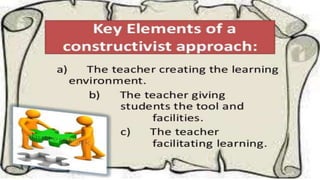
Thinking Skills Framework. But these 
projects represent constructivist 
approach to instruction.
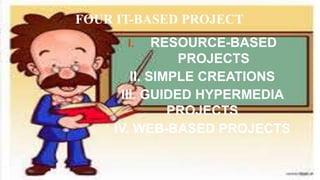
FOUR IT-BASED PROJECT 
I. RESOURCE-BASED 
PROJECTS 
II. SIMPLE CREATIONS 
III. GUIDED HYPERMEDIA 
PROJECTS 
IV. WEB-BASED PROJECTS
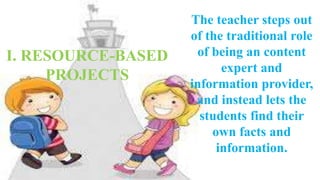
The teacher steps out 
of the traditional role 
of being an content 
expert and 
information provider, 
and instead lets the 
students find their 
own facts and 
information. 
I. RESOURCE-BASED 
PROJECTS
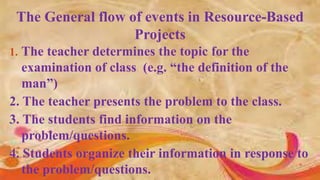
The General flow of events in Resource-Based 
Projects 
1. The teacher determines the topic for the 
examination of class (e.g. “the definition of the 
man”) 
2. The teacher presents the problem to the class. 
3. The students find information on the 
problem/questions. 
4. Students organize their information in response to 
the problem/questions.
Relating to finding information, tsthe central 
principle is to make the students “go beyond the 
textbook and curriculum materials”. 
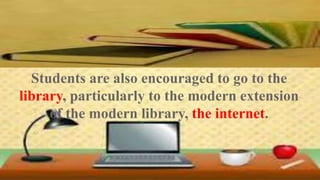
Students are also encouraged to go to the 
library, particularly to the modern extension 
of the modern library, the internet.
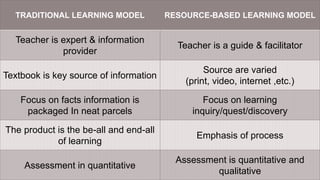
TRADITIONAL LEARNING MODEL RESOURCE-BASED LEARNING MODEL 
Teacher is expert & information 
provider 
Teacher is a guide & facilitator 
Textbook is key source of information 
Source are varied 
(print, video, internet ,etc.) 
Focus on facts information is 
packaged In neat parcels 
Focus on learning 
inquiry/quest/discovery 
The product is the be-all and end-all 
of learning 
Emphasis of process 
Assessment in quantitative 
Assessment is quantitative and 
qualitative
II.SIMPLE CREATIONS
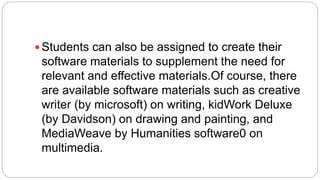
 Students can also be assigned to create their 
software materials to supplement the need for 
relevant and effective materials.Of course, there 
are available software materials such as creative 
writer (by microsoft) on writing, kidWork Deluxe 
(by Davidson) on drawing and painting, and 
MediaWeave by Humanities software0 on 
multimedia.
Creating is more consonant with planning, 
making, assembling, designing, or building. 
Creativity is said to combine three kind of 
skills/abilities: 
 Analyzing 
 Synthesizing 
 Promoting
To develop creativity, the following five key tasks 
may be recommended: 
1. Define the tasks 
2. Brainstorm 
3. Judge the ideas 
4. Act 
5. Adopt flexibility
The Upgraded Project Method 
Given these complex thinking skills, the modern day teacher 
can now be guided on his goal to help student achieve 
higher level thinking skills and creativity beyond the 
ordinary benchmark of the student’s passing, even excelling 
achievement test.
Project Method For Higher Learning 
Outcomes 
 Consists in having the students work on 
projects with depth, complexity, duration and 
relevance to the real world.
Project Method 
 There is a tighter link between the use of 
projects for simply coming up with products to 
having the students undergo the process of 
complex/higher thinking under the framework of the 
constructivist paradigm.
The Process 
 The process of project implementation 
takes the students to the steps, efforts, 
and experiences in project completion.
Guided Hypermedia 
Projects 
As an instructive tool, such as in the 
production by students of power-point 
presentation of a selective topic.
As a communication tool, such as 
when students do a multimedia 
presentation ( with text, graphics, 
photos, audio narration, 
interviews, video clips, etc. to 
simulate a television news show.
Web Based Project
Web Based Project 
Students can be made to create and post 
webpages on a given topic. 
• But creating webpages, even single page webpages, may 
be too sophisticated and time consuming for the 
average students
However, that posting of webpages in the 
Internet allows the students a wider 
audience. 
They can also be linked with other related 
cites in the Internet. 
But as of now, this creativity project may be 
too ambitious tool as a tool in the 
teaching-learning process.
If kids come to us from strong, healthy functioning 
families, it makes our job easier. 
If they do not come to us from strong, healthy, 
functioning families, it makes our job more important. 
-Barbara Colorose

It based project

  • 1.
    HIGHER THINKING SKILLSTHROUGH IT-BASED PROJECTS
  • 2.
    OVERVIEW In thislesson, we shall discuss about four types of IT-based projects which can effectively be used in order to engage students in activities of a higher plane of thinking. To be noted is the fact that these projects differ on the specific process and skills employed, also in the ultimate activity or platform used to communicate completed products to others.
  • 3.
    It is tobe understood that these projects do not address all of the thinking skills shown previously in the Thinking Skills Framework. But these projects represent constructivist approach to instruction.
  • 5.
    FOUR IT-BASED PROJECT I. RESOURCE-BASED PROJECTS II. SIMPLE CREATIONS III. GUIDED HYPERMEDIA PROJECTS IV. WEB-BASED PROJECTS
  • 6.
    The teacher stepsout of the traditional role of being an content expert and information provider, and instead lets the students find their own facts and information. I. RESOURCE-BASED PROJECTS
  • 7.
    The General flowof events in Resource-Based Projects 1. The teacher determines the topic for the examination of class (e.g. “the definition of the man”) 2. The teacher presents the problem to the class. 3. The students find information on the problem/questions. 4. Students organize their information in response to the problem/questions.
  • 8.
    Relating to findinginformation, tsthe central principle is to make the students “go beyond the textbook and curriculum materials”. Students are also encouraged to go to the library, particularly to the modern extension of the modern library, the internet.
  • 9.
    TRADITIONAL LEARNING MODELRESOURCE-BASED LEARNING MODEL Teacher is expert & information provider Teacher is a guide & facilitator Textbook is key source of information Source are varied (print, video, internet ,etc.) Focus on facts information is packaged In neat parcels Focus on learning inquiry/quest/discovery The product is the be-all and end-all of learning Emphasis of process Assessment in quantitative Assessment is quantitative and qualitative
  • 10.
  • 11.
     Students canalso be assigned to create their software materials to supplement the need for relevant and effective materials.Of course, there are available software materials such as creative writer (by microsoft) on writing, kidWork Deluxe (by Davidson) on drawing and painting, and MediaWeave by Humanities software0 on multimedia.
  • 12.
    Creating is moreconsonant with planning, making, assembling, designing, or building. Creativity is said to combine three kind of skills/abilities:  Analyzing  Synthesizing  Promoting
  • 13.
    To develop creativity,the following five key tasks may be recommended: 1. Define the tasks 2. Brainstorm 3. Judge the ideas 4. Act 5. Adopt flexibility
  • 14.
    The Upgraded ProjectMethod Given these complex thinking skills, the modern day teacher can now be guided on his goal to help student achieve higher level thinking skills and creativity beyond the ordinary benchmark of the student’s passing, even excelling achievement test.
  • 15.
    Project Method ForHigher Learning Outcomes  Consists in having the students work on projects with depth, complexity, duration and relevance to the real world.
  • 16.
    Project Method There is a tighter link between the use of projects for simply coming up with products to having the students undergo the process of complex/higher thinking under the framework of the constructivist paradigm.
  • 17.
    The Process The process of project implementation takes the students to the steps, efforts, and experiences in project completion.
  • 18.
    Guided Hypermedia Projects As an instructive tool, such as in the production by students of power-point presentation of a selective topic.
  • 19.
    As a communicationtool, such as when students do a multimedia presentation ( with text, graphics, photos, audio narration, interviews, video clips, etc. to simulate a television news show.
  • 20.
  • 21.
    Web Based Project Students can be made to create and post webpages on a given topic. • But creating webpages, even single page webpages, may be too sophisticated and time consuming for the average students
  • 22.
    However, that postingof webpages in the Internet allows the students a wider audience. They can also be linked with other related cites in the Internet. But as of now, this creativity project may be too ambitious tool as a tool in the teaching-learning process.
  • 23.
    If kids cometo us from strong, healthy functioning families, it makes our job easier. If they do not come to us from strong, healthy, functioning families, it makes our job more important. -Barbara Colorose