HIGHER THINKING SKILLS
THROUGH IT-BASED PROJECTS
OVERVIEW:
 In this lesson, we shall discuss four types of IT-
based projects which can effectively be used in
order to engage students in activities of a higher
plane of thinking. To be noted is the fact that these
projects differ in the specific process and skills
employed, also in the ultimate activity of platform
used to communicate completed products to others.
HIGHER THINKING SKILLS
THROUGH IT-BASED PROJECTS
 It is to be understood that these projects do not
address all of the thinking skills shown previously in
the Thinking Skills Framework. But these projects
represents constructivist approach to instruction,
namely:
 The teacher creating the learning environment
 The teacher giving students the tools and facilities,
and
 The teacher facilitating learning.
 On the other hand, it is the students themselves
who demonstrate higher thinking skills and
creativity through such activities searching for
information, organizing and synthesizing ideas,
creating presentations, and the like.
 Now let us see FOUR IT-Based Projects conducive
to develop higher thinking skills and creativity
among learners.
I. RESOURCE-BASED PROJECTS
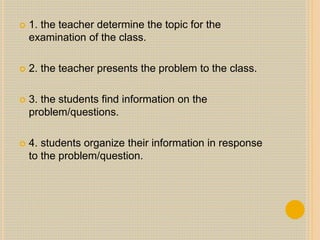
 In these projects, the teacher steps out of the
traditional role of being a content expert and
information provider, and instead lets the students
find their own facts and information. Only when
necessary for the active learning process does the
teacher step in to supply data or information. The
general flow of events in resource-based projects
are:
 1. the teacher determine the topic for the
examination of the class.
 2. the teacher presents the problem to the class.
 3. the students find information on the
problem/questions.
 4. students organize their information in response
to the problem/question.
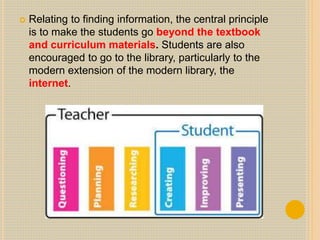
 Relating to finding information, the central principle
is to make the students go beyond the textbook
and curriculum materials. Students are also
encouraged to go to the library, particularly to the
modern extension of the modern library, the
internet.
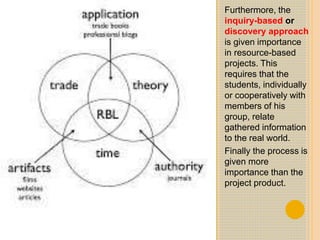
Furthermore, the
inquiry-based or
discovery approach
is given importance
in resource-based
projects. This
requires that the
students, individually
or cooperatively with
members of his
group, relate
gathered information
to the real world.
Finally the process is
given more
importance than the
project product.
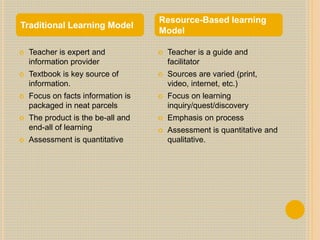
 Teacher is expert and
information provider
 Textbook is key source of
information.
 Focus on facts information is
packaged in neat parcels
 The product is the be-all and
end-all of learning
 Assessment is quantitative
 Teacher is a guide and
facilitator
 Sources are varied (print,
video, internet, etc.)
 Focus on learning
inquiry/quest/discovery
 Emphasis on process
 Assessment is quantitative and
qualitative.
Traditional Learning Model
Resource-Based learning
Model
II. SIMPLE CREATIONS
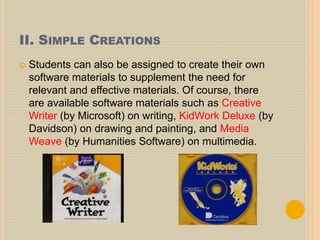
 Students can also be assigned to create their own
software materials to supplement the need for
relevant and effective materials. Of course, there
are available software materials such as Creative
Writer (by Microsoft) on writing, KidWork Deluxe (by
Davidson) on drawing and painting, and Media
Weave (by Humanities Software) on multimedia.
 In developing software, creativity as an outcome
should not be equated with ingenuity or high
intelligence. Creating is more consonant with
planning, making, assembling, designing, or
building. Creativity is said to combine three kind of
skills/abilities:
 Analyzing- distinguishing similarities and
differences/ seeing the project as a problem to be
solved.
 Synthesizing- making spontaneous connections
among ideas, thus generating interesting or new
ideas.
 Promoting- selling of new ideas to allow the public
to test the ideas themeselves.
 To develop creativity, the following five key tasks
may be recommended:
 1. Define the task. Clarify the goal of the
completed project to the student.
 2. Brainstorm. He students themselves will be
allowed to generate their own ideas on the project.
Rather than shoot down ideas, the teacher
encourages idea exchange.
 3. Judge the Ideas. The students themselves
make an appraisal for or against any idea. Only
when students are completely off track should the
teacher intervene.
 4. Act. The students do their work with the teacher
a facilitator.
 5. Adopt flexibility. The students should be
allowed to shift gears and not follow an action path
rigidly.
III. GUIDED HYPERMEDIA PROJECTS
 The production of self-made multimedia projects
can be approached in two different ways:
 1. as an instructive tool, such as in the production
by students of a power-point presentation of a
selected topic.
 2. as a communication tool, such as when
students do a multimedia presentation (with text,
“graphs, photos, audio narration, interviews, video
clips, etc. to simulate a television news show.
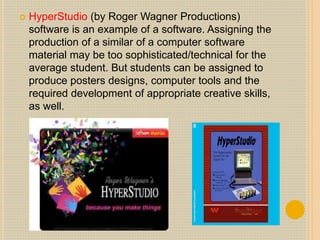
 HyperStudio (by Roger Wagner Productions)
software is an example of a software. Assigning the
production of a similar of a computer software
material may be too sophisticated/technical for the
average student. But students can be assigned to
produce posters designs, computer tools and the
required development of appropriate creative skills,
as well.
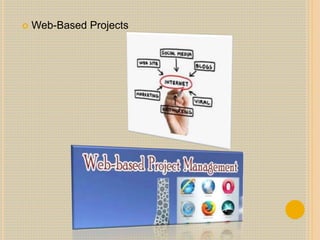
IV. WEB-BASED PROJECTS
 Students can be made to create ad post webpages
on a given topic. But creating webpages, even
single page webpages, may be too sophisticated
and time consuming for the average student.
 It should be said, however, that posting of
webpages in the Internet allows the students (now
the webpage creator) a wider audience. They can
also be linked with other related sites in the
Internet. But as of now, this creativity project may
be to ambitious as a toll in the teaching-learning
process.
 Web-Based Projects
 Prepared by:
 Justin Paul M. Bajado
 John Samuel Pagadora
 Vien Café
 Chelsea Nicole Yape
 Glenda Galo
 Alva Balois
 Melanie Ambal
THANK YOU!!!!

Higher Thinking Skills Through IT-Based Projects

  • 1.
  • 2.
    OVERVIEW:  In thislesson, we shall discuss four types of IT- based projects which can effectively be used in order to engage students in activities of a higher plane of thinking. To be noted is the fact that these projects differ in the specific process and skills employed, also in the ultimate activity of platform used to communicate completed products to others.
  • 3.
    HIGHER THINKING SKILLS THROUGHIT-BASED PROJECTS  It is to be understood that these projects do not address all of the thinking skills shown previously in the Thinking Skills Framework. But these projects represents constructivist approach to instruction, namely:  The teacher creating the learning environment  The teacher giving students the tools and facilities, and  The teacher facilitating learning.
  • 4.
     On theother hand, it is the students themselves who demonstrate higher thinking skills and creativity through such activities searching for information, organizing and synthesizing ideas, creating presentations, and the like.  Now let us see FOUR IT-Based Projects conducive to develop higher thinking skills and creativity among learners.
  • 5.
    I. RESOURCE-BASED PROJECTS In these projects, the teacher steps out of the traditional role of being a content expert and information provider, and instead lets the students find their own facts and information. Only when necessary for the active learning process does the teacher step in to supply data or information. The general flow of events in resource-based projects are:
  • 6.
     1. theteacher determine the topic for the examination of the class.  2. the teacher presents the problem to the class.  3. the students find information on the problem/questions.  4. students organize their information in response to the problem/question.
  • 7.
     Relating tofinding information, the central principle is to make the students go beyond the textbook and curriculum materials. Students are also encouraged to go to the library, particularly to the modern extension of the modern library, the internet.
  • 8.
    Furthermore, the inquiry-based or discoveryapproach is given importance in resource-based projects. This requires that the students, individually or cooperatively with members of his group, relate gathered information to the real world. Finally the process is given more importance than the project product.
  • 9.
     Teacher isexpert and information provider  Textbook is key source of information.  Focus on facts information is packaged in neat parcels  The product is the be-all and end-all of learning  Assessment is quantitative  Teacher is a guide and facilitator  Sources are varied (print, video, internet, etc.)  Focus on learning inquiry/quest/discovery  Emphasis on process  Assessment is quantitative and qualitative. Traditional Learning Model Resource-Based learning Model
  • 10.
    II. SIMPLE CREATIONS Students can also be assigned to create their own software materials to supplement the need for relevant and effective materials. Of course, there are available software materials such as Creative Writer (by Microsoft) on writing, KidWork Deluxe (by Davidson) on drawing and painting, and Media Weave (by Humanities Software) on multimedia.
  • 11.
     In developingsoftware, creativity as an outcome should not be equated with ingenuity or high intelligence. Creating is more consonant with planning, making, assembling, designing, or building. Creativity is said to combine three kind of skills/abilities:  Analyzing- distinguishing similarities and differences/ seeing the project as a problem to be solved.  Synthesizing- making spontaneous connections among ideas, thus generating interesting or new ideas.  Promoting- selling of new ideas to allow the public to test the ideas themeselves.
  • 12.
     To developcreativity, the following five key tasks may be recommended:  1. Define the task. Clarify the goal of the completed project to the student.  2. Brainstorm. He students themselves will be allowed to generate their own ideas on the project. Rather than shoot down ideas, the teacher encourages idea exchange.  3. Judge the Ideas. The students themselves make an appraisal for or against any idea. Only when students are completely off track should the teacher intervene.  4. Act. The students do their work with the teacher a facilitator.  5. Adopt flexibility. The students should be allowed to shift gears and not follow an action path rigidly.
  • 13.
    III. GUIDED HYPERMEDIAPROJECTS  The production of self-made multimedia projects can be approached in two different ways:  1. as an instructive tool, such as in the production by students of a power-point presentation of a selected topic.  2. as a communication tool, such as when students do a multimedia presentation (with text, “graphs, photos, audio narration, interviews, video clips, etc. to simulate a television news show.
  • 14.
     HyperStudio (byRoger Wagner Productions) software is an example of a software. Assigning the production of a similar of a computer software material may be too sophisticated/technical for the average student. But students can be assigned to produce posters designs, computer tools and the required development of appropriate creative skills, as well.
  • 15.
    IV. WEB-BASED PROJECTS Students can be made to create ad post webpages on a given topic. But creating webpages, even single page webpages, may be too sophisticated and time consuming for the average student.  It should be said, however, that posting of webpages in the Internet allows the students (now the webpage creator) a wider audience. They can also be linked with other related sites in the Internet. But as of now, this creativity project may be to ambitious as a toll in the teaching-learning process.
  • 16.
  • 17.
     Prepared by: Justin Paul M. Bajado  John Samuel Pagadora  Vien Café  Chelsea Nicole Yape  Glenda Galo  Alva Balois  Melanie Ambal
  • 18.