HIGHER THINKING SKILLS THROUGH IT-BASED PROJECTS


An introduction

    In this lesson, we shall discuss the four types of IT-based projects which can effectively
     be used in order to engage students in activities of a higher plane of thinking. It is to be
     understood that these projects do not address all of the thinking skills shown previously
     in the thinking skills framework. But these projects represents constructivists projects
     containing key elements of a constructivist approach to instructions, namely:
             The teacher creating the learning environment
             The teacher giving students tools and facilities and
             The teacher facilitating learning


The four types of IT-based projects

   1. Resource-based projects
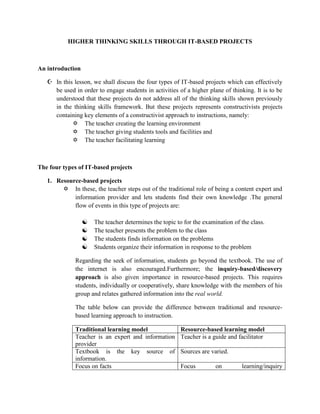
         In these, the teacher steps out of the traditional role of being a content expert and
            information provider and lets students find their own knowledge .The general
            flow of events in this type of projects are:

                     The teacher determines the topic to for the examination of the class.
                     The teacher presents the problem to the class
                     The students finds information on the problems
                     Students organize their information in response to the problem

              Regarding the seek of information, students go beyond the textbook. The use of
              the internet is also encouraged.Furthermore; the inquiry-based/discovery
              approach is also given importance in resource-based projects. This requires
              students, individually or cooperatively, share knowledge with the members of his
              group and relates gathered information into the real world.

              The table below can provide the difference between traditional and resource-
              based learning approach to instruction.

              Traditional learning model                 Resource-based learning model
              Teacher is an expert and information       Teacher is a guide and facilitator
              provider
              Textbook is the key source of              Sources are varied.
              information.
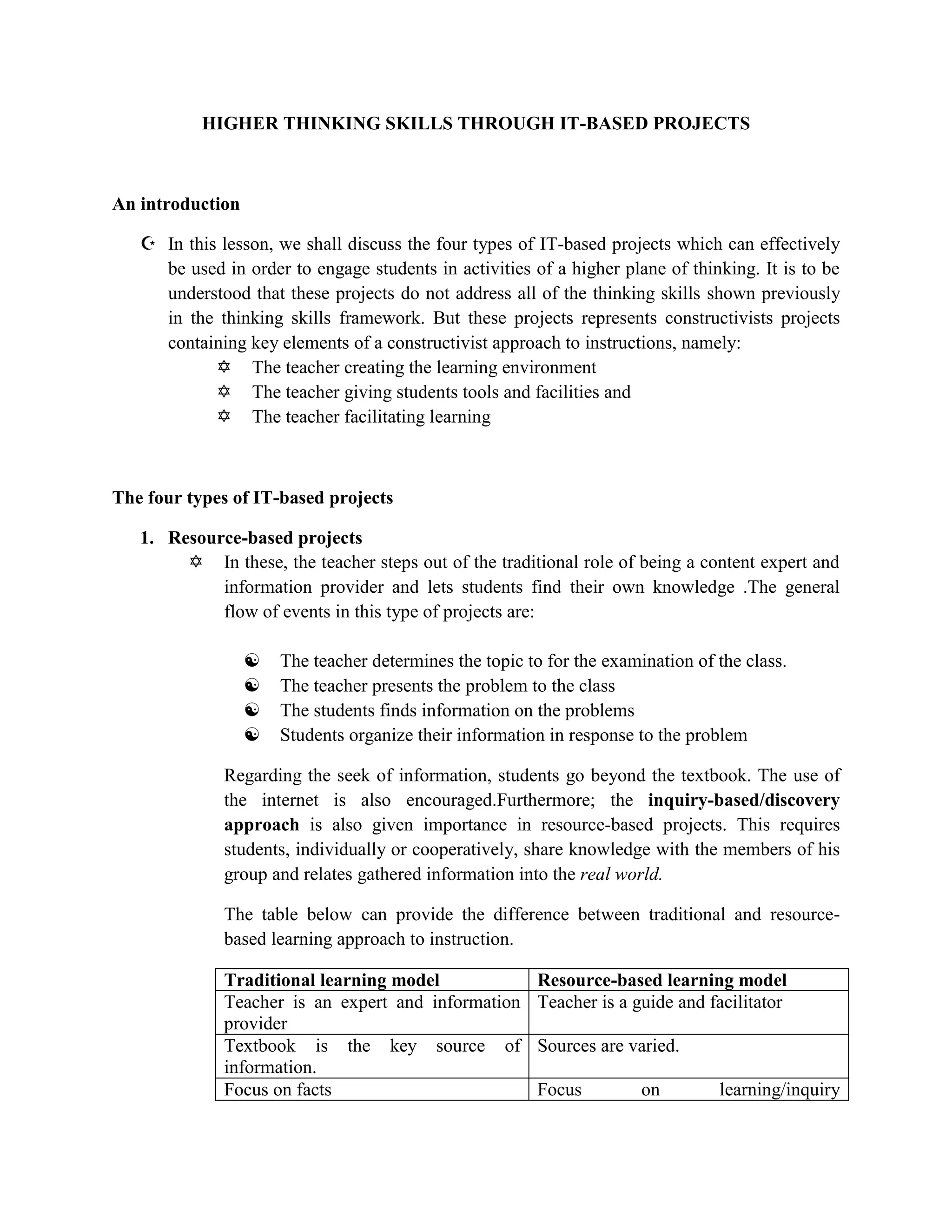
              Focus on facts                             Focus         on        learning/inquiry
Information is packaged in neat parcels quest/discovery
           The product is the be-all and end-all of Emphasis on process
           learning
           Assessment is qualitative                Assessment     is   qualitative     and
                                                    quantitative.


           Web quest

                 Developed by the San Diego State University as an Internet approach to
                  support resource-based projects. It is an inquiry-oriented activity which
                  most or all of the information used by learners are drawn from the web.

2. Simple creations
      Students can also be assigned to create their software materials to supplement the
         need for relevant and effective materials. In developing software, creativity as an
         outcome shouldn’t be equated to ingenuinity or higher intelligence.
         Creativity is said to combine three kinds of skills and abilities which are:
             Analyzing-distinguishing similarities/differences/seeing the project as a
                 problem to be solved.
             Synthesizing-making spontaneous connections among ideas, thus
                 generating interesting and new ideas.
             Promoting-selling of new ideas to allow the public to test the ideas
                 themselves.

           To develop creativity, the following five key tasks may be recommended:

                 Define the tasks
                 Brainstorm
                 Judge the ideas
                 Act
                 Adopt flexibility

3. Guided Hypermedia projects
      The production of self-made multimedia projects can be approached in two ways:
            As an instructive tool, such as in the production by students of a power
               point presentation for a selected topic.
            As a communication tool, such as when students do a multi-media
               presentation to simulate a television news show.

4. Web-based projects
   Students can be made to create and post web pages, even single paged web pages
    may be too sophisticated and time consuming for the average student.

    It should be said that posting web pages in the internet allows the students a wider
    audience. But as of now, this project is too ambitious too be used as a tool for the
    teaching-learning process.

Higher thinking skills through it based projects

  • 1.
    HIGHER THINKING SKILLSTHROUGH IT-BASED PROJECTS An introduction  In this lesson, we shall discuss the four types of IT-based projects which can effectively be used in order to engage students in activities of a higher plane of thinking. It is to be understood that these projects do not address all of the thinking skills shown previously in the thinking skills framework. But these projects represents constructivists projects containing key elements of a constructivist approach to instructions, namely:  The teacher creating the learning environment  The teacher giving students tools and facilities and  The teacher facilitating learning The four types of IT-based projects 1. Resource-based projects  In these, the teacher steps out of the traditional role of being a content expert and information provider and lets students find their own knowledge .The general flow of events in this type of projects are:  The teacher determines the topic to for the examination of the class.  The teacher presents the problem to the class  The students finds information on the problems  Students organize their information in response to the problem Regarding the seek of information, students go beyond the textbook. The use of the internet is also encouraged.Furthermore; the inquiry-based/discovery approach is also given importance in resource-based projects. This requires students, individually or cooperatively, share knowledge with the members of his group and relates gathered information into the real world. The table below can provide the difference between traditional and resource- based learning approach to instruction. Traditional learning model Resource-based learning model Teacher is an expert and information Teacher is a guide and facilitator provider Textbook is the key source of Sources are varied. information. Focus on facts Focus on learning/inquiry
  • 2.
    Information is packagedin neat parcels quest/discovery The product is the be-all and end-all of Emphasis on process learning Assessment is qualitative Assessment is qualitative and quantitative. Web quest  Developed by the San Diego State University as an Internet approach to support resource-based projects. It is an inquiry-oriented activity which most or all of the information used by learners are drawn from the web. 2. Simple creations  Students can also be assigned to create their software materials to supplement the need for relevant and effective materials. In developing software, creativity as an outcome shouldn’t be equated to ingenuinity or higher intelligence. Creativity is said to combine three kinds of skills and abilities which are:  Analyzing-distinguishing similarities/differences/seeing the project as a problem to be solved.  Synthesizing-making spontaneous connections among ideas, thus generating interesting and new ideas.  Promoting-selling of new ideas to allow the public to test the ideas themselves. To develop creativity, the following five key tasks may be recommended:  Define the tasks  Brainstorm  Judge the ideas  Act  Adopt flexibility 3. Guided Hypermedia projects  The production of self-made multimedia projects can be approached in two ways:  As an instructive tool, such as in the production by students of a power point presentation for a selected topic.  As a communication tool, such as when students do a multi-media presentation to simulate a television news show. 4. Web-based projects
  • 3.
    Students can be made to create and post web pages, even single paged web pages may be too sophisticated and time consuming for the average student. It should be said that posting web pages in the internet allows the students a wider audience. But as of now, this project is too ambitious too be used as a tool for the teaching-learning process.