IP Addressing
What is an IP Address?
• An IP address is a numeric identifier assigned
to each machine on an IP network. It
designates the location of a device on the
network. An IP address is a software address,
not a hardware address
What IP Addressing ?
• An IP address is a numeric identifier assigned
to each machine on an IP network. It
designates the location of a device on the
network. An IP address is a software address,
not a hardware address
IP Terminology
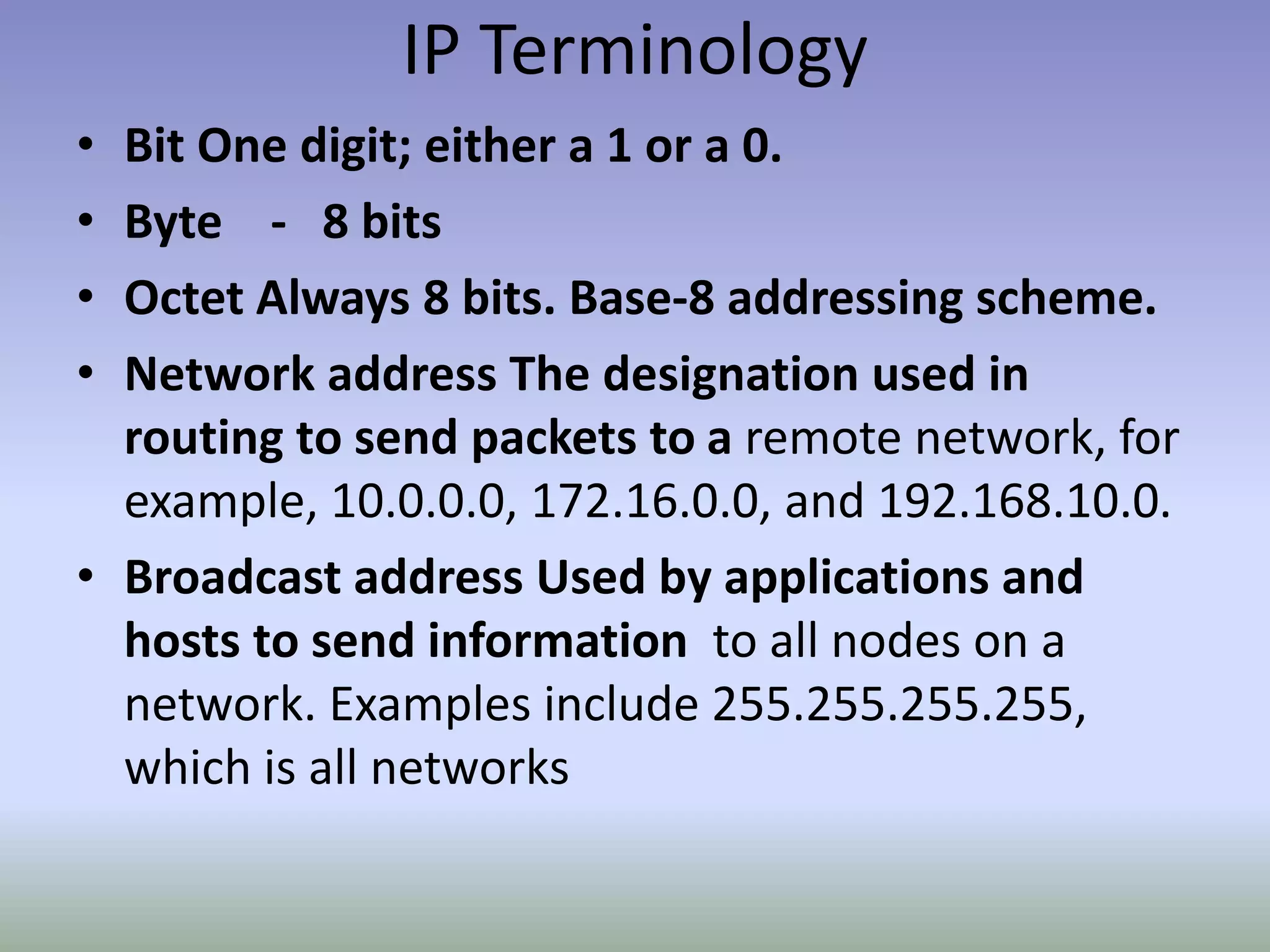
• Bit One digit; either a 1 or a 0.
• Byte - 8 bits
• Octet Always 8 bits. Base-8 addressing scheme.
• Network address The designation used in
routing to send packets to a remote network, for
example, 10.0.0.0, 172.16.0.0, and 192.168.10.0.
• Broadcast address Used by applications and
hosts to send information to all nodes on a
network. Examples include 255.255.255.255,
which is all networks
Basic Addressing
10.1.1.1
• IP addresses are written
in dotted decimal format.
• Four sections are
separated by dots.
• Each section contains a
number between 0 and
255.
Dots separate the sections
Each section contains
a number between 0
and 255
Basic Addressing
10.1.1.1
• Why is each section a number
between 0 and 255?
• Computers operate in binary,
humans operate in decimal.
• Computers treat IP addresses
as a single large 32 digit binary
number, but this is hard for
people to do.
• So, we split them up into four
smaller sections so we can
remember and work with them
better!
Dots separate the sections
Each section contains
a number between 0
and 255
Why????
Basic Addressing
10.1.1.1
• 32/4 == 8.
• 28 = 256.
• But, computers number
starting at 0, so to make a
space of 256 numbers, we
number from 0 to 255.
00001010 00000001 00000001 00000001
8 8 8 8
32
Each 8 digit group represents
a number between 0 and 255
Basic Addressing
10.1.1.1
• Each device on a network is
assigned an IP address.
• Each IP address has two
fundamental parts:
• The network portion, which
describes the physical wire
the device is attached to.
• The host portion, which
identifies the host on that
wire.
• How can we tell the
difference between the two
sections?
00001010 00000001 00000001 00000001
Network
Host
Basic Addressing
10.1.1.1
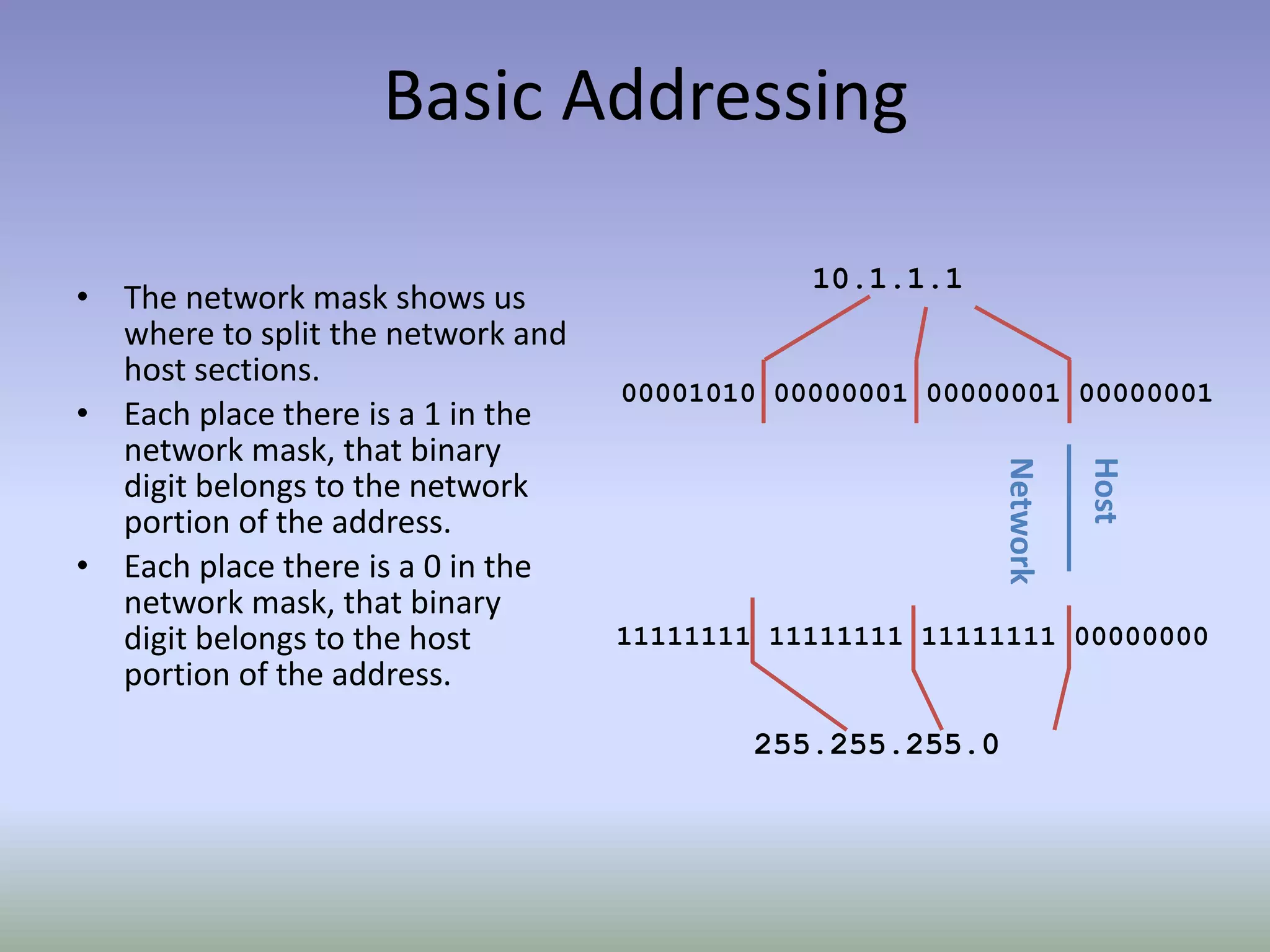
• The network mask shows us
where to split the network and
host sections.
• Each place there is a 1 in the
network mask, that binary
digit belongs to the network
portion of the address.
• Each place there is a 0 in the
network mask, that binary
digit belongs to the host
portion of the address.
00001010 00000001 00000001 00000001
Network
Host
255.255.255.0
11111111 11111111 11111111 00000000
Basic Addressing
10.1.1.1
• An alternative set of
terminology is:
• The network portion of the
address is called the prefix.
• The host portion of the
address is called the host.
• The network mask is
expressed as a prefix length,
which is a count of the
number of 1’s in the subnet
mask.
00001010 00000001 00000001 00000001
Prefix
Host
11111111 11111111 11111111 00000000
8 + 8 + 8 = 24
10.1.1.1/24
Basic Addressing
• The network address is the
IP address with all 0’s in the
host bits.
• The broadcast address is
the IP address with all 1’s in
the host bits.
• Packets sent to either
address will be delivered to
all the hosts connected to
the wire.
10 1 1 0/24
00001010 000000011 00000001 00000000
prefix host
these bits are 0, so this is the network address
10 1 1 255/24
00001010 000000011 00000001 11111111
prefix host
these bits are 1, so this is the broadcast address
Working with Addresses
• Two of the most common
questions you are going
to face when dealing with
IP addresses are:
• What’s the network?
• What’s the host?
• How do we figure this
out?
192.168.100.80/26
????
Working with Addresses (The Hard
Way)
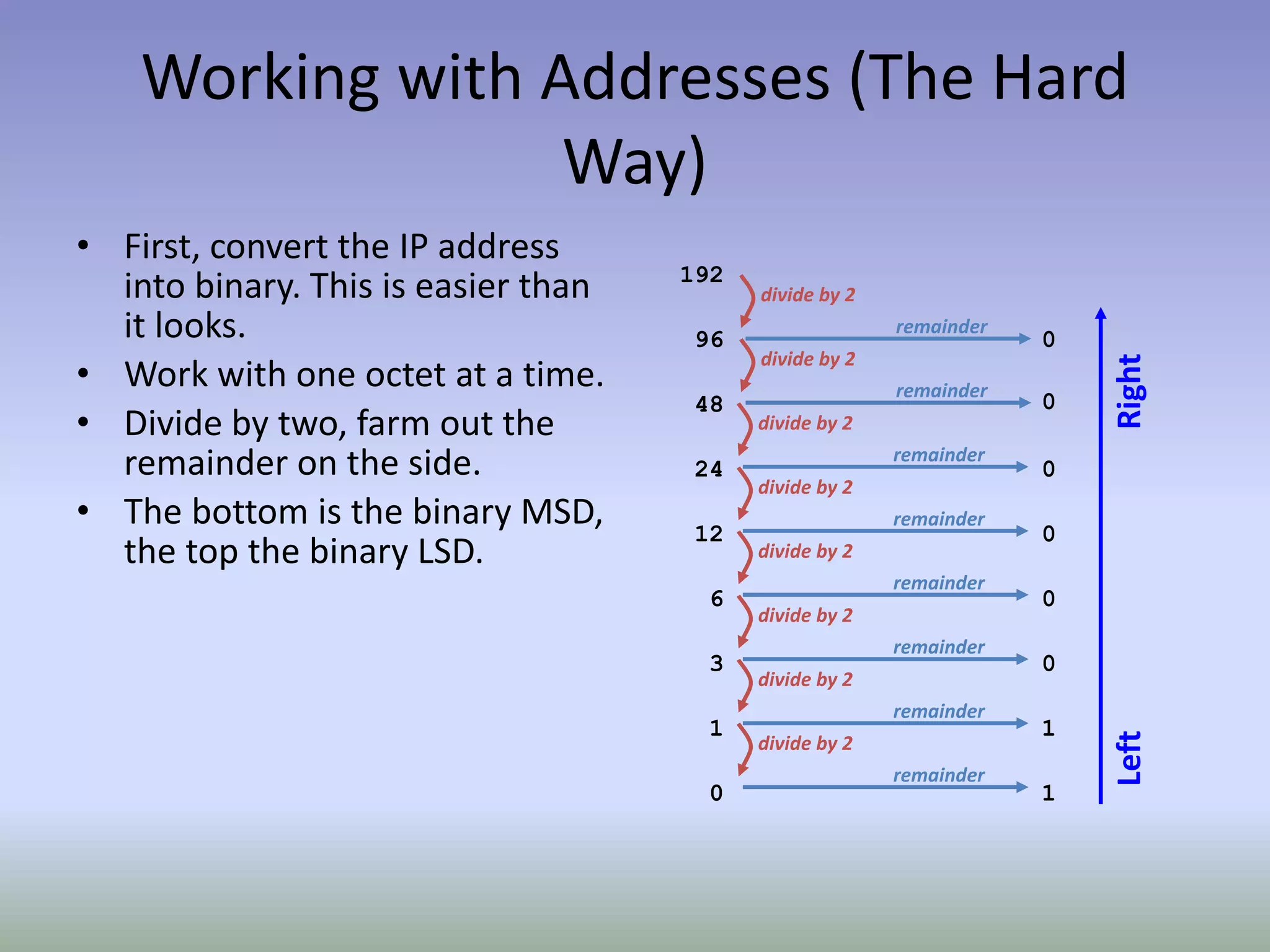
• First, convert the IP address
into binary. This is easier than
it looks.
• Work with one octet at a time.
• Divide by two, farm out the
remainder on the side.
• The bottom is the binary MSD,
the top the binary LSD.
192
96 0
divide by 2
remainder
48 0
divide by 2
remainder
24 0
divide by 2
remainder
12 0
divide by 2
remainder
6 0
divide by 2
remainder
3 0
divide by 2
remainder
1 1
divide by 2
remainder
0 1
divide by 2
remainder
LeftRight
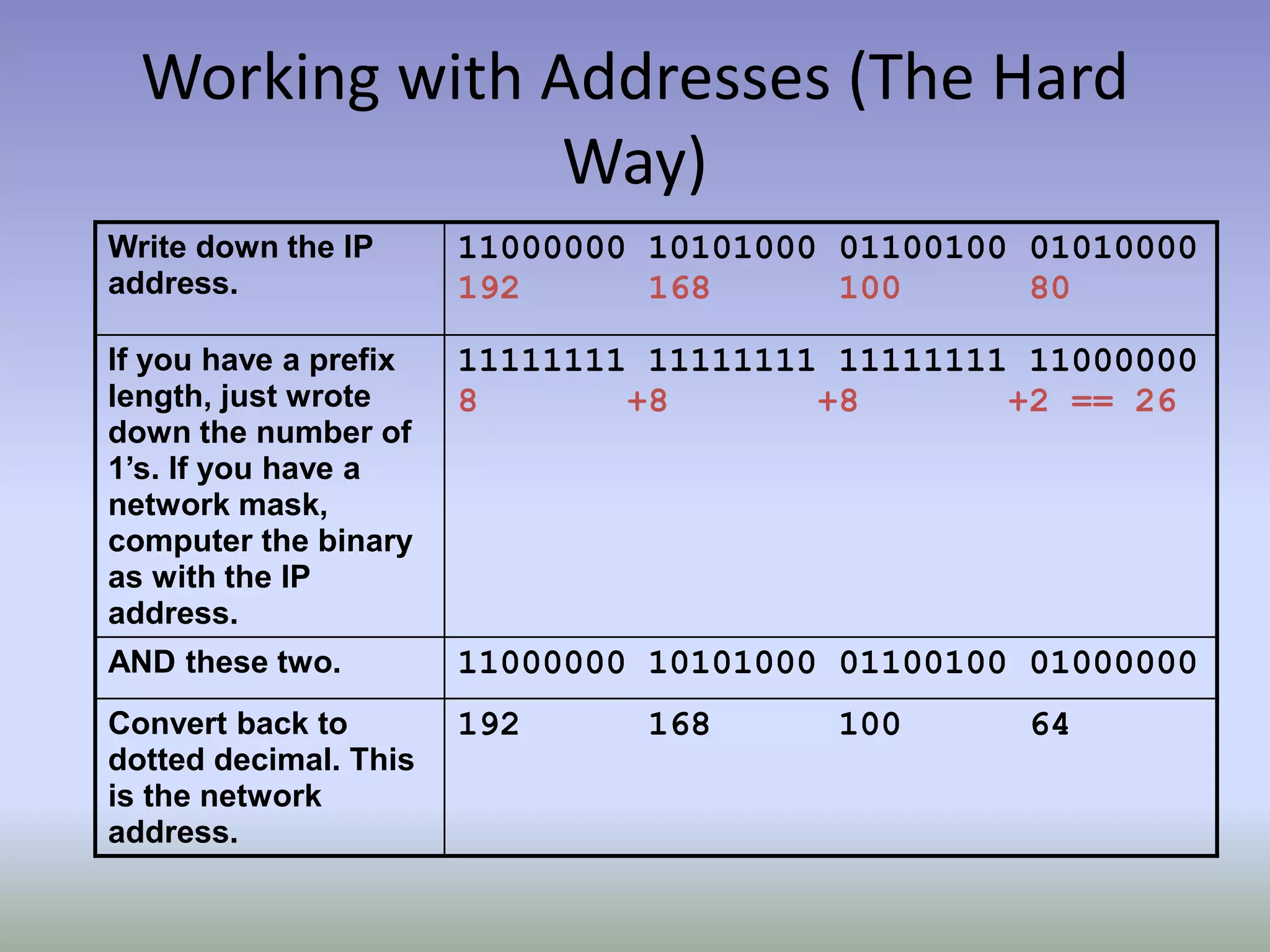
Working with Addresses (The Hard
Way)
Write down the IP
address.
11000000 10101000 01100100 01010000
192 168 100 80
If you have a prefix
length, just wrote
down the number of
1’s. If you have a
network mask,
computer the binary
as with the IP
address.
11111111 11111111 11111111 11000000
8 +8 +8 +2 == 26
AND these two. 11000000 10101000 01100100 01000000
Convert back to
dotted decimal. This
is the network
address.
192 168 100 64
Working with Addresses (The Hard
Way)
Write down the IP
address.
11000000 10101000 01100100 01010000
192 168 100 80
If you have a prefix
length, just wrote
down the number of
1’s. If you have a
network mask,
computer the binary
as with the IP
address.
11111111 11111111 11111111 11000000
8 +8 +8 +2 == 26
NOR these two. 00000000 00000000 00000000 00010000
Convert back to
dotted decimal. This
is the host address.
0 0 0 16
Working with Addresses (The Hard
Way)
• To convert from binary to
decimal, use a simple
chart.
• Add the number indicated
for each 1 set in the
binary number.
128 1 128
64 0 0
32 1 32
16 0 0
8 1 8
4 0 0
2 0 0
1 0 0
168
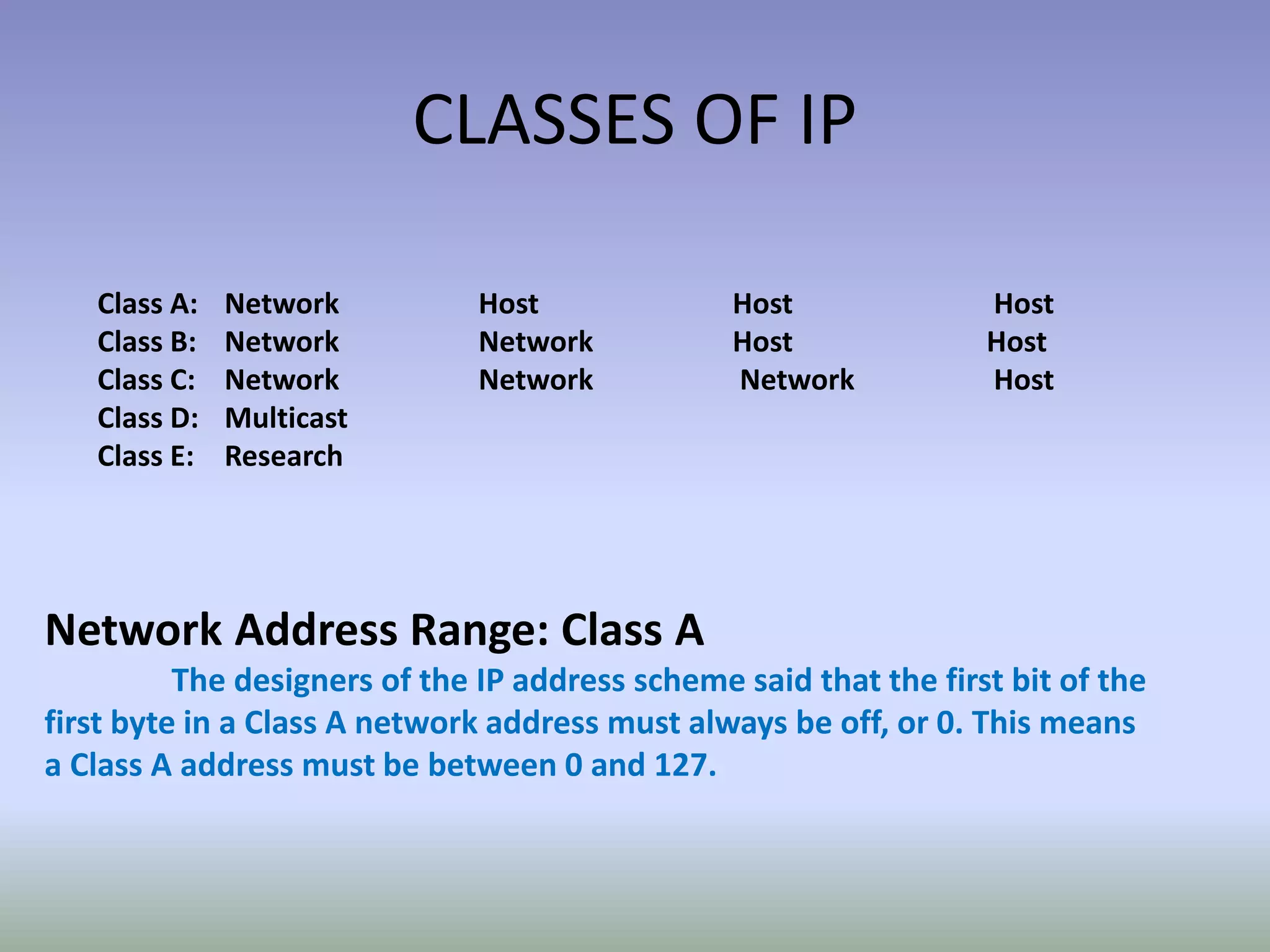
CLASSES OF IP
Class A: Network Host Host Host
Class B: Network Network Host Host
Class C: Network Network Network Host
Class D: Multicast
Class E: Research
Network Address Range: Class A
The designers of the IP address scheme said that the first bit of the
first byte in a Class A network address must always be off, or 0. This means
a Class A address must be between 0 and 127.
Network Address Range: Class B
In a Class B network, the RFCs state that the first
bit of the first byte must always be turned on, but the
second bit must always be turned off. If you turn the
other six bits all off and then all on, you will find the
range for a
Class B network:
10000000=128
10111111=191
Class B network can be defined when the first byte is
configured from
128 to 191.
Network Address Range: Class C
For Class C networks, the RFCs define the first two bits of
the first octet always turned on, but the third bit can never be on.
Following the same process as the previous classes, convert from
binary to decimal to find the range.
Here is the range for a Class C network:
11000000=192
11011111=223
IP address that starts at 192 and goes to 223, you’ll know
it is a Class C IP address.
Network Address Ranges: Classes D and E
The addresses between 224 and 255 are reserved for Class
D and E networks. Class D is used for multicast addresses and Class
E for scientific purposes. We will not discuss Class D and E
addresses in this book.
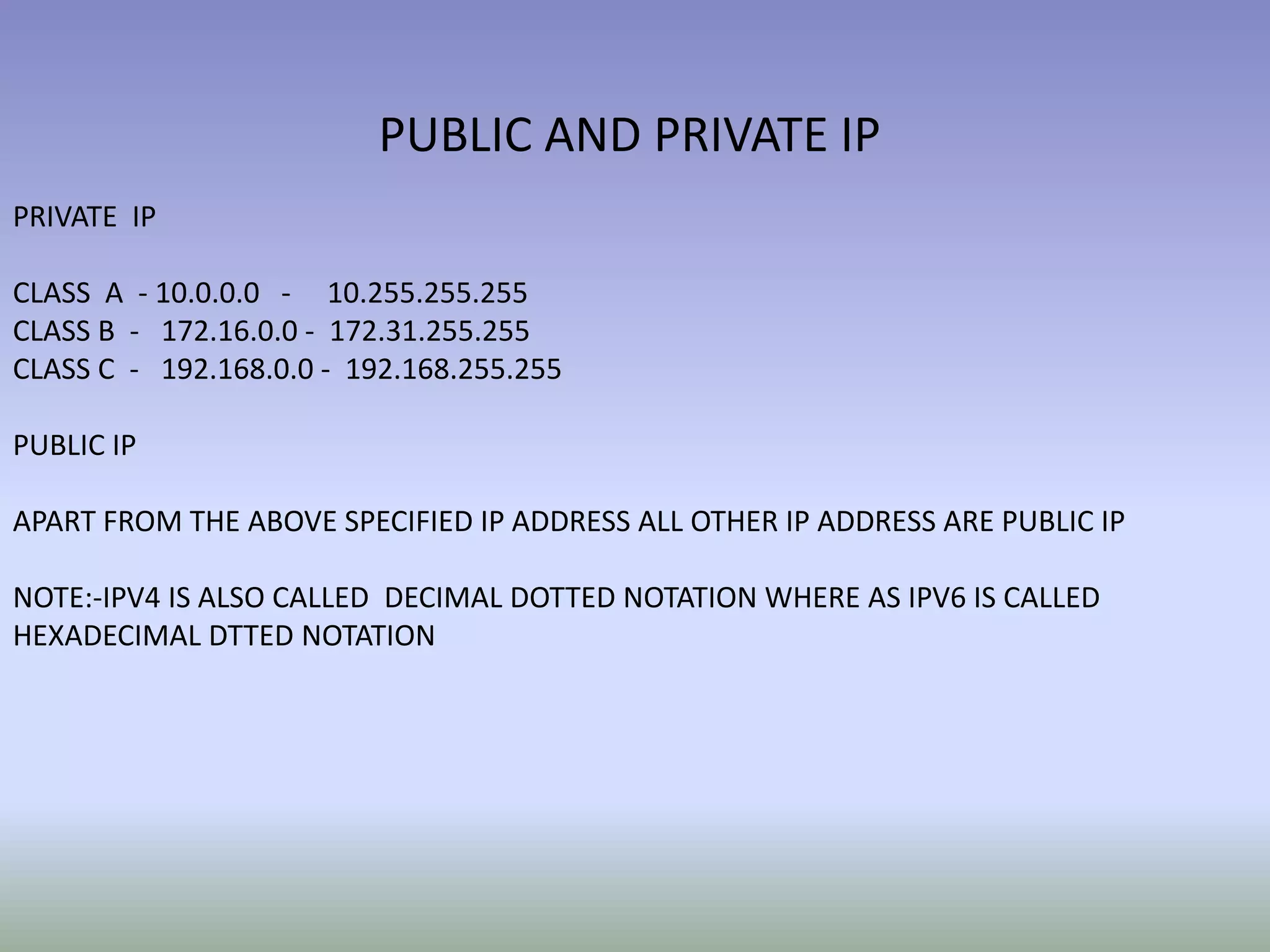
PUBLIC AND PRIVATE IP
PRIVATE IP
CLASS A - 10.0.0.0 - 10.255.255.255
CLASS B - 172.16.0.0 - 172.31.255.255
CLASS C - 192.168.0.0 - 192.168.255.255
PUBLIC IP
APART FROM THE ABOVE SPECIFIED IP ADDRESS ALL OTHER IP ADDRESS ARE PUBLIC IP
NOTE:-IPV4 IS ALSO CALLED DECIMAL DOTTED NOTATION WHERE AS IPV6 IS CALLED
HEXADECIMAL DTTED NOTATION

Ip addressing

  • 1.
  • 2.
    What is anIP Address? • An IP address is a numeric identifier assigned to each machine on an IP network. It designates the location of a device on the network. An IP address is a software address, not a hardware address
  • 3.
    What IP Addressing? • An IP address is a numeric identifier assigned to each machine on an IP network. It designates the location of a device on the network. An IP address is a software address, not a hardware address
  • 4.
    IP Terminology • BitOne digit; either a 1 or a 0. • Byte - 8 bits • Octet Always 8 bits. Base-8 addressing scheme. • Network address The designation used in routing to send packets to a remote network, for example, 10.0.0.0, 172.16.0.0, and 192.168.10.0. • Broadcast address Used by applications and hosts to send information to all nodes on a network. Examples include 255.255.255.255, which is all networks
  • 5.
    Basic Addressing 10.1.1.1 • IPaddresses are written in dotted decimal format. • Four sections are separated by dots. • Each section contains a number between 0 and 255. Dots separate the sections Each section contains a number between 0 and 255
  • 6.
    Basic Addressing 10.1.1.1 • Whyis each section a number between 0 and 255? • Computers operate in binary, humans operate in decimal. • Computers treat IP addresses as a single large 32 digit binary number, but this is hard for people to do. • So, we split them up into four smaller sections so we can remember and work with them better! Dots separate the sections Each section contains a number between 0 and 255 Why????
  • 7.
    Basic Addressing 10.1.1.1 • 32/4== 8. • 28 = 256. • But, computers number starting at 0, so to make a space of 256 numbers, we number from 0 to 255. 00001010 00000001 00000001 00000001 8 8 8 8 32 Each 8 digit group represents a number between 0 and 255
  • 8.
    Basic Addressing 10.1.1.1 • Eachdevice on a network is assigned an IP address. • Each IP address has two fundamental parts: • The network portion, which describes the physical wire the device is attached to. • The host portion, which identifies the host on that wire. • How can we tell the difference between the two sections? 00001010 00000001 00000001 00000001 Network Host
  • 9.
    Basic Addressing 10.1.1.1 • Thenetwork mask shows us where to split the network and host sections. • Each place there is a 1 in the network mask, that binary digit belongs to the network portion of the address. • Each place there is a 0 in the network mask, that binary digit belongs to the host portion of the address. 00001010 00000001 00000001 00000001 Network Host 255.255.255.0 11111111 11111111 11111111 00000000
  • 10.
    Basic Addressing 10.1.1.1 • Analternative set of terminology is: • The network portion of the address is called the prefix. • The host portion of the address is called the host. • The network mask is expressed as a prefix length, which is a count of the number of 1’s in the subnet mask. 00001010 00000001 00000001 00000001 Prefix Host 11111111 11111111 11111111 00000000 8 + 8 + 8 = 24 10.1.1.1/24
  • 11.
    Basic Addressing • Thenetwork address is the IP address with all 0’s in the host bits. • The broadcast address is the IP address with all 1’s in the host bits. • Packets sent to either address will be delivered to all the hosts connected to the wire. 10 1 1 0/24 00001010 000000011 00000001 00000000 prefix host these bits are 0, so this is the network address 10 1 1 255/24 00001010 000000011 00000001 11111111 prefix host these bits are 1, so this is the broadcast address
  • 12.
    Working with Addresses •Two of the most common questions you are going to face when dealing with IP addresses are: • What’s the network? • What’s the host? • How do we figure this out? 192.168.100.80/26 ????
  • 13.
    Working with Addresses(The Hard Way) • First, convert the IP address into binary. This is easier than it looks. • Work with one octet at a time. • Divide by two, farm out the remainder on the side. • The bottom is the binary MSD, the top the binary LSD. 192 96 0 divide by 2 remainder 48 0 divide by 2 remainder 24 0 divide by 2 remainder 12 0 divide by 2 remainder 6 0 divide by 2 remainder 3 0 divide by 2 remainder 1 1 divide by 2 remainder 0 1 divide by 2 remainder LeftRight
  • 14.
    Working with Addresses(The Hard Way) Write down the IP address. 11000000 10101000 01100100 01010000 192 168 100 80 If you have a prefix length, just wrote down the number of 1’s. If you have a network mask, computer the binary as with the IP address. 11111111 11111111 11111111 11000000 8 +8 +8 +2 == 26 AND these two. 11000000 10101000 01100100 01000000 Convert back to dotted decimal. This is the network address. 192 168 100 64
  • 15.
    Working with Addresses(The Hard Way) Write down the IP address. 11000000 10101000 01100100 01010000 192 168 100 80 If you have a prefix length, just wrote down the number of 1’s. If you have a network mask, computer the binary as with the IP address. 11111111 11111111 11111111 11000000 8 +8 +8 +2 == 26 NOR these two. 00000000 00000000 00000000 00010000 Convert back to dotted decimal. This is the host address. 0 0 0 16
  • 16.
    Working with Addresses(The Hard Way) • To convert from binary to decimal, use a simple chart. • Add the number indicated for each 1 set in the binary number. 128 1 128 64 0 0 32 1 32 16 0 0 8 1 8 4 0 0 2 0 0 1 0 0 168
  • 17.
    CLASSES OF IP ClassA: Network Host Host Host Class B: Network Network Host Host Class C: Network Network Network Host Class D: Multicast Class E: Research Network Address Range: Class A The designers of the IP address scheme said that the first bit of the first byte in a Class A network address must always be off, or 0. This means a Class A address must be between 0 and 127.
  • 18.
    Network Address Range:Class B In a Class B network, the RFCs state that the first bit of the first byte must always be turned on, but the second bit must always be turned off. If you turn the other six bits all off and then all on, you will find the range for a Class B network: 10000000=128 10111111=191 Class B network can be defined when the first byte is configured from 128 to 191.
  • 19.
    Network Address Range:Class C For Class C networks, the RFCs define the first two bits of the first octet always turned on, but the third bit can never be on. Following the same process as the previous classes, convert from binary to decimal to find the range. Here is the range for a Class C network: 11000000=192 11011111=223 IP address that starts at 192 and goes to 223, you’ll know it is a Class C IP address.
  • 20.
    Network Address Ranges:Classes D and E The addresses between 224 and 255 are reserved for Class D and E networks. Class D is used for multicast addresses and Class E for scientific purposes. We will not discuss Class D and E addresses in this book.
  • 21.
    PUBLIC AND PRIVATEIP PRIVATE IP CLASS A - 10.0.0.0 - 10.255.255.255 CLASS B - 172.16.0.0 - 172.31.255.255 CLASS C - 192.168.0.0 - 192.168.255.255 PUBLIC IP APART FROM THE ABOVE SPECIFIED IP ADDRESS ALL OTHER IP ADDRESS ARE PUBLIC IP NOTE:-IPV4 IS ALSO CALLED DECIMAL DOTTED NOTATION WHERE AS IPV6 IS CALLED HEXADECIMAL DTTED NOTATION