COMPUTER NETWORKING
Introduction
• A network is a group of Interconnected
computer systems by means of a shared
communications link.
• A computer network is nothing but two or
more computers and devices like printers
connected together.
• A network is a group Interconnected sharing
services and Interacting by means of shared
communications link. A network therefore
requires two or more individual with
something (data) to share
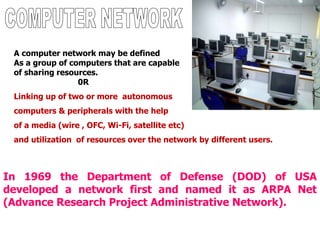
In 1969 the Department of Defense (DOD) of USA
developed a network first and named it as ARPA Net
(Advance Research Project Administrative Network).
A computer network may be defined
As a group of computers that are capable
of sharing resources.
0R
Linking up of two or more autonomous
computers & peripherals with the help
of a media (wire , OFC, Wi-Fi, satellite etc)
and utilization of resources over the network by different users.
Applications of Networks
Resource Sharing
Hardware (computing resources, disks, printers)
Software (application software)
Information Sharing
Easy accessibility from anywhere (files, databases)
Search Capability (WWW)
Communication
Email
Message broadcast
Remote computing
N/W According to AREA
• LAN ( Local Area N/W)
• MAN(Metropolitan Area N/W
• WAN(Wide Area N/W)
• PAN(Personnel Area N/W)
LAN
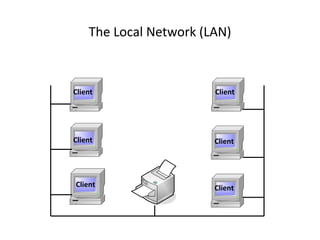
A Local area Network is a group of
computers and network
communication devices inter
connected within a geographically
limited area such as campus or
building.
LANs are characterized by
They transfer data at high speed. They
exist in limited area-building, campus.
Their technology is generally less
expensive.
MAN
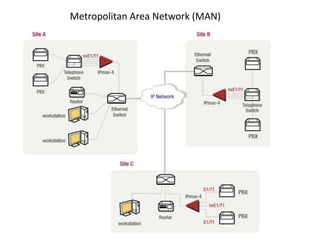
A Metropolitan Area Network
is a group of computers and network
communication devices inter
connected within a geographically
limited area such as city
WAN
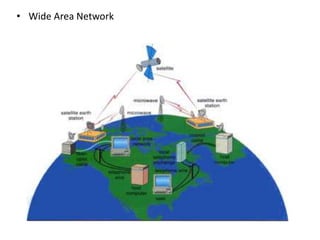
Wide Area Network interconnects
LAN. WAN may be located entirely within a
state or country or it may be inter connected
around the world. WAN are characterized by
the following.
They exist in a widely scattered
geographical area-country continent. They are
more susceptible to error due to the large
distance data travel. They inter connect
multiple LANs
The Local Network (LAN)
Client
ClientClient
Client Client
Client
Metropolitan Area Network (MAN)
• Wide Area Network
Hardware device use for Networks
• Network Interface Card (NIC)
• Routers
• Switch
• Modem
Network Interface Card (NIC)
• NIC provides the physical interface between computer and cabling.
• It prepares data, sends data, and controls the flow of data. It can also
receive and translate data into bytes for the CPU to understand.
• The following factors should be taken into consideration when choosing a
NIC:
1. - Preparing data
2. - Sending and controlling data
3. - Configuration
4. - Drivers
5. - Compatibility
6. - Performance
Based on the role of computers attached to a
network, Networks are divided into two types:
1. Peer to Peer Network
2. Clint Server Network
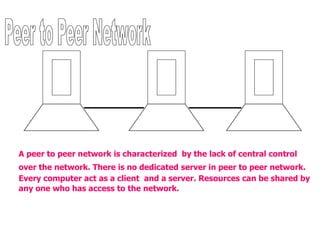
A peer to peer network is characterized by the lack of central control
over the network. There is no dedicated server in peer to peer network.
Every computer act as a client and a server. Resources can be shared by
any one who has access to the network.
1. No extra investment in server hardware and software
is required
2. The set-up is easy
3. Network administrator is not required
4. User can control the sharing of resources
5. Low cost
1. The security weak
2. Users are required to administer their own computer
3. There is additional load on the computers because of
resource sharing
4. It is not possible to handle as many network connection
as in server based networks.
S
E
R
V
E
R
S
E
R
V
E
R
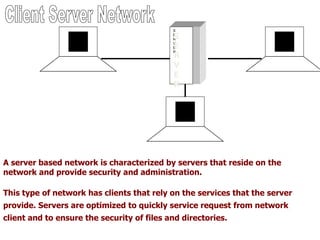
A server based network is characterized by servers that reside on the
network and provide security and administration.
This type of network has clients that rely on the services that the server
provide. Servers are optimized to quickly service request from network
client and to ensure the security of files and directories.
1. Strong central security
2. Central file storage
3. Functionality of servers to pool the available
hardware and software lowering over all cost
4. Easy management of a large number of users
5. Freeing users from the task of managing the
shared resources
1.Dedicated software
2.Expensive network operating system and
client licenses
3.Required a dedicated network administrator
4.On failure of server the whole network is
effected

Computer networking

  • 1.
  • 2.
    Introduction • A networkis a group of Interconnected computer systems by means of a shared communications link. • A computer network is nothing but two or more computers and devices like printers connected together. • A network is a group Interconnected sharing services and Interacting by means of shared communications link. A network therefore requires two or more individual with something (data) to share
  • 3.
    In 1969 theDepartment of Defense (DOD) of USA developed a network first and named it as ARPA Net (Advance Research Project Administrative Network). A computer network may be defined As a group of computers that are capable of sharing resources. 0R Linking up of two or more autonomous computers & peripherals with the help of a media (wire , OFC, Wi-Fi, satellite etc) and utilization of resources over the network by different users.
  • 4.
    Applications of Networks ResourceSharing Hardware (computing resources, disks, printers) Software (application software) Information Sharing Easy accessibility from anywhere (files, databases) Search Capability (WWW) Communication Email Message broadcast Remote computing
  • 5.
    N/W According toAREA • LAN ( Local Area N/W) • MAN(Metropolitan Area N/W • WAN(Wide Area N/W) • PAN(Personnel Area N/W)
  • 6.
    LAN A Local areaNetwork is a group of computers and network communication devices inter connected within a geographically limited area such as campus or building. LANs are characterized by They transfer data at high speed. They exist in limited area-building, campus. Their technology is generally less expensive.
  • 7.
    MAN A Metropolitan AreaNetwork is a group of computers and network communication devices inter connected within a geographically limited area such as city
  • 8.
    WAN Wide Area Networkinterconnects LAN. WAN may be located entirely within a state or country or it may be inter connected around the world. WAN are characterized by the following. They exist in a widely scattered geographical area-country continent. They are more susceptible to error due to the large distance data travel. They inter connect multiple LANs
  • 9.
    The Local Network(LAN) Client ClientClient Client Client Client
  • 10.
  • 11.
  • 12.
    Hardware device usefor Networks • Network Interface Card (NIC) • Routers • Switch • Modem
  • 13.
    Network Interface Card(NIC) • NIC provides the physical interface between computer and cabling. • It prepares data, sends data, and controls the flow of data. It can also receive and translate data into bytes for the CPU to understand. • The following factors should be taken into consideration when choosing a NIC: 1. - Preparing data 2. - Sending and controlling data 3. - Configuration 4. - Drivers 5. - Compatibility 6. - Performance
  • 14.
    Based on therole of computers attached to a network, Networks are divided into two types: 1. Peer to Peer Network 2. Clint Server Network
  • 15.
    A peer topeer network is characterized by the lack of central control over the network. There is no dedicated server in peer to peer network. Every computer act as a client and a server. Resources can be shared by any one who has access to the network.
  • 16.
    1. No extrainvestment in server hardware and software is required 2. The set-up is easy 3. Network administrator is not required 4. User can control the sharing of resources 5. Low cost
  • 17.
    1. The securityweak 2. Users are required to administer their own computer 3. There is additional load on the computers because of resource sharing 4. It is not possible to handle as many network connection as in server based networks.
  • 18.
    S E R V E R S E R V E R A server basednetwork is characterized by servers that reside on the network and provide security and administration. This type of network has clients that rely on the services that the server provide. Servers are optimized to quickly service request from network client and to ensure the security of files and directories.
  • 19.
    1. Strong centralsecurity 2. Central file storage 3. Functionality of servers to pool the available hardware and software lowering over all cost 4. Easy management of a large number of users 5. Freeing users from the task of managing the shared resources
  • 20.
    1.Dedicated software 2.Expensive networkoperating system and client licenses 3.Required a dedicated network administrator 4.On failure of server the whole network is effected