iOS 8 App Extensions 
by 
Ravi Kumar 
Sr.iOS Developer 
email:jrk.iosdev@gmail.com
● What is ios app Extension ? 
● App Extension’s Life Cycle 
● How an App Extension Communicates 
● Some APIs Are Unavailable to App Extensions 
● Creating an App Extension 
● Distribute the Containing App 
● Sharing Data with Your Containing App 
● debug an app extension 
● App Extension Types
What is ios app Extension ? 
● An app extension is different from an app 
● It is a way for you to share your app’s functionality with other apps 
● you must use an app to contain and deliver your extensions 
● To distribute app extensions to users, you submit a containing app to the 
App Store. When a user installs your containing app, the extensions it 
contains are also installed 
● You can use Objective-C or Swift,Objective-C and Swift 
● After installing an app extension, a user must take action to enable it
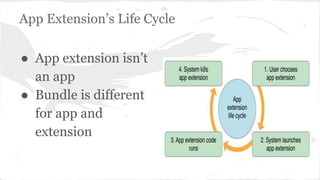
App Extension’s Life Cycle 
● App extension isn’t 
an app 
● Bundle is different 
for app and 
extension
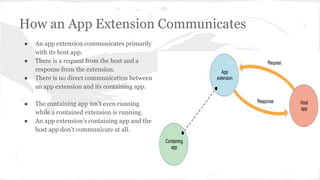
How an App Extension Communicates 
● An app extension communicates primarily 
with its host app. 
● There is a request from the host and a 
response from the extension. 
● There is no direct communication between 
an app extension and its containing app. 
● The containing app isn’t even running 
while a contained extension is running. 
● An app extension’s containing app and the 
host app don’t communicate at all.
Some APIs Are Unavailable to App Extensions 
● Access a sharedApplication object, and so cannot use 
any of the methods on that object. 
● HealthKit framework and EventKit UI framework are 
unavailable to app extensions. 
● Access the camera or microphone on an iOS device. 
● Perform long-running background tasks. 
● Receive data using AirDrop.
Creating an App Extension 
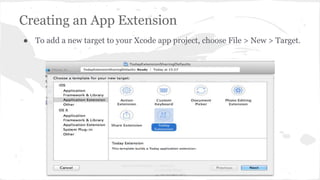
● To add a new target to your Xcode app project, choose File > New > Target.
Distribute the Containing App 
● You can’t submit an app extension to the App Store 
unless it’s inside a containing app, and you can’t 
transfer an extension from one app to another. 
● To deliver an iOS app extension, you must submit a 
containing app to the App Store. 
● To pass app review, your containing app must provide 
functionality to users; it can’t just contain app 
extensions.
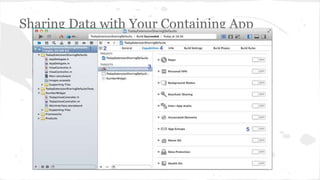
Sharing Data with Your Containing App
// Create and share access to an NSUserDefaults object. 
NSUserDefaults *mySharedDefaults = [[NSUserDefaults alloc] 
initWithSuiteName:@"com.example.domain.MyShareExtension"]; 
// Use the shared user defaults object to update the user's account. 
[mySharedDefaults setObject:theAccountName forKey:@"lastAccountName"];
debug an app extension 
● Enable the app extension’s scheme by choosing Product > Scheme > MyExtensionName or by 
clicking the scheme pop-up menu in the Xcode toolbar and choosing MyExtensionName. 
● Click the Build and Run button to tell Xcode to launch your specified host app. 
● The Debug navigator indicates it is waiting for you to invoke the app extension. 
● Invoke the app extension by way of the host app’s UI.
App Extension Types 
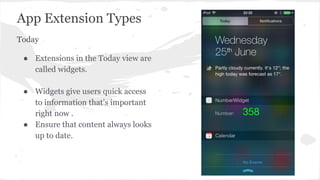
Today 
● Extensions in the Today view are 
called widgets. 
● Widgets give users quick access 
to information that’s important 
right now . 
● Ensure that content always looks 
up to date.
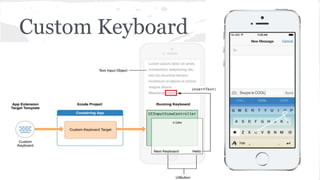
Custom Keyboard
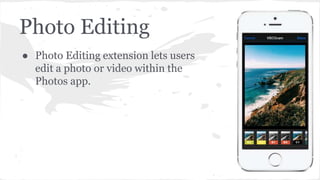
Photo Editing 
● Photo Editing extension lets users 
edit a photo or video within the 
Photos app.
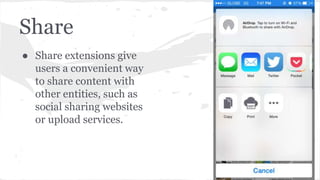
Share 
● Share extensions give 
users a convenient way 
to share content with 
other entities, such as 
social sharing websites 
or upload services.
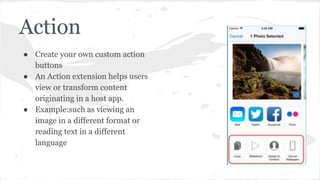
Action 
● Create your own custom action 
buttons 
● An Action extension helps users 
view or transform content 
originating in a host app. 
● Example:such as viewing an 
image in a different format or 
reading text in a different 
language
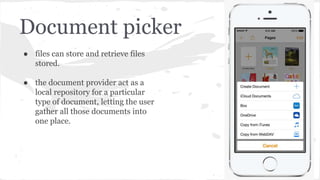
Document picker 
● files can store and retrieve files 
stored. 
● the document provider act as a 
local repository for a particular 
type of document, letting the user 
gather all those documents into 
one place.
Thank you

iOS 8 App Extensions

  • 1.
    iOS 8 AppExtensions by Ravi Kumar Sr.iOS Developer email:jrk.iosdev@gmail.com
  • 2.
    ● What isios app Extension ? ● App Extension’s Life Cycle ● How an App Extension Communicates ● Some APIs Are Unavailable to App Extensions ● Creating an App Extension ● Distribute the Containing App ● Sharing Data with Your Containing App ● debug an app extension ● App Extension Types
  • 3.
    What is iosapp Extension ? ● An app extension is different from an app ● It is a way for you to share your app’s functionality with other apps ● you must use an app to contain and deliver your extensions ● To distribute app extensions to users, you submit a containing app to the App Store. When a user installs your containing app, the extensions it contains are also installed ● You can use Objective-C or Swift,Objective-C and Swift ● After installing an app extension, a user must take action to enable it
  • 4.
    App Extension’s LifeCycle ● App extension isn’t an app ● Bundle is different for app and extension
  • 5.
    How an AppExtension Communicates ● An app extension communicates primarily with its host app. ● There is a request from the host and a response from the extension. ● There is no direct communication between an app extension and its containing app. ● The containing app isn’t even running while a contained extension is running. ● An app extension’s containing app and the host app don’t communicate at all.
  • 6.
    Some APIs AreUnavailable to App Extensions ● Access a sharedApplication object, and so cannot use any of the methods on that object. ● HealthKit framework and EventKit UI framework are unavailable to app extensions. ● Access the camera or microphone on an iOS device. ● Perform long-running background tasks. ● Receive data using AirDrop.
  • 7.
    Creating an AppExtension ● To add a new target to your Xcode app project, choose File > New > Target.
  • 8.
    Distribute the ContainingApp ● You can’t submit an app extension to the App Store unless it’s inside a containing app, and you can’t transfer an extension from one app to another. ● To deliver an iOS app extension, you must submit a containing app to the App Store. ● To pass app review, your containing app must provide functionality to users; it can’t just contain app extensions.
  • 9.
    Sharing Data withYour Containing App
  • 10.
    // Create andshare access to an NSUserDefaults object. NSUserDefaults *mySharedDefaults = [[NSUserDefaults alloc] initWithSuiteName:@"com.example.domain.MyShareExtension"]; // Use the shared user defaults object to update the user's account. [mySharedDefaults setObject:theAccountName forKey:@"lastAccountName"];
  • 11.
    debug an appextension ● Enable the app extension’s scheme by choosing Product > Scheme > MyExtensionName or by clicking the scheme pop-up menu in the Xcode toolbar and choosing MyExtensionName. ● Click the Build and Run button to tell Xcode to launch your specified host app. ● The Debug navigator indicates it is waiting for you to invoke the app extension. ● Invoke the app extension by way of the host app’s UI.
  • 12.
    App Extension Types Today ● Extensions in the Today view are called widgets. ● Widgets give users quick access to information that’s important right now . ● Ensure that content always looks up to date.
  • 13.
  • 14.
    Photo Editing ●Photo Editing extension lets users edit a photo or video within the Photos app.
  • 15.
    Share ● Shareextensions give users a convenient way to share content with other entities, such as social sharing websites or upload services.
  • 16.
    Action ● Createyour own custom action buttons ● An Action extension helps users view or transform content originating in a host app. ● Example:such as viewing an image in a different format or reading text in a different language
  • 17.
    Document picker ●files can store and retrieve files stored. ● the document provider act as a local repository for a particular type of document, letting the user gather all those documents into one place.
  • 18.