Tools for Android Games


Raul Portales
@sla_shalafi          @thepilltree
raul@plattysoft.com   http://thepilltree.com
Summary
●   Introduction to game development
●   Engines
       ●   AndEngine
       ●   jPCT-AE
●   Scores / Achievements
●   Monetization systems
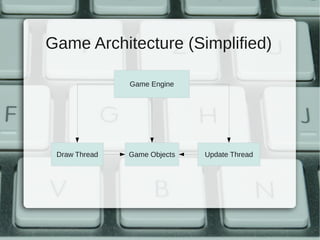
Game Architecture (Simplified)

               Game Engine


 Draw Thread   Game Objects   Update Thread
Performance Tips
●   Avoid object creations
       ●   Use pools and pre create them
●   Avoid getters and setters
       ●   Public attributes instead
●   Avoid collections
●   Avoid interfaces
●   Use a single Activity
Why use OpenGL?


   Performance
Why use OpenGL?


   Performance
Why use any Engine


You don’t want to start from scratch
AndEngine
AndEngine
●   http://www.andengine.org/
●   2D Graphics Engine
●   LGPL
●   Extensions
       ●   Physics Engine (Box2D)
       ●   Live Wallpapers
       ●   etc
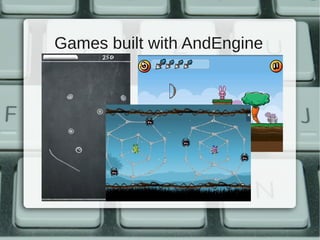
Games built with AndEngine
●   Chalk Ball
●   Bunny Shooter
●   Greedy Spiders
●   Wheelz
●   Farm Tower
●   ...
Games built with AndEngine
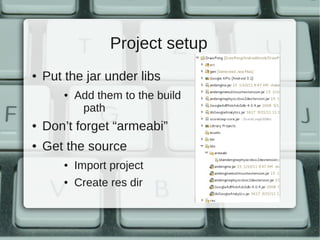
Project setup
●   Put the jar under libs
        ●   Add them to the build
             path
●   Don’t forget “armeabi”
●   Get the source
        ●   Import project
        ●   Create res dir
Concepts
●   Engine
●   Scene
       ●   Sprites + Handlers
●   Texture / Texture Atlas
●   Sprite
●   Body
       ●   Fixture
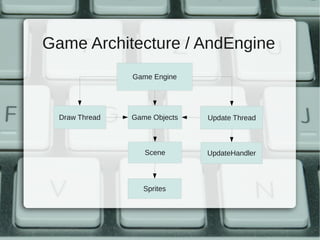
Game Architecture / AndEngine
                Game Engine


  Draw Thread   Game Objects   Update Thread


                   Scene       UpdateHandler


                   Sprites
Activity creation flow
●   BaseGameActivity
       ●   onLoadEngine
       ●   onLoadResources
       ●   onLoadScene
       ●   onLoadComplete
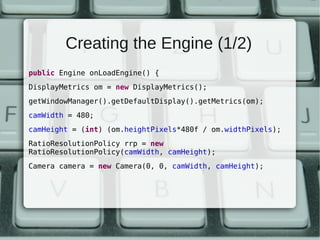
Creating the Engine (1/2)
public Engine onLoadEngine() {
DisplayMetrics om = new DisplayMetrics();
getWindowManager().getDefaultDisplay().getMetrics(om);
camWidth = 480;
camHeight = (int) (om.heightPixels*480f / om.widthPixels);
RatioResolutionPolicy rrp = new
RatioResolutionPolicy(camWidth, camHeight);
Camera camera = new Camera(0, 0, camWidth, camHeight);
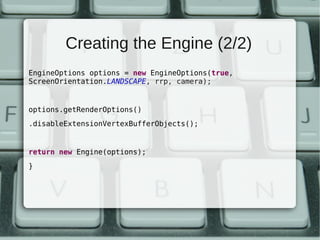
Creating the Engine (2/2)
EngineOptions options = new EngineOptions(true,
ScreenOrientation.LANDSCAPE, rrp, camera);


options.getRenderOptions()
.disableExtensionVertexBufferObjects();


return new Engine(options);
}
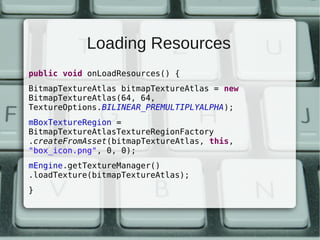
Loading Resources
public void onLoadResources() {
BitmapTextureAtlas bitmapTextureAtlas = new
BitmapTextureAtlas(64, 64,
TextureOptions.BILINEAR_PREMULTIPLYALPHA);
mBoxTextureRegion =
BitmapTextureAtlasTextureRegionFactory
.createFromAsset(bitmapTextureAtlas, this,
"box_icon.png", 0, 0);
mEngine.getTextureManager()
.loadTexture(bitmapTextureAtlas);
}
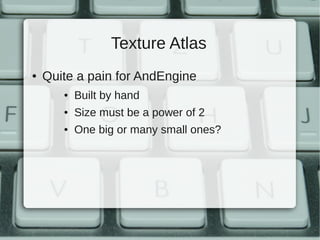
Texture Atlas
●   Quite a pain for AndEngine
       ●   Built by hand
       ●   Size must be a power of 2
       ●   One big or many small ones?
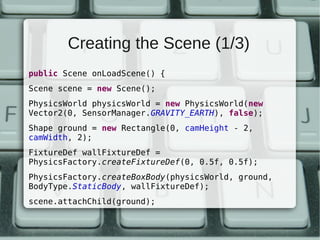
Creating the Scene (1/3)
public Scene onLoadScene() {
Scene scene = new Scene();
PhysicsWorld physicsWorld = new PhysicsWorld(new
Vector2(0, SensorManager.GRAVITY_EARTH), false);
Shape ground = new Rectangle(0, camHeight - 2,
camWidth, 2);
FixtureDef wallFixtureDef =
PhysicsFactory.createFixtureDef(0, 0.5f, 0.5f);
PhysicsFactory.createBoxBody(physicsWorld, ground,
BodyType.StaticBody, wallFixtureDef);
scene.attachChild(ground);
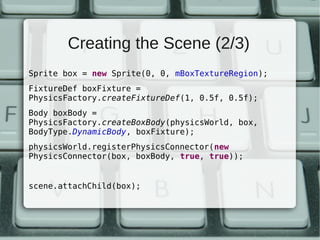
Creating the Scene (2/3)
Sprite box = new Sprite(0, 0, mBoxTextureRegion);
FixtureDef boxFixture =
PhysicsFactory.createFixtureDef(1, 0.5f, 0.5f);
Body boxBody =
PhysicsFactory.createBoxBody(physicsWorld, box,
BodyType.DynamicBody, boxFixture);
physicsWorld.registerPhysicsConnector(new
PhysicsConnector(box, boxBody, true, true));


scene.attachChild(box);
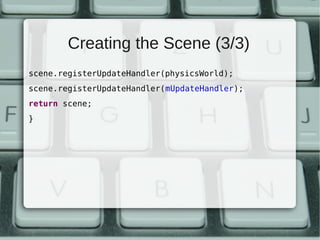
Creating the Scene (3/3)
scene.registerUpdateHandler(physicsWorld);
scene.registerUpdateHandler(mUpdateHandler);
return scene;
}
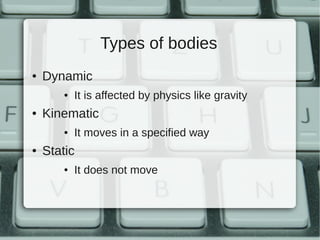
Types of bodies
●   Dynamic
        ●   It is affected by physics like gravity
●   Kinematic
        ●   It moves in a specified way
●   Static
        ●   It does not move
More Interesting things
●   TiledTextures / Animated Sprites
●   Animations
●   Sound Engine
●   Particle Systems
●   Collision Detect
●   Polygonal Bodies
●   Menus
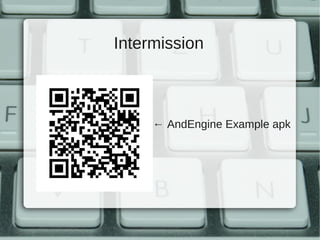
Intermission


     ← AndEngine Example apk
jPCT-AE
jPCT-AE
●   http://www.jpct.net/jpct-ae/
●   3D Engine
        ●   3DObjects
        ●   Lights
        ●   etc
●   No physics
        ●   It has collision detection
Games built with jPCT-AE
●   SpaceCat
●   SkyFrontier
●   Forgotten Elements
●   Mobialia Chess
●   Freddy Budgett
●   Alien Runner
●   ...
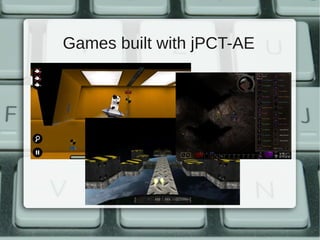
Games built with jPCT-AE
Project setup


Add jpct-ae.jar to libs / Build path
Concepts / Classes
●   Renderer / FrameBuffer
●   World
●   Texture / TextureManager
●   Object3D
●   Light
●   Camera
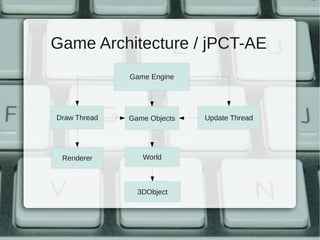
Game Architecture / jPCT-AE
              Game Engine


Draw Thread   Game Objects   Update Thread


 Renderer        World


                3DObject
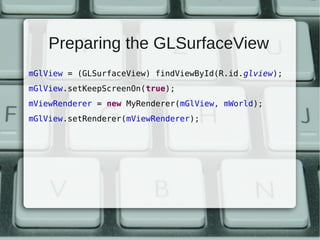
Preparing the GLSurfaceView
mGlView = (GLSurfaceView) findViewById(R.id.glview);
mGlView.setKeepScreenOn(true);
mViewRenderer = new MyRenderer(mGlView, mWorld);
mGlView.setRenderer(mViewRenderer);
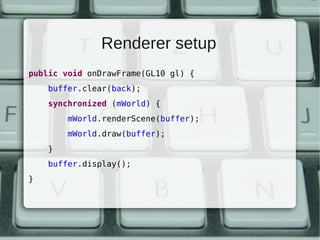
Renderer setup
public void onDrawFrame(GL10 gl) {
    buffer.clear(back);
    synchronized (mWorld) {
        mWorld.renderScene(buffer);
        mWorld.draw(buffer);
    }
    buffer.display();
}
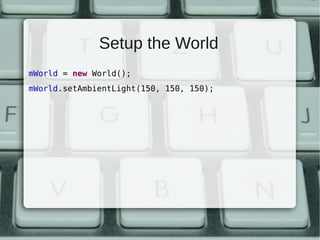
Setup the World
mWorld = new World();
mWorld.setAmbientLight(150, 150, 150);
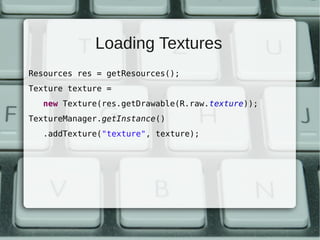
Loading Textures
Resources res = getResources();
Texture texture =
   new Texture(res.getDrawable(R.raw.texture));
TextureManager.getInstance()
   .addTexture("texture", texture);
Loading Objects
mModel = Loader.load3DS(getResources()
   .openRawResource(R.raw.model), 1)[0];
mModel.setTexture("texture");


mWorld.addObject(mModel);
mWorld.buildAllObjects();
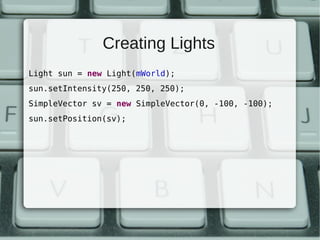
Creating Lights
Light sun = new Light(mWorld);
sun.setIntensity(250, 250, 250);
SimpleVector sv = new SimpleVector(0, -100, -100);
sun.setPosition(sv);
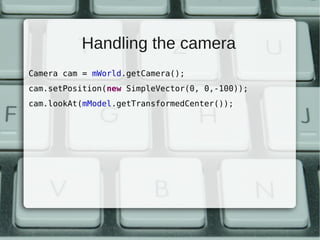
Handling the camera
Camera cam = mWorld.getCamera();
cam.setPosition(new SimpleVector(0, 0,-100));
cam.lookAt(mModel.getTransformedCenter());
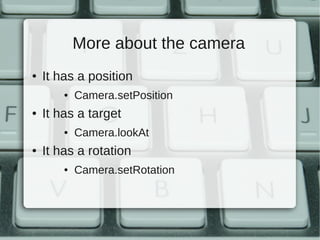
More about the camera
●   It has a position
        ●   Camera.setPosition
●   It has a target
        ●   Camera.lookAt
●   It has a rotation
        ●   Camera.setRotation
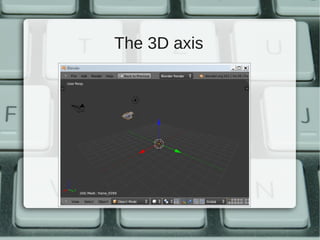
The 3D axis
Operations with objects
●   Hierarchy
       ●   addChild
●   Move
       ●   setPosition / translate
●   Rotation
       ●   rotateX, rotateY, rotateZ
More Interesting Things
●   Keyframe Animations
●   Collision detect (Ellipsoids)
●   Billboards
●   Transparency
●   Culling
●   Primitive Objects
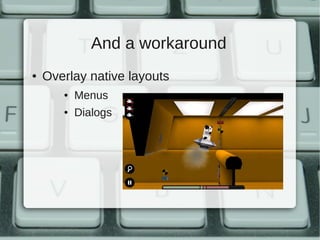
And a workaround
●   Overlay native layouts
       ●   Menus
       ●   Dialogs
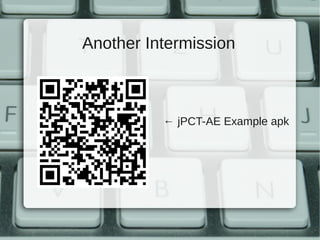
Another Intermission


          ← jPCT-AE Example apk
Bonus: Other Engines
●   PlayN
       ●    https://developers.google.com/playn/
●   NME
       ●    http://www.haxenme.org/
●   Unity
       ●    http://unity3d.com/
●   Game Maker
       ●    http://www.yoyogames.com/make
Scores / Achievements
Why use a Library?
●   Not reinventing the wheel
        ●   It is proven that works
●   Familiarity for users
        ●   Other games use them
●   You do not own the servers
        ●   You don’t, and that is good
Available libraries
●   ScoreLoop        ●   OpenFeint
What do you get?
●   Achievements
       ●   Not very impressive
●   Leaderboards
       ●   That is interesting
●   News Feed
●   Friends management
●   Improved engagement
Easy to integrate
●   Android Library Project
●   Initialize with the Application
●   Open a specific screen
        ●   2 lines of code
●   Submit a score or achievement
        ●   2 lines of code
Monetization


Too much to say for a single slide
And now...
●   Lunch
●   Pitch your game idea
       ●   Gather a team
●   Hackaton
●   Demos, Pizza & Beer
Tools for Android Games


Raul Portales
@sla_shalafi          @thepilltree
raul@plattysoft.com   http://thepilltree.com

Tools for developing Android Games

  • 1.
    Tools for AndroidGames Raul Portales @sla_shalafi @thepilltree raul@plattysoft.com http://thepilltree.com
  • 2.
    Summary ● Introduction to game development ● Engines ● AndEngine ● jPCT-AE ● Scores / Achievements ● Monetization systems
  • 3.
    Game Architecture (Simplified) Game Engine Draw Thread Game Objects Update Thread
  • 4.
    Performance Tips ● Avoid object creations ● Use pools and pre create them ● Avoid getters and setters ● Public attributes instead ● Avoid collections ● Avoid interfaces ● Use a single Activity
  • 5.
    Why use OpenGL? Performance
  • 6.
    Why use OpenGL? Performance
  • 7.
    Why use anyEngine You don’t want to start from scratch
  • 8.
  • 9.
    AndEngine ● http://www.andengine.org/ ● 2D Graphics Engine ● LGPL ● Extensions ● Physics Engine (Box2D) ● Live Wallpapers ● etc
  • 10.
    Games built withAndEngine ● Chalk Ball ● Bunny Shooter ● Greedy Spiders ● Wheelz ● Farm Tower ● ...
  • 11.
  • 12.
    Project setup ● Put the jar under libs ● Add them to the build path ● Don’t forget “armeabi” ● Get the source ● Import project ● Create res dir
  • 13.
    Concepts ● Engine ● Scene ● Sprites + Handlers ● Texture / Texture Atlas ● Sprite ● Body ● Fixture
  • 14.
    Game Architecture /AndEngine Game Engine Draw Thread Game Objects Update Thread Scene UpdateHandler Sprites
  • 15.
    Activity creation flow ● BaseGameActivity ● onLoadEngine ● onLoadResources ● onLoadScene ● onLoadComplete
  • 16.
    Creating the Engine(1/2) public Engine onLoadEngine() { DisplayMetrics om = new DisplayMetrics(); getWindowManager().getDefaultDisplay().getMetrics(om); camWidth = 480; camHeight = (int) (om.heightPixels*480f / om.widthPixels); RatioResolutionPolicy rrp = new RatioResolutionPolicy(camWidth, camHeight); Camera camera = new Camera(0, 0, camWidth, camHeight);
  • 17.
    Creating the Engine(2/2) EngineOptions options = new EngineOptions(true, ScreenOrientation.LANDSCAPE, rrp, camera); options.getRenderOptions() .disableExtensionVertexBufferObjects(); return new Engine(options); }
  • 18.
    Loading Resources public voidonLoadResources() { BitmapTextureAtlas bitmapTextureAtlas = new BitmapTextureAtlas(64, 64, TextureOptions.BILINEAR_PREMULTIPLYALPHA); mBoxTextureRegion = BitmapTextureAtlasTextureRegionFactory .createFromAsset(bitmapTextureAtlas, this, "box_icon.png", 0, 0); mEngine.getTextureManager() .loadTexture(bitmapTextureAtlas); }
  • 19.
    Texture Atlas ● Quite a pain for AndEngine ● Built by hand ● Size must be a power of 2 ● One big or many small ones?
  • 20.
    Creating the Scene(1/3) public Scene onLoadScene() { Scene scene = new Scene(); PhysicsWorld physicsWorld = new PhysicsWorld(new Vector2(0, SensorManager.GRAVITY_EARTH), false); Shape ground = new Rectangle(0, camHeight - 2, camWidth, 2); FixtureDef wallFixtureDef = PhysicsFactory.createFixtureDef(0, 0.5f, 0.5f); PhysicsFactory.createBoxBody(physicsWorld, ground, BodyType.StaticBody, wallFixtureDef); scene.attachChild(ground);
  • 21.
    Creating the Scene(2/3) Sprite box = new Sprite(0, 0, mBoxTextureRegion); FixtureDef boxFixture = PhysicsFactory.createFixtureDef(1, 0.5f, 0.5f); Body boxBody = PhysicsFactory.createBoxBody(physicsWorld, box, BodyType.DynamicBody, boxFixture); physicsWorld.registerPhysicsConnector(new PhysicsConnector(box, boxBody, true, true)); scene.attachChild(box);
  • 22.
    Creating the Scene(3/3) scene.registerUpdateHandler(physicsWorld); scene.registerUpdateHandler(mUpdateHandler); return scene; }
  • 23.
    Types of bodies ● Dynamic ● It is affected by physics like gravity ● Kinematic ● It moves in a specified way ● Static ● It does not move
  • 24.
    More Interesting things ● TiledTextures / Animated Sprites ● Animations ● Sound Engine ● Particle Systems ● Collision Detect ● Polygonal Bodies ● Menus
  • 25.
    Intermission ← AndEngine Example apk
  • 26.
  • 27.
    jPCT-AE ● http://www.jpct.net/jpct-ae/ ● 3D Engine ● 3DObjects ● Lights ● etc ● No physics ● It has collision detection
  • 28.
    Games built withjPCT-AE ● SpaceCat ● SkyFrontier ● Forgotten Elements ● Mobialia Chess ● Freddy Budgett ● Alien Runner ● ...
  • 29.
  • 30.
    Project setup Add jpct-ae.jarto libs / Build path
  • 31.
    Concepts / Classes ● Renderer / FrameBuffer ● World ● Texture / TextureManager ● Object3D ● Light ● Camera
  • 32.
    Game Architecture /jPCT-AE Game Engine Draw Thread Game Objects Update Thread Renderer World 3DObject
  • 33.
    Preparing the GLSurfaceView mGlView= (GLSurfaceView) findViewById(R.id.glview); mGlView.setKeepScreenOn(true); mViewRenderer = new MyRenderer(mGlView, mWorld); mGlView.setRenderer(mViewRenderer);
  • 34.
    Renderer setup public voidonDrawFrame(GL10 gl) { buffer.clear(back); synchronized (mWorld) { mWorld.renderScene(buffer); mWorld.draw(buffer); } buffer.display(); }
  • 35.
    Setup the World mWorld= new World(); mWorld.setAmbientLight(150, 150, 150);
  • 36.
    Loading Textures Resources res= getResources(); Texture texture = new Texture(res.getDrawable(R.raw.texture)); TextureManager.getInstance() .addTexture("texture", texture);
  • 37.
    Loading Objects mModel =Loader.load3DS(getResources() .openRawResource(R.raw.model), 1)[0]; mModel.setTexture("texture"); mWorld.addObject(mModel); mWorld.buildAllObjects();
  • 38.
    Creating Lights Light sun= new Light(mWorld); sun.setIntensity(250, 250, 250); SimpleVector sv = new SimpleVector(0, -100, -100); sun.setPosition(sv);
  • 39.
    Handling the camera Cameracam = mWorld.getCamera(); cam.setPosition(new SimpleVector(0, 0,-100)); cam.lookAt(mModel.getTransformedCenter());
  • 40.
    More about thecamera ● It has a position ● Camera.setPosition ● It has a target ● Camera.lookAt ● It has a rotation ● Camera.setRotation
  • 41.
  • 42.
    Operations with objects ● Hierarchy ● addChild ● Move ● setPosition / translate ● Rotation ● rotateX, rotateY, rotateZ
  • 43.
    More Interesting Things ● Keyframe Animations ● Collision detect (Ellipsoids) ● Billboards ● Transparency ● Culling ● Primitive Objects
  • 44.
    And a workaround ● Overlay native layouts ● Menus ● Dialogs
  • 45.
    Another Intermission ← jPCT-AE Example apk
  • 46.
    Bonus: Other Engines ● PlayN ● https://developers.google.com/playn/ ● NME ● http://www.haxenme.org/ ● Unity ● http://unity3d.com/ ● Game Maker ● http://www.yoyogames.com/make
  • 47.
  • 48.
    Why use aLibrary? ● Not reinventing the wheel ● It is proven that works ● Familiarity for users ● Other games use them ● You do not own the servers ● You don’t, and that is good
  • 49.
    Available libraries ● ScoreLoop ● OpenFeint
  • 50.
    What do youget? ● Achievements ● Not very impressive ● Leaderboards ● That is interesting ● News Feed ● Friends management ● Improved engagement
  • 51.
    Easy to integrate ● Android Library Project ● Initialize with the Application ● Open a specific screen ● 2 lines of code ● Submit a score or achievement ● 2 lines of code
  • 52.
    Monetization Too much tosay for a single slide
  • 53.
    And now... ● Lunch ● Pitch your game idea ● Gather a team ● Hackaton ● Demos, Pizza & Beer
  • 54.
    Tools for AndroidGames Raul Portales @sla_shalafi @thepilltree raul@plattysoft.com http://thepilltree.com