iOS Programming - 101
Xcode, Obj-C, iOS APIs
Subhransu Behera
@subhransu
subh@subhb.org
Xcode
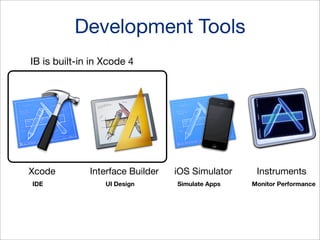
Development Tools
IB is built-in in Xcode 4

Xcode
IDE

Interface Builder
UI Design

iOS Simulator
Simulate Apps

Instruments
Monitor Performance
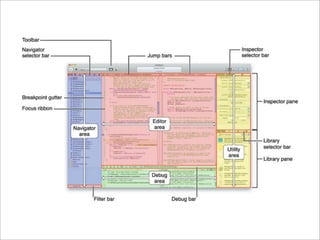
Xcode IDE

• Editors // source editor & UI editor
• Single window interface
• Automatic error identification and correction
• Assistance editing
• Source control
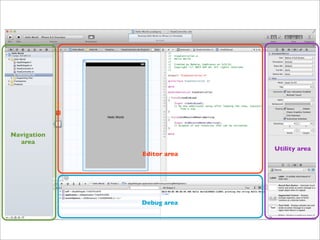
Navigation
area
Editor area

Debug area

Utility area
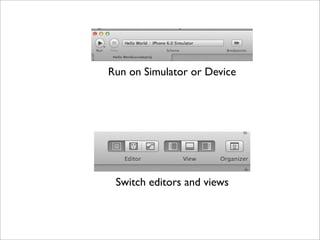
Run on Simulator or Device

Switch editors and views
Obj-C (Object Allocation)
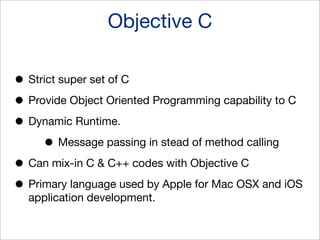
Objective C
• Strict super set of C
• Provide Object Oriented Programming capability to C
• Dynamic Runtime.
• Message passing in stead of method calling
• Can mix-in C & C++ codes with Objective C
• Primary language used by Apple for Mac OSX and iOS
application development.
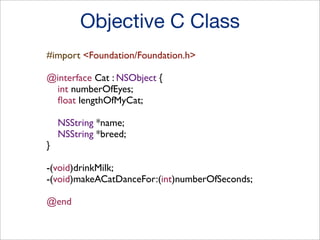
Objective C Class
#import <Foundation/Foundation.h>
@interface Cat : NSObject {
int numberOfEyes;
float lengthOfMyCat;

}

NSString *name;
NSString *breed;

-(void)drinkMilk;
-(void)makeACatDanceFor:(int)numberOfSeconds;
@end
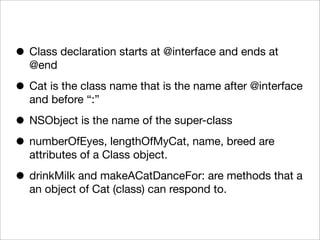
• Class declaration starts at @interface and ends at
@end

• Cat is the class name that is the name after @interface
and before “:”

• NSObject is the name of the super-class
• numberOfEyes, lengthOfMyCat, name, breed are
attributes of a Class object.

• drinkMilk and makeACatDanceFor: are methods that a
an object of Cat (class) can respond to.
Object Allocation
Cat *myCat = [[Cat alloc] init];
// what exactly happens
// 1st line allocates enough memory to hold a cat object

Cat *myCat = [Cat alloc];
// 2nd line initializes the object.

[myCat init];
Message Passing
Message Passing in Obj-C
• In other languages you refer this as method calling.

But due to the nature of Obj-C it’s often referred as a
message (can refer it as method or function) being
passed to an object to make it do something.

• A message is passed to an object with-in square
brackets.

[objectName messageName];

• Messages can be piped together. That is a message
can be passed to an object is the result of another
message.
[[objectName messageOne] messageTwo];
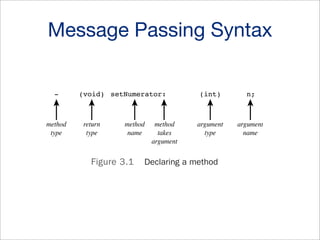
Message Passing Syntax

The @implementation Sec

ny arguments. In Chapter 7,“More on Classes,” you’ll see how methods that take
than one argument are identified.

method
type

return
type

method
name

Figure 3.1

method
takes
argument

argument
type

argument
name

Declaring a method

@implementation Section

ed, the @implementation section contains the actual code for the methods you
ed in the @interface section.You have to specify what type of data is to be store
objects of this class.That is, you have to describe the data that members of the cl
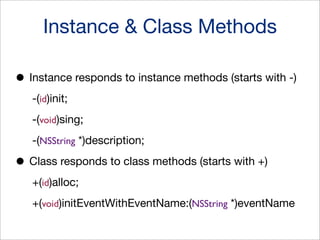
Instance & Class Methods
• Instance responds to instance methods (starts with -)
-(id)init;
-(void)sing;
-(NSString *)description;

• Class responds to class methods (starts with +)
+(id)alloc;
+(void)initEventWithEventName:(NSString *)eventName
Message Passing

• [receiver message];
• [receiver message:argument];
• [receiver message:arg1 andArg:arg2];
Objective-C Properties
Declared Properties

• Provides a getter and a setter method
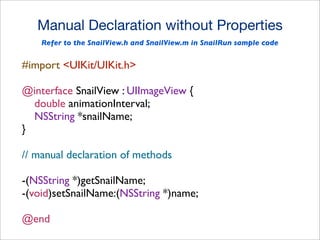
Manual Declaration without Properties
Refer to the SnailView.h and SnailView.m in SnailRun sample code

#import <UIKit/UIKit.h>
@interface SnailView : UIImageView {
double animationInterval;
NSString *snailName;
}
// manual declaration of methods
-(NSString *)getSnailName;
-(void)setSnailName:(NSString *)name;
@end
Manual Implementation without Properties
// manual getter method
-(NSString *)getSnailName {
return snailName;
}
// manual setter method
-(void)setSnailName:(NSString *)name {
if (![name isEqualToString:snailName]) {
snailName = name;
}
}
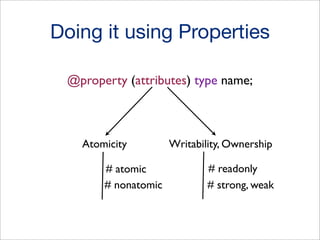
Doing it using Properties
@property (attributes) type name;

Atomicity
# atomic
# nonatomic

Writability, Ownership
# readonly
# strong, weak
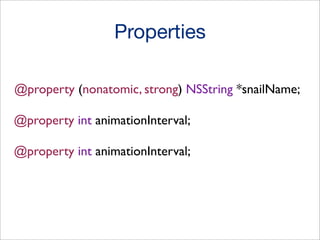
Properties
@property (nonatomic, strong) NSString *snailName;
@property int animationInterval;
Core Obj-C Classes
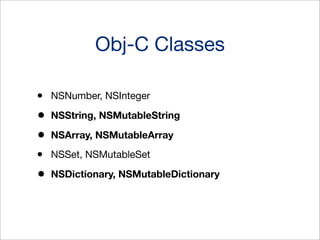
Obj-C Classes
•
•
•
•
•

NSNumber, NSInteger
NSString, NSMutableString
NSArray, NSMutableArray
NSSet, NSMutableSet
NSDictionary, NSMutableDictionary
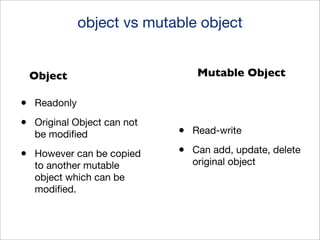
object vs mutable object
Mutable Object

Object

•
•

Readonly

•

However can be copied
to another mutable
object which can be
modified.

Original Object can not
be modified

•
•

Read-write
Can add, update, delete
original object
Strings
•

Have seen glimpse of it in all our NSLog
messages

•
•

NSLog(@"Objective C is Awesome");
NSString *snailName = [[NSString alloc] init];
Strings Methods
[NSString stringWithFormat:@"%d", someInteger];
[NSString stringWithFormat:@"My integer %d", someInteger];
[snailName stringByReplacingOccurrencesOfString:@"N"
withString:@"P"];
NSString *newString = [myString appendString:@"Another String"];
NSNumbers
NSNumber *animationDuration = [[NSNumber alloc] init];
NSNumber *animationDuration = [[NSNumber alloc]
initWithBool:YES];
NSNumber *animationDuration = [[NSNumber alloc]
initWithInt:1];
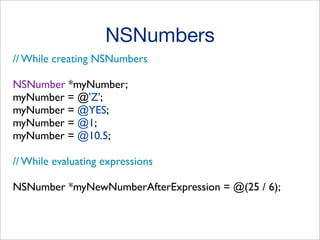
NSNumbers
// While creating NSNumbers
NSNumber *myNumber;
myNumber = @'Z';
myNumber = @YES;
myNumber = @1;
myNumber = @10.5;
// While evaluating expressions
NSNumber *myNewNumberAfterExpression = @(25 / 6);
NSArray & NSMutableArray
NSArray
(read-only)

•
•

Manage collections of Objects

•
•

NSMutableArray
(read write)

NSArray creates static array

Objects can be anything NSString, NSNumber, NSDictionary, even
NSArray itself.

NSMutableArray creates dynamic array

NSArray *myArray = [[NSArray alloc] init];
NSArray *myArray = [[NSArray alloc] initWithObjects:Obj1, Obj2, nil];
NSArray *myArray = @[Obj1, Obj2];
getting and setting values
•

Values are being accessed using array index

•
•

myArray[2] // will return 3rd object. Index starts from 0

Value can be set by assigning an Object for an index

•

myArray[3] = @"some value"; // will set value for 4th element
insertion & deletion
•

– count:

•
•

– containsObject:

•
•

Insert a given object at end of the array

– insertObject:atIndex:

•
•

Tells if a given object is present or not

– addObject:

•
•

returns number of objects currently in the array

Insert an object at specified index

– removeAllObjects:

•

Empties the array of all its elements
Learn more about
NSSet and NSDictionary
View Controllers
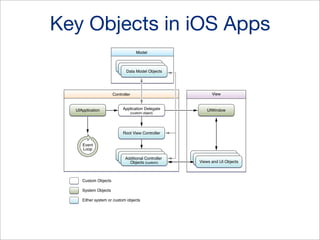
Key Objects in iOS Apps
Model
Data Model Objects
Data Model Objects
Data Model Objects

View

Controller

UIApplication

Application Delegate
(custom object)

UIWindow

Root View Controller
Event
Loop
Data Model Objects
Data ModelController
Additional Objects
Objects (custom)

Custom Objects
System Objects
Either system or custom objects

Data Model Objects
Data Model Objects
Views and UI Objects
when app finishes launching
- (BOOL)application:(UIApplication *)application
didFinishLaunchingWithOptions:(NSDictionary *)launchOptions{
// window is being instantiated

self.window = [[UIWindow alloc] initWithFrame:[[UIScreen
mainScreen] bounds]];
// view controller is being instantiated

self.viewController = [[ViewController alloc]
initWithNibName:@"ViewController" bundle:nil];
// every app needs a window and a window needs a root view controller

self.window.rootViewController = self.viewController;

[self.window makeKeyAndVisible];
return YES;
}
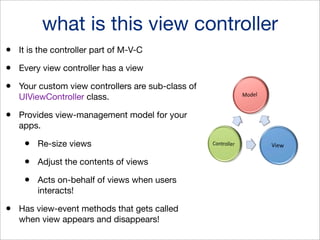
what is this view controller
•

It is the controller part of M-V-C

•

Every view controller has a view

•

Your custom view controllers are sub-class of
UIViewController class.

•

Provides view-management model for your
apps.

•
•

Adjust the contents of views

•
•

Re-size views

Acts on-behalf of views when users
interacts!

Has view-event methods that gets called
when view appears and disappears!
View controller view events
•

– viewDidLoad:

•
•

– viewDidUnload:

•
•

When view is about to made visible

– viewDidAppear:

•
•

After view controller’s view is released or set to
nil

– viewWillAppear:

•
•

Called after view has been loaded

When view has been fully transitioned to screen

– viewWillDisappear: and – viewDidDisappear:

•

The counter-part of above 2 methods.
Managing View Rotations
•

– shouldAutoRotate

•
•
•

Whether auto-rotation is supported or not
Returns a boolean value YES/NO or TRUE/
FALSE

– supportedInterfaceOrientations

•
•

Returns interface orientation masks

– didRotateFromInterfaceOrientation

•

Notifies when rotation happens
Sample Codes
https://www.dropbox.com/s/wqcuusr9p2j913i/SampleCodes.zip

•
•
•
•
•
•

HelloWorld - Combines two text from text field and display on a label
SliderExample - Displays current value of a Slider
Hashes - Displays the number of hashes and creates a geometric structue
WeatherApp - Provides weather for a given day (hard coded values)
SnailRun - Makes a snail move in a direction (try changing the direction value)
MediaPlayer - Plays a local video file
To learn more ...
•
•

Objective C - Read Stephen Kochan’s Book

•
•
•

Play with Obj-C and iOS lessons from Code School

Go through “iOS UI Element Usage Guidelines” in iOS Human Interface
Guidelines to learn more about the various UI components available and their
usage

Watch iOS Development Videos & WWDC Videos
Join the community “iOS Dev Scout” facebook group.
Thanks

Subhransu Behera
@subhransu
subh@subhb.org

iOS 101 - Xcode, Objective-C, iOS APIs

  • 1.
    iOS Programming -101 Xcode, Obj-C, iOS APIs Subhransu Behera @subhransu subh@subhb.org
  • 2.
  • 3.
    Development Tools IB isbuilt-in in Xcode 4 Xcode IDE Interface Builder UI Design iOS Simulator Simulate Apps Instruments Monitor Performance
  • 4.
    Xcode IDE • Editors// source editor & UI editor • Single window interface • Automatic error identification and correction • Assistance editing • Source control
  • 6.
  • 7.
    Run on Simulatoror Device Switch editors and views
  • 8.
  • 9.
    Objective C • Strictsuper set of C • Provide Object Oriented Programming capability to C • Dynamic Runtime. • Message passing in stead of method calling • Can mix-in C & C++ codes with Objective C • Primary language used by Apple for Mac OSX and iOS application development.
  • 10.
    Objective C Class #import<Foundation/Foundation.h> @interface Cat : NSObject { int numberOfEyes; float lengthOfMyCat; } NSString *name; NSString *breed; -(void)drinkMilk; -(void)makeACatDanceFor:(int)numberOfSeconds; @end
  • 11.
    • Class declarationstarts at @interface and ends at @end • Cat is the class name that is the name after @interface and before “:” • NSObject is the name of the super-class • numberOfEyes, lengthOfMyCat, name, breed are attributes of a Class object. • drinkMilk and makeACatDanceFor: are methods that a an object of Cat (class) can respond to.
  • 12.
    Object Allocation Cat *myCat= [[Cat alloc] init]; // what exactly happens // 1st line allocates enough memory to hold a cat object Cat *myCat = [Cat alloc]; // 2nd line initializes the object. [myCat init];
  • 13.
  • 14.
    Message Passing inObj-C • In other languages you refer this as method calling. But due to the nature of Obj-C it’s often referred as a message (can refer it as method or function) being passed to an object to make it do something. • A message is passed to an object with-in square brackets. [objectName messageName]; • Messages can be piped together. That is a message can be passed to an object is the result of another message. [[objectName messageOne] messageTwo];
  • 15.
    Message Passing Syntax The@implementation Sec ny arguments. In Chapter 7,“More on Classes,” you’ll see how methods that take than one argument are identified. method type return type method name Figure 3.1 method takes argument argument type argument name Declaring a method @implementation Section ed, the @implementation section contains the actual code for the methods you ed in the @interface section.You have to specify what type of data is to be store objects of this class.That is, you have to describe the data that members of the cl
  • 16.
    Instance & ClassMethods • Instance responds to instance methods (starts with -) -(id)init; -(void)sing; -(NSString *)description; • Class responds to class methods (starts with +) +(id)alloc; +(void)initEventWithEventName:(NSString *)eventName
  • 17.
    Message Passing • [receivermessage]; • [receiver message:argument]; • [receiver message:arg1 andArg:arg2];
  • 18.
  • 19.
    Declared Properties • Providesa getter and a setter method
  • 20.
    Manual Declaration withoutProperties Refer to the SnailView.h and SnailView.m in SnailRun sample code #import <UIKit/UIKit.h> @interface SnailView : UIImageView { double animationInterval; NSString *snailName; } // manual declaration of methods -(NSString *)getSnailName; -(void)setSnailName:(NSString *)name; @end
  • 21.
    Manual Implementation withoutProperties // manual getter method -(NSString *)getSnailName { return snailName; } // manual setter method -(void)setSnailName:(NSString *)name { if (![name isEqualToString:snailName]) { snailName = name; } }
  • 22.
    Doing it usingProperties @property (attributes) type name; Atomicity # atomic # nonatomic Writability, Ownership # readonly # strong, weak
  • 23.
    Properties @property (nonatomic, strong)NSString *snailName; @property int animationInterval; @property int animationInterval;
  • 24.
  • 25.
    Obj-C Classes • • • • • NSNumber, NSInteger NSString,NSMutableString NSArray, NSMutableArray NSSet, NSMutableSet NSDictionary, NSMutableDictionary
  • 26.
    object vs mutableobject Mutable Object Object • • Readonly • However can be copied to another mutable object which can be modified. Original Object can not be modified • • Read-write Can add, update, delete original object
  • 27.
    Strings • Have seen glimpseof it in all our NSLog messages • • NSLog(@"Objective C is Awesome"); NSString *snailName = [[NSString alloc] init];
  • 28.
    Strings Methods [NSString stringWithFormat:@"%d",someInteger]; [NSString stringWithFormat:@"My integer %d", someInteger]; [snailName stringByReplacingOccurrencesOfString:@"N" withString:@"P"]; NSString *newString = [myString appendString:@"Another String"];
  • 29.
    NSNumbers NSNumber *animationDuration =[[NSNumber alloc] init]; NSNumber *animationDuration = [[NSNumber alloc] initWithBool:YES]; NSNumber *animationDuration = [[NSNumber alloc] initWithInt:1];
  • 30.
    NSNumbers // While creatingNSNumbers NSNumber *myNumber; myNumber = @'Z'; myNumber = @YES; myNumber = @1; myNumber = @10.5; // While evaluating expressions NSNumber *myNewNumberAfterExpression = @(25 / 6);
  • 31.
    NSArray & NSMutableArray NSArray (read-only) • • Managecollections of Objects • • NSMutableArray (read write) NSArray creates static array Objects can be anything NSString, NSNumber, NSDictionary, even NSArray itself. NSMutableArray creates dynamic array NSArray *myArray = [[NSArray alloc] init]; NSArray *myArray = [[NSArray alloc] initWithObjects:Obj1, Obj2, nil]; NSArray *myArray = @[Obj1, Obj2];
  • 32.
    getting and settingvalues • Values are being accessed using array index • • myArray[2] // will return 3rd object. Index starts from 0 Value can be set by assigning an Object for an index • myArray[3] = @"some value"; // will set value for 4th element
  • 33.
    insertion & deletion • –count: • • – containsObject: • • Insert a given object at end of the array – insertObject:atIndex: • • Tells if a given object is present or not – addObject: • • returns number of objects currently in the array Insert an object at specified index – removeAllObjects: • Empties the array of all its elements
  • 34.
    Learn more about NSSetand NSDictionary
  • 35.
  • 36.
    Key Objects iniOS Apps Model Data Model Objects Data Model Objects Data Model Objects View Controller UIApplication Application Delegate (custom object) UIWindow Root View Controller Event Loop Data Model Objects Data ModelController Additional Objects Objects (custom) Custom Objects System Objects Either system or custom objects Data Model Objects Data Model Objects Views and UI Objects
  • 37.
    when app finisheslaunching - (BOOL)application:(UIApplication *)application didFinishLaunchingWithOptions:(NSDictionary *)launchOptions{ // window is being instantiated self.window = [[UIWindow alloc] initWithFrame:[[UIScreen mainScreen] bounds]]; // view controller is being instantiated self.viewController = [[ViewController alloc] initWithNibName:@"ViewController" bundle:nil]; // every app needs a window and a window needs a root view controller self.window.rootViewController = self.viewController; [self.window makeKeyAndVisible]; return YES; }
  • 38.
    what is thisview controller • It is the controller part of M-V-C • Every view controller has a view • Your custom view controllers are sub-class of UIViewController class. • Provides view-management model for your apps. • • Adjust the contents of views • • Re-size views Acts on-behalf of views when users interacts! Has view-event methods that gets called when view appears and disappears!
  • 39.
    View controller viewevents • – viewDidLoad: • • – viewDidUnload: • • When view is about to made visible – viewDidAppear: • • After view controller’s view is released or set to nil – viewWillAppear: • • Called after view has been loaded When view has been fully transitioned to screen – viewWillDisappear: and – viewDidDisappear: • The counter-part of above 2 methods.
  • 40.
    Managing View Rotations • –shouldAutoRotate • • • Whether auto-rotation is supported or not Returns a boolean value YES/NO or TRUE/ FALSE – supportedInterfaceOrientations • • Returns interface orientation masks – didRotateFromInterfaceOrientation • Notifies when rotation happens
  • 41.
    Sample Codes https://www.dropbox.com/s/wqcuusr9p2j913i/SampleCodes.zip • • • • • • HelloWorld -Combines two text from text field and display on a label SliderExample - Displays current value of a Slider Hashes - Displays the number of hashes and creates a geometric structue WeatherApp - Provides weather for a given day (hard coded values) SnailRun - Makes a snail move in a direction (try changing the direction value) MediaPlayer - Plays a local video file
  • 42.
    To learn more... • • Objective C - Read Stephen Kochan’s Book • • • Play with Obj-C and iOS lessons from Code School Go through “iOS UI Element Usage Guidelines” in iOS Human Interface Guidelines to learn more about the various UI components available and their usage Watch iOS Development Videos & WWDC Videos Join the community “iOS Dev Scout” facebook group.
  • 43.