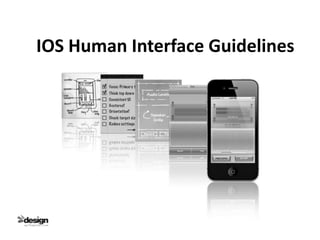
IOS Human Interface Guidelines
What are User Interface guidelines for ?

      To help developers design the best possible user interface & user experience.


      User Interface
      A connection between equipment and people, which help people interact
      with the system.


      User Experience
      The User Experience is how people feel while they do..
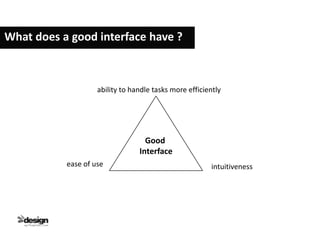
What does a good interface have ?


                    ability to handle tasks more efficiently


                                   Good
                                 Interface
           ease of use                                  intuitiveness
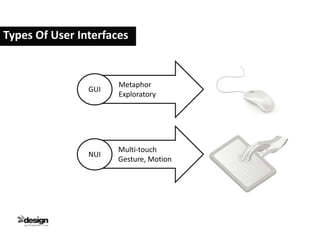
Types Of User Interfaces


                      Metaphor
                GUI
                      Exploratory


                      Multi-touch
                NUI
                      Gesture, Motion
Positive User Experience Principles


                            fast


                                      Easy
                    Clear
Key point for good Application development

     1.Beauty- Aesthetic integrity: Good balance of the appearance
                 functionality of the interface .
               - Focus is ALWAYS on content, but without a decent quality of
                 the app-artwork, the content will not be easily consumable.


      2.Generosity - share + consume
                   - Let your app interact with other apps.
Key point for good Application development


     3.Ubiquity- app should be more than an icon; i.e. put a widget(It's a
                    small application that can be installed and executed within
                    a web page by an end user) on the home screen about an
                    interesting feature.


     4.Utility - be useful, be interesting, try to be the both!
Technical Information on IPhone

       • Status Bar - at the upper edge
                    - Display the status bar as much as possible

       • Navigation Bar – below the status bar

       Tool Bar – at the bottom edge

       • Tab Bar – at the bottom edge

       • Make the minimum size of a tappable element - iPhone 44x44px,
         iPad 66x66px or 88x88px
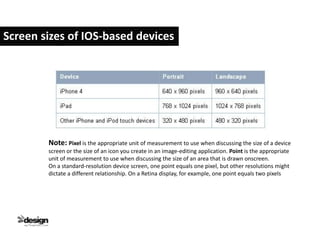
Screen sizes of IOS-based devices


        Note: Pixel is the appropriate unit of measurement to use when discussing the size of a device
        screen or the size of an icon you create in an image-editing application. Point is the appropriate
        unit of measurement to use when discussing the size of an area that is drawn onscreen.
        On a standard-resolution device screen, one point equals one pixel, but other resolutions might
        dictate a different relationship. On a Retina display, for example, one point equals two pixels
Most Important Information On IPhone

       • User see one screen at a time (an app has a single window but can have
         multiple.)

       • Users / Target : Determine the main purpose of the App.

       • Create an App definition statement: Determine who your target is and
                                          what the main function of your App
                                          is, and how it benefits them.

       • Orientation can change, landscape orientation should be both-sided.

       • Buttons / Target sizes : Create a user friendly amount of space between
                                 buttons (iPhone 44x44px, iPad 66x66px or
                                 88x88px)
Most Important Information On IPhone


      • Add physicality and realism (the voice recorder may look like a real
       microphone)

      • Do not fill the form with a lot of elements.

      •Do not ask a lot of questions (regarding updates, saving etc.)

      •Icons : app & store icons + launch images required.

      •Start instantly.

      •Always be prepared to stop.

      •Never quit an app programmatically.
References


      IOS Human Interface Guidelines
      http://developer.apple.com/library/ios/#documentation/userexperience/co
      nceptual/mobilehig/Introduction/Introduction.html#//apple_ref/doc/uid/TP
      40006556-CH1-SW1

       IPHONE User Interface Guidelines
      http://www.upsidelearning.com/blog/index.php/2010/06/24/iphone-user-
      interface-guidelines-part-i/

       IOS Human Interface Guidelines
       http://www.id-design.ca/2011/08/16/ios-human-interface-guidelines-
      summary/

iOS Human Interface Guideline

  • 1.
  • 2.
    What are UserInterface guidelines for ? To help developers design the best possible user interface & user experience. User Interface A connection between equipment and people, which help people interact with the system. User Experience The User Experience is how people feel while they do..
  • 3.
    What does agood interface have ? ability to handle tasks more efficiently Good Interface ease of use intuitiveness
  • 4.
    Types Of UserInterfaces Metaphor GUI Exploratory Multi-touch NUI Gesture, Motion
  • 5.
    Positive User ExperiencePrinciples fast Easy Clear
  • 6.
    Key point forgood Application development 1.Beauty- Aesthetic integrity: Good balance of the appearance functionality of the interface . - Focus is ALWAYS on content, but without a decent quality of the app-artwork, the content will not be easily consumable. 2.Generosity - share + consume - Let your app interact with other apps.
  • 7.
    Key point forgood Application development 3.Ubiquity- app should be more than an icon; i.e. put a widget(It's a small application that can be installed and executed within a web page by an end user) on the home screen about an interesting feature. 4.Utility - be useful, be interesting, try to be the both!
  • 8.
    Technical Information onIPhone • Status Bar - at the upper edge - Display the status bar as much as possible • Navigation Bar – below the status bar Tool Bar – at the bottom edge • Tab Bar – at the bottom edge • Make the minimum size of a tappable element - iPhone 44x44px, iPad 66x66px or 88x88px
  • 9.
    Screen sizes ofIOS-based devices Note: Pixel is the appropriate unit of measurement to use when discussing the size of a device screen or the size of an icon you create in an image-editing application. Point is the appropriate unit of measurement to use when discussing the size of an area that is drawn onscreen. On a standard-resolution device screen, one point equals one pixel, but other resolutions might dictate a different relationship. On a Retina display, for example, one point equals two pixels
  • 10.
    Most Important InformationOn IPhone • User see one screen at a time (an app has a single window but can have multiple.) • Users / Target : Determine the main purpose of the App. • Create an App definition statement: Determine who your target is and what the main function of your App is, and how it benefits them. • Orientation can change, landscape orientation should be both-sided. • Buttons / Target sizes : Create a user friendly amount of space between buttons (iPhone 44x44px, iPad 66x66px or 88x88px)
  • 11.
    Most Important InformationOn IPhone • Add physicality and realism (the voice recorder may look like a real microphone) • Do not fill the form with a lot of elements. •Do not ask a lot of questions (regarding updates, saving etc.) •Icons : app & store icons + launch images required. •Start instantly. •Always be prepared to stop. •Never quit an app programmatically.
  • 12.
    References IOS Human Interface Guidelines http://developer.apple.com/library/ios/#documentation/userexperience/co nceptual/mobilehig/Introduction/Introduction.html#//apple_ref/doc/uid/TP 40006556-CH1-SW1 IPHONE User Interface Guidelines http://www.upsidelearning.com/blog/index.php/2010/06/24/iphone-user- interface-guidelines-part-i/ IOS Human Interface Guidelines http://www.id-design.ca/2011/08/16/ios-human-interface-guidelines- summary/