Android 4.0 UI Design Tips
Justin Lee
Evolution of Android


Android 2.3    Android 3.0     Android 4.0
 Gingerbread    Honeycomb    Ice Cream Sandwich
One OS for Smartphones & Tablets
Topics
Major UI Changes
Design Patterns
Do and Don’t
Major UI Changes
Fight for Fragmentation
Android is not easy to learn
http://www.pocket-lint.com/news/40615/78-android-tips-beginners-set-up
Inconsistent hardware buttons
is a big problem
ICS drop hardware buttons


                screen


  Gingerbread            ICS
Software Buttons are dynamic


 Landscape Left


  Landscape Right
Back   Home   Recents
What’s missing?
Menu Button
Menu button is NOT longer a
primary button


  Gingerbread       ICS
Quiz: How to goto settings page?
Not to many people can get it by
themselves
ICS make the menu much
more easy to find
The menu button in legacy
app still available on ICS
But it’s time to say goodbye
http://android-developers.blogspot.com/2012/01/say-goodbye-to-menu-button.html
Migrate the global actions to the
action bar & action overflow
      Old                 New
Split action bar for contextual
actions
      Old               New
Backwards compatibility
                                                                  Legacy hardware


                                                                  Legacy software


http://developer.android.com/design/patterns/compatibility.html
Back Button
The behavior of back button
is inconsistent from user’s POV


                         ?
In app navigation is much more
predictable
Home Button
Home button perform too many
functions before ICS


                    tap

              tap


      long press
The only function of home
button on ICS is going home
How to goto a recent app?
Recents Button
Tap recents button to show
recent app list
The new recents screen


            tap to switch

            swipe to remove
Long press gesture changed
        Old                 New


Open contextual menu   Select the item
App UI Design Patterns
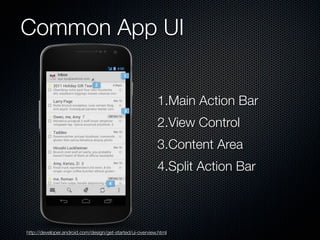
Common App UI


                                                           1.Main Action Bar
                                                           2.View Control
                                                           3.Content Area
                                                           4.Split Action Bar


http://developer.android.com/design/get-started/ui-overview.html
General App Structure
                   Top level views


                   Category views


                   Detail/edit view
New in ICS
                                                    1.Navigation Bar


                                                    2.Action Bar


                                                    3.Multi-pane layouts


                                                    4.Selection
 http://developer.android.com/design/patterns/new-4-0.html
Navigation

                                  Back                                Up


                    system & in-app
                                                               In-app navigation
                       navigation


http://developer.android.com/design/patterns/navigation.html
Swipe Views
       Swiping
       Between
       Detail Views


       Swiping
       Between
       Tabs

http://developer.android.com/design/patterns/swipe-views.html
Action Bar


                                           1.App icon
                                           2.View Control
                                           3.Action Buttons
                                           4.Action overflow


http://developer.android.com/design/patterns/actionbar.html
Split Action Bars


                                                              1.Main action bar
                                                              2.Top bar
                                                              3.Bottom Bar


http://developer.android.com/design/patterns/actionbar.html
Multi-pane layouts


             Smartphone                                                Tablet

http://developer.android.com/design/patterns/multi-pane-layouts.html
Selection

                                          Contextual action bar


Long press on an item in list to select                         Dynamically adjust CAB actions

  http://developer.android.com/design/patterns/selection.html
Notifications


http://developer.android.com/design/patterns/notifications.html
Do and Don’t
Do make the large, obvious
  tap targets
            Touchable UI components are generally laid out along 48dp units.


http://www.slideshare.net/AndroidDev/android-ui-design-tips
http://developer.android.com/design/style/metrics-grids.html
Do use screen density
  independent units (dp)
                                   not density independent (px)


                                       density independent (dp)


http://developer.android.com/guide/practices/screens_support.html
Do create versions of all resources
  for high density screens


http://developer.android.com/design/style/devices-displays.html
Do properly handle orientation changes
                            Stretch/compress                      Expand/collapse


                                        Stack                       Show/hide


http://developer.android.com/design/style/devices-displays.html
Do follow Android icon guideline
              Launcher
                   Launcher


                  Action Bar


http://developer.android.com/design/style/iconography.html
Don't mimic UI elements
  from other platforms

                                  Android


                                         iOS


                Windows Phone 7


http://developer.android.com/design/patterns/pure-android.html
Don't mimic UI elements
  from other platforms

                                 Android

                                        iOS

               Windows Phone 7


http://developer.android.com/design/patterns/pure-android.html
Don't use bottom tab bars


http://developer.android.com/design/patterns/pure-android.html
Don't use labeled back
  buttons on action bars


http://developer.android.com/design/patterns/pure-android.html
Don't use right-pointing
  carets on line items


http://developer.android.com/design/patterns/pure-android.html
Question?
Thank You!

Android 4.0 UI Design Tips