iPhone X and iOS 11:

An Overview
Adam.Talcott@ymedialabs.com
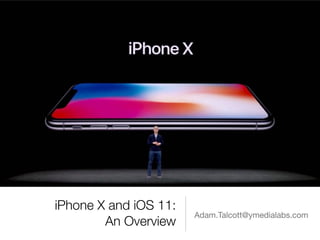
iPhone X
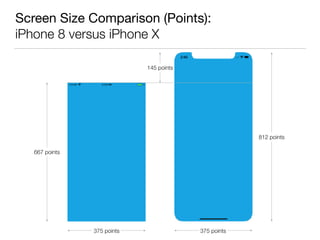
Screen Size Comparison (Points):

iPhone 8 versus iPhone X
667 points
375 points 375 points
812 points
145 points
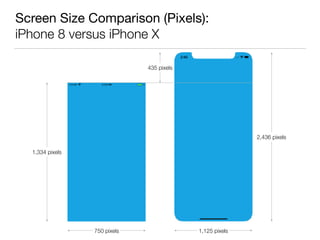
Screen Size Comparison (Pixels):

iPhone 8 versus iPhone X
1,334 pixels
750 pixels 1,125 pixels
2,436 pixels
435 pixels
Artwork Recommendations
• Apple recommends using:
• Resolution-independent PDFs for glyphs and flat, vector artwork
• Starting with Xcode 9 and iOS 11, appropriately sized PNGs
will be rendered at runtime
• High resolution PNGs with 2.0 and 3.0 scale factors for
rasterized images
• In practice, it may still be preferable to use PNGs if different images
are needed for different resolutions or if assets are to be shared
with Android apps
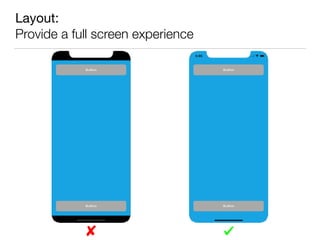
Layout:

Provide a full screen experience
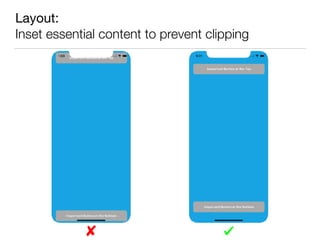
Layout:

Inset essential content to prevent clipping
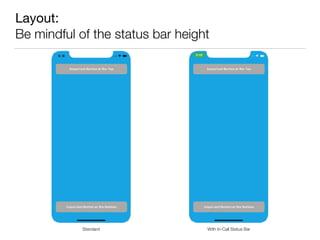
Layout:

Be mindful of the status bar height
With In-Call Status BarStandard
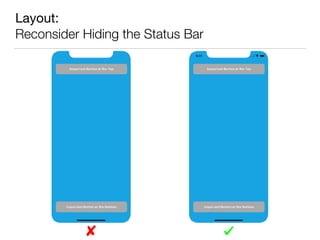
Layout:

Reconsider Hiding the Status Bar
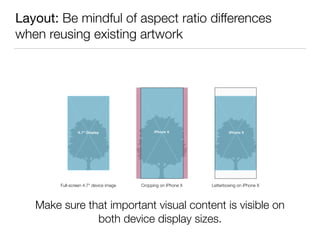
Layout: Be mindful of aspect ratio differences
when reusing existing artwork
Full-screen 4.7" device image Cropping on iPhone X Letterboxing on iPhone X
Make sure that important visual content is visible on

both device display sizes.
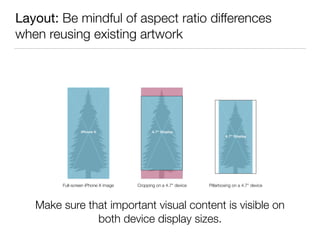
Layout: Be mindful of aspect ratio differences
when reusing existing artwork
Full-screen iPhone X image Cropping on a 4.7" device Pillarboxing on a 4.7" device
Make sure that important visual content is visible on

both device display sizes.
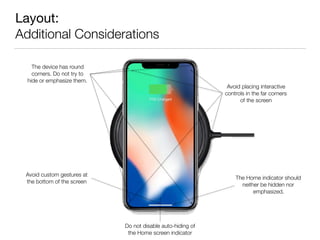
Layout:

Additional Considerations
The device has round
corners. Do not try to

hide or emphasize them.
The Home indicator should
neither be hidden nor
emphasized.
Avoid custom gestures at

the bottom of the screen
Avoid placing interactive
controls in the far corners

of the screen
Do not disable auto-hiding of
the Home screen indicator
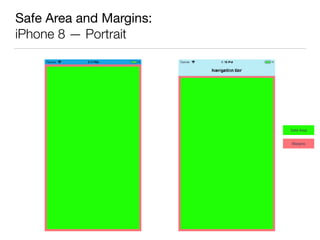
Safe Area and Margins
• iOS 7 introduced the top and bottom layout guides to
assure content is never rendered underneath top and
bottom bars (status, navigation, tab, etc.)
• iOS 11 introduces the additional concept of Safe Areas
which further ensure that content is appropriately inset
both horizontally and vertically on the device
• The safe area prevents content from underlapping top
and bottom bars, sensor housing and other areas
obscured on the display
Safe Area and Margins:

iPhone 8 — Portrait
Safe Area
Margins
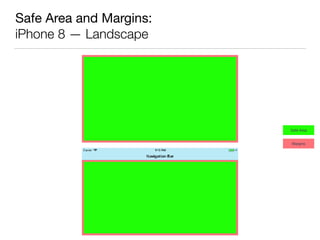
Safe Area and Margins:

iPhone 8 — Landscape
Safe Area
Margins
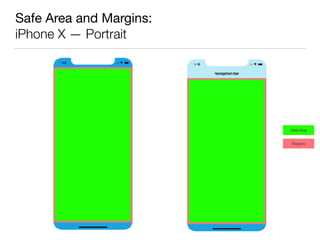
Safe Area and Margins:

iPhone X — Portrait
Safe Area
Margins
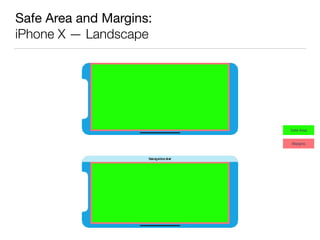
Safe Area and Margins:

iPhone X — Landscape
Safe Area
Margins
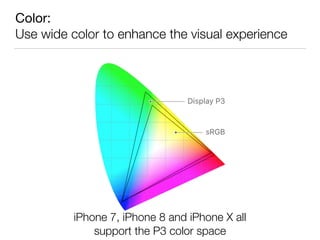
Color:

Use wide color to enhance the visual experience
iPhone 7, iPhone 8 and iPhone X all

support the P3 color space
Accurately reference authentication methods
iPhone X supports Face ID for authentication.

Don’t refer to Touch ID on iPhone X.
iOS 11
iPad:

Multitasking, Drag and Drop
• All new multitasking view
• Dock available from anywhere via swipe-up gesture
• Drag and Drop enables moving text, images and files
between apps
• Supports Multi-Touch to select multiple items, even
across apps
• Spring-loading lets you drag and drop items to an app by
hovering over the app’s icon in the Home screen or Dock
Core ML:

Machine Learning
• Provides an engine which can process a variety of machine
learning models in apps
• Operates on a model created and trained during
development
• Takes advantage of the CPU and GPU to provide high-
performance and efficient computing
• Support for computer vision and natural language processing
• Used across Apple’s product line, including Siri, Camera, and
QuickType
ARKit:

Augmented Reality
• Uses Visual Inertial Odometry (VIO) to combine camera sensor data and
CoreMotion data
• Apps can determine, with a high degree of accuracy, how the device is moving
within a room
• Scenes from the camera are analyzed to find horizontal planes, such as tables
and floors
• Objects can be tracked and placed within the scene
• Estimates the total amount of light in the room so the correct amount of light
may be applied to virtual objects
• The TrueDepth Camera on iPhone X allows for detecting the position, topology
and expression of a user’s face in real time
References
• Human Interface Guidelines: iPhone X
• iPhone X Tech Specs
• What’s New in iOS 11

iPhone X and iOS 11: An Overview

  • 1.
    iPhone X andiOS 11:
 An Overview Adam.Talcott@ymedialabs.com
  • 2.
  • 3.
    Screen Size Comparison(Points):
 iPhone 8 versus iPhone X 667 points 375 points 375 points 812 points 145 points
  • 4.
    Screen Size Comparison(Pixels):
 iPhone 8 versus iPhone X 1,334 pixels 750 pixels 1,125 pixels 2,436 pixels 435 pixels
  • 5.
    Artwork Recommendations • Applerecommends using: • Resolution-independent PDFs for glyphs and flat, vector artwork • Starting with Xcode 9 and iOS 11, appropriately sized PNGs will be rendered at runtime • High resolution PNGs with 2.0 and 3.0 scale factors for rasterized images • In practice, it may still be preferable to use PNGs if different images are needed for different resolutions or if assets are to be shared with Android apps
  • 6.
    Layout:
 Provide a fullscreen experience
  • 7.
  • 8.
    Layout:
 Be mindful ofthe status bar height With In-Call Status BarStandard
  • 9.
  • 10.
    Layout: Be mindfulof aspect ratio differences when reusing existing artwork Full-screen 4.7" device image Cropping on iPhone X Letterboxing on iPhone X Make sure that important visual content is visible on
 both device display sizes.
  • 11.
    Layout: Be mindfulof aspect ratio differences when reusing existing artwork Full-screen iPhone X image Cropping on a 4.7" device Pillarboxing on a 4.7" device Make sure that important visual content is visible on
 both device display sizes.
  • 12.
    Layout: Additional Considerations The devicehas round corners. Do not try to
 hide or emphasize them. The Home indicator should neither be hidden nor emphasized. Avoid custom gestures at
 the bottom of the screen Avoid placing interactive controls in the far corners
 of the screen Do not disable auto-hiding of the Home screen indicator
  • 13.
    Safe Area andMargins • iOS 7 introduced the top and bottom layout guides to assure content is never rendered underneath top and bottom bars (status, navigation, tab, etc.) • iOS 11 introduces the additional concept of Safe Areas which further ensure that content is appropriately inset both horizontally and vertically on the device • The safe area prevents content from underlapping top and bottom bars, sensor housing and other areas obscured on the display
  • 14.
    Safe Area andMargins:
 iPhone 8 — Portrait Safe Area Margins
  • 15.
    Safe Area andMargins:
 iPhone 8 — Landscape Safe Area Margins
  • 16.
    Safe Area andMargins:
 iPhone X — Portrait Safe Area Margins
  • 17.
    Safe Area andMargins:
 iPhone X — Landscape Safe Area Margins
  • 18.
    Color:
 Use wide colorto enhance the visual experience iPhone 7, iPhone 8 and iPhone X all
 support the P3 color space
  • 19.
    Accurately reference authenticationmethods iPhone X supports Face ID for authentication.
 Don’t refer to Touch ID on iPhone X.
  • 20.
  • 21.
    iPad:
 Multitasking, Drag andDrop • All new multitasking view • Dock available from anywhere via swipe-up gesture • Drag and Drop enables moving text, images and files between apps • Supports Multi-Touch to select multiple items, even across apps • Spring-loading lets you drag and drop items to an app by hovering over the app’s icon in the Home screen or Dock
  • 22.
    Core ML:
 Machine Learning • Providesan engine which can process a variety of machine learning models in apps • Operates on a model created and trained during development • Takes advantage of the CPU and GPU to provide high- performance and efficient computing • Support for computer vision and natural language processing • Used across Apple’s product line, including Siri, Camera, and QuickType
  • 23.
    ARKit:
 Augmented Reality • UsesVisual Inertial Odometry (VIO) to combine camera sensor data and CoreMotion data • Apps can determine, with a high degree of accuracy, how the device is moving within a room • Scenes from the camera are analyzed to find horizontal planes, such as tables and floors • Objects can be tracked and placed within the scene • Estimates the total amount of light in the room so the correct amount of light may be applied to virtual objects • The TrueDepth Camera on iPhone X allows for detecting the position, topology and expression of a user’s face in real time
  • 24.
    References • Human InterfaceGuidelines: iPhone X • iPhone X Tech Specs • What’s New in iOS 11