
Internet
HOW DOES IT WORK
Presentation By
SIYONA KAUL
X C
INDEX
• The Internet
• Internet and its Use
• How the Internet Works
• Major Features of the Internet
The Internet
• The Internet is a worldwide collection of computer networks, cooperating with
each other to exchange data using a common software standard.
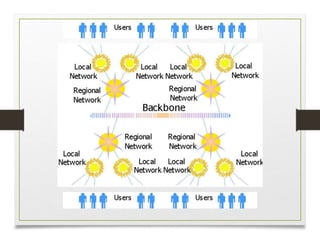
• The Internet uses high-speed data lines, called backbones, to carry data.
Smaller networks connect to the backbone, enabling any user on any network
to exchange data with any other user.
• The Internet was created by the Advanced Research Projects Agency (ARPA)
and the U.S. Department of Defense for scientific and military
communications.
The Internet and its use
• Internet allows the users to
• Connect easily through personal computers, mobile phones and smart TV
• Exchange electronic email with all those who have accounts on the
internet
• Posts information for others to access and updates it frequently
• Access multimedia information that includes text, photo, music, video etc
• Access diverse perspectives from around the world
How the Internet Works
• TCP/IP
• Every computer and network on the Internet uses the same protocols
(rules and procedures) to control timing and data format.
• The protocol used by the Internet is the Transmission Control
Protocol/Internet Protocol, or TCP/IP.
• No matter what type of computer system you connect to the Internet, if
it uses TCP/IP, it can exchange data with any other type of computer.
How the Internet Works
• Routing Traffic Across the Internet
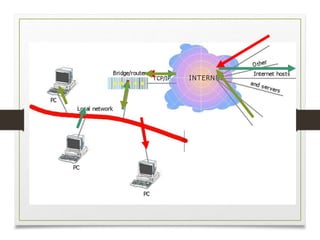
• Most computers don't connect directly to the Internet. Instead, they connect to
a smaller network that is connected to the Internet backbone.
• The Internet includes thousands of host computers (servers),which provide
data and services as requested by client systems.
• When you use the Internet, your PC requests data from a host system. The
request and data are broken into packets and travel across multiple networks
before being reassembled at their destination.
How the Internet Works
• Addressing Schemes
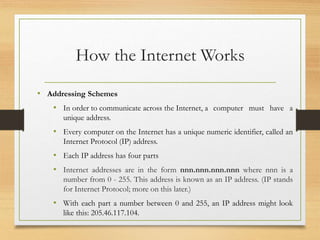
• In order to communicate across the Internet, a computer must have a
unique address.
• Every computer on the Internet has a unique numeric identifier, called an
Internet Protocol (IP) address.
• Each IP address has four parts
• Internet addresses are in the form nnn.nnn.nnn.nnn where nnn is a
number from 0 - 255. This address is known as an IP address. (IP stands
for Internet Protocol; more on this later.)
• With each part a number between 0 and 255, an IP address might look
like this: 205.46.117.104.
How the Internet Works
• Addressing Schemes
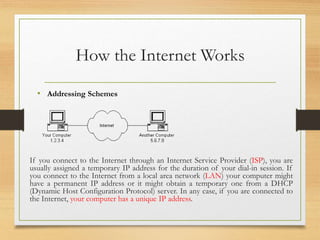
If you connect to the Internet through an Internet Service Provider (ISP), you are
usually assigned a temporary IP address for the duration of your dial-in session. If
you connect to the Internet from a local area network (LAN) your computer might
have a permanent IP address or it might obtain a temporary one from a DHCP
(Dynamic Host Configuration Protocol) server. In any case, if you are connected to
the Internet, your computer has a unique IP address.
How the Internet Works
• Domains and Sub Domains
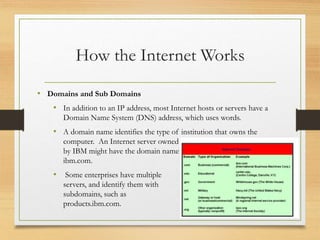
• In addition to an IP address, most Internet hosts or servers have a
Domain Name System (DNS) address, which uses words.
• A domain name identifies the type of institution that owns the
computer. An Internet server owned
by IBM might have the domain name
ibm.com.
• Some enterprises have multiple
servers, and identify them with
subdomains, such as
products.ibm.com.
Major Features of Internet
• The World Wide Web
• The World Wide Web supports hypertext documents, allows users to view
and navigate different types of data.
• A Web page is a document encoded with hypertext markup language (HTML)
tags. HTML allows designers to link content together via hyperlinks. Every
Web page has an address, a Uniform Resource Locator (URL).
• E-Mail
• An account on the Internet mail server with a domain name and an email
program helps create, send, and receive e-mail messages
• To use e-mail, a user must have an e-mail address, which you create by adding
your user name to the e-mail server's domain name, as in jsmith@aol.com.
Major Features of Internet
• News
• Telnet
• File Transfer Protocol (FTP)
• Internet Relay Chat (IRC)
Acknowledgement
• https://web.stanford.edu/class/msande91si/www-
spr04/readings/week1/InternetWhitepaper.htm
• https://simple.m.wikipedia.org › wiki › Internet
• https://www.edn.com › electronics-news › Top-10-uses-
of-the-Internet
How the-internet-works

How the-internet-works

  • 1.
    Internet HOW DOES ITWORK Presentation By SIYONA KAUL X C
  • 2.
    INDEX • The Internet •Internet and its Use • How the Internet Works • Major Features of the Internet
  • 3.
    The Internet • TheInternet is a worldwide collection of computer networks, cooperating with each other to exchange data using a common software standard. • The Internet uses high-speed data lines, called backbones, to carry data. Smaller networks connect to the backbone, enabling any user on any network to exchange data with any other user. • The Internet was created by the Advanced Research Projects Agency (ARPA) and the U.S. Department of Defense for scientific and military communications.
  • 5.
    The Internet andits use • Internet allows the users to • Connect easily through personal computers, mobile phones and smart TV • Exchange electronic email with all those who have accounts on the internet • Posts information for others to access and updates it frequently • Access multimedia information that includes text, photo, music, video etc • Access diverse perspectives from around the world
  • 6.
    How the InternetWorks • TCP/IP • Every computer and network on the Internet uses the same protocols (rules and procedures) to control timing and data format. • The protocol used by the Internet is the Transmission Control Protocol/Internet Protocol, or TCP/IP. • No matter what type of computer system you connect to the Internet, if it uses TCP/IP, it can exchange data with any other type of computer.
  • 7.
    How the InternetWorks • Routing Traffic Across the Internet • Most computers don't connect directly to the Internet. Instead, they connect to a smaller network that is connected to the Internet backbone. • The Internet includes thousands of host computers (servers),which provide data and services as requested by client systems. • When you use the Internet, your PC requests data from a host system. The request and data are broken into packets and travel across multiple networks before being reassembled at their destination.
  • 9.
    How the InternetWorks • Addressing Schemes • In order to communicate across the Internet, a computer must have a unique address. • Every computer on the Internet has a unique numeric identifier, called an Internet Protocol (IP) address. • Each IP address has four parts • Internet addresses are in the form nnn.nnn.nnn.nnn where nnn is a number from 0 - 255. This address is known as an IP address. (IP stands for Internet Protocol; more on this later.) • With each part a number between 0 and 255, an IP address might look like this: 205.46.117.104.
  • 10.
    How the InternetWorks • Addressing Schemes If you connect to the Internet through an Internet Service Provider (ISP), you are usually assigned a temporary IP address for the duration of your dial-in session. If you connect to the Internet from a local area network (LAN) your computer might have a permanent IP address or it might obtain a temporary one from a DHCP (Dynamic Host Configuration Protocol) server. In any case, if you are connected to the Internet, your computer has a unique IP address.
  • 11.
    How the InternetWorks • Domains and Sub Domains • In addition to an IP address, most Internet hosts or servers have a Domain Name System (DNS) address, which uses words. • A domain name identifies the type of institution that owns the computer. An Internet server owned by IBM might have the domain name ibm.com. • Some enterprises have multiple servers, and identify them with subdomains, such as products.ibm.com.
  • 12.
    Major Features ofInternet • The World Wide Web • The World Wide Web supports hypertext documents, allows users to view and navigate different types of data. • A Web page is a document encoded with hypertext markup language (HTML) tags. HTML allows designers to link content together via hyperlinks. Every Web page has an address, a Uniform Resource Locator (URL). • E-Mail • An account on the Internet mail server with a domain name and an email program helps create, send, and receive e-mail messages • To use e-mail, a user must have an e-mail address, which you create by adding your user name to the e-mail server's domain name, as in jsmith@aol.com.
  • 13.
    Major Features ofInternet • News • Telnet • File Transfer Protocol (FTP) • Internet Relay Chat (IRC)
  • 14.
    Acknowledgement • https://web.stanford.edu/class/msande91si/www- spr04/readings/week1/InternetWhitepaper.htm • https://simple.m.wikipedia.org› wiki › Internet • https://www.edn.com › electronics-news › Top-10-uses- of-the-Internet