Basics of
Web Design
Chapter 1
Internet & Web Basics
Key Concepts
1
Learning Outcomes
 Describe the evolution of the Internet and the Web
 Explain the need for web standards
 Describe universal design
 Identify benefits of accessible web design
 Describe the purpose of web browsers and web servers
 Identify Internet protocols
 Define URIs and domain names
 Describe XHTML and HTML
 Create your first web page
 Use the body, head, title and meta elements
 Name, save, and test a web page
2
The Evolution of the Internet
• Internet
– Interconnected network of computer networks
– ARPAnet
• Advanced Research Project Agency
• 1969 – four computers connected
– NSFnet
• National Science Foundation
– Use of the Internet was originally limited to government,
research and academic use
– 1991 Commercial ban lifted
3
Reasons for
Internet Growth in the 1990s
• Removal of the ban on commercial activity
• Development of the World Wide Web by Tim Berners-Lee at
CERN
• Development of Mosaic, the first graphics-based web
browser at NCSA
• Convergence of technologies:
₋ Affordable personal computers with GUI Operating Systems
₋ Affordable Internet service providers
4
Web Standards
and the W3C Consortium
W3C – World Wide Web Consortium
 Develops recommendations and prototype
technologies related to the Web
 Produces specifications, called Recommendations, in
an effort to standardize web technologies
 WAI – Web Accessibility Initiative
5
Web Accessibility
“The power of the Web is in its universality. Access by
everyone regardless of disability is an essential aspect.”
– Tim Berners-Lee
 Accessible Websites
provide accommodations that help individuals to individuals
with visual, auditory, physical, and neurological disabilities
overcome barriers
6
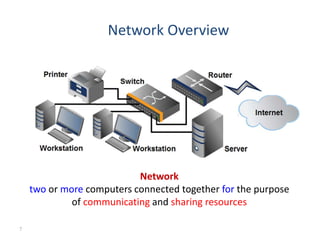
Network Overview
Network
two or more computers connected together for the purpose
of communicating and sharing resources
7
Internet, Packets and Routing
• Internet is a network of computer networks
• Data is transmitted by packet switching using the
standard Internet Protocol (IP)
• Packet – a unit of information carriage
• Packet switching – process of moving packets from
one node (computer device) to another
8
Internet, Packets and Routing
• At the sender, data is broken into packets and sent
to the nearest node (router)
• At each router, it sends the packet to another router
that is closer to the final destination
• At the receiver, packets are reassembled to get the
original data
• A simple analogy: mailing system
9
Internet v.s. Web
• The Internet
a inter-connected computer networks, linked by wires,
cables, wireless connections, etc.
• Web
a collection of interconnected documents and other
resources.
• The world wide web (WWW) is accessible via the
Internet, as are many other services including email, file
sharing, etc.
10
How does the Internet Work?
• Through
• communication protocols
set of Rules that describe the methods used for clients
and servers to communicate with each other over a
network.
– IP (Internet Protocol)
– TCP (Transmission Control Protocol)
– UDP (User Datagram Protocol)
– DNS (Domain Name Service),
– SMTP (Simple Mail Transmission Protocol)
– FTP (File Transmission Protocol)
11
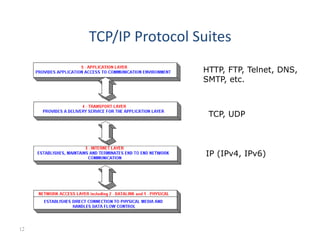
TCP/IP Protocol Suites
HTTP, FTP, Telnet, DNS,
SMTP, etc.
TCP, UDP
IP (IPv4, IPv6)
12
HTTP
Hypertext Transfer Protocol
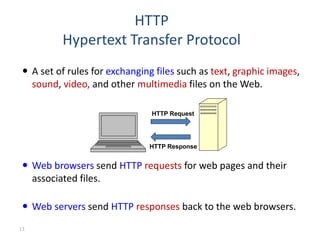
 A set of rules for exchanging files such as text, graphic images,
sound, video, and other multimedia files on the Web.
 Web browsers send HTTP requests for web pages and their
associated files.
 Web servers send HTTP responses back to the web browsers.
HTTP Request
HTTP Response
13
IP Address
• Each device connected to the Internet has a
unique numeric IP address.
• These addresses consist of a set of four groups of
numbers, called octets.
74.125.73.106 will get you Google!
• An IP address may correspond to a domain name.
14
• The World Wide Web (commonly shortened to the Web) is a
system of interlinked, hypertext documents accessed via the
Internet.
• It is created to share files/documents and overcome the
barrier of different file formats
• Hypertext refers to text on a computer that will lead the user
to other, related information on demand.
The World Wide Web (WWW)
15
Basics of the WWW
• Hypertext:
a format of information which allows one to move from
one part of a document to another or from one
document to another through hyperlinks
• Uniform Resource Locator (URL):
unique identifiers used to locate a particular
resource on the network
• Markup language:
• defines the structure and content of hypertext
documents. Ex: HTML
• A browser
is a software program which interprets the HTML
documents and displays it on the user’s screen.
16
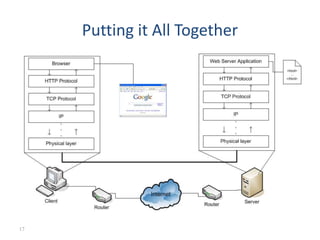
Putting it All Together
17
Client-Server Model
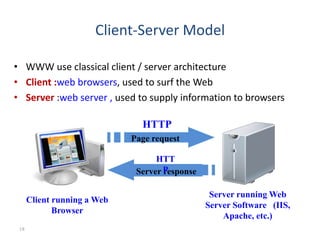
• WWW use classical client / server architecture
• Client :web browsers, used to surf the Web
• Server :web server , used to supply information to browsers
Page request
Client running a Web
Browser
Server running Web
Server Software (IIS,
Apache, etc.)
Server response
HTTP
HTT
P
18
How do Web Servers work?
– Client specifies document at a specific web
address that is desired (specified by a URL)
• Ex: http://www.cs.pitt.edu/
– If the document is HTML or text, the server simply
forwards it back to the client
• If it is text, it is shown unaltered in the browser
• If it is HTML it is rendered in the client's browser
– HTML tags are interpreted and result is shown to the user
19
What is a Web Page?
• Web pages are text files containing HTML
• HTML – Hyper Text Markup Language
– A notation for describing
• document structure (semantic markup)
• formatting (presentation markup)
• The markup tags
provide information about the page content structure
20

ch01-Internet & Web Basics &.ppt

  • 1.
    Basics of Web Design Chapter1 Internet & Web Basics Key Concepts 1
  • 2.
    Learning Outcomes  Describethe evolution of the Internet and the Web  Explain the need for web standards  Describe universal design  Identify benefits of accessible web design  Describe the purpose of web browsers and web servers  Identify Internet protocols  Define URIs and domain names  Describe XHTML and HTML  Create your first web page  Use the body, head, title and meta elements  Name, save, and test a web page 2
  • 3.
    The Evolution ofthe Internet • Internet – Interconnected network of computer networks – ARPAnet • Advanced Research Project Agency • 1969 – four computers connected – NSFnet • National Science Foundation – Use of the Internet was originally limited to government, research and academic use – 1991 Commercial ban lifted 3
  • 4.
    Reasons for Internet Growthin the 1990s • Removal of the ban on commercial activity • Development of the World Wide Web by Tim Berners-Lee at CERN • Development of Mosaic, the first graphics-based web browser at NCSA • Convergence of technologies: ₋ Affordable personal computers with GUI Operating Systems ₋ Affordable Internet service providers 4
  • 5.
    Web Standards and theW3C Consortium W3C – World Wide Web Consortium  Develops recommendations and prototype technologies related to the Web  Produces specifications, called Recommendations, in an effort to standardize web technologies  WAI – Web Accessibility Initiative 5
  • 6.
    Web Accessibility “The powerof the Web is in its universality. Access by everyone regardless of disability is an essential aspect.” – Tim Berners-Lee  Accessible Websites provide accommodations that help individuals to individuals with visual, auditory, physical, and neurological disabilities overcome barriers 6
  • 7.
    Network Overview Network two ormore computers connected together for the purpose of communicating and sharing resources 7
  • 8.
    Internet, Packets andRouting • Internet is a network of computer networks • Data is transmitted by packet switching using the standard Internet Protocol (IP) • Packet – a unit of information carriage • Packet switching – process of moving packets from one node (computer device) to another 8
  • 9.
    Internet, Packets andRouting • At the sender, data is broken into packets and sent to the nearest node (router) • At each router, it sends the packet to another router that is closer to the final destination • At the receiver, packets are reassembled to get the original data • A simple analogy: mailing system 9
  • 10.
    Internet v.s. Web •The Internet a inter-connected computer networks, linked by wires, cables, wireless connections, etc. • Web a collection of interconnected documents and other resources. • The world wide web (WWW) is accessible via the Internet, as are many other services including email, file sharing, etc. 10
  • 11.
    How does theInternet Work? • Through • communication protocols set of Rules that describe the methods used for clients and servers to communicate with each other over a network. – IP (Internet Protocol) – TCP (Transmission Control Protocol) – UDP (User Datagram Protocol) – DNS (Domain Name Service), – SMTP (Simple Mail Transmission Protocol) – FTP (File Transmission Protocol) 11
  • 12.
    TCP/IP Protocol Suites HTTP,FTP, Telnet, DNS, SMTP, etc. TCP, UDP IP (IPv4, IPv6) 12
  • 13.
    HTTP Hypertext Transfer Protocol A set of rules for exchanging files such as text, graphic images, sound, video, and other multimedia files on the Web.  Web browsers send HTTP requests for web pages and their associated files.  Web servers send HTTP responses back to the web browsers. HTTP Request HTTP Response 13
  • 14.
    IP Address • Eachdevice connected to the Internet has a unique numeric IP address. • These addresses consist of a set of four groups of numbers, called octets. 74.125.73.106 will get you Google! • An IP address may correspond to a domain name. 14
  • 15.
    • The WorldWide Web (commonly shortened to the Web) is a system of interlinked, hypertext documents accessed via the Internet. • It is created to share files/documents and overcome the barrier of different file formats • Hypertext refers to text on a computer that will lead the user to other, related information on demand. The World Wide Web (WWW) 15
  • 16.
    Basics of theWWW • Hypertext: a format of information which allows one to move from one part of a document to another or from one document to another through hyperlinks • Uniform Resource Locator (URL): unique identifiers used to locate a particular resource on the network • Markup language: • defines the structure and content of hypertext documents. Ex: HTML • A browser is a software program which interprets the HTML documents and displays it on the user’s screen. 16
  • 17.
    Putting it AllTogether 17
  • 18.
    Client-Server Model • WWWuse classical client / server architecture • Client :web browsers, used to surf the Web • Server :web server , used to supply information to browsers Page request Client running a Web Browser Server running Web Server Software (IIS, Apache, etc.) Server response HTTP HTT P 18
  • 19.
    How do WebServers work? – Client specifies document at a specific web address that is desired (specified by a URL) • Ex: http://www.cs.pitt.edu/ – If the document is HTML or text, the server simply forwards it back to the client • If it is text, it is shown unaltered in the browser • If it is HTML it is rendered in the client's browser – HTML tags are interpreted and result is shown to the user 19
  • 20.
    What is aWeb Page? • Web pages are text files containing HTML • HTML – Hyper Text Markup Language – A notation for describing • document structure (semantic markup) • formatting (presentation markup) • The markup tags provide information about the page content structure 20

Editor's Notes