iteration and prototyping
getting better …
… and starting well
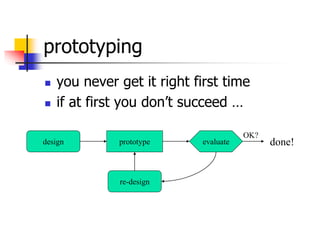
prototyping
 you never get it right first time
 if at first you don’t succeed …
prototype evaluatedesign
re-design
done!
OK?
Prototyping JTB October 2004 3
Overview
 Prototyping is a well understood and used
technique in engineering where novel
products are tested by testing a model
prototype
 prototypes can be “throw away” (e.g., scale
models) or go into commercial use (Concorde!)
 In software development prototypes can be
 paper-based -
 software-based
Prototyping JTB October 2004 4
What is Prototyping?
 Essential element in user centred design
 Is an experimental and partial design
 Involves users in testing design ideas
 Typically done very early in the design process
 Can be used throughout the SDLC
 Different types of prototyping are appropriate for
different stages of design
 Product conceptualization – requirements – task
match user acceptance
Prototyping JTB October 2004 5
What is a prototype?
In interaction design it can be (among other things):
a series of screen sketches
a storyboard, i.e. a cartoon-like series of scenes
a Powerpoint slide show
a video simulating the use of a system
a lump of wood (e.g. PalmPilot)
a cardboard mock-up
a piece of software with limited functionality
written in the target language or in another
language
Prototyping JTB October 2004 6
Why Prototype?
 Traditional software development: you can’t test until
you implement
 Implementation is expensive, and there is nothing to
test until you have made that expenditure of effort
and schedule time
 Result: any design errors are built in to the first thing
you can test, and it is very expensive to make
changes
 Result: design errors, unless they are really bad, are
left in the product
Prototyping JTB October 2004 7
Breaking this implementation
paradox
 Build a prototype of the basic functionality,
especially the interface
 Test the prototype, which will uncover design
errors
 Correct the errors
 Repeat until you have a clean design
 A major tool for improving usability
 Heavily used in industry
Prototyping JTB October 2004 8
What to prototype?
•Work flow, task design
•Screen layouts and information
display
•Difficult, controversial, critical areas
Prototyping JTB October 2004 9
Low-fidelity Prototyping
•Uses a medium which is unlike the final medium,
e.g. paper, cardboard
•Is quick, cheap and easily changed
•Examples:
sketches of screens, task sequences, etc
‘Post-it’ notes
storyboards
‘Wizard-of-Oz’
10
Prototyping Techniques
 Paper Prototyping
 Build it
 Wizard of Oz
 None are perfect -- research lies in
creating tools & techniques that will
support rapid development and
evaluation
11
Paper Prototyping
 Sketch it out on paper
 Fast, simple, effective
 Simulate “computer”, get feedback about real use
 Problems
 Only really effective in well-constrained environments
 Limited to desktop-like applications
12
Build it
 “sketch” it out on a computer
 Existing prototyping tools & UI builders
 Easy to create familiar look and feel
 Problems
 Existing tools limited to the desktop
 Lack support for small, mobile devices
 Lack support for variety of input and output
 Familiar look and feel limited to our culture
13
Wizard of Oz
 Fake it
 Only “prototype” the surface
 Use a human “behind the curtain” to fake the rest
 Particularly good for recognition
 Problems
 Easiest to do in a constrained environment
 How does one “fake” rapid sensor input, etc?
 Wizard must understand dialect, culture, etc.
Prototyping JTB October 2004 14
Paper Based Prototyping
 Paper based prototypes
 These have no functionality but can still be useful
for:-
 Generating ideas
 Gaining insights into what the user might want or is thinking
Eg a paper based design of a data entry screen
 Storyboards and Snapshots
 using “film-scripting” techniques to visualise
interactions between users and the system
 This is very quick and cheap
Prototyping JTB October 2004 15
Storyboards
•Often used with scenarios, bringing more
detail, and a chance to role play
•It is a series of sketches showing how a
user might progress through a task using
the device
•Used early in design
Prototyping JTB October 2004 16
Sketching
•Sketching is important to low-fidelity
prototyping
•Don’t be inhibited about drawing ability.
Practice simple symbols
Prototyping JTB October 2004 17
•Index cards (3 X 5 inches)
•Each card represents one screen
•Often used in website development
Using index
cards
Prototyping JTB October 2004 18
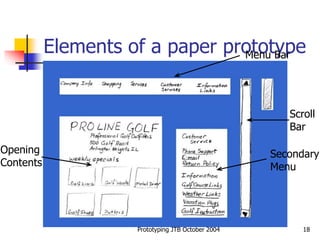
Elements of a paper prototypeMenu Bar
Scroll
Bar
Secondary
Menu
Opening
Contents
Prototyping JTB October 2004 19
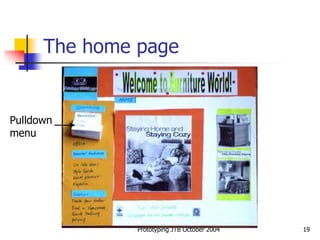
The home page
Pulldown
menu
Prototyping JTB October 2004 20
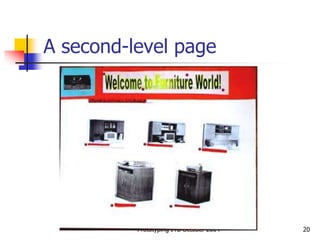
A second-level page
Prototyping JTB October 2004 21
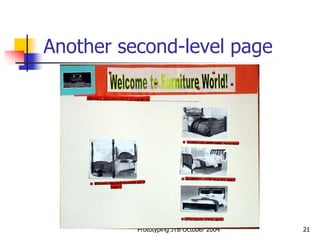
Another second-level page
Prototyping JTB October 2004 22
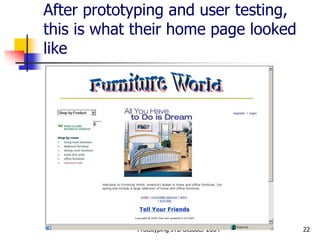
After prototyping and user testing,
this is what their home page looked
like
Prototyping JTB October 2004 23
High-fidelity prototyping
•Uses materials that you would expect to be in
the final product.
•Prototype looks more like the final system than
a low-fidelity version.
•For a high-fidelity software prototype common
environments include Macromedia Director, Visual
Basic, and Smalltalk.
•Danger that users think they have a full
system…….see compromises
Prototyping JTB October 2004 24
Aims of Prototyping in
Software
The aim of prototyping is to resolve
uncertainty about
 functional and user requirements
 operation sequences
 user support needs
 required representations
 “Look and Feel” of the interface
 appropriateness of the design
Prototyping JTB October 2004 25
Software Prototyping
 A software prototype will be a version of the
proposed system with limited functionality
 Will differ from the final system in terms of
 Size, reliability robustness & completeness
A software prototype
 is “executable”
 can be thrown away, or evolve
 may serve many different purposes
 should be “quick and dirty” (and cheap!)
 is an integral part of user-centred design approaches
based on evaluation/modification
Prototyping JTB October 2004 26
Prototyping Techniques
The three major kinds of prototyping are
 “Throw away” prototyping (a.k.a. “rapid
prototyping”)
 used exclusively in requirements gathering
 Incremental prototyping
 not actually prototyping at all, but the delivery of
prioritised functions incrementally to a single, overall
design
 Evolutionary prototyping (a.k.a “Rapid Application
Development, RAD)
 as for incremental prototyping but with evolving design
Prototyping JTB October 2004 27
Rapid Prototyping
 Aims to collect information on
requirements and the adequacy of
possible designs
 Recognises that requirements are likely
to be inaccurate when first specified
 The emphasis is on evaluating the
design before discarding it
Prototyping JTB October 2004 28
Incremental Prototyping
 Final product is built as separate components one at
a time
 There is one overall design for the system
 It is partitioned into independent and smaller
components
 Final product is released as a series of products
 Eg General student details data module – the students
assessment profile module
Prototyping JTB October 2004 29
Evolutionary prototyping – RAD
 As for incremental prototyping
 Additions and amendments are made following
evaluation and the system is regenerated in its
amended form
 In this case the prototype evolves into the final
system
Prototyping JTB October 2004 30
Other Prototyping Techniques
 Full prototype
 full functionality, lower performance than production software
 Horizontal prototype
 displays “breadth” of functionality, no lower level detail “back end”
support Eg. Database link
 Vertical prototype
 full functionality and performance of a “slice” or small part of the
system
• Two common types of compromise
• ‘horizontal’: provide a wide range of functions, but
with little detail
• ‘vertical’: provide a lot of detail for only a few
functions

Iteration and prototyping

  • 1.
    iteration and prototyping gettingbetter … … and starting well
  • 2.
    prototyping  you neverget it right first time  if at first you don’t succeed … prototype evaluatedesign re-design done! OK?
  • 3.
    Prototyping JTB October2004 3 Overview  Prototyping is a well understood and used technique in engineering where novel products are tested by testing a model prototype  prototypes can be “throw away” (e.g., scale models) or go into commercial use (Concorde!)  In software development prototypes can be  paper-based -  software-based
  • 4.
    Prototyping JTB October2004 4 What is Prototyping?  Essential element in user centred design  Is an experimental and partial design  Involves users in testing design ideas  Typically done very early in the design process  Can be used throughout the SDLC  Different types of prototyping are appropriate for different stages of design  Product conceptualization – requirements – task match user acceptance
  • 5.
    Prototyping JTB October2004 5 What is a prototype? In interaction design it can be (among other things): a series of screen sketches a storyboard, i.e. a cartoon-like series of scenes a Powerpoint slide show a video simulating the use of a system a lump of wood (e.g. PalmPilot) a cardboard mock-up a piece of software with limited functionality written in the target language or in another language
  • 6.
    Prototyping JTB October2004 6 Why Prototype?  Traditional software development: you can’t test until you implement  Implementation is expensive, and there is nothing to test until you have made that expenditure of effort and schedule time  Result: any design errors are built in to the first thing you can test, and it is very expensive to make changes  Result: design errors, unless they are really bad, are left in the product
  • 7.
    Prototyping JTB October2004 7 Breaking this implementation paradox  Build a prototype of the basic functionality, especially the interface  Test the prototype, which will uncover design errors  Correct the errors  Repeat until you have a clean design  A major tool for improving usability  Heavily used in industry
  • 8.
    Prototyping JTB October2004 8 What to prototype? •Work flow, task design •Screen layouts and information display •Difficult, controversial, critical areas
  • 9.
    Prototyping JTB October2004 9 Low-fidelity Prototyping •Uses a medium which is unlike the final medium, e.g. paper, cardboard •Is quick, cheap and easily changed •Examples: sketches of screens, task sequences, etc ‘Post-it’ notes storyboards ‘Wizard-of-Oz’
  • 10.
    10 Prototyping Techniques  PaperPrototyping  Build it  Wizard of Oz  None are perfect -- research lies in creating tools & techniques that will support rapid development and evaluation
  • 11.
    11 Paper Prototyping  Sketchit out on paper  Fast, simple, effective  Simulate “computer”, get feedback about real use  Problems  Only really effective in well-constrained environments  Limited to desktop-like applications
  • 12.
    12 Build it  “sketch”it out on a computer  Existing prototyping tools & UI builders  Easy to create familiar look and feel  Problems  Existing tools limited to the desktop  Lack support for small, mobile devices  Lack support for variety of input and output  Familiar look and feel limited to our culture
  • 13.
    13 Wizard of Oz Fake it  Only “prototype” the surface  Use a human “behind the curtain” to fake the rest  Particularly good for recognition  Problems  Easiest to do in a constrained environment  How does one “fake” rapid sensor input, etc?  Wizard must understand dialect, culture, etc.
  • 14.
    Prototyping JTB October2004 14 Paper Based Prototyping  Paper based prototypes  These have no functionality but can still be useful for:-  Generating ideas  Gaining insights into what the user might want or is thinking Eg a paper based design of a data entry screen  Storyboards and Snapshots  using “film-scripting” techniques to visualise interactions between users and the system  This is very quick and cheap
  • 15.
    Prototyping JTB October2004 15 Storyboards •Often used with scenarios, bringing more detail, and a chance to role play •It is a series of sketches showing how a user might progress through a task using the device •Used early in design
  • 16.
    Prototyping JTB October2004 16 Sketching •Sketching is important to low-fidelity prototyping •Don’t be inhibited about drawing ability. Practice simple symbols
  • 17.
    Prototyping JTB October2004 17 •Index cards (3 X 5 inches) •Each card represents one screen •Often used in website development Using index cards
  • 18.
    Prototyping JTB October2004 18 Elements of a paper prototypeMenu Bar Scroll Bar Secondary Menu Opening Contents
  • 19.
    Prototyping JTB October2004 19 The home page Pulldown menu
  • 20.
    Prototyping JTB October2004 20 A second-level page
  • 21.
    Prototyping JTB October2004 21 Another second-level page
  • 22.
    Prototyping JTB October2004 22 After prototyping and user testing, this is what their home page looked like
  • 23.
    Prototyping JTB October2004 23 High-fidelity prototyping •Uses materials that you would expect to be in the final product. •Prototype looks more like the final system than a low-fidelity version. •For a high-fidelity software prototype common environments include Macromedia Director, Visual Basic, and Smalltalk. •Danger that users think they have a full system…….see compromises
  • 24.
    Prototyping JTB October2004 24 Aims of Prototyping in Software The aim of prototyping is to resolve uncertainty about  functional and user requirements  operation sequences  user support needs  required representations  “Look and Feel” of the interface  appropriateness of the design
  • 25.
    Prototyping JTB October2004 25 Software Prototyping  A software prototype will be a version of the proposed system with limited functionality  Will differ from the final system in terms of  Size, reliability robustness & completeness A software prototype  is “executable”  can be thrown away, or evolve  may serve many different purposes  should be “quick and dirty” (and cheap!)  is an integral part of user-centred design approaches based on evaluation/modification
  • 26.
    Prototyping JTB October2004 26 Prototyping Techniques The three major kinds of prototyping are  “Throw away” prototyping (a.k.a. “rapid prototyping”)  used exclusively in requirements gathering  Incremental prototyping  not actually prototyping at all, but the delivery of prioritised functions incrementally to a single, overall design  Evolutionary prototyping (a.k.a “Rapid Application Development, RAD)  as for incremental prototyping but with evolving design
  • 27.
    Prototyping JTB October2004 27 Rapid Prototyping  Aims to collect information on requirements and the adequacy of possible designs  Recognises that requirements are likely to be inaccurate when first specified  The emphasis is on evaluating the design before discarding it
  • 28.
    Prototyping JTB October2004 28 Incremental Prototyping  Final product is built as separate components one at a time  There is one overall design for the system  It is partitioned into independent and smaller components  Final product is released as a series of products  Eg General student details data module – the students assessment profile module
  • 29.
    Prototyping JTB October2004 29 Evolutionary prototyping – RAD  As for incremental prototyping  Additions and amendments are made following evaluation and the system is regenerated in its amended form  In this case the prototype evolves into the final system
  • 30.
    Prototyping JTB October2004 30 Other Prototyping Techniques  Full prototype  full functionality, lower performance than production software  Horizontal prototype  displays “breadth” of functionality, no lower level detail “back end” support Eg. Database link  Vertical prototype  full functionality and performance of a “slice” or small part of the system • Two common types of compromise • ‘horizontal’: provide a wide range of functions, but with little detail • ‘vertical’: provide a lot of detail for only a few functions