Subject : HCI
Semester : VII
By: Arpit Kumar Sharma
1
1. Introduction
2. Historical evolution of the field
3. Interactive system design,
4. Concept of usability - definition and elaboration,
5. HCI and software Engineering,
6. GUI design and Aesthetics,
7. Prototyping techniques.
Contents of UNIT – 1st 2
3
• Human-computer interaction (HCI) is an area of research and practice
that emerged in the early 1980s, initially as a specialty area in computer
science embracing cognitive science and human factors engineering.
• HCI is very important because it will be fundamental to make products
more successful, safe, useful and functional. In the long run, it will make
more pleasurable for the user.
• Human-Computer Interaction (HCI) is a multidisciplinary field of study
focusing on the design of computer technology and, in particular, the
interaction between humans (the users) and computers.
• human-computer interaction and graphical user interface. Usability is the
measure of a product's potential to accomplish the goals of the user.
1. Introduction
4
• Humans are the users of the computers. HCI should always consider about what users expect
and need, what physical abilities and limitations they may have, how their perceptual systems
work, and what they find attractive and enjoyable when they use computers.
• A computer carries on its business in a much less obvious way. The information a computer
contains and the operations it performs are represented inside the computer in a form that we
can’t directly observe- binary digits encoded as two levels of electrical charge.
• Interaction between users and computers occurs at the user interface which includes both
software and hardware. People have to use the computers or different embedded devices for
different purposes. For this they have to interact with these machines.
5
HCI can be used in all disciplines wherever there is a possibility of computer
installation. Some of the areas where HCI can be implemented with distinctive
importance are mentioned below −
 Computer Science − For application design and engineering.
 Psychology − For application of theories and analytical purpose.
 Sociology − For interaction between technology and organization.
 Industrial Design − For interactive products like mobile phones, microwave
oven, etc.
6
Objective of Human Computer Interaction (HCI)
The intention of this subject is to learn the ways of designing user-friendly interfaces or
interactions. Considering which, we will learn the following −
 Ways to design and assess interactive systems.
 Ways to reduce design time through cognitive system and task models.
 Procedures and heuristics for interactive system design.
7Research Trends & Research Fields in HCI:
1. Ubiquitous Communication:
People have to communicate through high speed local networks, nationally over wide-area
networks, and portably via infrared, ultrasonic, cellular, and other technologies.
2. High Functionality Systems:
The main objective of HCI research is to make systems more usable, more useful, and to
provide users with experiences fitting their specific background knowledge and objectives.
3. Mass availability of computer graphics:
Computer graphics capabilities such as image processing, graphics transformations,
rendering, and interactive animations etc. are the areas of research.
4. Mixed Media:
Different HCI systems need to handle images, voice, sounds, video, text, and formatted data.
These should be exchangeable over communication links among users.
8
5. High-bandwidth interaction:
The rate at which humans and machines interact is increasing substantially due to the
changes in speed, computer graphics, new media, and new input/output devices.
6. Large and thin displays:
New display technologies are becoming matured by enabling very large displays and also
displays that are thin, light- weight, and have low power consumption.
7. Embedded computation:
The environment of computations has changed to embedded computation. New embedded
devices created the demand for the embedded computation and it is increasing day-by-day.
8. Group Interfaces:
At present, different interfaces are needed for meetings, for engineering projects, for
authoring joint documents. That is called group interfaces
92. Historical Evolution
From the initial computers performing batch processing to the user-centric design, there
were several milestones which are mentioned below −
• Early computer (e.g. ENIAC, 1946) − Improvement in the H/W technology brought
massive increase in computing power. People started thinking on innovative ideas.
• Visual Display Unit (1950s) − SAGE (semi-automatic ground environment), an air
defense system of the USA used the earliest version of VDU.
• Development of the Sketchpad (1962) − Ivan Sutherland developed Sketchpad and
proved that computer can be used for more than data processing.
• Douglas Engelbart introduced the idea of programming toolkits (1963) − Smaller
systems created larger systems and components.
10
• Introduction of Word Processor, Mouse (1968) − Design of NLS (oNLine System).
• Introduction of personal computer Dynabook (1970s) − Developed smalltalk at Xerox
PARC.
• The idea of metaphor − Xerox star and alto were the first systems to use the concept of
metaphors, which led to spontaneity of the interface.
• Direct Manipulation introduced by Ben Shneiderman (1982) − First used in Apple Mac
PC (1984) that reduced the chances for syntactic errors.
• Vannevar Bush introduced Hypertext (1945) − To denote the non-linear structure of
text.
11
• Multimodality (late 1980s).
• Computer Supported Cooperative Work (1990’s) − Computer mediated
communication.
• WWW (1989) − The first graphical browser (Mosaic) came in 1993.
• Ubiquitous Computing − Currently the most active research area in HCI. Sensor
based/context aware computing also known as pervasive computing.
123. Interactive System Design
The uni-directional movement of the waterfall model of Software Engineering
shows that every phase depends on the preceding phase and not vice-versa.
However, this model is not suitable for the interactive system design.
The interactive system design shows that every phase depends on each other to
serve the purpose of designing and product creation. It is a continuous process
as there is so much to know and users keep changing all the time. An interactive
system designer should recognize this diversity.
13
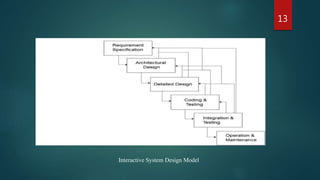
Interactive System Design Model
14
•Requirements: The first phase involves understanding what needs to design and what is its
function, purpose, etc. Here, the specifications of the input and output or the final product are
studied and marked.
•System Design: The requirement specifications from the first phase are studied in this phase
and system design is prepared. System Design helps in specifying hardware and system
requirements and also helps in defining overall system architecture. The software code to be
written in the next stage is created now.
•Implementation: With inputs from system design, the system is first developed in small
programs called units, which are integrated into the next phase. Each unit is developed and
tested for its functionality which is referred to as Unit Testing.
15
•Integration and Testing: All the units developed in the implementation phase are
integrated into a system after testing of each unit. The software designed, needs to go
through constant software testing to find out if there are any flaws or errors. Testing is
done so that the client does not face any problem during the installation of the software.
•Deployment of System: Once the functional and non-functional testing is done, the
product is deployed in the customer environment or released into the market.
•Maintenance: This step occurs after installation, and involves making modifications to
the system or an individual component to alter attributes or improve performance. These
modifications arise either due to change requests initiated by the customer, or defects
uncovered during live use of the system. The client is provided with regular maintenance
and support for the developed software.
164. Concept of Usability Engineering
Usability Engineering is a method in the progress of software and systems, which includes
user contribution from the inception of the process and assures the effectiveness of the
product through the use of a usability requirement and metrics.
It thus refers to the Usability Function features of the entire process of abstracting,
implementing & testing hardware and software products. Requirements gathering stage to
installation, marketing and testing of products, all fall in this process.
Goals of Usability Engineering
 Effective to use − Functional
 Efficient to use − Efficient
 Error free in use − Safe
 Easy to use − Friendly
Enjoyable in use − Delightful Experience
17
Usability:
Usability has three components − effectiveness, efficiency and satisfaction, using which,
users accomplish their goals in particular environments. Let us look in brief about these
components.
 Effectiveness − The completeness with which users achieve their goals.
 Efficiency − The competence used in using the resources to effectively achieve the
goals.
 Satisfaction − The ease of the work system to its users.
Usability Study:
The methodical study on the interaction between people, products, and environment based
on experimental assessment. Example: Psychology, Behavioural Science, etc.
18
Usability Testing:
The scientific evaluation of the stated usability parameters as per the user’s requirements,
competences, prospects, safety and satisfaction is known as usability testing.
Acceptance Testing:
Acceptance testing also known as User Acceptance Testing (UAT), is a testing procedure
that is performed by the users as a final checkpoint before signing off from a vendor. Let
us take an example of the handheld barcode scanner.
195. HCI and software Engineering
Software engineering is the study of designing, development and preservation of
software. It comes in contact with HCI to make the man and machine interaction more
vibrant and interactive.
Let us see the following model in software engineering for interactive designing.
20
•Requirements: The first phase involves understanding what needs to design and what is
its function, purpose, etc. Here, the specifications of the input and output or the final
product are studied and marked.
•System Design: The requirement specifications from the first phase are studied in this
phase and system design is prepared. System Design helps in specifying hardware and
system requirements and also helps in defining overall system architecture. The software
code to be written in the next stage is created now.
•Implementation: With inputs from system design, the system is first developed in small
programs called units, which are integrated into the next phase. Each unit is developed
and tested for its functionality which is referred to as Unit Testing.
Same Explanation as previous Topic “Interactive Design System” :
21
•Integration and Testing: All the units developed in the implementation phase are
integrated into a system after testing of each unit. The software designed, needs to go
through constant software testing to find out if there are any flaws or errors. Testing is done
so that the client does not face any problem during the installation of the software.
•Deployment of System: Once the functional and non-functional testing is done, the
product is deployed in the customer environment or released into the market.
•Maintenance: This step occurs after installation, and involves making modifications to the
system or an individual component to alter attributes or improve performance. These
modifications arise either due to change requests initiated by the customer, or defects
uncovered during live use of the system. The client is provided with regular maintenance
and support for the developed software.
226. GUI design and Aesthetics
Graphic User Interface (GUI) is the interface from where a user can operate programs,
applications or devices in a computer system. This is where the icons, menus, widgets,
labels exist for the users to access.
It is significant that everything in the GUI is arranged in a way that is recognizable
and pleasing to the eye, which shows the aesthetic sense of the GUI designer. GUI
aesthetics provides a character and identity to any product.
23
HCI in Indian Industries
For the past couple of years, majority IT companies in India are hiring designers for
HCI related activities. Even multi-national companies started hiring for HCI from
India as Indian designers have proven their capabilities in architectural, visual and
interaction designs. Thus, Indian HCI designers are not only making a mark in the
country, but also abroad.
The profession has boomed in the last decade even when the usability has been there
forever. And since new products are developed frequently, the durability prognosis
also looks great.
As per an estimation made on usability specialists, there are mere 1,000 experts in
India. The overall requirement is around 60,000. Out of all the designers working in
the country, HCI designers count for approximately 2.77%.
24
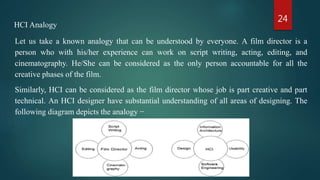
HCI Analogy
Let us take a known analogy that can be understood by everyone. A film director is a
person who with his/her experience can work on script writing, acting, editing, and
cinematography. He/She can be considered as the only person accountable for all the
creative phases of the film.
Similarly, HCI can be considered as the film director whose job is part creative and part
technical. An HCI designer have substantial understanding of all areas of designing. The
following diagram depicts the analogy −
25
Prototyping
Prototyping is another type of software engineering models that can have a complete
range of functionalities of the projected system.
In HCI, prototyping is a trial and partial design that helps users in testing design ideas
without executing a complete system.
Example of a prototype can be Sketches. Sketches of interactive design can later be
produced into graphical interface. See the following diagram.
7. Prototyping techniques
26
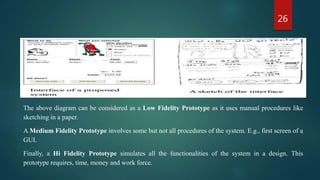
The above diagram can be considered as a Low Fidelity Prototype as it uses manual procedures like
sketching in a paper.
A Medium Fidelity Prototype involves some but not all procedures of the system. E.g., first screen of a
GUI.
Finally, a Hi Fidelity Prototype simulates all the functionalities of the system in a design. This
prototype requires, time, money and work force.
27
User Centered Design (UCD)
The process of collecting feedback from users to improve the design is known
as user centered design or UCD.
UCD Drawbacks
• Passive user involvement.
• User’s perception about the new interface may be inappropriate.
• Designers may ask incorrect questions to users.
28
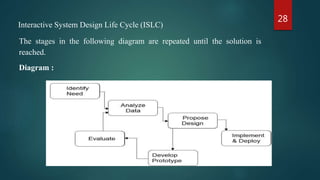
Interactive System Design Life Cycle (ISLC)
The stages in the following diagram are repeated until the solution is
reached.
Diagram :
29
Thank You…

HCI

  • 1.
    Subject : HCI Semester: VII By: Arpit Kumar Sharma 1
  • 2.
    1. Introduction 2. Historicalevolution of the field 3. Interactive system design, 4. Concept of usability - definition and elaboration, 5. HCI and software Engineering, 6. GUI design and Aesthetics, 7. Prototyping techniques. Contents of UNIT – 1st 2
  • 3.
    3 • Human-computer interaction(HCI) is an area of research and practice that emerged in the early 1980s, initially as a specialty area in computer science embracing cognitive science and human factors engineering. • HCI is very important because it will be fundamental to make products more successful, safe, useful and functional. In the long run, it will make more pleasurable for the user. • Human-Computer Interaction (HCI) is a multidisciplinary field of study focusing on the design of computer technology and, in particular, the interaction between humans (the users) and computers. • human-computer interaction and graphical user interface. Usability is the measure of a product's potential to accomplish the goals of the user. 1. Introduction
  • 4.
    4 • Humans arethe users of the computers. HCI should always consider about what users expect and need, what physical abilities and limitations they may have, how their perceptual systems work, and what they find attractive and enjoyable when they use computers. • A computer carries on its business in a much less obvious way. The information a computer contains and the operations it performs are represented inside the computer in a form that we can’t directly observe- binary digits encoded as two levels of electrical charge. • Interaction between users and computers occurs at the user interface which includes both software and hardware. People have to use the computers or different embedded devices for different purposes. For this they have to interact with these machines.
  • 5.
    5 HCI can beused in all disciplines wherever there is a possibility of computer installation. Some of the areas where HCI can be implemented with distinctive importance are mentioned below −  Computer Science − For application design and engineering.  Psychology − For application of theories and analytical purpose.  Sociology − For interaction between technology and organization.  Industrial Design − For interactive products like mobile phones, microwave oven, etc.
  • 6.
    6 Objective of HumanComputer Interaction (HCI) The intention of this subject is to learn the ways of designing user-friendly interfaces or interactions. Considering which, we will learn the following −  Ways to design and assess interactive systems.  Ways to reduce design time through cognitive system and task models.  Procedures and heuristics for interactive system design.
  • 7.
    7Research Trends &Research Fields in HCI: 1. Ubiquitous Communication: People have to communicate through high speed local networks, nationally over wide-area networks, and portably via infrared, ultrasonic, cellular, and other technologies. 2. High Functionality Systems: The main objective of HCI research is to make systems more usable, more useful, and to provide users with experiences fitting their specific background knowledge and objectives. 3. Mass availability of computer graphics: Computer graphics capabilities such as image processing, graphics transformations, rendering, and interactive animations etc. are the areas of research. 4. Mixed Media: Different HCI systems need to handle images, voice, sounds, video, text, and formatted data. These should be exchangeable over communication links among users.
  • 8.
    8 5. High-bandwidth interaction: Therate at which humans and machines interact is increasing substantially due to the changes in speed, computer graphics, new media, and new input/output devices. 6. Large and thin displays: New display technologies are becoming matured by enabling very large displays and also displays that are thin, light- weight, and have low power consumption. 7. Embedded computation: The environment of computations has changed to embedded computation. New embedded devices created the demand for the embedded computation and it is increasing day-by-day. 8. Group Interfaces: At present, different interfaces are needed for meetings, for engineering projects, for authoring joint documents. That is called group interfaces
  • 9.
    92. Historical Evolution Fromthe initial computers performing batch processing to the user-centric design, there were several milestones which are mentioned below − • Early computer (e.g. ENIAC, 1946) − Improvement in the H/W technology brought massive increase in computing power. People started thinking on innovative ideas. • Visual Display Unit (1950s) − SAGE (semi-automatic ground environment), an air defense system of the USA used the earliest version of VDU. • Development of the Sketchpad (1962) − Ivan Sutherland developed Sketchpad and proved that computer can be used for more than data processing. • Douglas Engelbart introduced the idea of programming toolkits (1963) − Smaller systems created larger systems and components.
  • 10.
    10 • Introduction ofWord Processor, Mouse (1968) − Design of NLS (oNLine System). • Introduction of personal computer Dynabook (1970s) − Developed smalltalk at Xerox PARC. • The idea of metaphor − Xerox star and alto were the first systems to use the concept of metaphors, which led to spontaneity of the interface. • Direct Manipulation introduced by Ben Shneiderman (1982) − First used in Apple Mac PC (1984) that reduced the chances for syntactic errors. • Vannevar Bush introduced Hypertext (1945) − To denote the non-linear structure of text.
  • 11.
    11 • Multimodality (late1980s). • Computer Supported Cooperative Work (1990’s) − Computer mediated communication. • WWW (1989) − The first graphical browser (Mosaic) came in 1993. • Ubiquitous Computing − Currently the most active research area in HCI. Sensor based/context aware computing also known as pervasive computing.
  • 12.
    123. Interactive SystemDesign The uni-directional movement of the waterfall model of Software Engineering shows that every phase depends on the preceding phase and not vice-versa. However, this model is not suitable for the interactive system design. The interactive system design shows that every phase depends on each other to serve the purpose of designing and product creation. It is a continuous process as there is so much to know and users keep changing all the time. An interactive system designer should recognize this diversity.
  • 13.
  • 14.
    14 •Requirements: The firstphase involves understanding what needs to design and what is its function, purpose, etc. Here, the specifications of the input and output or the final product are studied and marked. •System Design: The requirement specifications from the first phase are studied in this phase and system design is prepared. System Design helps in specifying hardware and system requirements and also helps in defining overall system architecture. The software code to be written in the next stage is created now. •Implementation: With inputs from system design, the system is first developed in small programs called units, which are integrated into the next phase. Each unit is developed and tested for its functionality which is referred to as Unit Testing.
  • 15.
    15 •Integration and Testing:All the units developed in the implementation phase are integrated into a system after testing of each unit. The software designed, needs to go through constant software testing to find out if there are any flaws or errors. Testing is done so that the client does not face any problem during the installation of the software. •Deployment of System: Once the functional and non-functional testing is done, the product is deployed in the customer environment or released into the market. •Maintenance: This step occurs after installation, and involves making modifications to the system or an individual component to alter attributes or improve performance. These modifications arise either due to change requests initiated by the customer, or defects uncovered during live use of the system. The client is provided with regular maintenance and support for the developed software.
  • 16.
    164. Concept ofUsability Engineering Usability Engineering is a method in the progress of software and systems, which includes user contribution from the inception of the process and assures the effectiveness of the product through the use of a usability requirement and metrics. It thus refers to the Usability Function features of the entire process of abstracting, implementing & testing hardware and software products. Requirements gathering stage to installation, marketing and testing of products, all fall in this process. Goals of Usability Engineering  Effective to use − Functional  Efficient to use − Efficient  Error free in use − Safe  Easy to use − Friendly Enjoyable in use − Delightful Experience
  • 17.
    17 Usability: Usability has threecomponents − effectiveness, efficiency and satisfaction, using which, users accomplish their goals in particular environments. Let us look in brief about these components.  Effectiveness − The completeness with which users achieve their goals.  Efficiency − The competence used in using the resources to effectively achieve the goals.  Satisfaction − The ease of the work system to its users. Usability Study: The methodical study on the interaction between people, products, and environment based on experimental assessment. Example: Psychology, Behavioural Science, etc.
  • 18.
    18 Usability Testing: The scientificevaluation of the stated usability parameters as per the user’s requirements, competences, prospects, safety and satisfaction is known as usability testing. Acceptance Testing: Acceptance testing also known as User Acceptance Testing (UAT), is a testing procedure that is performed by the users as a final checkpoint before signing off from a vendor. Let us take an example of the handheld barcode scanner.
  • 19.
    195. HCI andsoftware Engineering Software engineering is the study of designing, development and preservation of software. It comes in contact with HCI to make the man and machine interaction more vibrant and interactive. Let us see the following model in software engineering for interactive designing.
  • 20.
    20 •Requirements: The firstphase involves understanding what needs to design and what is its function, purpose, etc. Here, the specifications of the input and output or the final product are studied and marked. •System Design: The requirement specifications from the first phase are studied in this phase and system design is prepared. System Design helps in specifying hardware and system requirements and also helps in defining overall system architecture. The software code to be written in the next stage is created now. •Implementation: With inputs from system design, the system is first developed in small programs called units, which are integrated into the next phase. Each unit is developed and tested for its functionality which is referred to as Unit Testing. Same Explanation as previous Topic “Interactive Design System” :
  • 21.
    21 •Integration and Testing:All the units developed in the implementation phase are integrated into a system after testing of each unit. The software designed, needs to go through constant software testing to find out if there are any flaws or errors. Testing is done so that the client does not face any problem during the installation of the software. •Deployment of System: Once the functional and non-functional testing is done, the product is deployed in the customer environment or released into the market. •Maintenance: This step occurs after installation, and involves making modifications to the system or an individual component to alter attributes or improve performance. These modifications arise either due to change requests initiated by the customer, or defects uncovered during live use of the system. The client is provided with regular maintenance and support for the developed software.
  • 22.
    226. GUI designand Aesthetics Graphic User Interface (GUI) is the interface from where a user can operate programs, applications or devices in a computer system. This is where the icons, menus, widgets, labels exist for the users to access. It is significant that everything in the GUI is arranged in a way that is recognizable and pleasing to the eye, which shows the aesthetic sense of the GUI designer. GUI aesthetics provides a character and identity to any product.
  • 23.
    23 HCI in IndianIndustries For the past couple of years, majority IT companies in India are hiring designers for HCI related activities. Even multi-national companies started hiring for HCI from India as Indian designers have proven their capabilities in architectural, visual and interaction designs. Thus, Indian HCI designers are not only making a mark in the country, but also abroad. The profession has boomed in the last decade even when the usability has been there forever. And since new products are developed frequently, the durability prognosis also looks great. As per an estimation made on usability specialists, there are mere 1,000 experts in India. The overall requirement is around 60,000. Out of all the designers working in the country, HCI designers count for approximately 2.77%.
  • 24.
    24 HCI Analogy Let ustake a known analogy that can be understood by everyone. A film director is a person who with his/her experience can work on script writing, acting, editing, and cinematography. He/She can be considered as the only person accountable for all the creative phases of the film. Similarly, HCI can be considered as the film director whose job is part creative and part technical. An HCI designer have substantial understanding of all areas of designing. The following diagram depicts the analogy −
  • 25.
    25 Prototyping Prototyping is anothertype of software engineering models that can have a complete range of functionalities of the projected system. In HCI, prototyping is a trial and partial design that helps users in testing design ideas without executing a complete system. Example of a prototype can be Sketches. Sketches of interactive design can later be produced into graphical interface. See the following diagram. 7. Prototyping techniques
  • 26.
    26 The above diagramcan be considered as a Low Fidelity Prototype as it uses manual procedures like sketching in a paper. A Medium Fidelity Prototype involves some but not all procedures of the system. E.g., first screen of a GUI. Finally, a Hi Fidelity Prototype simulates all the functionalities of the system in a design. This prototype requires, time, money and work force.
  • 27.
    27 User Centered Design(UCD) The process of collecting feedback from users to improve the design is known as user centered design or UCD. UCD Drawbacks • Passive user involvement. • User’s perception about the new interface may be inappropriate. • Designers may ask incorrect questions to users.
  • 28.
    28 Interactive System DesignLife Cycle (ISLC) The stages in the following diagram are repeated until the solution is reached. Diagram :
  • 29.