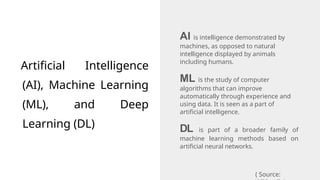
Artificial Intelligence
(AI), MachineLearning
(ML), and Deep
Learning (DL)
AI is intelligence demonstrated by
machines, as opposed to natural
intelligence displayed by animals
including humans.
ML is the study of computer
algorithms that can improve
automatically through experience and
using data. It is seen as a part of
artificial intelligence.
DL is part of a broader family of
machine learning methods based on
artificial neural networks.
( Source:
3.
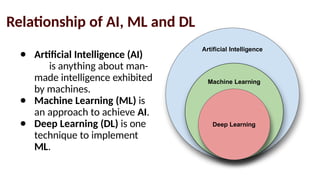
Relationship of AI,ML and DL
Artificial Intelligence
Machine Learning
Deep Learning
● Artificial Intelligence (AI)
is anything about man-
made intelligence exhibited
by machines.
● Machine Learning (ML) is
an approach to achieve AI.
● Deep Learning (DL) is one
technique to implement
ML.
4.
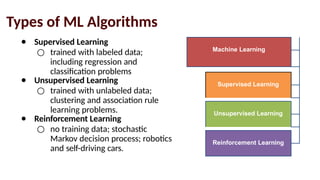
Types of MLAlgorithms
● Supervised Learning
○ trained with labeled data;
including regression and
classification problems
● Unsupervised Learning
○ trained with unlabeled data;
clustering and association rule
learning problems.
● Reinforcement Learning
○ no training data; stochastic
Markov decision process; robotics
and self-driving cars.
Machine Learning
Supervised Learning
Unsupervised Learning
Reinforcement Learning
5.
What is DeepLearning?
Deep learning is a class of machine learning algorithms that:
● use a cascade of multiple layers of nonlinear processing units
for feature extraction and transformation. Each successive
layer uses the output from the previous layer as input.
● learn in supervised (e.g., classification) and/or unsupervised
(e.g., pattern analysis) manners.
● learn multiple levels of representations that correspond to
different levels of abstraction; the levels form a hierarchy of
concepts.
(Source:
6.
Why Deep Learning?
●Limitations of traditional machine learning algorithms
○ not good at handling high dimensional data.
○ difficult to do feature extraction and object recognition.
● Advantages of deep learning
○ DL is computationally expensive, but it is capable of
handling high dimensional data.
○ feature extraction is done automatically.
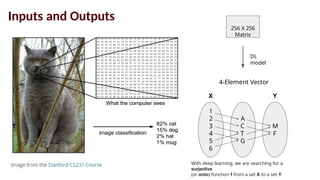
Inputs and Outputs
256X 256
Matrix
DL
model
4-Element Vector
1
2
3
4
5
6
A
C
T
G
M
F
With deep learning, we are searching for a
surjective
(or onto) function f from a set X to a set Y.
X Y
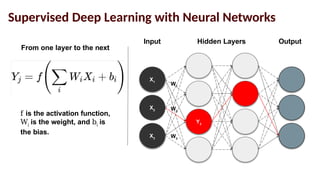
Supervised Deep Learningwith Neural Networks
X3
X2
X1
Y3
Input Hidden Layers Output
W1
W2
W3
From one layer to the next
f is the activation function,
Wi
is the weight, and bi
is
the bias.
13.
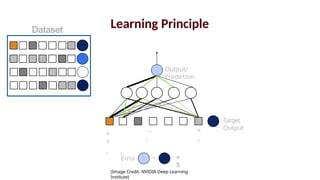
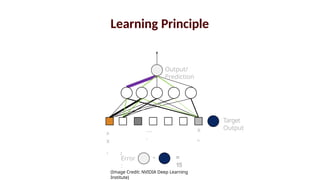
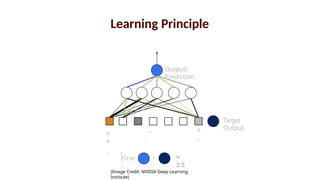
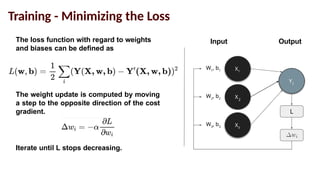
Training - Minimizingthe Loss
X3
X2
X1
Y2
Input Output
W3
, b3
The loss function with regard to weights
and biases can be defined as
W2
, b2
W1
, b1
L
The weight update is computed by moving
a step to the opposite direction of the cost
gradient.
Iterate until L stops decreasing.
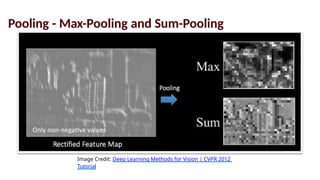
Pooling - Max-Poolingand Sum-Pooling
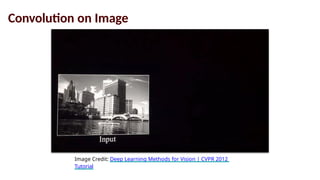
Image Credit: Deep Learning Methods for Vision | CVPR 2012
Tutorial
21.
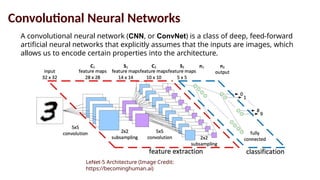
Convolutional Neural Networks
Aconvolutional neural network (CNN, or ConvNet) is a class of deep, feed-forward
artificial neural networks that explicitly assumes that the inputs are images, which
allows us to encode certain properties into the architecture.
LeNet-5 Architecture (Image Credit:
https://becominghuman.ai)
22.
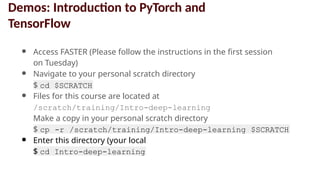
● Access FASTER(Please follow the instructions in the first session
on Tuesday)
● Navigate to your personal scratch directory
$ cd $SCRATCH
● Files for this course are located at
/scratch/training/Intro-deep-learning
Make a copy in your personal scratch directory
$ cp -r /scratch/training/Intro-deep-learning $SCRATCH
● Enter this directory (your local
copy)
$ cd Intro-deep-learning
Demos: Introduction to PyTorch and
TensorFlow
23.
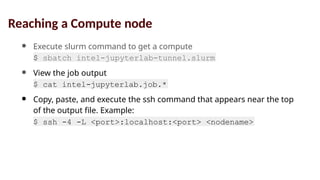
● Execute slurmcommand to get a compute
node
$ sbatch intel-jupyterlab-tunnel.slurm
● View the job output
file
$ cat intel-jupyterlab.job.*
● Copy, paste, and execute the ssh command that appears near the top
of the output file. Example:
$ ssh -4 -L <port>:localhost:<port> <nodename>
Reaching a Compute node
24.
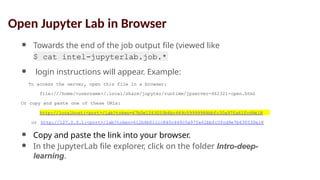
● Towards theend of the job output file (viewed like
this)
$ cat intel-jupyterlab.job.*
● login instructions will appear. Example:
To access the server, open this file in a browser:
file:///home/<username>/.local/share/jupyter/runtime/jpserver-462321-open.html
Or copy and paste one of these URLs:
http://localhost:<port>/lab?token=67b0e1263053b6bc449c59999984bbfc30a97fa61fcd9e18
or http://127.0.0.1:<port>/lab?token=612b6b0iiic840c449c5a97fa61bbfc3fcd9e7b630530e18
● Copy and paste the link into your browser.
● In the JupyterLab file explorer, click on the folder Intro-deep-
learning.
Open Jupyter Lab in Browser


![谷歌留痕技术教程[ 𝙩𝙤𝙥 𝟮𝟯𝟯. 𝙘 𝙤𝙢 ]](https://cdn.slidesharecdn.com/ss_thumbnails/top233-260130173900-2eb784f9-thumbnail.jpg?width=640&height=640&fit=bounds)


