How SOLR Search Works
Rajat Jain - 20th Dec, 2016
Agenda
• What do you mean by Search?
• Search Requirements
• Comparison of SOLR with SQL/NoSQL
• SOLR Architecture
• SOLR Usage in Trellis
• How Google Search Works
• Other Search Technologies
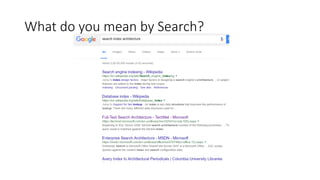
What do you mean by Search?
Search Requirements
• Text Search – eg. “Architects”
• Filters – eg. “In New Delhi”, “iOS”
• Sorting – eg. “Best Match”, “Highest Rating”, etc.
• And More..
• Facets
• Stemming
• Fuzzy Matching
• Image Search, etc.
Search Requirements
• Full Text Search
• Fast reads (writes can be slower)
• Various Combinations of Filters
• Various Combinations of Sorting
• Non Features:
• Real-time – usually staleness is not a problem
• Data Integrity – usually not a source of storage – can be ‘lossy’
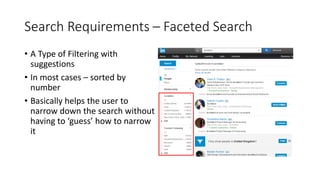
Search Requirements – Faceted Search
• A Type of Filtering with
suggestions
• In most cases – sorted by
number
• Basically helps the user to
narrow down the search without
having to ‘guess’ how to narrow
it
Conventional Storage for Search
• SQL (MySQL)
• Relational Tables
• Normalized Data
• Assuming using Keys / Indexes for reads & writes
• Optimized for reads and writes & transactional data (acid transactions)
• Lots of security, etc.
• Table Data stored in File System
• Indexing - Individual columns – set of columns
• Full Text search – recent addition (full text index)
Conventional Storage for Search
• No SQL (think MongoDB)
• Key Value Pairs
• De-normalized Data
• Unstructured Data
• Optimized for Reads – writes can be slightly slower (in case of transactional)
• Data stored in File System
• Indexing – individual fields
• Full Text Search – has in-built support
Advantages of SOLR over MySQL/NoSQL
• Reversed Index
• Mind-blowing Text-analysis / stemming / scoring / fuzziness
• Weighting fields / boosting – custom scoring functions
• Single document concept – no relations (in general)
• Faceting support out-of-the box
• Optimized for search and search alone (at scale without performance
drop)
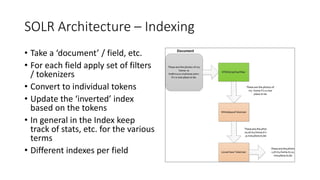
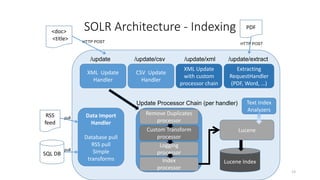
SOLR Architecture – Indexing
• Take a ‘document’ / field, etc.
• For each field apply set of filters
/ tokenizers
• Convert to individual tokens
• Update the ‘inverted’ index
based on the tokens
• In general in the Index keep
track of stats, etc. for the various
terms
• Different indexes per field
SOLR Architecture - Indexing
13
XML Update
Handler
CSV Update
Handler
/update /update/csv
XML Update
with custom
processor chain
/update/xml
Extracting
RequestHandler
(PDF, Word, …)
/update/extract
Lucene Index
Data Import
Handler
Database pull
RSS pull
Simple
transforms
SQL DB
RSS
feed
<doc>
<title>
Remove Duplicates
processor
Logging
processor
Index
processor
Custom Transform
processor
PDF
HTTP POST
HTTP POST
pull
pull
Update Processor Chain (per handler)
Lucene
Text Index
Analyzers
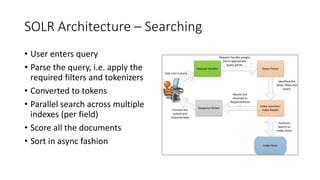
SOLR Architecture – Searching
• User enters query
• Parse the query, i.e. apply the
required filters and tokenizers
• Converted to tokens
• Parallel search across multiple
indexes (per field)
• Score all the documents
• Sort in async fashion
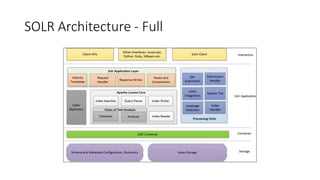
SOLR Architecture - Full
SOLR Architecture – Updating Index
• Types of Index Updates
• Instant Index
• Incremental Indexing
• Full Indexing
• Index Update Strategies
• Instant / Incremental Index cannot happen continuously
• Too much causes performance degradation
• Full Index periodically to optimize the index
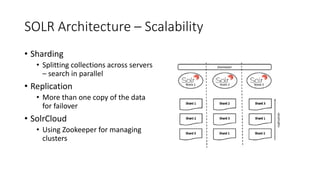
SOLR Architecture – Scalability
• Sharding
• Splitting collections across servers
– search in parallel
• Replication
• More than one copy of the data
for failover
• SolrCloud
• Using Zookeeper for managing
clusters
SOLR Architecture – Other Features
• Stemming
• Identify root word and variations of the word, eg. "stems", "stemmer",
"stemming", "stemmed" as based on "stem"
• Fuzzy Matching
• Similar Words / Misspellings
• Edit Distance
• NLP
• Identify Entities / Nouns in Search Query
• OpenNLP Plugin for SOLR
• And much more…
SOLR Usage in Trellis
• Architecture
• Data-in from MySQL
• Index Update Strategy
• AutoComplete
• Basic Search
• Advanced Search
• Filters / Sorting / Facets & More
• Demo (Incl. Config Files)
How Google Search Works
• Crawling
• Robots.txt
• Indexing
• Multiple Indexes – Instant / Daily / Weekly / Long Tail
• Searching
• NLP, Stemming, Auto-correct, etc.
• Ranking – PageRank
• Video - https://www.youtube.com/watch?v=BNHR6IQJGZs
Other Search Technologies
• ElasticSearch
• Much newer than Solr
• Built-in scalability
• Uses same Lucene as the base
• JSON instead of XML
• Good for Analytical querying
• Others
• Splunk
• Sphinx
That’s All Folks
References
• SOLR Home Page -
http://lucene.apache.org/solr/
• Tutorials
• http://www.solrtutorial.com/index.h
tml
• https://lucene.apache.org/solr/4_10
_0/tutorial.html
• Just Google the rest!!

How Solr Search Works

  • 1.
    How SOLR SearchWorks Rajat Jain - 20th Dec, 2016
  • 2.
    Agenda • What doyou mean by Search? • Search Requirements • Comparison of SOLR with SQL/NoSQL • SOLR Architecture • SOLR Usage in Trellis • How Google Search Works • Other Search Technologies
  • 3.
    What do youmean by Search?
  • 4.
    What do youmean by Search?
  • 5.
    What do youmean by Search?
  • 6.
    Search Requirements • TextSearch – eg. “Architects” • Filters – eg. “In New Delhi”, “iOS” • Sorting – eg. “Best Match”, “Highest Rating”, etc. • And More.. • Facets • Stemming • Fuzzy Matching • Image Search, etc.
  • 7.
    Search Requirements • FullText Search • Fast reads (writes can be slower) • Various Combinations of Filters • Various Combinations of Sorting • Non Features: • Real-time – usually staleness is not a problem • Data Integrity – usually not a source of storage – can be ‘lossy’
  • 8.
    Search Requirements –Faceted Search • A Type of Filtering with suggestions • In most cases – sorted by number • Basically helps the user to narrow down the search without having to ‘guess’ how to narrow it
  • 9.
    Conventional Storage forSearch • SQL (MySQL) • Relational Tables • Normalized Data • Assuming using Keys / Indexes for reads & writes • Optimized for reads and writes & transactional data (acid transactions) • Lots of security, etc. • Table Data stored in File System • Indexing - Individual columns – set of columns • Full Text search – recent addition (full text index)
  • 10.
    Conventional Storage forSearch • No SQL (think MongoDB) • Key Value Pairs • De-normalized Data • Unstructured Data • Optimized for Reads – writes can be slightly slower (in case of transactional) • Data stored in File System • Indexing – individual fields • Full Text Search – has in-built support
  • 11.
    Advantages of SOLRover MySQL/NoSQL • Reversed Index • Mind-blowing Text-analysis / stemming / scoring / fuzziness • Weighting fields / boosting – custom scoring functions • Single document concept – no relations (in general) • Faceting support out-of-the box • Optimized for search and search alone (at scale without performance drop)
  • 12.
    SOLR Architecture –Indexing • Take a ‘document’ / field, etc. • For each field apply set of filters / tokenizers • Convert to individual tokens • Update the ‘inverted’ index based on the tokens • In general in the Index keep track of stats, etc. for the various terms • Different indexes per field
  • 13.
    SOLR Architecture -Indexing 13 XML Update Handler CSV Update Handler /update /update/csv XML Update with custom processor chain /update/xml Extracting RequestHandler (PDF, Word, …) /update/extract Lucene Index Data Import Handler Database pull RSS pull Simple transforms SQL DB RSS feed <doc> <title> Remove Duplicates processor Logging processor Index processor Custom Transform processor PDF HTTP POST HTTP POST pull pull Update Processor Chain (per handler) Lucene Text Index Analyzers
  • 14.
    SOLR Architecture –Searching • User enters query • Parse the query, i.e. apply the required filters and tokenizers • Converted to tokens • Parallel search across multiple indexes (per field) • Score all the documents • Sort in async fashion
  • 15.
  • 16.
    SOLR Architecture –Updating Index • Types of Index Updates • Instant Index • Incremental Indexing • Full Indexing • Index Update Strategies • Instant / Incremental Index cannot happen continuously • Too much causes performance degradation • Full Index periodically to optimize the index
  • 17.
    SOLR Architecture –Scalability • Sharding • Splitting collections across servers – search in parallel • Replication • More than one copy of the data for failover • SolrCloud • Using Zookeeper for managing clusters
  • 18.
    SOLR Architecture –Other Features • Stemming • Identify root word and variations of the word, eg. "stems", "stemmer", "stemming", "stemmed" as based on "stem" • Fuzzy Matching • Similar Words / Misspellings • Edit Distance • NLP • Identify Entities / Nouns in Search Query • OpenNLP Plugin for SOLR • And much more…
  • 19.
    SOLR Usage inTrellis • Architecture • Data-in from MySQL • Index Update Strategy • AutoComplete • Basic Search • Advanced Search • Filters / Sorting / Facets & More • Demo (Incl. Config Files)
  • 20.
    How Google SearchWorks • Crawling • Robots.txt • Indexing • Multiple Indexes – Instant / Daily / Weekly / Long Tail • Searching • NLP, Stemming, Auto-correct, etc. • Ranking – PageRank • Video - https://www.youtube.com/watch?v=BNHR6IQJGZs
  • 21.
    Other Search Technologies •ElasticSearch • Much newer than Solr • Built-in scalability • Uses same Lucene as the base • JSON instead of XML • Good for Analytical querying • Others • Splunk • Sphinx
  • 22.
    That’s All Folks References •SOLR Home Page - http://lucene.apache.org/solr/ • Tutorials • http://www.solrtutorial.com/index.h tml • https://lucene.apache.org/solr/4_10 _0/tutorial.html • Just Google the rest!!