Rapid Prototyping
with
Solr
Presented by Erik Hatcher, Lucid Imagination
About me...
• Co-author,“Lucene in Action”
• Commiter, Lucene and Solr
• Lucene PMC and ASF member
• Member of Technical Staff / co-founder,
Lucid Imagination
Got data? Let's make it searchable! This presentation
will demonstrate getting documents into Solr
quickly, will provide some tips in adjusting Solr's
schema to match your needs better, and finally will
discuss how to showcase your data in a flexible
search user interface.We'll see how to rapidly
leverage faceting, highlighting, spell checking, and
debugging. Even after all that, there will be enough
time left to outline the next steps in developing your
search application and taking it to production.
Abstract
Why prototype?
• Demonstrate Solr can handle your data and
searching needs
• It’s quick and easy
• An immediate functional user interface
impresses decision makers and target users
• The User Interface IS the App
Got data?
• Files (Word, PDF, HTML, etc)?
• Solr Cell
• Databases? Feeds?
• Data Import Handler
• 3rd party repositories? Web crawl?
• Solr HTTP API, Manifold Connectors Framework, Nutch
• CSV?
• see below!
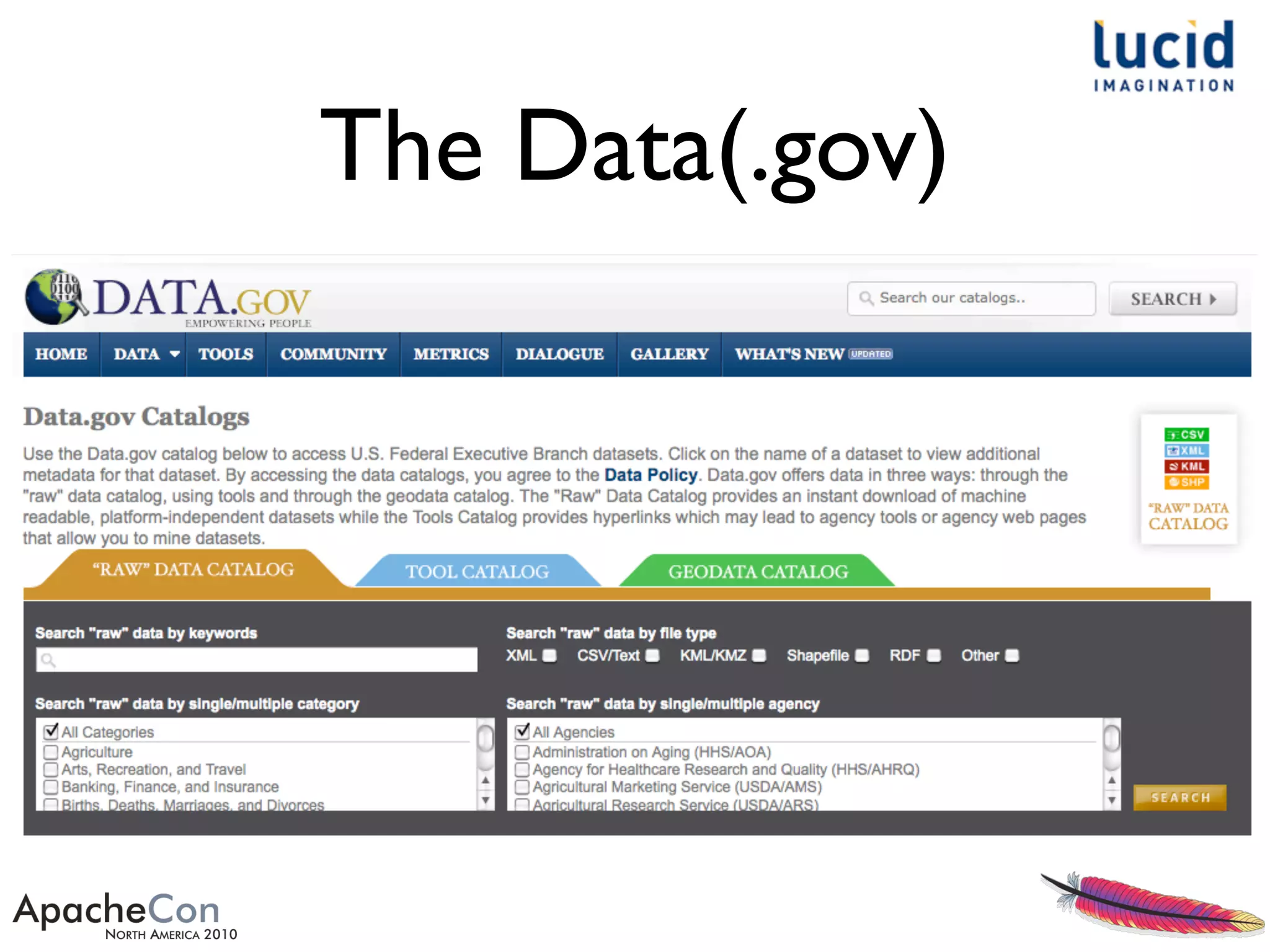
The Data(.gov)
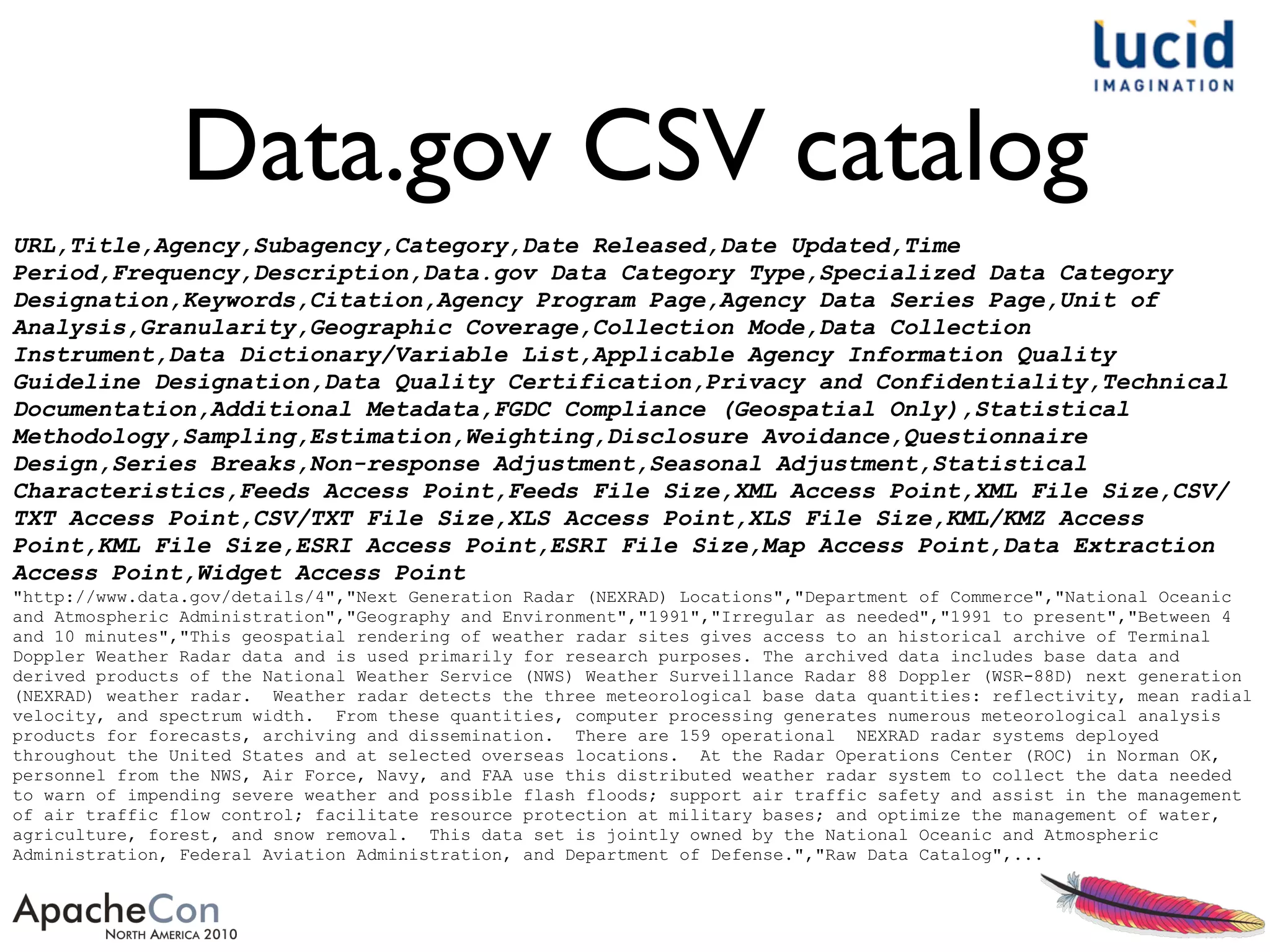
Data.gov CSV catalog
URL,Title,Agency,Subagency,Category,Date Released,Date Updated,Time
Period,Frequency,Description,Data.gov Data Category Type,Specialized Data Category
Designation,Keywords,Citation,Agency Program Page,Agency Data Series Page,Unit of
Analysis,Granularity,Geographic Coverage,Collection Mode,Data Collection
Instrument,Data Dictionary/Variable List,Applicable Agency Information Quality
Guideline Designation,Data Quality Certification,Privacy and Confidentiality,Technical
Documentation,Additional Metadata,FGDC Compliance (Geospatial Only),Statistical
Methodology,Sampling,Estimation,Weighting,Disclosure Avoidance,Questionnaire
Design,Series Breaks,Non-response Adjustment,Seasonal Adjustment,Statistical
Characteristics,Feeds Access Point,Feeds File Size,XML Access Point,XML File Size,CSV/
TXT Access Point,CSV/TXT File Size,XLS Access Point,XLS File Size,KML/KMZ Access
Point,KML File Size,ESRI Access Point,ESRI File Size,Map Access Point,Data Extraction
Access Point,Widget Access Point
"http://www.data.gov/details/4","Next Generation Radar (NEXRAD) Locations","Department of Commerce","National Oceanic
and Atmospheric Administration","Geography and Environment","1991","Irregular as needed","1991 to present","Between 4
and 10 minutes","This geospatial rendering of weather radar sites gives access to an historical archive of Terminal
Doppler Weather Radar data and is used primarily for research purposes. The archived data includes base data and
derived products of the National Weather Service (NWS) Weather Surveillance Radar 88 Doppler (WSR-88D) next generation
(NEXRAD) weather radar. Weather radar detects the three meteorological base data quantities: reflectivity, mean radial
velocity, and spectrum width. From these quantities, computer processing generates numerous meteorological analysis
products for forecasts, archiving and dissemination. There are 159 operational NEXRAD radar systems deployed
throughout the United States and at selected overseas locations. At the Radar Operations Center (ROC) in Norman OK,
personnel from the NWS, Air Force, Navy, and FAA use this distributed weather radar system to collect the data needed
to warn of impending severe weather and possible flash floods; support air traffic safety and assist in the management
of air traffic flow control; facilitate resource protection at military bases; and optimize the management of water,
agriculture, forest, and snow removal. This data set is jointly owned by the National Oceanic and Atmospheric
Administration, Federal Aviation Administration, and Department of Defense.","Raw Data Catalog",...
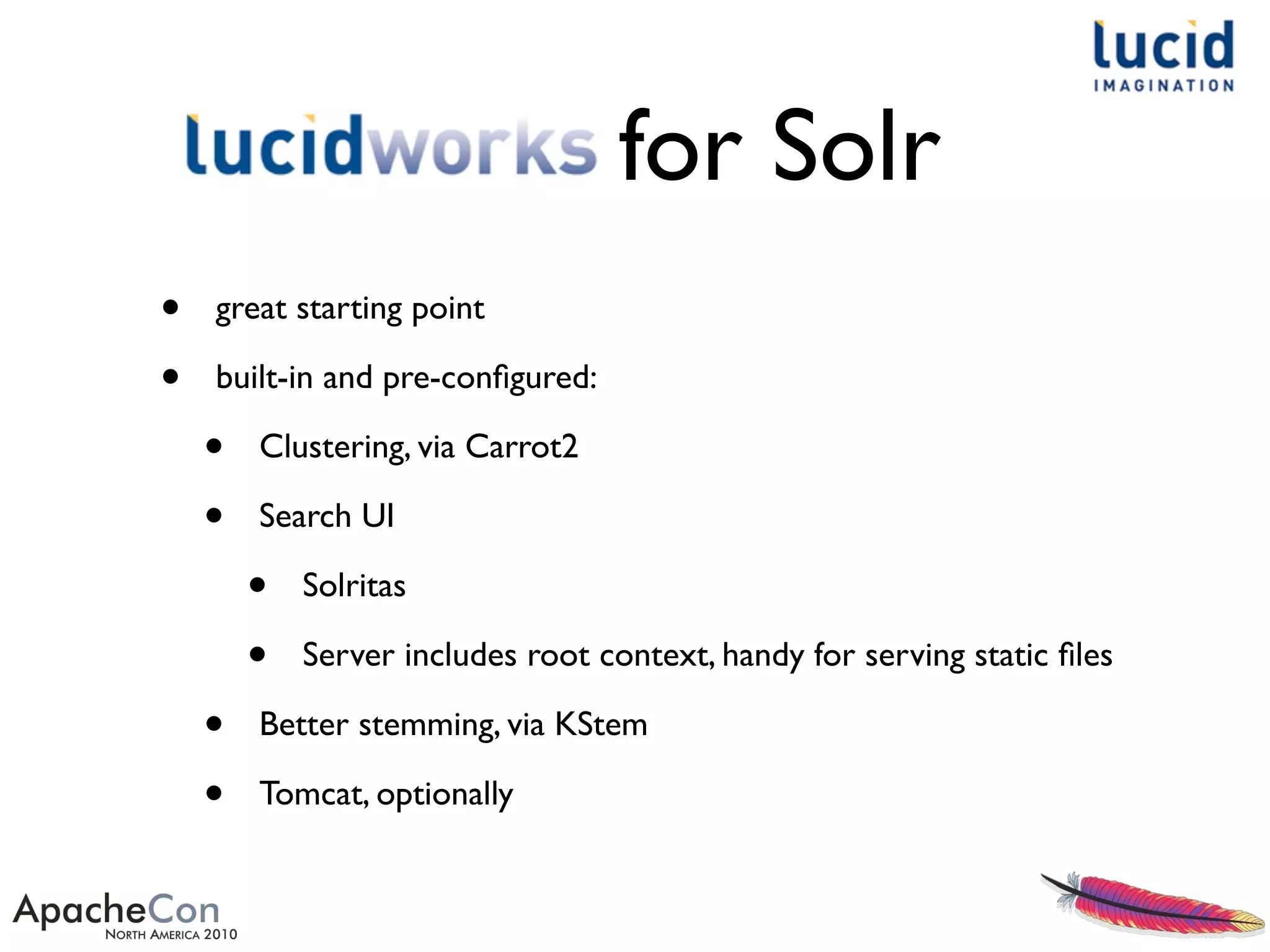
for Solr
• great starting point
• built-in and pre-configured:
• Clustering, via Carrot2
• Search UI
• Solritas
• Server includes root context, handy for serving static files
• Better stemming, via KStem
• Tomcat, optionally
~/LucidWorks: start.sh
.
.
.
INFO: using system property solr.solr.home: /Users/erikhatcher/LucidWorks/lucidworks/jetty/../solr
Nov 4, 2010 11:14:40 AM org.apache.solr.servlet.SolrUpdateServlet init
INFO: SolrUpdateServlet.init() done
2010-11-04 11:14:40.709::INFO: Started SocketConnector @ 0.0.0.0:8983
Nov 4, 2010 11:14:40 AM org.apache.solr.core.SolrCore execute
INFO: [] webapp=null path=null params={start=0&event=firstSearcher&q=solr+rocks&rows=10} hits=0 status=0 QTime=31
Nov 4, 2010 11:14:40 AM org.apache.solr.core.SolrCore execute
INFO: [] webapp=null path=null params={event=firstSearcher&q=static+firstSearcher+warming+query+from+solrconfig.xml} hits=0
status=0 QTime=2
Nov 4, 2010 11:14:40 AM org.apache.solr.core.QuerySenderListener newSearcher
INFO: QuerySenderListener done.
Nov 4, 2010 11:14:40 AM org.apache.solr.handler.component.SpellCheckComponent$SpellCheckerListener newSearcher
INFO: Loading spell index for spellchecker: default
Nov 4, 2010 11:14:40 AM org.apache.solr.core.SolrCore registerSearcher
INFO: [] Registered new searcher Searcher@4ff217ec main
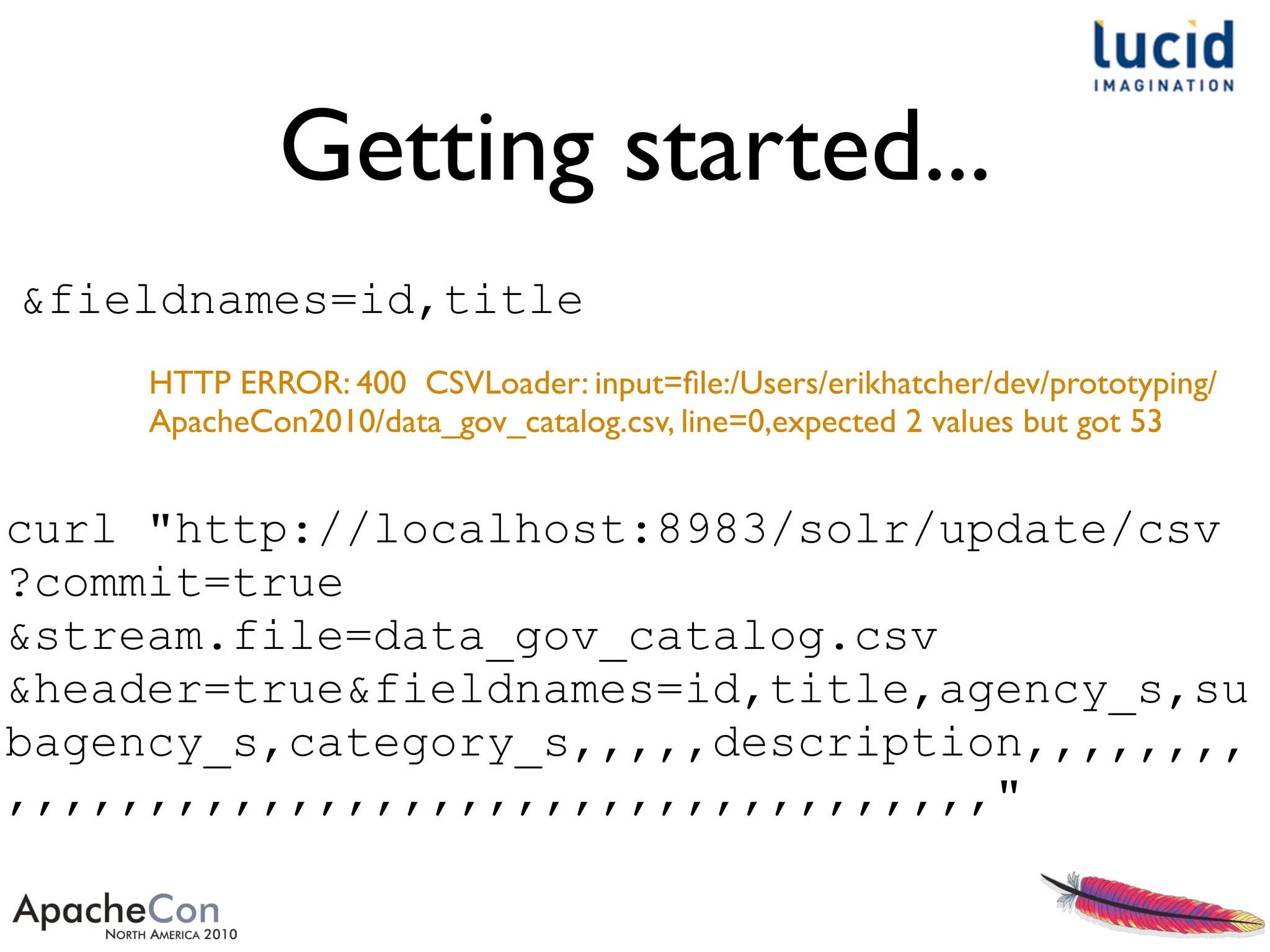
Getting started...
curl "http://localhost:8983/solr/update/csv
?commit=true
&stream.file=data_gov_catalog.csv
&header=true&fieldnames=id,title,agency_s,su
bagency_s,category_s,,,,,description,,,,,,,,
,,,,,,,,,,,,,,,,,,,,,,,,,,,,,,,,,,,"
HTTP ERROR: 400 CSVLoader: input=file:/Users/erikhatcher/dev/prototyping/
ApacheCon2010/data_gov_catalog.csv, line=0,expected 2 values but got 53
&fieldnames=id,title
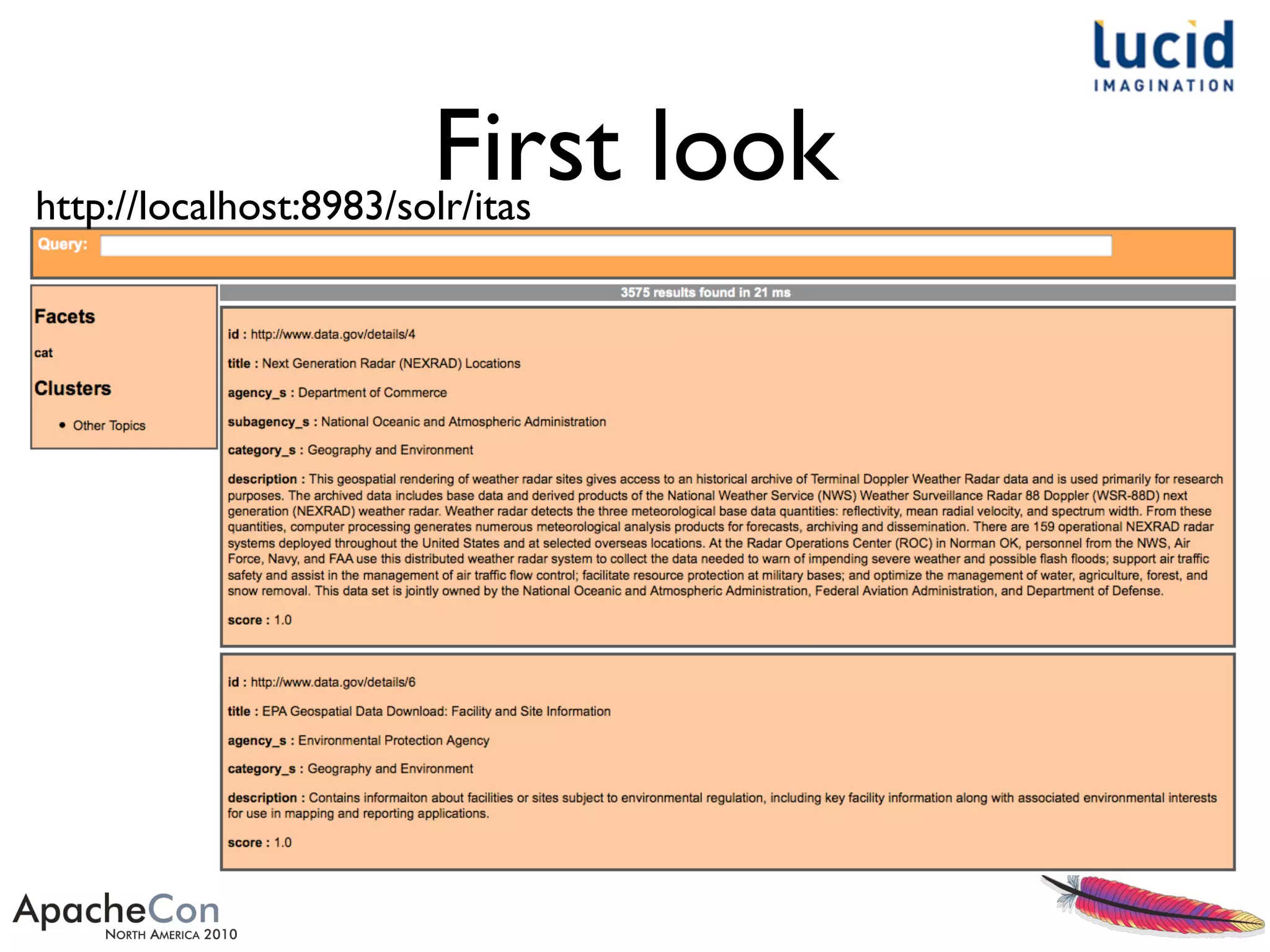
First lookhttp://localhost:8983/solr/itas
Solritas
• Pronounced: so-LAIR-uh-toss
• Celeritas is a Latin word, translated as "swiftness" or
"speed". It is often given as the origin of the symbol c,
the universal notation for the speed of light - http://
en.wikipedia.org/wiki/Celeritas
• VelocityResponseWriter - simply passes the Solr
response through the Apache Velocity templating
engine
• • http://wiki.apache.org/solr/VelocityResponseWriter
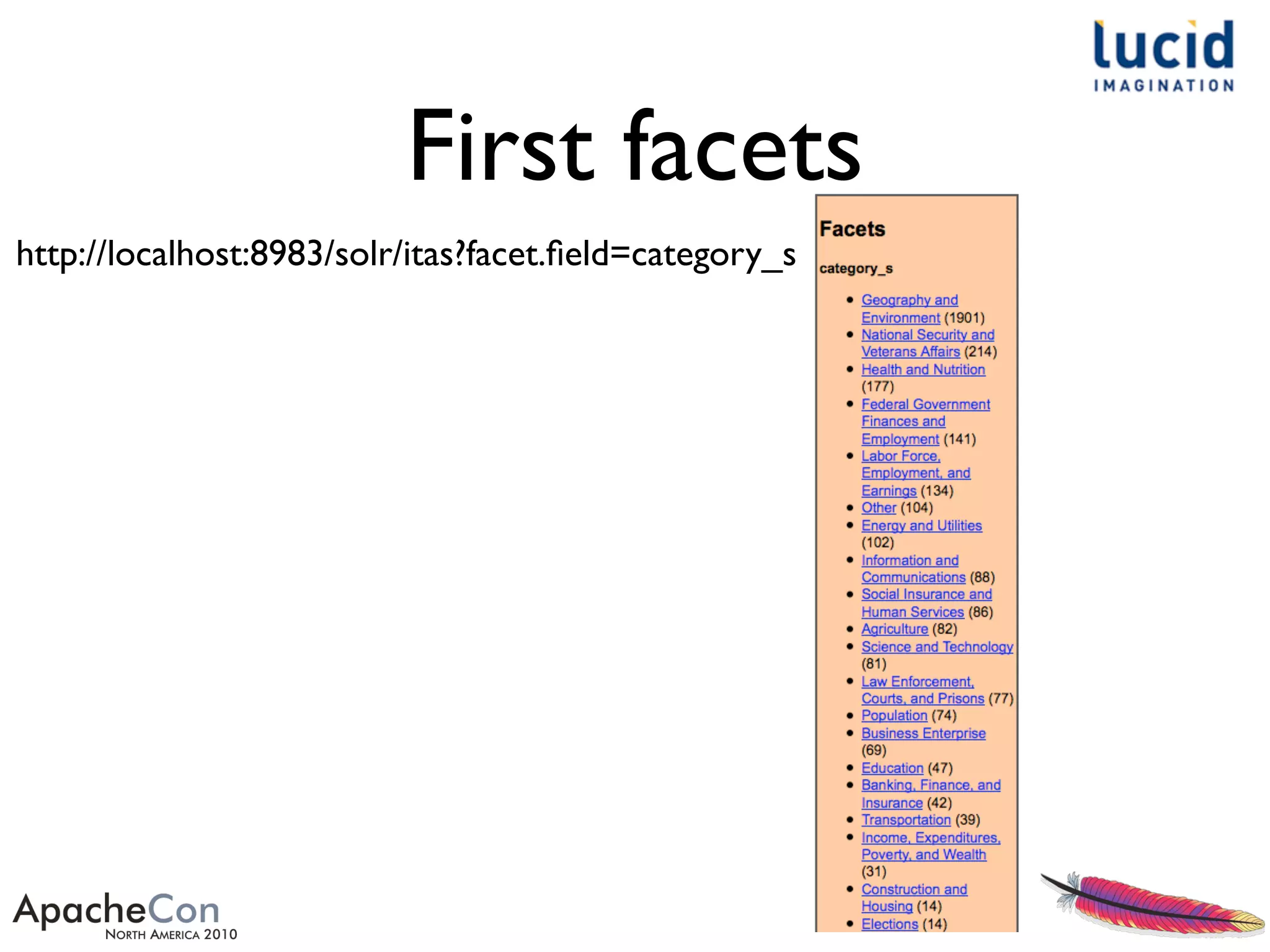
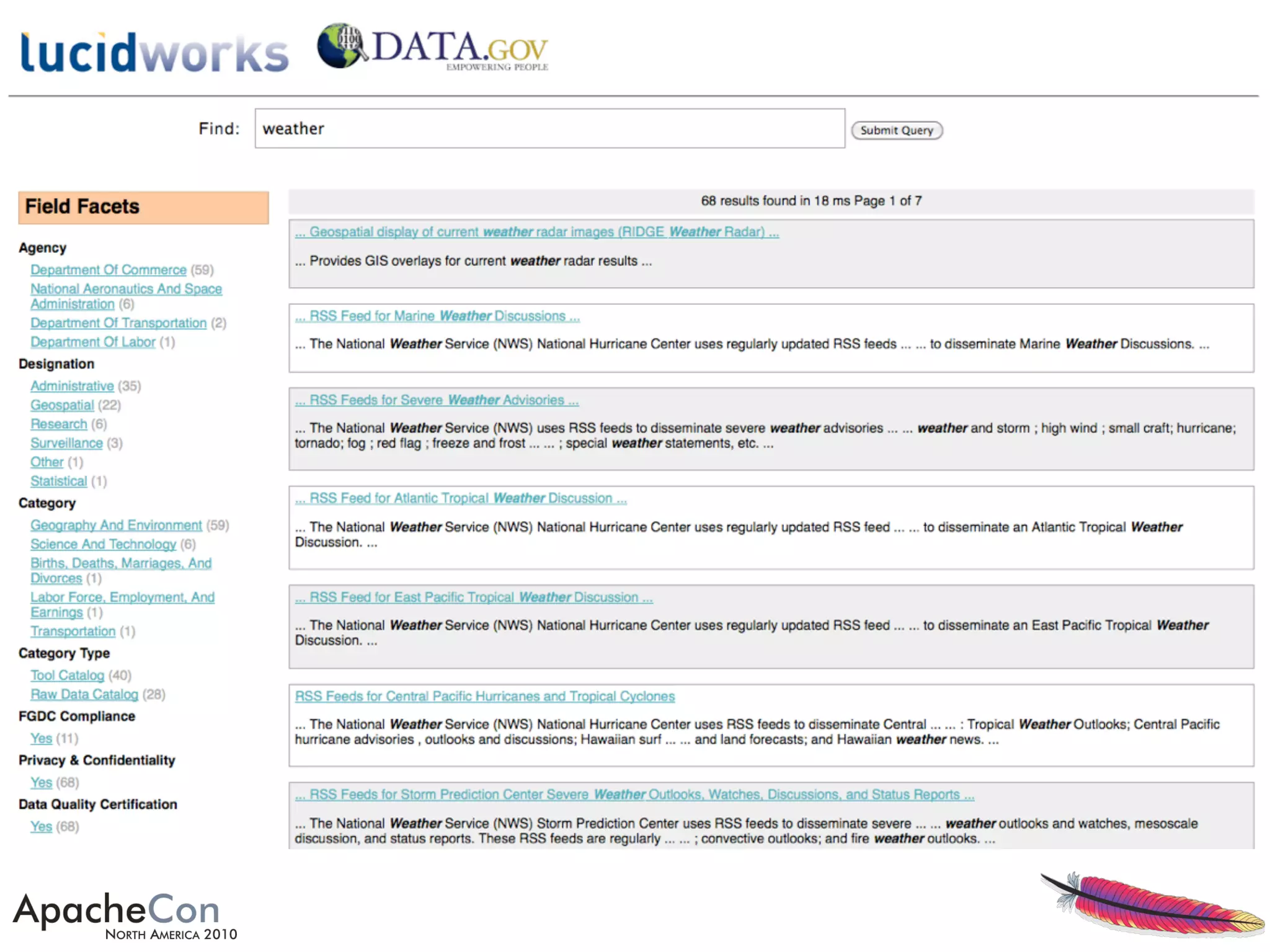
First facets
http://localhost:8983/solr/itas?facet.field=category_s
Iterations
• Cleaned up field names:
• s/t/,/ and s/ /_/
• Mapped some field values
• Copied Solr trunkVelocity templates and
CSS, polished layout and content templates
• Schema and config adjustments
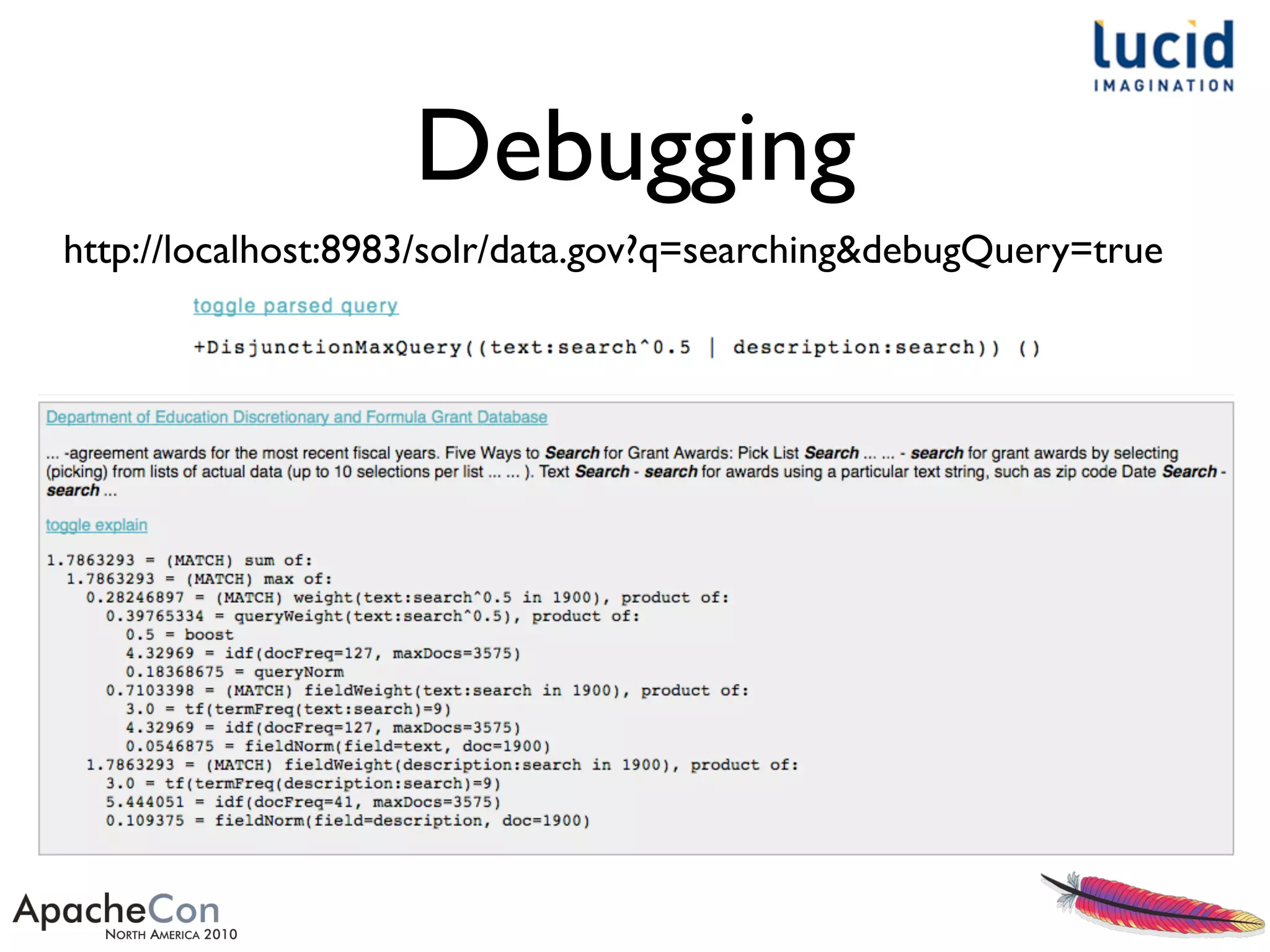
Debugging
http://localhost:8983/solr/data.gov?q=searching&debugQuery=true
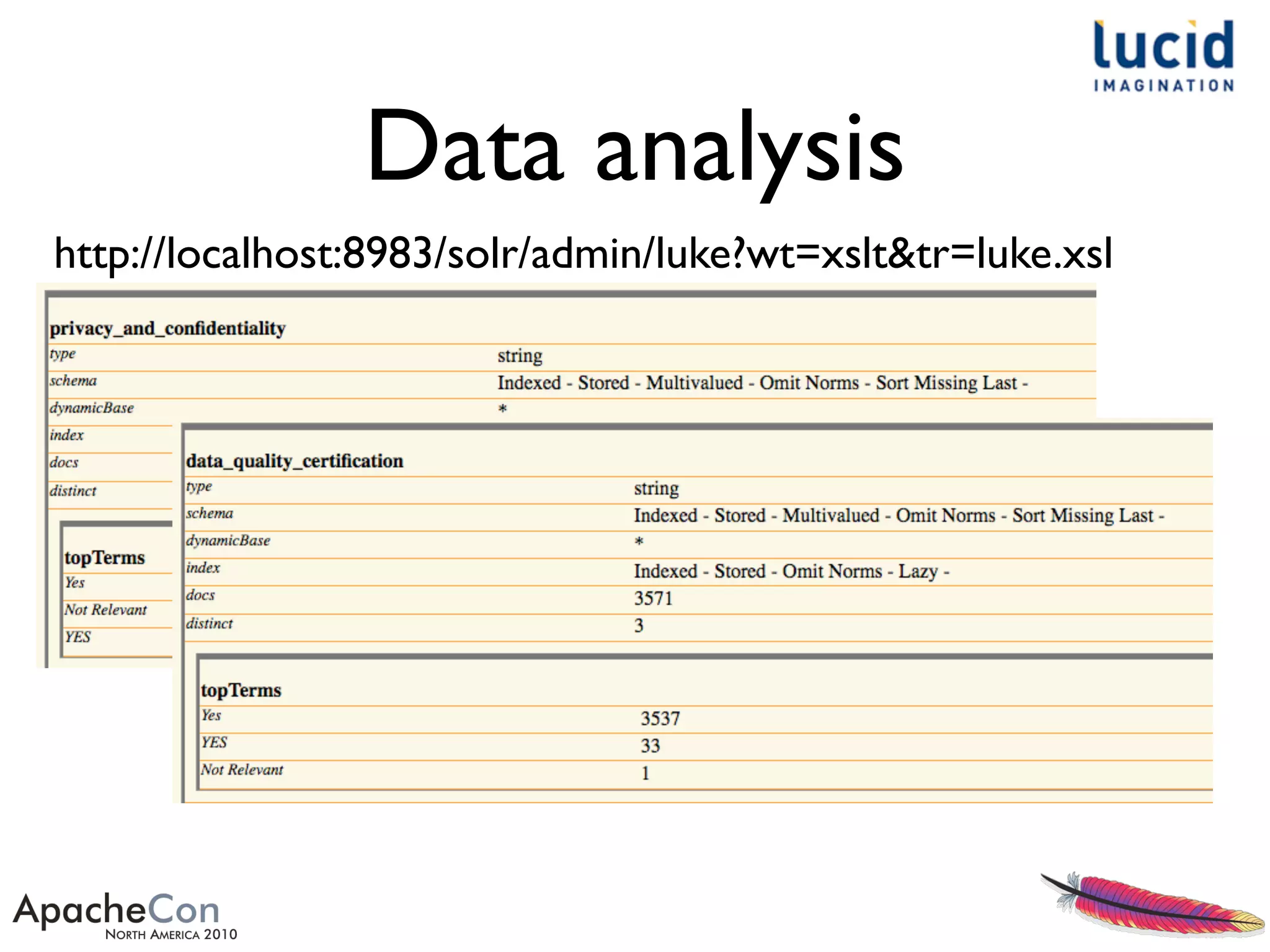
Data analysis
http://localhost:8983/solr/admin/luke?wt=xslt&tr=luke.xsl
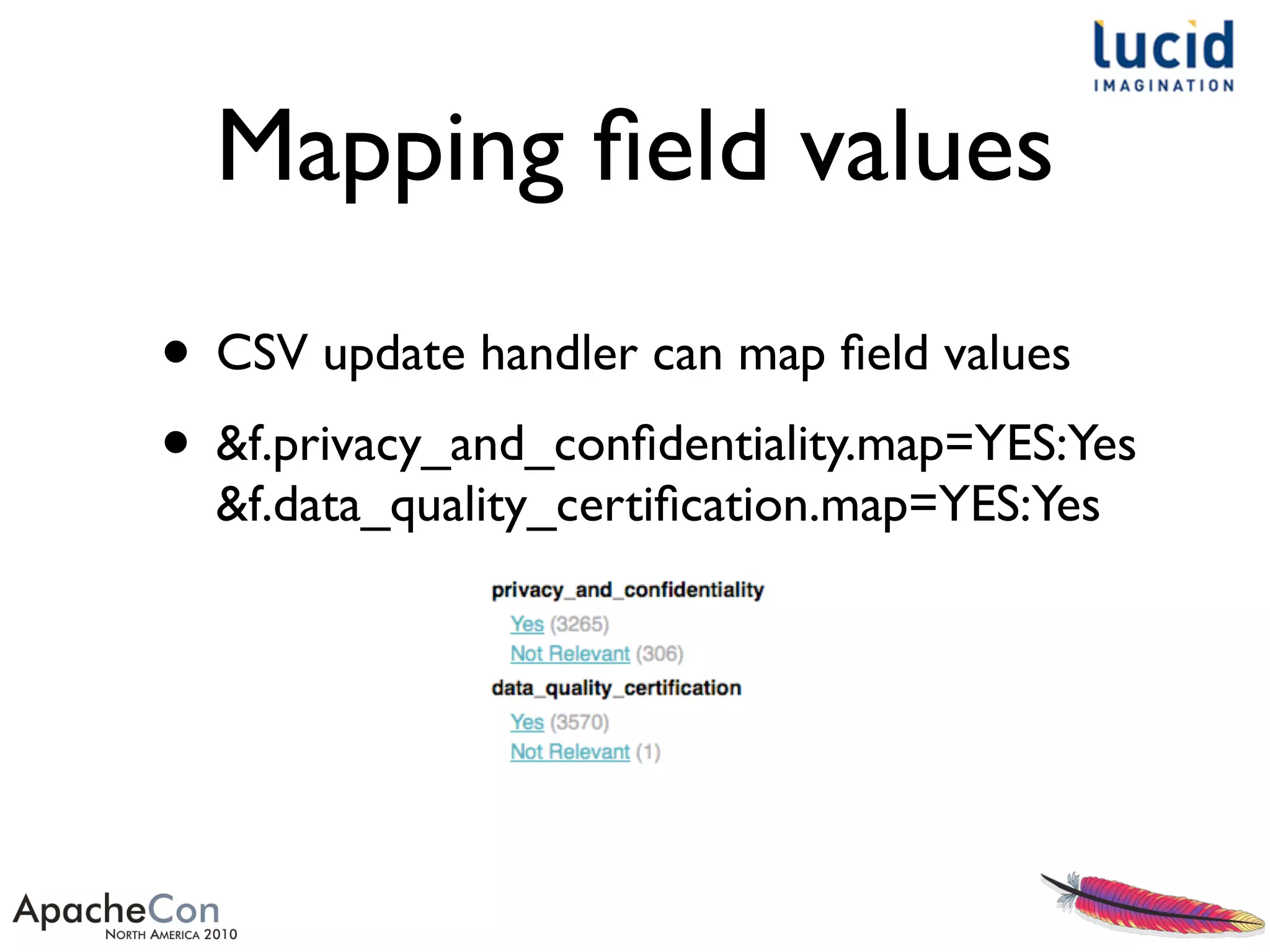
Mapping field values
• CSV update handler can map field values
• &f.privacy_and_confidentiality.map=YES:Yes
&f.data_quality_certification.map=YES:Yes
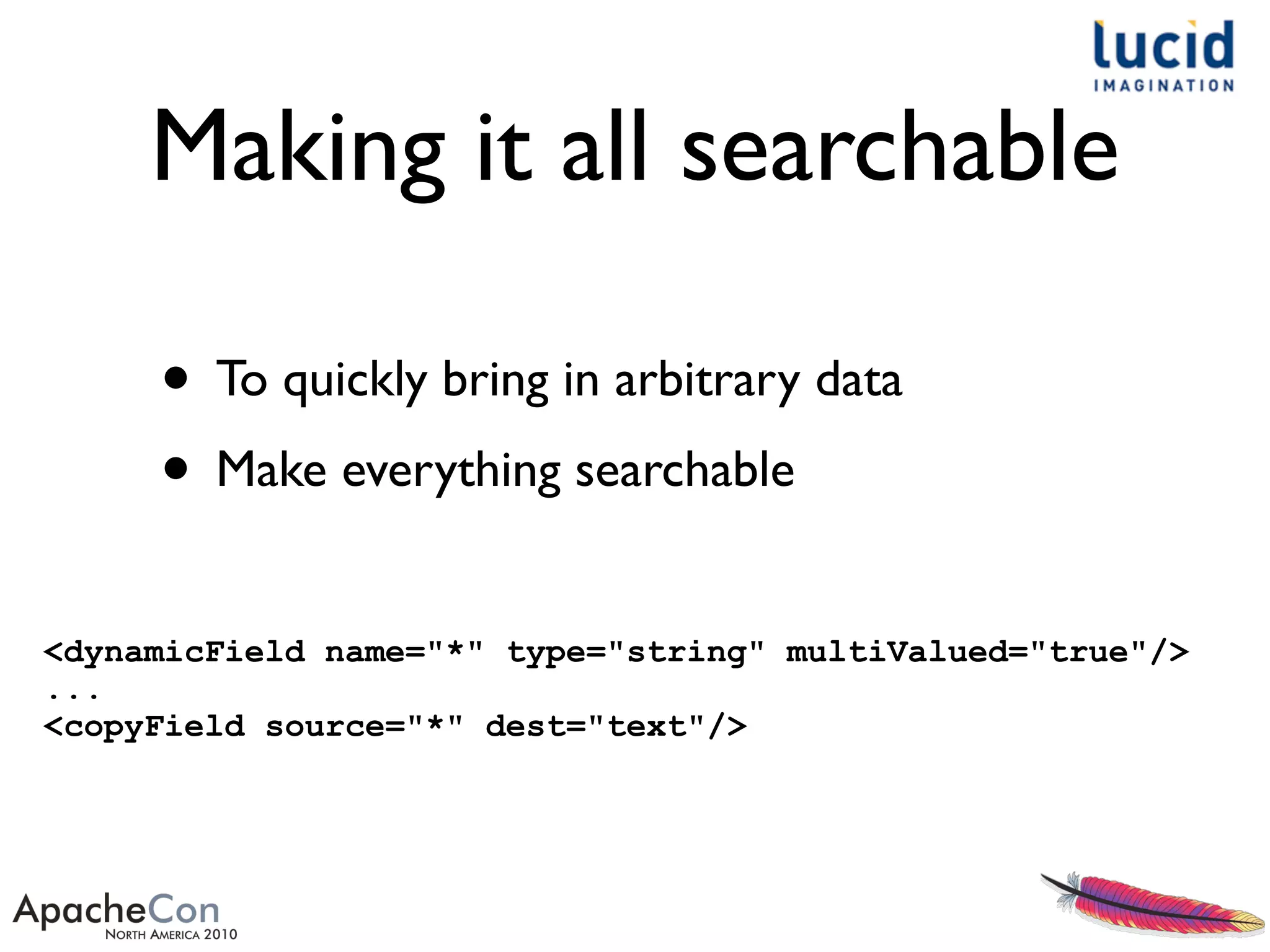
Making it all searchable
<dynamicField name="*" type="string" multiValued="true"/>
...
<copyField source="*" dest="text"/>
• To quickly bring in arbitrary data
• Make everything searchable
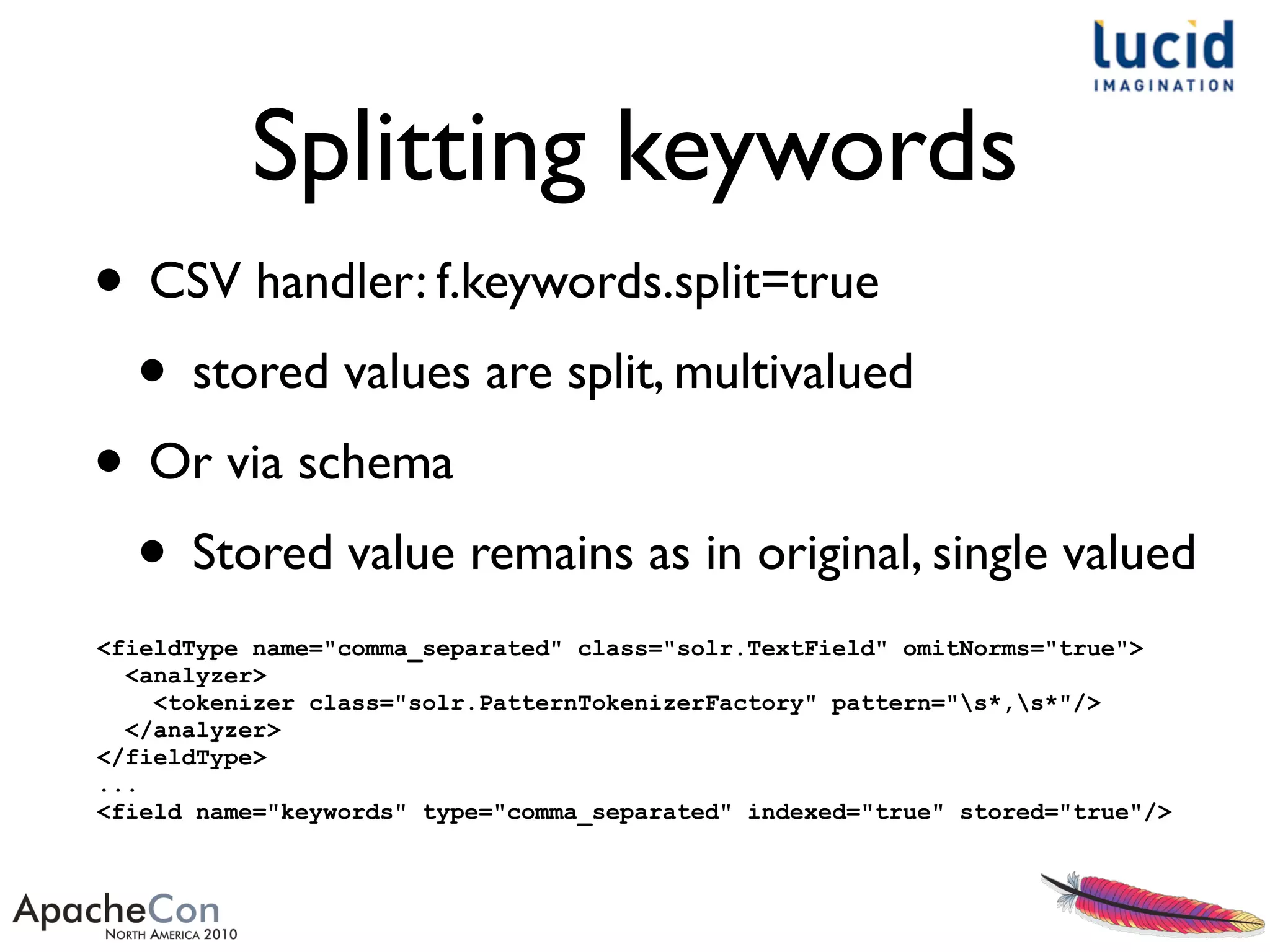
Splitting keywords
• CSV handler: f.keywords.split=true
• stored values are split, multivalued
• Or via schema
• Stored value remains as in original, single valued
<fieldType name="comma_separated" class="solr.TextField" omitNorms="true">
<analyzer>
<tokenizer class="solr.PatternTokenizerFactory" pattern="s*,s*"/>
</analyzer>
</fieldType>
...
<field name="keywords" type="comma_separated" indexed="true" stored="true"/>
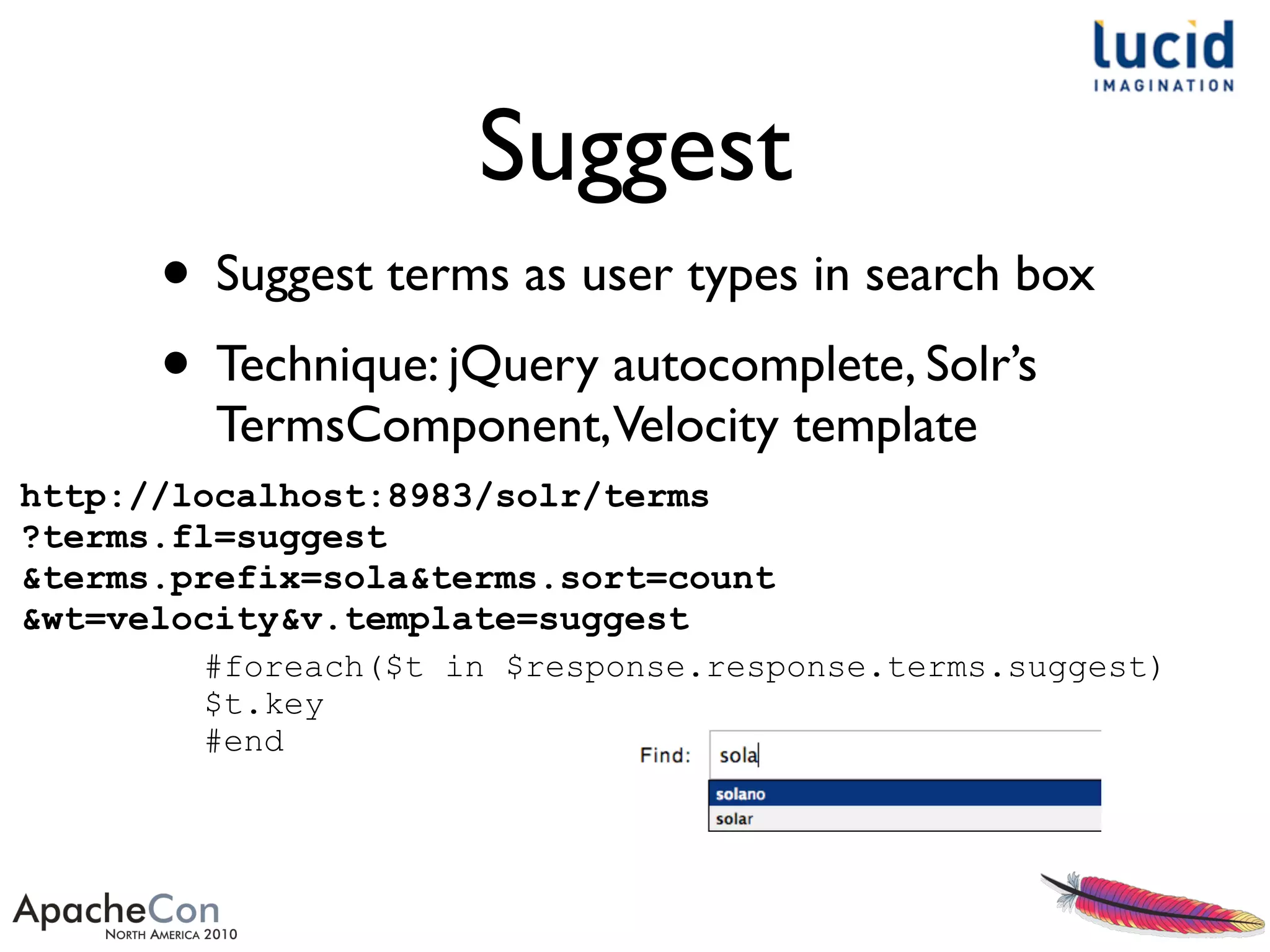
Suggest
• Suggest terms as user types in search box
• Technique: jQuery autocomplete, Solr’s
TermsComponent,Velocity template
http://localhost:8983/solr/terms
?terms.fl=suggest
&terms.prefix=sola&terms.sort=count
&wt=velocity&v.template=suggest
#foreach($t in $response.response.terms.suggest)
$t.key
#end
Suggest schema
<fieldType name="suggestable" class="solr.TextField"
positionIncrementGap="100">
<analyzer>
<tokenizer class="solr.StandardTokenizerFactory"/>
<filter class="solr.LowerCaseFilterFactory"/>
<filter class="solr.PatternReplaceFilterFactory"
pattern="([^a-z])"
replacement="" replace="all"/>
<filter class="solr.StopFilterFactory"
ignoreCase="true" words="stopwords.txt"
enablePositionIncrements="true" />
</analyzer>
</fieldType>
...
<field name="suggest" type="suggestable"
indexed="true" stored="false" multiValued="true"/>
Custom pages
• Document detail page
• Multiple query intersection comparison
withVenn visualization
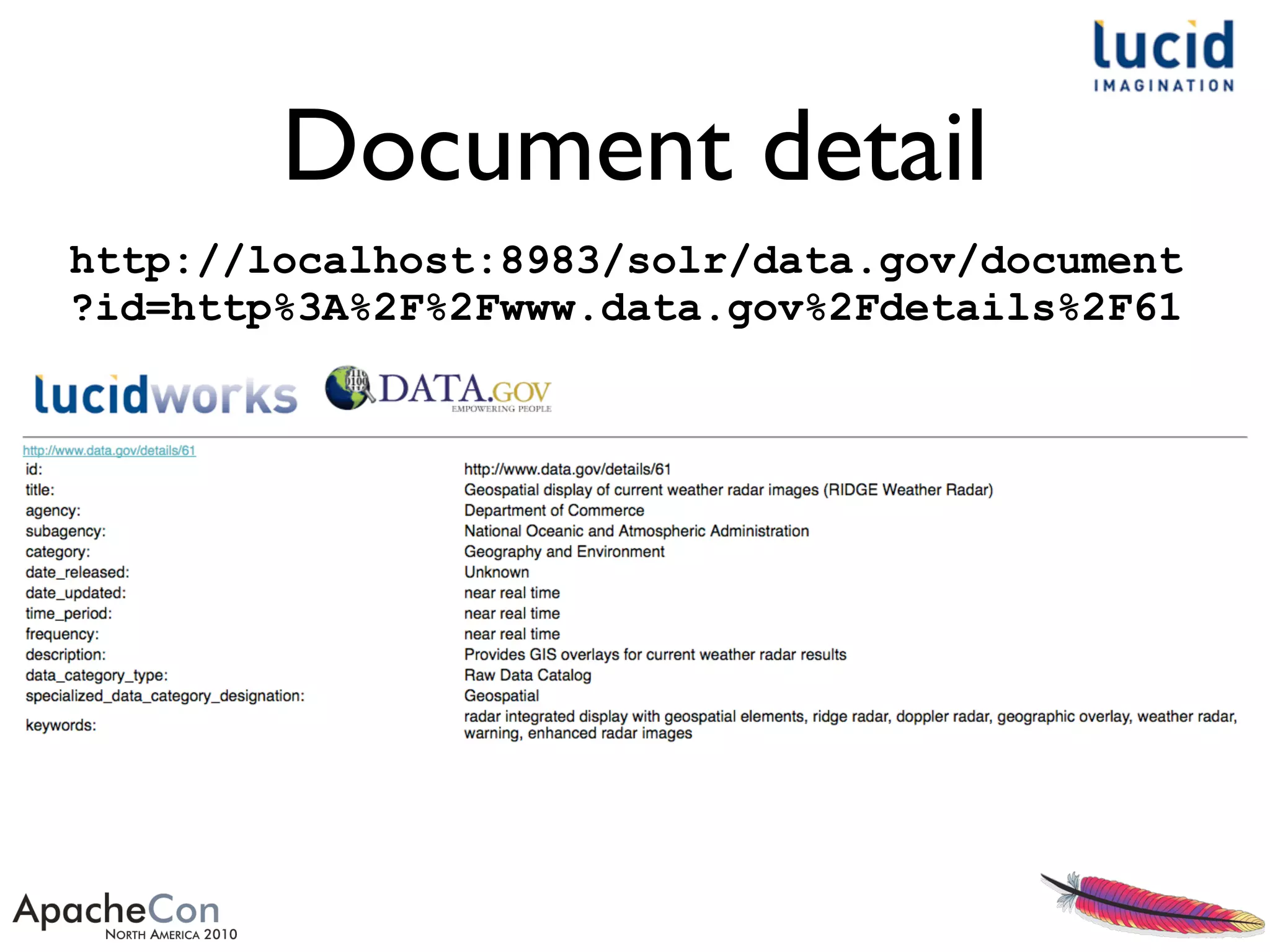
Document detail
http://localhost:8983/solr/data.gov/document
?id=http%3A%2F%2Fwww.data.gov%2Fdetails%2F61
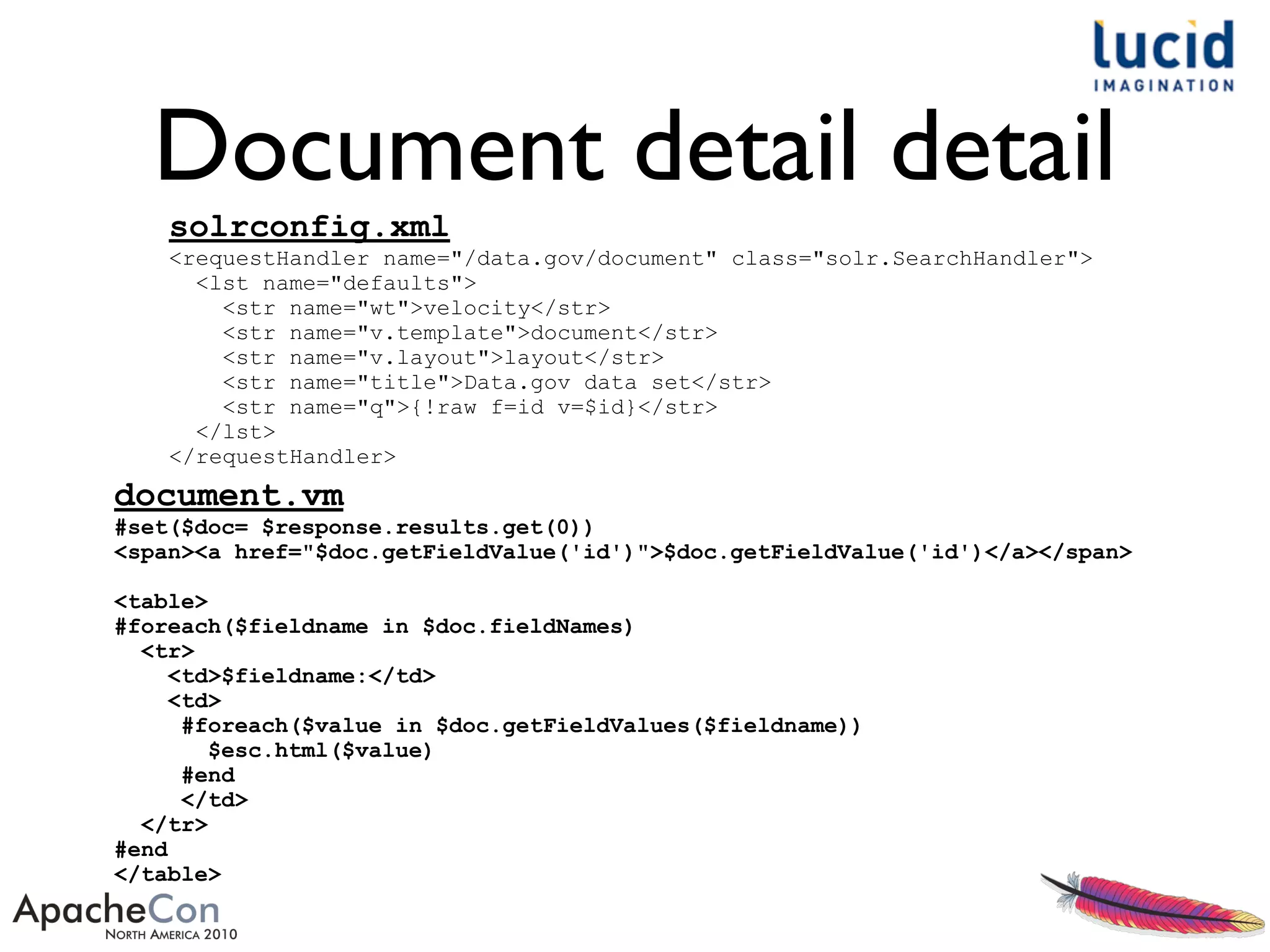
Document detail detail
solrconfig.xml
<requestHandler name="/data.gov/document" class="solr.SearchHandler">
<lst name="defaults">
<str name="wt">velocity</str>
<str name="v.template">document</str>
<str name="v.layout">layout</str>
<str name="title">Data.gov data set</str>
<str name="q">{!raw f=id v=$id}</str>
</lst>
</requestHandler>
document.vm
#set($doc= $response.results.get(0))
<span><a href="$doc.getFieldValue('id')">$doc.getFieldValue('id')</a></span>
<table>
#foreach($fieldname in $doc.fieldNames)
<tr>
<td>$fieldname:</td>
<td>
#foreach($value in $doc.getFieldValues($fieldname))
$esc.html($value)
#end
</td>
</tr>
#end
</table>
Query intersection
• Just showing off.... how easy it is to do
something with a bit of visual impact
• Compare three independent queries,
intersecting them in aVenn diagram
visualization
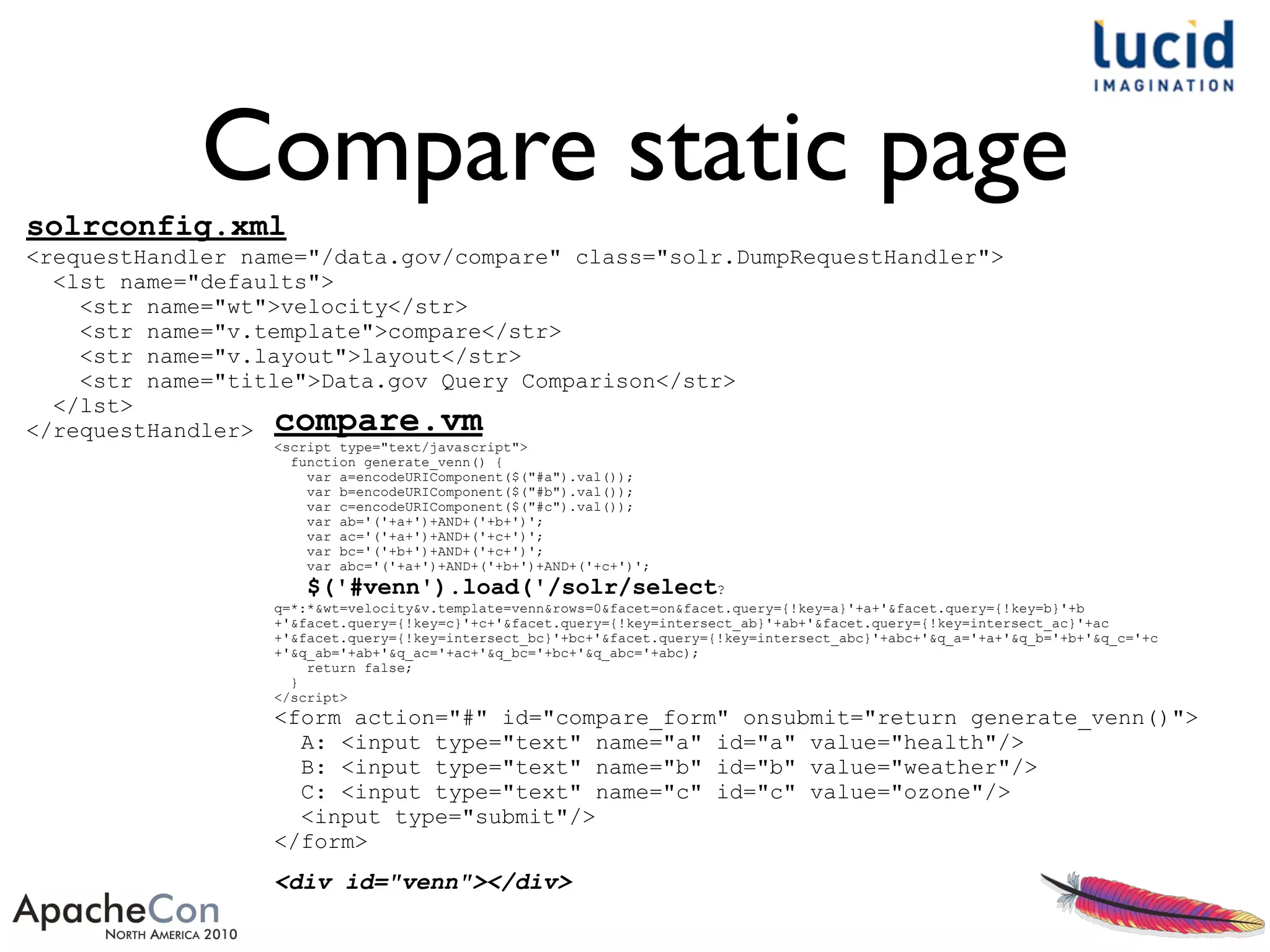
Compare static page
solrconfig.xml
<requestHandler name="/data.gov/compare" class="solr.DumpRequestHandler">
<lst name="defaults">
<str name="wt">velocity</str>
<str name="v.template">compare</str>
<str name="v.layout">layout</str>
<str name="title">Data.gov Query Comparison</str>
</lst>
</requestHandler> compare.vm
<script type="text/javascript">
function generate_venn() {
var a=encodeURIComponent($("#a").val());
var b=encodeURIComponent($("#b").val());
var c=encodeURIComponent($("#c").val());
var ab='('+a+')+AND+('+b+')';
var ac='('+a+')+AND+('+c+')';
var bc='('+b+')+AND+('+c+')';
var abc='('+a+')+AND+('+b+')+AND+('+c+')';
$('#venn').load('/solr/select?
q=*:*&wt=velocity&v.template=venn&rows=0&facet=on&facet.query={!key=a}'+a+'&facet.query={!key=b}'+b
+'&facet.query={!key=c}'+c+'&facet.query={!key=intersect_ab}'+ab+'&facet.query={!key=intersect_ac}'+ac
+'&facet.query={!key=intersect_bc}'+bc+'&facet.query={!key=intersect_abc}'+abc+'&q_a='+a+'&q_b='+b+'&q_c='+c
+'&q_ab='+ab+'&q_ac='+ac+'&q_bc='+bc+'&q_abc='+abc);
return false;
}
</script>
<form action="#" id="compare_form" onsubmit="return generate_venn()">
A: <input type="text" name="a" id="a" value="health"/>
B: <input type="text" name="b" id="b" value="weather"/>
C: <input type="text" name="c" id="c" value="ozone"/>
<input type="submit"/>
</form>
<div id="venn"></div>
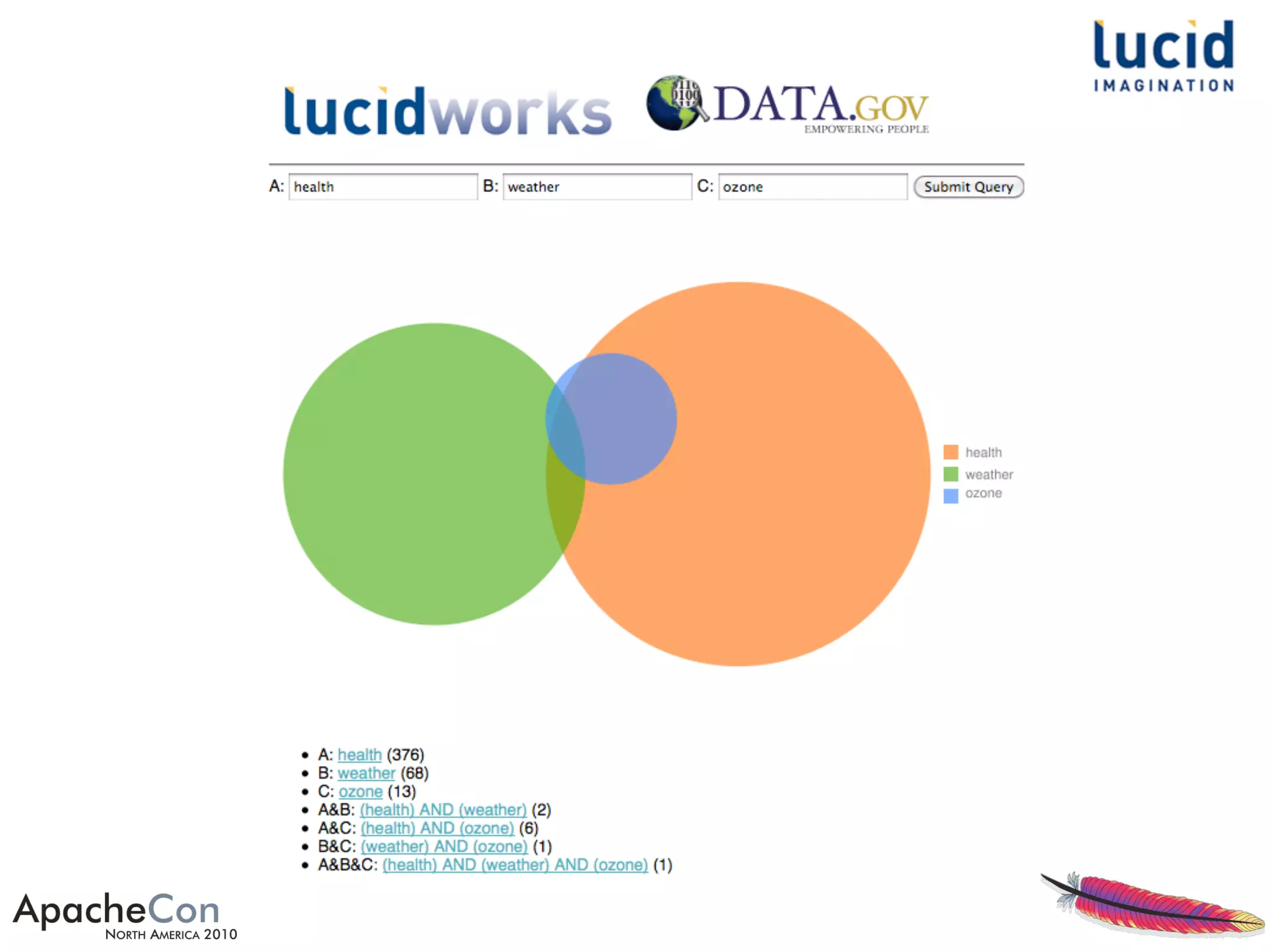
Venn chart
venn.vm
#set($values = $response.response.facet_counts.facet_queries)
#set($params = $response.responseHeader.params)
<img src="http://chart.apis.google.com/chart?
chs=600x400&cht=v&chd=t:$values.a,$values.b,$values.c,
$values.intersect_ab,$values.intersect_ac,$values.intersect_bc,
$values.intersect_abc&chdl=$esc.url($params.q_a)|$esc.url
($params.q_b)|$esc.url($params.q_c)"/>
<ul>
<li>A: <a href="/solr/data.gov?q={!lucene}$params.q_a">$params.q_a</a> ($values.a)</li>
<li>B: <a href="/solr/data.gov?q={!lucene}$params.q_b">$params.q_b</a> ($values.b)</li>
<li>C: <a href="/solr/data.gov?q={!lucene}$params.q_c">$params.q_c</a> ($values.c)</li>
<li>A&B: <a href="/solr/data.gov?q={!lucene}$params.q_ab">$params.q_ab</a>
($values.intersect_ab)</li>
<li>A&C: <a href="/solr/data.gov?q={!lucene}$params.q_ac">$params.q_ac</a>
($values.intersect_ac)</li>
<li>B&C: <a href="/solr/data.gov?q={!lucene}$params.q_bc">$params.q_bc</a>
($values.intersect_bc)</li>
<li>A&B&C: <a href="/solr/data.gov?q={!lucene}$params.q_abc">$params.q_abc</a>
($values.intersect_abc)</li>
</ul>
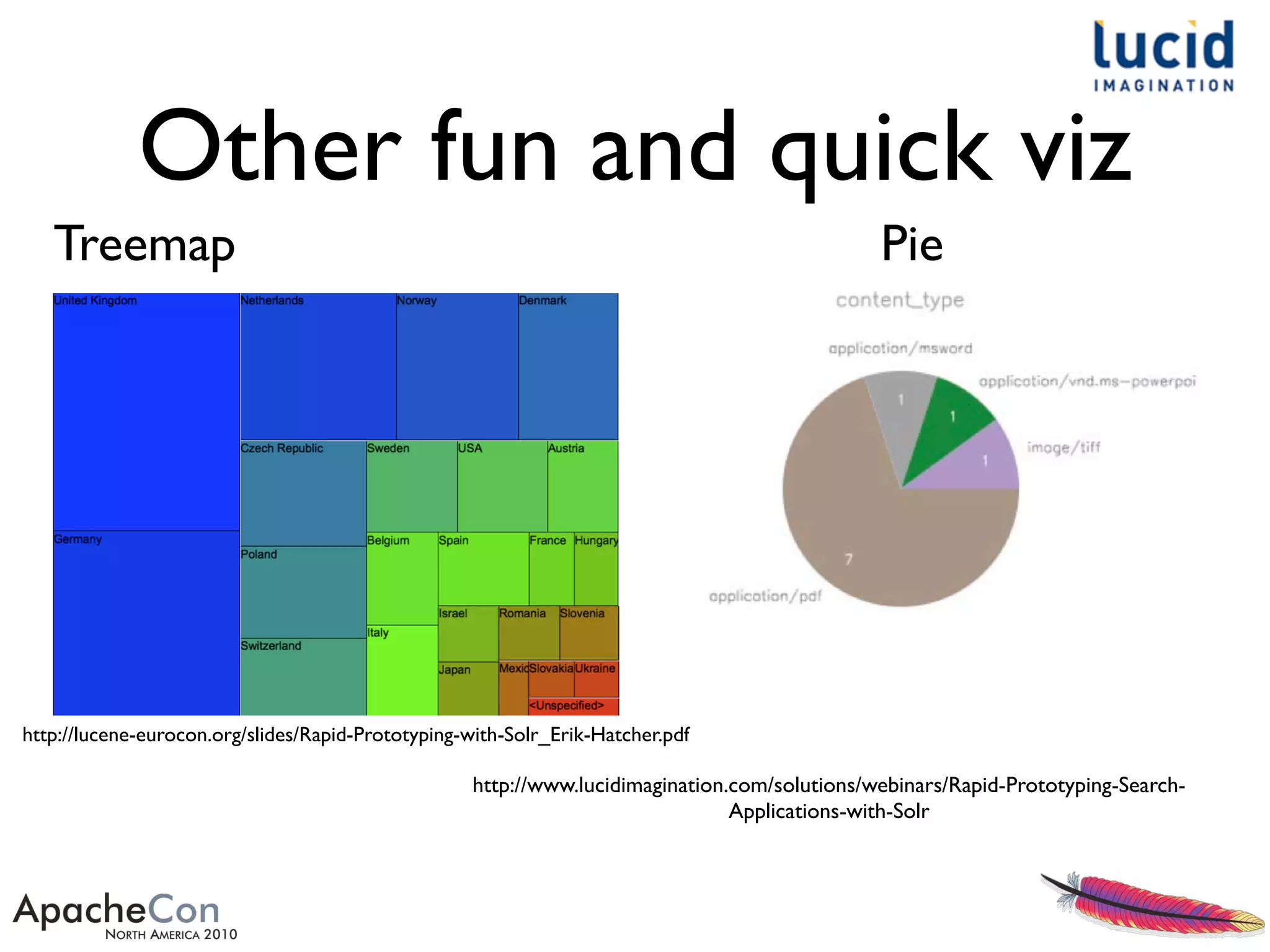
Other fun and quick viz
Treemap
http://lucene-eurocon.org/slides/Rapid-Prototyping-with-Solr_Erik-Hatcher.pdf
Pie
http://www.lucidimagination.com/solutions/webinars/Rapid-Prototyping-Search-
Applications-with-Solr
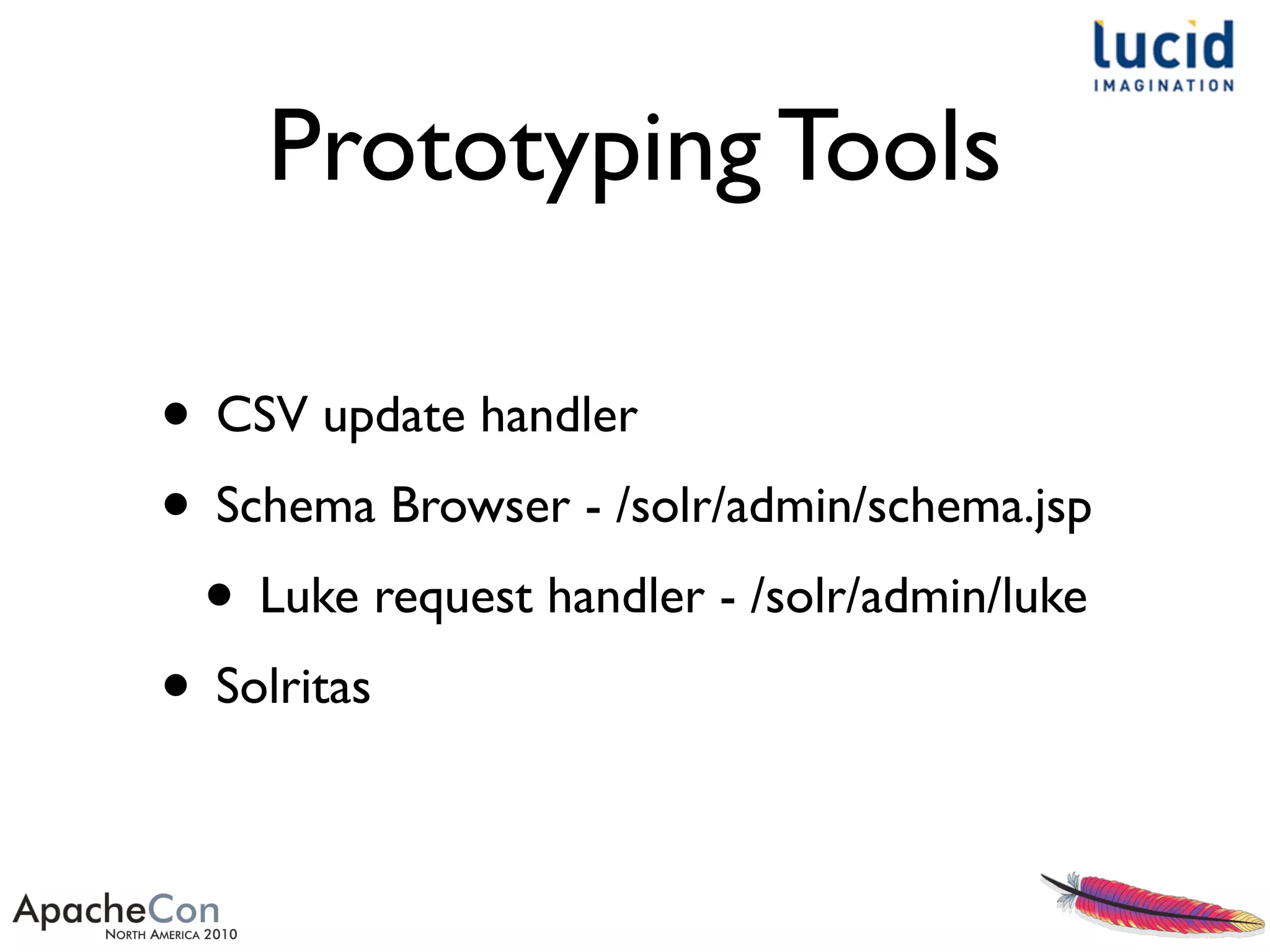
Prototyping Tools
• CSV update handler
• Schema Browser - /solr/admin/schema.jsp
• Luke request handler - /solr/admin/luke
• Solritas
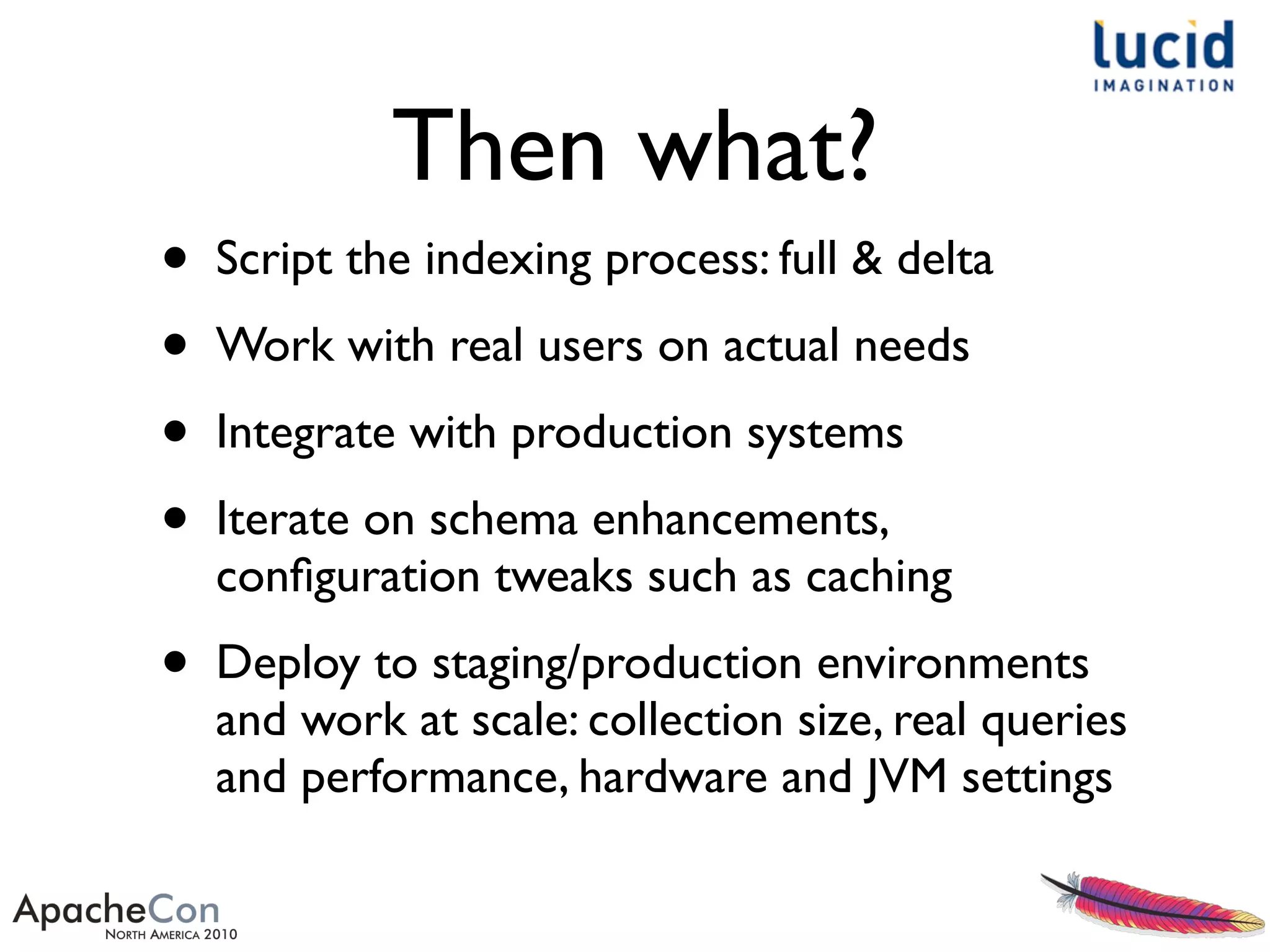
Then what?
• Script the indexing process: full & delta
• Work with real users on actual needs
• Integrate with production systems
• Iterate on schema enhancements,
configuration tweaks such as caching
• Deploy to staging/production environments
and work at scale: collection size, real queries
and performance, hardware and JVM settings
Test
• Performance
• Scalability
• Relevance
• Automate all of the above, start baselines,
avoid regressions
The Code
https://github.com/erikhatcher/solr-rapid-prototyping
ApacheCon2010
For more information...
• http://www.lucidimagination.com
• LucidFind
• search Lucene ecosystem: mailing lists, wikis, JIRA, etc
• http://search.lucidimagination.com
• Getting started with LucidWorks Enterprise:
• http://www.lucidimagination.com/enterprise-search-solutions
Rapid Prototyping with Solr

Rapid Prototyping with Solr

  • 1.
    Rapid Prototyping with Solr Presented byErik Hatcher, Lucid Imagination
  • 2.
    About me... • Co-author,“Lucenein Action” • Commiter, Lucene and Solr • Lucene PMC and ASF member • Member of Technical Staff / co-founder, Lucid Imagination
  • 3.
    Got data? Let'smake it searchable! This presentation will demonstrate getting documents into Solr quickly, will provide some tips in adjusting Solr's schema to match your needs better, and finally will discuss how to showcase your data in a flexible search user interface.We'll see how to rapidly leverage faceting, highlighting, spell checking, and debugging. Even after all that, there will be enough time left to outline the next steps in developing your search application and taking it to production. Abstract
  • 4.
    Why prototype? • DemonstrateSolr can handle your data and searching needs • It’s quick and easy • An immediate functional user interface impresses decision makers and target users • The User Interface IS the App
  • 5.
    Got data? • Files(Word, PDF, HTML, etc)? • Solr Cell • Databases? Feeds? • Data Import Handler • 3rd party repositories? Web crawl? • Solr HTTP API, Manifold Connectors Framework, Nutch • CSV? • see below!
  • 6.
  • 7.
    Data.gov CSV catalog URL,Title,Agency,Subagency,Category,DateReleased,Date Updated,Time Period,Frequency,Description,Data.gov Data Category Type,Specialized Data Category Designation,Keywords,Citation,Agency Program Page,Agency Data Series Page,Unit of Analysis,Granularity,Geographic Coverage,Collection Mode,Data Collection Instrument,Data Dictionary/Variable List,Applicable Agency Information Quality Guideline Designation,Data Quality Certification,Privacy and Confidentiality,Technical Documentation,Additional Metadata,FGDC Compliance (Geospatial Only),Statistical Methodology,Sampling,Estimation,Weighting,Disclosure Avoidance,Questionnaire Design,Series Breaks,Non-response Adjustment,Seasonal Adjustment,Statistical Characteristics,Feeds Access Point,Feeds File Size,XML Access Point,XML File Size,CSV/ TXT Access Point,CSV/TXT File Size,XLS Access Point,XLS File Size,KML/KMZ Access Point,KML File Size,ESRI Access Point,ESRI File Size,Map Access Point,Data Extraction Access Point,Widget Access Point "http://www.data.gov/details/4","Next Generation Radar (NEXRAD) Locations","Department of Commerce","National Oceanic and Atmospheric Administration","Geography and Environment","1991","Irregular as needed","1991 to present","Between 4 and 10 minutes","This geospatial rendering of weather radar sites gives access to an historical archive of Terminal Doppler Weather Radar data and is used primarily for research purposes. The archived data includes base data and derived products of the National Weather Service (NWS) Weather Surveillance Radar 88 Doppler (WSR-88D) next generation (NEXRAD) weather radar. Weather radar detects the three meteorological base data quantities: reflectivity, mean radial velocity, and spectrum width. From these quantities, computer processing generates numerous meteorological analysis products for forecasts, archiving and dissemination. There are 159 operational NEXRAD radar systems deployed throughout the United States and at selected overseas locations. At the Radar Operations Center (ROC) in Norman OK, personnel from the NWS, Air Force, Navy, and FAA use this distributed weather radar system to collect the data needed to warn of impending severe weather and possible flash floods; support air traffic safety and assist in the management of air traffic flow control; facilitate resource protection at military bases; and optimize the management of water, agriculture, forest, and snow removal. This data set is jointly owned by the National Oceanic and Atmospheric Administration, Federal Aviation Administration, and Department of Defense.","Raw Data Catalog",...
  • 8.
    for Solr • greatstarting point • built-in and pre-configured: • Clustering, via Carrot2 • Search UI • Solritas • Server includes root context, handy for serving static files • Better stemming, via KStem • Tomcat, optionally
  • 9.
    ~/LucidWorks: start.sh . . . INFO: usingsystem property solr.solr.home: /Users/erikhatcher/LucidWorks/lucidworks/jetty/../solr Nov 4, 2010 11:14:40 AM org.apache.solr.servlet.SolrUpdateServlet init INFO: SolrUpdateServlet.init() done 2010-11-04 11:14:40.709::INFO: Started SocketConnector @ 0.0.0.0:8983 Nov 4, 2010 11:14:40 AM org.apache.solr.core.SolrCore execute INFO: [] webapp=null path=null params={start=0&event=firstSearcher&q=solr+rocks&rows=10} hits=0 status=0 QTime=31 Nov 4, 2010 11:14:40 AM org.apache.solr.core.SolrCore execute INFO: [] webapp=null path=null params={event=firstSearcher&q=static+firstSearcher+warming+query+from+solrconfig.xml} hits=0 status=0 QTime=2 Nov 4, 2010 11:14:40 AM org.apache.solr.core.QuerySenderListener newSearcher INFO: QuerySenderListener done. Nov 4, 2010 11:14:40 AM org.apache.solr.handler.component.SpellCheckComponent$SpellCheckerListener newSearcher INFO: Loading spell index for spellchecker: default Nov 4, 2010 11:14:40 AM org.apache.solr.core.SolrCore registerSearcher INFO: [] Registered new searcher Searcher@4ff217ec main
  • 10.
    Getting started... curl "http://localhost:8983/solr/update/csv ?commit=true &stream.file=data_gov_catalog.csv &header=true&fieldnames=id,title,agency_s,su bagency_s,category_s,,,,,description,,,,,,,, ,,,,,,,,,,,,,,,,,,,,,,,,,,,,,,,,,,," HTTPERROR: 400 CSVLoader: input=file:/Users/erikhatcher/dev/prototyping/ ApacheCon2010/data_gov_catalog.csv, line=0,expected 2 values but got 53 &fieldnames=id,title
  • 11.
  • 12.
    Solritas • Pronounced: so-LAIR-uh-toss •Celeritas is a Latin word, translated as "swiftness" or "speed". It is often given as the origin of the symbol c, the universal notation for the speed of light - http:// en.wikipedia.org/wiki/Celeritas • VelocityResponseWriter - simply passes the Solr response through the Apache Velocity templating engine • • http://wiki.apache.org/solr/VelocityResponseWriter
  • 13.
  • 14.
    Iterations • Cleaned upfield names: • s/t/,/ and s/ /_/ • Mapped some field values • Copied Solr trunkVelocity templates and CSS, polished layout and content templates • Schema and config adjustments
  • 16.
  • 17.
  • 18.
    Mapping field values •CSV update handler can map field values • &f.privacy_and_confidentiality.map=YES:Yes &f.data_quality_certification.map=YES:Yes
  • 19.
    Making it allsearchable <dynamicField name="*" type="string" multiValued="true"/> ... <copyField source="*" dest="text"/> • To quickly bring in arbitrary data • Make everything searchable
  • 20.
    Splitting keywords • CSVhandler: f.keywords.split=true • stored values are split, multivalued • Or via schema • Stored value remains as in original, single valued <fieldType name="comma_separated" class="solr.TextField" omitNorms="true"> <analyzer> <tokenizer class="solr.PatternTokenizerFactory" pattern="s*,s*"/> </analyzer> </fieldType> ... <field name="keywords" type="comma_separated" indexed="true" stored="true"/>
  • 21.
    Suggest • Suggest termsas user types in search box • Technique: jQuery autocomplete, Solr’s TermsComponent,Velocity template http://localhost:8983/solr/terms ?terms.fl=suggest &terms.prefix=sola&terms.sort=count &wt=velocity&v.template=suggest #foreach($t in $response.response.terms.suggest) $t.key #end
  • 22.
    Suggest schema <fieldType name="suggestable"class="solr.TextField" positionIncrementGap="100"> <analyzer> <tokenizer class="solr.StandardTokenizerFactory"/> <filter class="solr.LowerCaseFilterFactory"/> <filter class="solr.PatternReplaceFilterFactory" pattern="([^a-z])" replacement="" replace="all"/> <filter class="solr.StopFilterFactory" ignoreCase="true" words="stopwords.txt" enablePositionIncrements="true" /> </analyzer> </fieldType> ... <field name="suggest" type="suggestable" indexed="true" stored="false" multiValued="true"/>
  • 23.
    Custom pages • Documentdetail page • Multiple query intersection comparison withVenn visualization
  • 24.
  • 25.
    Document detail detail solrconfig.xml <requestHandlername="/data.gov/document" class="solr.SearchHandler"> <lst name="defaults"> <str name="wt">velocity</str> <str name="v.template">document</str> <str name="v.layout">layout</str> <str name="title">Data.gov data set</str> <str name="q">{!raw f=id v=$id}</str> </lst> </requestHandler> document.vm #set($doc= $response.results.get(0)) <span><a href="$doc.getFieldValue('id')">$doc.getFieldValue('id')</a></span> <table> #foreach($fieldname in $doc.fieldNames) <tr> <td>$fieldname:</td> <td> #foreach($value in $doc.getFieldValues($fieldname)) $esc.html($value) #end </td> </tr> #end </table>
  • 26.
    Query intersection • Justshowing off.... how easy it is to do something with a bit of visual impact • Compare three independent queries, intersecting them in aVenn diagram visualization
  • 28.
    Compare static page solrconfig.xml <requestHandlername="/data.gov/compare" class="solr.DumpRequestHandler"> <lst name="defaults"> <str name="wt">velocity</str> <str name="v.template">compare</str> <str name="v.layout">layout</str> <str name="title">Data.gov Query Comparison</str> </lst> </requestHandler> compare.vm <script type="text/javascript"> function generate_venn() { var a=encodeURIComponent($("#a").val()); var b=encodeURIComponent($("#b").val()); var c=encodeURIComponent($("#c").val()); var ab='('+a+')+AND+('+b+')'; var ac='('+a+')+AND+('+c+')'; var bc='('+b+')+AND+('+c+')'; var abc='('+a+')+AND+('+b+')+AND+('+c+')'; $('#venn').load('/solr/select? q=*:*&wt=velocity&v.template=venn&rows=0&facet=on&facet.query={!key=a}'+a+'&facet.query={!key=b}'+b +'&facet.query={!key=c}'+c+'&facet.query={!key=intersect_ab}'+ab+'&facet.query={!key=intersect_ac}'+ac +'&facet.query={!key=intersect_bc}'+bc+'&facet.query={!key=intersect_abc}'+abc+'&q_a='+a+'&q_b='+b+'&q_c='+c +'&q_ab='+ab+'&q_ac='+ac+'&q_bc='+bc+'&q_abc='+abc); return false; } </script> <form action="#" id="compare_form" onsubmit="return generate_venn()"> A: <input type="text" name="a" id="a" value="health"/> B: <input type="text" name="b" id="b" value="weather"/> C: <input type="text" name="c" id="c" value="ozone"/> <input type="submit"/> </form> <div id="venn"></div>
  • 29.
    Venn chart venn.vm #set($values =$response.response.facet_counts.facet_queries) #set($params = $response.responseHeader.params) <img src="http://chart.apis.google.com/chart? chs=600x400&cht=v&chd=t:$values.a,$values.b,$values.c, $values.intersect_ab,$values.intersect_ac,$values.intersect_bc, $values.intersect_abc&chdl=$esc.url($params.q_a)|$esc.url ($params.q_b)|$esc.url($params.q_c)"/> <ul> <li>A: <a href="/solr/data.gov?q={!lucene}$params.q_a">$params.q_a</a> ($values.a)</li> <li>B: <a href="/solr/data.gov?q={!lucene}$params.q_b">$params.q_b</a> ($values.b)</li> <li>C: <a href="/solr/data.gov?q={!lucene}$params.q_c">$params.q_c</a> ($values.c)</li> <li>A&B: <a href="/solr/data.gov?q={!lucene}$params.q_ab">$params.q_ab</a> ($values.intersect_ab)</li> <li>A&C: <a href="/solr/data.gov?q={!lucene}$params.q_ac">$params.q_ac</a> ($values.intersect_ac)</li> <li>B&C: <a href="/solr/data.gov?q={!lucene}$params.q_bc">$params.q_bc</a> ($values.intersect_bc)</li> <li>A&B&C: <a href="/solr/data.gov?q={!lucene}$params.q_abc">$params.q_abc</a> ($values.intersect_abc)</li> </ul>
  • 30.
    Other fun andquick viz Treemap http://lucene-eurocon.org/slides/Rapid-Prototyping-with-Solr_Erik-Hatcher.pdf Pie http://www.lucidimagination.com/solutions/webinars/Rapid-Prototyping-Search- Applications-with-Solr
  • 31.
    Prototyping Tools • CSVupdate handler • Schema Browser - /solr/admin/schema.jsp • Luke request handler - /solr/admin/luke • Solritas
  • 32.
    Then what? • Scriptthe indexing process: full & delta • Work with real users on actual needs • Integrate with production systems • Iterate on schema enhancements, configuration tweaks such as caching • Deploy to staging/production environments and work at scale: collection size, real queries and performance, hardware and JVM settings
  • 33.
    Test • Performance • Scalability •Relevance • Automate all of the above, start baselines, avoid regressions
  • 34.
  • 35.
    For more information... •http://www.lucidimagination.com • LucidFind • search Lucene ecosystem: mailing lists, wikis, JIRA, etc • http://search.lucidimagination.com • Getting started with LucidWorks Enterprise: • http://www.lucidimagination.com/enterprise-search-solutions