COMPUTER GRAPHICS
introducing
INPUT DEVICES
In order to input data on graphics workstations,various
input devices are used
VARIOUS TYPES OF INPUT DEVICES
• KEYBOARD
• MOUSE
• TRACKBALL
• SPACEBALL
• JOYSTICK
• DATA GLOVE
• DIGITIZERS
• IMAGE SCANNERS
• TOUCH PANELS
• LIGHT PENS
• VOICE SYSTEM
IMAGE SCANNERS
Design, organize, and image processing
If we have drawings, graphs recorded in
a paper and also color and b/w photos
or text, we can store these in a
Computer for processing with an image
scanner.
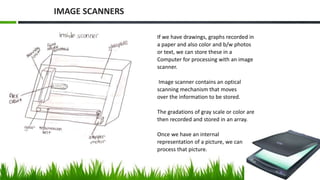
Image scanner contains an optical
scanning mechanism that moves
over the information to be stored.
The gradations of gray scale or color are
then recorded and stored in an array.
Once we have an internal
representation of a picture, we can
process that picture.
IMAGE SCANNERS
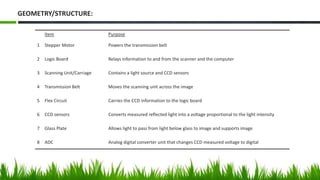
Item Purpose
1 Stepper Motor Powers the transmission belt
2 Logic Board Relays information to and from the scanner and the computer
3 Scanning Unit/Carriage Contains a light source and CCD sensors
4 Transmission Belt Moves the scanning unit across the image
5 Flex Circuit Carries the CCD information to the logic board
6 CCD sensors Converts measured reflected light into a voltage proportional to the light intensity
7 Glass Plate Allows light to pass from light below glass to image and supports image
8 ADC Analog digital converter unit that changes CCD measured voltage to digital
GEOMETRY/STRUCTURE:
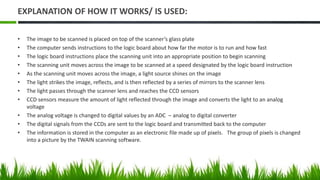
EXPLANATION OF HOW IT WORKS/ IS USED:
• The image to be scanned is placed on top of the scanner’s glass plate
• The computer sends instructions to the logic board about how far the motor is to run and how fast
• The logic board instructions place the scanning unit into an appropriate position to begin scanning
• The scanning unit moves across the image to be scanned at a speed designated by the logic board instruction
• As the scanning unit moves across the image, a light source shines on the image
• The light strikes the image, reflects, and is then reflected by a series of mirrors to the scanner lens
• The light passes through the scanner lens and reaches the CCD sensors
• CCD sensors measure the amount of light reflected through the image and converts the light to an analog
voltage
• The analog voltage is changed to digital values by an ADC – analog to digital converter
• The digital signals from the CCDs are sent to the logic board and transmitted back to the computer
• The information is stored in the computer as an electronic file made up of pixels. The group of pixels is changed
into a picture by the TWAIN scanning software.
TOUCH PANELS
Design, organize, and collaborate
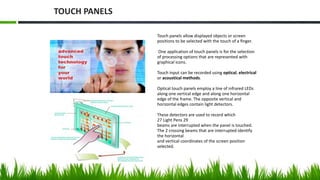
Touch panels allow displayed objects or screen
positions to be selected with the touch of a finger.
One application of touch panels is for the selection
of processing options that are represented with
graphical icons.
Touch input can be recorded using optical, electrical
or acoustical methods.
Optical touch panels employ a line of infrared LEDs
along one vertical edge and along one horizontal
edge of the frame. The opposite vertical and
horizontal edges contain light detectors.
These detectors are used to record which
27 Light Pens 29
beams are interrupted when the panel is touched.
The 2 crossing beams that are interrupted identify
the horizontal
and vertical coordinates of the screen position
selected.
TOUCH PANELS
INFRARED TOUCH SCREEN
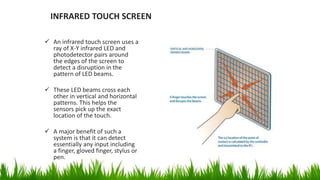
 An infrared touch screen uses a
ray of X-Y infrared LED and
photodetector pairs around
the edges of the screen to
detect a disruption in the
pattern of LED beams.
 These LED beams cross each
other in vertical and horizontal
patterns. This helps the
sensors pick up the exact
location of the touch.
 A major benefit of such a
system is that it can detect
essentially any input including
a finger, gloved finger, stylus or
pen.
TOUCHPANELS
More information
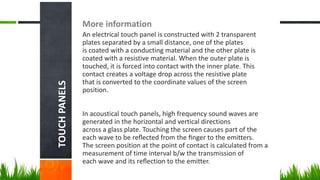
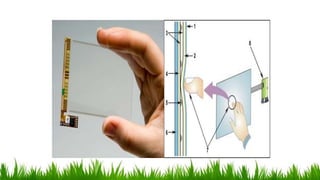
An electrical touch panel is constructed with 2 transparent
plates separated by a small distance, one of the plates
is coated with a conducting material and the other plate is
coated with a resistive material. When the outer plate is
touched, it is forced into contact with the inner plate. This
contact creates a voltage drop across the resistive plate
that is converted to the coordinate values of the screen
position.
In acoustical touch panels, high frequency sound waves are
generated in the horizontal and vertical directions
across a glass plate. Touching the screen causes part of the
each wave to be reflected from the finger to the emitters.
The screen position at the point of contact is calculated from a
measurement of time interval b/w the transmission of
each wave and its reflection to the emitter.
SURFACE ACOUSTIC WAVE TOUCH SCREEN
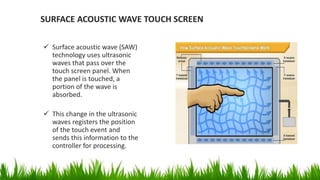
 Surface acoustic wave (SAW)
technology uses ultrasonic
waves that pass over the
touch screen panel. When
the panel is touched, a
portion of the wave is
absorbed.
 This change in the ultrasonic
waves registers the position
of the touch event and
sends this information to the
controller for processing.
LIGHT PENS
Design, organize, and collaborate
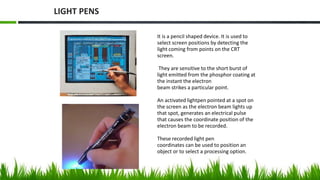
It is a pencil shaped device. It is used to
select screen positions by detecting the
light coming from points on the CRT
screen.
They are sensitive to the short burst of
light emitted from the phosphor coating at
the instant the electron
beam strikes a particular point.
An activated lightpen pointed at a spot on
the screen as the electron beam lights up
that spot, generates an electrical pulse
that causes the coordinate position of the
electron beam to be recorded.
These recorded light pen
coordinates can be used to position an
object or to select a processing option.
LIGHT PENS
Uses
• Can be used on a computer screen, TV screen
and a smart board.
• A light pen is similar to a mouse.
Construction
• It includes a light that is detected by the pixels on the
screen.
• It has a photoreceptor for sensing the signal.
15
FAULTS :
• Short lifespan.
• Being easily damaged.
• Works only with any CRT-based display , but not
with LCD screens.
• When pointed at the screen, part of the screen
image will be covered by the hand and pen.
• Too much light can confuse the sensor, cause it to
operate differently.
16
VOICE SYSTEMS
Desing, organize and collaborate
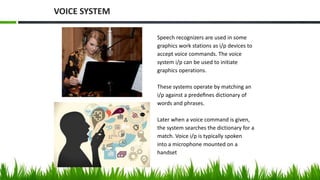
Speech recognizers are used in some
graphics work stations as i/p devices to
accept voice commands. The voice
system i/p can be used to initiate
graphics operations.
These systems operate by matching an
i/p against a predefines dictionary of
words and phrases.
Later when a voice command is given,
the system searches the dictionary for a
match. Voice i/p is typically spoken
into a microphone mounted on a
handset
VOICE SYSTEM
VOICE COMMAND
19
• It is a device controlled by means of the human voice.
• By removing the need of using buttons, dials and
switches, users can easily operate appliances while doing
other tasks . Speech recognition converts spoken words
to text.
SPEECH RECOGNIZER
• It is commonly used in Graphic Workstations.
• Commands are given through Microphones mounted on Headsets.
• When a voice command is given, the system searches the dictionary for a match.
• The speaker must have great voice clarity.
• Words may changed.
• Requires paid software.
20
FAULTS :
THANK YOU!!

Input devices dani

  • 1.
  • 2.
    In order toinput data on graphics workstations,various input devices are used VARIOUS TYPES OF INPUT DEVICES • KEYBOARD • MOUSE • TRACKBALL • SPACEBALL • JOYSTICK • DATA GLOVE • DIGITIZERS • IMAGE SCANNERS • TOUCH PANELS • LIGHT PENS • VOICE SYSTEM
  • 3.
  • 4.
    If we havedrawings, graphs recorded in a paper and also color and b/w photos or text, we can store these in a Computer for processing with an image scanner. Image scanner contains an optical scanning mechanism that moves over the information to be stored. The gradations of gray scale or color are then recorded and stored in an array. Once we have an internal representation of a picture, we can process that picture. IMAGE SCANNERS
  • 5.
    Item Purpose 1 StepperMotor Powers the transmission belt 2 Logic Board Relays information to and from the scanner and the computer 3 Scanning Unit/Carriage Contains a light source and CCD sensors 4 Transmission Belt Moves the scanning unit across the image 5 Flex Circuit Carries the CCD information to the logic board 6 CCD sensors Converts measured reflected light into a voltage proportional to the light intensity 7 Glass Plate Allows light to pass from light below glass to image and supports image 8 ADC Analog digital converter unit that changes CCD measured voltage to digital GEOMETRY/STRUCTURE:
  • 6.
    EXPLANATION OF HOWIT WORKS/ IS USED: • The image to be scanned is placed on top of the scanner’s glass plate • The computer sends instructions to the logic board about how far the motor is to run and how fast • The logic board instructions place the scanning unit into an appropriate position to begin scanning • The scanning unit moves across the image to be scanned at a speed designated by the logic board instruction • As the scanning unit moves across the image, a light source shines on the image • The light strikes the image, reflects, and is then reflected by a series of mirrors to the scanner lens • The light passes through the scanner lens and reaches the CCD sensors • CCD sensors measure the amount of light reflected through the image and converts the light to an analog voltage • The analog voltage is changed to digital values by an ADC – analog to digital converter • The digital signals from the CCDs are sent to the logic board and transmitted back to the computer • The information is stored in the computer as an electronic file made up of pixels. The group of pixels is changed into a picture by the TWAIN scanning software.
  • 7.
  • 8.
    Touch panels allowdisplayed objects or screen positions to be selected with the touch of a finger. One application of touch panels is for the selection of processing options that are represented with graphical icons. Touch input can be recorded using optical, electrical or acoustical methods. Optical touch panels employ a line of infrared LEDs along one vertical edge and along one horizontal edge of the frame. The opposite vertical and horizontal edges contain light detectors. These detectors are used to record which 27 Light Pens 29 beams are interrupted when the panel is touched. The 2 crossing beams that are interrupted identify the horizontal and vertical coordinates of the screen position selected. TOUCH PANELS
  • 9.
    INFRARED TOUCH SCREEN An infrared touch screen uses a ray of X-Y infrared LED and photodetector pairs around the edges of the screen to detect a disruption in the pattern of LED beams.  These LED beams cross each other in vertical and horizontal patterns. This helps the sensors pick up the exact location of the touch.  A major benefit of such a system is that it can detect essentially any input including a finger, gloved finger, stylus or pen.
  • 10.
    TOUCHPANELS More information An electricaltouch panel is constructed with 2 transparent plates separated by a small distance, one of the plates is coated with a conducting material and the other plate is coated with a resistive material. When the outer plate is touched, it is forced into contact with the inner plate. This contact creates a voltage drop across the resistive plate that is converted to the coordinate values of the screen position. In acoustical touch panels, high frequency sound waves are generated in the horizontal and vertical directions across a glass plate. Touching the screen causes part of the each wave to be reflected from the finger to the emitters. The screen position at the point of contact is calculated from a measurement of time interval b/w the transmission of each wave and its reflection to the emitter.
  • 12.
    SURFACE ACOUSTIC WAVETOUCH SCREEN  Surface acoustic wave (SAW) technology uses ultrasonic waves that pass over the touch screen panel. When the panel is touched, a portion of the wave is absorbed.  This change in the ultrasonic waves registers the position of the touch event and sends this information to the controller for processing.
  • 13.
  • 14.
    It is apencil shaped device. It is used to select screen positions by detecting the light coming from points on the CRT screen. They are sensitive to the short burst of light emitted from the phosphor coating at the instant the electron beam strikes a particular point. An activated lightpen pointed at a spot on the screen as the electron beam lights up that spot, generates an electrical pulse that causes the coordinate position of the electron beam to be recorded. These recorded light pen coordinates can be used to position an object or to select a processing option. LIGHT PENS
  • 15.
    Uses • Can beused on a computer screen, TV screen and a smart board. • A light pen is similar to a mouse. Construction • It includes a light that is detected by the pixels on the screen. • It has a photoreceptor for sensing the signal. 15
  • 16.
    FAULTS : • Shortlifespan. • Being easily damaged. • Works only with any CRT-based display , but not with LCD screens. • When pointed at the screen, part of the screen image will be covered by the hand and pen. • Too much light can confuse the sensor, cause it to operate differently. 16
  • 17.
  • 18.
    Speech recognizers areused in some graphics work stations as i/p devices to accept voice commands. The voice system i/p can be used to initiate graphics operations. These systems operate by matching an i/p against a predefines dictionary of words and phrases. Later when a voice command is given, the system searches the dictionary for a match. Voice i/p is typically spoken into a microphone mounted on a handset VOICE SYSTEM
  • 19.
    VOICE COMMAND 19 • Itis a device controlled by means of the human voice. • By removing the need of using buttons, dials and switches, users can easily operate appliances while doing other tasks . Speech recognition converts spoken words to text. SPEECH RECOGNIZER • It is commonly used in Graphic Workstations. • Commands are given through Microphones mounted on Headsets. • When a voice command is given, the system searches the dictionary for a match.
  • 20.
    • The speakermust have great voice clarity. • Words may changed. • Requires paid software. 20 FAULTS :
  • 21.

Editor's Notes

  • #2 This presentation demonstrates the new capabilities of PowerPoint and it is best viewed in Slide Show. These slides are designed to give you great ideas for the presentations you’ll create in PowerPoint 2010! For more sample templates, click the File tab, and then on the New tab, click Sample Templates.