Information System Security
Unit 1
Dr. Pallawi Bulakh
Conceptual Foundation of Information
• Systems Security
• 1.1 Concepts and Terminology: Threats, Attacks,
Vulnerabilities, Risks, Risk Assessment and Mitigation
• 1.2 Security – Confidentiality, Integrity, availability,
Identification, Authentication, Authorization,
Accountability, Privacy
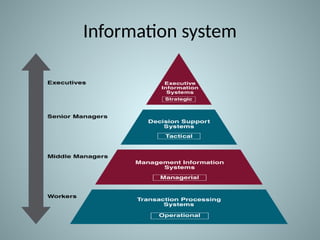
Information system
Introduction to Information System Security
• Information systems (IS) are integral to
organizations, used to collect, store, process, and
distribute data.
• Ensuring the security of these systems is essential for
protecting sensitive data, ensuring business
continuity, and maintaining trust.
• Information System Security (ISS) encompasses
policies, procedures, and measures designed to
safeguard IS from unauthorized access, attacks, or
damage.
Importance of Information System Security
• Data Protection: Safeguard sensitive and personal data from
unauthorized access.
• Business Continuity: Prevent downtime and service disruptions
caused by cyber threats.
• Regulatory Compliance: Meet legal and regulatory requirements for
data security (GDPR, HIPAA, etc.).
• Reputation: Maintain trust and confidence with clients, partners,
and customers.
Threats to Information System Security
• Cyber Attacks: Including hacking, ransomware,
phishing, and denial-of-service (DoS) attacks.
• Malware: Viruses, worms, and spyware
designed to corrupt or steal data.
• Insider Threats: Employees or trusted
individuals exploiting system vulnerabilities.
• Physical Threats: Theft or damage to hardware
or unauthorized access to premises.
What are Threats?
• A threat is any potential danger to an information system. Threats
can be intentional (e.g., cyber-attacks) or unintentional (e.g.,
natural disasters).
• Examples:
• Cyber-attacks (hacking, phishing)
• Natural disasters (flood, fire)
• System malfunctions
• Insider threats (employees)
What are Attacks?
• An attack is a deliberate attempt to exploit a vulnerability in a system.
Attacks can target data, networks, hardware, or software.
• Examples of attacks:
– Phishing: Fraudulent attempts to steal sensitive information.
– Denial of Service (DoS): Overloading systems to make them unavailable.
– Ransomware: Malicious software that locks systems or data until a ransom is paid.
– SQL Injection: Attacks targeting databases through vulnerabilities in web
applications.
Attack
• A cryptographic attack is a method used by hackers to
target cryptographic solutions like ciphertext,
encryption keys, etc.
• These attacks aim to retrieve the plaintext from the
ciphertext or decode the encrypted data.
• Hackers may attempt to bypass the security of a
cryptographic system by discovering weaknesses and
flaws in cryptography techniques, cryptographic
protocol, encryption algorithms, or key management
strategy.
Types of attack
• Passive attacks:
• Passive cryptography attacks intend to obtain unauthorized
access to sensitive data or information by intercepting or
eavesdropping on general communication. In this situation,
the data and the communication remain intact and are not
tampered with. The attacker only gains access to the data.
• Active attacks: On the other hand, active cryptography
attacks
• involve some kind of modification of the data or
communication. In this case, the attacker not only gains
access to the data but also tampers with it.
Types of active attacks are as follows:
• Masquerade Attack
• Modification of Messages
• Repudiation
• Replay Attack
• Denial of Service (DoS) Attack
1. Masquerade Attack
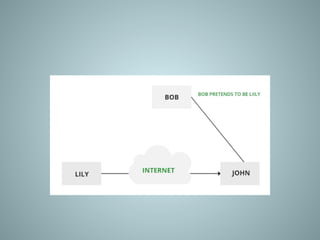
• Masquerade attacks are considered one type of cyber
attack in which the attacker disguises himself to pose as
some other person and accesses systems or data.
• It could either be impersonating a legal user or system and
demanding other users or systems to provide information
with sensitive content or access areas that are not
supposed to be accessed normally.
• This may even include behaving like an actual user or even
some component of the system with the intention of
manipulating people to give out their private information
or allowing them into secured locations.
2. Modification of Messages
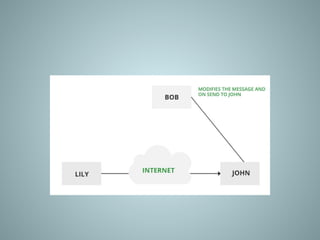
• This is when someone changes parts of a message
without permission, or mixes up the order of
messages, to cause trouble.
• Imagine someone secretly changing a letter you sent,
making it say something different.
• This kind of attack breaks the trust in the information
being sent.
• For example, a message meaning “Allow JOHN to read
confidential file X” is modified as “Allow Smith to read
confidential file X”.
3. Repudiation
• Repudiation attacks are a type of cyber attack
wherein some person does something
damaging online, such as a financial transaction
or sends a message one does not want to send,
then denies having done it.
• Such attacks can seriously hinder the ability to
trace down the origin of the attack or to identify
who is responsible for a given action, making it
tricky to hold responsible the right person.
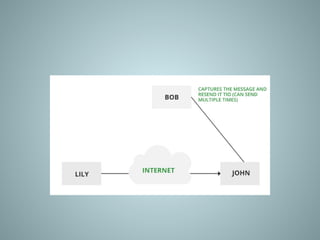
4. Replay
• It is a passive capturing of a message with an
objective to transmit it for the production of an
authorized effect.
• Thus, in this type of attack, the main objective of
an attacker is saving a copy of the data that was
originally present on that particular network and
later on uses it for personal uses.
• Once the data gets corrupted or leaked it
becomes an insecure and unsafe tool for its users.
5. Denial of Service (DoS) Attack
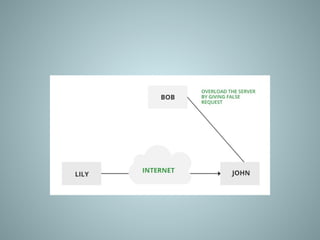
• Denial of Service (DoS) is a form of
cybersecurity attack that involves denying the
intended users of the system or network
access by flooding traffic or requests.
• In this DoS attack, the attacker floods a target
system or network with traffic or requests in
order to consume the available resources such
as bandwidth, CPU cycles, or memory and
prevent legitimate users from accessing them.
Types of DoS attacks
• Flood attacks: Here, an attacker sends such a
large number of packets or requests to a
system or network that it cannot handle them
all and the system gets crashed.
• Amplification attacks: In this category, the
attacker increases the power of an attack by
utilizing another system or network to increase
traffic then directs it all into the target to boost
the strength of the attack.
Passive Attacks
• A Passive attack attempts to learn or make use of information from the system but does not affect
system resources.
• Passive Attacks are in the nature of eavesdropping on or monitoring transmission.
• The goal of the opponent is to obtain information that is being transmitted. Passive attacks involve an
attacker passively monitoring or collecting data without altering or destroying it.
• Examples of passive attacks include eavesdropping, where an attacker listens in on network traffic to
collect sensitive information, and sniffing, where an attacker captures and analyzes data packets to
steal sensitive information.
• Types of Passive attacks are as follows:
• The Release of Message Content
• Traffic Analysis
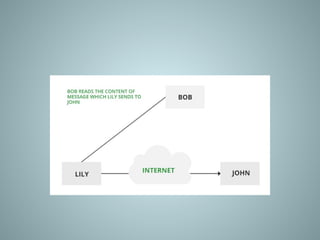
1. The Release of Message Content
• Telephonic conversation, an electronic mail
message, or a transferred file may contain
sensitive or confidential information.
• We would like to prevent an opponent from
learning the contents of these transmissions.
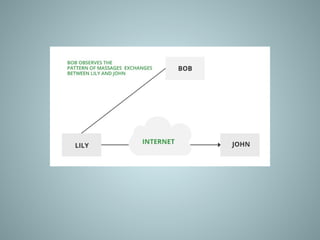
2. Traffic Analysis
• Suppose that we had a way of masking (encryption) information,
so that the attacker even if captured the message could not
extract any information from the message.
• The opponent could determine the location and identity of
communicating host and could observe the frequency and length
of messages being exchanged.
• This information might be useful in guessing the nature of the
communication that was taking place.
• The most useful protection against traffic analysis is encryption of
SIP traffic.
• To do this, an attacker would have to access the SIP proxy (or its
call log) to determine who made the call.
What are Vulnerabilities?
 A vulnerability is a weakness or flaw in a system that could be exploited by
an attacker.
 Vulnerabilities can be found in hardware, software, processes, or human
actions.
– Examples of vulnerabilities:
• Unpatched software or outdated systems.
• Weak passwords or poor authentication mechanisms.
• Misconfigured network devices or firewalls.
• Lack of employee awareness about security.
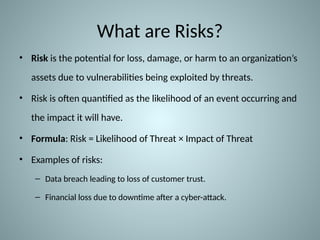
What are Risks?
• Risk is the potential for loss, damage, or harm to an organization’s
assets due to vulnerabilities being exploited by threats.
• Risk is often quantified as the likelihood of an event occurring and
the impact it will have.
• Formula: Risk = Likelihood of Threat × Impact of Threat
• Examples of risks:
– Data breach leading to loss of customer trust.
– Financial loss due to downtime after a cyber-attack.
Risk Assessment Process
• Step 1: Identify Assets: Determine what needs protection (data, systems,
people).
• Step 2: Identify Threats: Recognize possible threats that could exploit
vulnerabilities.
• Step 3: Identify Vulnerabilities: Find weaknesses in the system.
• Step 4: Assess Risk: Evaluate the likelihood and impact of each risk.
• Step 5: Document and Prioritize: Rank risks by their potential impact and
likelihood.
Types of Risk Assessment
– Qualitative Risk Assessment: Uses subjective
measures (e.g., low, medium, high) to assess risks.
– Quantitative Risk Assessment: Uses numerical
values to assess risks (e.g., cost of damage,
probability of an event).
– Hybrid Risk Assessment: Combines both
qualitative and quantitative approaches for a
comprehensive analysis.
Risk Mitigation Strategies
– Risk Avoidance: Altering business practices to eliminate the risk
entirely.
– Risk Reduction: Implementing controls (technical, administrative,
physical) to reduce the likelihood or impact of risks.
– Risk Sharing: Transferring the risk to a third party (e.g., insurance,
outsourcing).
– Risk Acceptance: Acknowledging the risk and deciding not to take
any specific action, typically for low-impact risks.
Risk Mitigation Techniques
– Firewalls & Intrusion Detection Systems (IDS): Protect
networks from unauthorized access and attacks.
– Encryption: Protect sensitive data by encrypting it during
storage and transmission.
– Access Control & Authentication: Ensure only authorized
users have access to critical systems.
– Regular Patching & Updates: Keep software and systems
up-to-date to protect against known vulnerabilities.
– Employee Training & Awareness: Educate employees on
security best practices to reduce human errors and
insider threats.
Information Security Principles
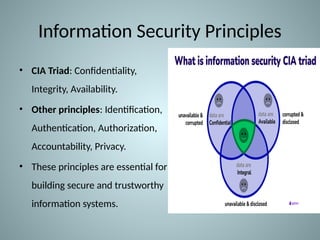
• CIA Triad: Confidentiality,
Integrity, Availability.
• Other principles: Identification,
Authentication, Authorization,
Accountability, Privacy.
• These principles are essential for
building secure and trustworthy
information systems.
Confidentiality
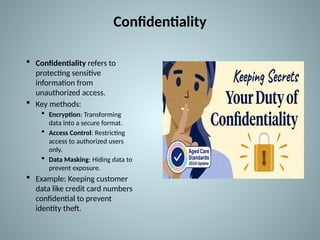
 Confidentiality refers to
protecting sensitive
information from
unauthorized access.
 Key methods:
 Encryption: Transforming
data into a secure format.
 Access Control: Restricting
access to authorized users
only.
 Data Masking: Hiding data to
prevent exposure.
 Example: Keeping customer
data like credit card numbers
confidential to prevent
identity theft.
Integrity
– Integrity ensures that data remains accurate, consistent, and
unaltered, except by authorized users.
– Techniques to ensure integrity:
• Checksums & Hash Functions: Verifying data hasn’t been altered.
• Version Control: Tracking changes to ensure only authorized updates.
• Digital Signatures: Verifying the authenticity and integrity of data.
– Example: Ensuring that a financial transaction is recorded
correctly and hasn't been tampered with.
Availability
– Availability means ensuring that information and
systems are accessible when needed.
– Techniques for ensuring availability:
• Redundancy: Having backup systems in place.
• Failover Systems: Automatically switching to a backup
system in case of failure.
• Disaster Recovery Plans: Procedures to restore systems
after disruptions.
– Example: Ensuring a website is online and
accessible to users at all times.
Identification
– Identification is the process of recognizing an
individual, system, or entity within the system.
– Methods of identification:
• Usernames: Unique identifiers for each user.
• Biometric Data: Fingerprints, retina scans, etc.
• IP Addresses: Identifying devices on a network.
– Example: A system asks for a username to identify
the user before granting access.
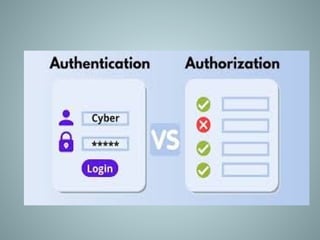
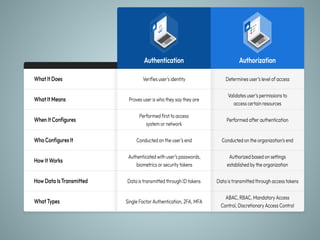
Authentication
– Authentication verifies the identity of an individual
or system.
– Methods of authentication:
• Passwords: The most common authentication method.
• Multi-factor Authentication (MFA): A combination of
something you know, have, and are (e.g., password +
phone verification).
• Biometric Authentication: Using physical characteristics
like fingerprints or facial recognition.
– Example: Logging into a bank account requires a
password and a one-time code sent to your phone.
Authorization
– Authorization ensures that an authenticated user has
permission to access specific resources.
– Techniques:
• Access Control Lists (ACLs): Specifying permissions for
users or groups.
• Role-Based Access Control (RBAC): Assigning permissions
based on user roles.
• Least Privilege: Giving users the minimum access
necessary to perform their job.
– Example: A regular user can view documents, but
only a manager can edit them.
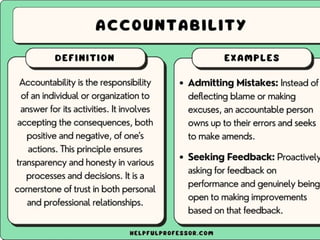
Accountability
– Accountability ensures that actions taken on a system
can be traced to the responsible party.
– Methods to ensure accountability:
• Audit Logs: Keeping records of system activities.
• Logging: Recording who did what and when.
• Monitoring: Continuous tracking of user activities to detect
abnormal behavior.
– Example: An admin logs in to the system and performs
updates. Logs track the action for future review.
Privacy
– Privacy refers to the right of individuals to control
how their personal data is collected, stored, and
used.
– Techniques to protect privacy:
• Data Anonymization: Removing personally
identifiable information from data sets.
• Consent Management: Ensuring users consent
to how their data is collected and used.
• Privacy Policies: Clear guidelines outlining data
usage and protection.
– Example: A user’s personal data is protected under
GDPR, and they must consent to its collection.
Summary
• The CIA Triad (Confidentiality, Integrity, Availability) is the foundation
of security.
• Identification, Authentication, Authorization, Accountability, and
Privacy ensure robust and secure systems.
• Best practices: Implement multi-layered security (defense in depth).
• Regularly audit and update security policies.
• Educate users on privacy and security responsibilities.
• Security is an ongoing process—always monitor, assess, and improve.
QB
• Explain active and passive attack with example.
• Define integrity and non repudiation
• Differentiate passive attack from active attack with example.
• Define Security attacks.
• Define Threat and attack.
• Define Brute-force attack
• What is Modification of messages
• What is masquerade?
• Define Denial of service.
• Discuss the principles of security
• Write a note on CIA Triad
• Describe security mechanism
• Explain in detail about various types of attacks
Information system security  Unit 1.pptx

Information system security Unit 1.pptx

  • 1.
  • 2.
    Conceptual Foundation ofInformation • Systems Security • 1.1 Concepts and Terminology: Threats, Attacks, Vulnerabilities, Risks, Risk Assessment and Mitigation • 1.2 Security – Confidentiality, Integrity, availability, Identification, Authentication, Authorization, Accountability, Privacy
  • 3.
  • 4.
    Introduction to InformationSystem Security • Information systems (IS) are integral to organizations, used to collect, store, process, and distribute data. • Ensuring the security of these systems is essential for protecting sensitive data, ensuring business continuity, and maintaining trust. • Information System Security (ISS) encompasses policies, procedures, and measures designed to safeguard IS from unauthorized access, attacks, or damage.
  • 5.
    Importance of InformationSystem Security • Data Protection: Safeguard sensitive and personal data from unauthorized access. • Business Continuity: Prevent downtime and service disruptions caused by cyber threats. • Regulatory Compliance: Meet legal and regulatory requirements for data security (GDPR, HIPAA, etc.). • Reputation: Maintain trust and confidence with clients, partners, and customers.
  • 6.
    Threats to InformationSystem Security • Cyber Attacks: Including hacking, ransomware, phishing, and denial-of-service (DoS) attacks. • Malware: Viruses, worms, and spyware designed to corrupt or steal data. • Insider Threats: Employees or trusted individuals exploiting system vulnerabilities. • Physical Threats: Theft or damage to hardware or unauthorized access to premises.
  • 7.
    What are Threats? •A threat is any potential danger to an information system. Threats can be intentional (e.g., cyber-attacks) or unintentional (e.g., natural disasters). • Examples: • Cyber-attacks (hacking, phishing) • Natural disasters (flood, fire) • System malfunctions • Insider threats (employees)
  • 8.
    What are Attacks? •An attack is a deliberate attempt to exploit a vulnerability in a system. Attacks can target data, networks, hardware, or software. • Examples of attacks: – Phishing: Fraudulent attempts to steal sensitive information. – Denial of Service (DoS): Overloading systems to make them unavailable. – Ransomware: Malicious software that locks systems or data until a ransom is paid. – SQL Injection: Attacks targeting databases through vulnerabilities in web applications.
  • 9.
    Attack • A cryptographicattack is a method used by hackers to target cryptographic solutions like ciphertext, encryption keys, etc. • These attacks aim to retrieve the plaintext from the ciphertext or decode the encrypted data. • Hackers may attempt to bypass the security of a cryptographic system by discovering weaknesses and flaws in cryptography techniques, cryptographic protocol, encryption algorithms, or key management strategy.
  • 10.
    Types of attack •Passive attacks: • Passive cryptography attacks intend to obtain unauthorized access to sensitive data or information by intercepting or eavesdropping on general communication. In this situation, the data and the communication remain intact and are not tampered with. The attacker only gains access to the data. • Active attacks: On the other hand, active cryptography attacks • involve some kind of modification of the data or communication. In this case, the attacker not only gains access to the data but also tampers with it.
  • 11.
    Types of activeattacks are as follows: • Masquerade Attack • Modification of Messages • Repudiation • Replay Attack • Denial of Service (DoS) Attack
  • 12.
    1. Masquerade Attack •Masquerade attacks are considered one type of cyber attack in which the attacker disguises himself to pose as some other person and accesses systems or data. • It could either be impersonating a legal user or system and demanding other users or systems to provide information with sensitive content or access areas that are not supposed to be accessed normally. • This may even include behaving like an actual user or even some component of the system with the intention of manipulating people to give out their private information or allowing them into secured locations.
  • 14.
    2. Modification ofMessages • This is when someone changes parts of a message without permission, or mixes up the order of messages, to cause trouble. • Imagine someone secretly changing a letter you sent, making it say something different. • This kind of attack breaks the trust in the information being sent. • For example, a message meaning “Allow JOHN to read confidential file X” is modified as “Allow Smith to read confidential file X”.
  • 16.
    3. Repudiation • Repudiationattacks are a type of cyber attack wherein some person does something damaging online, such as a financial transaction or sends a message one does not want to send, then denies having done it. • Such attacks can seriously hinder the ability to trace down the origin of the attack or to identify who is responsible for a given action, making it tricky to hold responsible the right person.
  • 17.
    4. Replay • Itis a passive capturing of a message with an objective to transmit it for the production of an authorized effect. • Thus, in this type of attack, the main objective of an attacker is saving a copy of the data that was originally present on that particular network and later on uses it for personal uses. • Once the data gets corrupted or leaked it becomes an insecure and unsafe tool for its users.
  • 19.
    5. Denial ofService (DoS) Attack • Denial of Service (DoS) is a form of cybersecurity attack that involves denying the intended users of the system or network access by flooding traffic or requests. • In this DoS attack, the attacker floods a target system or network with traffic or requests in order to consume the available resources such as bandwidth, CPU cycles, or memory and prevent legitimate users from accessing them.
  • 20.
    Types of DoSattacks • Flood attacks: Here, an attacker sends such a large number of packets or requests to a system or network that it cannot handle them all and the system gets crashed. • Amplification attacks: In this category, the attacker increases the power of an attack by utilizing another system or network to increase traffic then directs it all into the target to boost the strength of the attack.
  • 22.
    Passive Attacks • APassive attack attempts to learn or make use of information from the system but does not affect system resources. • Passive Attacks are in the nature of eavesdropping on or monitoring transmission. • The goal of the opponent is to obtain information that is being transmitted. Passive attacks involve an attacker passively monitoring or collecting data without altering or destroying it. • Examples of passive attacks include eavesdropping, where an attacker listens in on network traffic to collect sensitive information, and sniffing, where an attacker captures and analyzes data packets to steal sensitive information. • Types of Passive attacks are as follows: • The Release of Message Content • Traffic Analysis
  • 23.
    1. The Releaseof Message Content • Telephonic conversation, an electronic mail message, or a transferred file may contain sensitive or confidential information. • We would like to prevent an opponent from learning the contents of these transmissions.
  • 25.
    2. Traffic Analysis •Suppose that we had a way of masking (encryption) information, so that the attacker even if captured the message could not extract any information from the message. • The opponent could determine the location and identity of communicating host and could observe the frequency and length of messages being exchanged. • This information might be useful in guessing the nature of the communication that was taking place. • The most useful protection against traffic analysis is encryption of SIP traffic. • To do this, an attacker would have to access the SIP proxy (or its call log) to determine who made the call.
  • 27.
    What are Vulnerabilities? A vulnerability is a weakness or flaw in a system that could be exploited by an attacker.  Vulnerabilities can be found in hardware, software, processes, or human actions. – Examples of vulnerabilities: • Unpatched software or outdated systems. • Weak passwords or poor authentication mechanisms. • Misconfigured network devices or firewalls. • Lack of employee awareness about security.
  • 28.
    What are Risks? •Risk is the potential for loss, damage, or harm to an organization’s assets due to vulnerabilities being exploited by threats. • Risk is often quantified as the likelihood of an event occurring and the impact it will have. • Formula: Risk = Likelihood of Threat × Impact of Threat • Examples of risks: – Data breach leading to loss of customer trust. – Financial loss due to downtime after a cyber-attack.
  • 29.
    Risk Assessment Process •Step 1: Identify Assets: Determine what needs protection (data, systems, people). • Step 2: Identify Threats: Recognize possible threats that could exploit vulnerabilities. • Step 3: Identify Vulnerabilities: Find weaknesses in the system. • Step 4: Assess Risk: Evaluate the likelihood and impact of each risk. • Step 5: Document and Prioritize: Rank risks by their potential impact and likelihood.
  • 30.
    Types of RiskAssessment – Qualitative Risk Assessment: Uses subjective measures (e.g., low, medium, high) to assess risks. – Quantitative Risk Assessment: Uses numerical values to assess risks (e.g., cost of damage, probability of an event). – Hybrid Risk Assessment: Combines both qualitative and quantitative approaches for a comprehensive analysis.
  • 31.
    Risk Mitigation Strategies –Risk Avoidance: Altering business practices to eliminate the risk entirely. – Risk Reduction: Implementing controls (technical, administrative, physical) to reduce the likelihood or impact of risks. – Risk Sharing: Transferring the risk to a third party (e.g., insurance, outsourcing). – Risk Acceptance: Acknowledging the risk and deciding not to take any specific action, typically for low-impact risks.
  • 32.
    Risk Mitigation Techniques –Firewalls & Intrusion Detection Systems (IDS): Protect networks from unauthorized access and attacks. – Encryption: Protect sensitive data by encrypting it during storage and transmission. – Access Control & Authentication: Ensure only authorized users have access to critical systems. – Regular Patching & Updates: Keep software and systems up-to-date to protect against known vulnerabilities. – Employee Training & Awareness: Educate employees on security best practices to reduce human errors and insider threats.
  • 33.
    Information Security Principles •CIA Triad: Confidentiality, Integrity, Availability. • Other principles: Identification, Authentication, Authorization, Accountability, Privacy. • These principles are essential for building secure and trustworthy information systems.
  • 34.
    Confidentiality  Confidentiality refersto protecting sensitive information from unauthorized access.  Key methods:  Encryption: Transforming data into a secure format.  Access Control: Restricting access to authorized users only.  Data Masking: Hiding data to prevent exposure.  Example: Keeping customer data like credit card numbers confidential to prevent identity theft.
  • 35.
    Integrity – Integrity ensuresthat data remains accurate, consistent, and unaltered, except by authorized users. – Techniques to ensure integrity: • Checksums & Hash Functions: Verifying data hasn’t been altered. • Version Control: Tracking changes to ensure only authorized updates. • Digital Signatures: Verifying the authenticity and integrity of data. – Example: Ensuring that a financial transaction is recorded correctly and hasn't been tampered with.
  • 36.
    Availability – Availability meansensuring that information and systems are accessible when needed. – Techniques for ensuring availability: • Redundancy: Having backup systems in place. • Failover Systems: Automatically switching to a backup system in case of failure. • Disaster Recovery Plans: Procedures to restore systems after disruptions. – Example: Ensuring a website is online and accessible to users at all times.
  • 37.
    Identification – Identification isthe process of recognizing an individual, system, or entity within the system. – Methods of identification: • Usernames: Unique identifiers for each user. • Biometric Data: Fingerprints, retina scans, etc. • IP Addresses: Identifying devices on a network. – Example: A system asks for a username to identify the user before granting access.
  • 38.
    Authentication – Authentication verifiesthe identity of an individual or system. – Methods of authentication: • Passwords: The most common authentication method. • Multi-factor Authentication (MFA): A combination of something you know, have, and are (e.g., password + phone verification). • Biometric Authentication: Using physical characteristics like fingerprints or facial recognition. – Example: Logging into a bank account requires a password and a one-time code sent to your phone.
  • 39.
    Authorization – Authorization ensuresthat an authenticated user has permission to access specific resources. – Techniques: • Access Control Lists (ACLs): Specifying permissions for users or groups. • Role-Based Access Control (RBAC): Assigning permissions based on user roles. • Least Privilege: Giving users the minimum access necessary to perform their job. – Example: A regular user can view documents, but only a manager can edit them.
  • 42.
    Accountability – Accountability ensuresthat actions taken on a system can be traced to the responsible party. – Methods to ensure accountability: • Audit Logs: Keeping records of system activities. • Logging: Recording who did what and when. • Monitoring: Continuous tracking of user activities to detect abnormal behavior. – Example: An admin logs in to the system and performs updates. Logs track the action for future review.
  • 44.
    Privacy – Privacy refersto the right of individuals to control how their personal data is collected, stored, and used. – Techniques to protect privacy: • Data Anonymization: Removing personally identifiable information from data sets. • Consent Management: Ensuring users consent to how their data is collected and used. • Privacy Policies: Clear guidelines outlining data usage and protection. – Example: A user’s personal data is protected under GDPR, and they must consent to its collection.
  • 45.
    Summary • The CIATriad (Confidentiality, Integrity, Availability) is the foundation of security. • Identification, Authentication, Authorization, Accountability, and Privacy ensure robust and secure systems. • Best practices: Implement multi-layered security (defense in depth). • Regularly audit and update security policies. • Educate users on privacy and security responsibilities. • Security is an ongoing process—always monitor, assess, and improve.
  • 46.
    QB • Explain activeand passive attack with example. • Define integrity and non repudiation • Differentiate passive attack from active attack with example. • Define Security attacks. • Define Threat and attack. • Define Brute-force attack • What is Modification of messages • What is masquerade? • Define Denial of service. • Discuss the principles of security • Write a note on CIA Triad • Describe security mechanism • Explain in detail about various types of attacks