Unit 2
Activities of SDLC
The Preliminary Investigation
 The Preliminary Investigation is the foundation phase in SDLC. Its main
objective is to analyze a business problem or opportunity and decide if it’s
worth pursuing further development.
1. Request Clarification
 ✅ Purpose:
 To clearly understand the problem or request made by the user, customer,
or management and define the scope of the system to be developed.
✅ Activities:
 Identify the Origin of the Request:
 Who raised the request? (e.g., department head, user, customer)
 Is it a problem to solve, or an opportunity to improve operations?
 Initial Meetings with Stakeholders:
 Discuss the background, needs, and expectations.
 Identify key users, departments involved, and data sources.
 Define System Boundaries:
 What parts of the business will the system affect?
 What is included or excluded in this investigation?
 Clarify Goals & Objectives:
 Is the request to automate, improve, replace, or integrate existing systems?
 What will success look like?
✅ Output:
 A well-understood problem statement.
 A documented summary of what is needed and why.
 Clear and realistic objectives for proceeding.
2. Feasibility Study
 This is the core decision-making activity of the Preliminary Investigation.
The goal is to assess if the proposed project is doable from several
perspectives.
 ✅ Purpose:
 To evaluate the practicality, cost-effectiveness, and acceptability of the
system before allocating major resources.
✅ Types of Feasibility:
 🔹 a) Technical Feasibility
 Questions Addressed:
 Do we have the required hardware, software, and technical skills?
 Can existing systems be integrated?
 Example:
 If a mobile app is proposed, does the organization have the platform to host it
(Android/iOS)?
b) Economic Feasibility (Cost–Benefit Analysis)
 Questions Addressed:
 Is the system financially viable?
 Do the expected benefits (increased efficiency, savings, revenue) outweigh the
costs?
 Cost Types:
 Tangible Costs: Hardware, software, training.
 Intangible Costs: Employee stress, disruption.
 Tangible Benefits: Cost reduction, error minimization.
 Intangible Benefits: Customer satisfaction, brand image.
c) Operational Feasibility
 Questions Addressed:
 Will the system work in the organization’s environment?
 Will users be comfortable with and accept the change?
 Evaluation Points:
 User resistance
 Process compatibility
 Cultural and organizational readiness
d) Schedule Feasibility
 Questions Addressed:
 Can the system be completed in the required timeframe?
 Are deadlines realistic?
 Risks:
 Unforeseen delays
 Dependency on external vendors or systems
e) Legal & Ethical Feasibility
 Questions Addressed:
 Does the system comply with data protection laws (e.g., GDPR)?
 Are there ethical concerns with the data collected or functionality?
 Examples:
 A hospital system must meet HIPAA standards.
 Use of AI must not discriminate unfairly.
✅ Output:
 A detailed Feasibility Report covering all the above.
 A summary of potential risks and rewards.
 A recommendation on whether the project should proceed.
3. Request Approval
 This is the final step in the Preliminary Investigation. It determines if the
project should proceed to the System Analysis phase.
 ✅ Purpose:
 To formally present the findings to decision-makers and seek authorization
to move ahead.
✅ Activities:
 Prepare the Preliminary Investigation Report:
 Includes: Problem statement, objectives, feasibility findings, estimated budget,
timeline, and risk assessment.
 Present to Stakeholders/Management:
 Review findings in a presentation or meeting.
 Answer questions about cost, value, and impact.
 Decision Making:
 Options:
 Approve the request: Proceed to System Analysis.
 Reject the request: Close the investigation.
 Request modifications: Rework scope or timelines.
✅ Output:
 Formal approval to proceed with detailed system development.
 Allocation of resources and budget for the next phase.
 A go/no-go decision based on well-informed analysis.
📦 Final Deliverable of Preliminary
Investigation:
 ✅ Preliminary Investigation Report
 Includes:
 Background and problem statement
 Goals and objectives
 Detailed feasibility analysis (all types)
 Cost–benefit summary
 Recommendation
 Approval documentation (sign-offs)
Phase: Determination of System
Requirements (System Analysis Phase)
 This phase is critical because the quality and clarity of requirements
directly affect the success of the software project.
 The aim is to understand what the users need from the system — both in
terms of functionality and performance.
Objectives:
 Identify user needs and system expectations.
 Define functional and non-functional requirements.
 Understand existing systems and propose improvements.
 Create documentation for use in system design.
Activities in Determination of System
Requirements:
 1. ✅ Requirements Gathering
 Purpose:
 Collect information from various stakeholders to understand the needs of the system.
 Techniques Used:
 Interviews: Face-to-face discussions with end users, management, and IT staff.
 Questionnaires: Written surveys for a broader group of users.
 Observation: Watching how current systems and processes are used.
 Document Analysis: Studying existing documentation, reports, forms, etc.
 Workshops or Joint Application Design (JAD): Group sessions involving users and
developers.
 Prototyping: Building mock-ups or demos to understand requirements interactively
2. ✅ Requirements Analysis
 Purpose:
 Evaluate and organize the collected data to:
 Resolve conflicts or inconsistencies.
 Remove vague or ambiguous requirements.
 Clarify assumptions.
 Focus Areas:
 Identify functional requirements:
 What the system should do (e.g., "Allow users to log in," "Generate monthly reports").
 Identify non-functional requirements:
 How the system should behave (e.g., performance, usability, reliability, scalability).
 Address business rules:
 Conditions or constraints specific to the organization (e.g., discounts based on membership).
✅ 3.Modeling Requirements
 Purpose:
 Represent the system requirements visually or formally to improve
understanding.
 Common Models:
 Data Flow Diagrams (DFD): Show how data moves through the system.
 Entity-Relationship Diagrams (ERD): Define database structure and
relationships.
 Use Case Diagrams: Show interactions between users and the system.
 Flowcharts or Activity Diagrams: Illustrate workflows and processes.
✅4. Requirements Specification
 Purpose:
 Document all agreed-upon requirements in a structured format.
 Key Deliverables:
 Software Requirements Specification (SRS) Document
 Contains:
 Functional requirements
 Non-functional requirements
 Constraints
 System interfaces
 User requirements
 Validation:
 Ensure users and stakeholders review and confirm the documented requirements.
5. ✅ Requirements Validation and Sign-Off
 Purpose:
 Ensure the documented requirements are correct, complete, and agreed
upon.
 Activities:
 Conduct walkthroughs and reviews with stakeholders.
 Perform validation checks:
 Are the requirements clear?
 Are they testable?
 Do they meet business needs?
 Obtain formal sign-off from users or management.
Types of Requirements
Requirement Type Description
Functional
Specific behaviors, tasks, or functions the system
must perform
Non-Functional
Qualities like performance, reliability, security,
etc.
Technical
Requirements related to hardware, software,
database, etc.
User Requirements
What end users expect from the system in terms
of interaction
Business Requirements
High-level goals and outcomes the business aims
to achieve
Interface Requirements
How the system interacts with users, other
systems, or hardware
🚧 Common Challenges in Requirement
Determination:
 Users may not know what they want.
 Conflicting requirements from different departments.
 Evolving business needs.
 Ambiguous or incomplete descriptions.
✅ Benefits of Effective Requirements
Determination
 Fewer changes later in the development.
 Lower project costs.
 Higher user satisfaction.
 Clear roadmap for design and development teams.
 Improved communication between stakeholders.
📘 Final Deliverable:
 → Software Requirements Specification (SRS) Document
 This becomes the foundation for the System Design Phase.
System Design Phase in SDLC
 Once the requirements are clearly defined and approved (from the
Requirements Analysis phase), the next step is to design the solution —
essentially building the blueprint of the future system.
 Main Objective:
 To translate requirements into a complete and detailed system architecture
and design that will guide the actual development (coding).
Major Activities in System Design:
 ✅ 1. Architectural Design (High-Level Design / HLD)
 🎯 Purpose:
 To define the overall structure of the system — how the components interact, what modules will be
created, and how data will flow.
 Key Focus Areas:
 System Architecture:
 Identify major modules/components.
 Define their relationships (e.g., client-server, layered architecture).
 Technology Stack:
 Decide on platforms, programming languages, frameworks, databases, etc.
 System Interfaces:
 Define how the system interacts with other systems (APIs, external software).
 Security Architecture:
 High-level planning of security features (authentication, encryption).
 Deliverables:

2. Detailed Design (Low-Level Design /
LLD)
 🎯 Purpose:
 To define the internal logic and detailed functioning
of each module/component identified in the high-level
design.
 Key Elements:
 Module Design:
 Structure and logic of individual software components.
 Database Design:
 Entity-Relationship Diagram (ERD)
 Table structures, keys, indexes, relationships
 Interface Design:
 Layout and elements of user interface screens (forms,
dashboards, input fields)
 Navigation flows
 Data Flow Design:
 Data flow diagrams (DFDs) showing how data moves
between modules.
Deliverables:
Low-Level Design Document (LLD)
Data Dictionary
UI Mockups / Wireframes
Process and logic flowcharts
Database schemas
✅ 3. User Interface (UI) Design
 🎯 Purpose:
 To design the visual and interactive part of the system that the end users will work
with.
 Activities:
 Create wireframes or mockups.
 Decide layout, colors, fonts, icons, buttons, and error messages.
 Ensure consistency, responsiveness, and accessibility.
 Deliverables:
 UI Prototypes
 Style Guide / Design System
 Navigation and flow diagrams
✅ 4. Security Design
 🎯 Purpose:
 To protect the system and its data from unauthorized access, breaches, or
failures.
 Activities:
 Plan user roles and permissions.
 Decide encryption methods (data at rest/in transit).
 Include authentication and authorization logic (e.g., OAuth, 2FA).
 Consider data privacy, backups, and compliance (e.g., GDPR).
✅ 5. Performance & Reliability Design
 🎯 Purpose:
 Ensure the system performs well under expected loads and remains stable
and recoverable.
 Activities:
 Design for scalability (horizontal/vertical).
 Decide caching mechanisms.
 Plan for load balancing.
 Design fallback and recovery procedures for crashes or data loss.
📘 Types of Design Documents and Tools Used:
Design Artifact Purpose
High-Level Design (HLD) Architecture, major modules, technologies
Low-Level Design (LLD) Logic, database design, detailed workflows
Entity Relationship Diagram Data modeling, database structure
Data Flow Diagrams (DFDs) Show data movement through the system
Class Diagrams (UML) Structure of object-oriented systems
Sequence Diagrams (UML) Show interactions over time
✅ Goals of System Design:
 Satisfy all functional and non-functional requirements.
 Ensure the system is modular, maintainable, and scalable.
 Provide a clear roadmap for developers to begin coding.
 Allow testing team to prepare test plans based on design specs.
❗ Common Pitfalls to Avoid:
 Ambiguous or incomplete design specifications.
 Ignoring non-functional requirements (e.g., performance, security).
 Over-engineering — adding unnecessary complexity.
 Lack of stakeholder review before development begins.
🧾 Final Deliverables of the Design Phase:
 ✅ High-Level Design (HLD) Document
 ✅ Low-Level Design (LLD) Document
 ✅ Database Design (ERD + schema)
 ✅ UI/UX Design Files (mockups, prototypes)
 ✅ Interface Design Specifications
 ✅ Security & Performance Guidelines
Development of Software (Coding Phase)
 This is the implementation phase of the SDLC, where all
the designs and requirements are transformed into a
working software system through coding.
Purpose:
 To convert the software design into actual executable code using
programming languages, tools, and techniques.
Key Activities:
 Set Up the Development Environment:
 Install IDEs (e.g., Visual Studio, Eclipse)
 Configure development tools, libraries, and version control (e.g.,
Git)
 Assign Tasks to Developers:
 Divide the project into modules/components
 Assign responsibilities based on skill and expertise
 Start Coding:
 Developers write code based on Low-Level Design (LLD)
 Follow coding standards, guidelines, and best practices
 Use proper naming conventions and documentation
Key activities
 Use of Version Control:
 Track changes to code using systems like Git, SVN
 Enable collaboration among developers
 Perform Unit Testing:
 Each module is tested independently
 Ensures the individual unit functions as intended
 Peer Code Review:
 Code is reviewed by team members to detect bugs and maintain quality
 Helps ensure consistency and improves reliability
Best Practices:
 Write modular, reusable, and clean code
 Comment your code where needed
 Keep security and performance in mind
 Regularly commit code with clear messages
Output/Deliverables:
 Fully functional source code
 Internal documentation (inline comments, README files)
 Unit test results
 Updated modules integrated with other components
Importance of This Phase:
 This is where the system comes to life
 Any flaws here can lead to bugs, performance issues, or failures
 Directly impacts software quality, maintainability, and user experience
System Testing in SDLC
 System Testing is a critical phase in the Software Development Life Cycle
(SDLC) where the entire software system is tested end-to-end to verify it
meets the specified requirements.
Levels of Testing Included in System
Testing
 1. Unit Testing
 🔹 Definition:
Testing of individual components or modules of software in isolation to ensure that each unit works as
expected.
 🔹 Who Performs It?
Usually done by developers.
 🔹 Tools Used:
 JUnit (Java)
 NUnit (.NET)
 PyTest (Python)
 🔹 Example:
Testing a function that calculates interest in a banking application.
 🔹 Goal:
 Ensure correctness of logic
 Catch bugs early
2. Integration Testing
 🔹 Definition:
Testing the interaction between modules or components
to ensure they work together properly.
 🔹 Types:
 Big Bang Integration: All modules integrated at once
 Incremental Integration: Modules integrated step-by-step
 Top-Down: Starts from top-level module
 Bottom-Up: Starts from low-level modules
 🔹 Who Performs It?
 Developers or testers
 🔹 Tools Used:
JUnit with mock objects
Postman (for API integration)
Selenium (for UI integration)
🔹 Example:
Check if login module passes control
properly to user dashboard after
authentication.
🔹 Goal:
Detect interface errors
Ensure data flow is correct across
modules
3. System Testing
 🔹 Definition:
Testing the complete and fully integrated software
product to evaluate its compliance with specified
requirements.
 🔹 Who Performs It?
 Testers/QA teams (independent of developers)
 🔹 Types of System Testing:
 Functional Testing – Validates functionality (e.g., login,
transactions)
 Non-Functional Testing:
 Performance Testing – Response time, scalability
 Security Testing – Vulnerabilities, access control
 Usability Testing – Ease of use, navigation
 Compatibility Testing – Across devices, OS, browsers
🔹 Tools Used:
Selenium
LoadRunner
JMeter
TestRail (for test management)
🔹 Example:
Simulate real-world usage of an e-commerce website from
user registration to payment.
🔹 Goal:
Ensure the software system functions as a whole
Validate that it meets business and user requirements
Summary Table
Testing Type Scope Performed By Focus Area Goal
Unit Testing
Individual
components/
modules
Developers
Logic
correctness
Detect early
bugs in code
units
Integration
Testing
Interaction
between
modules
Developers/
Testers
Data flow &
interfaces
Ensure
modules work
together
System Testing Entire system QA/Testers
Functional +
Non-functional
Validate
complete
system
System Implementation and Evaluation
 This phase occurs after the software has been fully developed and tested. It
involves installing the system, making it operational, and evaluating its
performance in a live environment.
System Implementation
 📌 Definition:
 The process of deploying the developed software into the production
environment and making it available for end-users.
Key Steps in Implementation:
 a) Installation and Deployment
 Install software on user machines or servers.
 Set up databases, networks, and infrastructure.
 Migrate data from old systems (if any).
 Ensure the environment (hardware, OS, network) is configured correctly.
 b) User Training
 Train users on how to use the new system.
 Provide manuals, tutorials, and help resources.
 May involve workshops, webinars, or hands-on sessions.
 c) Changeover Strategies (Deployment Models)
 Direct Cutover – Old system is immediately replaced by the new one.
 Fast, but risky.
 Parallel Run – Old and new systems run together for a time.
 Safe, but expensive and resource-intensive.
 Phased Implementation – System is introduced in phases/modules.
 Allows gradual adaptation.
 Pilot Implementation – System is first implemented in a small part of the
organization.
 Ideal for testing in real-world use with minimal risk.
 d) Post-Installation Support
 Resolve issues users face in the early days.
 Monitor for performance problems or bugs.
 Apply patches or configuration changes as needed.
2. System Evaluation
 📌 Definition:
 Evaluation is the process of assessing how well the implemented system
performs and whether it meets the user and business requirements.
Key Steps in Evaluation:
 a) Performance Evaluation
 Measure speed, accuracy, response time, and uptime.
 Identify any system bottlenecks or slowdowns.
 b) User Feedback
 Gather feedback through surveys, interviews, or feedback forms.
 Evaluate user satisfaction, usability, and acceptance.
 c) Validation Against Requirements
 Compare the actual performance to the original SRS (Software Requirement
Specification).
 Verify whether all functional and non-functional requirements are met.
Key Steps in Evaluation:
 d) Error and Bug Tracking
 Analyze user-reported issues.
 Determine if additional debugging or patches are needed.
 e) Cost-Benefit Analysis
 Review if the system delivers value for money.
 Calculate ROI (Return on Investment).
 f) System Audit
 Conduct internal or external audits to check data integrity, security, and
compliance.
System Maintainance
 Definition:
 System Maintenance refers to the ongoing process of modifying a software
system after its deployment to fix bugs, improve performance, or adapt it to
new environments or user requirements.
Types of Maintenance:
Type Description
1. Corrective
Fixes bugs or errors found after the
system is operational.
2. Adaptive
Updates software to work in a new or
changed environment (e.g., new OS).
3. Perfective
Enhances existing features or adds new
features to improve functionality.
4. Preventive
Refactors or improves code to prevent
future issues (e.g., performance
tuning).
Software Reengineering
 Reengineering is the process of analysing and modifying existing software to
improve its functionality, maintainability, or to migrate it to new platforms
without altering its core behavior.
Why Reengineer Software?
 High maintenance costs
 Outdated technologies
 Poor structure or documentation
 Need for scalability or performance improvements
Reverse Engineering
 Definition:Reverse engineering is the process of analyzing software to extract
design and specification information from the existing code, often when
original documentation is unavailable.
Purpose:
 Understand legacy systems
 Recover lost documentation
 Identify reuse opportunities
 Improve understanding before making changes
Restructuring
 Definition:Restructuring refers to the modification of internal structure of
code (or data) without changing its external behavior.
 Types:
 Code Restructuring: Improve readability and maintainability
 Data Restructuring: Optimize data structures and access methods
Benefits:
 Improves code quality
 Makes future maintenance easier
 Helps detect hidden bugs
Summary Table
Concept Purpose Outcome
Maintenance
Keep software functional
and relevant
Bug fixes, updates,
improvements
Reengineering
Modernize and improve
existing systems
Improved maintainability,
performance
Reverse Engineering
Understand system from
code
Documentation, analysis
Restructuring
Clean up code or data
without behavior change
Better structure and
maintainability
Forward Engineering
Build from
models/specifications
New or improved
software
Software Re-Engineering
 Software Re-Engineering is the examination and alteration of a system to reconstitute it in a new
form.
 The principle of Re-Engineering when applied to the software development process is called
software re-engineering.
 It positively affects software cost, quality, customer service, and delivery speed.
 In Software Re-engineering, we are improving the software to make it more efficient and
effective.
 It is a process where the software's design is changed and the source code is created from scratch.
 Sometimes software engineers notice that certain software product components need more
upkeep than other components, necessitating their re-engineering.
Steps in Software reengineering
 Decide which components of the software we want to re-engineer. Is it the
complete software or just some components of the software?
 Do Reverse Engineering to learn about existing software functionalities.
 Perform restructuring of source code if needed for example modifying
functional-Oriented programs in Object-Oriented programs
 Perform restructuring of data if required
 Use Forward Engineering ideas to generate re-engineered software
The need for software Re-engineering:
 Software re-engineering is an economical process for software development
and quality enhancement of the product.
 This process enables us to identify the useless consumption of deployed
resources and the constraints that are restricting the development process so
that the development process could be made easier and cost-effective (time,
financial, direct advantage, optimize the code, indirect benefits, etc.) and
maintainable.
 The software reengineering is necessary for having-
 a) Boost up productivity: Software reengineering increase productivity by optimizing the code and
database so that processing gets faster.
 b) Processes in continuity: The functionality of older software products can be still used while the
testing or development of software.
 c) Improvement opportunity: Meanwhile the process of software reengineering, not only software
qualities, features, and functionality but also your skills are refined, and new ideas hit your mind. This
makes the developer's mind accustomed to capturing new opportunities so that more and more new
features can be developed.
 d) Reduction in risks: Instead of developing the software product from scratch or from the beginning
stage, developers develop the product from its existing stage to enhance some specific features brought
in concern by stakeholders or its users. Such kind of practice reduces the chances of fault fallibility.
 e) Saves time: As stated above, the product is developed from the existing stage rather than the
beginning stage, so the time consumed in software engineering is lesser.
 f) Optimization: This process refines the system features, and functionalities and reduces the complexity
of the product by consistent optimization as maximum as possible.
Re-Engineering cost factors:
 The quality of the software is to be re-engineered.
 The tool support availability for engineering.
 The extent of the data conversion is required.
 The availability of expert staff for Re-engineering.
Software Re-Engineering Activities:
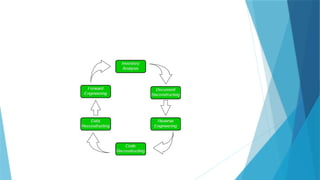
 1. Inventory Analysis:
Every software organization should have an inventory of all the applications.
 Inventory can be nothing more than a spreadsheet model containing
information that provides a detailed description of every active application.
 By sorting this information according to business criticality, longevity, current
maintainability, and other local important criteria, candidates for re-
engineering appear.
 The resource can then be allocated to a candidate application for re-
engineering work.

 2. Document reconstructing:
Documentation of a system either explains how it operates or how to use it.
 Documentation must be updated.
 It may not be necessary to fully document an application.
 The system is business-critical and must be fully re-documented.
3. Reverse Engineering:
Reverse engineering is a process of design recovery. Reverse engineering tools
extract data and architectural and procedural design information from an existing
program.
4. Code Reconstructing:
 To accomplish code reconstruction, the source code is analyzed using a
reconstructing tool. Violations of structured programming construct are noted
and code is then reconstructed.
 The resultant restructured code is reviewed and tested to ensure that no
anomalies have been introduced.
5. Data Restructuring:
 Data restructuring begins with a reverse engineering activity.
 The current data architecture is dissected, and the necessary data models are
defined.
 Data objects and attributes are identified, and existing data structures are reviewed
for quality.
6. Forward Engineering:
Forward Engineering also called renovation or reclamation not only recovers design
information from existing software but uses this information to alter or reconstitute the
existing system to improve its overall quality.
Software Reverse Engineering
 Software Reverse Engineering is a process of recovering the design,
requirement specifications, and functions of a product from an analysis of its
code.
 It builds a program database and generates information from this.
 Reverse engineering can extract design information from source code, but the
abstraction level, the completeness of the documentation, the degree to
which tools and a human analyst work together, and the directionality of the
process are highly variable.
Objective of Reverse Engineering:
 Reducing Costs: Reverse engineering can help cut costs in product development by finding
replacements or cost-effective alternatives for systems or components.
 Analysis of Security: Reverse engineering is used in cybersecurity to examine exploits,
vulnerabilities, and malware. This helps in understanding of threat mechanisms and the
development of practical defenses by security experts.
 Integration and Customization: Through the process of reverse engineering, developers
can incorporate or modify hardware or software components into pre-existing systems to
improve their operation or tailor them to meet particular needs.
 Recovering Lost Source Code: Reverse engineering can be used to recover the source code
of a software application that has been lost or is inaccessible or at the very least, to
produce a higher-level representation of it.
 Fixing bugs and maintenance: Reverse engineering can help find and repair flaws or
provide updates for systems for which the original source code is either unavailable or
inadequately documented.
Steps of Software Reverse Engineering:
 Collection Information: This step focuses on collecting all possible information (i.e., source design
documents, etc.) about the software.
 Examining the Information: The information collected in step-1 is studied so as to get familiar with the
system.
 Extracting the Structure: This step concerns identifying program structure in the form of a structure
chart where each node corresponds to some routine.
 Recording the Functionality: During this step processing details of each module of the structure, charts
are recorded using structured language like decision table, etc.
 Recording Data Flow: From the information extracted in step-3 and step-4, a set of data flow diagrams
is derived to show the flow of data among the processes.
 Recording Control Flow: The high-level control structure of the software is recorded.
 Review Extracted Design: The design document extracted is reviewed several times to ensure
consistency and correctness. It also ensures that the design represents the program.
 Generate Documentation: Finally, in this step, the complete documentation including SRS, design
document, history, overview, etc. is recorded for future use.
What is Forward Engineering?
 Forward Engineering is a method of creating or making an application with the help
of the given requirements.
 Forward engineering is also known as Renovation and Reclamation. Forward
engineering requires high proficiency skills.
 It takes more time to construct or develop an application.
 Forward engineering is a technique of creating high-level models or designs to make
complexities and low-level information.
 Therefore this kind of engineering has completely different principles in numerous
packages and information processes.
 Forward Engineering applies all the software engineering process that contains
SDLC to recreate associated existing applications.
 It is near to full fill new needs of the users into re-engineering.
Characteristics of forward engineering
 Forward engineering is a variety of engineering that has different principles in numerous
package and information processes.
 Forward engineering is vital in IT as a result of it represents the 'normal’ development process.
 Forward engineering deals with the conversion of business processes, services, and functions
into applications.
 In this method, the business model is developed first. Then, a top-down approach is followed
to urge the package from the model developed.
 Forward engineering tools are accustomed to moving from implementation styles and logic to
the event of supply code.
 It essentially permits the user to develop a business model which may then be translated into
data system components.
 These tools follow the top-down approach. System creator and visual Analyst is a forward
engineering CASE tool.
THANK YOU
B.Sc. DS Unit 2 Software Engineering.pptx

B.Sc. DS Unit 2 Software Engineering.pptx

  • 1.
  • 2.
    The Preliminary Investigation The Preliminary Investigation is the foundation phase in SDLC. Its main objective is to analyze a business problem or opportunity and decide if it’s worth pursuing further development.
  • 3.
    1. Request Clarification ✅ Purpose:  To clearly understand the problem or request made by the user, customer, or management and define the scope of the system to be developed.
  • 4.
    ✅ Activities:  Identifythe Origin of the Request:  Who raised the request? (e.g., department head, user, customer)  Is it a problem to solve, or an opportunity to improve operations?  Initial Meetings with Stakeholders:  Discuss the background, needs, and expectations.  Identify key users, departments involved, and data sources.  Define System Boundaries:  What parts of the business will the system affect?  What is included or excluded in this investigation?  Clarify Goals & Objectives:  Is the request to automate, improve, replace, or integrate existing systems?  What will success look like?
  • 5.
    ✅ Output:  Awell-understood problem statement.  A documented summary of what is needed and why.  Clear and realistic objectives for proceeding.
  • 6.
    2. Feasibility Study This is the core decision-making activity of the Preliminary Investigation. The goal is to assess if the proposed project is doable from several perspectives.  ✅ Purpose:  To evaluate the practicality, cost-effectiveness, and acceptability of the system before allocating major resources.
  • 7.
    ✅ Types ofFeasibility:  🔹 a) Technical Feasibility  Questions Addressed:  Do we have the required hardware, software, and technical skills?  Can existing systems be integrated?  Example:  If a mobile app is proposed, does the organization have the platform to host it (Android/iOS)?
  • 8.
    b) Economic Feasibility(Cost–Benefit Analysis)  Questions Addressed:  Is the system financially viable?  Do the expected benefits (increased efficiency, savings, revenue) outweigh the costs?  Cost Types:  Tangible Costs: Hardware, software, training.  Intangible Costs: Employee stress, disruption.  Tangible Benefits: Cost reduction, error minimization.  Intangible Benefits: Customer satisfaction, brand image.
  • 9.
    c) Operational Feasibility Questions Addressed:  Will the system work in the organization’s environment?  Will users be comfortable with and accept the change?  Evaluation Points:  User resistance  Process compatibility  Cultural and organizational readiness
  • 10.
    d) Schedule Feasibility Questions Addressed:  Can the system be completed in the required timeframe?  Are deadlines realistic?  Risks:  Unforeseen delays  Dependency on external vendors or systems
  • 11.
    e) Legal &Ethical Feasibility  Questions Addressed:  Does the system comply with data protection laws (e.g., GDPR)?  Are there ethical concerns with the data collected or functionality?  Examples:  A hospital system must meet HIPAA standards.  Use of AI must not discriminate unfairly.
  • 12.
    ✅ Output:  Adetailed Feasibility Report covering all the above.  A summary of potential risks and rewards.  A recommendation on whether the project should proceed.
  • 13.
    3. Request Approval This is the final step in the Preliminary Investigation. It determines if the project should proceed to the System Analysis phase.  ✅ Purpose:  To formally present the findings to decision-makers and seek authorization to move ahead.
  • 14.
    ✅ Activities:  Preparethe Preliminary Investigation Report:  Includes: Problem statement, objectives, feasibility findings, estimated budget, timeline, and risk assessment.  Present to Stakeholders/Management:  Review findings in a presentation or meeting.  Answer questions about cost, value, and impact.  Decision Making:  Options:  Approve the request: Proceed to System Analysis.  Reject the request: Close the investigation.  Request modifications: Rework scope or timelines.
  • 15.
    ✅ Output:  Formalapproval to proceed with detailed system development.  Allocation of resources and budget for the next phase.  A go/no-go decision based on well-informed analysis.
  • 16.
    📦 Final Deliverableof Preliminary Investigation:  ✅ Preliminary Investigation Report  Includes:  Background and problem statement  Goals and objectives  Detailed feasibility analysis (all types)  Cost–benefit summary  Recommendation  Approval documentation (sign-offs)
  • 17.
    Phase: Determination ofSystem Requirements (System Analysis Phase)  This phase is critical because the quality and clarity of requirements directly affect the success of the software project.  The aim is to understand what the users need from the system — both in terms of functionality and performance.
  • 18.
    Objectives:  Identify userneeds and system expectations.  Define functional and non-functional requirements.  Understand existing systems and propose improvements.  Create documentation for use in system design.
  • 19.
    Activities in Determinationof System Requirements:  1. ✅ Requirements Gathering  Purpose:  Collect information from various stakeholders to understand the needs of the system.  Techniques Used:  Interviews: Face-to-face discussions with end users, management, and IT staff.  Questionnaires: Written surveys for a broader group of users.  Observation: Watching how current systems and processes are used.  Document Analysis: Studying existing documentation, reports, forms, etc.  Workshops or Joint Application Design (JAD): Group sessions involving users and developers.  Prototyping: Building mock-ups or demos to understand requirements interactively
  • 20.
    2. ✅ RequirementsAnalysis  Purpose:  Evaluate and organize the collected data to:  Resolve conflicts or inconsistencies.  Remove vague or ambiguous requirements.  Clarify assumptions.  Focus Areas:  Identify functional requirements:  What the system should do (e.g., "Allow users to log in," "Generate monthly reports").  Identify non-functional requirements:  How the system should behave (e.g., performance, usability, reliability, scalability).  Address business rules:  Conditions or constraints specific to the organization (e.g., discounts based on membership).
  • 21.
    ✅ 3.Modeling Requirements Purpose:  Represent the system requirements visually or formally to improve understanding.  Common Models:  Data Flow Diagrams (DFD): Show how data moves through the system.  Entity-Relationship Diagrams (ERD): Define database structure and relationships.  Use Case Diagrams: Show interactions between users and the system.  Flowcharts or Activity Diagrams: Illustrate workflows and processes.
  • 22.
    ✅4. Requirements Specification Purpose:  Document all agreed-upon requirements in a structured format.  Key Deliverables:  Software Requirements Specification (SRS) Document  Contains:  Functional requirements  Non-functional requirements  Constraints  System interfaces  User requirements  Validation:  Ensure users and stakeholders review and confirm the documented requirements.
  • 23.
    5. ✅ RequirementsValidation and Sign-Off  Purpose:  Ensure the documented requirements are correct, complete, and agreed upon.  Activities:  Conduct walkthroughs and reviews with stakeholders.  Perform validation checks:  Are the requirements clear?  Are they testable?  Do they meet business needs?  Obtain formal sign-off from users or management.
  • 24.
    Types of Requirements RequirementType Description Functional Specific behaviors, tasks, or functions the system must perform Non-Functional Qualities like performance, reliability, security, etc. Technical Requirements related to hardware, software, database, etc. User Requirements What end users expect from the system in terms of interaction Business Requirements High-level goals and outcomes the business aims to achieve Interface Requirements How the system interacts with users, other systems, or hardware
  • 25.
    🚧 Common Challengesin Requirement Determination:  Users may not know what they want.  Conflicting requirements from different departments.  Evolving business needs.  Ambiguous or incomplete descriptions.
  • 26.
    ✅ Benefits ofEffective Requirements Determination  Fewer changes later in the development.  Lower project costs.  Higher user satisfaction.  Clear roadmap for design and development teams.  Improved communication between stakeholders.
  • 27.
    📘 Final Deliverable: → Software Requirements Specification (SRS) Document  This becomes the foundation for the System Design Phase.
  • 28.
    System Design Phasein SDLC  Once the requirements are clearly defined and approved (from the Requirements Analysis phase), the next step is to design the solution — essentially building the blueprint of the future system.  Main Objective:  To translate requirements into a complete and detailed system architecture and design that will guide the actual development (coding).
  • 29.
    Major Activities inSystem Design:  ✅ 1. Architectural Design (High-Level Design / HLD)  🎯 Purpose:  To define the overall structure of the system — how the components interact, what modules will be created, and how data will flow.  Key Focus Areas:  System Architecture:  Identify major modules/components.  Define their relationships (e.g., client-server, layered architecture).  Technology Stack:  Decide on platforms, programming languages, frameworks, databases, etc.  System Interfaces:  Define how the system interacts with other systems (APIs, external software).  Security Architecture:  High-level planning of security features (authentication, encryption).  Deliverables: 
  • 30.
    2. Detailed Design(Low-Level Design / LLD)  🎯 Purpose:  To define the internal logic and detailed functioning of each module/component identified in the high-level design.  Key Elements:  Module Design:  Structure and logic of individual software components.  Database Design:  Entity-Relationship Diagram (ERD)  Table structures, keys, indexes, relationships  Interface Design:  Layout and elements of user interface screens (forms, dashboards, input fields)  Navigation flows  Data Flow Design:  Data flow diagrams (DFDs) showing how data moves between modules. Deliverables: Low-Level Design Document (LLD) Data Dictionary UI Mockups / Wireframes Process and logic flowcharts Database schemas
  • 31.
    ✅ 3. UserInterface (UI) Design  🎯 Purpose:  To design the visual and interactive part of the system that the end users will work with.  Activities:  Create wireframes or mockups.  Decide layout, colors, fonts, icons, buttons, and error messages.  Ensure consistency, responsiveness, and accessibility.  Deliverables:  UI Prototypes  Style Guide / Design System  Navigation and flow diagrams
  • 32.
    ✅ 4. SecurityDesign  🎯 Purpose:  To protect the system and its data from unauthorized access, breaches, or failures.  Activities:  Plan user roles and permissions.  Decide encryption methods (data at rest/in transit).  Include authentication and authorization logic (e.g., OAuth, 2FA).  Consider data privacy, backups, and compliance (e.g., GDPR).
  • 33.
    ✅ 5. Performance& Reliability Design  🎯 Purpose:  Ensure the system performs well under expected loads and remains stable and recoverable.  Activities:  Design for scalability (horizontal/vertical).  Decide caching mechanisms.  Plan for load balancing.  Design fallback and recovery procedures for crashes or data loss.
  • 34.
    📘 Types ofDesign Documents and Tools Used: Design Artifact Purpose High-Level Design (HLD) Architecture, major modules, technologies Low-Level Design (LLD) Logic, database design, detailed workflows Entity Relationship Diagram Data modeling, database structure Data Flow Diagrams (DFDs) Show data movement through the system Class Diagrams (UML) Structure of object-oriented systems Sequence Diagrams (UML) Show interactions over time
  • 35.
    ✅ Goals ofSystem Design:  Satisfy all functional and non-functional requirements.  Ensure the system is modular, maintainable, and scalable.  Provide a clear roadmap for developers to begin coding.  Allow testing team to prepare test plans based on design specs.
  • 36.
    ❗ Common Pitfallsto Avoid:  Ambiguous or incomplete design specifications.  Ignoring non-functional requirements (e.g., performance, security).  Over-engineering — adding unnecessary complexity.  Lack of stakeholder review before development begins.
  • 37.
    🧾 Final Deliverablesof the Design Phase:  ✅ High-Level Design (HLD) Document  ✅ Low-Level Design (LLD) Document  ✅ Database Design (ERD + schema)  ✅ UI/UX Design Files (mockups, prototypes)  ✅ Interface Design Specifications  ✅ Security & Performance Guidelines
  • 38.
    Development of Software(Coding Phase)  This is the implementation phase of the SDLC, where all the designs and requirements are transformed into a working software system through coding.
  • 39.
    Purpose:  To convertthe software design into actual executable code using programming languages, tools, and techniques.
  • 40.
    Key Activities:  SetUp the Development Environment:  Install IDEs (e.g., Visual Studio, Eclipse)  Configure development tools, libraries, and version control (e.g., Git)  Assign Tasks to Developers:  Divide the project into modules/components  Assign responsibilities based on skill and expertise  Start Coding:  Developers write code based on Low-Level Design (LLD)  Follow coding standards, guidelines, and best practices  Use proper naming conventions and documentation
  • 41.
    Key activities  Useof Version Control:  Track changes to code using systems like Git, SVN  Enable collaboration among developers  Perform Unit Testing:  Each module is tested independently  Ensures the individual unit functions as intended  Peer Code Review:  Code is reviewed by team members to detect bugs and maintain quality  Helps ensure consistency and improves reliability
  • 42.
    Best Practices:  Writemodular, reusable, and clean code  Comment your code where needed  Keep security and performance in mind  Regularly commit code with clear messages
  • 43.
    Output/Deliverables:  Fully functionalsource code  Internal documentation (inline comments, README files)  Unit test results  Updated modules integrated with other components
  • 44.
    Importance of ThisPhase:  This is where the system comes to life  Any flaws here can lead to bugs, performance issues, or failures  Directly impacts software quality, maintainability, and user experience
  • 45.
    System Testing inSDLC  System Testing is a critical phase in the Software Development Life Cycle (SDLC) where the entire software system is tested end-to-end to verify it meets the specified requirements.
  • 46.
    Levels of TestingIncluded in System Testing  1. Unit Testing  🔹 Definition: Testing of individual components or modules of software in isolation to ensure that each unit works as expected.  🔹 Who Performs It? Usually done by developers.  🔹 Tools Used:  JUnit (Java)  NUnit (.NET)  PyTest (Python)  🔹 Example: Testing a function that calculates interest in a banking application.  🔹 Goal:  Ensure correctness of logic  Catch bugs early
  • 47.
    2. Integration Testing 🔹 Definition: Testing the interaction between modules or components to ensure they work together properly.  🔹 Types:  Big Bang Integration: All modules integrated at once  Incremental Integration: Modules integrated step-by-step  Top-Down: Starts from top-level module  Bottom-Up: Starts from low-level modules  🔹 Who Performs It?  Developers or testers  🔹 Tools Used: JUnit with mock objects Postman (for API integration) Selenium (for UI integration) 🔹 Example: Check if login module passes control properly to user dashboard after authentication. 🔹 Goal: Detect interface errors Ensure data flow is correct across modules
  • 48.
    3. System Testing 🔹 Definition: Testing the complete and fully integrated software product to evaluate its compliance with specified requirements.  🔹 Who Performs It?  Testers/QA teams (independent of developers)  🔹 Types of System Testing:  Functional Testing – Validates functionality (e.g., login, transactions)  Non-Functional Testing:  Performance Testing – Response time, scalability  Security Testing – Vulnerabilities, access control  Usability Testing – Ease of use, navigation  Compatibility Testing – Across devices, OS, browsers 🔹 Tools Used: Selenium LoadRunner JMeter TestRail (for test management) 🔹 Example: Simulate real-world usage of an e-commerce website from user registration to payment. 🔹 Goal: Ensure the software system functions as a whole Validate that it meets business and user requirements
  • 49.
    Summary Table Testing TypeScope Performed By Focus Area Goal Unit Testing Individual components/ modules Developers Logic correctness Detect early bugs in code units Integration Testing Interaction between modules Developers/ Testers Data flow & interfaces Ensure modules work together System Testing Entire system QA/Testers Functional + Non-functional Validate complete system
  • 50.
    System Implementation andEvaluation  This phase occurs after the software has been fully developed and tested. It involves installing the system, making it operational, and evaluating its performance in a live environment.
  • 51.
    System Implementation  📌Definition:  The process of deploying the developed software into the production environment and making it available for end-users.
  • 52.
    Key Steps inImplementation:  a) Installation and Deployment  Install software on user machines or servers.  Set up databases, networks, and infrastructure.  Migrate data from old systems (if any).  Ensure the environment (hardware, OS, network) is configured correctly.
  • 53.
     b) UserTraining  Train users on how to use the new system.  Provide manuals, tutorials, and help resources.  May involve workshops, webinars, or hands-on sessions.
  • 54.
     c) ChangeoverStrategies (Deployment Models)  Direct Cutover – Old system is immediately replaced by the new one.  Fast, but risky.  Parallel Run – Old and new systems run together for a time.  Safe, but expensive and resource-intensive.  Phased Implementation – System is introduced in phases/modules.  Allows gradual adaptation.  Pilot Implementation – System is first implemented in a small part of the organization.  Ideal for testing in real-world use with minimal risk.
  • 55.
     d) Post-InstallationSupport  Resolve issues users face in the early days.  Monitor for performance problems or bugs.  Apply patches or configuration changes as needed.
  • 56.
    2. System Evaluation 📌 Definition:  Evaluation is the process of assessing how well the implemented system performs and whether it meets the user and business requirements.
  • 57.
    Key Steps inEvaluation:  a) Performance Evaluation  Measure speed, accuracy, response time, and uptime.  Identify any system bottlenecks or slowdowns.  b) User Feedback  Gather feedback through surveys, interviews, or feedback forms.  Evaluate user satisfaction, usability, and acceptance.  c) Validation Against Requirements  Compare the actual performance to the original SRS (Software Requirement Specification).  Verify whether all functional and non-functional requirements are met.
  • 58.
    Key Steps inEvaluation:  d) Error and Bug Tracking  Analyze user-reported issues.  Determine if additional debugging or patches are needed.  e) Cost-Benefit Analysis  Review if the system delivers value for money.  Calculate ROI (Return on Investment).  f) System Audit  Conduct internal or external audits to check data integrity, security, and compliance.
  • 59.
    System Maintainance  Definition: System Maintenance refers to the ongoing process of modifying a software system after its deployment to fix bugs, improve performance, or adapt it to new environments or user requirements.
  • 60.
    Types of Maintenance: TypeDescription 1. Corrective Fixes bugs or errors found after the system is operational. 2. Adaptive Updates software to work in a new or changed environment (e.g., new OS). 3. Perfective Enhances existing features or adds new features to improve functionality. 4. Preventive Refactors or improves code to prevent future issues (e.g., performance tuning).
  • 61.
    Software Reengineering  Reengineeringis the process of analysing and modifying existing software to improve its functionality, maintainability, or to migrate it to new platforms without altering its core behavior.
  • 62.
    Why Reengineer Software? High maintenance costs  Outdated technologies  Poor structure or documentation  Need for scalability or performance improvements
  • 63.
    Reverse Engineering  Definition:Reverseengineering is the process of analyzing software to extract design and specification information from the existing code, often when original documentation is unavailable.
  • 64.
    Purpose:  Understand legacysystems  Recover lost documentation  Identify reuse opportunities  Improve understanding before making changes
  • 65.
    Restructuring  Definition:Restructuring refersto the modification of internal structure of code (or data) without changing its external behavior.  Types:  Code Restructuring: Improve readability and maintainability  Data Restructuring: Optimize data structures and access methods
  • 66.
    Benefits:  Improves codequality  Makes future maintenance easier  Helps detect hidden bugs
  • 69.
    Summary Table Concept PurposeOutcome Maintenance Keep software functional and relevant Bug fixes, updates, improvements Reengineering Modernize and improve existing systems Improved maintainability, performance Reverse Engineering Understand system from code Documentation, analysis Restructuring Clean up code or data without behavior change Better structure and maintainability Forward Engineering Build from models/specifications New or improved software
  • 70.
    Software Re-Engineering  SoftwareRe-Engineering is the examination and alteration of a system to reconstitute it in a new form.  The principle of Re-Engineering when applied to the software development process is called software re-engineering.  It positively affects software cost, quality, customer service, and delivery speed.  In Software Re-engineering, we are improving the software to make it more efficient and effective.  It is a process where the software's design is changed and the source code is created from scratch.  Sometimes software engineers notice that certain software product components need more upkeep than other components, necessitating their re-engineering.
  • 71.
    Steps in Softwarereengineering  Decide which components of the software we want to re-engineer. Is it the complete software or just some components of the software?  Do Reverse Engineering to learn about existing software functionalities.  Perform restructuring of source code if needed for example modifying functional-Oriented programs in Object-Oriented programs  Perform restructuring of data if required  Use Forward Engineering ideas to generate re-engineered software
  • 72.
    The need forsoftware Re-engineering:  Software re-engineering is an economical process for software development and quality enhancement of the product.  This process enables us to identify the useless consumption of deployed resources and the constraints that are restricting the development process so that the development process could be made easier and cost-effective (time, financial, direct advantage, optimize the code, indirect benefits, etc.) and maintainable.  The software reengineering is necessary for having-
  • 73.
     a) Boostup productivity: Software reengineering increase productivity by optimizing the code and database so that processing gets faster.  b) Processes in continuity: The functionality of older software products can be still used while the testing or development of software.  c) Improvement opportunity: Meanwhile the process of software reengineering, not only software qualities, features, and functionality but also your skills are refined, and new ideas hit your mind. This makes the developer's mind accustomed to capturing new opportunities so that more and more new features can be developed.  d) Reduction in risks: Instead of developing the software product from scratch or from the beginning stage, developers develop the product from its existing stage to enhance some specific features brought in concern by stakeholders or its users. Such kind of practice reduces the chances of fault fallibility.  e) Saves time: As stated above, the product is developed from the existing stage rather than the beginning stage, so the time consumed in software engineering is lesser.  f) Optimization: This process refines the system features, and functionalities and reduces the complexity of the product by consistent optimization as maximum as possible.
  • 74.
    Re-Engineering cost factors: The quality of the software is to be re-engineered.  The tool support availability for engineering.  The extent of the data conversion is required.  The availability of expert staff for Re-engineering.
  • 76.
    Software Re-Engineering Activities: 1. Inventory Analysis: Every software organization should have an inventory of all the applications.  Inventory can be nothing more than a spreadsheet model containing information that provides a detailed description of every active application.  By sorting this information according to business criticality, longevity, current maintainability, and other local important criteria, candidates for re- engineering appear.  The resource can then be allocated to a candidate application for re- engineering work. 
  • 77.
     2. Documentreconstructing: Documentation of a system either explains how it operates or how to use it.  Documentation must be updated.  It may not be necessary to fully document an application.  The system is business-critical and must be fully re-documented.
  • 78.
    3. Reverse Engineering: Reverseengineering is a process of design recovery. Reverse engineering tools extract data and architectural and procedural design information from an existing program. 4. Code Reconstructing:  To accomplish code reconstruction, the source code is analyzed using a reconstructing tool. Violations of structured programming construct are noted and code is then reconstructed.  The resultant restructured code is reviewed and tested to ensure that no anomalies have been introduced.
  • 79.
    5. Data Restructuring: Data restructuring begins with a reverse engineering activity.  The current data architecture is dissected, and the necessary data models are defined.  Data objects and attributes are identified, and existing data structures are reviewed for quality. 6. Forward Engineering: Forward Engineering also called renovation or reclamation not only recovers design information from existing software but uses this information to alter or reconstitute the existing system to improve its overall quality.
  • 80.
    Software Reverse Engineering Software Reverse Engineering is a process of recovering the design, requirement specifications, and functions of a product from an analysis of its code.  It builds a program database and generates information from this.  Reverse engineering can extract design information from source code, but the abstraction level, the completeness of the documentation, the degree to which tools and a human analyst work together, and the directionality of the process are highly variable.
  • 81.
    Objective of ReverseEngineering:  Reducing Costs: Reverse engineering can help cut costs in product development by finding replacements or cost-effective alternatives for systems or components.  Analysis of Security: Reverse engineering is used in cybersecurity to examine exploits, vulnerabilities, and malware. This helps in understanding of threat mechanisms and the development of practical defenses by security experts.  Integration and Customization: Through the process of reverse engineering, developers can incorporate or modify hardware or software components into pre-existing systems to improve their operation or tailor them to meet particular needs.  Recovering Lost Source Code: Reverse engineering can be used to recover the source code of a software application that has been lost or is inaccessible or at the very least, to produce a higher-level representation of it.  Fixing bugs and maintenance: Reverse engineering can help find and repair flaws or provide updates for systems for which the original source code is either unavailable or inadequately documented.
  • 82.
    Steps of SoftwareReverse Engineering:  Collection Information: This step focuses on collecting all possible information (i.e., source design documents, etc.) about the software.  Examining the Information: The information collected in step-1 is studied so as to get familiar with the system.  Extracting the Structure: This step concerns identifying program structure in the form of a structure chart where each node corresponds to some routine.  Recording the Functionality: During this step processing details of each module of the structure, charts are recorded using structured language like decision table, etc.  Recording Data Flow: From the information extracted in step-3 and step-4, a set of data flow diagrams is derived to show the flow of data among the processes.  Recording Control Flow: The high-level control structure of the software is recorded.  Review Extracted Design: The design document extracted is reviewed several times to ensure consistency and correctness. It also ensures that the design represents the program.  Generate Documentation: Finally, in this step, the complete documentation including SRS, design document, history, overview, etc. is recorded for future use.
  • 83.
    What is ForwardEngineering?  Forward Engineering is a method of creating or making an application with the help of the given requirements.  Forward engineering is also known as Renovation and Reclamation. Forward engineering requires high proficiency skills.  It takes more time to construct or develop an application.  Forward engineering is a technique of creating high-level models or designs to make complexities and low-level information.  Therefore this kind of engineering has completely different principles in numerous packages and information processes.  Forward Engineering applies all the software engineering process that contains SDLC to recreate associated existing applications.  It is near to full fill new needs of the users into re-engineering.
  • 84.
    Characteristics of forwardengineering  Forward engineering is a variety of engineering that has different principles in numerous package and information processes.  Forward engineering is vital in IT as a result of it represents the 'normal’ development process.  Forward engineering deals with the conversion of business processes, services, and functions into applications.  In this method, the business model is developed first. Then, a top-down approach is followed to urge the package from the model developed.  Forward engineering tools are accustomed to moving from implementation styles and logic to the event of supply code.  It essentially permits the user to develop a business model which may then be translated into data system components.  These tools follow the top-down approach. System creator and visual Analyst is a forward engineering CASE tool.
  • 86.