SESSION ID:
#RSAC
Dave Shackleford
INCIDENT RESPONSE IN THE CLOUD
AIR-W14
Sr. Instructor
SANS Institute
@daveshackleford
#RSAC
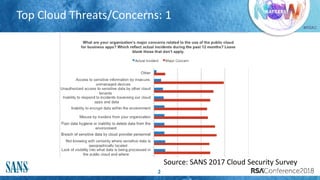
Top Cloud Threats/Concerns: 1
2
Source: SANS 2017 Cloud Security Survey
#RSAC
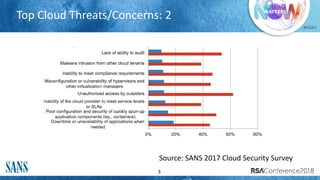
Top Cloud Threats/Concerns: 2
3
Source: SANS 2017 Cloud Security Survey
#RSAC
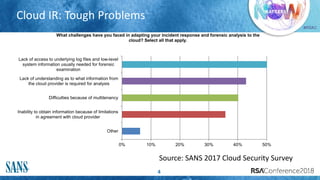
Cloud IR: Tough Problems
4
0% 10% 20% 30% 40% 50%
Other
Inability to obtain information because of limitations
in agreement with cloud provider
Difficulties because of multitenancy
Lack of understanding as to what information from
the cloud provider is required for analysis
Lack of access to underlying log files and low-level
system information usually needed for forensic
examination
What challenges have you faced in adapting your incident response and forensic analysis to the
cloud? Select all that apply.
Source: SANS 2017 Cloud Security Survey
#RSAC
Why Is This So Tough?
Cloud incident detection and response feels challenging for a few
reasons:
Lack of visibility
Lack of event data
Lack of access to evidence
Missing controls and processes
Skills gaps
#RSAC
Updating Our IR Phases
The news isn’t all doom and gloom, fortunately
There are many ways we can improve our detection and IR
capabilities in the cloud today
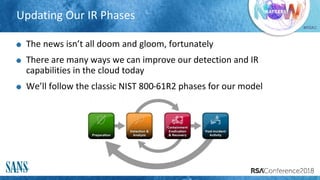
We’ll follow the classic NIST 800-61R2 phases for our model
#RSAC
PREPARATION
#RSAC
Gather Info from Providers
8
Evidence from CSPs and timeframes (SLAs)
Do they have contacts in law enforcement?
Can customers participate in IR and forensics investigations?
What data retention/disposal lifecycles exist?
What skills do CSP IR/forensics teams have?
#RSAC
More Info We Need from Providers
9
What processes are in place for IR of virtual infrastructure?
How are impacts to tenants minimized?
How is network monitoring/tracking implemented?
How do CSPs allow law enforcement access?
#RSAC
Planning for Cloud IR
10
First, ensure you have IAM enabled for response teams when needed
Create least privilege accounts to perform specific actions in the cloud when
needed (define a role for these, ideally, for “cross-account access”)
Enable MFA for these accounts
Enable write-once storage for logs, evidence
Leverage S3 Bucket Versioning for secure retention
Enable cloud-wide logging if available
#RSAC
Planning for Cloud IR (2)
11
Create a new Security Group (AWS) or NSG (Azure) that only allows:
Inbound connections from responders
Outbound connections if absolutely necessary
You can adjust as needed
Enable triggered metric-based alarms (AWS CloudWatch, for
example)
#RSAC
DETECTION & ANALYSIS
#RSAC
What can we get from providers?
13
What data types (evidence) can you get from providers?
Webserver logs
Application server logs
Database logs
Virtual Machine guest operating system logs
Virtualization hypervisor host access logs
Virtualization management platform logs and SaaS portal logs
Network captures
Billing records
Management portal logs
API logs
Cloud or network provider perimeter network logs
Logs from DNS servers
#RSAC
SaaS Incident Detection
Some SaaS providers may agree to share the log and audit trail data
with customers
Many, however, will not
This leads to two scenarios:
Log data from the SaaS CSP triggers an incident response scenario internally
using SIEM, Log Management, etc.
The CSP’s internal incident response process is triggered, and they notify the
consumer within some pre-specified SLA-defined period
CASB solutions can also help with this
#RSAC
IaaS Incident Detection
There are two definitive elements of IaaS incident detection and response:
CSP Incident Response: This applies to backend storage, networks, servers, and
virtualization infrastructure only
Consumer Incident Response: All consumer VMs and associated virtual networks
should produce logs identical to internal events
One advantage of the IaaS model is the ability to include security platforms
in the CSP infrastructure
Many IaaS providers like Amazon allow virtual appliances or other security-
specific systems to be installed and managed by the consumer
Some IaaS providers also provide a suite of security services as well
#RSAC
Example Controls: AWS CloudTrail
CloudTrail is a logging service that records any API calls made to AWS:
Identity of the API caller
Time of the API call
Source IP address of the API caller
Request parameters
Response elements returned by the AWS service
CloudTrail logging captures all requests made from the standard AWS
management console, command line tools, any AWS Software
Development Kits (SDKs) and other AWS services
#RSAC
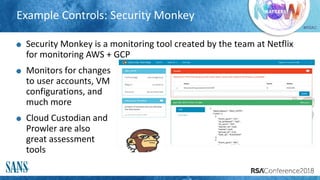
Example Controls: Security Monkey
Security Monkey is a monitoring tool created by the team at Netflix
for monitoring AWS + GCP
Monitors for changes
to user accounts, VM
configurations, and
much more
Cloud Custodian and
Prowler are also
great assessment
tools
#RSAC
What Events/Indicators to Look For?
18
There are many types of events and information that can help
identify potential incidents in the cloud:
Incident notification from your CSP
Billing alarms
IAM activity (logins in particular)
Cloud environment logs (CloudTrail, for example)
CloudWatch Alarms (various other metrics)
Using a hosted or managed logging service can aid in detection of
unusual activity significantly
#RSAC
Log Details to Look For
19
Suspicious user activity
Federated user activity on behalf of others
New resource creation by cloud services
Specific time ranges that are suspicious
Specific region activity
Failed access to resources for user/group
Skip any “read only” logs—“Get” or “Describe” or “List”
These provide little value, aside from “recon”
#RSAC
CONTAINMENT/ERADICATION/RECOVERY
#RSAC
Containment
Apply a tag to assets under investigation
This can optionally be done automatically
Move the affected system to a “quarantine” VPC, OR
Apply the “quarantine” Security Group/NSG and monitor within the
existing VPC/subnet
Ensure any additional access controls are applied/adjusted as
necessary
#RSAC
Planning for Forensics in the Cloud
Planning for forensics in the cloud can be challenging
Until recently, there have been very few tools available to help analysts
inspect systems and acquire data
When considering evidence acquisition and analysis, we should look for
the following:
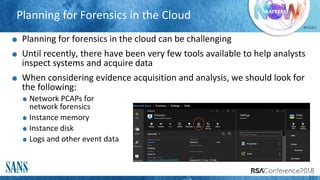
Network PCAPs for
network forensics
Instance memory
Instance disk
Logs and other event data
22
#RSAC
Evidence Capture
23
Capturing disk in a running instance is getting easier to do
In EC2, you perform a snapshot capture of EBS, then attach to a forensic
workstation
In Azure, you can capture IaaS OS and Data drives directly from the portal
Capturing memory in a shared environment will require some form of
capture on a per-instance basis
In other words, running memory of instances will need to be acquired
with separate tools (remote or local)
Tools like Margarita Shotgun can help do this
#RSAC
Building a SANS SIFT Workstation in the Cloud
Building a SANS Investigative Forensic Toolkit (SIFT) instance in the
cloud is a GREAT plan for performing forensic investigations
The process is simple:
Start a current 64-bit Ubuntu Linux image AMI and choose resource level
Configure your security keys for the forensics/IR team
Lock down SSH access to a known IP address or bastion host for IR
Run “apt-get update” and “apt-get upgrade”
Download SIFT: wget https://raw.github.com/sans-dfir/sift-
bootstrap/master/bootstrap.sh
Run “sudo bash bootstrap.sh –i”
24
#RSAC
A Forensic Process for Disk Analysis in EC2
25
Create a snapshot of the suspect disk volume in EC2:
Instances: Note the Instance ID of the suspect system
Volumes under Elastic Block Store: Note the Volume ID of the above Instance
ID
Snapshots under Elastic Block Store: Click “Create Snapshot” and enter
Volume ID, Name, and Description.
Right-click your snapshot and select “Create Volume”—match disk type, size,
and AZ (where suspect system is). Note the Volume ID of this new one.
Attach the volume to your SIFT workstation
Right-click this volume and select “Attach Volume”. Select your SIFT instance
and choose “Attach”. Done!
#RSAC
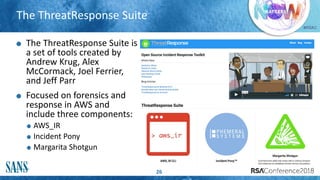
The ThreatResponse Suite
26
The ThreatResponse Suite is
a set of tools created by
Andrew Krug, Alex
McCormack, Joel Ferrier,
and Jeff Parr
Focused on forensics and
response in AWS and
include three components:
AWS_IR
Incident Pony
Margarita Shotgun
#RSAC
Need a Step-by-Step Guide?
Ken Hartman hooked you UP
His SANS Reading Room paper
describes in detail how to set up
a cloud forensics workstation,
acquire evidence, and analyze it
Find this at
https://www.sans.org/reading-
room/whitepapers/cloud/digital-
forensic-analysis-amazon-linux-
ec2-instances-38235
#RSAC
Eradication & Recovery
From a system/content perspective, little changes
Assess ongoing system risk
Evaluate whether cleanup is possible or worth doing
If possible, blow the system away once evidence is in place
In a true DevOps workflow, this is simple – just initiate a new instance build
Can be done automatically, as well
See Jonathon Poling’s SecTor presentation for some additional ideas on log
analysis in AWS:
https://sector.ca/sessions/incident-response-and-forensics-in-aws/
#RSAC
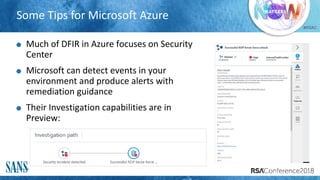
Some Tips for Microsoft Azure
Much of DFIR in Azure focuses on Security
Center
Microsoft can detect events in your
environment and produce alerts with
remediation guidance
Their Investigation capabilities are in
Preview:
#RSAC
POST-INCIDENT ACTIVITY
And Looking Ahead…
#RSAC
Looking Ahead: Cloud IR Automation
Many are looking to script and automate IR activities in the cloud
This may involve log collection, monitoring, and automated tools like
AWS Lambda functions
TeriRadichel has created the AWS Security Automation Framework to
help with this:
https://github.com/tradichel/AWSSecurityAutomationFramework
A great talk on this at BlackHat 2016:
https://www.blackhat.com/docs/us-16/materials/us-16-Krug-
Hardening-AWS-Environments-And-Automating-Incident-Response-
For-AWS-Compromises-wp.pdf
#RSAC
Azure IR Automation
Azure has a feature in Preview called Security Center Playbooks
Leverages Azure Logic Apps (templates for automation/orchestration)
Logic Apps can be designed around the IR Event Cycle:
Detect event
Trigger workflow
Send Alerts
(Optionally) Perform
containment/remediation
actions
#RSAC
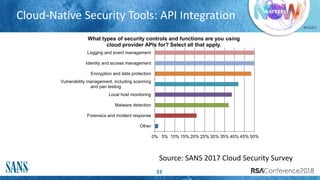
Cloud-Native Security Tools: API Integration
33
0% 5% 10% 15% 20% 25% 30% 35% 40% 45% 50%
Other
Forensics and incident response
Malware detection
Local host monitoring
Vulnerability management, including scanning
and pen testing
Encryption and data protection
Identity and access management
Logging and event management
What types of security controls and functions are you using
cloud provider APIs for? Select all that apply.
Source: SANS 2017 Cloud Security Survey
#RSAC
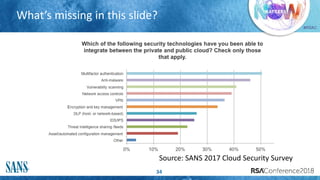
What’s missing in this slide?
34
Source: SANS 2017 Cloud Security Survey
#RSAC
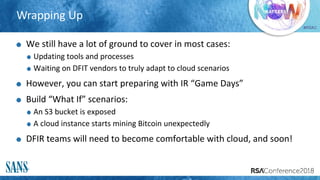
Wrapping Up
We still have a lot of ground to cover in most cases:
Updating tools and processes
Waiting on DFIT vendors to truly adapt to cloud scenarios
However, you can start preparing with IR “Game Days”
Build “What If” scenarios:
An S3 bucket is exposed
A cloud instance starts mining Bitcoin unexpectedly
DFIR teams will need to become comfortable with cloud, and soon!
#RSAC
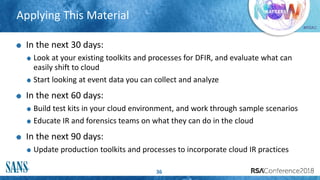
Applying This Material
36
In the next 30 days:
Look at your existing toolkits and processes for DFIR, and evaluate what can
easily shift to cloud
Start looking at event data you can collect and analyze
In the next 60 days:
Build test kits in your cloud environment, and work through sample scenarios
Educate IR and forensics teams on what they can do in the cloud
In the next 90 days:
Update production toolkits and processes to incorporate cloud IR practices

Incident response-in-the-cloud

  • 1.
    SESSION ID: #RSAC Dave Shackleford INCIDENTRESPONSE IN THE CLOUD AIR-W14 Sr. Instructor SANS Institute @daveshackleford
  • 2.
    #RSAC Top Cloud Threats/Concerns:1 2 Source: SANS 2017 Cloud Security Survey
  • 3.
    #RSAC Top Cloud Threats/Concerns:2 3 Source: SANS 2017 Cloud Security Survey
  • 4.
    #RSAC Cloud IR: ToughProblems 4 0% 10% 20% 30% 40% 50% Other Inability to obtain information because of limitations in agreement with cloud provider Difficulties because of multitenancy Lack of understanding as to what information from the cloud provider is required for analysis Lack of access to underlying log files and low-level system information usually needed for forensic examination What challenges have you faced in adapting your incident response and forensic analysis to the cloud? Select all that apply. Source: SANS 2017 Cloud Security Survey
  • 5.
    #RSAC Why Is ThisSo Tough? Cloud incident detection and response feels challenging for a few reasons: Lack of visibility Lack of event data Lack of access to evidence Missing controls and processes Skills gaps
  • 6.
    #RSAC Updating Our IRPhases The news isn’t all doom and gloom, fortunately There are many ways we can improve our detection and IR capabilities in the cloud today We’ll follow the classic NIST 800-61R2 phases for our model
  • 7.
  • 8.
    #RSAC Gather Info fromProviders 8 Evidence from CSPs and timeframes (SLAs) Do they have contacts in law enforcement? Can customers participate in IR and forensics investigations? What data retention/disposal lifecycles exist? What skills do CSP IR/forensics teams have?
  • 9.
    #RSAC More Info WeNeed from Providers 9 What processes are in place for IR of virtual infrastructure? How are impacts to tenants minimized? How is network monitoring/tracking implemented? How do CSPs allow law enforcement access?
  • 10.
    #RSAC Planning for CloudIR 10 First, ensure you have IAM enabled for response teams when needed Create least privilege accounts to perform specific actions in the cloud when needed (define a role for these, ideally, for “cross-account access”) Enable MFA for these accounts Enable write-once storage for logs, evidence Leverage S3 Bucket Versioning for secure retention Enable cloud-wide logging if available
  • 11.
    #RSAC Planning for CloudIR (2) 11 Create a new Security Group (AWS) or NSG (Azure) that only allows: Inbound connections from responders Outbound connections if absolutely necessary You can adjust as needed Enable triggered metric-based alarms (AWS CloudWatch, for example)
  • 12.
  • 13.
    #RSAC What can weget from providers? 13 What data types (evidence) can you get from providers? Webserver logs Application server logs Database logs Virtual Machine guest operating system logs Virtualization hypervisor host access logs Virtualization management platform logs and SaaS portal logs Network captures Billing records Management portal logs API logs Cloud or network provider perimeter network logs Logs from DNS servers
  • 14.
    #RSAC SaaS Incident Detection SomeSaaS providers may agree to share the log and audit trail data with customers Many, however, will not This leads to two scenarios: Log data from the SaaS CSP triggers an incident response scenario internally using SIEM, Log Management, etc. The CSP’s internal incident response process is triggered, and they notify the consumer within some pre-specified SLA-defined period CASB solutions can also help with this
  • 15.
    #RSAC IaaS Incident Detection Thereare two definitive elements of IaaS incident detection and response: CSP Incident Response: This applies to backend storage, networks, servers, and virtualization infrastructure only Consumer Incident Response: All consumer VMs and associated virtual networks should produce logs identical to internal events One advantage of the IaaS model is the ability to include security platforms in the CSP infrastructure Many IaaS providers like Amazon allow virtual appliances or other security- specific systems to be installed and managed by the consumer Some IaaS providers also provide a suite of security services as well
  • 16.
    #RSAC Example Controls: AWSCloudTrail CloudTrail is a logging service that records any API calls made to AWS: Identity of the API caller Time of the API call Source IP address of the API caller Request parameters Response elements returned by the AWS service CloudTrail logging captures all requests made from the standard AWS management console, command line tools, any AWS Software Development Kits (SDKs) and other AWS services
  • 17.
    #RSAC Example Controls: SecurityMonkey Security Monkey is a monitoring tool created by the team at Netflix for monitoring AWS + GCP Monitors for changes to user accounts, VM configurations, and much more Cloud Custodian and Prowler are also great assessment tools
  • 18.
    #RSAC What Events/Indicators toLook For? 18 There are many types of events and information that can help identify potential incidents in the cloud: Incident notification from your CSP Billing alarms IAM activity (logins in particular) Cloud environment logs (CloudTrail, for example) CloudWatch Alarms (various other metrics) Using a hosted or managed logging service can aid in detection of unusual activity significantly
  • 19.
    #RSAC Log Details toLook For 19 Suspicious user activity Federated user activity on behalf of others New resource creation by cloud services Specific time ranges that are suspicious Specific region activity Failed access to resources for user/group Skip any “read only” logs—“Get” or “Describe” or “List” These provide little value, aside from “recon”
  • 20.
  • 21.
    #RSAC Containment Apply a tagto assets under investigation This can optionally be done automatically Move the affected system to a “quarantine” VPC, OR Apply the “quarantine” Security Group/NSG and monitor within the existing VPC/subnet Ensure any additional access controls are applied/adjusted as necessary
  • 22.
    #RSAC Planning for Forensicsin the Cloud Planning for forensics in the cloud can be challenging Until recently, there have been very few tools available to help analysts inspect systems and acquire data When considering evidence acquisition and analysis, we should look for the following: Network PCAPs for network forensics Instance memory Instance disk Logs and other event data 22
  • 23.
    #RSAC Evidence Capture 23 Capturing diskin a running instance is getting easier to do In EC2, you perform a snapshot capture of EBS, then attach to a forensic workstation In Azure, you can capture IaaS OS and Data drives directly from the portal Capturing memory in a shared environment will require some form of capture on a per-instance basis In other words, running memory of instances will need to be acquired with separate tools (remote or local) Tools like Margarita Shotgun can help do this
  • 24.
    #RSAC Building a SANSSIFT Workstation in the Cloud Building a SANS Investigative Forensic Toolkit (SIFT) instance in the cloud is a GREAT plan for performing forensic investigations The process is simple: Start a current 64-bit Ubuntu Linux image AMI and choose resource level Configure your security keys for the forensics/IR team Lock down SSH access to a known IP address or bastion host for IR Run “apt-get update” and “apt-get upgrade” Download SIFT: wget https://raw.github.com/sans-dfir/sift- bootstrap/master/bootstrap.sh Run “sudo bash bootstrap.sh –i” 24
  • 25.
    #RSAC A Forensic Processfor Disk Analysis in EC2 25 Create a snapshot of the suspect disk volume in EC2: Instances: Note the Instance ID of the suspect system Volumes under Elastic Block Store: Note the Volume ID of the above Instance ID Snapshots under Elastic Block Store: Click “Create Snapshot” and enter Volume ID, Name, and Description. Right-click your snapshot and select “Create Volume”—match disk type, size, and AZ (where suspect system is). Note the Volume ID of this new one. Attach the volume to your SIFT workstation Right-click this volume and select “Attach Volume”. Select your SIFT instance and choose “Attach”. Done!
  • 26.
    #RSAC The ThreatResponse Suite 26 TheThreatResponse Suite is a set of tools created by Andrew Krug, Alex McCormack, Joel Ferrier, and Jeff Parr Focused on forensics and response in AWS and include three components: AWS_IR Incident Pony Margarita Shotgun
  • 27.
    #RSAC Need a Step-by-StepGuide? Ken Hartman hooked you UP His SANS Reading Room paper describes in detail how to set up a cloud forensics workstation, acquire evidence, and analyze it Find this at https://www.sans.org/reading- room/whitepapers/cloud/digital- forensic-analysis-amazon-linux- ec2-instances-38235
  • 28.
    #RSAC Eradication & Recovery Froma system/content perspective, little changes Assess ongoing system risk Evaluate whether cleanup is possible or worth doing If possible, blow the system away once evidence is in place In a true DevOps workflow, this is simple – just initiate a new instance build Can be done automatically, as well See Jonathon Poling’s SecTor presentation for some additional ideas on log analysis in AWS: https://sector.ca/sessions/incident-response-and-forensics-in-aws/
  • 29.
    #RSAC Some Tips forMicrosoft Azure Much of DFIR in Azure focuses on Security Center Microsoft can detect events in your environment and produce alerts with remediation guidance Their Investigation capabilities are in Preview:
  • 30.
  • 31.
    #RSAC Looking Ahead: CloudIR Automation Many are looking to script and automate IR activities in the cloud This may involve log collection, monitoring, and automated tools like AWS Lambda functions TeriRadichel has created the AWS Security Automation Framework to help with this: https://github.com/tradichel/AWSSecurityAutomationFramework A great talk on this at BlackHat 2016: https://www.blackhat.com/docs/us-16/materials/us-16-Krug- Hardening-AWS-Environments-And-Automating-Incident-Response- For-AWS-Compromises-wp.pdf
  • 32.
    #RSAC Azure IR Automation Azurehas a feature in Preview called Security Center Playbooks Leverages Azure Logic Apps (templates for automation/orchestration) Logic Apps can be designed around the IR Event Cycle: Detect event Trigger workflow Send Alerts (Optionally) Perform containment/remediation actions
  • 33.
    #RSAC Cloud-Native Security Tools:API Integration 33 0% 5% 10% 15% 20% 25% 30% 35% 40% 45% 50% Other Forensics and incident response Malware detection Local host monitoring Vulnerability management, including scanning and pen testing Encryption and data protection Identity and access management Logging and event management What types of security controls and functions are you using cloud provider APIs for? Select all that apply. Source: SANS 2017 Cloud Security Survey
  • 34.
    #RSAC What’s missing inthis slide? 34 Source: SANS 2017 Cloud Security Survey
  • 35.
    #RSAC Wrapping Up We stillhave a lot of ground to cover in most cases: Updating tools and processes Waiting on DFIT vendors to truly adapt to cloud scenarios However, you can start preparing with IR “Game Days” Build “What If” scenarios: An S3 bucket is exposed A cloud instance starts mining Bitcoin unexpectedly DFIR teams will need to become comfortable with cloud, and soon!
  • 36.
    #RSAC Applying This Material 36 Inthe next 30 days: Look at your existing toolkits and processes for DFIR, and evaluate what can easily shift to cloud Start looking at event data you can collect and analyze In the next 60 days: Build test kits in your cloud environment, and work through sample scenarios Educate IR and forensics teams on what they can do in the cloud In the next 90 days: Update production toolkits and processes to incorporate cloud IR practices