
Detecting Malicious Cloud Account Behavior:
A Look at the New Native Platform Capabilities
@bradgeesaman
Bio
Previously
● Network Security Engineer
● Penetration Tester/Security Consultant
Past 8+ Years
● Cloud Infrastructure Administrator
● “DevOps” practitioner *
● Ethical Hacking Educator
○ CTF Scenario design
○ Running CTF competition workloads inside public clouds using containers **
Past Two Years
● Researching Cloud Security Issues with Containers and Container Orchestrators
○ Hacking and Hardening Kubernetes Clusters by Example: https://youtu.be/vTgQLzeBfRU
● Independent Consulting - Securing Containers and Kubernetes
* Sorry
** Not recommended. It seemed like a good idea then.
Twitter: @bradgeesaman
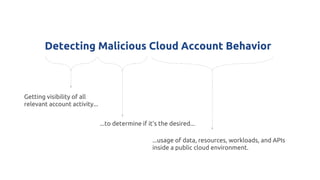
Detecting Malicious Cloud Account Behavior
Getting visibility of all
relevant account activity...
...to determine if it’s the desired...
...usage of data, resources, workloads, and APIs
inside a public cloud environment.
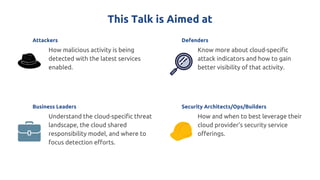
This Talk is Aimed at
Attackers
How malicious activity is being
detected with the latest services
enabled.
Business Leaders
Understand the cloud-specific threat
landscape, the cloud shared
responsibility model, and where to
focus detection efforts.
Security Architects/Ops/Builders
How and when to best leverage their
cloud provider’s security service
offerings.
Defenders
Know more about cloud-specific
attack indicators and how to gain
better visibility of that activity.
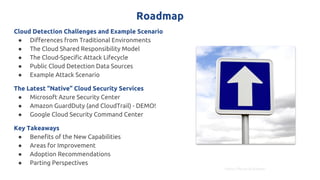
Roadmap
Cloud Detection Challenges and Example Scenario
● Differences from Traditional Environments
● The Cloud Shared Responsibility Model
● The Cloud-Specific Attack Lifecycle
● Public Cloud Detection Data Sources
● Example Attack Scenario
The Latest “Native” Cloud Security Services
● Microsoft Azure Security Center
● Amazon GuardDuty (and CloudTrail) - DEMO!
● Google Cloud Security Command Center
Key Takeaways
● Benefits of the New Capabilities
● Areas for Improvement
● Adoption Recommendations
● Parting Perspectives
https://flic.kr/p/afRuwn
What makes detecting malicious behavior in the
cloud different from traditional environments?
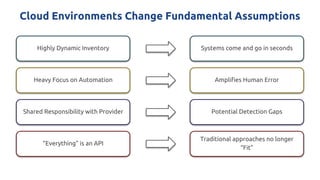
Cloud Environments Change Fundamental Assumptions
Highly Dynamic Inventory Systems come and go in seconds
Heavy Focus on Automation
Shared Responsibility with Provider
“Everything” is an API
Amplifies Human Error
Potential Detection Gaps
Traditional approaches no longer
“Fit”
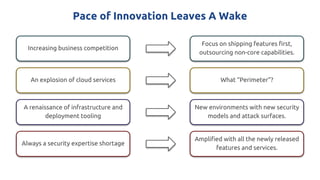
Pace of Innovation Leaves A Wake
Increasing business competition
Focus on shipping features first,
outsourcing non-core capabilities.
An explosion of cloud services
A renaissance of infrastructure and
deployment tooling
Always a security expertise shortage
What “Perimeter”?
New environments with new security
models and attack surfaces.
Amplified with all the newly released
features and services.
Understanding the responsibility boundary
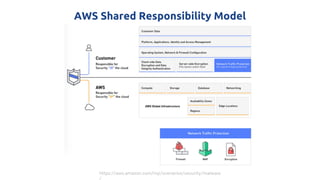
AWS Shared Responsibility Model
https://aws.amazon.com/mp/scenarios/security/malware
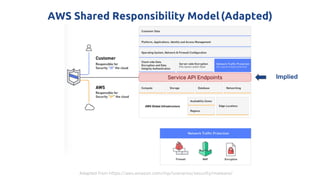
AWS Shared Responsibility Model(Adapted)
Adapted from https://aws.amazon.com/mp/scenarios/security/malware/
Service API Endpoints Implied
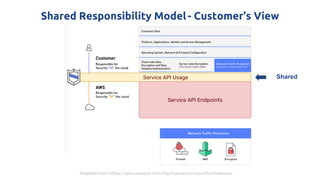
Shared Responsibility Model- Customer’s View
Service API Usage Shared
Service API Endpoints
Adapted from https://aws.amazon.com/mp/scenarios/security/malware/
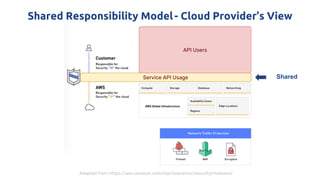
Shared Responsibility Model- Cloud Provider’s View
Service API Usage Shared
API Users
Adapted from https://aws.amazon.com/mp/scenarios/security/malware/
Protecting those shared APIs are
challenging and nuanced,
but very necessary.
What does an attack lifecycle look like in a cloud
environment?
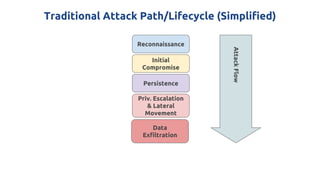
Traditional Attack Path/Lifecycle (Simplified)
Reconnaissance
Initial
Compromise
Persistence
Priv. Escalation
& Lateral
Movement
Data
Exfiltration
AttackFlow
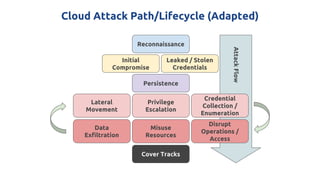
Cloud Attack Path/Lifecycle (Adapted)
Reconnaissance
Initial
Compromise
Persistence
Lateral
Movement
Privilege
Escalation
Credential
Collection /
Enumeration
Data
Exfiltration
Misuse
Resources
Disrupt
Operations /
Access
Cover Tracks
Leaked / Stolen
Credentials
AttackFlow
Escalation, Enumeration, Persistence, Covering Tracks
Escalation
● https://rhinosecuritylabs.com/aws/aws-privilege-escalation-methods-mitigation/
Enumeration/Exploration
● https://danielgrzelak.com/exploring-an-aws-account-after-pwning-it-ff629c2aae3
9
Persistence
● https://danielgrzelak.com/backdooring-an-aws-account-da007d36f8f9
Covering Tracks
● https://danielgrzelak.com/disrupting-aws-logging-a42e437d6594
* Concepts apply to all cloud providers
What detection methods are available?
Cloud Account Behavior Data Detection Sources*
Network
● Activity to/from known-bad IPs
● Unusual changes to traffic patterns
● Unusual outbound port usage
DNS
● Queries to known-bad domains (CnC,
bots, malware, crypto-mining, etc) or
embed data in the lookup
Host-based
● OS, Application, Security/Audit logs
● Endpoint security events
Network-Device based
● FW/IDS/IPS “drop-in” solution logs/alerts
Cloud Provider API Activity
● Multiple failed logins
● Simultaneous API access from different
countries
● Attempted activity from terminated
accounts/credentials/keys
● Uncommon service/API usage
● Credential/permission enumeration
● Changes to user accounts/logging/detection
configurations
● Sensitive changes to user permissions
● Internal IAM credentials used from external
sources
Service Access Logs
● Web/User Access logs
* Not an exhaustive list.
Cloud Account Behavior Data Detection Sources*
Network
● Activity to/from known-bad IPs
● Unusual changes to traffic patterns
● Unusual outbound port usage
DNS
● Queries to known-bad domains (CnC,
bots, malware, crypto-mining, etc) or
embed data in the lookup
Host-based
● OS, Application, Security/Audit logs
● Endpoint security events
Network-Device based
● FW/IDS/IPS “drop-in” solution logs/alerts
Cloud Provider API Activity
● Multiple failed logins
● Simultaneous API access from different
countries
● Attempted activity from terminated
accounts/credentials/keys
● Uncommon service/API usage
● Credential/permission enumeration
● Changes to user accounts/logging/detection
configurations
● Sensitive changes to user permissions
● Internal IAM credentials used from external
sources
Service Access Logs
● Web/User Access logs
* Not an exhaustive list.
Example Attack Walkthrough
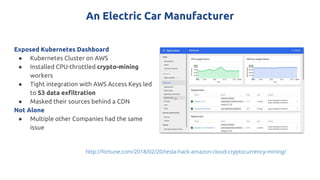
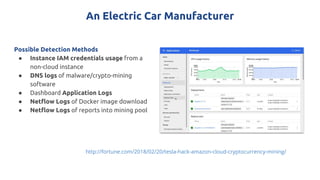
An Electric Car Manufacturer
Exposed Kubernetes Dashboard
● Kubernetes Cluster on AWS
● Installed CPU-throttled crypto-mining
workers
● Tight integration with AWS Access Keys led
to S3 data exfiltration
● Masked their sources behind a CDN
Not Alone
● Multiple other Companies had the same
issue
http://fortune.com/2018/02/20/tesla-hack-amazon-cloud-cryptocurrency-mining/
An Electric Car Manufacturer
Possible Detection Methods
● Instance IAM credentials usage from a
non-cloud instance
● DNS logs of malware/crypto-mining
software
● Dashboard Application Logs
● Netflow Logs of Docker image download
● Netflow Logs of reports into mining pool
http://fortune.com/2018/02/20/tesla-hack-amazon-cloud-cryptocurrency-mining/
Note: A Direct Compromise May Not Be Needed
Credential theft
● Phishing
● Malware
● Backdoored
libraries/tools
● Password
guessing/weak
passwords
Malicious Outsiders
● Compromise of 3rd
Party Services with
integrated access
○ Source Control
○ CI/CD
○ Mail Delivery
● Failure to disable,
delete, rotate
credentials post
termination
Credential Leaks
● Checked into source
code
● Technical support
tickets
● Public Q&A Tech
Help chat/forums
● Applications transmit
keys in headers,
messages, or logs of
API calls
The Latest “Native” Cloud Security Services
Services In Scope
Microsoft Azure
Security Center,
Advanced Threat
Protection
Google Cloud Security
Command Center
AWS GuardDuty
(and CloudTrail,
CloudWatch)
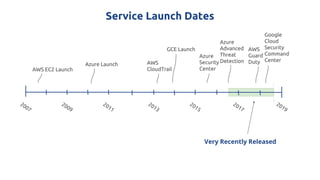
Service Launch Dates
AWS EC2 Launch
2007
Azure Launch
2009
2011
2013
2015
2017
2019
GCE Launch
AWS
CloudTrail
Azure
Security
Center
Azure
Advanced
Threat
Detection
Google
Cloud
Security
Command
Center
AWS
Guard
Duty
Very Recently Released
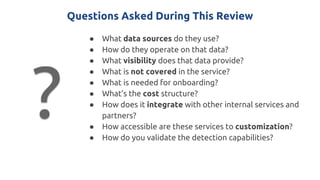
Questions Asked During This Review
● What data sources do they use?
● How do they operate on that data?
● What visibility does that data provide?
● What is not covered in the service?
● What is needed for onboarding?
● What’s the cost structure?
● How does it integrate with other internal services and
partners?
● How accessible are these services to customization?
● How do you validate the detection capabilities?
?
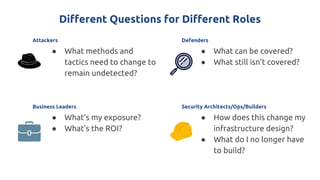
Different Questions for Different Roles
Attackers
● What methods and
tactics need to change to
remain undetected?
Business Leaders
● What’s my exposure?
● What’s the ROI?
Security Architects/Ops/Builders
● How does this change my
infrastructure design?
● What do I no longer have
to build?
Defenders
● What can be covered?
● What still isn’t covered?
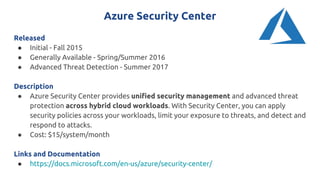
Azure Security Center
Released
● Initial - Fall 2015
● Generally Available - Spring/Summer 2016
● Advanced Threat Detection - Summer 2017
Description
● Azure Security Center provides unified security management and advanced threat
protection across hybrid cloud workloads. With Security Center, you can apply
security policies across your workloads, limit your exposure to threats, and detect and
respond to attacks.
● Cost: $15/system/month
Links and Documentation
● https://docs.microsoft.com/en-us/azure/security-center/
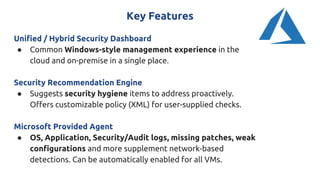
Key Features
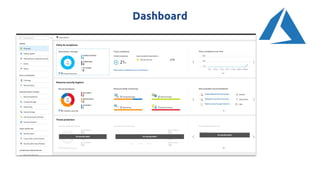
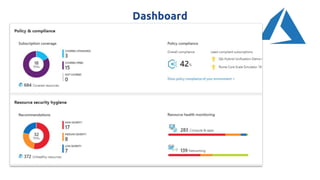
Unified / Hybrid Security Dashboard
● Common Windows-style management experience in the
cloud and on-premise in a single place.
Security Recommendation Engine
● Suggests security hygiene items to address proactively.
Offers customizable policy (XML) for user-supplied checks.
Microsoft Provided Agent
● OS, Application, Security/Audit logs, missing patches, weak
configurations and more supplement network-based
detections. Can be automatically enabled for all VMs.
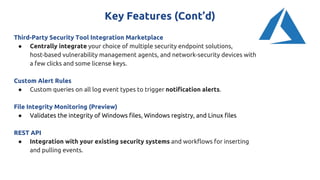
Key Features (Cont’d)
Third-Party Security Tool Integration Marketplace
● Centrally integrate your choice of multiple security endpoint solutions,
host-based vulnerability management agents, and network-security devices with
a few clicks and some license keys.
Custom Alert Rules
● Custom queries on all log event types to trigger notification alerts.
File Integrity Monitoring (Preview)
● Validates the integrity of Windows files, Windows registry, and Linux files
REST API
● Integration with your existing security systems and workflows for inserting
and pulling events.
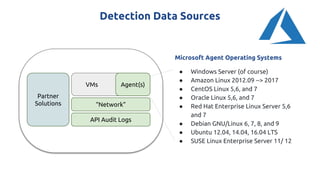
Detection Data Sources
VMs
“Network”
API Audit Logs
Agent(s)
Microsoft Agent Operating Systems
● Windows Server (of course)
● Amazon Linux 2012.09 --> 2017
● CentOS Linux 5,6, and 7
● Oracle Linux 5,6, and 7
● Red Hat Enterprise Linux Server 5,6
and 7
● Debian GNU/Linux 6, 7, 8, and 9
● Ubuntu 12.04, 14.04, 16.04 LTS
● SUSE Linux Enterprise Server 11/ 12
Partner
Solutions
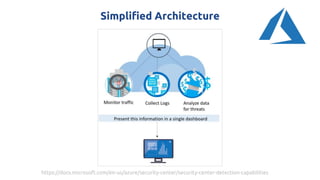
Simplified Architecture
https://docs.microsoft.com/en-us/azure/security-center/security-center-detection-capabilities
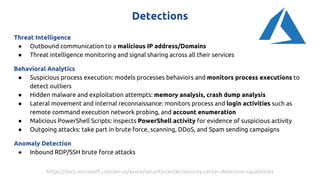
Detections
Threat Intelligence
● Outbound communication to a malicious IP address/Domains
● Threat intelligence monitoring and signal sharing across all their services
Behavioral Analytics
● Suspicious process execution: models processes behaviors and monitors process executions to
detect outliers
● Hidden malware and exploitation attempts: memory analysis, crash dump analysis
● Lateral movement and internal reconnaissance: monitors process and login activities such as
remote command execution network probing, and account enumeration
● Malicious PowerShell Scripts: inspects PowerShell activity for evidence of suspicious activity
● Outgoing attacks: take part in brute force, scanning, DDoS, and Spam sending campaigns
Anomaly Detection
● Inbound RDP/SSH brute force attacks
https://docs.microsoft.com/en-us/azure/security-center/security-center-detection-capabilities
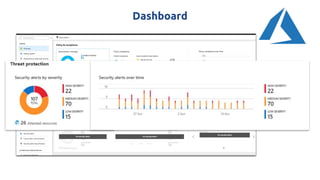
Dashboard
Dashboard
Dashboard
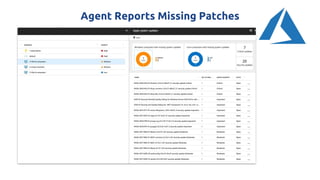
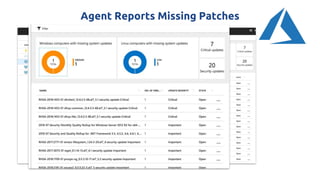
Agent Reports Missing Patches
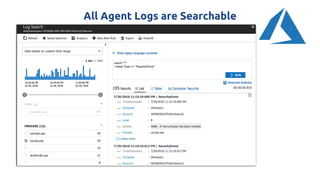
All Agent Logs are Searchable
Value Added
Hybrid-first approach
● Leverages the vast amount of enterprise management features and
capabilities applied to Azure resources.
Provides a Microsoft-supported Windows/Linux Agent
● Supported OSes get enhanced detection capabilities (logs, process
monitoring, crash dump analysis)
Integrated, Self-Service Partner Marketplace
● Adding a solution is a few clicks and a license away in many cases.
Leverages the Azure Log Analytics Service
● Mature integrations, advanced querying, and full-featured REST API
Areas for Improvement
● A detailed list of anomalous detection capabilities is not yet
available.
● Ability to tune detection parameters.
● Potential delay from agent deployment to it reporting in the
Dashboard.
● The ability to supply custom threat/IP feeds to aid in improving
detection accuracy.
Amazon GuardDuty et al
Released
● AWS CloudTrail: Spring 2013
● AWS VPC Flow Logs: Summer 2015
● Amazon GuardDuty: Winter 2017
Description
● Amazon GuardDuty offers threat detection that enables you to
continuously monitor and protect your AWS accounts and workloads.
● 30-day free trial.
● North America: $0.25-$1 per GB of VPC/DNS, $4 per 1M Cloudtrail Events
Links and Documentation
● https://aws.amazon.com/guardduty/
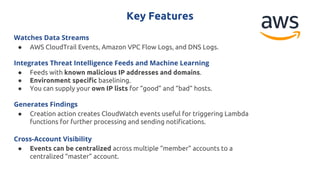
Key Features
Watches Data Streams
● AWS CloudTrail Events, Amazon VPC Flow Logs, and DNS Logs.
Integrates Threat Intelligence Feeds and Machine Learning
● Feeds with known malicious IP addresses and domains.
● Environment specific baselining.
● You can supply your own IP lists for “good” and “bad” hosts.
Generates Findings
● Creation action creates CloudWatch events useful for triggering Lambda
functions for further processing and sending notifications.
Cross-Account Visibility
● Events can be centralized across multiple “member” accounts to a
centralized “master” account.
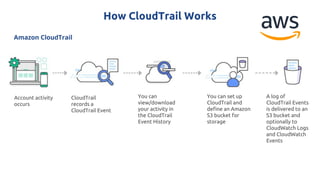
Amazon CloudTrail
How CloudTrail Works
Account activity
occurs
CloudTrail
records a
CloudTrail Event
You can
view/download
your activity in
the CloudTrail
Event History
You can set up
CloudTrail and
define an Amazon
S3 bucket for
storage
A log of
CloudTrail Events
is delivered to an
S3 bucket and
optionally to
CloudWatch Logs
and CloudWatch
Events
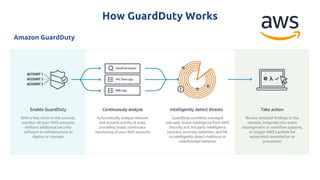
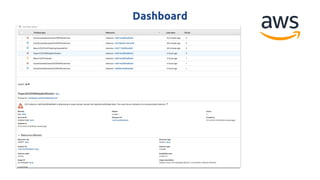
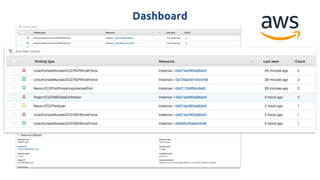
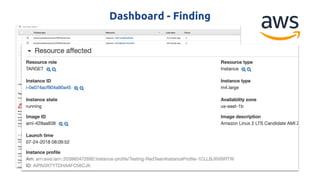
Amazon GuardDuty
How GuardDuty Works
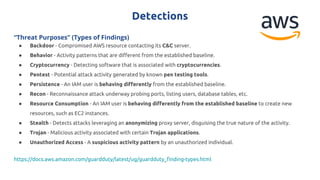
Detections
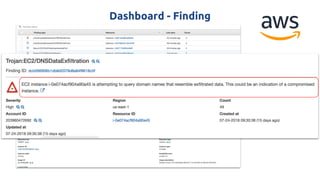
“Threat Purposes” (Types of Findings)
● Backdoor - Compromised AWS resource contacting its C&C server.
● Behavior - Activity patterns that are different from the established baseline.
● Cryptocurrency - Detecting software that is associated with cryptocurrencies.
● Pentest - Potential attack activity generated by known pen testing tools.
● Persistence - An IAM user is behaving differently from the established baseline.
● Recon - Reconnaissance attack underway probing ports, listing users, database tables, etc.
● Resource Consumption - An IAM user is behaving differently from the established baseline to create new
resources, such as EC2 instances.
● Stealth - Detects attacks leveraging an anonymizing proxy server, disguising the true nature of the activity.
● Trojan - Malicious activity associated with certain Trojan applications.
● Unauthorized Access - A suspicious activity pattern by an unauthorized individual.
https://docs.aws.amazon.com/guardduty/latest/ug/guardduty_finding-types.html
Dashboard
Dashboard
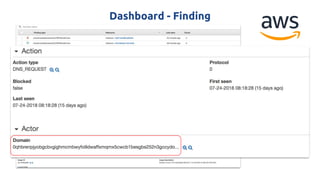
Dashboard - Finding
Dashboard - Finding
Dashboard - Finding
Demo!
Rhino Security Labs - Cloud Goat (Slightly Modified)
Safe, practice environment for learning how to collect keys, move laterally,
escalate privileges, and more.
● Blog
https://rhinosecuritylabs.com/aws/cloudgoat-vulnerable-design-aws-envi
ronment/
● Code
https://github.com/RhinoSecurityLabs/cloudgoat
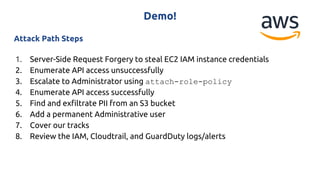
Demo!
Attack Path Steps
1. Server-Side Request Forgery to steal EC2 IAM instance credentials
2. Enumerate API access unsuccessfully
3. Escalate to Administrator using attach-role-policy
4. Enumerate API access successfully
5. Find and exfiltrate PII from an S3 bucket
6. Add a permanent Administrative user
7. Cover our tracks
8. Review the IAM, Cloudtrail, and GuardDuty logs/alerts
Value Added
Zero-Impact Setup
● Nearly a “one-click” installation process.
Clear Listing of GuardDuty Detections
● You know what AWS is monitoring for you.
Broad Partner Ecosystem
● Many options to choose from in many different areas of security, not just
detection.
Detects Multiple Forms of API Misuse
● Several key detections for behaviors associated with compromised
credentials.
Areas for Improvement
● Ability to tune parameters for all settings and detections
● Ability to add custom detections into the native analytics engine/flow
● API ability to create custom findings, not just view them.
● Unified security dashboard and workflow for all AWS Security services
○ AWS Config
○ AWS Inspector
○ AWS CloudTrail
○ AWS GuardDuty
Google Cloud Security Command Center
Released
● Google StackDriver: Spring 2016
● Google Cloud VPC Flow logs: Spring 2018
● Google Cloud Security Command Center (Alpha): Spring 2018
Description
● The Cloud Security Command Center (Cloud SCC) is the canonical security and
data risk database for Google Cloud Platform (GCP). Cloud SCC enables you to
understand your security and data attack surface by providing asset inventory,
discovery, search, and management.
Links and Documentation
● https://cloud.google.com/security-command-center/
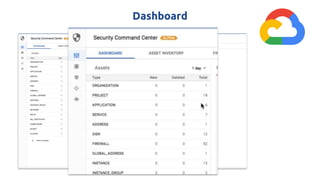
Key Features
Asset Discovery/Inventory
● Across App Engine, Compute Engine, Cloud Storage, and Cloud Datastore
Anomaly Detection
● Identifies threats like botnets, cryptocurrency mining, anomalous reboots, and
suspicious network traffic.
● Cost: Unknown. Free during Alpha period.
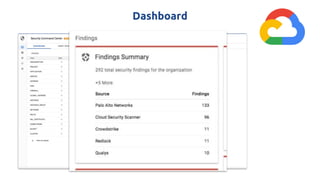
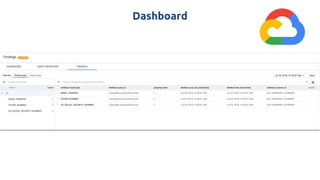
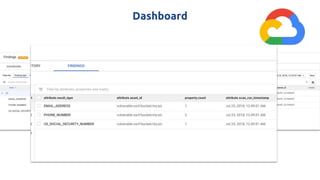
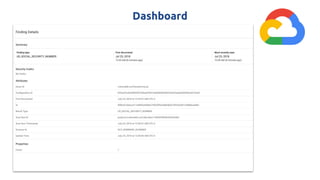
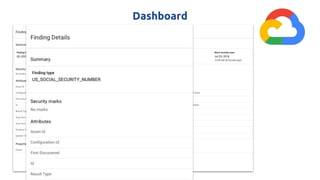
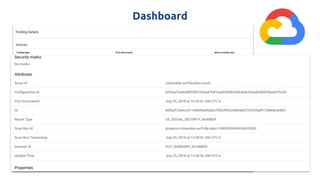
Centralized Finding Dashboard
● Web application vulnerability scans - Cloud Security Scanner
● Sensitive data on storage bucket scans - DLP API
● Access control and policy scans - Forseti
● All third party security solution findings/results
Key Features (Cont’d)
Real-Time Notifications
● Receive Cloud SCC alerts via Gmail, SMS, and Jira with Cloud Pub/Sub
notification integration.
REST API
● Integration with your existing security systems and workflows.
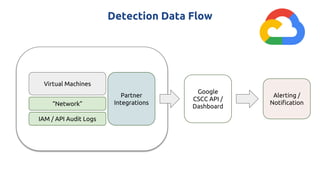
Detection Data Flow
Virtual Machines
IAM / API Audit Logs
“Network”
Partner
Integrations
Google
CSCC API /
Dashboard
Alerting /
Notification
Detections
As Listed but not Detailed
● Botnets
● Cryptocurrency mining
● Anomalous reboots
● Suspicious/anomalous network traffic
Dashboard
Dashboard
Dashboard
Dashboard
Dashboard
Dashboard
Dashboard
Dashboard
Value Added
Zero-Impact Setup
● Setup does not affect any running workflows.
Partner Focus
● The API and Interface feature partner solutions and integrate their output
streams into a single management interface.
Framework-Oriented
● Similar to the Stackdriver logging service in that it’s a framework for handling
all security events across all applicable services.
Limitations and Suggestions
Limitations
● Still in Alpha, so anomalous detection capabilities are still in the
early stages.
● Not yet a comprehensive or detailed list of detection capabilities.
Suggestions
● Ability to tune all settings and detections
● Ability to add custom detections into the native flow
● Integrated security detections for all managed GCP services
● Integrate native notification and alerting functionality
Key Takeaways and Looking Ahead
Common Areas for Improvement
Detections
● Visibility dependent on implementation
● Detection capability listings
● Customization / Tuning
● ML/AI in use, but how exactly?
Integrations
● Wide range of ease of integration
● A small selection of vendors that integrate natively into the new
services.
Education
● Clearer guidelines needed.
Are the provider-native threat detection
services all I need?
Should I Adopt These Services Now?
The Framework is Important
Wherever possible, avoid
undifferentiated heavy lifting
Watch this space closely
Security solution vendors -- Take note
Additional Learning and Exploration
Cloud Goat - Rhino Security Labs
● https://github.com/RhinoSecurityLabs/cloudgoat
● "Vulnerable by Design" AWS infrastructure setup and testing environment
FlAWS.Cloud - Scott Piper
● http://flaws.cloud
Detecting Credential Compromise in AWS - Will Bengston
● https://www.blackhat.com/us-18/briefings.html#detecting-credential-compromi
se-in-aws
Cloud Security Trends Reports
● https://info.redlock.io/cloud-security-trends-may2018
● https://start.paloaltonetworks.com/cloud-security-report-2018
Thank you!
Questions?
@bradgeesaman

Detecting Malicious Cloud Account Behavior: A Look at the New Native Platform Capabilities

  • 1.
    Detecting Malicious CloudAccount Behavior: A Look at the New Native Platform Capabilities @bradgeesaman
  • 2.
    Bio Previously ● Network SecurityEngineer ● Penetration Tester/Security Consultant Past 8+ Years ● Cloud Infrastructure Administrator ● “DevOps” practitioner * ● Ethical Hacking Educator ○ CTF Scenario design ○ Running CTF competition workloads inside public clouds using containers ** Past Two Years ● Researching Cloud Security Issues with Containers and Container Orchestrators ○ Hacking and Hardening Kubernetes Clusters by Example: https://youtu.be/vTgQLzeBfRU ● Independent Consulting - Securing Containers and Kubernetes * Sorry ** Not recommended. It seemed like a good idea then. Twitter: @bradgeesaman
  • 3.
    Detecting Malicious CloudAccount Behavior Getting visibility of all relevant account activity... ...to determine if it’s the desired... ...usage of data, resources, workloads, and APIs inside a public cloud environment.
  • 4.
    This Talk isAimed at Attackers How malicious activity is being detected with the latest services enabled. Business Leaders Understand the cloud-specific threat landscape, the cloud shared responsibility model, and where to focus detection efforts. Security Architects/Ops/Builders How and when to best leverage their cloud provider’s security service offerings. Defenders Know more about cloud-specific attack indicators and how to gain better visibility of that activity.
  • 5.
    Roadmap Cloud Detection Challengesand Example Scenario ● Differences from Traditional Environments ● The Cloud Shared Responsibility Model ● The Cloud-Specific Attack Lifecycle ● Public Cloud Detection Data Sources ● Example Attack Scenario The Latest “Native” Cloud Security Services ● Microsoft Azure Security Center ● Amazon GuardDuty (and CloudTrail) - DEMO! ● Google Cloud Security Command Center Key Takeaways ● Benefits of the New Capabilities ● Areas for Improvement ● Adoption Recommendations ● Parting Perspectives https://flic.kr/p/afRuwn
  • 6.
    What makes detectingmalicious behavior in the cloud different from traditional environments?
  • 7.
    Cloud Environments ChangeFundamental Assumptions Highly Dynamic Inventory Systems come and go in seconds Heavy Focus on Automation Shared Responsibility with Provider “Everything” is an API Amplifies Human Error Potential Detection Gaps Traditional approaches no longer “Fit”
  • 8.
    Pace of InnovationLeaves A Wake Increasing business competition Focus on shipping features first, outsourcing non-core capabilities. An explosion of cloud services A renaissance of infrastructure and deployment tooling Always a security expertise shortage What “Perimeter”? New environments with new security models and attack surfaces. Amplified with all the newly released features and services.
  • 9.
  • 10.
    AWS Shared ResponsibilityModel https://aws.amazon.com/mp/scenarios/security/malware
  • 11.
    AWS Shared ResponsibilityModel(Adapted) Adapted from https://aws.amazon.com/mp/scenarios/security/malware/ Service API Endpoints Implied
  • 12.
    Shared Responsibility Model-Customer’s View Service API Usage Shared Service API Endpoints Adapted from https://aws.amazon.com/mp/scenarios/security/malware/
  • 13.
    Shared Responsibility Model-Cloud Provider’s View Service API Usage Shared API Users Adapted from https://aws.amazon.com/mp/scenarios/security/malware/
  • 14.
    Protecting those sharedAPIs are challenging and nuanced, but very necessary.
  • 15.
    What does anattack lifecycle look like in a cloud environment?
  • 16.
    Traditional Attack Path/Lifecycle(Simplified) Reconnaissance Initial Compromise Persistence Priv. Escalation & Lateral Movement Data Exfiltration AttackFlow
  • 17.
    Cloud Attack Path/Lifecycle(Adapted) Reconnaissance Initial Compromise Persistence Lateral Movement Privilege Escalation Credential Collection / Enumeration Data Exfiltration Misuse Resources Disrupt Operations / Access Cover Tracks Leaked / Stolen Credentials AttackFlow
  • 18.
    Escalation, Enumeration, Persistence,Covering Tracks Escalation ● https://rhinosecuritylabs.com/aws/aws-privilege-escalation-methods-mitigation/ Enumeration/Exploration ● https://danielgrzelak.com/exploring-an-aws-account-after-pwning-it-ff629c2aae3 9 Persistence ● https://danielgrzelak.com/backdooring-an-aws-account-da007d36f8f9 Covering Tracks ● https://danielgrzelak.com/disrupting-aws-logging-a42e437d6594 * Concepts apply to all cloud providers
  • 19.
    What detection methodsare available?
  • 20.
    Cloud Account BehaviorData Detection Sources* Network ● Activity to/from known-bad IPs ● Unusual changes to traffic patterns ● Unusual outbound port usage DNS ● Queries to known-bad domains (CnC, bots, malware, crypto-mining, etc) or embed data in the lookup Host-based ● OS, Application, Security/Audit logs ● Endpoint security events Network-Device based ● FW/IDS/IPS “drop-in” solution logs/alerts Cloud Provider API Activity ● Multiple failed logins ● Simultaneous API access from different countries ● Attempted activity from terminated accounts/credentials/keys ● Uncommon service/API usage ● Credential/permission enumeration ● Changes to user accounts/logging/detection configurations ● Sensitive changes to user permissions ● Internal IAM credentials used from external sources Service Access Logs ● Web/User Access logs * Not an exhaustive list.
  • 21.
    Cloud Account BehaviorData Detection Sources* Network ● Activity to/from known-bad IPs ● Unusual changes to traffic patterns ● Unusual outbound port usage DNS ● Queries to known-bad domains (CnC, bots, malware, crypto-mining, etc) or embed data in the lookup Host-based ● OS, Application, Security/Audit logs ● Endpoint security events Network-Device based ● FW/IDS/IPS “drop-in” solution logs/alerts Cloud Provider API Activity ● Multiple failed logins ● Simultaneous API access from different countries ● Attempted activity from terminated accounts/credentials/keys ● Uncommon service/API usage ● Credential/permission enumeration ● Changes to user accounts/logging/detection configurations ● Sensitive changes to user permissions ● Internal IAM credentials used from external sources Service Access Logs ● Web/User Access logs * Not an exhaustive list.
  • 22.
  • 23.
    An Electric CarManufacturer Exposed Kubernetes Dashboard ● Kubernetes Cluster on AWS ● Installed CPU-throttled crypto-mining workers ● Tight integration with AWS Access Keys led to S3 data exfiltration ● Masked their sources behind a CDN Not Alone ● Multiple other Companies had the same issue http://fortune.com/2018/02/20/tesla-hack-amazon-cloud-cryptocurrency-mining/
  • 24.
    An Electric CarManufacturer Possible Detection Methods ● Instance IAM credentials usage from a non-cloud instance ● DNS logs of malware/crypto-mining software ● Dashboard Application Logs ● Netflow Logs of Docker image download ● Netflow Logs of reports into mining pool http://fortune.com/2018/02/20/tesla-hack-amazon-cloud-cryptocurrency-mining/
  • 25.
    Note: A DirectCompromise May Not Be Needed Credential theft ● Phishing ● Malware ● Backdoored libraries/tools ● Password guessing/weak passwords Malicious Outsiders ● Compromise of 3rd Party Services with integrated access ○ Source Control ○ CI/CD ○ Mail Delivery ● Failure to disable, delete, rotate credentials post termination Credential Leaks ● Checked into source code ● Technical support tickets ● Public Q&A Tech Help chat/forums ● Applications transmit keys in headers, messages, or logs of API calls
  • 26.
    The Latest “Native”Cloud Security Services
  • 27.
    Services In Scope MicrosoftAzure Security Center, Advanced Threat Protection Google Cloud Security Command Center AWS GuardDuty (and CloudTrail, CloudWatch)
  • 28.
    Service Launch Dates AWSEC2 Launch 2007 Azure Launch 2009 2011 2013 2015 2017 2019 GCE Launch AWS CloudTrail Azure Security Center Azure Advanced Threat Detection Google Cloud Security Command Center AWS Guard Duty Very Recently Released
  • 29.
    Questions Asked DuringThis Review ● What data sources do they use? ● How do they operate on that data? ● What visibility does that data provide? ● What is not covered in the service? ● What is needed for onboarding? ● What’s the cost structure? ● How does it integrate with other internal services and partners? ● How accessible are these services to customization? ● How do you validate the detection capabilities? ?
  • 30.
    Different Questions forDifferent Roles Attackers ● What methods and tactics need to change to remain undetected? Business Leaders ● What’s my exposure? ● What’s the ROI? Security Architects/Ops/Builders ● How does this change my infrastructure design? ● What do I no longer have to build? Defenders ● What can be covered? ● What still isn’t covered?
  • 31.
  • 32.
    Azure Security Center Released ●Initial - Fall 2015 ● Generally Available - Spring/Summer 2016 ● Advanced Threat Detection - Summer 2017 Description ● Azure Security Center provides unified security management and advanced threat protection across hybrid cloud workloads. With Security Center, you can apply security policies across your workloads, limit your exposure to threats, and detect and respond to attacks. ● Cost: $15/system/month Links and Documentation ● https://docs.microsoft.com/en-us/azure/security-center/
  • 33.
    Key Features Unified /Hybrid Security Dashboard ● Common Windows-style management experience in the cloud and on-premise in a single place. Security Recommendation Engine ● Suggests security hygiene items to address proactively. Offers customizable policy (XML) for user-supplied checks. Microsoft Provided Agent ● OS, Application, Security/Audit logs, missing patches, weak configurations and more supplement network-based detections. Can be automatically enabled for all VMs.
  • 34.
    Key Features (Cont’d) Third-PartySecurity Tool Integration Marketplace ● Centrally integrate your choice of multiple security endpoint solutions, host-based vulnerability management agents, and network-security devices with a few clicks and some license keys. Custom Alert Rules ● Custom queries on all log event types to trigger notification alerts. File Integrity Monitoring (Preview) ● Validates the integrity of Windows files, Windows registry, and Linux files REST API ● Integration with your existing security systems and workflows for inserting and pulling events.
  • 35.
    Detection Data Sources VMs “Network” APIAudit Logs Agent(s) Microsoft Agent Operating Systems ● Windows Server (of course) ● Amazon Linux 2012.09 --> 2017 ● CentOS Linux 5,6, and 7 ● Oracle Linux 5,6, and 7 ● Red Hat Enterprise Linux Server 5,6 and 7 ● Debian GNU/Linux 6, 7, 8, and 9 ● Ubuntu 12.04, 14.04, 16.04 LTS ● SUSE Linux Enterprise Server 11/ 12 Partner Solutions
  • 36.
  • 37.
    Detections Threat Intelligence ● Outboundcommunication to a malicious IP address/Domains ● Threat intelligence monitoring and signal sharing across all their services Behavioral Analytics ● Suspicious process execution: models processes behaviors and monitors process executions to detect outliers ● Hidden malware and exploitation attempts: memory analysis, crash dump analysis ● Lateral movement and internal reconnaissance: monitors process and login activities such as remote command execution network probing, and account enumeration ● Malicious PowerShell Scripts: inspects PowerShell activity for evidence of suspicious activity ● Outgoing attacks: take part in brute force, scanning, DDoS, and Spam sending campaigns Anomaly Detection ● Inbound RDP/SSH brute force attacks https://docs.microsoft.com/en-us/azure/security-center/security-center-detection-capabilities
  • 38.
  • 39.
  • 40.
  • 41.
  • 42.
  • 43.
    All Agent Logsare Searchable
  • 44.
    Value Added Hybrid-first approach ●Leverages the vast amount of enterprise management features and capabilities applied to Azure resources. Provides a Microsoft-supported Windows/Linux Agent ● Supported OSes get enhanced detection capabilities (logs, process monitoring, crash dump analysis) Integrated, Self-Service Partner Marketplace ● Adding a solution is a few clicks and a license away in many cases. Leverages the Azure Log Analytics Service ● Mature integrations, advanced querying, and full-featured REST API
  • 45.
    Areas for Improvement Areasfor Improvement ● A detailed list of anomalous detection capabilities is not yet available. ● Ability to tune detection parameters. ● Potential delay from agent deployment to it reporting in the Dashboard. ● The ability to supply custom threat/IP feeds to aid in improving detection accuracy.
  • 46.
  • 47.
    Amazon GuardDuty etal Released ● AWS CloudTrail: Spring 2013 ● AWS VPC Flow Logs: Summer 2015 ● Amazon GuardDuty: Winter 2017 Description ● Amazon GuardDuty offers threat detection that enables you to continuously monitor and protect your AWS accounts and workloads. ● 30-day free trial. ● North America: $0.25-$1 per GB of VPC/DNS, $4 per 1M Cloudtrail Events Links and Documentation ● https://aws.amazon.com/guardduty/
  • 48.
    Key Features Watches DataStreams ● AWS CloudTrail Events, Amazon VPC Flow Logs, and DNS Logs. Integrates Threat Intelligence Feeds and Machine Learning ● Feeds with known malicious IP addresses and domains. ● Environment specific baselining. ● You can supply your own IP lists for “good” and “bad” hosts. Generates Findings ● Creation action creates CloudWatch events useful for triggering Lambda functions for further processing and sending notifications. Cross-Account Visibility ● Events can be centralized across multiple “member” accounts to a centralized “master” account.
  • 49.
    Amazon CloudTrail How CloudTrailWorks Account activity occurs CloudTrail records a CloudTrail Event You can view/download your activity in the CloudTrail Event History You can set up CloudTrail and define an Amazon S3 bucket for storage A log of CloudTrail Events is delivered to an S3 bucket and optionally to CloudWatch Logs and CloudWatch Events
  • 50.
  • 51.
    Detections “Threat Purposes” (Typesof Findings) ● Backdoor - Compromised AWS resource contacting its C&C server. ● Behavior - Activity patterns that are different from the established baseline. ● Cryptocurrency - Detecting software that is associated with cryptocurrencies. ● Pentest - Potential attack activity generated by known pen testing tools. ● Persistence - An IAM user is behaving differently from the established baseline. ● Recon - Reconnaissance attack underway probing ports, listing users, database tables, etc. ● Resource Consumption - An IAM user is behaving differently from the established baseline to create new resources, such as EC2 instances. ● Stealth - Detects attacks leveraging an anonymizing proxy server, disguising the true nature of the activity. ● Trojan - Malicious activity associated with certain Trojan applications. ● Unauthorized Access - A suspicious activity pattern by an unauthorized individual. https://docs.aws.amazon.com/guardduty/latest/ug/guardduty_finding-types.html
  • 52.
  • 53.
  • 54.
  • 55.
  • 56.
  • 57.
    Demo! Rhino Security Labs- Cloud Goat (Slightly Modified) Safe, practice environment for learning how to collect keys, move laterally, escalate privileges, and more. ● Blog https://rhinosecuritylabs.com/aws/cloudgoat-vulnerable-design-aws-envi ronment/ ● Code https://github.com/RhinoSecurityLabs/cloudgoat
  • 58.
    Demo! Attack Path Steps 1.Server-Side Request Forgery to steal EC2 IAM instance credentials 2. Enumerate API access unsuccessfully 3. Escalate to Administrator using attach-role-policy 4. Enumerate API access successfully 5. Find and exfiltrate PII from an S3 bucket 6. Add a permanent Administrative user 7. Cover our tracks 8. Review the IAM, Cloudtrail, and GuardDuty logs/alerts
  • 59.
    Value Added Zero-Impact Setup ●Nearly a “one-click” installation process. Clear Listing of GuardDuty Detections ● You know what AWS is monitoring for you. Broad Partner Ecosystem ● Many options to choose from in many different areas of security, not just detection. Detects Multiple Forms of API Misuse ● Several key detections for behaviors associated with compromised credentials.
  • 60.
    Areas for Improvement Areasfor Improvement ● Ability to tune parameters for all settings and detections ● Ability to add custom detections into the native analytics engine/flow ● API ability to create custom findings, not just view them. ● Unified security dashboard and workflow for all AWS Security services ○ AWS Config ○ AWS Inspector ○ AWS CloudTrail ○ AWS GuardDuty
  • 61.
    Google Cloud SecurityCommand Center
  • 62.
    Google Cloud SecurityCommand Center Released ● Google StackDriver: Spring 2016 ● Google Cloud VPC Flow logs: Spring 2018 ● Google Cloud Security Command Center (Alpha): Spring 2018 Description ● The Cloud Security Command Center (Cloud SCC) is the canonical security and data risk database for Google Cloud Platform (GCP). Cloud SCC enables you to understand your security and data attack surface by providing asset inventory, discovery, search, and management. Links and Documentation ● https://cloud.google.com/security-command-center/
  • 63.
    Key Features Asset Discovery/Inventory ●Across App Engine, Compute Engine, Cloud Storage, and Cloud Datastore Anomaly Detection ● Identifies threats like botnets, cryptocurrency mining, anomalous reboots, and suspicious network traffic. ● Cost: Unknown. Free during Alpha period. Centralized Finding Dashboard ● Web application vulnerability scans - Cloud Security Scanner ● Sensitive data on storage bucket scans - DLP API ● Access control and policy scans - Forseti ● All third party security solution findings/results
  • 64.
    Key Features (Cont’d) Real-TimeNotifications ● Receive Cloud SCC alerts via Gmail, SMS, and Jira with Cloud Pub/Sub notification integration. REST API ● Integration with your existing security systems and workflows.
  • 65.
    Detection Data Flow VirtualMachines IAM / API Audit Logs “Network” Partner Integrations Google CSCC API / Dashboard Alerting / Notification
  • 66.
    Detections As Listed butnot Detailed ● Botnets ● Cryptocurrency mining ● Anomalous reboots ● Suspicious/anomalous network traffic
  • 67.
  • 68.
  • 69.
  • 70.
  • 71.
  • 72.
  • 73.
  • 74.
  • 75.
    Value Added Zero-Impact Setup ●Setup does not affect any running workflows. Partner Focus ● The API and Interface feature partner solutions and integrate their output streams into a single management interface. Framework-Oriented ● Similar to the Stackdriver logging service in that it’s a framework for handling all security events across all applicable services.
  • 76.
    Limitations and Suggestions Limitations ●Still in Alpha, so anomalous detection capabilities are still in the early stages. ● Not yet a comprehensive or detailed list of detection capabilities. Suggestions ● Ability to tune all settings and detections ● Ability to add custom detections into the native flow ● Integrated security detections for all managed GCP services ● Integrate native notification and alerting functionality
  • 77.
    Key Takeaways andLooking Ahead
  • 78.
    Common Areas forImprovement Detections ● Visibility dependent on implementation ● Detection capability listings ● Customization / Tuning ● ML/AI in use, but how exactly? Integrations ● Wide range of ease of integration ● A small selection of vendors that integrate natively into the new services. Education ● Clearer guidelines needed.
  • 79.
    Are the provider-nativethreat detection services all I need?
  • 80.
    Should I AdoptThese Services Now?
  • 81.
  • 82.
  • 83.
  • 84.
  • 85.
    Additional Learning andExploration Cloud Goat - Rhino Security Labs ● https://github.com/RhinoSecurityLabs/cloudgoat ● "Vulnerable by Design" AWS infrastructure setup and testing environment FlAWS.Cloud - Scott Piper ● http://flaws.cloud Detecting Credential Compromise in AWS - Will Bengston ● https://www.blackhat.com/us-18/briefings.html#detecting-credential-compromi se-in-aws Cloud Security Trends Reports ● https://info.redlock.io/cloud-security-trends-may2018 ● https://start.paloaltonetworks.com/cloud-security-report-2018
  • 86.