SCIENCE
PASSION
TECHNOLOGY
Implementation of Interactive Learning Objects for
German Language Acquisition in Primary School
based on Learning Analytics Measurements
Markus Ebner, Marko Burazer and Martin Ebner
EdMedia + Innovate Learning 2020, Online;
June 23-26, 2020
Outline
• Introduction to IDeRBlog
• Background
• Goals of the project
• Implementation of Learning Objects (Exercises)
• Presentation of the Exercises
• Evaluation and Data Analysis
• Summary
• Future Work
2
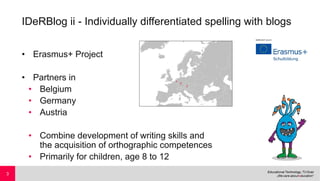
IDeRBlog ii - Individually differentiated spelling with blogs
• Erasmus+ Project
• Partners in
• Belgium
• Germany
• Austria
• Combine development of writing skills and
the acquisition of orthographic competences
• Primarily for children, age 8 to 12
3
Ideas and main points
• User friendly web-based platform
• Writing a text and get automatic feedback for autonomous correction
• German orthography is known to be difficult to master.
• Help pupils who struggle with the acquisition of German orthography
• Help them improve writing and spelling
• Provide qualitative analysis of orthographic
problems for teachers
• Provide exercises for training
4
IDeRBlog ii
•Children write their own blogs
•Checked by teachers and an
intelligent dictionary
•Online and offline exercises on our
website http://iderblog.eu
•Many exercises
• Monitoring learning process not possible
• Exercises are on different servers
5
Goals of IDeRBlog ii
•Monitor learning process
• Help and motivate children
•Find out what can be learned from user data
•How do children react and like the exercises (evaluation)
•Help teachers to create more (better) exercises
6
Exercise Types
German (English)
1. Einsetzen (Insert)
2. Fehlerstellen (Fault Locations)
3. Merkwörter (Cue Words)
4. Zuordnen (Assign)
5. Glücksrad (Wheel of Fortune)
7
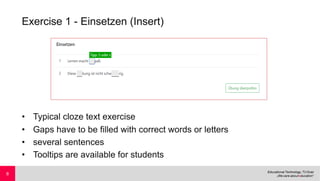
Exercise 1 - Einsetzen (Insert)
• Typical cloze text exercise
• Gaps have to be filled with correct words or letters
• several sentences
• Tooltips are available for students
8
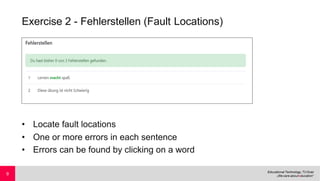
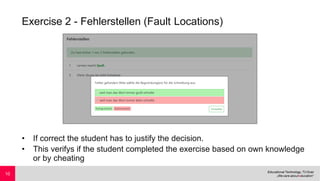
Exercise 2 - Fehlerstellen (Fault Locations)
• Locate fault locations
• One or more errors in each sentence
• Errors can be found by clicking on a word
9
Exercise 2 - Fehlerstellen (Fault Locations)
• If correct the student has to justify the decision.
• This verifys if the student completed the exercise based on own knowledge
or by cheating
10
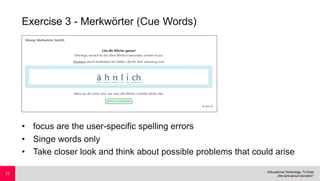
Exercise 3 - Merkwörter (Cue Words)
• focus are the user-specific spelling errors
• Singe words only
• Take closer look and think about possible problems that could arise
11
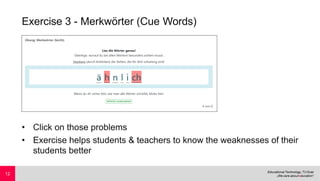
Exercise 3 - Merkwörter (Cue Words)
• Click on those problems
• Exercise helps students & teachers to know the weaknesses of their
students better
12
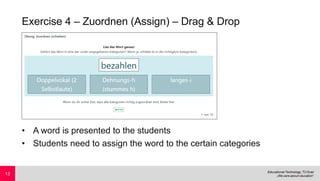
Exercise 4 – Zuordnen (Assign) – Drag & Drop
• A word is presented to the students
• Students need to assign the word to the certain categories
13
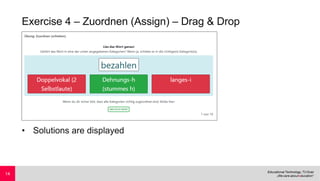
Exercise 4 – Zuordnen (Assign) – Drag & Drop
• Solutions are displayed
14
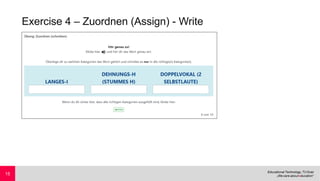
Exercise 4 – Zuordnen (Assign) - Write
15
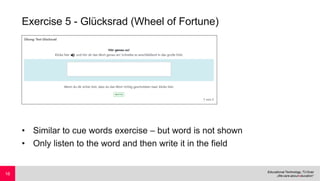
Exercise 5 - Glücksrad (Wheel of Fortune)
• Similar to cue words exercise – but word is not shown
• Only listen to the word and then write it in the field
16
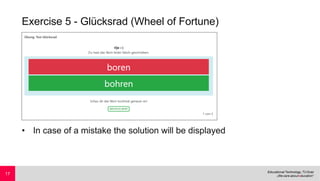
Exercise 5 - Glücksrad (Wheel of Fortune)
• In case of a mistake the solution will be displayed
17
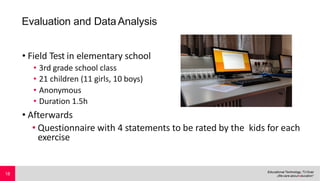
Evaluation and DataAnalysis
• Field Test in elementary school
• 3rd grade school class
• 21 children (11 girls, 10 boys)
• Anonymous
• Duration 1.5h
• Afterwards
• Questionnaire with 4 statements to be rated by the kids for each
exercise
18
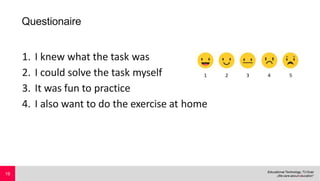
Questionaire
1. I knew what the task was
2. I could solve the task myself
3. It was fun to practice
4. I also want to do the exercise at home
19
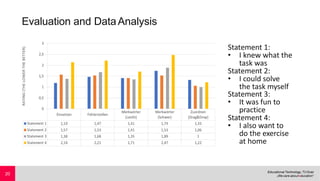
Evaluation and DataAnalysis
Statement 1:
• I knew what the
task was
Statement 2:
• I could solve
the task myself
Statement 3:
• It was fun to
practice
Statement 4:
• I also want to
do the exercise
at home
20
DataAnalysis
• Insert
• Most mistakes because of inaccurate description and typing
errors
• Using past tense instead of present tense
• Some kids knew how to write the word, but added a white
space character
• fault locations
• Some kids didn‘t take this exercise serious
(clicking on every word until error was found)
• Word „Blüte“ (blossom) clicked 21 times in total
(20 times by the same user)
21
DataAnalysis
• Cue words (easy)
• Although not clear in beginning what to do, only a few typical
typing errors
• Cue words (hard)
• Many mistakes, lots of empty input fields
• Average error rate: 71.5%
• Not a single session was error free
• Assign (Drag & Drop)
• Average error rate: 21.1%
22
Summary
• Despite little time well received by children
• Descriptions for every exercise is essential for success
• Immediate and visual feedback important
• Fault locations: Kids thought exercise is finished
• Young children are rather slow at typing
• Should be considered when analysing data
23
Future Work
• Improve current exercise prototypes (Usability)
• More different exercises
• API provides access to data
• Making exercises available on mobile devices
• Tablets
• Smartphones
24
Thank you!
For further information about the project
and partners please visit: http://iderblog.eu
Acknowledgements
The IDeRBlog-project and the IDeRBlog-ii project are funded by the European
Commission in the framework of Erasmus+ (IDeRBlog: VG-SPS-SL-14-001616-
3, 2014-2017; IDeRBlog-ii: VG-IN-SL-18-36-047317, 2018-2021).
Project-team of IDeRBlog-ii: Germany: LPM Saarland (M. Gros = coordinator, N.
Steinhauer); Gebundene Ganztagsschule Dellengarten (S. Pfeifer, J. Gregori);
Austria: PH Steiermark (K. Edtstadler, E. Herunter); TU Graz (M. Ebner, M.
Ebner); Belgium: Gemeindeschule Raeren (A. Huppertz, V. Kistemann);
25

Implementation fo Interactive Learning Objects for German Language Acquisition in Primary School based on Learning Analytics Measurements

  • 1.
    SCIENCE PASSION TECHNOLOGY Implementation of InteractiveLearning Objects for German Language Acquisition in Primary School based on Learning Analytics Measurements Markus Ebner, Marko Burazer and Martin Ebner EdMedia + Innovate Learning 2020, Online; June 23-26, 2020
  • 2.
    Outline • Introduction toIDeRBlog • Background • Goals of the project • Implementation of Learning Objects (Exercises) • Presentation of the Exercises • Evaluation and Data Analysis • Summary • Future Work 2
  • 3.
    IDeRBlog ii -Individually differentiated spelling with blogs • Erasmus+ Project • Partners in • Belgium • Germany • Austria • Combine development of writing skills and the acquisition of orthographic competences • Primarily for children, age 8 to 12 3
  • 4.
    Ideas and mainpoints • User friendly web-based platform • Writing a text and get automatic feedback for autonomous correction • German orthography is known to be difficult to master. • Help pupils who struggle with the acquisition of German orthography • Help them improve writing and spelling • Provide qualitative analysis of orthographic problems for teachers • Provide exercises for training 4
  • 5.
    IDeRBlog ii •Children writetheir own blogs •Checked by teachers and an intelligent dictionary •Online and offline exercises on our website http://iderblog.eu •Many exercises • Monitoring learning process not possible • Exercises are on different servers 5
  • 6.
    Goals of IDeRBlogii •Monitor learning process • Help and motivate children •Find out what can be learned from user data •How do children react and like the exercises (evaluation) •Help teachers to create more (better) exercises 6
  • 7.
    Exercise Types German (English) 1.Einsetzen (Insert) 2. Fehlerstellen (Fault Locations) 3. Merkwörter (Cue Words) 4. Zuordnen (Assign) 5. Glücksrad (Wheel of Fortune) 7
  • 8.
    Exercise 1 -Einsetzen (Insert) • Typical cloze text exercise • Gaps have to be filled with correct words or letters • several sentences • Tooltips are available for students 8
  • 9.
    Exercise 2 -Fehlerstellen (Fault Locations) • Locate fault locations • One or more errors in each sentence • Errors can be found by clicking on a word 9
  • 10.
    Exercise 2 -Fehlerstellen (Fault Locations) • If correct the student has to justify the decision. • This verifys if the student completed the exercise based on own knowledge or by cheating 10
  • 11.
    Exercise 3 -Merkwörter (Cue Words) • focus are the user-specific spelling errors • Singe words only • Take closer look and think about possible problems that could arise 11
  • 12.
    Exercise 3 -Merkwörter (Cue Words) • Click on those problems • Exercise helps students & teachers to know the weaknesses of their students better 12
  • 13.
    Exercise 4 –Zuordnen (Assign) – Drag & Drop • A word is presented to the students • Students need to assign the word to the certain categories 13
  • 14.
    Exercise 4 –Zuordnen (Assign) – Drag & Drop • Solutions are displayed 14
  • 15.
    Exercise 4 –Zuordnen (Assign) - Write 15
  • 16.
    Exercise 5 -Glücksrad (Wheel of Fortune) • Similar to cue words exercise – but word is not shown • Only listen to the word and then write it in the field 16
  • 17.
    Exercise 5 -Glücksrad (Wheel of Fortune) • In case of a mistake the solution will be displayed 17
  • 18.
    Evaluation and DataAnalysis •Field Test in elementary school • 3rd grade school class • 21 children (11 girls, 10 boys) • Anonymous • Duration 1.5h • Afterwards • Questionnaire with 4 statements to be rated by the kids for each exercise 18
  • 19.
    Questionaire 1. I knewwhat the task was 2. I could solve the task myself 3. It was fun to practice 4. I also want to do the exercise at home 19
  • 20.
    Evaluation and DataAnalysis Statement1: • I knew what the task was Statement 2: • I could solve the task myself Statement 3: • It was fun to practice Statement 4: • I also want to do the exercise at home 20
  • 21.
    DataAnalysis • Insert • Mostmistakes because of inaccurate description and typing errors • Using past tense instead of present tense • Some kids knew how to write the word, but added a white space character • fault locations • Some kids didn‘t take this exercise serious (clicking on every word until error was found) • Word „Blüte“ (blossom) clicked 21 times in total (20 times by the same user) 21
  • 22.
    DataAnalysis • Cue words(easy) • Although not clear in beginning what to do, only a few typical typing errors • Cue words (hard) • Many mistakes, lots of empty input fields • Average error rate: 71.5% • Not a single session was error free • Assign (Drag & Drop) • Average error rate: 21.1% 22
  • 23.
    Summary • Despite littletime well received by children • Descriptions for every exercise is essential for success • Immediate and visual feedback important • Fault locations: Kids thought exercise is finished • Young children are rather slow at typing • Should be considered when analysing data 23
  • 24.
    Future Work • Improvecurrent exercise prototypes (Usability) • More different exercises • API provides access to data • Making exercises available on mobile devices • Tablets • Smartphones 24
  • 25.
    Thank you! For furtherinformation about the project and partners please visit: http://iderblog.eu Acknowledgements The IDeRBlog-project and the IDeRBlog-ii project are funded by the European Commission in the framework of Erasmus+ (IDeRBlog: VG-SPS-SL-14-001616- 3, 2014-2017; IDeRBlog-ii: VG-IN-SL-18-36-047317, 2018-2021). Project-team of IDeRBlog-ii: Germany: LPM Saarland (M. Gros = coordinator, N. Steinhauer); Gebundene Ganztagsschule Dellengarten (S. Pfeifer, J. Gregori); Austria: PH Steiermark (K. Edtstadler, E. Herunter); TU Graz (M. Ebner, M. Ebner); Belgium: Gemeindeschule Raeren (A. Huppertz, V. Kistemann); 25