PHISHING Presented by: Alya =) 4 server ‘07
INTRODUCTION What is “Phishing”??? »  Technique for acquiring your personal information and subsequently committing fraud in your name. »  Include  stealing your identity  or emptying your checking and savings accounts. »  A form of cyber-crime that's growing faster than the ability of the police or courts to deal with it. »  Simply a play on the word "fishing" — scammers drop email lures into the sea of Internet users, hoping to hook your personal information.  »  More dangerous variation called “spear phishing” »  More insidious than regular phishing. »  Assume that your sensitive information has been captured or is at risk.  »  Until you’ve installed and run an anti-spyware program, do not log in to any of your financial accounts.  »  Crimeware will record your password and account information and transmit it to the crooks, who then sell it to the highest bidder.
How does it occur??? » Conducted by email. » Receive an authentic-looking email message that appears to come from a legitimate business. » Ask you to divulge or verify personal data such as an account number, password, credit card number or Social Security number. » Possible for you to be phished by mail, telephone or even in person. » Through the use of Instant Messaging (IM), which can also be used for identity theft as well as spreading viruses and spyware.  INTRODUCTION
Who perpetrates it??? » Phishers are scam artists. » Send millions of emails, realizing that even few recipients give them identifying information. » Purchase software specifically designed to help set up and manage a phishing scam site. Who is affected by phishing? » Popular targets are users of online banking services and auction sites. » Email address has been made public anywhere on the Internet then you are more susceptible to phishing. » Scammers can use spidering or Web-crawling programs to search the Internet and collect millions of email addresses.  INTRODUCTION
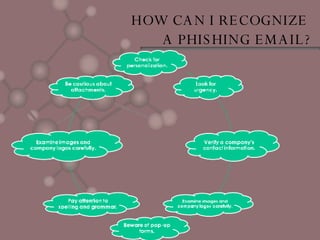
HOW CAN I RECOGNIZE  A PHISHING EMAIL?
HOW CAN I MINIMIZE THE POSSIBILITY OF  BEING CAUGHT BY A PHISHING SCAM? •  Be on guard •  Don't fill out a form on a Web site unless you know it is secure. •  Regularly check your bank, credit and debit card statements (paper and online). •  Ensure that your browser is up to date. •  Install and maintain antivirus and anti-spyware software •  Consider installing a phish-blocking toolbar on your Web browser. •  Stay informed.
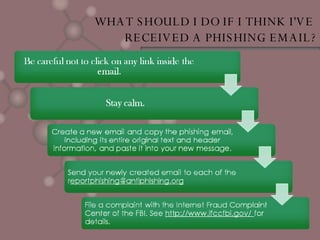
WHAT SHOULD I DO IF I THINK I'VE  RECEIVED A PHISHING EMAIL?
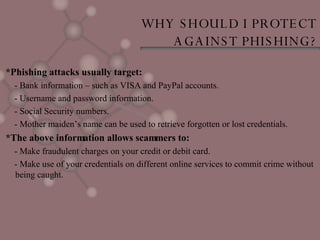
WHY SHOULD I PROTECT  AGAINST PHISHING? *Phishing attacks usually target:  - Bank information – such as VISA and PayPal accounts.  - Username and password information.  - Social Security numbers.  - Mother maiden’s name can be used to retrieve forgotten or lost credentials.  *The above information allows scammers to:  - Make fraudulent charges on your credit or debit card.  - Make use of your credentials on different online services to commit crime without being caught.
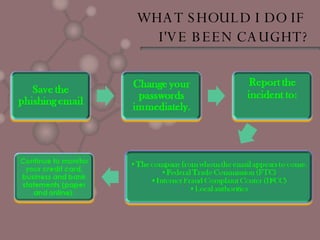
WHAT SHOULD I DO IF  I'VE BEEN CAUGHT?
CONCLUSION •  Disturbing signs of evolving. •  Attacks becoming savvier & attackers beginning to share code and techniques with virus writers called crackers. •  Slow down unless service providers adequately address consumer security concerns in the form of strong authentication. •  Time to educate their users on how to spot a phishing attack. •  Email requests for passwords, credit card numbers, and other private data are never legitimate.
REFERENCES Date of searching the information on the internet; -09 MAY 2007- -20 JUNE 2007- Web; http://www.ncsu.edu/it/essentials/antivirus_security/phishing/intro.html http://www.ncsu.edu/it/essentials/antivirus_security/phishing/recognize.html http://www.ncsu.edu/it/essentials/antivirus_security/phishing/receive.html http://www.ncsu.edu/it/essentials/antivirus_security/phishing/avoid.html http://www.ncsu.edu/it/essentials/antivirus_security/phishing/whatdo.html
 

Ict Phishing (Present)

  • 1.
    PHISHING Presented by:Alya =) 4 server ‘07
  • 2.
    INTRODUCTION What is“Phishing”??? » Technique for acquiring your personal information and subsequently committing fraud in your name. » Include stealing your identity or emptying your checking and savings accounts. » A form of cyber-crime that's growing faster than the ability of the police or courts to deal with it. » Simply a play on the word "fishing" — scammers drop email lures into the sea of Internet users, hoping to hook your personal information. » More dangerous variation called “spear phishing” » More insidious than regular phishing. » Assume that your sensitive information has been captured or is at risk. » Until you’ve installed and run an anti-spyware program, do not log in to any of your financial accounts. » Crimeware will record your password and account information and transmit it to the crooks, who then sell it to the highest bidder.
  • 3.
    How does itoccur??? » Conducted by email. » Receive an authentic-looking email message that appears to come from a legitimate business. » Ask you to divulge or verify personal data such as an account number, password, credit card number or Social Security number. » Possible for you to be phished by mail, telephone or even in person. » Through the use of Instant Messaging (IM), which can also be used for identity theft as well as spreading viruses and spyware. INTRODUCTION
  • 4.
    Who perpetrates it???» Phishers are scam artists. » Send millions of emails, realizing that even few recipients give them identifying information. » Purchase software specifically designed to help set up and manage a phishing scam site. Who is affected by phishing? » Popular targets are users of online banking services and auction sites. » Email address has been made public anywhere on the Internet then you are more susceptible to phishing. » Scammers can use spidering or Web-crawling programs to search the Internet and collect millions of email addresses. INTRODUCTION
  • 5.
    HOW CAN IRECOGNIZE A PHISHING EMAIL?
  • 6.
    HOW CAN IMINIMIZE THE POSSIBILITY OF BEING CAUGHT BY A PHISHING SCAM? • Be on guard • Don't fill out a form on a Web site unless you know it is secure. • Regularly check your bank, credit and debit card statements (paper and online). • Ensure that your browser is up to date. • Install and maintain antivirus and anti-spyware software • Consider installing a phish-blocking toolbar on your Web browser. • Stay informed.
  • 7.
    WHAT SHOULD IDO IF I THINK I'VE RECEIVED A PHISHING EMAIL?
  • 8.
    WHY SHOULD IPROTECT AGAINST PHISHING? *Phishing attacks usually target: - Bank information – such as VISA and PayPal accounts. - Username and password information. - Social Security numbers. - Mother maiden’s name can be used to retrieve forgotten or lost credentials. *The above information allows scammers to: - Make fraudulent charges on your credit or debit card. - Make use of your credentials on different online services to commit crime without being caught.
  • 9.
    WHAT SHOULD IDO IF I'VE BEEN CAUGHT?
  • 10.
    CONCLUSION • Disturbing signs of evolving. • Attacks becoming savvier & attackers beginning to share code and techniques with virus writers called crackers. • Slow down unless service providers adequately address consumer security concerns in the form of strong authentication. • Time to educate their users on how to spot a phishing attack. • Email requests for passwords, credit card numbers, and other private data are never legitimate.
  • 11.
    REFERENCES Date ofsearching the information on the internet; -09 MAY 2007- -20 JUNE 2007- Web; http://www.ncsu.edu/it/essentials/antivirus_security/phishing/intro.html http://www.ncsu.edu/it/essentials/antivirus_security/phishing/recognize.html http://www.ncsu.edu/it/essentials/antivirus_security/phishing/receive.html http://www.ncsu.edu/it/essentials/antivirus_security/phishing/avoid.html http://www.ncsu.edu/it/essentials/antivirus_security/phishing/whatdo.html
  • 12.