PHISHING A THREAT TO
NETWORK SECURITY
1
OUTLINE……
Introduction
What Is Phishing??
What Kind Of Information
Do The Hackers Want?
How Phishing Is Done?
Techniques Of Phishing
Prevention
Conclusion
2
INTRODUCTION
Origin of word “Phishing” from two words –
‘Password’ & ‘Harvesting’.
3
 There are a number of different phishing
techniques used to obtain personal information
from users.
 As technology becomes more advanced, the
phishing techniques being used are also more
advanced.
 To prevent Internet phishing, users should
have knowledge of various types of phishing
techniques and we should also be aware of
anti-phishing techniques to protect ourselves
from getting phished.
4
PHISHING
 Phishing is a type of deception designed to
steal your valuable personal data, such as
credit card numbers, passwords, account data,
or other information.
5
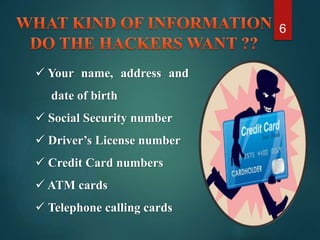
 Your name, address and
date of birth
 Social Security number
 Driver’s License number
 Credit Card numbers
 ATM cards
 Telephone calling cards
6
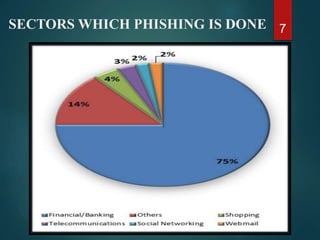
SECTORS WHICH PHISHING IS DONE 7
8HOW PHISHING IS DONE ??
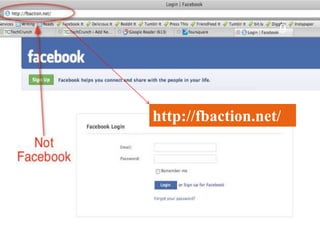
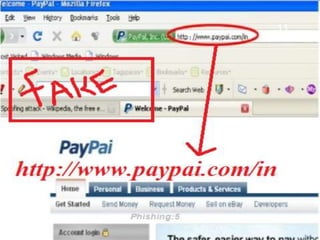
http://fbaction.net/
9
10
11
12
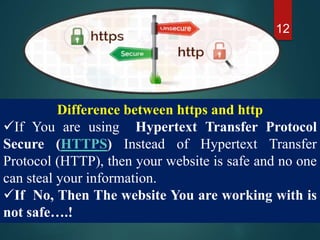
Difference between https and http
If You are using Hypertext Transfer Protocol
Secure (HTTPS) Instead of Hypertext Transfer
Protocol (HTTP), then your website is safe and no one
can steal your information.
If No, Then The website You are working with is
not safe….!
• To verify the website you are connecting to is the
genuine website.
• To ensure the privacy of your data during transit.
• To ensure the integrity of your data during transit.
Why do we use TLS or SSL? 13
 Using https, the computers agree
on a “code”
This “code” is running in TLS or
SSL so that no one can steal Your
personal Information.
14Why https is safe?
TYPES OF PHISHING
 Clone phishing
 Spear phishing
 Whaling phishing
15
Clone Phishing
16
Content of original mail (including link) copied
to create duplicate email. But the link may be
replaced with phishers fake or harmful links.
Spear Phishing
Phishing attempts directed at specific
individuals or companies have been termed
Spear Phishing.
Whaling Phishing
Phishing attacks have been directed specifically
at senior executives and other high profile
targets within businesses is known as Whaling
Phishing.
Phishing
Link
manipul
-ation
Key
loggers
Session
hacking
Phone
phishing
17
Link manipulation
18
1)Link manipulation
Link manipulation is the technique
in which the phisher sends fake link
to A website that is usually visited
by the victim or the user.
Two Types Of Fake Links.
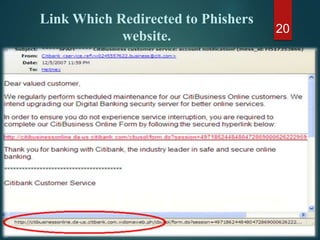
Link Which Redirected to Phishers
website.
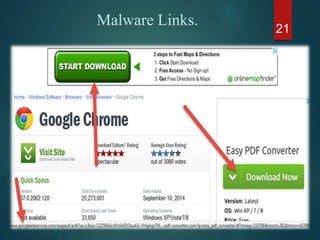
Malware Links.
19
20
Link Which Redirected to Phishers
website.
Malware Links. 21
22
23
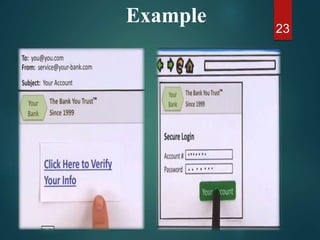
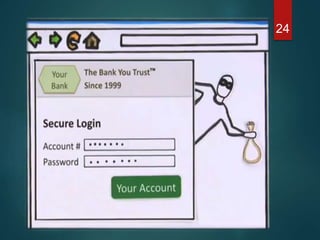
Example
24
HOW TO PREVENT?
 One of the anti-phishing techniques used to prevent
link manipulation is to move the mouse over the link
to view the actual address.
 To check the http”s” connection in address bar ,
meaning its a secure connection.
25
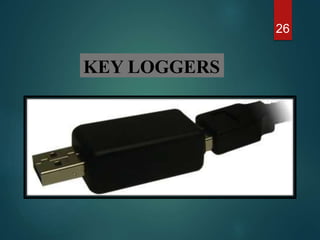
KEY LOGGERS
26
WHY KEYLOGGERS ARE A THREAT?
 key loggers doesn't make any threat to the
system itself
 A key logger is a type of software can record
instant messages, e-mail, and any information
you type at any time using your keyboard.
 As a result, cyber criminals can get PIN codes
and account numbers for e-payment systems,
passwords to online gaming accounts, email
addresses, user names, email passwords etc.
27
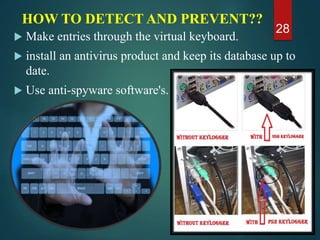
HOW TO DETECT AND PREVENT??
 Make entries through the virtual keyboard.
 install an antivirus product and keep its database up to
date.
 Use anti-spyware software's.
28
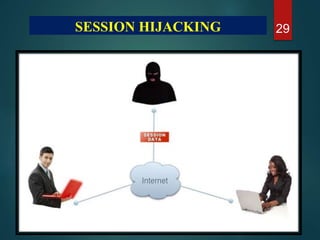
29SESSION HIJACKING
•Session Hijacking (a.k.a. Session Side jacking) is a form
of Man In The Middle (MITM) attack.
• In which a malicious attacker has access to the transport
layer and can eavesdrop on communications.
•When communications are not protected they can steal
the unique session ID and imitate the victim on the
target site.
•This grants the attacker access to your account and data.
SESSION HIJACKING 30
Example…! 31
Steps in Session Hijacking
1. Place yourself between the victim and the target .
2. Monitor the flow of packets
3. Predict the sequence number
4. Kill the connection to the victim’s machine
5. Take over the session
6. Start injecting packets to the target server
32
Prevention of session hijacking
1.Encription and connectivity.
2.Use anti-virus software.
PHONE
PHISHING
33
Phone phishing
 Mobile Phishing is a social engineering
technique where the attack is invited via mobile
texting rather than email.
 Using Fake Calls and will say to dial something.
 Using fake SMS.
34
Examples of phone phishing 35
So be careful
when you
use Mobile
banking and
all..!
36
Email Spoofing
 Email Trap By Using Fake Email Address.
 This is the trick
Used by spammers.
37
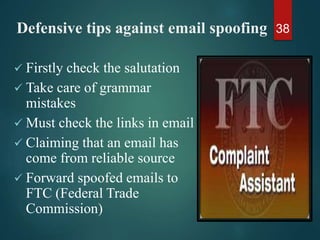
Defensive tips against email spoofing
 Firstly check the salutation
 Take care of grammar
mistakes
 Must check the links in email
 Claiming that an email has
come from reliable source
 Forward spoofed emails to
FTC (Federal Trade
Commission)
38
Prevention Against Phishing Attack
39
1.Never respond to emails that request
personal financial information 40
2.Visit bank’s websites by typing the
URL into the address bar
41
3.Keep a regular check on your
Accounts and Credit cards. 42
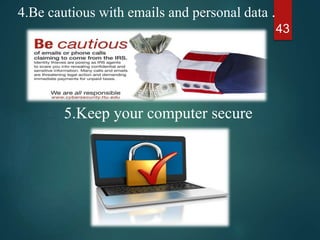
4.Be cautious with emails and personal data .
43
5.Keep your computer secure
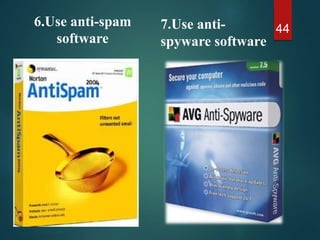
6.Use anti-spam
software
447.Use anti-
spyware software
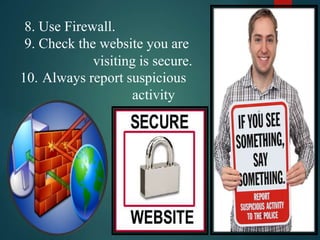
8. Use Firewall.
9. Check the website you are
visiting is secure.
10. Always report suspicious
activity
45
11. GET EDUCATED ABOUT
PHISHING PREVENTION ATTACK
“It is better to be safer now, than feel sorry later”
46
47

Phising a Threat to Network Security

  • 1.
    PHISHING A THREATTO NETWORK SECURITY 1
  • 2.
    OUTLINE…… Introduction What Is Phishing?? WhatKind Of Information Do The Hackers Want? How Phishing Is Done? Techniques Of Phishing Prevention Conclusion 2
  • 3.
    INTRODUCTION Origin of word“Phishing” from two words – ‘Password’ & ‘Harvesting’. 3
  • 4.
     There area number of different phishing techniques used to obtain personal information from users.  As technology becomes more advanced, the phishing techniques being used are also more advanced.  To prevent Internet phishing, users should have knowledge of various types of phishing techniques and we should also be aware of anti-phishing techniques to protect ourselves from getting phished. 4
  • 5.
    PHISHING  Phishing isa type of deception designed to steal your valuable personal data, such as credit card numbers, passwords, account data, or other information. 5
  • 6.
     Your name,address and date of birth  Social Security number  Driver’s License number  Credit Card numbers  ATM cards  Telephone calling cards 6
  • 7.
  • 8.
  • 9.
  • 10.
  • 11.
  • 12.
    12 Difference between httpsand http If You are using Hypertext Transfer Protocol Secure (HTTPS) Instead of Hypertext Transfer Protocol (HTTP), then your website is safe and no one can steal your information. If No, Then The website You are working with is not safe….!
  • 13.
    • To verifythe website you are connecting to is the genuine website. • To ensure the privacy of your data during transit. • To ensure the integrity of your data during transit. Why do we use TLS or SSL? 13
  • 14.
     Using https,the computers agree on a “code” This “code” is running in TLS or SSL so that no one can steal Your personal Information. 14Why https is safe?
  • 15.
    TYPES OF PHISHING Clone phishing  Spear phishing  Whaling phishing 15
  • 16.
    Clone Phishing 16 Content oforiginal mail (including link) copied to create duplicate email. But the link may be replaced with phishers fake or harmful links. Spear Phishing Phishing attempts directed at specific individuals or companies have been termed Spear Phishing. Whaling Phishing Phishing attacks have been directed specifically at senior executives and other high profile targets within businesses is known as Whaling Phishing.
  • 17.
  • 18.
  • 19.
    1)Link manipulation Link manipulationis the technique in which the phisher sends fake link to A website that is usually visited by the victim or the user. Two Types Of Fake Links. Link Which Redirected to Phishers website. Malware Links. 19
  • 20.
    20 Link Which Redirectedto Phishers website.
  • 21.
  • 22.
  • 23.
  • 24.
  • 25.
    HOW TO PREVENT? One of the anti-phishing techniques used to prevent link manipulation is to move the mouse over the link to view the actual address.  To check the http”s” connection in address bar , meaning its a secure connection. 25
  • 26.
  • 27.
    WHY KEYLOGGERS AREA THREAT?  key loggers doesn't make any threat to the system itself  A key logger is a type of software can record instant messages, e-mail, and any information you type at any time using your keyboard.  As a result, cyber criminals can get PIN codes and account numbers for e-payment systems, passwords to online gaming accounts, email addresses, user names, email passwords etc. 27
  • 28.
    HOW TO DETECTAND PREVENT??  Make entries through the virtual keyboard.  install an antivirus product and keep its database up to date.  Use anti-spyware software's. 28
  • 29.
  • 30.
    •Session Hijacking (a.k.a.Session Side jacking) is a form of Man In The Middle (MITM) attack. • In which a malicious attacker has access to the transport layer and can eavesdrop on communications. •When communications are not protected they can steal the unique session ID and imitate the victim on the target site. •This grants the attacker access to your account and data. SESSION HIJACKING 30
  • 31.
  • 32.
    Steps in SessionHijacking 1. Place yourself between the victim and the target . 2. Monitor the flow of packets 3. Predict the sequence number 4. Kill the connection to the victim’s machine 5. Take over the session 6. Start injecting packets to the target server 32 Prevention of session hijacking 1.Encription and connectivity. 2.Use anti-virus software.
  • 33.
  • 34.
    Phone phishing  MobilePhishing is a social engineering technique where the attack is invited via mobile texting rather than email.  Using Fake Calls and will say to dial something.  Using fake SMS. 34
  • 35.
    Examples of phonephishing 35
  • 36.
    So be careful whenyou use Mobile banking and all..! 36
  • 37.
    Email Spoofing  EmailTrap By Using Fake Email Address.  This is the trick Used by spammers. 37
  • 38.
    Defensive tips againstemail spoofing  Firstly check the salutation  Take care of grammar mistakes  Must check the links in email  Claiming that an email has come from reliable source  Forward spoofed emails to FTC (Federal Trade Commission) 38
  • 39.
  • 40.
    1.Never respond toemails that request personal financial information 40
  • 41.
    2.Visit bank’s websitesby typing the URL into the address bar 41
  • 42.
    3.Keep a regularcheck on your Accounts and Credit cards. 42
  • 43.
    4.Be cautious withemails and personal data . 43 5.Keep your computer secure
  • 44.
  • 45.
    8. Use Firewall. 9.Check the website you are visiting is secure. 10. Always report suspicious activity 45
  • 46.
    11. GET EDUCATEDABOUT PHISHING PREVENTION ATTACK “It is better to be safer now, than feel sorry later” 46
  • 47.