PHISHING ORIGINS
 The first documented use of the word
"phishing" took place in 1996. Most people
believe it originated as an alternative spelling
of "fishing," as in "to fish for information"
What is PHISHING
“Phishing is an illegal activity using social
engineering techniques to fraudulently
solicit sensitive information or install
malicious software.”
 Phishing attempts to obtain sensitive information such as
usernames, passwords, personal information, military
operations details, financial information and so on.
 Phishing emails can also include malicious links or
attachments.
Emotional Triggers Exploited by
Phishing
 Greed
 Fear
 Heroism
 Desire to be liked
 Authority
Example
 Suppose you check your e-mail one day and find a
message from your bank. You've gotten e-mail from
them before, but this one seems suspicious,
especially since it threatens to close your account if
you don't reply immediately.
 This message and others like it are examples
of phishing, a method of online identity theft.
 In addition to stealing personal and financial data,
phishers can infect computers with viruses.
Tools and Tactics
 Using IP addresses instead of domain names in hyperlinks that
address the fake web site.
 Registering similar sounding DNS domains and setting up fake web
sites that closely mimic the domain name of the target web site.
 Embedding hyperlinks from the real target web site into the HTML
contents of an email about the fake phishing web site, so that the
user's web browser makes most of the HTTP connections to the
real web server and only a small number of connections to the fake
web server.
If the user's email client software supports auto-rendering of
the content, their client may attempt to connect automatically to the
fake web server as soon as the email is read, and manual browsers
may not notice the small number of connections to a malicious
server amongst the normal network activity to the real web site.
Effects of Phishing
 Identity theft
 Internet fraud
 Financial loss to the original institutions
 Difficulties in Law Enforcement
Investigations
 Erosion of Public Trust in the Internet.
STATISTICS
Industries most affected by phishing:
oFinancial
oPayment Services
oGaming
oRetail
oSocial Networks
STATISTICS
Number of brands effected
Types of Phishing
 Deceptive - Sending a deceptive email, in bulk, with a “call to action”
that demands the recipient click on a link.
 Malware-Based - Running malicious software on the user’s machine.
 Content-Injection – Inserting malicious content into legitimate site.
 Man-in-the-Middle Phishing - Phisher positions himself between the
user and the legitimate site.
 Search Engine Phishing - Create web pages for fake products, get
the pages indexed by search engines, and wait for users to enter their
confidential information as part of an order, sign-up, or balance
transfer.
Identifying a phishing scam
Phishing scams tend to have common
characteristics which make them easy to identify.
 Spelling and punctuation errors.
 Include a redirect to malicious URL’s which
require you input usernames and passwords to
access.
 Try to appear genuine by using legitimate
operational terms, key words, company logos
and accurate personal information.
 Fake or unknown sender.
Identifying a phishing
scam(ctd)
 Scare tactics to entice a target to provide personal information
or follow links.
 Sensational subject lines to entice targets to click on attached
links or provide personal information.
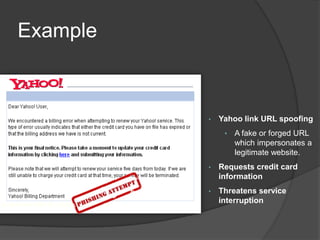
Example
Example
• Yahoo link URL spoofing
• A fake or forged URL
which impersonates a
legitimate website.
• Requests credit card
information
• Threatens service
interruption
Example
How to avoid a phishing scam
Protect yourself from phishing scams:
 Think before you open
 Beware the unknown sender or sensational subject line.
 Be suspicious of any email with urgent requests for
personal financial information
 Regularly check your bank, credit and debit card
statements to ensure that all transactions are legitimate
 Install latest anti-virus packages
 Inspect the address bar and SSL certificate
 Digitally sign and encrypt emails where ever possible.
How to avoid a phishing
scam(ctd)
 Do not follow links included in emails or text
messages, use a known good link instead.
 Do not follow links to unsubscribe from spam,
simply mark as spam and delete..
 You will never get a free iPad, don’t fill anything
out!
Anti-Phishing Working Group
(anti-phishing.org )
 The organization provides a forum to discuss phishing
issues, define the scope of the phishing problem in terms
of hard and soft costs, and share information and best
practices for eliminating the problem.
 The APWG has over 2300+ members from over 1500
companies & agencies worldwide. Member companies
include leading security companies such as
○ Symantec
○ McAfee
○ Kaspersky
 Financial Industry members include
○ VISA
○ Mastercard
○ American Bankers Association.
REFERENCES
 http://www.antiphishing.org/reports/apwg_report_november_2006.p
df
 http://72.14.235.104/search?q=cache:-T6-
U5dhgYAJ:www.avira.com/en/threats/what_is_phishing.html+Phishi
ng+consequences&hl=en&gl=in&ct=clnk&cd=7
 Phishing-dhs-report.pdf
 Report_on_phishing.pdf
 http://www.cert-in.org.in/training/15thjuly05/phishing.pdf
 http://www.antiphishing.org
YOUR PASSWORD, YOUR DATA, YOUR LIFE!!!!

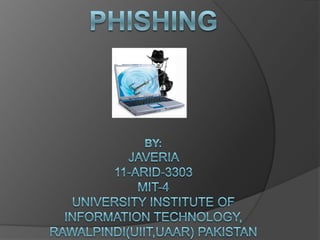
Phishing

  • 3.
    PHISHING ORIGINS  Thefirst documented use of the word "phishing" took place in 1996. Most people believe it originated as an alternative spelling of "fishing," as in "to fish for information"
  • 4.
    What is PHISHING “Phishingis an illegal activity using social engineering techniques to fraudulently solicit sensitive information or install malicious software.”  Phishing attempts to obtain sensitive information such as usernames, passwords, personal information, military operations details, financial information and so on.  Phishing emails can also include malicious links or attachments.
  • 5.
    Emotional Triggers Exploitedby Phishing  Greed  Fear  Heroism  Desire to be liked  Authority
  • 6.
    Example  Suppose youcheck your e-mail one day and find a message from your bank. You've gotten e-mail from them before, but this one seems suspicious, especially since it threatens to close your account if you don't reply immediately.  This message and others like it are examples of phishing, a method of online identity theft.  In addition to stealing personal and financial data, phishers can infect computers with viruses.
  • 7.
    Tools and Tactics Using IP addresses instead of domain names in hyperlinks that address the fake web site.  Registering similar sounding DNS domains and setting up fake web sites that closely mimic the domain name of the target web site.  Embedding hyperlinks from the real target web site into the HTML contents of an email about the fake phishing web site, so that the user's web browser makes most of the HTTP connections to the real web server and only a small number of connections to the fake web server. If the user's email client software supports auto-rendering of the content, their client may attempt to connect automatically to the fake web server as soon as the email is read, and manual browsers may not notice the small number of connections to a malicious server amongst the normal network activity to the real web site.
  • 9.
    Effects of Phishing Identity theft  Internet fraud  Financial loss to the original institutions  Difficulties in Law Enforcement Investigations  Erosion of Public Trust in the Internet.
  • 10.
    STATISTICS Industries most affectedby phishing: oFinancial oPayment Services oGaming oRetail oSocial Networks
  • 11.
  • 12.
    Types of Phishing Deceptive - Sending a deceptive email, in bulk, with a “call to action” that demands the recipient click on a link.  Malware-Based - Running malicious software on the user’s machine.  Content-Injection – Inserting malicious content into legitimate site.  Man-in-the-Middle Phishing - Phisher positions himself between the user and the legitimate site.  Search Engine Phishing - Create web pages for fake products, get the pages indexed by search engines, and wait for users to enter their confidential information as part of an order, sign-up, or balance transfer.
  • 13.
    Identifying a phishingscam Phishing scams tend to have common characteristics which make them easy to identify.  Spelling and punctuation errors.  Include a redirect to malicious URL’s which require you input usernames and passwords to access.  Try to appear genuine by using legitimate operational terms, key words, company logos and accurate personal information.  Fake or unknown sender.
  • 14.
    Identifying a phishing scam(ctd) Scare tactics to entice a target to provide personal information or follow links.  Sensational subject lines to entice targets to click on attached links or provide personal information.
  • 15.
  • 16.
    Example • Yahoo linkURL spoofing • A fake or forged URL which impersonates a legitimate website. • Requests credit card information • Threatens service interruption
  • 17.
  • 18.
    How to avoida phishing scam Protect yourself from phishing scams:  Think before you open  Beware the unknown sender or sensational subject line.  Be suspicious of any email with urgent requests for personal financial information  Regularly check your bank, credit and debit card statements to ensure that all transactions are legitimate  Install latest anti-virus packages  Inspect the address bar and SSL certificate  Digitally sign and encrypt emails where ever possible.
  • 19.
    How to avoida phishing scam(ctd)  Do not follow links included in emails or text messages, use a known good link instead.  Do not follow links to unsubscribe from spam, simply mark as spam and delete..  You will never get a free iPad, don’t fill anything out!
  • 20.
    Anti-Phishing Working Group (anti-phishing.org)  The organization provides a forum to discuss phishing issues, define the scope of the phishing problem in terms of hard and soft costs, and share information and best practices for eliminating the problem.  The APWG has over 2300+ members from over 1500 companies & agencies worldwide. Member companies include leading security companies such as ○ Symantec ○ McAfee ○ Kaspersky  Financial Industry members include ○ VISA ○ Mastercard ○ American Bankers Association.
  • 21.
  • 23.
    YOUR PASSWORD, YOURDATA, YOUR LIFE!!!!