Internet fraud
Turcu Alexandru
What is an Internet fraud?
• An Internet fraud is the use of Internet services or software
with Internet access to defraud victims or to otherwise take
advantage of them.
• Internet crime schemes steal millions of dollars each year
from victims and continue to plague the Internet through
various methods.
Methods of Internet fraud
Business E-Mail Compromise
(BEC)
• This is a sophisticated scam targeting businesses working
with foreign suppliers and companies that regularly
perform wire transfer payments. The scam is carried out by
compromising legitimate business e-mail accounts through
social engineering or computer intrusion techniques to
conduct unauthorized transfers of funds.
Data Breach
• It is a leak or spill of data which is released from a secure
location to an untrusted environment. Data breaches can
occur at the personal and corporate levels and involve
sensitive, protected, or confidential information that is
copied, transmitted, viewed, stolen, or used by an individual
unauthorized to do so.
• It is an interruption of an authorized user's access to any
system or network, typically one caused with malicious
intent.
E-Mail Account Compromise (EAC)
• Similar to BEC, this scam targets the general public and
professionals associated with, but not limited to, financial
and lending institutions, real estate companies, and law
firms. Perpetrators of EAC use compromised e-mails to
request payments to fraudulent locations.
Denial of Service
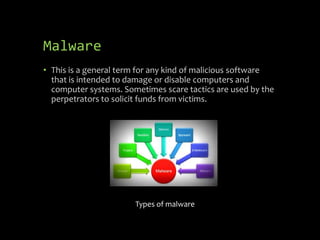
Malware
• This is a general term for any kind of malicious software
that is intended to damage or disable computers and
computer systems. Sometimes scare tactics are used by the
perpetrators to solicit funds from victims.
Types of malware
Phishing and Vishing
• Phishing is a scam in which you receive a fraudulent email
designed to steal your identity or personal information,
such as credit card numbers, bank account numbers, debit
card PINs, and account passwords. The email may state that
your account has been compromised or that one of your
accounts was charged incorrectly. The email will instruct
you to click on a link in the email or reply with your bank
account number to confirm your identity or verify your
account. The email may even threaten to disable your
account if you don't reply, but don't believe it.
• Similar to phishing, vishing scammers also seek to get you
to provide your personal information. However, vishing
scams use the phone to make their requests, instead of
email. You may be directed to call a phone number to verify
an account or to reactivate a debit or credit card.
Ransomware
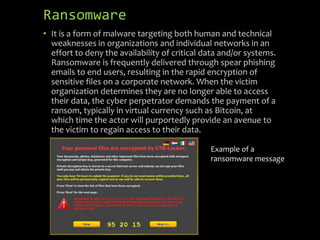
• It is a form of malware targeting both human and technical
weaknesses in organizations and individual networks in an
effort to deny the availability of critical data and/or systems.
Ransomware is frequently delivered through spear phishing
emails to end users, resulting in the rapid encryption of
sensitive files on a corporate network. When the victim
organization determines they are no longer able to access
their data, the cyber perpetrator demands the payment of a
ransom, typically in virtual currency such as Bitcoin, at
which time the actor will purportedly provide an avenue to
the victim to regain access to their data.
Example of a
ransomware message
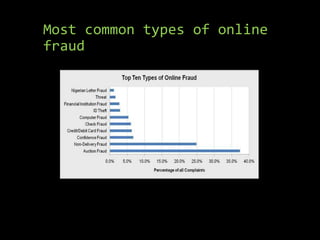
Most common types of online
fraud
What can be done to prevent
Internet fraud?
Scammers, hackers, and identity thieves are looking to steal
your personal information – and your money. But there are
steps you can take to protect yourself, like keeping your
computer software up-to-date and giving out your personal
information only when you have a good reason:
• Use security software that updates automatically
• Treat your personal information seriously
• Check out companies to see who you are really dealing with
• Protect your passwords
• Back up your files
How to protect your data
from phishing
Legitimate companies never ask for your password or account number
via email. If you receive a phishing email there are several actions you
should take:
• Don't click on any links in the email. They can contain a virus that can
harm your computer. Even if links in the email say the name of the
company, don't trust them. They may redirect to a fraudulent website.
Don't reply to the email.
• If you believe that the email is valid, contact the company using the
phone numbers listed on your statements, on the company's website,
or in the phone book. Tell the customer service representative about
the email and ask if your account has been compromised. You can also
contact the company online by typing the company's web address
directly into the address bar; never use the links provided in the email.
• If you clicked on any links in the phishing email or replied with the
requested personal information, contact the company directly to let
them know about the email and ask to have fraud alerts placed on
your accounts, have new credit cards issued, or set new passwords.
Bibliography
• https://www.fbi.gov/scams-and-safety/common-fraud-
schemes/internet-fraud
• https://www.usa.gov/online-safety
• https://www.consumer.ftc.gov/articles/0009-computer-
security

Internet Fraud #scichallenge2017

  • 1.
  • 2.
    What is anInternet fraud? • An Internet fraud is the use of Internet services or software with Internet access to defraud victims or to otherwise take advantage of them. • Internet crime schemes steal millions of dollars each year from victims and continue to plague the Internet through various methods.
  • 3.
  • 4.
    Business E-Mail Compromise (BEC) •This is a sophisticated scam targeting businesses working with foreign suppliers and companies that regularly perform wire transfer payments. The scam is carried out by compromising legitimate business e-mail accounts through social engineering or computer intrusion techniques to conduct unauthorized transfers of funds.
  • 5.
    Data Breach • Itis a leak or spill of data which is released from a secure location to an untrusted environment. Data breaches can occur at the personal and corporate levels and involve sensitive, protected, or confidential information that is copied, transmitted, viewed, stolen, or used by an individual unauthorized to do so.
  • 6.
    • It isan interruption of an authorized user's access to any system or network, typically one caused with malicious intent. E-Mail Account Compromise (EAC) • Similar to BEC, this scam targets the general public and professionals associated with, but not limited to, financial and lending institutions, real estate companies, and law firms. Perpetrators of EAC use compromised e-mails to request payments to fraudulent locations. Denial of Service
  • 7.
    Malware • This isa general term for any kind of malicious software that is intended to damage or disable computers and computer systems. Sometimes scare tactics are used by the perpetrators to solicit funds from victims. Types of malware
  • 8.
    Phishing and Vishing •Phishing is a scam in which you receive a fraudulent email designed to steal your identity or personal information, such as credit card numbers, bank account numbers, debit card PINs, and account passwords. The email may state that your account has been compromised or that one of your accounts was charged incorrectly. The email will instruct you to click on a link in the email or reply with your bank account number to confirm your identity or verify your account. The email may even threaten to disable your account if you don't reply, but don't believe it. • Similar to phishing, vishing scammers also seek to get you to provide your personal information. However, vishing scams use the phone to make their requests, instead of email. You may be directed to call a phone number to verify an account or to reactivate a debit or credit card.
  • 9.
    Ransomware • It isa form of malware targeting both human and technical weaknesses in organizations and individual networks in an effort to deny the availability of critical data and/or systems. Ransomware is frequently delivered through spear phishing emails to end users, resulting in the rapid encryption of sensitive files on a corporate network. When the victim organization determines they are no longer able to access their data, the cyber perpetrator demands the payment of a ransom, typically in virtual currency such as Bitcoin, at which time the actor will purportedly provide an avenue to the victim to regain access to their data. Example of a ransomware message
  • 10.
    Most common typesof online fraud
  • 11.
    What can bedone to prevent Internet fraud? Scammers, hackers, and identity thieves are looking to steal your personal information – and your money. But there are steps you can take to protect yourself, like keeping your computer software up-to-date and giving out your personal information only when you have a good reason: • Use security software that updates automatically • Treat your personal information seriously • Check out companies to see who you are really dealing with • Protect your passwords • Back up your files
  • 12.
    How to protectyour data from phishing Legitimate companies never ask for your password or account number via email. If you receive a phishing email there are several actions you should take: • Don't click on any links in the email. They can contain a virus that can harm your computer. Even if links in the email say the name of the company, don't trust them. They may redirect to a fraudulent website. Don't reply to the email. • If you believe that the email is valid, contact the company using the phone numbers listed on your statements, on the company's website, or in the phone book. Tell the customer service representative about the email and ask if your account has been compromised. You can also contact the company online by typing the company's web address directly into the address bar; never use the links provided in the email. • If you clicked on any links in the phishing email or replied with the requested personal information, contact the company directly to let them know about the email and ask to have fraud alerts placed on your accounts, have new credit cards issued, or set new passwords.
  • 13.