Phishing
By:
Esraa Yaseen Israa El-Jamal
To:
Eng. Abdel Nasser Abdelhadi
Islamic University-Gaza
Faculty of Engineering
Computer Department
Outline
 Definition
 Comparison to Spam
 Facts about Phishing
 Phishing step by step
 What phishers want ?
 Effects of phishing
 Real stories
 How to phish??
 Marks of phishing emails
 How to Avoid?
 I’ve been already phished
” phishing”
Name and definition …
It is the act of tricking someone into giving
confidential information (like passwords and
credit card information) on a fake web page
or email form pretending to come from a
legitimate company (like their bank).
COMPARISON TO SPAM
 The purpose of a phishing message is to acquire sensitive
information about a user. For doing so the message needs to
deceive the intended recipient.
So it doesn’t contains any useful information and hence falls
under the category of spam.
 A spam message tries to sell a product or service, whereas
phishing message needs to look like it is from a legitimate
organization.
 Techniques applied to spam message cant be applied naively
to phishing messages.
Facts about Phishing !
6.1 Billion – Number of phishing e-
mails sent world-wide each month.
$1,200 – Average loss to successfully
phished person.
A new phishing scam is launched
every two minutes.
What kinds of personal
information do the thieves want?
◦ Your name, address and date of birth
◦ Social Security number
◦ Driver’s License number
◦ Credit Card numbers
◦ ATM cards
◦ Telephone calling cards
Industries affected
Major industries affected are:
 Financial Services
 ISPs
 Online retailers
The most websites
frequently attacked
by phishers
eBay Phishing Scam
example
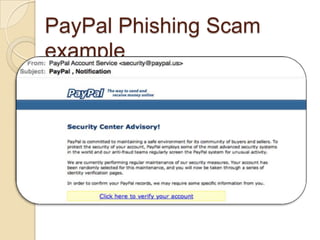
PayPal Phishing Scam
example
Phishing step by step …
Effects of Phishing
Internet fraud
Identity theft
Financial loss to the original institutions
Erosion of Public Trust in the Internet.
Real stories
How to phish
some web site??
Be clever
!
Be clever !
Be clever !
Be clever !
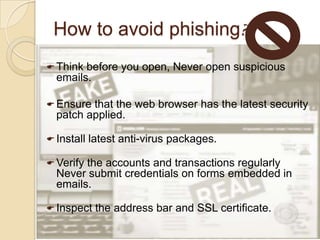
How to avoid phishing?
 Think before you open, Never open suspicious
emails.
 Ensure that the web browser has the latest security
patch applied.
 Install latest anti-virus packages.
 Verify the accounts and transactions regularly
Never submit credentials on forms embedded in
emails.
 Inspect the address bar and SSL certificate.
Good or Bad Site?
Good or Bad Site?
If I’ve been already phished
??
 Take immediate action to protect your identity
and all of your online accounts.
 Treat the situation like you lost your wallet or
purse. Immediately contact all of your financial
institutions, preferably by phone, and inform them
of the situation.
Go to every web site where you may have stored
credit card and/or bank numbers and change the
password at each web site
 Choose a strong password that is significantly
different from your old passwords.
 Forward spam that is phishing for information to
spam@uce.gov and visit FTC’s
References
 http://www.phishing.org/phishing-
techniques/
 http://en.wikipedia.org/wiki/Phishing
 http://www.youtube.com
 http://sarasota.ifas.ufl.edu/FCS/phish_
stories.pdf
Questions
Thanks
for

Phishing

  • 1.
    Phishing By: Esraa Yaseen IsraaEl-Jamal To: Eng. Abdel Nasser Abdelhadi Islamic University-Gaza Faculty of Engineering Computer Department
  • 2.
    Outline  Definition  Comparisonto Spam  Facts about Phishing  Phishing step by step  What phishers want ?  Effects of phishing  Real stories  How to phish??  Marks of phishing emails  How to Avoid?  I’ve been already phished
  • 3.
    ” phishing” Name anddefinition … It is the act of tricking someone into giving confidential information (like passwords and credit card information) on a fake web page or email form pretending to come from a legitimate company (like their bank).
  • 4.
    COMPARISON TO SPAM The purpose of a phishing message is to acquire sensitive information about a user. For doing so the message needs to deceive the intended recipient. So it doesn’t contains any useful information and hence falls under the category of spam.  A spam message tries to sell a product or service, whereas phishing message needs to look like it is from a legitimate organization.  Techniques applied to spam message cant be applied naively to phishing messages.
  • 5.
    Facts about Phishing! 6.1 Billion – Number of phishing e- mails sent world-wide each month. $1,200 – Average loss to successfully phished person. A new phishing scam is launched every two minutes.
  • 6.
    What kinds ofpersonal information do the thieves want? ◦ Your name, address and date of birth ◦ Social Security number ◦ Driver’s License number ◦ Credit Card numbers ◦ ATM cards ◦ Telephone calling cards
  • 7.
    Industries affected Major industriesaffected are:  Financial Services  ISPs  Online retailers
  • 8.
    The most websites frequentlyattacked by phishers
  • 9.
  • 10.
  • 11.
  • 12.
    Effects of Phishing Internetfraud Identity theft Financial loss to the original institutions Erosion of Public Trust in the Internet.
  • 13.
  • 14.
  • 17.
  • 18.
  • 19.
  • 20.
  • 21.
    How to avoidphishing?  Think before you open, Never open suspicious emails.  Ensure that the web browser has the latest security patch applied.  Install latest anti-virus packages.  Verify the accounts and transactions regularly Never submit credentials on forms embedded in emails.  Inspect the address bar and SSL certificate.
  • 22.
  • 23.
  • 24.
    If I’ve beenalready phished ??  Take immediate action to protect your identity and all of your online accounts.  Treat the situation like you lost your wallet or purse. Immediately contact all of your financial institutions, preferably by phone, and inform them of the situation. Go to every web site where you may have stored credit card and/or bank numbers and change the password at each web site  Choose a strong password that is significantly different from your old passwords.  Forward spam that is phishing for information to spam@uce.gov and visit FTC’s
  • 25.
    References  http://www.phishing.org/phishing- techniques/  http://en.wikipedia.org/wiki/Phishing http://www.youtube.com  http://sarasota.ifas.ufl.edu/FCS/phish_ stories.pdf
  • 26.
  • 27.