PRESENTED BY:
RAJESH KUMAR
Topic Is Html5
Content
 Introduction
 Elements
 Attributes
 HTML Basic Tags
 HTML Links
 HTML Images
 HTML Tables
 HTML Lists
 HTML Layouts
 HTML Media
 Conclusion
HTML Introduction
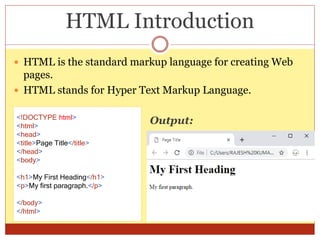
 HTML is the standard markup language for creating Web
pages.
 HTML stands for Hyper Text Markup Language.
<!DOCTYPE html>
<html>
<head>
<title>Page Title</title>
</head>
<body>
<h1>My First Heading</h1>
<p>My first paragraph.</p>
</body>
</html>
Output:
HTML Elements
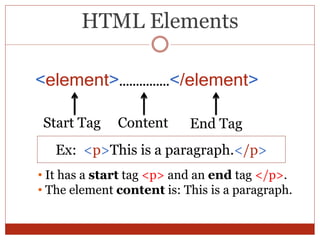
<element>……………</element>
Start Tag Content End Tag
• It has a start tag <p> and an end tag </p>.
• The element content is: This is a paragraph.
Ex: <p>This is a paragraph.</p>
HTML Attributes
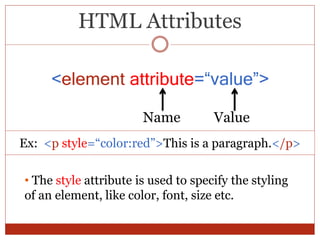
<element attribute=“value”>
Name Value
Ex: <p style=“color:red”>This is a paragraph.</p>
• The style attribute is used to specify the styling
of an element, like color, font, size etc.
HTML Basic Tags
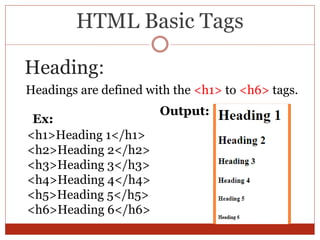
Headings are defined with the <h1> to <h6> tags.
Heading:
<h1>Heading 1</h1>
<h2>Heading 2</h2>
<h3>Heading 3</h3>
<h4>Heading 4</h4>
<h5>Heading 5</h5>
<h6>Heading 6</h6>
Ex:
Output:
HTML Basic Tags
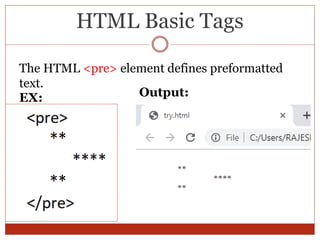
The HTML <pre> element defines preformatted
text.
Output:EX:
HTML Basic Tags
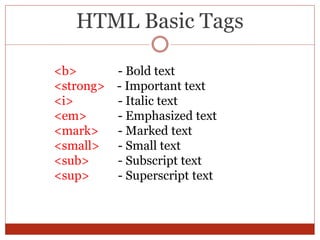
<b> - Bold text
<strong> - Important text
<i> - Italic text
<em> - Emphasized text
<mark> - Marked text
<small> - Small text
<sub> - Subscript text
<sup> - Superscript text
HTML Links
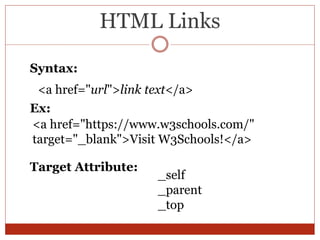
<a href="url">link text</a>
Syntax:
<a href="https://www.w3schools.com/"
target="_blank">Visit W3Schools!</a>
Ex:
_self
_parent
_top
Target Attribute:
HTML Images
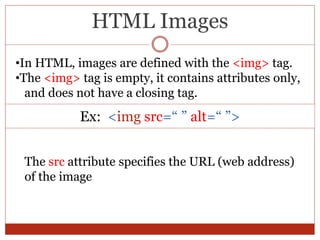
•In HTML, images are defined with the <img> tag.
•The <img> tag is empty, it contains attributes only,
and does not have a closing tag.
Ex: <img src=“ ” alt=“ ”>
The src attribute specifies the URL (web address)
of the image
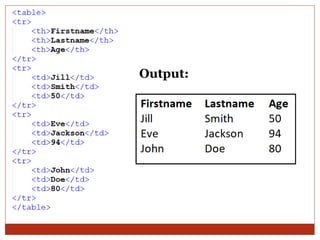
HTML Tables
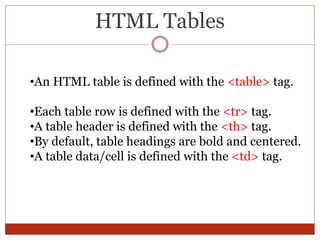
•An HTML table is defined with the <table> tag.
•Each table row is defined with the <tr> tag.
•A table header is defined with the <th> tag.
•By default, table headings are bold and centered.
•A table data/cell is defined with the <td> tag.
Output:
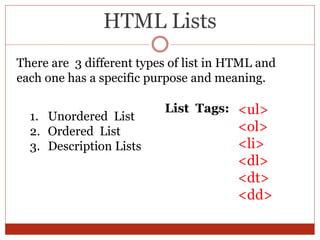
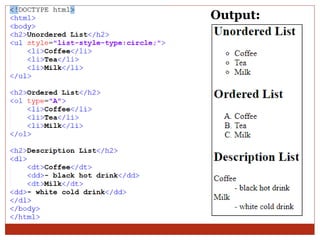
HTML Lists
There are 3 different types of list in HTML and
each one has a specific purpose and meaning.
1. Unordered List
2. Ordered List
3. Description Lists
<ul>
<ol>
<li>
<dl>
<dt>
<dd>
List Tags:
Output:
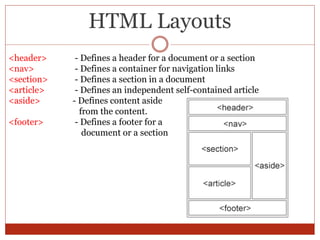
HTML Layouts
<header> - Defines a header for a document or a section
<nav> - Defines a container for navigation links
<section> - Defines a section in a document
<article> - Defines an independent self-contained article
<aside> - Defines content aside
from the content.
<footer> - Defines a footer for a
document or a section
HTML Media
Video:
To embed a video in a web page we used <video> tag.
Audio:
To embed a audio in a web page we used <audio>
tag.
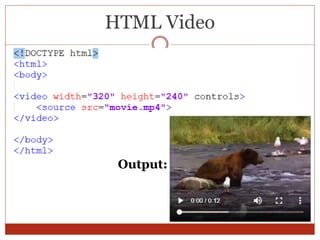
HTML Video
Output:
Conclusion
1. HTML5 is still work in progress.
2. There is no urgency to redesign a website using
the new iteration of the language .
3. Only a handful of major browsers like Mozilla
Firefox and Google Chrome etc. currently
support HTML5 elements.
References
1. https://www.w3schools.com/html/default.asp
2.https://www.udemy.com/the-advanced-html5/
learn/lecture/9062274#overview
Thank You

HTML5 2019

  • 1.
  • 2.
    Content  Introduction  Elements Attributes  HTML Basic Tags  HTML Links  HTML Images  HTML Tables  HTML Lists  HTML Layouts  HTML Media  Conclusion
  • 3.
    HTML Introduction  HTMLis the standard markup language for creating Web pages.  HTML stands for Hyper Text Markup Language. <!DOCTYPE html> <html> <head> <title>Page Title</title> </head> <body> <h1>My First Heading</h1> <p>My first paragraph.</p> </body> </html> Output:
  • 4.
    HTML Elements <element>……………</element> Start TagContent End Tag • It has a start tag <p> and an end tag </p>. • The element content is: This is a paragraph. Ex: <p>This is a paragraph.</p>
  • 5.
    HTML Attributes <element attribute=“value”> NameValue Ex: <p style=“color:red”>This is a paragraph.</p> • The style attribute is used to specify the styling of an element, like color, font, size etc.
  • 6.
    HTML Basic Tags Headingsare defined with the <h1> to <h6> tags. Heading: <h1>Heading 1</h1> <h2>Heading 2</h2> <h3>Heading 3</h3> <h4>Heading 4</h4> <h5>Heading 5</h5> <h6>Heading 6</h6> Ex: Output:
  • 7.
    HTML Basic Tags TheHTML <pre> element defines preformatted text. Output:EX:
  • 8.
    HTML Basic Tags <b>- Bold text <strong> - Important text <i> - Italic text <em> - Emphasized text <mark> - Marked text <small> - Small text <sub> - Subscript text <sup> - Superscript text
  • 9.
    HTML Links <a href="url">linktext</a> Syntax: <a href="https://www.w3schools.com/" target="_blank">Visit W3Schools!</a> Ex: _self _parent _top Target Attribute:
  • 10.
    HTML Images •In HTML,images are defined with the <img> tag. •The <img> tag is empty, it contains attributes only, and does not have a closing tag. Ex: <img src=“ ” alt=“ ”> The src attribute specifies the URL (web address) of the image
  • 11.
    HTML Tables •An HTMLtable is defined with the <table> tag. •Each table row is defined with the <tr> tag. •A table header is defined with the <th> tag. •By default, table headings are bold and centered. •A table data/cell is defined with the <td> tag.
  • 12.
  • 13.
    HTML Lists There are3 different types of list in HTML and each one has a specific purpose and meaning. 1. Unordered List 2. Ordered List 3. Description Lists <ul> <ol> <li> <dl> <dt> <dd> List Tags:
  • 14.
  • 15.
    HTML Layouts <header> -Defines a header for a document or a section <nav> - Defines a container for navigation links <section> - Defines a section in a document <article> - Defines an independent self-contained article <aside> - Defines content aside from the content. <footer> - Defines a footer for a document or a section
  • 16.
    HTML Media Video: To embeda video in a web page we used <video> tag. Audio: To embed a audio in a web page we used <audio> tag.
  • 17.
  • 18.
    Conclusion 1. HTML5 isstill work in progress. 2. There is no urgency to redesign a website using the new iteration of the language . 3. Only a handful of major browsers like Mozilla Firefox and Google Chrome etc. currently support HTML5 elements.
  • 19.
  • 20.