H T M L 5 O V E RV I E W
BY
RAJEEV KUMAR
9/7/2015 1Designed By-Rajeev Sisodiya
HTML5
Enhancing websites for the
people.
9/7/2015 2Designed By-Rajeev Sisodiya
• With HTML you can create your own Web site.
• HTML stands for Hyper Text Markup Language.
• HTML is derived from a language SGML (Standard
Graphics Markup Language).
• The future of HTML is XML (extended Markup
Language).
• HTML is not a programming language, it is a Markup
Language.
• A markup language is a set of markup tags.
• HTML uses markup tags to describe web pages.
• HTML is not case sensitive language.
• HTML documents contain HTML tags and plain text.
9/7/2015 3Designed By-Rajeev Sisodiya
 The Web Hypertext Application Technology Working
Group (WHATWG) began work on the new standard in
2004, when the World Wide Web Consortium (W3C)
was focusing future developments on XHTML 2.0, and
HTML 4.01 had not been updated since 2000.
 W3C and WHATWG are currently working together on
the development of HTML5. Besides representatives
from Mozilla, Opera, Apple, Microsoft and Google.
 Expected completion would be in 2022.
9/7/2015 4Designed By-Rajeev Sisodiya
 Audio and Video Playback without any Plug-in With HTML5 you can stream audio
and video without no need of third party plug-in such as flash.
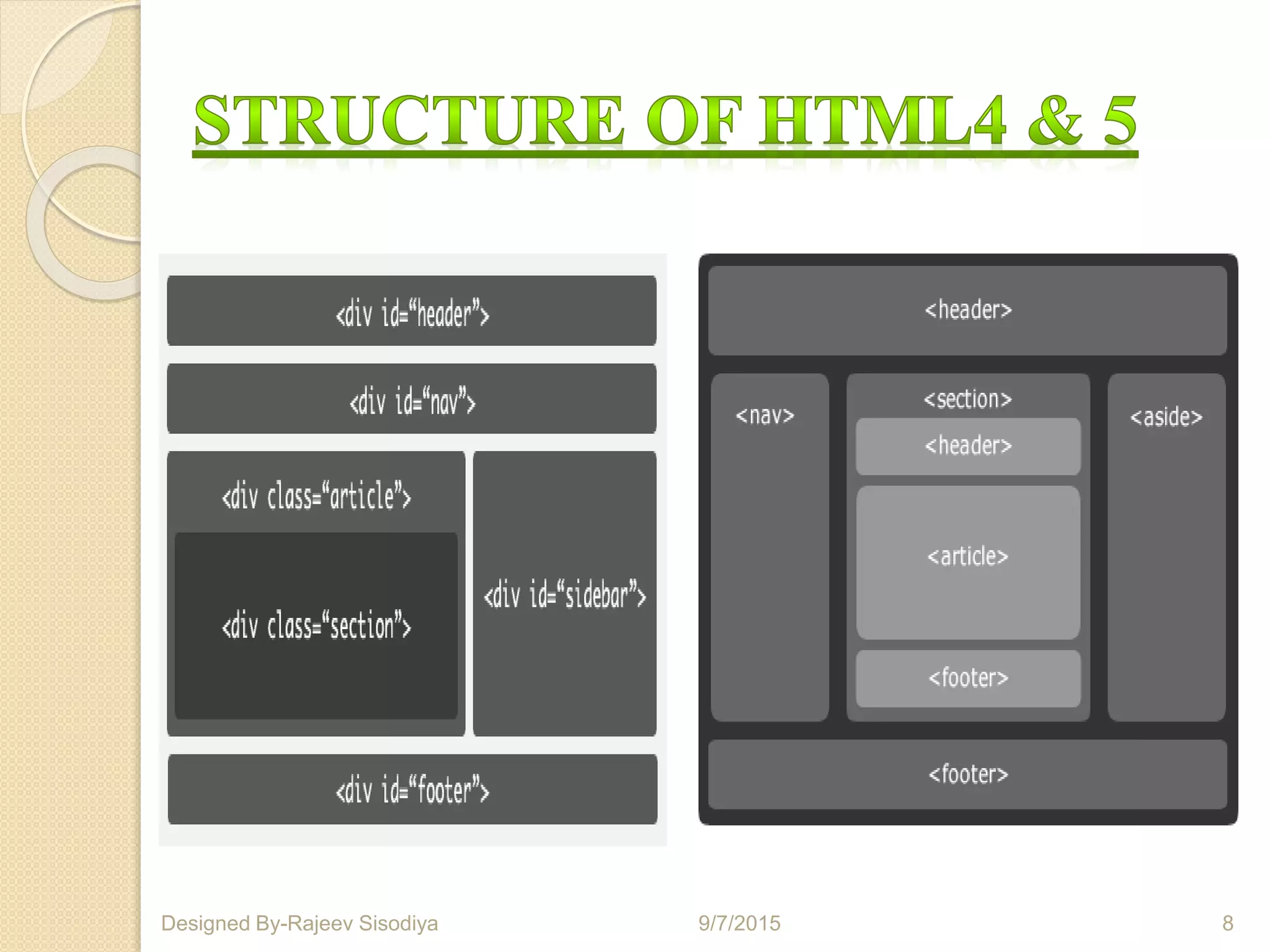
 Code Maintenance In HTML5 we have new structural elements instead of traditional
div tags to create page template, the final result will be a cleaner and more organized
code.
 Local Data Storage HTML5 allows to store data locally from client side. The data can
be accessed to support the web application and it can even be accessed when the client
is disconnected for a short period of time. There are methodologies for storing data:
session storage, local storage and database storage.
 Great for Mobile Devices HTML5 could be the solution to faster applications that will
be accessible universally across all mobile phones.
 New form types and elements will help you certify that the information entered online
is completely accurate. There won’t be any need to run additional scripts for checking
validation. This speeds up the loading time and the user experience will be enhanced.
9/7/2015 5Designed By-Rajeev Sisodiya
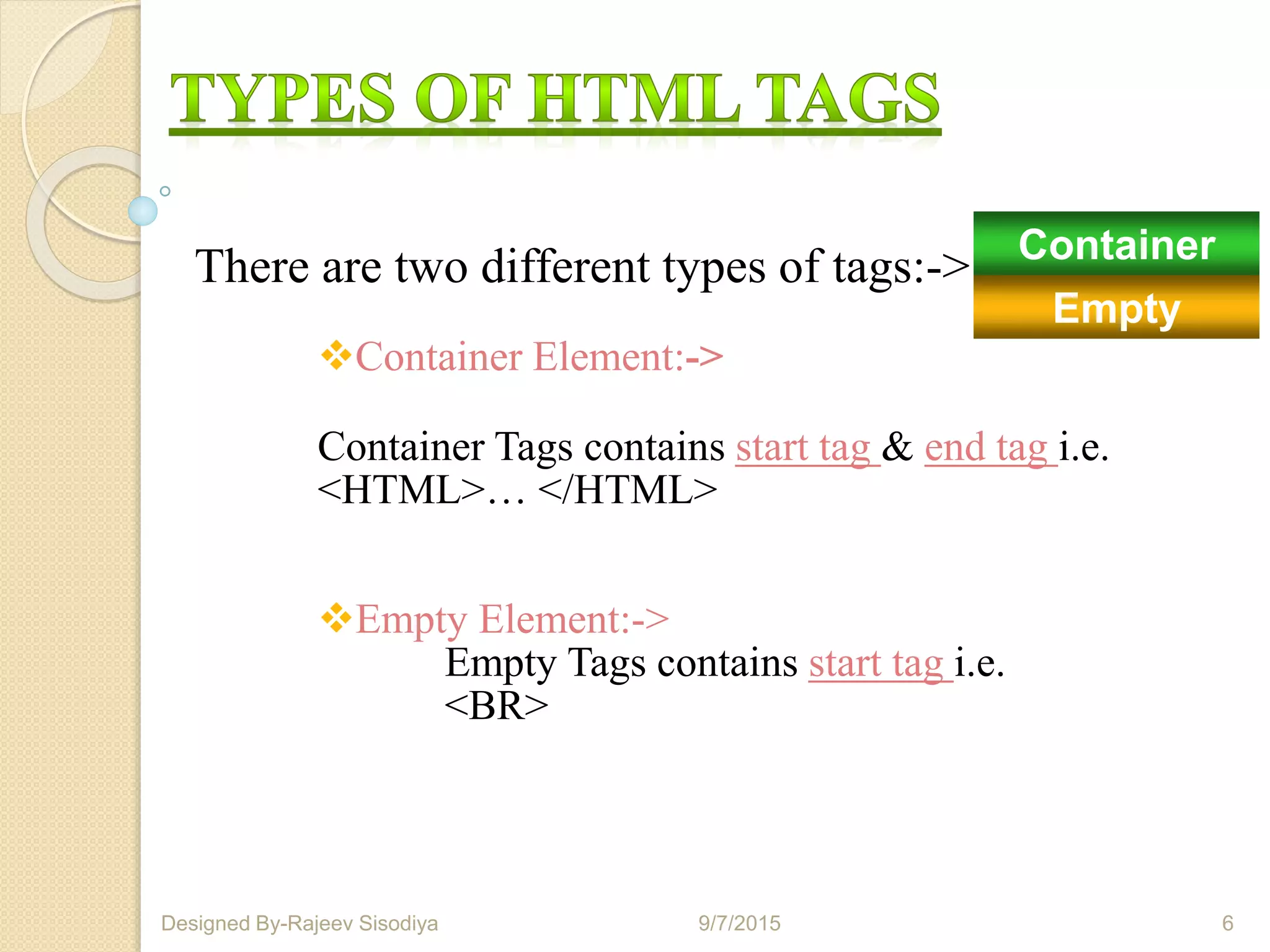
There are two different types of tags:->
Container Element:->
Container Tags contains start tag & end tag i.e.
<HTML>… </HTML>
Empty Element:->
Empty Tags contains start tag i.e.
<BR>
9/7/2015 6Designed By-Rajeev Sisodiya
Container
Empty
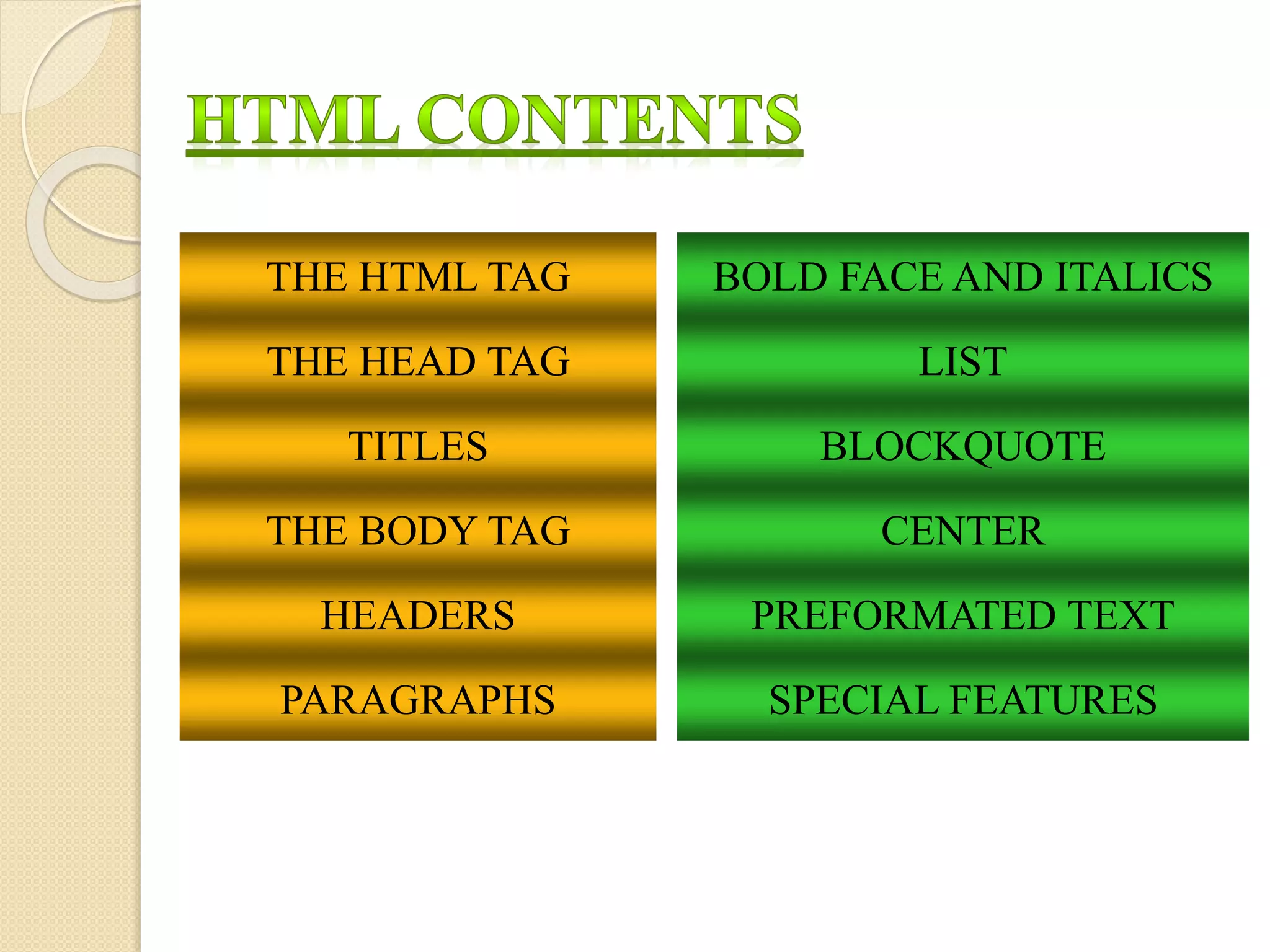
BOLD FACE AND ITALICS
LIST
BLOCKQUOTE
CENTER
PREFORMATED TEXT
SPECIAL FEATURES
THE HTML TAG
THE HEAD TAG
TITLES
THE BODY TAG
HEADERS
PARAGRAPHS
9/7/2015 8Designed By-Rajeev Sisodiya
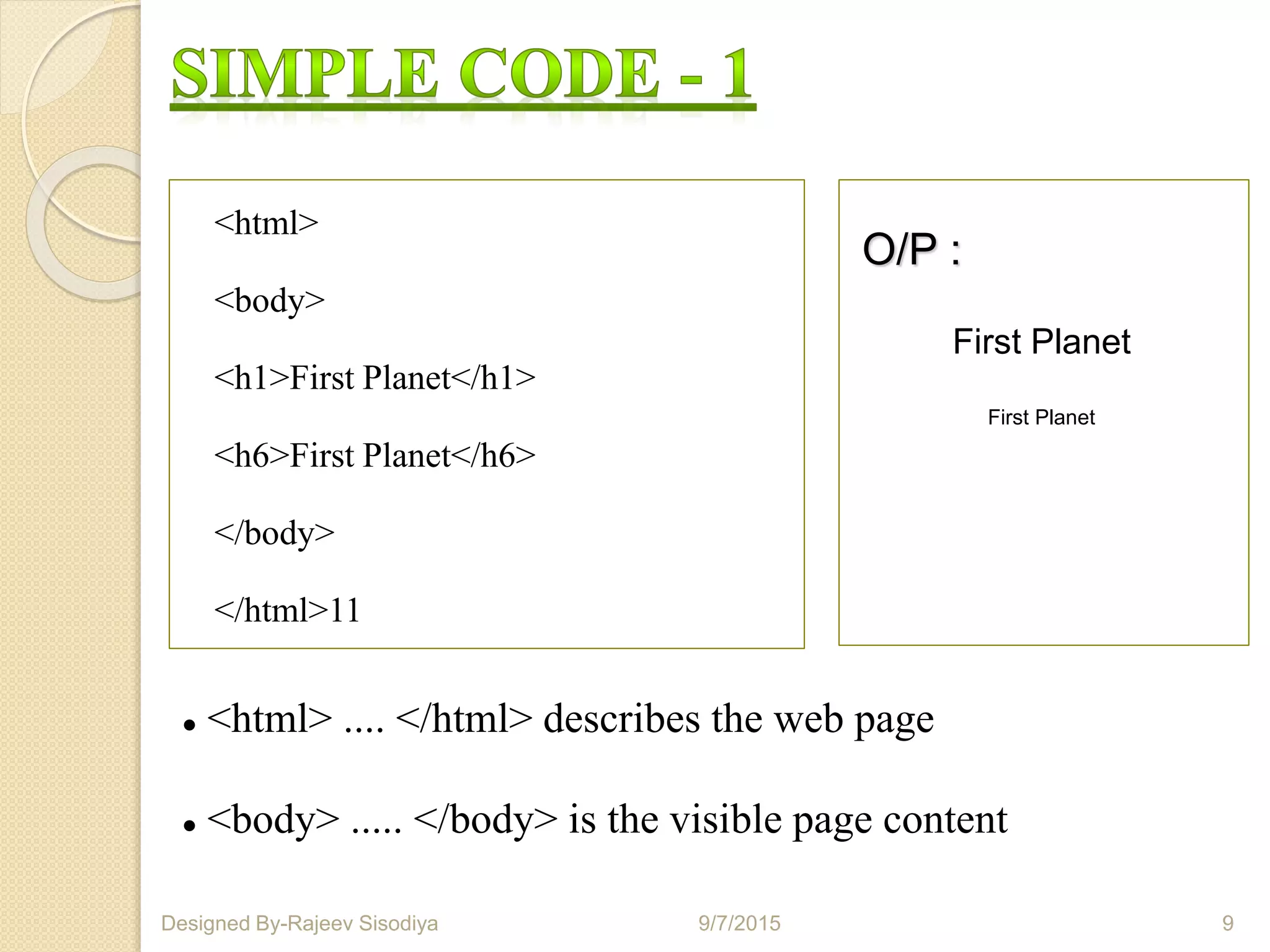
 <html> .... </html> describes the web page
 <body> ..... </body> is the visible page content
<html>
<body>
<h1>First Planet</h1>
<h6>First Planet</h6>
</body>
</html>11
O/P :
9/7/2015 9Designed By-Rajeev Sisodiya
First Planet
First Planet
<HTML> TAG:
Tags are contained in < > symbols. In most cases you start
with the beginning tag, put in the word or words that will be
affected by this tag, and at the end of the string of word(s),
you place a closing tag.
The <html>tag is usually placed on the first line of
your document. At the end of your document you should close
with the </html> tag.
The <html> tag signals the point where text
should start being interpreted as HTML code.
9/7/2015 Designed By-Rajeev Sisodiya 11
<div> Defines section in documents
<dir> Defines directory lists
<head> Defines information about the document
<footer> Defines a footer for a document or section
<form> Defines an HTML form for user input
<img> Defines an image
<input> Defines an input control
<li> Defines a list item
<ins> Defines inserted text
<mark> Defines high lighted document
Just like the header of a memo, the head of an HTML
document contains special information, like its title. The head
of a document is demarcated by <head> and </head>
respectively.
<html>
<head>
<title>My First HTML Document</title>
</head>
</html
A title tag allows you to specify a Document Title in your
browser window. When people make hotlists, this title is
what they see in their list after they add your document. The
format is:
<title>My First HTML Document</title>
Remember, the title usually doesn't appear in the document
itself, but in a title box or bar at the top of the window.
Like you might expect, the body tags <body> and </body>
define the beginning and end of the bulk of your document. All
your text, images, and links will be in the body of the
document.
The body should start after the head. A typical page might begin
like
<html>
<head>
<title>My First HTML Document</title>
</head>
<body>
</html>
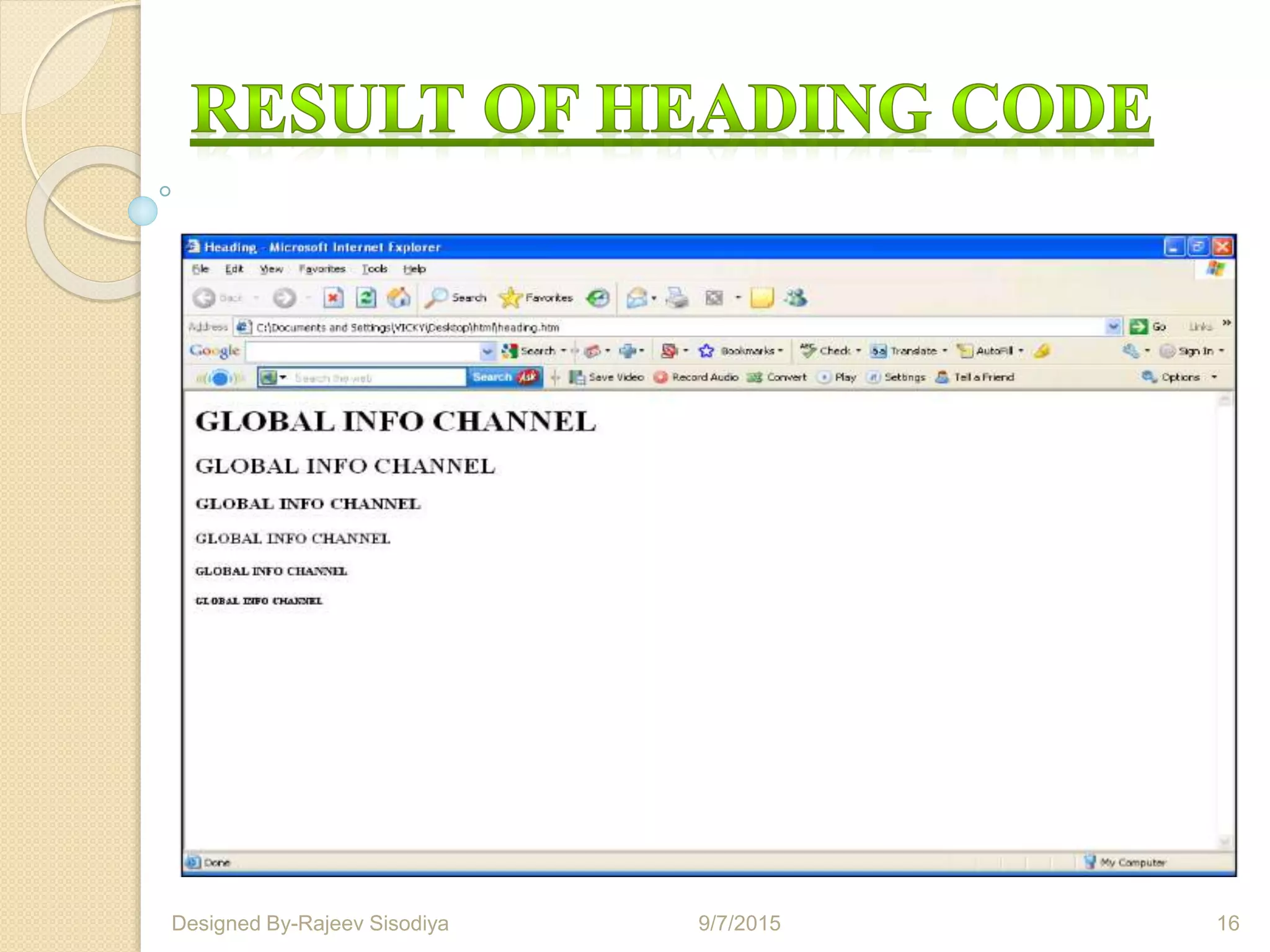
<html>
<head><title>heading</title></head>
<body>
<h1> GLOBAL INFO CHANNEL</h1>
<h2> GLOBAL INFO CHANNEL</h2>
<h3> GLOBAL INFO CHANNEL</h3>
<h4> GLOBAL INFO CHANNEL</h4>
<h5> GLOBAL INFO CHANNEL</h5>
<h6> GLOBAL INFO CHANNEL</h6>
</body>
</html>
9/7/2015 15Designed By-Rajeev Sisodiya
9/7/2015 16Designed By-Rajeev Sisodiya
There is an easy way in HTML to have numbered,
unnumbered, and definition lists. In addition, you can nest
lists within lists.
When using lists, you have no control over the amount of
space between the bullet or list number, HTML automatically
does this for you. Neither (as yet) do you have control over
what type of bullet will be used as each browser is different.
Unnumbered lists are started with the <ul> tag, followed
by the actual list items, which are marked with the <li>
tag. The list is ended with the ending tag </ul>.
For example, here is an unnumbered list with three items:
<ul>
<li> list item 1
<li> list item 2
<li> list item 3
</ul>
Here is the same list using a numbered list format:
<ol>
<li> list item 1
<li> list item 2
<li> list item 3
</ol>
Definition lists allow you to indent without necessarily having
to use bullets.
<dl>
<dt> This is a term
<dd> This is a definition
<dd> And yet another definition
<dt> Another term
<dd> Another definition
</dl>
HTML Images :
HTML images are defined with the <img>
tag.
Syntax : <img src "123.jpg" width="104" height="142" />
Example :
<html>
<body>
<img src="word.jpg"
width="104"
height="142" />
</body>
</html>
O/P:
9/7/2015 21Designed By-Rajeev Sisodiya
9/7/2015 22Designed By-Rajeev Sisodiya
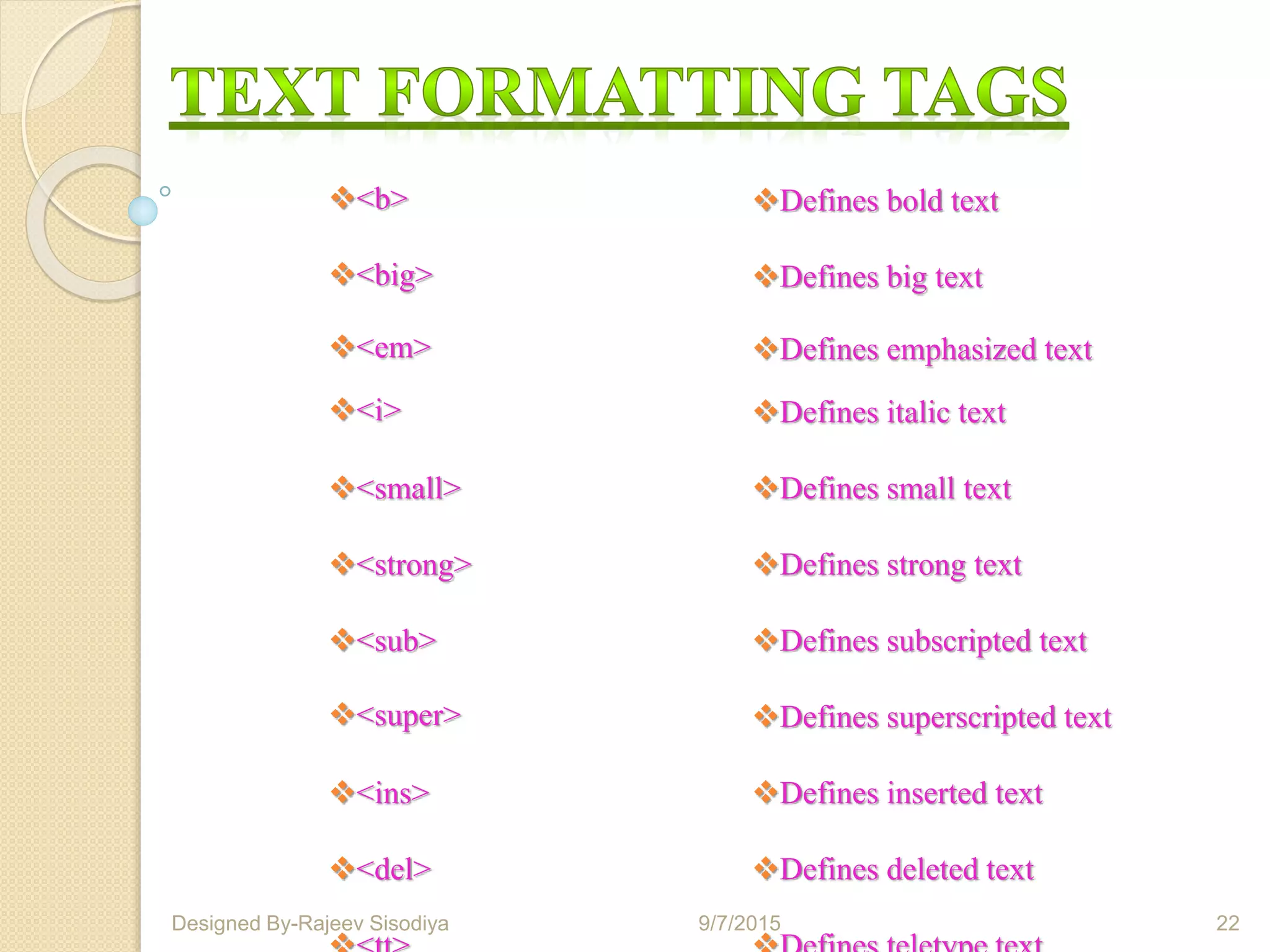
<b> Defines bold text
<big> Defines big text
<em> Defines emphasized text
<i> Defines italic text
<small> Defines small text
<strong> Defines strong text
<sub> Defines subscripted text
<super> Defines superscripted text
<ins> Defines inserted text
<del> Defines deleted text
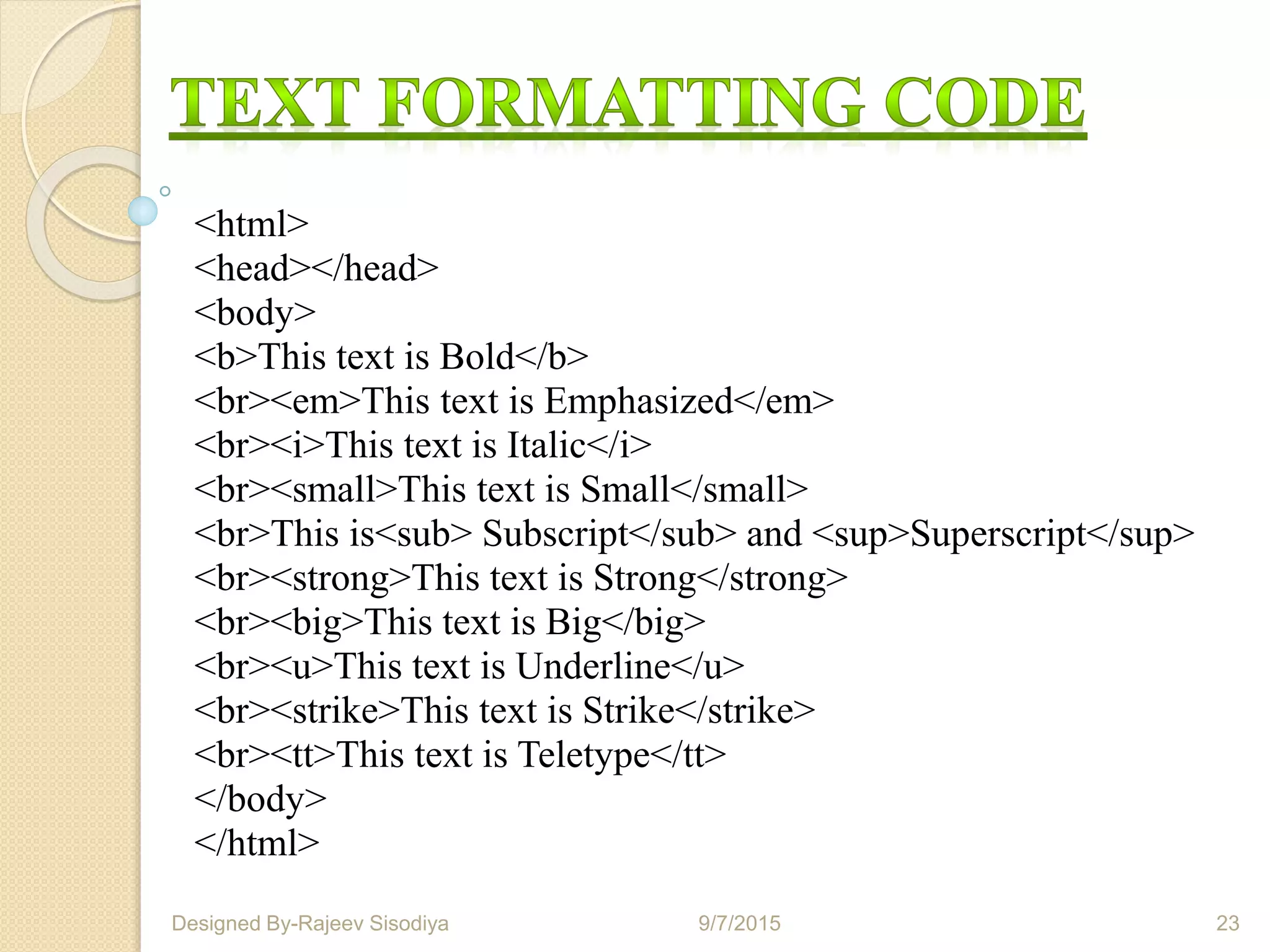
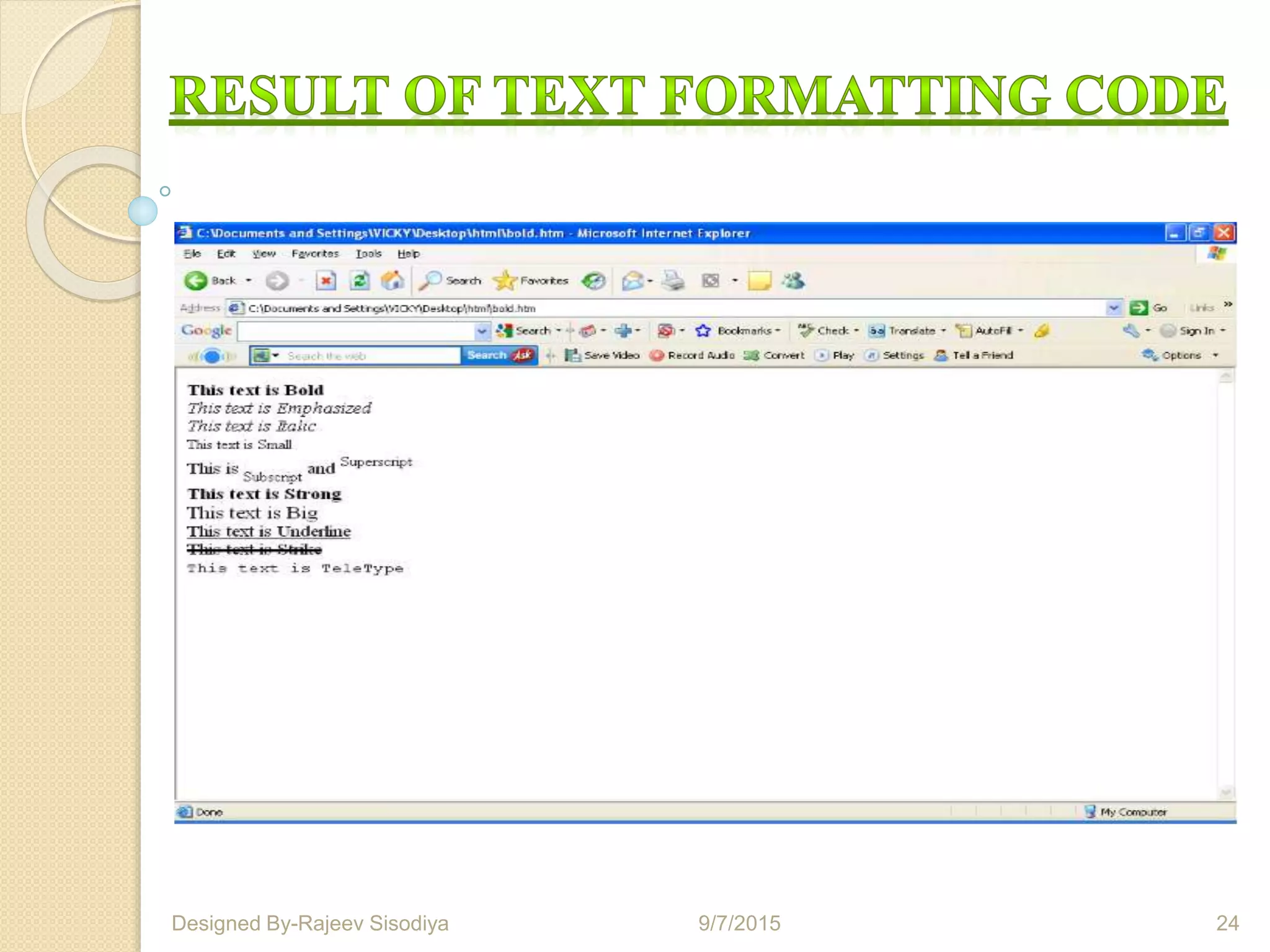
<html>
<head></head>
<body>
<b>This text is Bold</b>
<br><em>This text is Emphasized</em>
<br><i>This text is Italic</i>
<br><small>This text is Small</small>
<br>This is<sub> Subscript</sub> and <sup>Superscript</sup>
<br><strong>This text is Strong</strong>
<br><big>This text is Big</big>
<br><u>This text is Underline</u>
<br><strike>This text is Strike</strike>
<br><tt>This text is Teletype</tt>
</body>
</html>
9/7/2015 23Designed By-Rajeev Sisodiya
9/7/2015 24Designed By-Rajeev Sisodiya
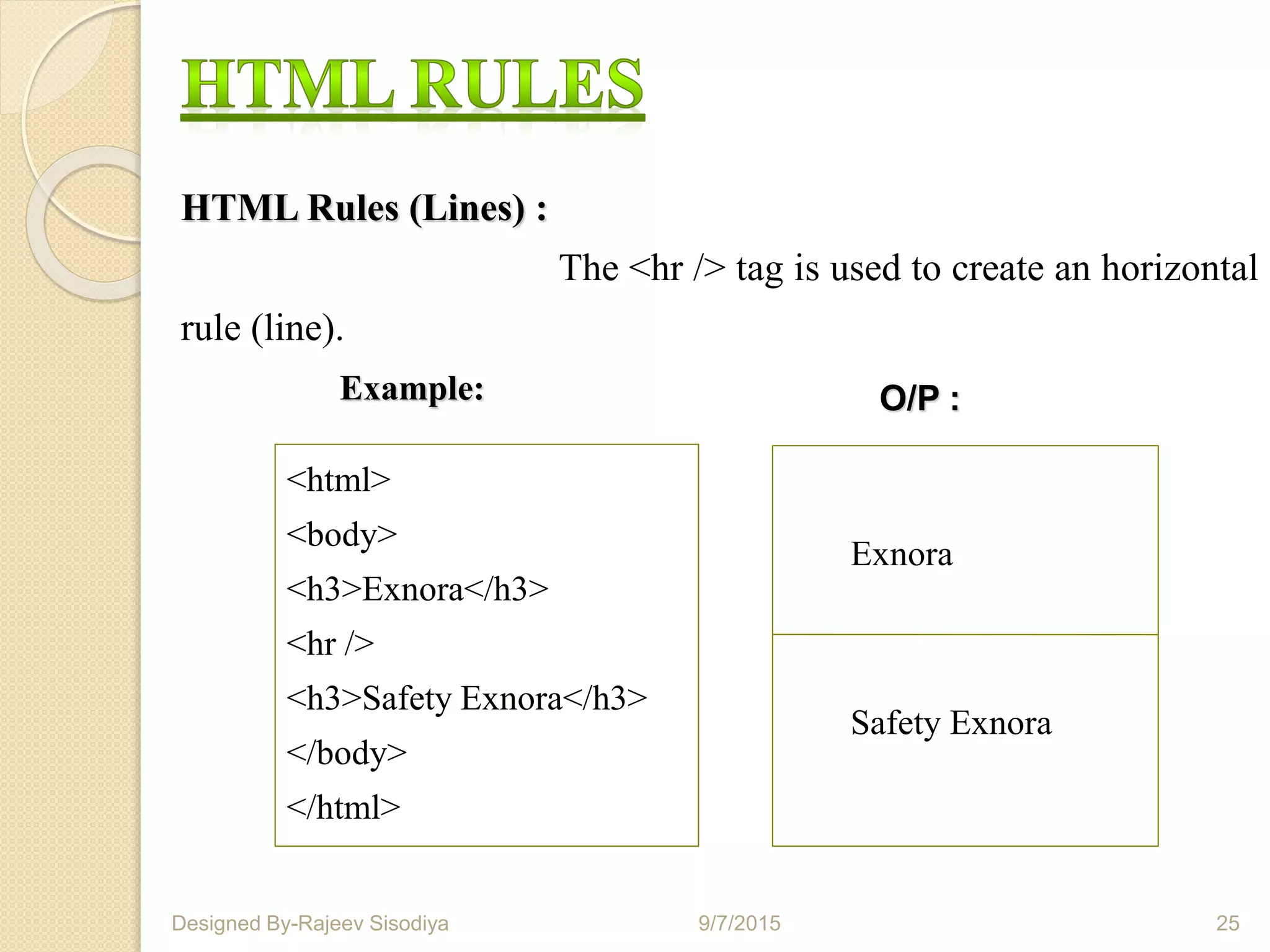
HTML Rules (Lines) :
The <hr /> tag is used to create an horizontal
rule (line).
<html>
<body>
<h3>Exnora</h3>
<hr />
<h3>Safety Exnora</h3>
</body>
</html>
O/P :
Exnora
Safety Exnora
9/7/2015 25Designed By-Rajeev Sisodiya
Example:
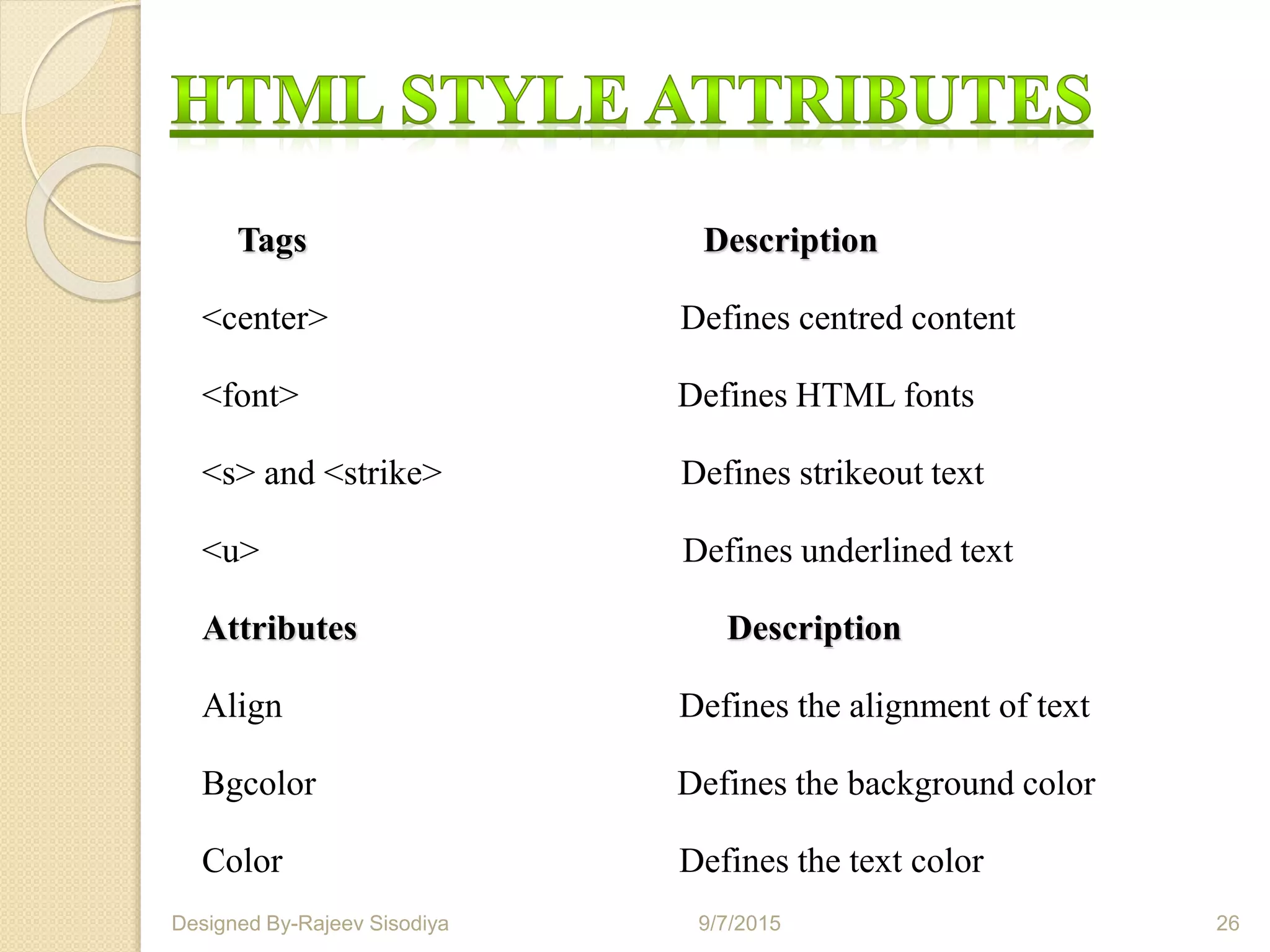
Tags Description
<center> Defines centred content
<font> Defines HTML fonts
<s> and <strike> Defines strikeout text
<u> Defines underlined text
Attributes Description
Align Defines the alignment of text
Bgcolor Defines the background color
Color Defines the text color
9/7/2015 26Designed By-Rajeev Sisodiya
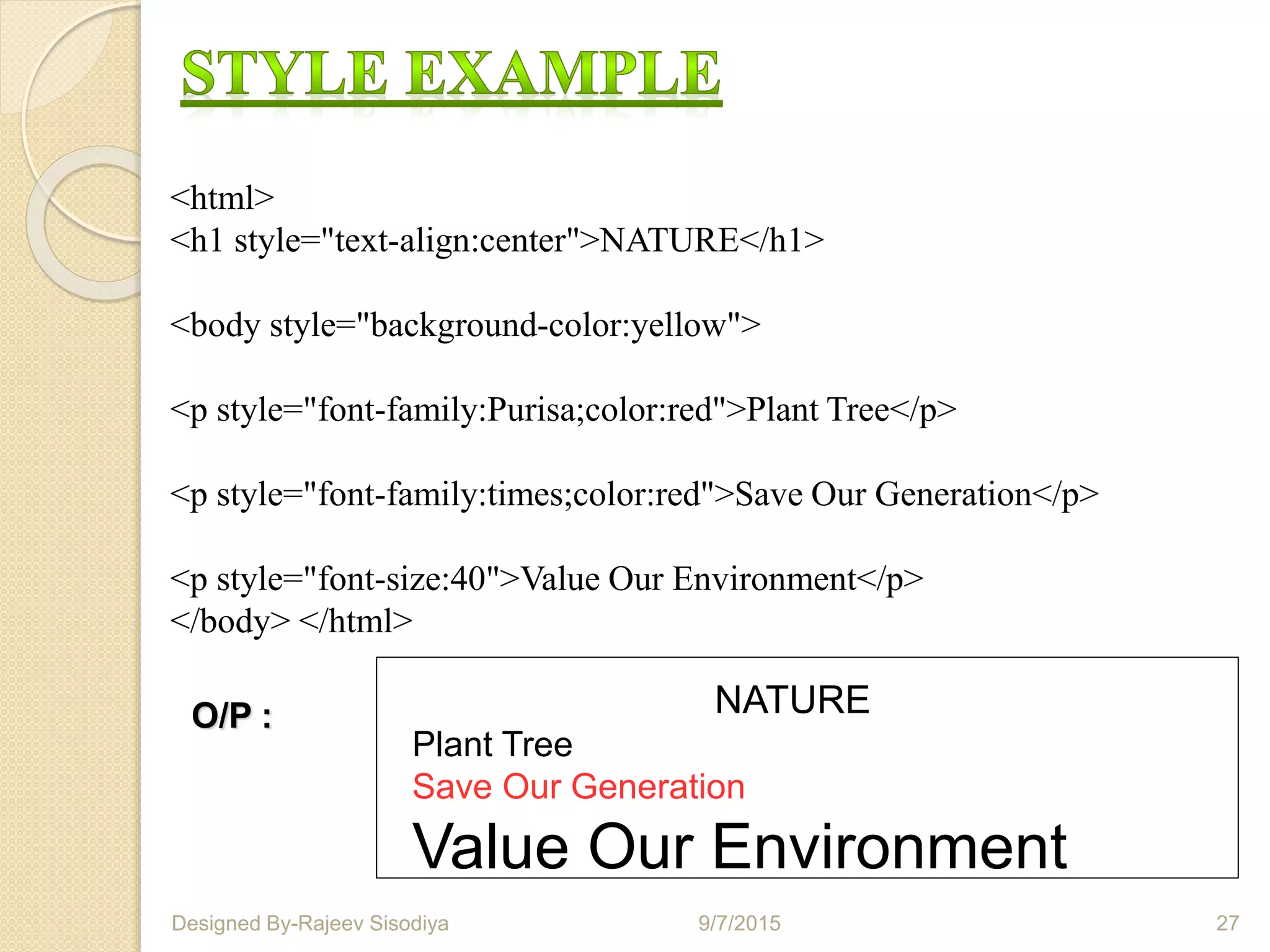
<html>
<h1 style="text-align:center">NATURE</h1>
<body style="background-color:yellow">
<p style="font-family:Purisa;color:red">Plant Tree</p>
<p style="font-family:times;color:red">Save Our Generation</p>
<p style="font-size:40">Value Our Environment</p>
</body> </html>
NATURE
Plant Tree
Save Our Generation
Value Our Environment
O/P :
9/7/2015 27Designed By-Rajeev Sisodiya
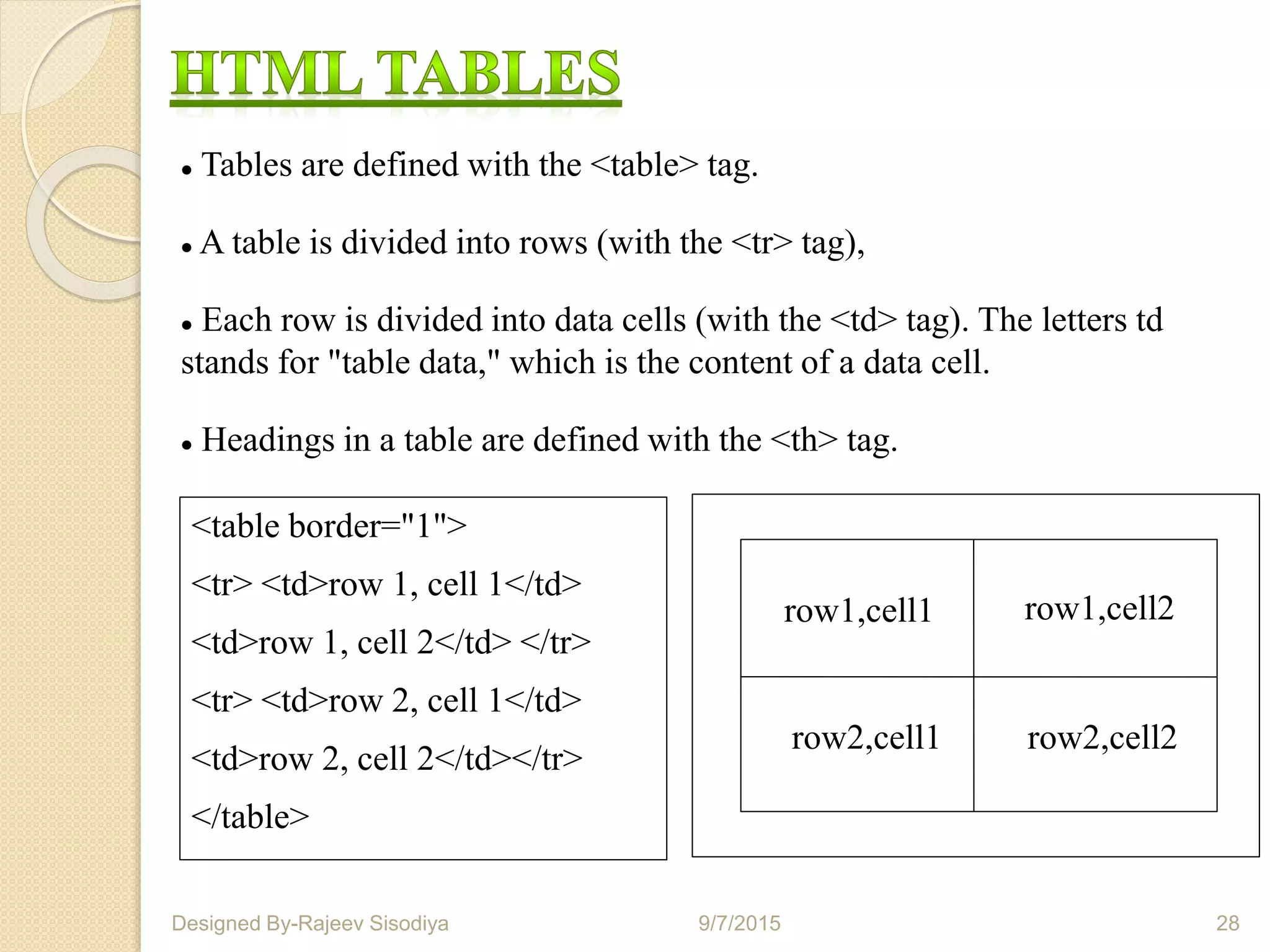
 Tables are defined with the <table> tag.
 A table is divided into rows (with the <tr> tag),
 Each row is divided into data cells (with the <td> tag). The letters td
stands for "table data," which is the content of a data cell.
 Headings in a table are defined with the <th> tag.
<table border="1">
<tr> <td>row 1, cell 1</td>
<td>row 1, cell 2</td> </tr>
<tr> <td>row 2, cell 1</td>
<td>row 2, cell 2</td></tr>
</table>
row1,cell1 row1,cell2
row2,cell1 row2,cell2
9/7/2015 28Designed By-Rajeev Sisodiya
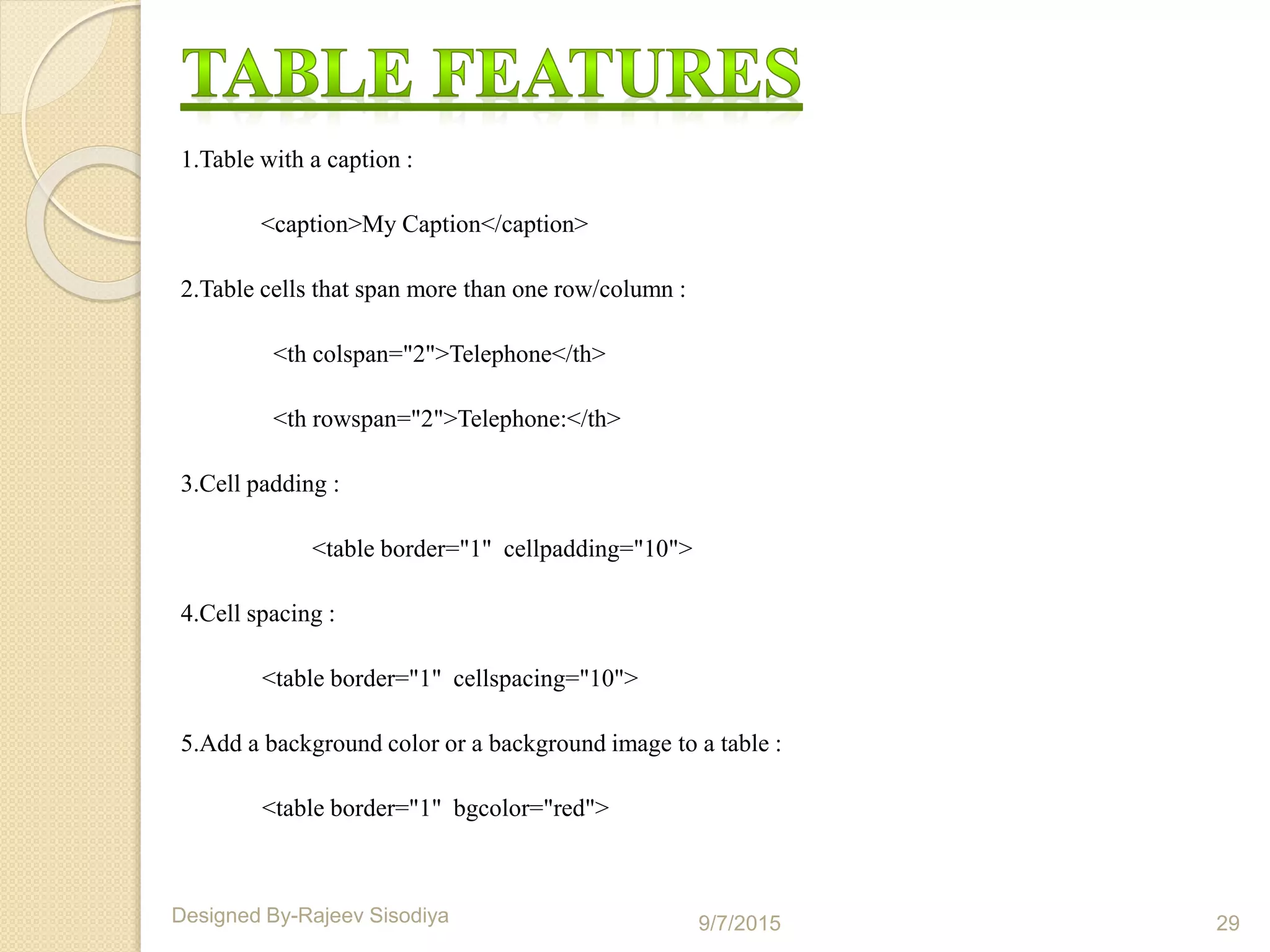
1.Table with a caption :
<caption>My Caption</caption>
2.Table cells that span more than one row/column :
<th colspan="2">Telephone</th>
<th rowspan="2">Telephone:</th>
3.Cell padding :
<table border="1" cellpadding="10">
4.Cell spacing :
<table border="1" cellspacing="10">
5.Add a background color or a background image to a table :
<table border="1" bgcolor="red">
9/7/2015 29Designed By-Rajeev Sisodiya
HTML Forms are used to select different kinds of user input.
A form is an area that can contain form elements.
Form elements are elements that allow the user to enter information like,
1. Text fields,
2. Text area fields,
3. Drop-down menus,
4.Radio buttons,
5. Checkboxes,
6. Action attribute and the submit button , etc.
9/7/2015 30Designed By-Rajeev Sisodiya
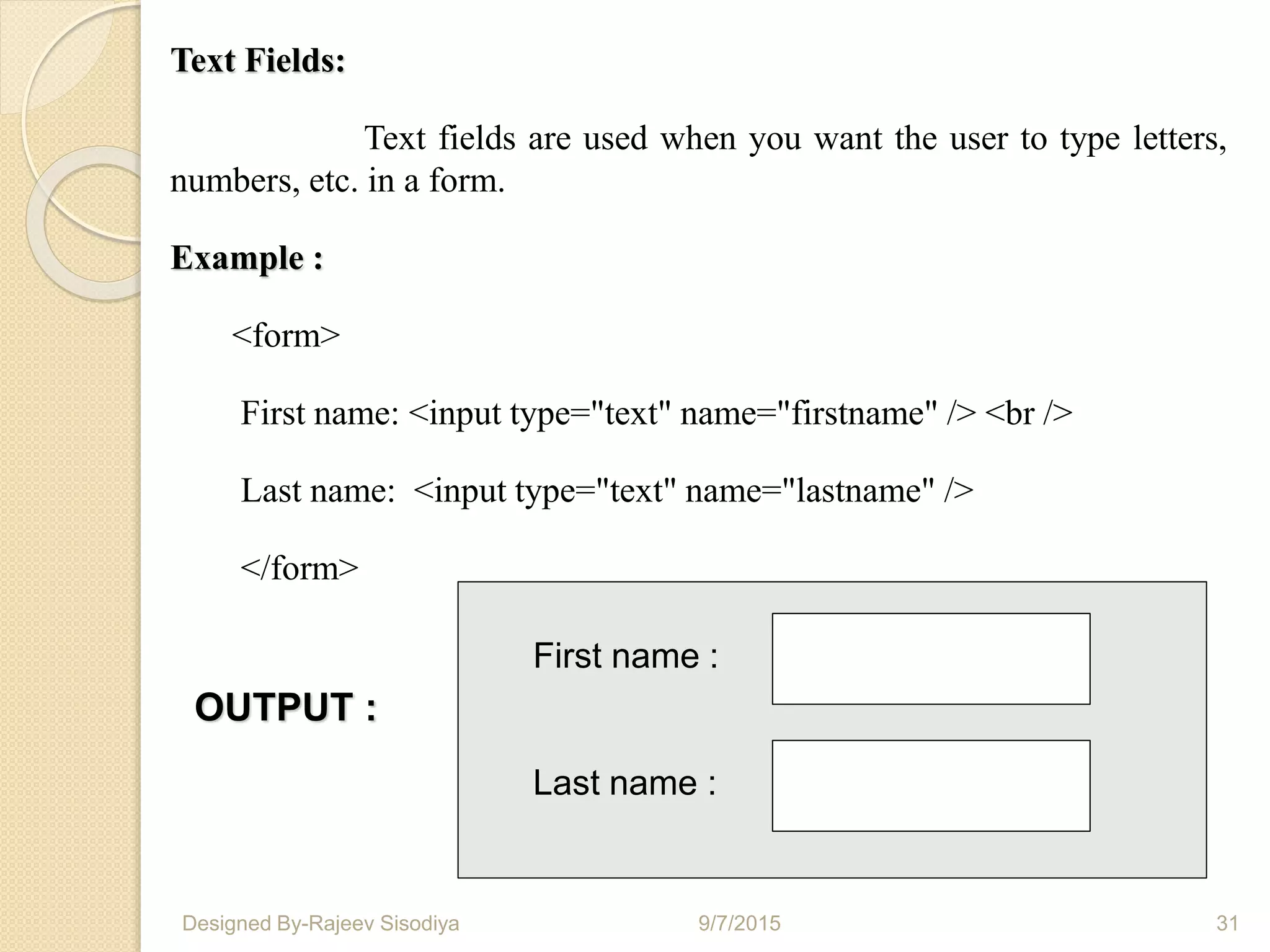
Text Fields:
Text fields are used when you want the user to type letters,
numbers, etc. in a form.
Example :
<form>
First name: <input type="text" name="firstname" /> <br />
Last name: <input type="text" name="lastname" />
</form>
First name :
Last name :
OUTPUT :
9/7/2015 31Designed By-Rajeev Sisodiya
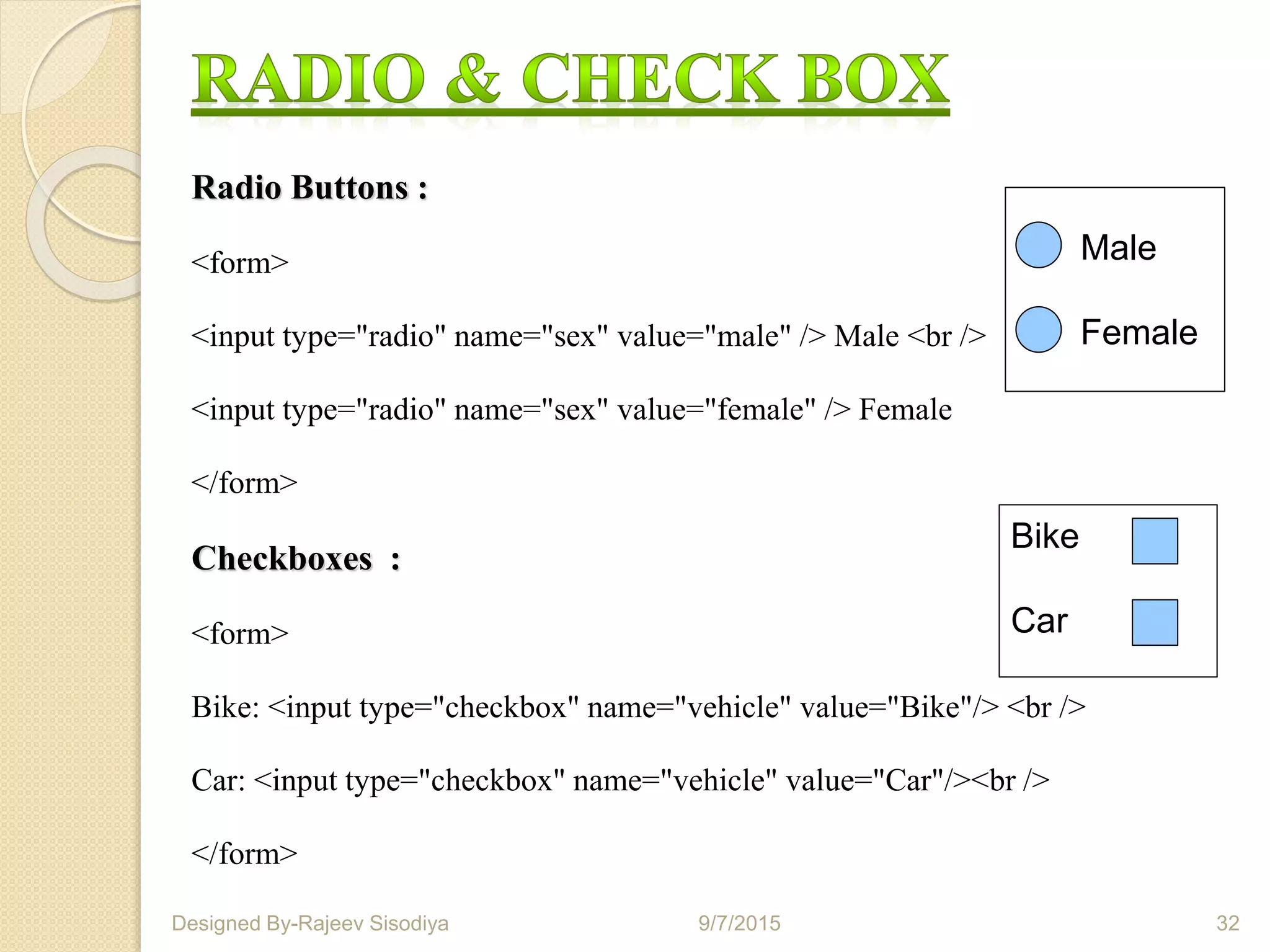
Radio Buttons :
<form>
<input type="radio" name="sex" value="male" /> Male <br />
<input type="radio" name="sex" value="female" /> Female
</form>
Checkboxes :
<form>
Bike: <input type="checkbox" name="vehicle" value="Bike"/> <br />
Car: <input type="checkbox" name="vehicle" value="Car"/><br />
</form>
Male
Female
Bike
Car
9/7/2015 32Designed By-Rajeev Sisodiya
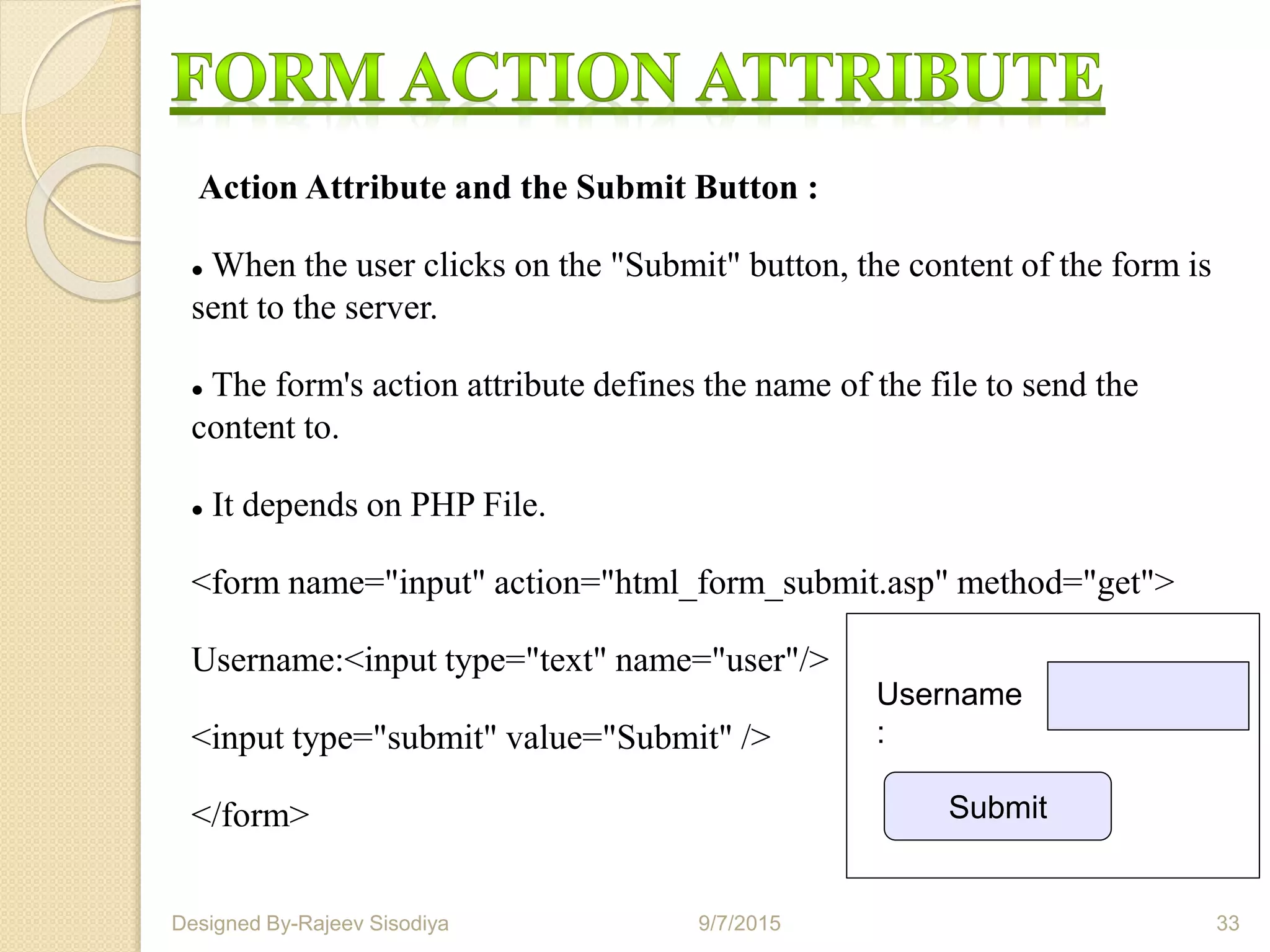
Action Attribute and the Submit Button :
 When the user clicks on the "Submit" button, the content of the form is
sent to the server.
 The form's action attribute defines the name of the file to send the
content to.
 It depends on PHP File.
<form name="input" action="html_form_submit.asp" method="get">
Username:<input type="text" name="user"/>
<input type="submit" value="Submit" />
</form> Submit
Username
:
9/7/2015 33Designed By-Rajeev Sisodiya
 Any text editor can be used to create HTML
documents.
 The most commonly used text editors are:
Notepad (Windows)
WordPad (Windows)
Simple text (Macintosh)
9/7/2015 34Designed By-Rajeev Sisodiya
 What You See is What You Get (WYSIWYG)
authoring tools provide graphical user interfaces
to simplify the creation of HTML documents.
 Examples of WYSIWYG authoring tools are:
 FrontPage by Microsoft
 Dreamweaver by Macromedia
 Page Mill by Adobe
 Netscape Composer
9/7/2015 35Designed By-Rajeev Sisodiya
HTML5 added several new input types:
•Color
•Date
•Datetime
•Datetime-local
•Email
•Month
•WeekNumber
•Range
•Search
•Tel
•Time
•Url
9/7/2015 36Designed By-Rajeev Sisodiya
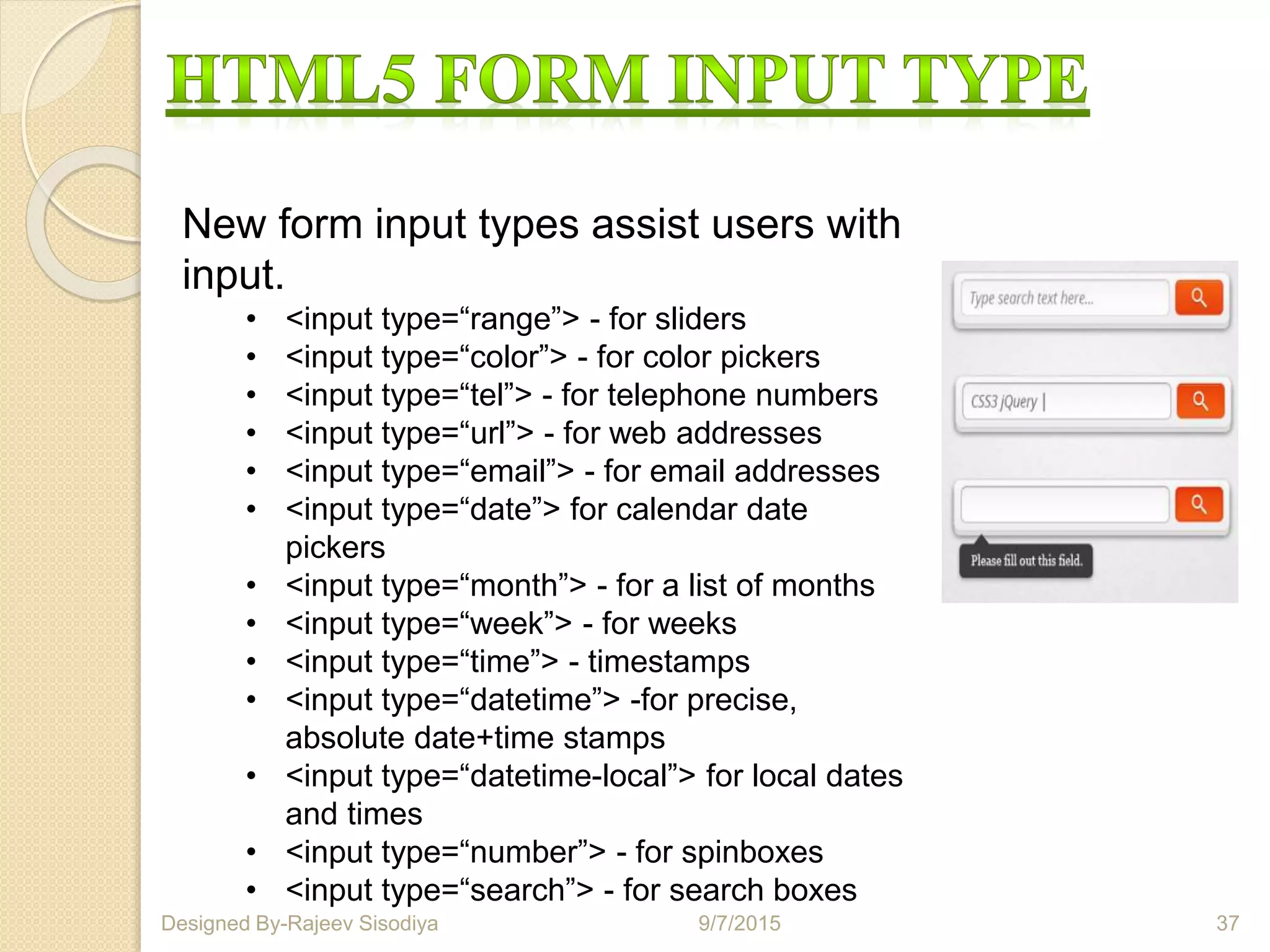
New form input types assist users with
input.
• <input type=“range”> - for sliders
• <input type=“color”> - for color pickers
• <input type=“tel”> - for telephone numbers
• <input type=“url”> - for web addresses
• <input type=“email”> - for email addresses
• <input type=“date”> for calendar date
pickers
• <input type=“month”> - for a list of months
• <input type=“week”> - for weeks
• <input type=“time”> - timestamps
• <input type=“datetime”> -for precise,
absolute date+time stamps
• <input type=“datetime-local”> for local dates
and times
• <input type=“number”> - for spinboxes
• <input type=“search”> - for search boxes
9/7/2015 37Designed By-Rajeev Sisodiya
It is possible to include comments in a source HTML
document that do not appear when seen through a browser.
This is most useful for giving warnings and special
instructions to future editors of your document.
Comments take the form:
<!-----This comment will not appear in the browser----->
 http://www.w3.org
http://html5doctor.com
 http://html5demos.com
 https://developer.mozilla.org
 http://blogs.msdn.com/b/dorischen
 http://www.html5rocks.com
 http://www.w3schools.com
•http://diveintohtml5.info
9/7/2015 39Designed By-Rajeev Sisodiya
Presentation created
by Rajeev Kumar
9/7/2015 40Designed By-Rajeev Sisodiya
Htmlppt

Htmlppt

  • 1.
    H T ML 5 O V E RV I E W BY RAJEEV KUMAR 9/7/2015 1Designed By-Rajeev Sisodiya
  • 2.
    HTML5 Enhancing websites forthe people. 9/7/2015 2Designed By-Rajeev Sisodiya
  • 3.
    • With HTMLyou can create your own Web site. • HTML stands for Hyper Text Markup Language. • HTML is derived from a language SGML (Standard Graphics Markup Language). • The future of HTML is XML (extended Markup Language). • HTML is not a programming language, it is a Markup Language. • A markup language is a set of markup tags. • HTML uses markup tags to describe web pages. • HTML is not case sensitive language. • HTML documents contain HTML tags and plain text. 9/7/2015 3Designed By-Rajeev Sisodiya
  • 4.
     The WebHypertext Application Technology Working Group (WHATWG) began work on the new standard in 2004, when the World Wide Web Consortium (W3C) was focusing future developments on XHTML 2.0, and HTML 4.01 had not been updated since 2000.  W3C and WHATWG are currently working together on the development of HTML5. Besides representatives from Mozilla, Opera, Apple, Microsoft and Google.  Expected completion would be in 2022. 9/7/2015 4Designed By-Rajeev Sisodiya
  • 5.
     Audio andVideo Playback without any Plug-in With HTML5 you can stream audio and video without no need of third party plug-in such as flash.  Code Maintenance In HTML5 we have new structural elements instead of traditional div tags to create page template, the final result will be a cleaner and more organized code.  Local Data Storage HTML5 allows to store data locally from client side. The data can be accessed to support the web application and it can even be accessed when the client is disconnected for a short period of time. There are methodologies for storing data: session storage, local storage and database storage.  Great for Mobile Devices HTML5 could be the solution to faster applications that will be accessible universally across all mobile phones.  New form types and elements will help you certify that the information entered online is completely accurate. There won’t be any need to run additional scripts for checking validation. This speeds up the loading time and the user experience will be enhanced. 9/7/2015 5Designed By-Rajeev Sisodiya
  • 6.
    There are twodifferent types of tags:-> Container Element:-> Container Tags contains start tag & end tag i.e. <HTML>… </HTML> Empty Element:-> Empty Tags contains start tag i.e. <BR> 9/7/2015 6Designed By-Rajeev Sisodiya Container Empty
  • 7.
    BOLD FACE ANDITALICS LIST BLOCKQUOTE CENTER PREFORMATED TEXT SPECIAL FEATURES THE HTML TAG THE HEAD TAG TITLES THE BODY TAG HEADERS PARAGRAPHS
  • 8.
  • 9.
     <html> ....</html> describes the web page  <body> ..... </body> is the visible page content <html> <body> <h1>First Planet</h1> <h6>First Planet</h6> </body> </html>11 O/P : 9/7/2015 9Designed By-Rajeev Sisodiya First Planet First Planet
  • 10.
    <HTML> TAG: Tags arecontained in < > symbols. In most cases you start with the beginning tag, put in the word or words that will be affected by this tag, and at the end of the string of word(s), you place a closing tag. The <html>tag is usually placed on the first line of your document. At the end of your document you should close with the </html> tag. The <html> tag signals the point where text should start being interpreted as HTML code.
  • 11.
    9/7/2015 Designed By-RajeevSisodiya 11 <div> Defines section in documents <dir> Defines directory lists <head> Defines information about the document <footer> Defines a footer for a document or section <form> Defines an HTML form for user input <img> Defines an image <input> Defines an input control <li> Defines a list item <ins> Defines inserted text <mark> Defines high lighted document
  • 12.
    Just like theheader of a memo, the head of an HTML document contains special information, like its title. The head of a document is demarcated by <head> and </head> respectively. <html> <head> <title>My First HTML Document</title> </head> </html
  • 13.
    A title tagallows you to specify a Document Title in your browser window. When people make hotlists, this title is what they see in their list after they add your document. The format is: <title>My First HTML Document</title> Remember, the title usually doesn't appear in the document itself, but in a title box or bar at the top of the window.
  • 14.
    Like you mightexpect, the body tags <body> and </body> define the beginning and end of the bulk of your document. All your text, images, and links will be in the body of the document. The body should start after the head. A typical page might begin like <html> <head> <title>My First HTML Document</title> </head> <body> </html>
  • 15.
    <html> <head><title>heading</title></head> <body> <h1> GLOBAL INFOCHANNEL</h1> <h2> GLOBAL INFO CHANNEL</h2> <h3> GLOBAL INFO CHANNEL</h3> <h4> GLOBAL INFO CHANNEL</h4> <h5> GLOBAL INFO CHANNEL</h5> <h6> GLOBAL INFO CHANNEL</h6> </body> </html> 9/7/2015 15Designed By-Rajeev Sisodiya
  • 16.
  • 17.
    There is aneasy way in HTML to have numbered, unnumbered, and definition lists. In addition, you can nest lists within lists. When using lists, you have no control over the amount of space between the bullet or list number, HTML automatically does this for you. Neither (as yet) do you have control over what type of bullet will be used as each browser is different.
  • 18.
    Unnumbered lists arestarted with the <ul> tag, followed by the actual list items, which are marked with the <li> tag. The list is ended with the ending tag </ul>. For example, here is an unnumbered list with three items: <ul> <li> list item 1 <li> list item 2 <li> list item 3 </ul>
  • 19.
    Here is thesame list using a numbered list format: <ol> <li> list item 1 <li> list item 2 <li> list item 3 </ol>
  • 20.
    Definition lists allowyou to indent without necessarily having to use bullets. <dl> <dt> This is a term <dd> This is a definition <dd> And yet another definition <dt> Another term <dd> Another definition </dl>
  • 21.
    HTML Images : HTMLimages are defined with the <img> tag. Syntax : <img src "123.jpg" width="104" height="142" /> Example : <html> <body> <img src="word.jpg" width="104" height="142" /> </body> </html> O/P: 9/7/2015 21Designed By-Rajeev Sisodiya
  • 22.
    9/7/2015 22Designed By-RajeevSisodiya <b> Defines bold text <big> Defines big text <em> Defines emphasized text <i> Defines italic text <small> Defines small text <strong> Defines strong text <sub> Defines subscripted text <super> Defines superscripted text <ins> Defines inserted text <del> Defines deleted text
  • 23.
    <html> <head></head> <body> <b>This text isBold</b> <br><em>This text is Emphasized</em> <br><i>This text is Italic</i> <br><small>This text is Small</small> <br>This is<sub> Subscript</sub> and <sup>Superscript</sup> <br><strong>This text is Strong</strong> <br><big>This text is Big</big> <br><u>This text is Underline</u> <br><strike>This text is Strike</strike> <br><tt>This text is Teletype</tt> </body> </html> 9/7/2015 23Designed By-Rajeev Sisodiya
  • 24.
  • 25.
    HTML Rules (Lines): The <hr /> tag is used to create an horizontal rule (line). <html> <body> <h3>Exnora</h3> <hr /> <h3>Safety Exnora</h3> </body> </html> O/P : Exnora Safety Exnora 9/7/2015 25Designed By-Rajeev Sisodiya Example:
  • 26.
    Tags Description <center> Definescentred content <font> Defines HTML fonts <s> and <strike> Defines strikeout text <u> Defines underlined text Attributes Description Align Defines the alignment of text Bgcolor Defines the background color Color Defines the text color 9/7/2015 26Designed By-Rajeev Sisodiya
  • 27.
    <html> <h1 style="text-align:center">NATURE</h1> <body style="background-color:yellow"> <pstyle="font-family:Purisa;color:red">Plant Tree</p> <p style="font-family:times;color:red">Save Our Generation</p> <p style="font-size:40">Value Our Environment</p> </body> </html> NATURE Plant Tree Save Our Generation Value Our Environment O/P : 9/7/2015 27Designed By-Rajeev Sisodiya
  • 28.
     Tables aredefined with the <table> tag.  A table is divided into rows (with the <tr> tag),  Each row is divided into data cells (with the <td> tag). The letters td stands for "table data," which is the content of a data cell.  Headings in a table are defined with the <th> tag. <table border="1"> <tr> <td>row 1, cell 1</td> <td>row 1, cell 2</td> </tr> <tr> <td>row 2, cell 1</td> <td>row 2, cell 2</td></tr> </table> row1,cell1 row1,cell2 row2,cell1 row2,cell2 9/7/2015 28Designed By-Rajeev Sisodiya
  • 29.
    1.Table with acaption : <caption>My Caption</caption> 2.Table cells that span more than one row/column : <th colspan="2">Telephone</th> <th rowspan="2">Telephone:</th> 3.Cell padding : <table border="1" cellpadding="10"> 4.Cell spacing : <table border="1" cellspacing="10"> 5.Add a background color or a background image to a table : <table border="1" bgcolor="red"> 9/7/2015 29Designed By-Rajeev Sisodiya
  • 30.
    HTML Forms areused to select different kinds of user input. A form is an area that can contain form elements. Form elements are elements that allow the user to enter information like, 1. Text fields, 2. Text area fields, 3. Drop-down menus, 4.Radio buttons, 5. Checkboxes, 6. Action attribute and the submit button , etc. 9/7/2015 30Designed By-Rajeev Sisodiya
  • 31.
    Text Fields: Text fieldsare used when you want the user to type letters, numbers, etc. in a form. Example : <form> First name: <input type="text" name="firstname" /> <br /> Last name: <input type="text" name="lastname" /> </form> First name : Last name : OUTPUT : 9/7/2015 31Designed By-Rajeev Sisodiya
  • 32.
    Radio Buttons : <form> <inputtype="radio" name="sex" value="male" /> Male <br /> <input type="radio" name="sex" value="female" /> Female </form> Checkboxes : <form> Bike: <input type="checkbox" name="vehicle" value="Bike"/> <br /> Car: <input type="checkbox" name="vehicle" value="Car"/><br /> </form> Male Female Bike Car 9/7/2015 32Designed By-Rajeev Sisodiya
  • 33.
    Action Attribute andthe Submit Button :  When the user clicks on the "Submit" button, the content of the form is sent to the server.  The form's action attribute defines the name of the file to send the content to.  It depends on PHP File. <form name="input" action="html_form_submit.asp" method="get"> Username:<input type="text" name="user"/> <input type="submit" value="Submit" /> </form> Submit Username : 9/7/2015 33Designed By-Rajeev Sisodiya
  • 34.
     Any texteditor can be used to create HTML documents.  The most commonly used text editors are: Notepad (Windows) WordPad (Windows) Simple text (Macintosh) 9/7/2015 34Designed By-Rajeev Sisodiya
  • 35.
     What YouSee is What You Get (WYSIWYG) authoring tools provide graphical user interfaces to simplify the creation of HTML documents.  Examples of WYSIWYG authoring tools are:  FrontPage by Microsoft  Dreamweaver by Macromedia  Page Mill by Adobe  Netscape Composer 9/7/2015 35Designed By-Rajeev Sisodiya
  • 36.
    HTML5 added severalnew input types: •Color •Date •Datetime •Datetime-local •Email •Month •WeekNumber •Range •Search •Tel •Time •Url 9/7/2015 36Designed By-Rajeev Sisodiya
  • 37.
    New form inputtypes assist users with input. • <input type=“range”> - for sliders • <input type=“color”> - for color pickers • <input type=“tel”> - for telephone numbers • <input type=“url”> - for web addresses • <input type=“email”> - for email addresses • <input type=“date”> for calendar date pickers • <input type=“month”> - for a list of months • <input type=“week”> - for weeks • <input type=“time”> - timestamps • <input type=“datetime”> -for precise, absolute date+time stamps • <input type=“datetime-local”> for local dates and times • <input type=“number”> - for spinboxes • <input type=“search”> - for search boxes 9/7/2015 37Designed By-Rajeev Sisodiya
  • 38.
    It is possibleto include comments in a source HTML document that do not appear when seen through a browser. This is most useful for giving warnings and special instructions to future editors of your document. Comments take the form: <!-----This comment will not appear in the browser----->
  • 39.
     http://www.w3.org http://html5doctor.com  http://html5demos.com https://developer.mozilla.org  http://blogs.msdn.com/b/dorischen  http://www.html5rocks.com  http://www.w3schools.com •http://diveintohtml5.info 9/7/2015 39Designed By-Rajeev Sisodiya
  • 40.
    Presentation created by RajeevKumar 9/7/2015 40Designed By-Rajeev Sisodiya