SharePoint Online:
Reviewing the State of the Union

           March 21, 2012
Who are we?

» Adam Levithan                                               » Jill Hannemann

  – Senior Consultant at Portal                                     – Director of Advisory Services at
    Solutions                                                         Portal Solutions
  – SharePoint Areas of Interest: OOTB                              – SharePoint Areas of Interest:
    Site Templates, Project Timeline,                                 Term Store, Product Catalog,
    InfoPath List Forms, Communities,                                 Records Center, Metadata
    and Social Engagement                                             Navigation, and e-Discovery
                                                                      with Exchange
  – Most Watched TV Show:
    Peppa Pig                                                       – Favorite Vacation Destination:
                                                                      Italy


            © 2011 All rights reserved.   www.portalsolutions.net                      2
About Portal Solutions

200+                                     10+
SharePoint                               Years in
Implementations                          Business


4
Practice Areas (Advisory/Design,
Implementation, Managed, Govt Serv.)


                                                                   Our customers are organizations
3                                 2                                     that need to improve
Times selected for                Locations – DC &
SP Early Adopter                  Boston
                                                                    performance through effective
Program                                                                  information sharing.
                                                                          Portalsolutions.net

           © 2011 All rights reserved.          www.portalsolutions.net                   3
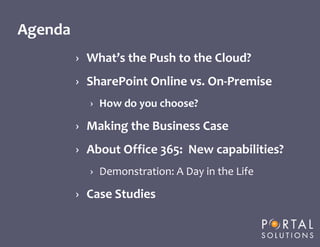
Agenda
         › What’s the Push to the Cloud?
         › SharePoint Online vs. On-Premise
                   › How do you choose?

         › Making the Business Case
         › About Office 365: New capabilities?
                   › Demonstration: A Day in the Life

         › Case Studies


     © 2011 All rights reserved.   www.portalsolutions.net   4
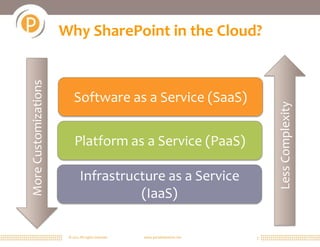
More Customizations   Why SharePoint in the Cloud?


                          Software as a Service (SaaS)


                                                                                   Less Complexity
                          Platform as a Service (PaaS)

                              Infrastructure as a Service
                                        (IaaS)

                       © 2011 All rights reserved.   www.portalsolutions.net   5
Push to the Cloud

» Cloud enables on-demand computing resources
  to be rapidly provisioned with minimal
  management effort.
» Microsoft shift to service-based organization
  – Cloud First
  – Yammer Acquisition


“SharePoint as we know it, is 10 years old.”

        © 2011 All rights reserved.   www.portalsolutions.net   6
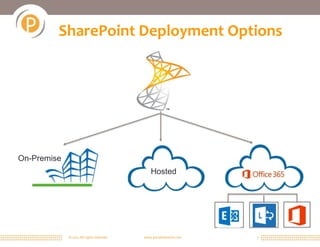
SharePoint Deployment Options


On-Premise
                                               Hosted


             © 2011 All rights reserved.   www.portalsolutions.net   7
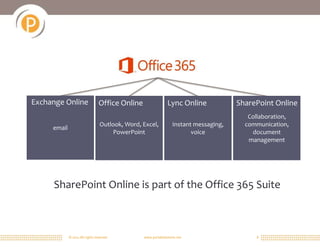
Exchange Online                  Office Online                 Lync Online             SharePoint Online
                                                                                          Collaboration,
                                  Outlook, Word, Excel,           Instant messaging,     communication,
     email
                                       PowerPoint                        voice             document
                                                                                          management


     SharePoint Online is part of the Office 365 Suite


             © 2011 All rights reserved.         www.portalsolutions.net                     8
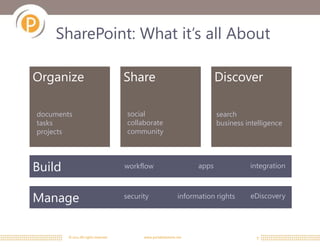
SharePoint: What it’s all About

Organize                              Share                                  Discover

documents                              social                                search
tasks                                  collaborate                           business intelligence
projects                               community


Build                                 workflow                        apps             integration


Manage                                security                  information rights     eDiscovery


        © 2011 All rights reserved.         www.portalsolutions.net                      9
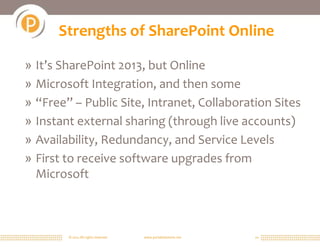
Strengths of SharePoint Online

» It’s SharePoint 2013, but Online
» Microsoft Integration, and then some
» “Free” – Public Site, Intranet, Collaboration Sites
» Instant external sharing (through live accounts)
» Availability, Redundancy, and Service Levels
» First to receive software upgrades from
  Microsoft


        © 2011 All rights reserved.   www.portalsolutions.net   10
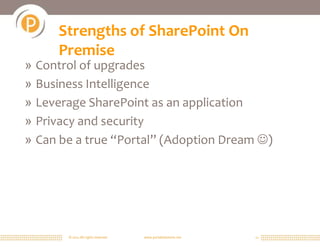
Strengths of SharePoint On
     Premise
» Control of upgrades
» Business Intelligence
» Leverage SharePoint as an application
» Privacy and security
» Can be a true “Portal” (Adoption Dream )


       © 2011 All rights reserved.   www.portalsolutions.net   11
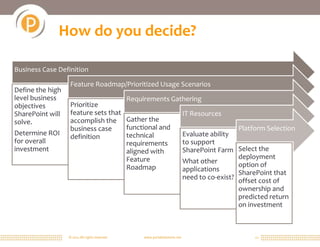
How do you decide?

Business Case Definition

                   Feature Roadmap/Prioritized Usage Scenarios
Define the high
level business                                  Requirements Gathering
objectives         Prioritize
SharePoint will    feature sets that                                           IT Resources
solve.             accomplish the Gather the
                   business case     functional and                                             Platform Selection
Determine ROI      definition        technical                                 Evaluate ability
for overall                          requirements                              to support
investment                           aligned with                              SharePoint Farm Select the
                                     Feature                                                     deployment
                                                                               What other        option of
                                     Roadmap                                   applications      SharePoint that
                                                                               need to co-exist? offset cost of
                                                                                                 ownership and
                                                                                                 predicted return
                                                                                                 on investment


                  © 2011 All rights reserved.        www.portalsolutions.net                          12
Considerations for the Decision

» Who Drives this initiative: IT or Business?
  – Budget? Who is sponsoring the initiative?
» Who has sign off on decisions for IT
  infrastructure vs. business solution?
» Security tolerance and standards?
» Resourcing availability?
» IT infrastructure make up
» Measuring ROI and adoption? Who measures
  success

        © 2011 All rights reserved.   www.portalsolutions.net   13
Total Cost of Ownership Options

» On Premise
» Cloud Hosting
» Office 365


       © 2011 All rights reserved.   www.portalsolutions.net   14
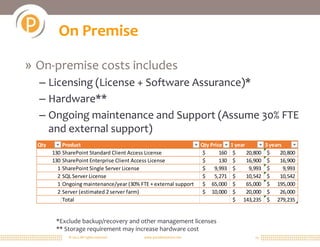
On Premise

» On-premise costs includes
  – Licensing (License + Software Assurance)*
  – Hardware**
  – Ongoing maintenance and Support (Assume 30% FTE
    and external support)
  Qty       Product                                                   Qty Price     1 year          3 years
        130 SharePoint Standard Client Access License                  $      160    $     20,800    $    20,800
        130 SharePoint Enterprise Client Access License                $      130    $     16,900    $    16,900
          1 SharePoint Single Server License                           $    9,993    $      9,993    $      9,993
          2 SQL Server License                                         $    5,271    $     10,542    $    10,542
          1 Ongoing maintenance/year (30% FTE + external support       $ 65,000      $     65,000    $ 195,000
          2 Server (estimated 2 server farm)                           $ 10,000      $     20,000    $    26,000
            Total                                                                    $ 143,235       $ 279,235


         *Exclude backup/recovery and other management licenses
         ** Storage requirement may increase hardware cost
              © 2011 All rights reserved.   www.portalsolutions.net                           15
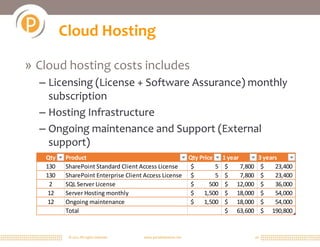
Cloud Hosting

» Cloud hosting costs includes
  – Licensing (License + Software Assurance) monthly
    subscription
  – Hosting Infrastructure
  – Ongoing maintenance and Support (External
    support)
   Qty   Product                                                  Qty Price     1 year          3 years
   130   SharePoint Standard Client Access License                 $        5    $     7,800     $    23,400
   130   SharePoint Enterprise Client Access License               $        5    $     7,800     $    23,400
    2    SQL Server License                                        $      500    $ 12,000        $    36,000
    12   Server Hosting monthly                                    $    1,500    $ 18,000        $    54,000
    12   Ongoing maintenance                                       $    1,500    $ 18,000        $    54,000
         Total                                                                   $ 63,600        $ 190,800


          © 2011 All rights reserved.   www.portalsolutions.net                                16
SharePoint Online (O365)

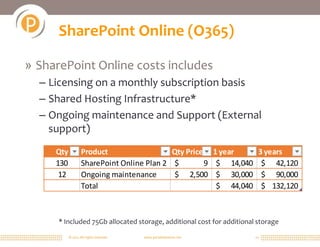
» SharePoint Online costs includes
  – Licensing on a monthly subscription basis
  – Shared Hosting Infrastructure*
  – Ongoing maintenance and Support (External
    support)
     Qty           Product                  Qty Price 1 year            3 years
     130           SharePoint Online Plan 2 $        9 $ 14,040          $ 42,120
      12           Ongoing maintenance      $ 2,500 $ 30,000             $ 90,000
                   Total                               $ 44,040          $ 132,120


      * Included 75Gb allocated storage, additional cost for additional storage

           © 2011 All rights reserved.   www.portalsolutions.net       17
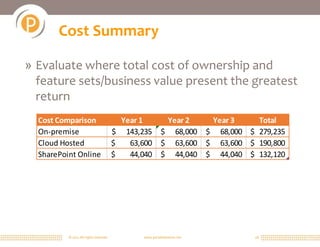
Cost Summary

» Evaluate where total cost of ownership and
  feature sets/business value present the greatest
  return
  Cost Comparison                         Year 1           Year 2          Year 3    Total
  On-premise                            $ 143,235         $ 68,000        $ 68,000 $ 279,235
  Cloud Hosted                          $   63,600        $ 63,600        $ 63,600 $ 190,800
  SharePoint Online                     $   44,040        $ 44,040        $ 44,040 $ 132,120


          © 2011 All rights reserved.           www.portalsolutions.net              18
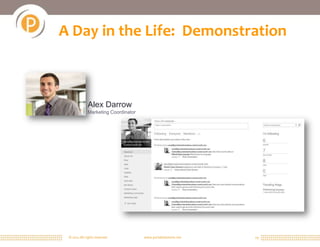
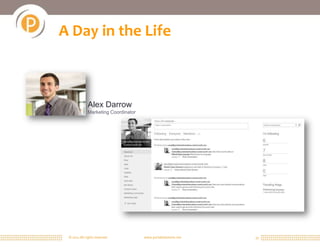
A Day in the Life: Demonstration


              Alex Darrow
              Marketing Coordinator


 © 2011 All rights reserved.          www.portalsolutions.net   19
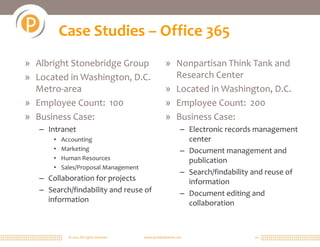
Case Studies – Office 365
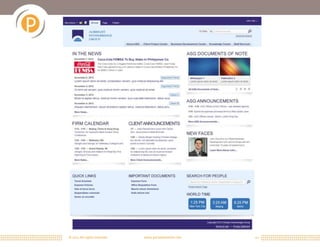
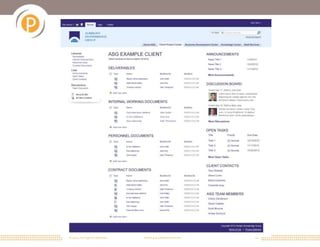
» Albright Stonebridge Group                            » Nonpartisan Think Tank and
» Located in Washington, D.C.                             Research Center
  Metro-area                                            » Located in Washington, D.C.
» Employee Count: 100                                   » Employee Count: 200
» Business Case:                                        » Business Case:
   – Intranet                                                    – Electronic records management
       •   Accounting                                              center
       •   Marketing                                             – Document management and
       •   Human Resources                                         publication
       •   Sales/Proposal Management
                                                                 – Search/findability and reuse of
   – Collaboration for projects                                    information
   – Search/findability and reuse of                             – Document editing and
     information                                                   collaboration


             © 2011 All rights reserved.   www.portalsolutions.net                   20
© 2011 All rights reserved.   www.portalsolutions.net   21
© 2011 All rights reserved.   www.portalsolutions.net   22
Case Study – On Premise
» The Nature Conservancy
» 2012 Digital PR Awards: #1 Intranet
» Headquarters in Washington, D.C. Metro-area, 40 Offices
  World-Wide
» Employee Count: 5000
» Business Case:
   – International Social Intranet
        • Finding & Connecting with People
   –   Knowledge Management
   –   Customized Project Management
   –   Department Collaboration
   –   Integration with External Systems
        • Human Resources
        • Financial

            © 2011 All rights reserved.   www.portalsolutions.net   23
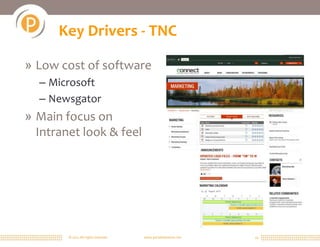
Key Drivers - TNC

» Low cost of software
  – Microsoft
  – Newsgator
» Main focus on
  Intranet look & feel


        © 2011 All rights reserved.   www.portalsolutions.net   24
Case Study – Hybrid Deployment

» Legal, Regulatory, and Business Publishing
» Located in Washington, D.C. Metro-area
» Employee Count: 1500
» Business Case:
  – Document Management
  – Search/findability
  – Department Collaboration
  – Business intelligence and key performance indicators
  – Internal applications and electronic workflow
    processes
        © 2011 All rights reserved.   www.portalsolutions.net   25
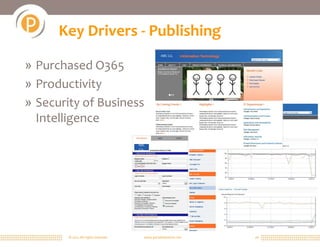
Key Drivers - Publishing
                                                  ABC Co.


» Purchased O365
» Productivity
» Security of Business                                            ABC
                                                                  Co.

  Intelligence
                                      ABC
                                      Co.


        © 2011 All rights reserved.     www.portalsolutions.net         26
What does moving to Office 365 mean?

» Deployment
  – Initial deploy is still required to migrate data to Office 365
  – AD clean up and network upgrade is often required
  – Hybrid phasing is often prolonged period of discomfort
» Service Change
  – Balance between continuous innovations and minimize
    change
  – Control IT policies but not feature availability
» Privacy and Security Considerations
  – Understand your internal security and privacy requirements


         © 2011 All rights reserved.   www.portalsolutions.net   27
Questions


» Contact Us
  – Jill Hannemann
    • jhannemann@portalsolutions.net
    • @jilltabuchi
  – Adam Levithan
    • alevithan@portalsolutions.net
    • @collabadam

       © 2011 All rights reserved.   www.portalsolutions.net   28
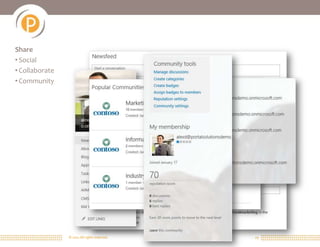
Share
• Social
• Collaborate
• Community


                © 2011 All rights reserved.   www.portalsolutions.net   29
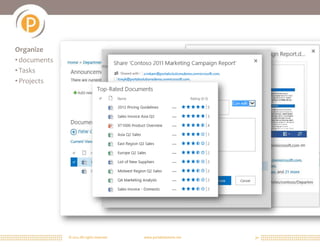
Organize
• documents
• Tasks
• Projects


              © 2011 All rights reserved.   www.portalsolutions.net   30
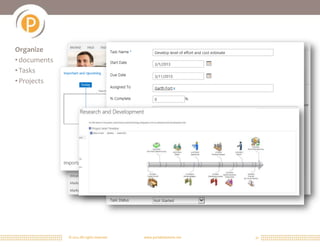
Organize
• documents
• Tasks
• Projects


              © 2011 All rights reserved.   www.portalsolutions.net   31
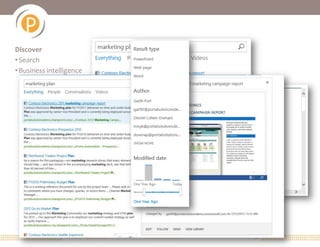
Discover
• Search
• Business intelligence


                  © 2011 All rights reserved.   www.portalsolutions.net   32
A Day in the Life


              Alex Darrow
              Marketing Coordinator


 © 2011 All rights reserved.          www.portalsolutions.net   33

Understanding SharePoint Online

  • 1.
    SharePoint Online: Reviewing theState of the Union March 21, 2012
  • 2.
    Who are we? »Adam Levithan » Jill Hannemann – Senior Consultant at Portal – Director of Advisory Services at Solutions Portal Solutions – SharePoint Areas of Interest: OOTB – SharePoint Areas of Interest: Site Templates, Project Timeline, Term Store, Product Catalog, InfoPath List Forms, Communities, Records Center, Metadata and Social Engagement Navigation, and e-Discovery with Exchange – Most Watched TV Show: Peppa Pig – Favorite Vacation Destination: Italy © 2011 All rights reserved. www.portalsolutions.net 2
  • 3.
    About Portal Solutions 200+ 10+ SharePoint Years in Implementations Business 4 Practice Areas (Advisory/Design, Implementation, Managed, Govt Serv.) Our customers are organizations 3 2 that need to improve Times selected for Locations – DC & SP Early Adopter Boston performance through effective Program information sharing. Portalsolutions.net © 2011 All rights reserved. www.portalsolutions.net 3
  • 4.
    Agenda › What’s the Push to the Cloud? › SharePoint Online vs. On-Premise › How do you choose? › Making the Business Case › About Office 365: New capabilities? › Demonstration: A Day in the Life › Case Studies © 2011 All rights reserved. www.portalsolutions.net 4
  • 5.
    More Customizations Why SharePoint in the Cloud? Software as a Service (SaaS) Less Complexity Platform as a Service (PaaS) Infrastructure as a Service (IaaS) © 2011 All rights reserved. www.portalsolutions.net 5
  • 6.
    Push to theCloud » Cloud enables on-demand computing resources to be rapidly provisioned with minimal management effort. » Microsoft shift to service-based organization – Cloud First – Yammer Acquisition “SharePoint as we know it, is 10 years old.” © 2011 All rights reserved. www.portalsolutions.net 6
  • 7.
    SharePoint Deployment Options On-Premise Hosted © 2011 All rights reserved. www.portalsolutions.net 7
  • 8.
    Exchange Online Office Online Lync Online SharePoint Online Collaboration, Outlook, Word, Excel, Instant messaging, communication, email PowerPoint voice document management SharePoint Online is part of the Office 365 Suite © 2011 All rights reserved. www.portalsolutions.net 8
  • 9.
    SharePoint: What it’sall About Organize Share Discover documents social search tasks collaborate business intelligence projects community Build workflow apps integration Manage security information rights eDiscovery © 2011 All rights reserved. www.portalsolutions.net 9
  • 10.
    Strengths of SharePointOnline » It’s SharePoint 2013, but Online » Microsoft Integration, and then some » “Free” – Public Site, Intranet, Collaboration Sites » Instant external sharing (through live accounts) » Availability, Redundancy, and Service Levels » First to receive software upgrades from Microsoft © 2011 All rights reserved. www.portalsolutions.net 10
  • 11.
    Strengths of SharePointOn Premise » Control of upgrades » Business Intelligence » Leverage SharePoint as an application » Privacy and security » Can be a true “Portal” (Adoption Dream ) © 2011 All rights reserved. www.portalsolutions.net 11
  • 12.
    How do youdecide? Business Case Definition Feature Roadmap/Prioritized Usage Scenarios Define the high level business Requirements Gathering objectives Prioritize SharePoint will feature sets that IT Resources solve. accomplish the Gather the business case functional and Platform Selection Determine ROI definition technical Evaluate ability for overall requirements to support investment aligned with SharePoint Farm Select the Feature deployment What other option of Roadmap applications SharePoint that need to co-exist? offset cost of ownership and predicted return on investment © 2011 All rights reserved. www.portalsolutions.net 12
  • 13.
    Considerations for theDecision » Who Drives this initiative: IT or Business? – Budget? Who is sponsoring the initiative? » Who has sign off on decisions for IT infrastructure vs. business solution? » Security tolerance and standards? » Resourcing availability? » IT infrastructure make up » Measuring ROI and adoption? Who measures success © 2011 All rights reserved. www.portalsolutions.net 13
  • 14.
    Total Cost ofOwnership Options » On Premise » Cloud Hosting » Office 365 © 2011 All rights reserved. www.portalsolutions.net 14
  • 15.
    On Premise » On-premisecosts includes – Licensing (License + Software Assurance)* – Hardware** – Ongoing maintenance and Support (Assume 30% FTE and external support) Qty Product Qty Price 1 year 3 years 130 SharePoint Standard Client Access License $ 160 $ 20,800 $ 20,800 130 SharePoint Enterprise Client Access License $ 130 $ 16,900 $ 16,900 1 SharePoint Single Server License $ 9,993 $ 9,993 $ 9,993 2 SQL Server License $ 5,271 $ 10,542 $ 10,542 1 Ongoing maintenance/year (30% FTE + external support $ 65,000 $ 65,000 $ 195,000 2 Server (estimated 2 server farm) $ 10,000 $ 20,000 $ 26,000 Total $ 143,235 $ 279,235 *Exclude backup/recovery and other management licenses ** Storage requirement may increase hardware cost © 2011 All rights reserved. www.portalsolutions.net 15
  • 16.
    Cloud Hosting » Cloudhosting costs includes – Licensing (License + Software Assurance) monthly subscription – Hosting Infrastructure – Ongoing maintenance and Support (External support) Qty Product Qty Price 1 year 3 years 130 SharePoint Standard Client Access License $ 5 $ 7,800 $ 23,400 130 SharePoint Enterprise Client Access License $ 5 $ 7,800 $ 23,400 2 SQL Server License $ 500 $ 12,000 $ 36,000 12 Server Hosting monthly $ 1,500 $ 18,000 $ 54,000 12 Ongoing maintenance $ 1,500 $ 18,000 $ 54,000 Total $ 63,600 $ 190,800 © 2011 All rights reserved. www.portalsolutions.net 16
  • 17.
    SharePoint Online (O365) »SharePoint Online costs includes – Licensing on a monthly subscription basis – Shared Hosting Infrastructure* – Ongoing maintenance and Support (External support) Qty Product Qty Price 1 year 3 years 130 SharePoint Online Plan 2 $ 9 $ 14,040 $ 42,120 12 Ongoing maintenance $ 2,500 $ 30,000 $ 90,000 Total $ 44,040 $ 132,120 * Included 75Gb allocated storage, additional cost for additional storage © 2011 All rights reserved. www.portalsolutions.net 17
  • 18.
    Cost Summary » Evaluatewhere total cost of ownership and feature sets/business value present the greatest return Cost Comparison Year 1 Year 2 Year 3 Total On-premise $ 143,235 $ 68,000 $ 68,000 $ 279,235 Cloud Hosted $ 63,600 $ 63,600 $ 63,600 $ 190,800 SharePoint Online $ 44,040 $ 44,040 $ 44,040 $ 132,120 © 2011 All rights reserved. www.portalsolutions.net 18
  • 19.
    A Day inthe Life: Demonstration Alex Darrow Marketing Coordinator © 2011 All rights reserved. www.portalsolutions.net 19
  • 20.
    Case Studies –Office 365 » Albright Stonebridge Group » Nonpartisan Think Tank and » Located in Washington, D.C. Research Center Metro-area » Located in Washington, D.C. » Employee Count: 100 » Employee Count: 200 » Business Case: » Business Case: – Intranet – Electronic records management • Accounting center • Marketing – Document management and • Human Resources publication • Sales/Proposal Management – Search/findability and reuse of – Collaboration for projects information – Search/findability and reuse of – Document editing and information collaboration © 2011 All rights reserved. www.portalsolutions.net 20
  • 21.
    © 2011 Allrights reserved. www.portalsolutions.net 21
  • 22.
    © 2011 Allrights reserved. www.portalsolutions.net 22
  • 23.
    Case Study –On Premise » The Nature Conservancy » 2012 Digital PR Awards: #1 Intranet » Headquarters in Washington, D.C. Metro-area, 40 Offices World-Wide » Employee Count: 5000 » Business Case: – International Social Intranet • Finding & Connecting with People – Knowledge Management – Customized Project Management – Department Collaboration – Integration with External Systems • Human Resources • Financial © 2011 All rights reserved. www.portalsolutions.net 23
  • 24.
    Key Drivers -TNC » Low cost of software – Microsoft – Newsgator » Main focus on Intranet look & feel © 2011 All rights reserved. www.portalsolutions.net 24
  • 25.
    Case Study –Hybrid Deployment » Legal, Regulatory, and Business Publishing » Located in Washington, D.C. Metro-area » Employee Count: 1500 » Business Case: – Document Management – Search/findability – Department Collaboration – Business intelligence and key performance indicators – Internal applications and electronic workflow processes © 2011 All rights reserved. www.portalsolutions.net 25
  • 26.
    Key Drivers -Publishing ABC Co. » Purchased O365 » Productivity » Security of Business ABC Co. Intelligence ABC Co. © 2011 All rights reserved. www.portalsolutions.net 26
  • 27.
    What does movingto Office 365 mean? » Deployment – Initial deploy is still required to migrate data to Office 365 – AD clean up and network upgrade is often required – Hybrid phasing is often prolonged period of discomfort » Service Change – Balance between continuous innovations and minimize change – Control IT policies but not feature availability » Privacy and Security Considerations – Understand your internal security and privacy requirements © 2011 All rights reserved. www.portalsolutions.net 27
  • 28.
    Questions » Contact Us – Jill Hannemann • jhannemann@portalsolutions.net • @jilltabuchi – Adam Levithan • alevithan@portalsolutions.net • @collabadam © 2011 All rights reserved. www.portalsolutions.net 28
  • 29.
    Share • Social • Collaborate •Community © 2011 All rights reserved. www.portalsolutions.net 29
  • 30.
    Organize • documents • Tasks •Projects © 2011 All rights reserved. www.portalsolutions.net 30
  • 31.
    Organize • documents • Tasks •Projects © 2011 All rights reserved. www.portalsolutions.net 31
  • 32.
    Discover • Search • Businessintelligence © 2011 All rights reserved. www.portalsolutions.net 32
  • 33.
    A Day inthe Life Alex Darrow Marketing Coordinator © 2011 All rights reserved. www.portalsolutions.net 33

Editor's Notes

  • #3 A & J
  • #4 J
  • #5 J
  • #6 J
  • #7 A&J
  • #8 A
  • #9 ASharePoint Online is part of the overall suite to online tools called Office 365. What Microsoft has essentially done is taken everything that you previously accessed on your desktop: email plus productivity apps like Word, Excel, and PowerPoint, and made them available online via the Office 365 offering. They now include the most recent version of SharePoint as well. We now start to dive a bit deeper into the SharePoint component of Office365,
  • #10 A
  • #11 A
  • #12 J
  • #13 JWho Drives this initiative: IT or Business?Who makes decisions on which items? Security?Resourcing?IT infrastructureBudget? Who is sponsoring the initiative?Measuring ROI and adoption?
  • #14 A&J
  • #15 J
  • #16 J
  • #17 J
  • #18 J
  • #19 J
  • #20 A
  • #21 J
  • #22 J
  • #23 J
  • #24 A
  • #26 A
  • #28 A