SharePoint Workflow Migration
SP 2010 to SP 2013
in association with
About Cygnet Infotech
 We are a global IT services & solutions provider.
 We provide custom software development services
across technologies and domains to our clients in
over 23 countries.
 We are ISO 9001, ISO 27001 and CMMi Level III
Certified
 Learn more about us at www.cygnet-infotech.com
TestingWhiz™ is an Easy,
Intuitive and Affordable
Test Automation Solution
that uses Keyword-Driven
Testing and Data Driven
Testing for Web and
Cloud Application Testing
www.testing-whiz.com
m1 enterprise ordering
systems provide a range
of smartphone based
ordering apps applicable
for B2B, retail, restaurants
and catalog companies
www.my-m1.com
Code Less, Test More
Today’s Webinar
SharePoint Workflow Migration SP2010 – SP2013
Presenter:
Jay Mehta
SharePoint Consultant & MCT
SharePoint Workflow Migration
Objectives
 Experiences in SharePoint Workflow Migration
 5 Steps to Migrate SharePoint OOTB Workflows
 4 Keys to Migrate SharePoint Designer Workflows
 3 Challenges in Migrating SharePoint Custom Workflows
 An approach to workflow migration using Visual Studio 2012
 Leveraging Workflow Manager in SharePoint 2013
 Q and A
SharePoint Workflow Migration
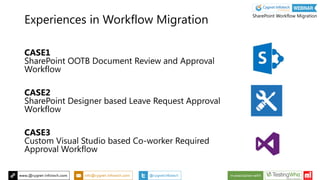
CASE1
SharePoint OOTB Document Review and Approval
Workflow
CASE2
SharePoint Designer based Leave Request Approval
Workflow
CASE3
Custom Visual Studio based Co-worker Required
Approval Workflow
Experiences in Workflow Migration
SharePoint Workflow Migration
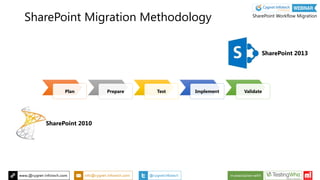
Plan Prepare Test Implement Validate
SharePoint 2010
SharePoint 2013
SharePoint Migration Methodology SharePoint Workflow Migration
Objectives
 Our Experience in Workflow Migration
 5 Steps to Migrate SharePoint OOTB Workflows
 4 Keys to Migrate SharePoint Designer Workflows
 3 Challenges in Migrating SharePoint Custom Workflows
 An approach to workflow migration using Visual Studio 2012
 Leveraging Workflow Manager in SharePoint 2013
 Q and A
SharePoint Workflow Migration
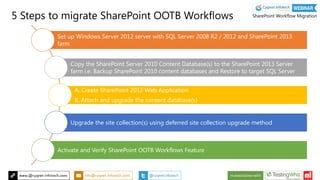
Set up Windows Server 2012 server with SQL Server 2008 R2 / 2012 and SharePoint 2013
farm
Copy the SharePoint Server 2010 Content Database(s) to the SharePoint 2013 Server
farm i.e. Backup SharePoint 2010 content databases and Restore to target SQL Server
A. Create SharePoint 2013 Web Application
B. Attach and upgrade the content database(s)
Upgrade the site collection(s) using deferred site collection upgrade method
Activate and Verify SharePoint OOTB Workflows Feature
5 Steps to migrate SharePoint OOTB Workflows SharePoint Workflow Migration
Objectives
 Our Experience in Workflow Migration
 5 Steps to Migrate SharePoint OOTB Workflows
 4 Keys to Migrate SharePoint Designer Workflows
 3 Challenges in Migrating SharePoint Custom Workflows
 An approach to workflow migration using Visual Studio 2012
 Leveraging Workflow Manager in SharePoint 2013
 Q and A
SharePoint Workflow Migration
Enables SharePoint 2010 Workflows to work in SP 2013
Negotiates between two versions of SharePoint
WF in SharePoint 2010
AWS in SharePoint 2013
Supports Stages and Loops, can call Web Services, WCF,
REST & JSON
Enhanced rich email editor
4 Keys to Migrate
SharePoint Designer Workflows
SharePoint Workflow Migration
SharePoint Workflow Interop in Action
SharePoint Workflow Migration
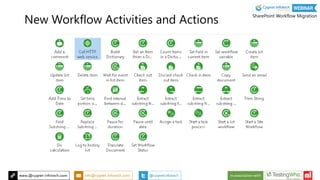
New Workflow Activities and Actions
SharePoint Workflow Migration
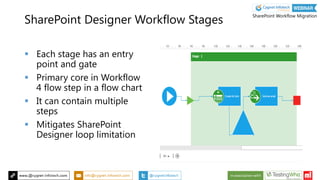
SharePoint Designer Workflow Stages
 Each stage has an entry
point and gate
 Primary core in Workflow
4 flow step in a flow chart
 It can contain multiple
steps
 Mitigates SharePoint
Designer loop limitation
SharePoint Workflow Migration
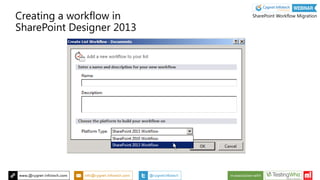
Creating a workflow in
SharePoint Designer 2013
SharePoint Workflow Migration
Objectives
 Our Experience in Workflow Migration
 5 Steps to Migrate SharePoint OOTB Workflows
 4 Keys to Migrate SharePoint Designer Workflows
 3 Challenges in Migrating SharePoint Custom Workflows
 An approach to workflow migration using Visual Studio 2012
 Leveraging Workflow Manager in SharePoint 2013
 Q and A
SharePoint Workflow Migration
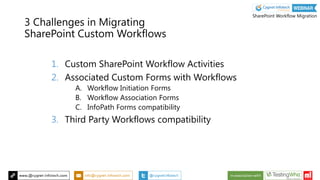
3 Challenges in Migrating
SharePoint Custom Workflows
1. Custom SharePoint Workflow Activities
2. Associated Custom Forms with Workflows
A. Workflow Initiation Forms
B. Workflow Association Forms
C. InfoPath Forms compatibility
3. Third Party Workflows compatibility
SharePoint Workflow Migration
Objectives
 Our Experience in Workflow Migration
 5 Steps to Migrate SharePoint OOTB Workflows
 4 Keys to Migrate SharePoint Designer Workflows
 3 Challenges in Migrating SharePoint Custom Workflows
 An approach to workflow migration using Visual Studio 2012
 Leveraging Workflow Manager in SharePoint 2013
 Q and A
SharePoint Workflow Migration
1. Consider the SharePoint 2010 and 2013 GAC location
2. Modify .CSPROJ file of Custom SharePoint Solution
• Target Framework Version should be v4.5
• Target Office Version should be 15.0
3. Modify Package designer
• SharePoint Product Version = 15.0
4. Reload the Project and verify the references to SP 15 API
5. Add your business / code logic to Web Service / WCF Services
An approach to Workflow Migration
using Visual Studio 2012
SharePoint Workflow Migration
Objectives
 Our Experience in Workflow Migration
 5 Steps to Migrate SharePoint OOTB Workflows
 4 Keys to Migrate SharePoint Designer Workflows
 3 Challenges in Migrating SharePoint Custom Workflows
 An approach to workflow migration using Visual Studio 2012
 Leveraging Workflow Manager in SharePoint 2013
 Q and A
SharePoint Workflow Migration
Workflow in SharePoint 2013
SharePoint Workflow Migration
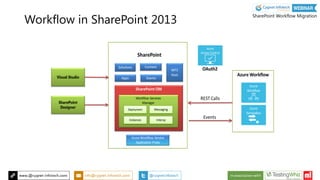
Workflow in SharePoint 2013
 Workflow processing moved to Workflow Manager
 SharePoint farm & Workflow Manager farm can be on
same/different servers
 XAML Code Styling to author an Workflow
 Improves stability, scalability & transparency
SharePoint Workflow Migration
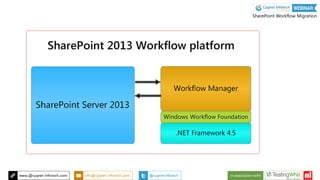
Workflow Manager
 SharePoint 2013 Workflow platform uses the new Workflow
Manager service.
 Built on top of Windows Workflow Foundation. Windows Workflow
Foundation is part of the .NET Framework 4.5.
 All Workflows can be authored as Declarative
 SharePoint Server 2013 uses Workflow Manager for its workflow
engine.
SharePoint Workflow Migration
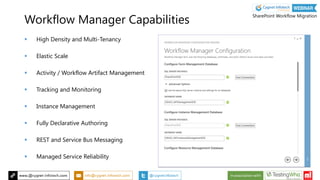
Workflow Manager Capabilities
 High Density and Multi-Tenancy
 Elastic Scale
 Activity / Workflow Artifact Management
 Tracking and Monitoring
 Instance Management
 Fully Declarative Authoring
 REST and Service Bus Messaging
 Managed Service Reliability
SharePoint Workflow Migration
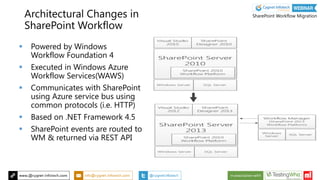
Architectural Changes in
SharePoint Workflow
 Powered by Windows
Workflow Foundation 4
 Executed in Windows Azure
Workflow Services(WAWS)
 Communicates with SharePoint
using Azure service bus using
common protocols (i.e. HTTP)
 Based on .NET Framework 4.5
 SharePoint events are routed to
WM & returned via REST API
SharePoint Workflow Migration
Write to us: info@cygnet-infotech.com
To get free consultation on your SharePoint Migration queries
SharePoint Workflow Migration

SharePoint Workflow Migration

  • 1.
    SharePoint Workflow Migration SP2010 to SP 2013 in association with
  • 2.
    About Cygnet Infotech We are a global IT services & solutions provider.  We provide custom software development services across technologies and domains to our clients in over 23 countries.  We are ISO 9001, ISO 27001 and CMMi Level III Certified  Learn more about us at www.cygnet-infotech.com
  • 3.
    TestingWhiz™ is anEasy, Intuitive and Affordable Test Automation Solution that uses Keyword-Driven Testing and Data Driven Testing for Web and Cloud Application Testing www.testing-whiz.com m1 enterprise ordering systems provide a range of smartphone based ordering apps applicable for B2B, retail, restaurants and catalog companies www.my-m1.com Code Less, Test More
  • 4.
    Today’s Webinar SharePoint WorkflowMigration SP2010 – SP2013 Presenter: Jay Mehta SharePoint Consultant & MCT SharePoint Workflow Migration
  • 5.
    Objectives  Experiences inSharePoint Workflow Migration  5 Steps to Migrate SharePoint OOTB Workflows  4 Keys to Migrate SharePoint Designer Workflows  3 Challenges in Migrating SharePoint Custom Workflows  An approach to workflow migration using Visual Studio 2012  Leveraging Workflow Manager in SharePoint 2013  Q and A SharePoint Workflow Migration
  • 6.
    CASE1 SharePoint OOTB DocumentReview and Approval Workflow CASE2 SharePoint Designer based Leave Request Approval Workflow CASE3 Custom Visual Studio based Co-worker Required Approval Workflow Experiences in Workflow Migration SharePoint Workflow Migration
  • 7.
    Plan Prepare TestImplement Validate SharePoint 2010 SharePoint 2013 SharePoint Migration Methodology SharePoint Workflow Migration
  • 8.
    Objectives  Our Experiencein Workflow Migration  5 Steps to Migrate SharePoint OOTB Workflows  4 Keys to Migrate SharePoint Designer Workflows  3 Challenges in Migrating SharePoint Custom Workflows  An approach to workflow migration using Visual Studio 2012  Leveraging Workflow Manager in SharePoint 2013  Q and A SharePoint Workflow Migration
  • 9.
    Set up WindowsServer 2012 server with SQL Server 2008 R2 / 2012 and SharePoint 2013 farm Copy the SharePoint Server 2010 Content Database(s) to the SharePoint 2013 Server farm i.e. Backup SharePoint 2010 content databases and Restore to target SQL Server A. Create SharePoint 2013 Web Application B. Attach and upgrade the content database(s) Upgrade the site collection(s) using deferred site collection upgrade method Activate and Verify SharePoint OOTB Workflows Feature 5 Steps to migrate SharePoint OOTB Workflows SharePoint Workflow Migration
  • 10.
    Objectives  Our Experiencein Workflow Migration  5 Steps to Migrate SharePoint OOTB Workflows  4 Keys to Migrate SharePoint Designer Workflows  3 Challenges in Migrating SharePoint Custom Workflows  An approach to workflow migration using Visual Studio 2012  Leveraging Workflow Manager in SharePoint 2013  Q and A SharePoint Workflow Migration
  • 11.
    Enables SharePoint 2010Workflows to work in SP 2013 Negotiates between two versions of SharePoint WF in SharePoint 2010 AWS in SharePoint 2013 Supports Stages and Loops, can call Web Services, WCF, REST & JSON Enhanced rich email editor 4 Keys to Migrate SharePoint Designer Workflows SharePoint Workflow Migration
  • 12.
    SharePoint Workflow Interopin Action SharePoint Workflow Migration
  • 13.
    New Workflow Activitiesand Actions SharePoint Workflow Migration
  • 14.
    SharePoint Designer WorkflowStages  Each stage has an entry point and gate  Primary core in Workflow 4 flow step in a flow chart  It can contain multiple steps  Mitigates SharePoint Designer loop limitation SharePoint Workflow Migration
  • 15.
    Creating a workflowin SharePoint Designer 2013 SharePoint Workflow Migration
  • 16.
    Objectives  Our Experiencein Workflow Migration  5 Steps to Migrate SharePoint OOTB Workflows  4 Keys to Migrate SharePoint Designer Workflows  3 Challenges in Migrating SharePoint Custom Workflows  An approach to workflow migration using Visual Studio 2012  Leveraging Workflow Manager in SharePoint 2013  Q and A SharePoint Workflow Migration
  • 17.
    3 Challenges inMigrating SharePoint Custom Workflows 1. Custom SharePoint Workflow Activities 2. Associated Custom Forms with Workflows A. Workflow Initiation Forms B. Workflow Association Forms C. InfoPath Forms compatibility 3. Third Party Workflows compatibility SharePoint Workflow Migration
  • 18.
    Objectives  Our Experiencein Workflow Migration  5 Steps to Migrate SharePoint OOTB Workflows  4 Keys to Migrate SharePoint Designer Workflows  3 Challenges in Migrating SharePoint Custom Workflows  An approach to workflow migration using Visual Studio 2012  Leveraging Workflow Manager in SharePoint 2013  Q and A SharePoint Workflow Migration
  • 19.
    1. Consider theSharePoint 2010 and 2013 GAC location 2. Modify .CSPROJ file of Custom SharePoint Solution • Target Framework Version should be v4.5 • Target Office Version should be 15.0 3. Modify Package designer • SharePoint Product Version = 15.0 4. Reload the Project and verify the references to SP 15 API 5. Add your business / code logic to Web Service / WCF Services An approach to Workflow Migration using Visual Studio 2012 SharePoint Workflow Migration
  • 20.
    Objectives  Our Experiencein Workflow Migration  5 Steps to Migrate SharePoint OOTB Workflows  4 Keys to Migrate SharePoint Designer Workflows  3 Challenges in Migrating SharePoint Custom Workflows  An approach to workflow migration using Visual Studio 2012  Leveraging Workflow Manager in SharePoint 2013  Q and A SharePoint Workflow Migration
  • 21.
    Workflow in SharePoint2013 SharePoint Workflow Migration
  • 22.
  • 23.
    Workflow in SharePoint2013  Workflow processing moved to Workflow Manager  SharePoint farm & Workflow Manager farm can be on same/different servers  XAML Code Styling to author an Workflow  Improves stability, scalability & transparency SharePoint Workflow Migration
  • 24.
    Workflow Manager  SharePoint2013 Workflow platform uses the new Workflow Manager service.  Built on top of Windows Workflow Foundation. Windows Workflow Foundation is part of the .NET Framework 4.5.  All Workflows can be authored as Declarative  SharePoint Server 2013 uses Workflow Manager for its workflow engine. SharePoint Workflow Migration
  • 25.
    Workflow Manager Capabilities High Density and Multi-Tenancy  Elastic Scale  Activity / Workflow Artifact Management  Tracking and Monitoring  Instance Management  Fully Declarative Authoring  REST and Service Bus Messaging  Managed Service Reliability SharePoint Workflow Migration
  • 26.
    Architectural Changes in SharePointWorkflow  Powered by Windows Workflow Foundation 4  Executed in Windows Azure Workflow Services(WAWS)  Communicates with SharePoint using Azure service bus using common protocols (i.e. HTTP)  Based on .NET Framework 4.5  SharePoint events are routed to WM & returned via REST API SharePoint Workflow Migration
  • 27.
    Write to us:info@cygnet-infotech.com To get free consultation on your SharePoint Migration queries SharePoint Workflow Migration