How to Format a Computer
Your Windows XP PC is corrupted and you
want to format your Windows XP Or maybe you
want to install a fresh copy of Windows XP with
Service Pack 3 and you do not know how to do
this. If you don't want to make any mistakes during
formatting and want to get the job done fast, read
on after the jump for more detailed instructions.
Created by Md Aftab-(aftabsama786@gmail.com). 17/7/2014
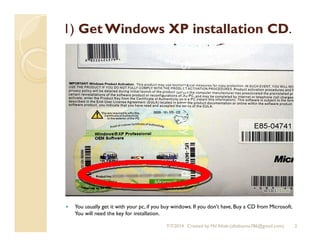
1) Get Windows XP installation CD.
 You usually get it with your pc, if you buy windows. If you don't have, Buy a CD from Microsoft.
You will need the key for installation.
2Created by Md Aftab-(aftabsama786@gmail.com).7/7/2014
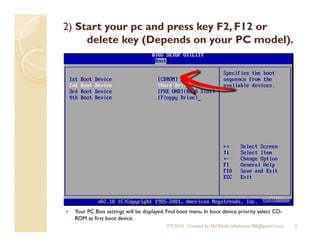
2) Start your pc and press key F2, F12 or
delete key (Depends on your PC model).
 Your PC Bios settings will be displayed. Find boot menu. In boot device priority select CD-
ROM as first boot device.
3Created by Md Aftab-(aftabsama786@gmail.com).7/7/2014
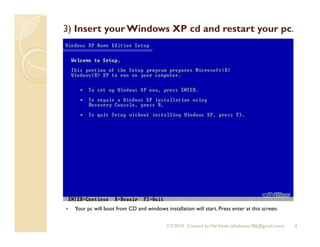
3) Insert yourWindows XP cd and restart your pc.
 Your pc will boot from CD and windows installation will start. Press enter at this screen.
4Created by Md Aftab-(aftabsama786@gmail.com).7/7/2014
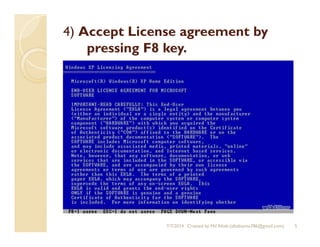
4) Accept License agreement by
pressing F8 key.
5Created by Md Aftab-(aftabsama786@gmail.com).7/7/2014
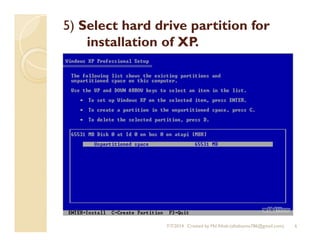
5) Select hard drive partition for
installation of XP.
6Created by Md Aftab-(aftabsama786@gmail.com).7/7/2014
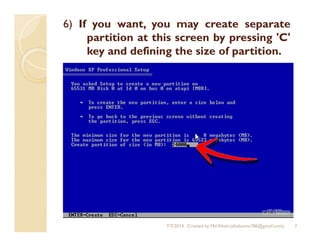
6) If you want, you may create separate
partition at this screen by pressing 'C'
key and defining the size of partition.
7Created by Md Aftab-(aftabsama786@gmail.com).7/7/2014
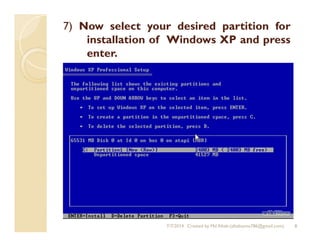
7) Now select your desired partition for
installation of Windows XP and press
enter.
8Created by Md Aftab-(aftabsama786@gmail.com).7/7/2014
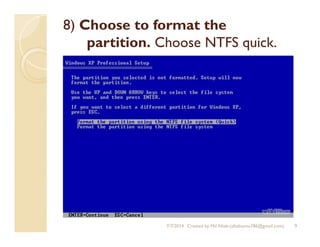
8) Choose to format the
partition. Choose NTFS quick.
9Created by Md Aftab-(aftabsama786@gmail.com).7/7/2014
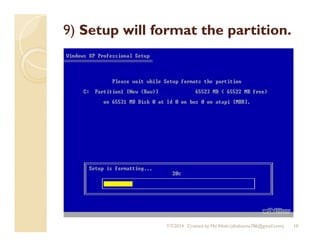
9) Setup will format the partition.
10Created by Md Aftab-(aftabsama786@gmail.com).7/7/2014
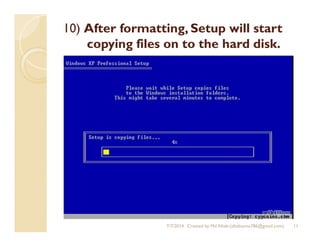
10) After formatting, Setup will start
copying files on to the hard disk.
11Created by Md Aftab-(aftabsama786@gmail.com).7/7/2014
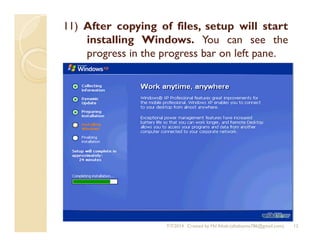
11) After copying of files, setup will start
installing Windows. You can see the
progress in the progress bar on left pane.
12Created by Md Aftab-(aftabsama786@gmail.com).7/7/2014
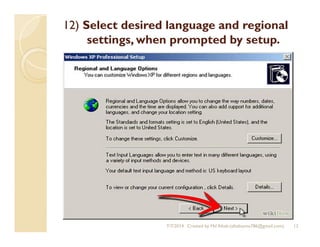
12) Select desired language and regional
settings, when prompted by setup.
13Created by Md Aftab-(aftabsama786@gmail.com).7/7/2014
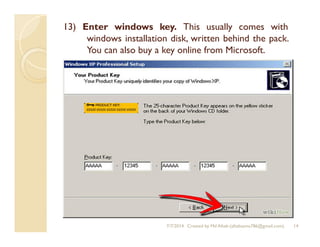
13) Enter windows key. This usually comes with
windows installation disk, written behind the pack.
You can also buy a key online from Microsoft.
14Created by Md Aftab-(aftabsama786@gmail.com).7/7/2014
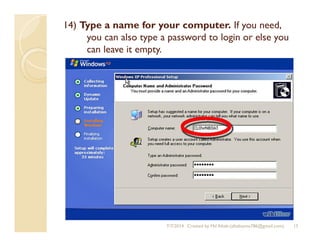
14) Type a name for your computer. If you need,
you can also type a password to login or else you
can leave it empty.
15Created by Md Aftab-(aftabsama786@gmail.com).7/7/2014
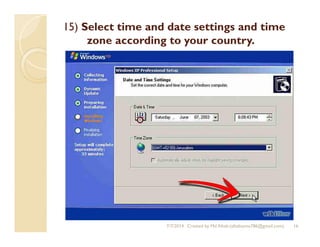
15) Select time and date settings and time
zone according to your country.
16Created by Md Aftab-(aftabsama786@gmail.com).7/7/2014
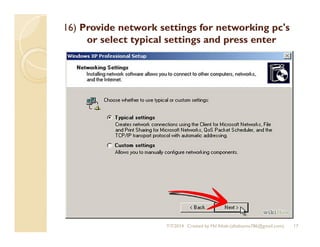
16) Provide network settings for networking pc's
or select typical settings and press enter
17Created by Md Aftab-(aftabsama786@gmail.com).7/7/2014
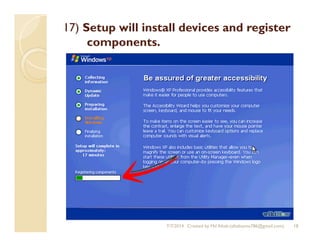
17) Setup will install devices and register
components.
18Created by Md Aftab-(aftabsama786@gmail.com).7/7/2014
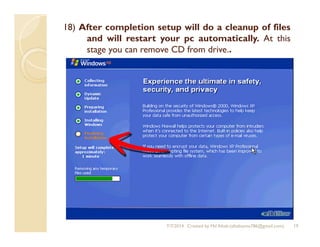
18) After completion setup will do a cleanup of files
and will restart your pc automatically. At this
stage you can remove CD from drive..
19Created by Md Aftab-(aftabsama786@gmail.com).7/7/2014
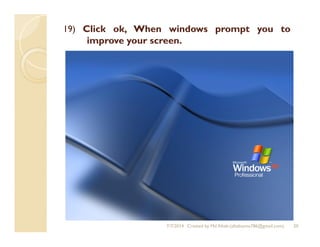
19) Click ok, When windows prompt you to
improve your screen.
20Created by Md Aftab-(aftabsama786@gmail.com).7/7/2014

How to Format a Computer WindowsXP

  • 1.
    How to Formata Computer Your Windows XP PC is corrupted and you want to format your Windows XP Or maybe you want to install a fresh copy of Windows XP with Service Pack 3 and you do not know how to do this. If you don't want to make any mistakes during formatting and want to get the job done fast, read on after the jump for more detailed instructions. Created by Md Aftab-(aftabsama786@gmail.com). 17/7/2014
  • 2.
    1) Get WindowsXP installation CD.  You usually get it with your pc, if you buy windows. If you don't have, Buy a CD from Microsoft. You will need the key for installation. 2Created by Md Aftab-(aftabsama786@gmail.com).7/7/2014
  • 3.
    2) Start yourpc and press key F2, F12 or delete key (Depends on your PC model).  Your PC Bios settings will be displayed. Find boot menu. In boot device priority select CD- ROM as first boot device. 3Created by Md Aftab-(aftabsama786@gmail.com).7/7/2014
  • 4.
    3) Insert yourWindowsXP cd and restart your pc.  Your pc will boot from CD and windows installation will start. Press enter at this screen. 4Created by Md Aftab-(aftabsama786@gmail.com).7/7/2014
  • 5.
    4) Accept Licenseagreement by pressing F8 key. 5Created by Md Aftab-(aftabsama786@gmail.com).7/7/2014
  • 6.
    5) Select harddrive partition for installation of XP. 6Created by Md Aftab-(aftabsama786@gmail.com).7/7/2014
  • 7.
    6) If youwant, you may create separate partition at this screen by pressing 'C' key and defining the size of partition. 7Created by Md Aftab-(aftabsama786@gmail.com).7/7/2014
  • 8.
    7) Now selectyour desired partition for installation of Windows XP and press enter. 8Created by Md Aftab-(aftabsama786@gmail.com).7/7/2014
  • 9.
    8) Choose toformat the partition. Choose NTFS quick. 9Created by Md Aftab-(aftabsama786@gmail.com).7/7/2014
  • 10.
    9) Setup willformat the partition. 10Created by Md Aftab-(aftabsama786@gmail.com).7/7/2014
  • 11.
    10) After formatting,Setup will start copying files on to the hard disk. 11Created by Md Aftab-(aftabsama786@gmail.com).7/7/2014
  • 12.
    11) After copyingof files, setup will start installing Windows. You can see the progress in the progress bar on left pane. 12Created by Md Aftab-(aftabsama786@gmail.com).7/7/2014
  • 13.
    12) Select desiredlanguage and regional settings, when prompted by setup. 13Created by Md Aftab-(aftabsama786@gmail.com).7/7/2014
  • 14.
    13) Enter windowskey. This usually comes with windows installation disk, written behind the pack. You can also buy a key online from Microsoft. 14Created by Md Aftab-(aftabsama786@gmail.com).7/7/2014
  • 15.
    14) Type aname for your computer. If you need, you can also type a password to login or else you can leave it empty. 15Created by Md Aftab-(aftabsama786@gmail.com).7/7/2014
  • 16.
    15) Select timeand date settings and time zone according to your country. 16Created by Md Aftab-(aftabsama786@gmail.com).7/7/2014
  • 17.
    16) Provide networksettings for networking pc's or select typical settings and press enter 17Created by Md Aftab-(aftabsama786@gmail.com).7/7/2014
  • 18.
    17) Setup willinstall devices and register components. 18Created by Md Aftab-(aftabsama786@gmail.com).7/7/2014
  • 19.
    18) After completionsetup will do a cleanup of files and will restart your pc automatically. At this stage you can remove CD from drive.. 19Created by Md Aftab-(aftabsama786@gmail.com).7/7/2014
  • 20.
    19) Click ok,When windows prompt you to improve your screen. 20Created by Md Aftab-(aftabsama786@gmail.com).7/7/2014