hello@propelguru.com +1-604-256-0821
How To Design
Wireframe for
Website
A wireframe demonstrates the interface elements of a webpage
that can be used to create secondary and global navigation.
Wireframes establish the basic structure of a page and is done
before the visual design. Wireframes can be either created
digitally or manually.
Basic Visual Representation Of Elements
On A Website
hello@propelguru.com +1-604-256-0821
What Is Wireframe
Content Structure Hierarchy Functionality Behavior
1 2 3 4 5
hello@propelguru.com +1-604-256-0821
What Is Important In Wireframe?
The process of wireframing includes both analyzing the problem and identifying interfaces.
Before creating your wireframe, here are the important things to consider.
Don’t emphasize much: Wireframing is used for designing
the location and layout of elements. Start simple because
low-fidelity wireframes are easier to work with.
Avoid too much detail: In the beginning, do not add too
much information. This might confuse your client and
teammates.
Do not wireframe every single page: It is not necessary to
add layout to every single page view. Prioritize elements on
your page.
hello@propelguru.com +1-604-256-0821
What To Avoid In Wireframe?
❖ Research well
❖ Design in an organic manner
❖ Choose your tools
❖ Outline your layout with boxes
❖ Segregate informational with proper hierarchy and typography
❖ Use full spectrum of greyscale
❖ Make wireframe high-definition
❖ Translate wireframe into a visual
hello@propelguru.com +1-604-256-0821
How To Design Wireframe?
Best Tools To Create Wireframe
● Adobe XD: This tool works best for beginners. Its user-friendly interface will help you create different
variations in your project.
● Sketch: It is a detailed and vector based tool with several free wireframe design kits.
● Figma: This software offers a wide range of features that will work best for beginners and for expert
designers.
● UXPin: It is best tool for the one who is looking to learn how to create a wireframe. This will allow you to do
more fine-tuning.
● Invision Freehand: It is a cloud app and multiple stakeholders and designers can write at the same time.
● Adobe Photoshop: From digital painting to photo editing, Adobe Photoshop can do it all. You can create high
quality without switching to different design systems.
hello@propelguru.com +1-604-256-0821
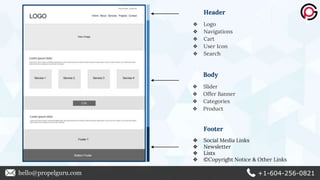
Header
❖ Logo
❖ Navigations
❖ Cart
❖ User Icon
❖ Search
Body
❖ Slider
❖ Offer Banner
❖ Categories
❖ Product
Footer
❖ Social Media Links
❖ Newsletter
❖ Lists
❖ ©Copyright Notice & Other Links
hello@propelguru.com +1-604-256-0821
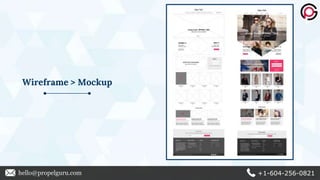
Wireframe > Mockup
hello@propelguru.com +1-604-256-0821
Thank You!
hello@propelguru.com +1-604-256-0821

How To Design A Wireframe For Website

  • 1.
    hello@propelguru.com +1-604-256-0821 How ToDesign Wireframe for Website
  • 2.
    A wireframe demonstratesthe interface elements of a webpage that can be used to create secondary and global navigation. Wireframes establish the basic structure of a page and is done before the visual design. Wireframes can be either created digitally or manually. Basic Visual Representation Of Elements On A Website hello@propelguru.com +1-604-256-0821 What Is Wireframe
  • 3.
    Content Structure HierarchyFunctionality Behavior 1 2 3 4 5 hello@propelguru.com +1-604-256-0821 What Is Important In Wireframe?
  • 4.
    The process ofwireframing includes both analyzing the problem and identifying interfaces. Before creating your wireframe, here are the important things to consider. Don’t emphasize much: Wireframing is used for designing the location and layout of elements. Start simple because low-fidelity wireframes are easier to work with. Avoid too much detail: In the beginning, do not add too much information. This might confuse your client and teammates. Do not wireframe every single page: It is not necessary to add layout to every single page view. Prioritize elements on your page. hello@propelguru.com +1-604-256-0821 What To Avoid In Wireframe?
  • 5.
    ❖ Research well ❖Design in an organic manner ❖ Choose your tools ❖ Outline your layout with boxes ❖ Segregate informational with proper hierarchy and typography ❖ Use full spectrum of greyscale ❖ Make wireframe high-definition ❖ Translate wireframe into a visual hello@propelguru.com +1-604-256-0821 How To Design Wireframe?
  • 6.
    Best Tools ToCreate Wireframe ● Adobe XD: This tool works best for beginners. Its user-friendly interface will help you create different variations in your project. ● Sketch: It is a detailed and vector based tool with several free wireframe design kits. ● Figma: This software offers a wide range of features that will work best for beginners and for expert designers. ● UXPin: It is best tool for the one who is looking to learn how to create a wireframe. This will allow you to do more fine-tuning. ● Invision Freehand: It is a cloud app and multiple stakeholders and designers can write at the same time. ● Adobe Photoshop: From digital painting to photo editing, Adobe Photoshop can do it all. You can create high quality without switching to different design systems. hello@propelguru.com +1-604-256-0821
  • 7.
    Header ❖ Logo ❖ Navigations ❖Cart ❖ User Icon ❖ Search Body ❖ Slider ❖ Offer Banner ❖ Categories ❖ Product Footer ❖ Social Media Links ❖ Newsletter ❖ Lists ❖ ©Copyright Notice & Other Links hello@propelguru.com +1-604-256-0821
  • 8.
  • 9.