How to clean your
computer keyboard
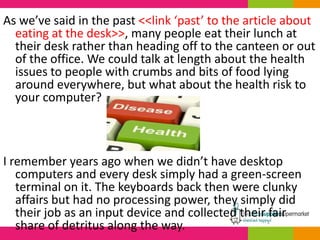
As we’ve said in the past <<link ‘past’ to the article about
eating at the desk>>, many people eat their lunch at
their desk rather than heading off to the canteen or out
of the office. We could talk at length about the health
issues to people with crumbs and bits of food lying
around everywhere, but what about the health risk to
your computer?
I remember years ago when we didn’t have desktop
computers and every desk simply had a green-screen
terminal on it. The keyboards back then were clunky
affairs but had no processing power, they simply did
their job as an input device and collected their fair
share of detritus along the way.
The time came when one of the managers,
noticing a particularly nasty pile up of crumbs in
one keyboard, decided that enough was enough
and they had to get cleaned – so he asked our
incumbent cleaning contractor if they were up to
the job and obviously they said yes.
Oh dear.
Out of fifty keyboards in one office, six of them were never to be
used again, this despite the contractor being extremely careful and
only using approved cleaning fluids. Well, that’s when we in the IT
department got involved and asked the question: “you’re using
fluids on a keyboard?”
These days we mostly have laptops in the office and using fluids on
them would be disastrous! A good rule of thumb I go by when
cleaning a computer is to never let a fluid into direct contact with
it, it’s just not fun when a water damaged equipment has to get
sent away. They’re just not built for water y’know.
SO HOW CAN WE CLEAN THEM? HERE’S
A QUICK GUIDE:
Desktop computer keyboard
When un-plugged, put a paper hand towel or some kitchen
paper on the desk the full size of the keyboard and then turn
the keyboard upside down and gently shake it. You’ll probably
see crumbs, hairs and all sorts of stuff fall onto the towel.
When you’re done, simply wipe the towel up and throw it away.
If you’re still using a desktop computer then your
keyboard will likely not be powered (other than
through the USB port for lights etc.) and it’ll be pretty
tough. The first thing to do is to un-plug it from the
desktop though as you’re about to get vigorous and
I’ve seen many people shaking their keyboard only to
pull the main computer over onto the floor.
Some keyboards have easy to remove keys to make
cleaning a doddle. If this is the case, remove your keys
one by one. A little word of advice – make sure you
know where they go back! Some particularly helpful
keyboards have the letters printed on the main board,
too, but if not then either snapshot with your
smartphone or have a colleague’s keyboard close at
hand.
If the keys do come away from the keyboard, check with
the manufacturer to see if they can also be soaked. I’ve
seen some where you can pop the keys in a bowel with
some washing up liquid to give them a proper clean.
If your keyboard isn’t one of these
easy-types then you can get a good
clean by using a compressed air
canister to blast the dirt away. These
are particularly good at the job and
worth keeping around for blasting
other bits of filth away from other
parts of the computer.
5 Star Spray Duster Can HFC Free
Compressed Gas Flammable
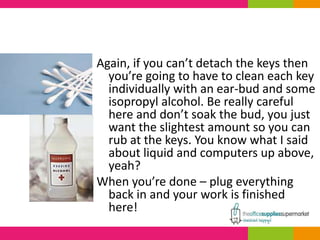
Again, if you can’t detach the keys then
you’re going to have to clean each key
individually with an ear-bud and some
isopropyl alcohol. Be really careful
here and don’t soak the bud, you just
want the slightest amount so you can
rub at the keys. You know what I said
about liquid and computers up above,
yeah?
When you’re done – plug everything
back in and your work is finished
here!
Laptop computers
Special care needs to be taken with laptops and I’ll say
from the start – don’t be turning yours upside down to
share the dirt out! Yes, they’re usually pretty light and
easy to move about, but with the screen open and
upside down I’ve seen more than a few get dropped.
Instead, simply use the compressed air canister to blast
the dirt from between the keys. It’s unlikely that you’ll
be able to remove the keys on a laptop keyboard so
this is the best way to get it clean on the board itself.
Finally, using your swab and the alcohol, clean the tops of
the keys gently! No excess liquid at all here, laptops are
delicate beasts.
And that’s it!
It’s worth cleaning keyboards at regular intervals,
especially if you’re one of those hard workers who
spends most of their time at the desk. Those
keyboards are harbouring enough spare food to
feed an army of bugs, so get ‘em cleaned and starve
‘em!
CONTACT US
08451 701 601
sales@theofficesuppliessupermarket.com
http://www.theofficesuppliessupermarket.com

How to clean your computer keyboard

  • 1.
    How to cleanyour computer keyboard
  • 2.
    As we’ve saidin the past <<link ‘past’ to the article about eating at the desk>>, many people eat their lunch at their desk rather than heading off to the canteen or out of the office. We could talk at length about the health issues to people with crumbs and bits of food lying around everywhere, but what about the health risk to your computer? I remember years ago when we didn’t have desktop computers and every desk simply had a green-screen terminal on it. The keyboards back then were clunky affairs but had no processing power, they simply did their job as an input device and collected their fair share of detritus along the way.
  • 3.
    The time camewhen one of the managers, noticing a particularly nasty pile up of crumbs in one keyboard, decided that enough was enough and they had to get cleaned – so he asked our incumbent cleaning contractor if they were up to the job and obviously they said yes.
  • 4.
    Oh dear. Out offifty keyboards in one office, six of them were never to be used again, this despite the contractor being extremely careful and only using approved cleaning fluids. Well, that’s when we in the IT department got involved and asked the question: “you’re using fluids on a keyboard?” These days we mostly have laptops in the office and using fluids on them would be disastrous! A good rule of thumb I go by when cleaning a computer is to never let a fluid into direct contact with it, it’s just not fun when a water damaged equipment has to get sent away. They’re just not built for water y’know.
  • 5.
    SO HOW CANWE CLEAN THEM? HERE’S A QUICK GUIDE:
  • 6.
    Desktop computer keyboard Whenun-plugged, put a paper hand towel or some kitchen paper on the desk the full size of the keyboard and then turn the keyboard upside down and gently shake it. You’ll probably see crumbs, hairs and all sorts of stuff fall onto the towel. When you’re done, simply wipe the towel up and throw it away. If you’re still using a desktop computer then your keyboard will likely not be powered (other than through the USB port for lights etc.) and it’ll be pretty tough. The first thing to do is to un-plug it from the desktop though as you’re about to get vigorous and I’ve seen many people shaking their keyboard only to pull the main computer over onto the floor.
  • 7.
    Some keyboards haveeasy to remove keys to make cleaning a doddle. If this is the case, remove your keys one by one. A little word of advice – make sure you know where they go back! Some particularly helpful keyboards have the letters printed on the main board, too, but if not then either snapshot with your smartphone or have a colleague’s keyboard close at hand. If the keys do come away from the keyboard, check with the manufacturer to see if they can also be soaked. I’ve seen some where you can pop the keys in a bowel with some washing up liquid to give them a proper clean.
  • 8.
    If your keyboardisn’t one of these easy-types then you can get a good clean by using a compressed air canister to blast the dirt away. These are particularly good at the job and worth keeping around for blasting other bits of filth away from other parts of the computer. 5 Star Spray Duster Can HFC Free Compressed Gas Flammable
  • 9.
    Again, if youcan’t detach the keys then you’re going to have to clean each key individually with an ear-bud and some isopropyl alcohol. Be really careful here and don’t soak the bud, you just want the slightest amount so you can rub at the keys. You know what I said about liquid and computers up above, yeah? When you’re done – plug everything back in and your work is finished here!
  • 10.
    Laptop computers Special careneeds to be taken with laptops and I’ll say from the start – don’t be turning yours upside down to share the dirt out! Yes, they’re usually pretty light and easy to move about, but with the screen open and upside down I’ve seen more than a few get dropped. Instead, simply use the compressed air canister to blast the dirt from between the keys. It’s unlikely that you’ll be able to remove the keys on a laptop keyboard so this is the best way to get it clean on the board itself. Finally, using your swab and the alcohol, clean the tops of the keys gently! No excess liquid at all here, laptops are delicate beasts.
  • 11.
    And that’s it! It’sworth cleaning keyboards at regular intervals, especially if you’re one of those hard workers who spends most of their time at the desk. Those keyboards are harbouring enough spare food to feed an army of bugs, so get ‘em cleaned and starve ‘em!
  • 12.
    CONTACT US 08451 701601 sales@theofficesuppliessupermarket.com http://www.theofficesuppliessupermarket.com