Red Hat Ceph
Performance & Sizing
Guide
Jose De la Rosa
September 7, 2016
2
Agenda
1. Ceph Overview
a. Architecture
b. Approach to storing data
2. Test methodology
a. What was tested
b. How it was tested & measured
3. Results
a. Key findings
b. Recommendations
3
Ceph Overview
4
Ceph Overview
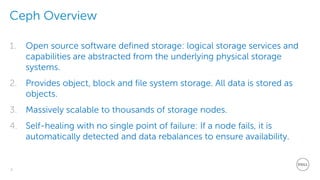
1. Open source software defined storage: logical storage services and
capabilities are abstracted from the underlying physical storage
systems.
2. Provides object, block and file system storage. All data is stored as
objects.
3. Massively scalable to thousands of storage nodes.
4. Self-healing with no single point of failure: If a node fails, it is
automatically detected and data rebalances to ensure availability.
5
Client access
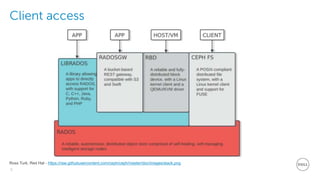
Ross Turk, Red Hat - https://raw.githubusercontent.com/ceph/ceph/master/doc/images/stack.png
6
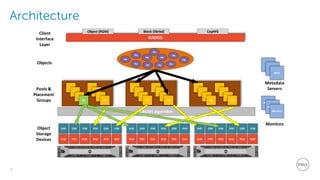
Architecture
Disk
OSD
Disk
OSD
Disk
OSD
Disk
OSD
Disk
OSD
Disk
OSD
Disk
OSD
Disk
OSD
Disk
OSD
Disk
OSD
Disk
OSD
Disk
OSD
Disk
OSD
Disk
OSD
Disk
OSD
Disk
OSD
Disk
OSD
Disk
OSDObject
Storage
Devices
PG
PG
PG
PG
CRUSH algorithm
PG
PG
PG
PG
PG
PG
PG
PG
PG
PG
PG
PG
PG
PG
PG
PG
PG
PG
PG
PG
Pools &
Placement
Groups
Obj Obj
Obj
Obj
Obj
Obj
Obj
Obj
RADOS
Object (RGW) Block (librbd) CephFS
Client
Interface
Layer
Objects
Obj
Obj
Obj
Monitors
Monitor
Monitor
Monitor
Metadata
Servers
MDS
MDS
MDS
7
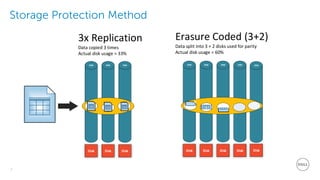
Storage Protection Method
Disk Disk Disk
OSD OSD OSD
3x Replication
Data copied 3 times
Actual disk usage = 33%
Disk Disk Disk Disk
OSD OSD OSD OSD
Erasure Coded (3+2)
Data split into 3 + 2 disks used for parity
Actual disk usage = 60%
Disk
OSD
8
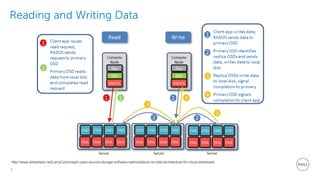
Reading and Writing Data
http://www.slideshare.net/LarryCover/ceph-open-source-storage-software-optimizations-on-intel-architecture-for-cloud-workloads
9
Test Setup &
Methodology
10
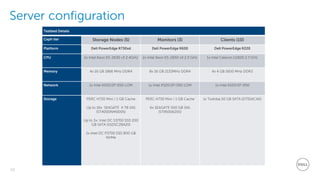
Server configuration
Testbed Details
Ceph tier Storage Nodes (5) Monitors (3) Clients (10)
Platform Dell PowerEdge R730xd Dell PowerEdge R630 Dell PowerEdge R220
CPU 2x Intel Xeon E5-2630 v3 2.4GHz 2x Intel Xeon E5-2650 v3 2.3 GHz 1x Intel Celeron G1820 2.7 GHz
Memory 4x 16 GB 1866 MHz DDR4 8x 16 GB 2133MHz DDR4 4x 4 GB 1600 MHz DDR3
Network 1x Intel X520/2P I350 LOM 1x Intel X520/2P I350 LOM 1x Intel X520/2P I350
Storage PERC H730 Mini / 1 GB Cache
Up to 16x: SEAGATE 4 TB SAS
(ST4000NM0005)
Up to 3x: Intel DC S3700 SSD 200
GB SATA (SSDSC2BA20)
1x Intel DC P3700 SSD 800 GB
NVMe
PERC H730 Mini / 1 GB Cache
6x SEAGATE 500 GB SAS
(ST9500620S)
1x Toshiba 50 GB SATA (DT01ACA0)
11
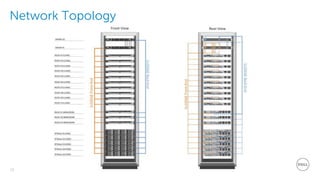
Network Topology
12
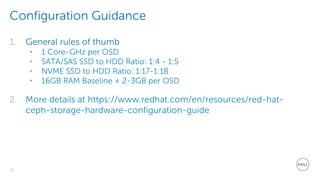
Configuration Guidance
1. General rules of thumb
• 1 Core-GHz per OSD
• SATA/SAS SSD to HDD Ratio: 1:4 - 1:5
• NVME SSD to HDD Ratio: 1:17-1:18
• 16GB RAM Baseline + 2-3GB per OSD
2. More details at https://www.redhat.com/en/resources/red-hat-
ceph-storage-hardware-configuration-guide
13
Storage node configurations tested
OSD to Journal
Ratio [drives]
12+3 16+0 16+1
OSD node
configuration
12+3 16+0 16+1
HDDs 12 16 16
HDD RAID mode Single-disk RAID0 Single-disk RAID0 Single-disk RAID0 / HBA mode
SATA SSDs 3 0 0
SSD RAID mode JBOD JBOD JBOD
NVMe SSDs 0 0 1
Network 1x 10 GbE Front-End
1x 10 GbE Back-End
1x 10 GbE Front-End
1x 10 GbE Back-End
1x 10 GbE Front-End
1x 10 GbE Back-End
14
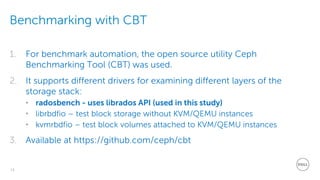
Benchmarking with CBT
1. For benchmark automation, the open source utility Ceph
Benchmarking Tool (CBT) was used.
2. It supports different drivers for examining different layers of the
storage stack:
• radosbench - uses librados API (used in this study)
• librbdfio – test block storage without KVM/QEMU instances
• kvmrbdfio – test block volumes attached to KVM/QEMU instances
3. Available at https://github.com/ceph/cbt
15
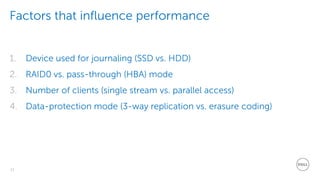
Factors that influence performance
1. Device used for journaling (SSD vs. HDD)
2. RAID0 vs. pass-through (HBA) mode
3. Number of clients (single stream vs. parallel access)
4. Data-protection mode (3-way replication vs. erasure coding)
16
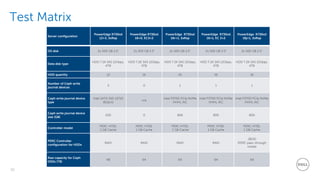
Test Matrix
Server configuration
PowerEdge R730xd
12+3, 3xRep
PowerEdge R730xd
16+0, EC3+2
PowerEdge R730xd
16r+1, 3xRep
PowerEdge R730xd
16+1, EC 3+2
PowerEdge R730xd
16j+1, 3xRep
OS disk 2x 500 GB 2.5" 2x 500 GB 2.5" 2x 500 GB 2.5" 2x 500 GB 2.5" 2x 500 GB 2.5"
Data disk type
HDD 7.2K SAS 12Gbps,
4TB
HDD 7.2K SAS 12Gbps,
4TB
HDD 7.2K SAS 12Gbps,
4TB
HDD 7.2K SAS 12Gbps,
4TB
HDD 7.2K SAS 12Gbps,
4TB
HDD quantity 12 16 16 16 16
Number of Ceph write
journal devices
3 0 1 1 1
Ceph write journal device
type
Intel SATA SSD S3710
(6Gb/s)
n/a
Intel P3700 PCIe NVMe
HHHL AIC
Intel P3700 PCIe NVMe
HHHL AIC
Intel P3700 PCIe NVMe
HHHL AIC
Ceph write journal device
size (GB)
200 0 800 800 800
Controller model
PERC H730,
1 GB Cache
PERC H730,
1 GB Cache
PERC H730,
1 GB Cache
PERC H730,
1 GB Cache
PERC H730,
1 GB Cache
PERC Controller
configuration for HDDs
RAID RAID RAID RAID
JBOD
(PERC pass-through
mode)
Raw capacity for Ceph
OSDs (TB)
48 64 64 64 64
17
Benchmark Test
Results
18
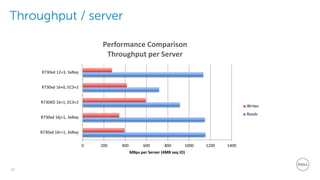
Throughput / server
0 200 400 600 800 1000 1200 1400
R730xd 16r+1, 3xRep
R730xd 16j+1, 3xRep
R730XD 16+1, EC3+2
R730xd 16+0, EC3+2
R730xd 12+3, 3xRep
MBps per Server (4MB seq IO)
Performance Comparison
Throughput per Server
Writes
Reads
19
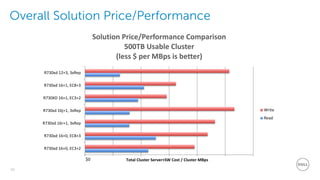
Overall Solution Price/Performance
R730xd 16+0, EC3+2
R730xd 16+0, EC8+3
R730xd 16r+1, 3xRep
R730xd 16j+1, 3xRep
R730XD 16+1, EC3+2
R730xd 16+1, EC8+3
R730xd 12+3, 3xRep
Total Cluster Server+SW Cost / Cluster MBps
Solution Price/Performance Comparison
500TB Usable Cluster
(less $ per MBps is better)
Write
Read
$0
20
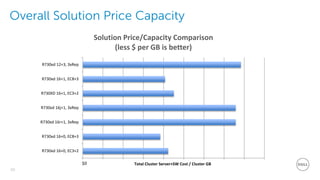
Overall Solution Price Capacity
R730xd 16+0, EC3+2
R730xd 16+0, EC8+3
R730xd 16r+1, 3xRep
R730xd 16j+1, 3xRep
R730XD 16+1, EC3+2
R730xd 16+1, EC8+3
R730xd 12+3, 3xRep
Total Cluster Server+SW Cost / Cluster GB
Solution Price/Capacity Comparison
(less $ per GB is better)
$0
21
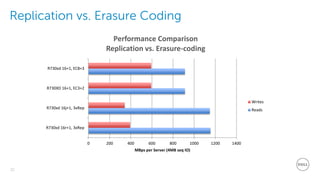
Replication vs. Erasure Coding
0 200 400 600 800 1000 1200 1400
R730xd 16r+1, 3xRep
R730xd 16j+1, 3xRep
R730XD 16+1, EC3+2
R730xd 16+1, EC8+3
MBps per Server (4MB seq IO)
Performance Comparison
Replication vs. Erasure-coding
Writes
Reads
22
JBOD vs. RAID0
1153
1147
393
342
0 200 400 600 800 1000 1200 1400
R730XD 16 RAID+1, 3xRep
R730XD 16 JBOD+1, 3xRep
MBps per Server (4MB seq IO)
Performance Comparison
JBOD vs. RAID0 Config
Writes
Reads
23
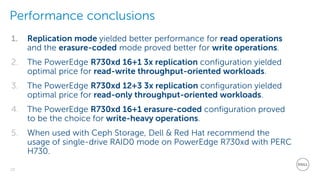
Performance conclusions
1. Replication mode yielded better performance for read operations
and the erasure-coded mode proved better for write operations.
2. The PowerEdge R730xd 16+1 3x replication configuration yielded
optimal price for read-write throughput-oriented workloads.
3. The PowerEdge R730xd 12+3 3x replication configuration yielded
optimal price for read-only throughput-oriented workloads.
4. The PowerEdge R730xd 16+1 erasure-coded configuration proved
to be the choice for write-heavy operations.
5. When used with Ceph Storage, Dell & Red Hat recommend the
usage of single-drive RAID0 mode on PowerEdge R730xd with PERC
H730.
24
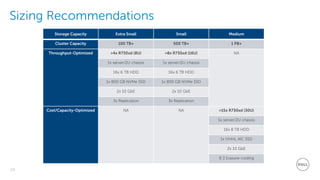
Sizing Recommendations
Storage Capacity Extra Small Small Medium
Cluster Capacity 100 TB+ 500 TB+ 1 PB+
Throughput-Optimized >4x R730xd (8U) >8x R730xd (16U) NA
1x server/2U chassis 1x server/2U chassis
16x 6 TB HDD 16x 6 TB HDD
1x 800 GB NVMe SSD 1x 800 GB NVMe SSD
2x 10 GbE 2x 10 GbE
3x Replication 3x Replication
Cost/Capacity-Optimized NA NA >15x R730xd (30U)
1x server/2U chassis
16x 8 TB HDD
1x HHHL AIC SSD
2x 10 GbE
8:3 Erasure-coding
25
Observations
1. Obey SSD to HDD ratio
2. Hardware matters, look at RAID controllers if you use HDDs
3. Don’t use RAID controllers on SSDs
4. SSD sequential write bandwidth becomes a bottleneck
5. Random workloads should go on Flash-only
6. 10GbE Bonding not necessary with <=16 drives
26
Recommended Reading
Dell PowerEdge R730xd Red Hat Ceph Storage Performance and
Sizing Guide
http://en.community.dell.com/techcenter/cloud/m/dell_cloud_resources/20442913
Enterprise Ceph: Every Way, Your Way
https://www.redhat.com/files/summit/session-assets/2016/SS88828-enterprise-
ceph_every-way-your-way.pdf

Ceph Performance and Sizing Guide

  • 1.
    Red Hat Ceph Performance& Sizing Guide Jose De la Rosa September 7, 2016
  • 2.
    2 Agenda 1. Ceph Overview a.Architecture b. Approach to storing data 2. Test methodology a. What was tested b. How it was tested & measured 3. Results a. Key findings b. Recommendations
  • 3.
  • 4.
    4 Ceph Overview 1. Opensource software defined storage: logical storage services and capabilities are abstracted from the underlying physical storage systems. 2. Provides object, block and file system storage. All data is stored as objects. 3. Massively scalable to thousands of storage nodes. 4. Self-healing with no single point of failure: If a node fails, it is automatically detected and data rebalances to ensure availability.
  • 5.
    5 Client access Ross Turk,Red Hat - https://raw.githubusercontent.com/ceph/ceph/master/doc/images/stack.png
  • 6.
  • 7.
    7 Storage Protection Method DiskDisk Disk OSD OSD OSD 3x Replication Data copied 3 times Actual disk usage = 33% Disk Disk Disk Disk OSD OSD OSD OSD Erasure Coded (3+2) Data split into 3 + 2 disks used for parity Actual disk usage = 60% Disk OSD
  • 8.
    8 Reading and WritingData http://www.slideshare.net/LarryCover/ceph-open-source-storage-software-optimizations-on-intel-architecture-for-cloud-workloads
  • 9.
  • 10.
    10 Server configuration Testbed Details Cephtier Storage Nodes (5) Monitors (3) Clients (10) Platform Dell PowerEdge R730xd Dell PowerEdge R630 Dell PowerEdge R220 CPU 2x Intel Xeon E5-2630 v3 2.4GHz 2x Intel Xeon E5-2650 v3 2.3 GHz 1x Intel Celeron G1820 2.7 GHz Memory 4x 16 GB 1866 MHz DDR4 8x 16 GB 2133MHz DDR4 4x 4 GB 1600 MHz DDR3 Network 1x Intel X520/2P I350 LOM 1x Intel X520/2P I350 LOM 1x Intel X520/2P I350 Storage PERC H730 Mini / 1 GB Cache Up to 16x: SEAGATE 4 TB SAS (ST4000NM0005) Up to 3x: Intel DC S3700 SSD 200 GB SATA (SSDSC2BA20) 1x Intel DC P3700 SSD 800 GB NVMe PERC H730 Mini / 1 GB Cache 6x SEAGATE 500 GB SAS (ST9500620S) 1x Toshiba 50 GB SATA (DT01ACA0)
  • 11.
  • 12.
    12 Configuration Guidance 1. Generalrules of thumb • 1 Core-GHz per OSD • SATA/SAS SSD to HDD Ratio: 1:4 - 1:5 • NVME SSD to HDD Ratio: 1:17-1:18 • 16GB RAM Baseline + 2-3GB per OSD 2. More details at https://www.redhat.com/en/resources/red-hat- ceph-storage-hardware-configuration-guide
  • 13.
    13 Storage node configurationstested OSD to Journal Ratio [drives] 12+3 16+0 16+1 OSD node configuration 12+3 16+0 16+1 HDDs 12 16 16 HDD RAID mode Single-disk RAID0 Single-disk RAID0 Single-disk RAID0 / HBA mode SATA SSDs 3 0 0 SSD RAID mode JBOD JBOD JBOD NVMe SSDs 0 0 1 Network 1x 10 GbE Front-End 1x 10 GbE Back-End 1x 10 GbE Front-End 1x 10 GbE Back-End 1x 10 GbE Front-End 1x 10 GbE Back-End
  • 14.
    14 Benchmarking with CBT 1.For benchmark automation, the open source utility Ceph Benchmarking Tool (CBT) was used. 2. It supports different drivers for examining different layers of the storage stack: • radosbench - uses librados API (used in this study) • librbdfio – test block storage without KVM/QEMU instances • kvmrbdfio – test block volumes attached to KVM/QEMU instances 3. Available at https://github.com/ceph/cbt
  • 15.
    15 Factors that influenceperformance 1. Device used for journaling (SSD vs. HDD) 2. RAID0 vs. pass-through (HBA) mode 3. Number of clients (single stream vs. parallel access) 4. Data-protection mode (3-way replication vs. erasure coding)
  • 16.
    16 Test Matrix Server configuration PowerEdgeR730xd 12+3, 3xRep PowerEdge R730xd 16+0, EC3+2 PowerEdge R730xd 16r+1, 3xRep PowerEdge R730xd 16+1, EC 3+2 PowerEdge R730xd 16j+1, 3xRep OS disk 2x 500 GB 2.5" 2x 500 GB 2.5" 2x 500 GB 2.5" 2x 500 GB 2.5" 2x 500 GB 2.5" Data disk type HDD 7.2K SAS 12Gbps, 4TB HDD 7.2K SAS 12Gbps, 4TB HDD 7.2K SAS 12Gbps, 4TB HDD 7.2K SAS 12Gbps, 4TB HDD 7.2K SAS 12Gbps, 4TB HDD quantity 12 16 16 16 16 Number of Ceph write journal devices 3 0 1 1 1 Ceph write journal device type Intel SATA SSD S3710 (6Gb/s) n/a Intel P3700 PCIe NVMe HHHL AIC Intel P3700 PCIe NVMe HHHL AIC Intel P3700 PCIe NVMe HHHL AIC Ceph write journal device size (GB) 200 0 800 800 800 Controller model PERC H730, 1 GB Cache PERC H730, 1 GB Cache PERC H730, 1 GB Cache PERC H730, 1 GB Cache PERC H730, 1 GB Cache PERC Controller configuration for HDDs RAID RAID RAID RAID JBOD (PERC pass-through mode) Raw capacity for Ceph OSDs (TB) 48 64 64 64 64
  • 17.
  • 18.
    18 Throughput / server 0200 400 600 800 1000 1200 1400 R730xd 16r+1, 3xRep R730xd 16j+1, 3xRep R730XD 16+1, EC3+2 R730xd 16+0, EC3+2 R730xd 12+3, 3xRep MBps per Server (4MB seq IO) Performance Comparison Throughput per Server Writes Reads
  • 19.
    19 Overall Solution Price/Performance R730xd16+0, EC3+2 R730xd 16+0, EC8+3 R730xd 16r+1, 3xRep R730xd 16j+1, 3xRep R730XD 16+1, EC3+2 R730xd 16+1, EC8+3 R730xd 12+3, 3xRep Total Cluster Server+SW Cost / Cluster MBps Solution Price/Performance Comparison 500TB Usable Cluster (less $ per MBps is better) Write Read $0
  • 20.
    20 Overall Solution PriceCapacity R730xd 16+0, EC3+2 R730xd 16+0, EC8+3 R730xd 16r+1, 3xRep R730xd 16j+1, 3xRep R730XD 16+1, EC3+2 R730xd 16+1, EC8+3 R730xd 12+3, 3xRep Total Cluster Server+SW Cost / Cluster GB Solution Price/Capacity Comparison (less $ per GB is better) $0
  • 21.
    21 Replication vs. ErasureCoding 0 200 400 600 800 1000 1200 1400 R730xd 16r+1, 3xRep R730xd 16j+1, 3xRep R730XD 16+1, EC3+2 R730xd 16+1, EC8+3 MBps per Server (4MB seq IO) Performance Comparison Replication vs. Erasure-coding Writes Reads
  • 22.
    22 JBOD vs. RAID0 1153 1147 393 342 0200 400 600 800 1000 1200 1400 R730XD 16 RAID+1, 3xRep R730XD 16 JBOD+1, 3xRep MBps per Server (4MB seq IO) Performance Comparison JBOD vs. RAID0 Config Writes Reads
  • 23.
    23 Performance conclusions 1. Replicationmode yielded better performance for read operations and the erasure-coded mode proved better for write operations. 2. The PowerEdge R730xd 16+1 3x replication configuration yielded optimal price for read-write throughput-oriented workloads. 3. The PowerEdge R730xd 12+3 3x replication configuration yielded optimal price for read-only throughput-oriented workloads. 4. The PowerEdge R730xd 16+1 erasure-coded configuration proved to be the choice for write-heavy operations. 5. When used with Ceph Storage, Dell & Red Hat recommend the usage of single-drive RAID0 mode on PowerEdge R730xd with PERC H730.
  • 24.
    24 Sizing Recommendations Storage CapacityExtra Small Small Medium Cluster Capacity 100 TB+ 500 TB+ 1 PB+ Throughput-Optimized >4x R730xd (8U) >8x R730xd (16U) NA 1x server/2U chassis 1x server/2U chassis 16x 6 TB HDD 16x 6 TB HDD 1x 800 GB NVMe SSD 1x 800 GB NVMe SSD 2x 10 GbE 2x 10 GbE 3x Replication 3x Replication Cost/Capacity-Optimized NA NA >15x R730xd (30U) 1x server/2U chassis 16x 8 TB HDD 1x HHHL AIC SSD 2x 10 GbE 8:3 Erasure-coding
  • 25.
    25 Observations 1. Obey SSDto HDD ratio 2. Hardware matters, look at RAID controllers if you use HDDs 3. Don’t use RAID controllers on SSDs 4. SSD sequential write bandwidth becomes a bottleneck 5. Random workloads should go on Flash-only 6. 10GbE Bonding not necessary with <=16 drives
  • 26.
    26 Recommended Reading Dell PowerEdgeR730xd Red Hat Ceph Storage Performance and Sizing Guide http://en.community.dell.com/techcenter/cloud/m/dell_cloud_resources/20442913 Enterprise Ceph: Every Way, Your Way https://www.redhat.com/files/summit/session-assets/2016/SS88828-enterprise- ceph_every-way-your-way.pdf

Editor's Notes

  • #6 http://docs.ceph.com/docs/hammer/architecture/ RADOS - preserves consistent data access and strong safety semantics while allowing nodes to act semi-autonomously to self manage replication, failure detection, and failure recovery through the use of a small cluster map.
  • #7 Monitor nodes – which monitor the state of the cluster and decide what storage nodes are available to store data Metadata servers store metadata for CephFS file systems Data is always evenly distributed to all OSDs CRUSH is configurable and scales indefinitely
  • #8 OSDs perform optimally when all storage drives are the same size and speed. Solid state storage media (SSDs and NVMe) can be used for journaling and caching to improve performance + consistency.
  • #14 Throughput is a measurement of the average number of megabytes transferred within a period of time for a specific file size.
  • #19 The R730xd 16+1, 3xRep configuration provided the best performance for read/write workloads. However, for write-oriented workloads, the R730xd 16+1, EC3+2 configuration provides superior write performance at significantly lesser costs.
  • #20 The R730xd 16+1, 3xRep configuration yielded optimal price performance for mixed read/write, and throughput-oriented workloads. However, for read-mostly workloads, the R730xd 12+3, 3xRep configuration is an attractive alternative based on its superior read price/performance.
  • #21 For capacity-archive workloads, erasure-coded configurations are significantly less expensive per GB data archived. Write-heavy capacity-archives should use the R730xd 16+1, EC configuration, because adding an SSD write-journal increases total $/GB by only a small value and increases write performance.
  • #22 Keeping everything else constant, replicated reads perform much better than erasure-coded reads. However, erasure-coded writes perform better than replicated writes.