Motherboards   How Motherboards Work IT Essentials: PC Hardware and Software v4.0
Motherboards  Introduction To Motherboards  Form Factor Sockets and CPUs Chipsets Bus Speed Memory  Motherboard Power Connector. Slots And Ports On Motherboard.
Motherboard The motherboard is the main printed circuit board and contains the buses, or electrical pathways, found in a computer. These buses allow data to travel between the various components that comprise a computer. A motherboard is also known as the system board, the backplane, or the main board.
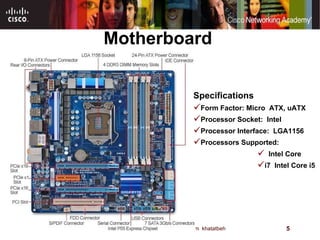
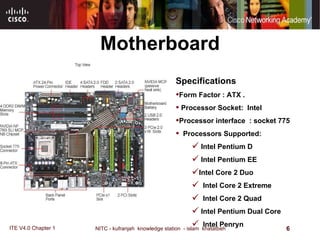
Motherboard The motherboard accommodates the central processing unit  ( CPU ) , RAM, expansion slots, heat sink / fan assembly, BIOS chip, chip set, and the embedded wires that interconnect the motherboard components .  Sockets, internal and external connectors, and various ports are also placed on the motherboard .  
Motherboard Specifications Form Factor: Micro  ATX, uATX Processor Socket:  Intel Processor Interface:  LGA1156 Processors Supported:    Intel Core  i7  Intel Core i5
Motherboard Specifications Form Factor : ATX . Processor Socket :   Intel  Processor interface  : socket 775     Processors Supported :   Intel Pentium D  Intel Pentium EE  Intel Core 2 Duo    Intel Core 2 Extreme    Intel Core 2 Quad  Intel Pentium Dual Core    Intel Penryn
Motherboards Form Factor The  form factor  of motherboards pertains to the size and shape of the board. It also describes the physical layout of the different components and devices on the motherboard.  The form factor affects where individual components go and the shape of the computer's case. There are several specific form factors that most PC motherboards use so that they can all fit in standard cases.
Various Form Factors Exist For Motherboards AT – Advanced Technology ATX – Advanced Technology Extended Mini-ATX – Smaller footprint of ATX Micro-ATX – Smaller footprint of ATX LPX – Low-profile Extended NLX – New Low-profile Extended BTX – Balanced Technology Extended
Motherboards Form Factor The form factor is just one of the many standards that apply to motherboards. Some of the other standards include:  The  socket for the microprocessor  determines what kind of  Central Processing Unit  (CPU) the motherboard uses.  The  chipset  is part of the motherboard's logic system and is usually made of two parts -- the  northbridge  and the  southbridge . These two "bridges" connect the CPU to other parts of the computer.  The  Basic Input/Output System (BIOS)  chip controls the most basic functions of the computer and performs a self-test every time you turn it on. Some systems feature dual BIOS, which provides a backup in case one fails or in case of error during updating.  The  real time clock chip  is a battery-operated chip that maintains basic settings and the system time.
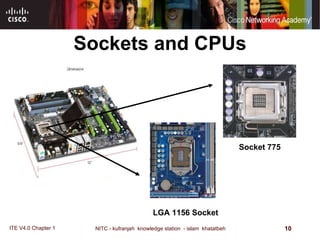
Sockets and CPUs Socket 775 LGA 1156 Socket 1333 MHz Front Side Bus :   NVIDIA nForce 780i MCP      Northbridge :   800 MHz DDR2    667 MHz DDR2    Dual Channel Supported    533 MHz DDR2      Memory Supported :   DDR2      Memory Type :   8 GB  -  64bit      Maximum Memory Supported :   240- Pin      Number of Pins :   4      Number of Slots : 
Sockets and CPUs The central processing unit  (CPU)  is considered the brain of the computer. It is sometimes referred to as the processor. Most calculations take place in the CPU. the CPU is the most important element of a computer system. CPUs come in different form factors, each style requiring a particular slot or socket on the motherboard. Common CPU manufacturers include  Intel  and  AMD   1333 MHz Front Side Bus :   NVIDIA nForce 780i MCP      Northbridge :   800 MHz DDR2    667 MHz DDR2    Dual Channel Supported    533 MHz DDR2      Memory Supported :   DDR2      Memory Type :   8 GB  -  64bit      Maximum Memory Supported :   240- Pin      Number of Pins :   4      Number of Slots : 
Sockets and CPUs The CPU socket or slot is the connector that interfaces between the motherboard and the processor itself . Most CPU sockets and processors in use today are built around the pin grid array  ( PGA )  architecture, in which the pins on the underside of the processor are inserted into the socket, usually with zero insertion force  ( ZIF ). ZIF  refers to the amount of force needed to install a CPU into the motherboard socket or slot .  Slot - based processors are cartridge - shaped and fit into a slot that looks similar to an expansion slot .  1333 MHz Front Side Bus :   NVIDIA nForce 780i MCP      Northbridge :   800 MHz DDR2    667 MHz DDR2    Dual Channel Supported    533 MHz DDR2      Memory Supported :   DDR2      Memory Type :   8 GB  -  64bit      Maximum Memory Supported :   240- Pin      Number of Pins :   4      Number of Slots : 
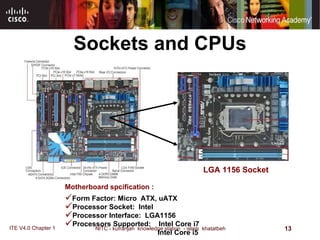
Sockets and CPUs Motherboard spcification :  Form Factor: Micro  ATX, uATX Processor Socket :   Intel   Processor Interface :   LGA1156   Processors Supported :   Intel Core i7   Intel Core i5 LGA 1156 Socket 1333 MHz Front Side Bus :   NVIDIA nForce 780i MCP      Northbridge :   800 MHz DDR2    667 MHz DDR2    Dual Channel Supported    533 MHz DDR2      Memory Supported :   DDR2      Memory Type :   8 GB  -  64bit      Maximum Memory Supported :   240- Pin      Number of Pins :   4      Number of Slots : 
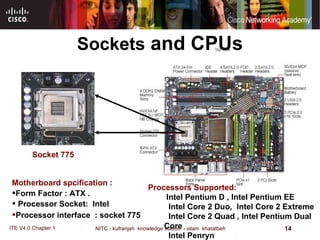
Sockets  and CPUs Motherboard spcification :  Form Factor : ATX . Processor Socket :   Intel  Processor interface  : socket 775    Socket 775 Processors Supported :   Intel Pentium D , Intel Pentium EE  Intel Core 2 Duo,  Intel Core 2 Extreme    Intel Core 2 Quad , Intel Pentium Dual Core    Intel Penryn 1333 MHz Front Side Bus :   NVIDIA nForce 780i MCP      Northbridge :   800 MHz DDR2    667 MHz DDR2    Dual Channel Supported    533 MHz DDR2      Memory Supported :   DDR2      Memory Type :   8 GB  -  64bit      Maximum Memory Supported :   240- Pin      Number of Pins :   4      Number of Slots : 
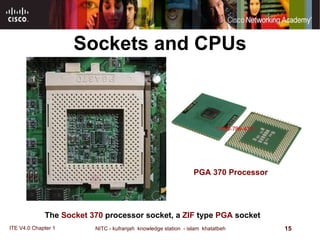
Sockets and CPUs The   Socket 370   processor socket, a   ZIF   type   PGA   socket   PGA 370 Processor  1333 MHz Front Side Bus :   NVIDIA nForce 780i MCP      Northbridge :   800 MHz DDR2    667 MHz DDR2    Dual Channel Supported    533 MHz DDR2      Memory Supported :   DDR2      Memory Type :   8 GB  -  64bit      Maximum Memory Supported :   240- Pin      Number of Pins :   4      Number of Slots : 
Sockets and CPUs The newest Intel CPU does not have a PGA. It has an  LGA.   LGA  stands for Land Grid Array. An LGA is different from a PGA in that the pins are actually part of the socket, not the CPU.  Anyone who already has a specific CPU in mind should select a motherboard based on that CPU. For example, if you want to use one of the new multi-core chips made by Intel or AMD, you will need to select a motherboard with the correct socket for those chips. CPUs simply will not fit into sockets that don't match their PGA.  The CPU communicates with other elements of the motherboard through a  chipset . We'll look at the chipset in more detail next   1333 MHz Front Side Bus :   NVIDIA nForce 780i MCP      Northbridge :   800 MHz DDR2    667 MHz DDR2    Dual Channel Supported    533 MHz DDR2      Memory Supported :   DDR2      Memory Type :   8 GB  -  64bit      Maximum Memory Supported :   240- Pin      Number of Pins :   4      Number of Slots : 
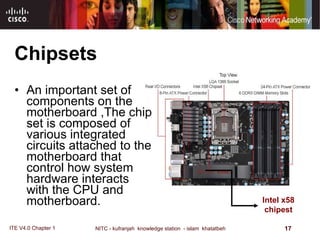
Chipsets An important set of components on the motherboard ,The chip set is composed of various integrated circuits attached to the motherboard that control how system hardware interacts with the CPU and motherboard.  Intel x58 chipest 1333 MHz Front Side Bus :   NVIDIA nForce 780i MCP      Northbridge :   800 MHz DDR2    667 MHz DDR2    Dual Channel Supported    533 MHz DDR2      Memory Supported :   DDR2      Memory Type :   8 GB  -  64bit      Maximum Memory Supported :   240- Pin      Number of Pins :   4      Number of Slots : 
Chipsets The chip set of a motherboard allows the CPU to communicate and interact with the other components of the computer, and to exchange data with system memory, or RAM, hard disk drives, video cards, and other output devices.  The chip set establishes how much memory can be added to a motherboard. The chip set also determines the type of connectors on the motherboard. Most chip sets are divided into two distinct components,  Northbridge  and  Southbridge.   Northbridge  controls access to the RAM, video card, and the speeds at which the CPU can communicate with them. The video card is sometimes integrated into the Northbridge.  Southbridge , in most cases, allows the CPU to communicate with the hard drives, sound card, USB ports, and other I/O ports.  1333 MHz Front Side Bus :   NVIDIA nForce 780i MCP      Northbridge :   800 MHz DDR2    667 MHz DDR2    Dual Channel Supported    533 MHz DDR2      Memory Supported :   DDR2      Memory Type :   8 GB  -  64bit      Maximum Memory Supported :   240- Pin      Number of Pins :   4      Number of Slots : 
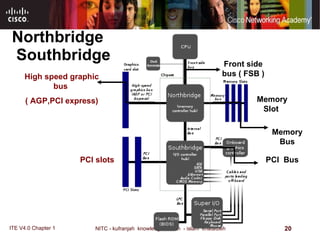
Northbridge, Southbridge   The northbridge connects directly to the processor via the front side bus ( FSB ). A memory controller is located on the northbridge, which gives the CPU fast access to the memory. The northbridge also connects to the  AGP or PCI Express bus  and to the memory itself.  The southbridge is slower than the northbridge, and information from the CPU has to go through the northbridge before reaching the southbridge. Other busses connect the southbridge to the  PCI bus , the  USB  ports and the  IDE  or SATA hard disk connections  . Chipset selection and CPU selection go hand in hand, because manufacturers optimize chipsets to work with specific CPUs.  The chipset is an integrated part of the motherboard, so it cannot be removed or upgraded. This means that not only must the motherboard's socket fit the CPU, the motherboard's chipset must work optimally with the CPU.  1333 MHz Front Side Bus :   NVIDIA nForce 780i MCP      Northbridge :   800 MHz DDR2    667 MHz DDR2    Dual Channel Supported    533 MHz DDR2      Memory Supported :   DDR2      Memory Type :   8 GB  -  64bit      Maximum Memory Supported :   240- Pin      Number of Pins :   4      Number of Slots : 
Northbridge  Southbridge Front side bus ( FSB ) Memory Slot  Memory Bus PCI  Bus PCI slots  High speed graphic bus  ( AGP,PCI express)
Bus Speed A bus is simply a circuit that connects one part of the motherboard to another. The more data a bus can handle at one time, the faster it allows information to travel. The  speed  of the bus, measured in megahertz (MHz).
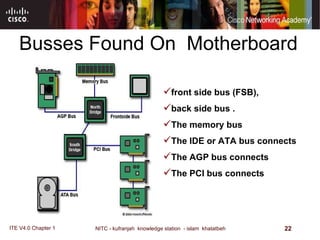
Busses Found On  Motherboard front side bus (FSB),  back side bus  . The memory bus  The IDE or ATA bus connects  The AGP bus connects  The PCI bus connects
Busses Found On  Motherboard front side bus  ( FSB ) OR  CPU Bus  is the bus that carries data between the CPU and the northbridge. Depending on the processor used, some computers may also have a back-side bus that connects the CPU to the cache. This bus and the cache connected to it are faster than accessing the system memory via the front side bus. The amount of data that a CPU can process at the one time depends on the size of the front side bus  ( FSB ).  The wider the processor data bus width, the more powerful the processor is .  Current processors have a 32-bit or a 64-bit processor data bus .
Busses Found On  Motherboard back side bus  connects the CPU with the level 2 (L2) cache, also known as secondary or external cache. The processor determines the speed of the back side bus.  memory bus  connects the northbridge to the memory.  IDE  or  ATA  bus connects the southbridge to the disk drives.  AGP  bus connects the video card to the memory and the CPU. The speed of the AGP bus is usually 66 MHz .
Busses Found On  Motherboard The  PCI  bus connects PCI slots to the southbridge. On most systems, the speed of the PCI bus is 33 MHz. Also compatible with PCI is  PCI Express , which is much faster than PCI but is still compatible with current software and operating systems. PCI Express is likely to replace both PCI and AGP busses.  The faster a computer's bus speed, the faster it will operate, A fast bus speed cannot make up for a slow processor or chipset.
Memory The speed of the chipset and busses controls how quickly it can communicate with other parts of the computer. The speed of the RAM connection directly controls how fast the computer can access instructions and data, and therefore has a big effect on system performance. A fast processor with slow RAM is going nowhere.  The amount of memory available also controls how much data the computer can have readily available. RAM makes up the bulk of a computer's memory. The general rule of thumb is the more RAM the computer has, the better.
Memory Much of the memory available today is  dual data rate  (DDR) memory. This means that the memory can transmit data twice per cycle instead of once, which makes the memory faster. Also, most motherboards have space for multiple memory chips, and on newer motherboards, they often connect to the northbridge via a dual bus instead of a single bus. This further reduces the amount of time it takes for the processor to get information from the memory.
Memory A motherboard's memory slots directly affect what kind and how much memory is supported. Just like other components, the memory plugs into the slot via a series of pins. The memory module must have the right number of pins to fit into the slot on the motherboard.
Slots And Ports On  Motherboard  Peripheral Component Interconnect  ( PCI )- is 32-bit or 64-bit expansion slot , PCI is standard slot currently used in most computer, connections for video, sound and video capture cards, network cards.  Accelerated Graphics Port  ( AGP ) -  is 32-bit expansion slot , AGP is designed for video card .  Integrated Drive Electronics  ( IDE ) - interfaces for the hard drives ,  IDE , also called Advanced Technology Attachment (ATA) is an early drive controller interface that connects computers and hard disk drives. An IDE interface uses a 40-pin connector.  Memory slots  .
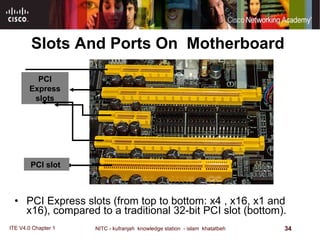
Slots And Ports On  Motherboard  PCI Express  Peripheral Component Interconnect Express), is a computer expansion card standard designed to replace the older PCI, and AGP standards. Introduced by Intel in 2004, PCIe is the latest standard for expansion cards,   express is backward compatible with PCI slot , PCI-express has x1,x4,x8,x16 slot .  serial ATA , or  SATA  computer bus, is a storage-interface for connecting host bus adapters to mass storage devices such as hard disk drives and optical drives. The SATA host adapter is integrated into almost all modern consumer laptop computers and desktop motherboards.
Slots And Ports On  Motherboard  parallel port  on a computer is a standard Type A DB-25 female connector . SCSI  port can transmit data at rates in excess of 320 Mbps and can support up to 15 devices.  USB Ports and Cables The Universal Serial Bus (USB) is a standard interface that connects peripheral devices to a computer. It was originally designed to replace serial and parallel connections.  serial port  can be either a DB-9, or a DB-25 male connector. Serial ports transmit one bit of data at a time. To connect a serial device, such as a modem or printer. FireWire Ports  .FireWire is a high-speed, hot-swappable interface that connects peripheral devices to a computer.
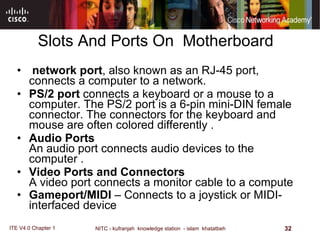
Slots And Ports On  Motherboard  network port , also known as an RJ-45 port, connects a computer to a network .  PS/2 port  connects a keyboard or a mouse to a computer. The PS/2 port is a 6-pin mini-DIN female connector. The connectors for the keyboard and mouse are often colored differently . Audio Ports An audio port connects audio devices to the computer . Video Ports and Connectors A video port connects a monitor cable to a compute Gameport / MIDI  – Connects to a joystick or MIDI - interfaced device
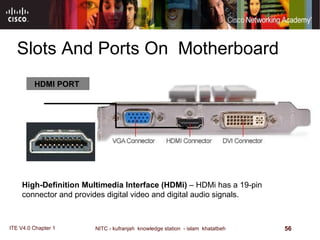
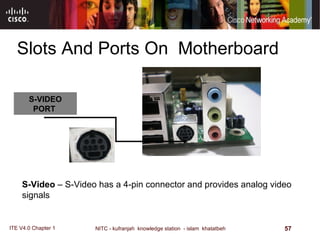
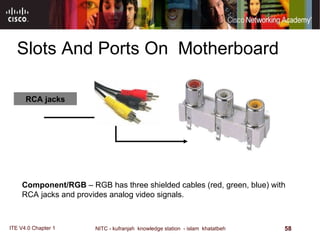
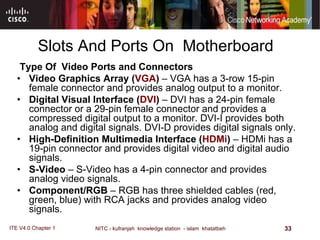
Slots And Ports On  Motherboard  Type Of   Video Ports and Connectors Video Graphics Array ( VGA )  – VGA has a 3-row 15-pin female connector and provides analog output to a monitor.  Digital Visual Interface ( DVI )  – DVI has a 24-pin female connector or a 29-pin female connector and provides a compressed digital output to a monitor. DVI-I provides both analog and digital signals. DVI-D provides digital signals only.  High-Definition Multimedia Interface ( HDMi )  – HDMi has a 19-pin connector and provides digital video and digital audio signals.  S-Video  – S-Video has a 4-pin connector and provides analog video signals.  Component/RGB  – RGB has three shielded cables (red, green, blue) with RCA jacks and provides analog video signals.
Slots And Ports On  Motherboard  PCI Express slots  ( from top to bottom :  x4 , x16, x1 and x16 ) , compared to a traditional 32-bit PCI slot  ( bottom ) . PCI slot  PCI Express slots
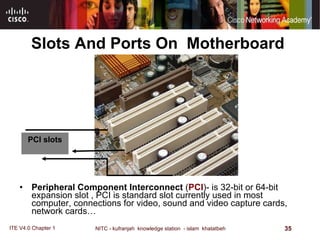
Slots And Ports On  Motherboard  Peripheral Component Interconnect  ( PCI )- is 32-bit or 64-bit expansion slot , PCI is standard slot currently used in most computer, connections for video, sound and video capture cards, network cards… PCI slots
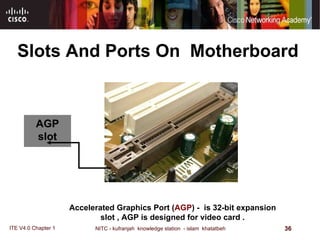
Slots And Ports On  Motherboard AGP slot  Accelerated Graphics Port ( AGP ) -  is 32-bit expansion slot , AGP is designed for video card .
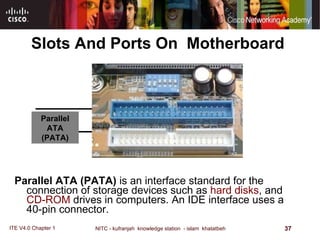
Slots And Ports On  Motherboard  Parallel ATA  ( PATA )  is an interface standard for the connection of storage devices such as  hard disks , and  CD-ROM  drives in computers. An IDE interface uses a 40-pin connector.  Parallel ATA  ( PATA )
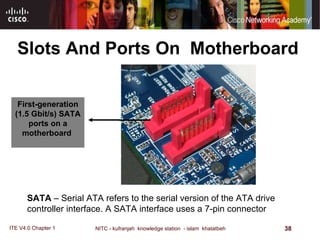
Slots And Ports On  Motherboard First - generation  ( 1.5 Gbit / s )  SATA ports on a   motherboard   SATA  –  Serial ATA refers to the serial version of the ATA drive controller interface .  A SATA interface uses a 7-pin connector
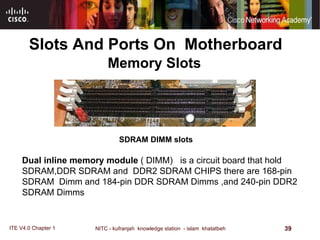
   SDRAM   DIMM slots Dual inline memory module  ( DIMM)  is a circuit board that hold SDRAM,DDR SDRAM and  DDR2 SDRAM CHIPS there are 168-pin SDRAM  Dimm and 184-pin DDR SDRAM Dimms ,and 240-pin DDR2 SDRAM Dimms  Memory Slots Slots And Ports On  Motherboard
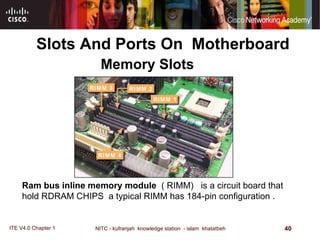
Slots And Ports On  Motherboard Memory Slots Ram bus inline memory module  ( RIMM)  is a circuit board that hold RDRAM CHIPS  a typical RIMM has 184-pin configuration .
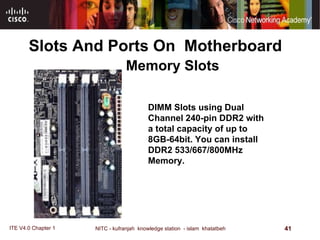
Slots And Ports On  Motherboard DIMM Slots using Dual Channel 240-pin DDR2 with a total capacity of up to 8GB-64bit .  You can install DDR2 533/667/800MHz Memory .  Memory Slots
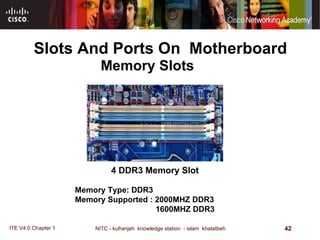
Slots And Ports On  Motherboard 4 DDR3 Memory Slot Memory Type: DDR3  Memory Supported : 2000MHZ DDR3 1600MHZ DDR3 Memory Slots
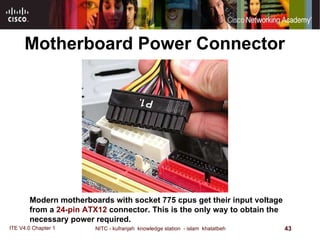
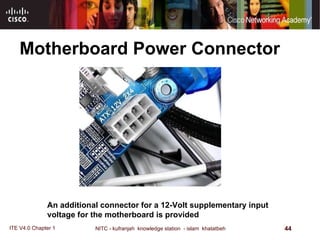
Motherboard Power Connector  Modern motherboards with socket 775 cpus get their input voltage from a  24-pin ATX12  connector. This is the only way to obtain the necessary power required.
Motherboard Power Connector  An additional connector for a 12-Volt supplementary input voltage for the motherboard is provided
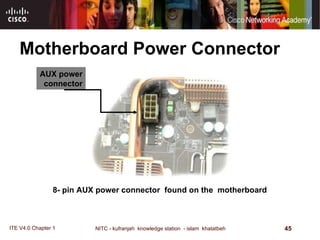
Motherboard Power Connector  8- pin AUX power connector  found on the  motherboard  AUX power connector
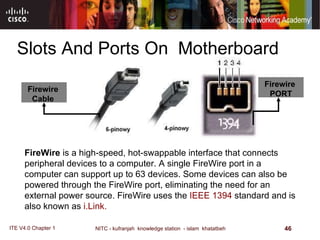
Slots And Ports On  Motherboard Firewire   Cable  FireWire  is a high-speed, hot-swappable interface that connects peripheral devices to a computer. A single FireWire port in a computer can support up to 63 devices. Some devices can also be powered through the FireWire port, eliminating the need for an external power source. FireWire uses the  IEEE 1394  standard and is also known as  i.Link.  Firewire   PORT
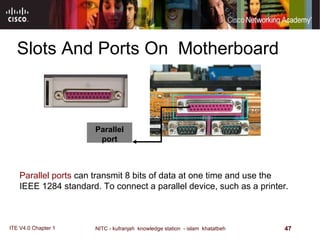
Slots And Ports On  Motherboard Parallel port Parallel ports  can transmit 8 bits of data at one time and use the IEEE 1284 standard. To connect a parallel device, such as a printer.
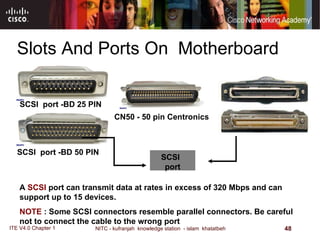
Slots And Ports On  Motherboard SCSI  port A  SCSI  port can transmit data at rates in excess of 320 Mbps and can support up to 15 devices.  NOTE  : Some SCSI connectors resemble parallel connectors .  Be careful not to connect the cable to the wrong port   SCSI  port -BD 25 PIN  SCSI  port -BD 50 PIN  CN50  -  50 pin Centronics
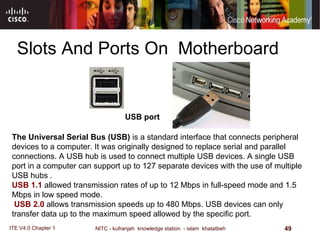
Slots And Ports On  Motherboard The Universal Serial Bus (USB)  is a standard interface that connects peripheral devices to a computer. It was originally designed to replace serial and parallel connections. A USB hub is used to connect multiple USB devices .  A single USB port in a computer can support up to 127 separate devices with the use of multiple USB hubs . USB 1.1  allowed transmission rates of up to 12 Mbps in full - speed mode and 1.5 Mbps in low speed mode . USB 2.0  allows transmission speeds up to 480 Mbps .  USB devices can only transfer data up to the maximum speed allowed by the specific port .  USB port
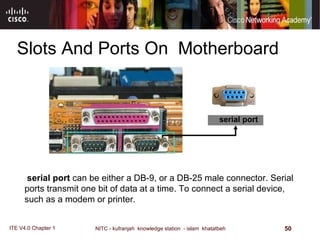
Slots And Ports On  Motherboard serial port  serial port  can be either a DB-9, or a DB-25 male connector .  Serial ports transmit one bit of data at a time .  To connect a serial device, such as a modem or printer.
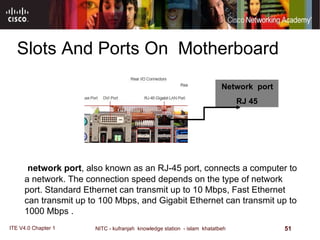
Slots And Ports On  Motherboard Network  port  RJ 45 network port , also known as an RJ-45 port, connects a computer to a network .  The connection speed depends on the type of network port .  Standard Ethernet can transmit up to 10 Mbps, Fast Ethernet can transmit up to 100 Mbps, and Gigabit Ethernet can transmit up to 1000 Mbps .
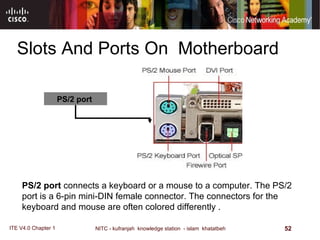
Slots And Ports On  Motherboard PS/2 port  PS/2 port  connects a keyboard or a mouse to a computer. The PS/2 port is a 6-pin mini-DIN female connector. The connectors for the keyboard and mouse are often colored differently .
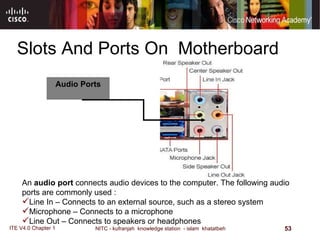
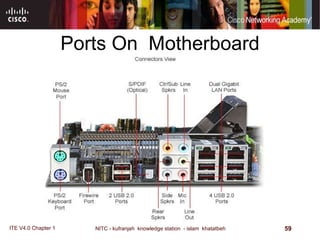
Slots And Ports On  Motherboard Audio Ports An  audio port  connects audio devices to the computer. The following audio ports are commonly used :  Line In – Connects to an external source, such as a stereo system  Microphone – Connects to a microphone  Line Out – Connects to speakers or headphones
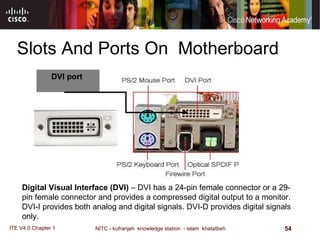
Slots And Ports On  Motherboard DVI port  Digital Visual Interface (DVI)  – DVI has a 24-pin female connector or a 29-pin female connector and provides a compressed digital output to a monitor. DVI-I provides both analog and digital signals. DVI-D provides digital signals only.
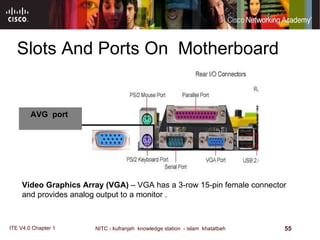
Slots And Ports On  Motherboard AVG  port  Video Graphics Array  ( VGA )  – VGA has a 3-row 15-pin female connector and provides analog output to a monitor .
Slots And Ports On  Motherboard HDMI PORT  High-Definition Multimedia Interface (HDMi)  – HDMi has a 19-pin connector and provides digital video and digital audio signals.
Slots And Ports On  Motherboard S-VIDEO PORT  S - Video  – S-Video has a 4-pin connector and provides analog video signals
Slots And Ports On  Motherboard RCA jacks Component/RGB  – RGB has three shielded cables (red, green, blue) with RCA jacks and provides analog video signals.
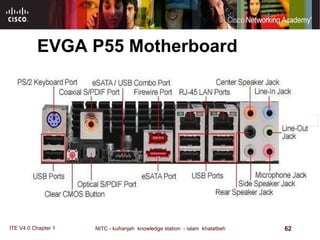
Ports On  Motherboard
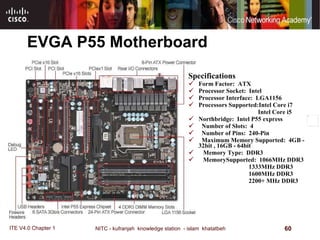
EVGA P55 Motherboard Specifications Form Factor:  ATX  Processor Socket:  Intel  Processor Interface:  LGA1156     Processors Supported:Intel Core i7   Intel Core i5     Northbridge:  Intel P55 express     Number of Slots:  4     Number of Pins:  240-Pin     Maximum Memory Supported:  4GB - 32bit , 16GB - 64bit     Memory Type:  DDR3     MemorySupported:  1066MHz DDR3   1333MHz DDR3  1600MHz DDR3 2200+ MHz DDR3
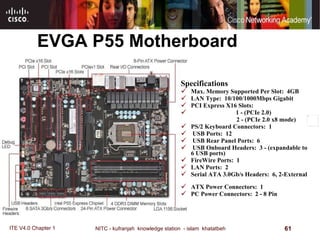
EVGA P55 Motherboard Specifications Max. Memory Supported Per Slot:  4GB     LAN Type:  10/100/1000Mbps Gigabit  PCI Express X16 Slots:  1 - (PCIe 2.0)  2 - (PCIe 2.0 x8 mode)  PS/2 Keyboard Connectors:  1  USB Ports:  12    USB Rear Panel Ports:  6  USB Onboard Headers:  3 - (expandable to 6 USB ports)  FireWire Ports:  1  LAN Ports:  2  Serial ATA 3.0Gb/s Headers:  6, 2-External  ATX Power Connectors:  1  PC Power Connectors:  2 - 8 Pin   
EVGA P55 Motherboard

How Motherboards Work

  • 1.
    Motherboards How Motherboards Work IT Essentials: PC Hardware and Software v4.0
  • 2.
    Motherboards IntroductionTo Motherboards Form Factor Sockets and CPUs Chipsets Bus Speed Memory Motherboard Power Connector. Slots And Ports On Motherboard.
  • 3.
    Motherboard The motherboardis the main printed circuit board and contains the buses, or electrical pathways, found in a computer. These buses allow data to travel between the various components that comprise a computer. A motherboard is also known as the system board, the backplane, or the main board.
  • 4.
    Motherboard The motherboardaccommodates the central processing unit ( CPU ) , RAM, expansion slots, heat sink / fan assembly, BIOS chip, chip set, and the embedded wires that interconnect the motherboard components . Sockets, internal and external connectors, and various ports are also placed on the motherboard .  
  • 5.
    Motherboard Specifications FormFactor: Micro ATX, uATX Processor Socket:  Intel Processor Interface:  LGA1156 Processors Supported:   Intel Core i7  Intel Core i5
  • 6.
    Motherboard Specifications FormFactor : ATX . Processor Socket :   Intel Processor interface : socket 775   Processors Supported :   Intel Pentium D  Intel Pentium EE  Intel Core 2 Duo   Intel Core 2 Extreme   Intel Core 2 Quad  Intel Pentium Dual Core   Intel Penryn
  • 7.
    Motherboards Form FactorThe form factor of motherboards pertains to the size and shape of the board. It also describes the physical layout of the different components and devices on the motherboard. The form factor affects where individual components go and the shape of the computer's case. There are several specific form factors that most PC motherboards use so that they can all fit in standard cases.
  • 8.
    Various Form FactorsExist For Motherboards AT – Advanced Technology ATX – Advanced Technology Extended Mini-ATX – Smaller footprint of ATX Micro-ATX – Smaller footprint of ATX LPX – Low-profile Extended NLX – New Low-profile Extended BTX – Balanced Technology Extended
  • 9.
    Motherboards Form FactorThe form factor is just one of the many standards that apply to motherboards. Some of the other standards include: The socket for the microprocessor determines what kind of Central Processing Unit (CPU) the motherboard uses. The chipset is part of the motherboard's logic system and is usually made of two parts -- the northbridge and the southbridge . These two "bridges" connect the CPU to other parts of the computer. The Basic Input/Output System (BIOS) chip controls the most basic functions of the computer and performs a self-test every time you turn it on. Some systems feature dual BIOS, which provides a backup in case one fails or in case of error during updating. The real time clock chip is a battery-operated chip that maintains basic settings and the system time.
  • 10.
    Sockets and CPUsSocket 775 LGA 1156 Socket 1333 MHz Front Side Bus :  NVIDIA nForce 780i MCP     Northbridge :  800 MHz DDR2   667 MHz DDR2   Dual Channel Supported   533 MHz DDR2     Memory Supported :  DDR2     Memory Type :  8 GB - 64bit     Maximum Memory Supported :  240- Pin     Number of Pins :  4     Number of Slots : 
  • 11.
    Sockets and CPUsThe central processing unit (CPU) is considered the brain of the computer. It is sometimes referred to as the processor. Most calculations take place in the CPU. the CPU is the most important element of a computer system. CPUs come in different form factors, each style requiring a particular slot or socket on the motherboard. Common CPU manufacturers include Intel and AMD 1333 MHz Front Side Bus :  NVIDIA nForce 780i MCP     Northbridge :  800 MHz DDR2   667 MHz DDR2   Dual Channel Supported   533 MHz DDR2     Memory Supported :  DDR2     Memory Type :  8 GB - 64bit     Maximum Memory Supported :  240- Pin     Number of Pins :  4     Number of Slots : 
  • 12.
    Sockets and CPUsThe CPU socket or slot is the connector that interfaces between the motherboard and the processor itself . Most CPU sockets and processors in use today are built around the pin grid array ( PGA ) architecture, in which the pins on the underside of the processor are inserted into the socket, usually with zero insertion force ( ZIF ). ZIF refers to the amount of force needed to install a CPU into the motherboard socket or slot . Slot - based processors are cartridge - shaped and fit into a slot that looks similar to an expansion slot . 1333 MHz Front Side Bus :  NVIDIA nForce 780i MCP     Northbridge :  800 MHz DDR2   667 MHz DDR2   Dual Channel Supported   533 MHz DDR2     Memory Supported :  DDR2     Memory Type :  8 GB - 64bit     Maximum Memory Supported :  240- Pin     Number of Pins :  4     Number of Slots : 
  • 13.
    Sockets and CPUsMotherboard spcification : Form Factor: Micro ATX, uATX Processor Socket :  Intel Processor Interface :  LGA1156 Processors Supported :  Intel Core i7   Intel Core i5 LGA 1156 Socket 1333 MHz Front Side Bus :  NVIDIA nForce 780i MCP     Northbridge :  800 MHz DDR2   667 MHz DDR2   Dual Channel Supported   533 MHz DDR2     Memory Supported :  DDR2     Memory Type :  8 GB - 64bit     Maximum Memory Supported :  240- Pin     Number of Pins :  4     Number of Slots : 
  • 14.
    Sockets andCPUs Motherboard spcification : Form Factor : ATX . Processor Socket :   Intel Processor interface : socket 775   Socket 775 Processors Supported :   Intel Pentium D , Intel Pentium EE  Intel Core 2 Duo,  Intel Core 2 Extreme   Intel Core 2 Quad , Intel Pentium Dual Core   Intel Penryn 1333 MHz Front Side Bus :  NVIDIA nForce 780i MCP     Northbridge :  800 MHz DDR2   667 MHz DDR2   Dual Channel Supported   533 MHz DDR2     Memory Supported :  DDR2     Memory Type :  8 GB - 64bit     Maximum Memory Supported :  240- Pin     Number of Pins :  4     Number of Slots : 
  • 15.
    Sockets and CPUsThe Socket 370 processor socket, a ZIF type PGA socket PGA 370 Processor 1333 MHz Front Side Bus :  NVIDIA nForce 780i MCP     Northbridge :  800 MHz DDR2   667 MHz DDR2   Dual Channel Supported   533 MHz DDR2     Memory Supported :  DDR2     Memory Type :  8 GB - 64bit     Maximum Memory Supported :  240- Pin     Number of Pins :  4     Number of Slots : 
  • 16.
    Sockets and CPUsThe newest Intel CPU does not have a PGA. It has an LGA. LGA stands for Land Grid Array. An LGA is different from a PGA in that the pins are actually part of the socket, not the CPU. Anyone who already has a specific CPU in mind should select a motherboard based on that CPU. For example, if you want to use one of the new multi-core chips made by Intel or AMD, you will need to select a motherboard with the correct socket for those chips. CPUs simply will not fit into sockets that don't match their PGA. The CPU communicates with other elements of the motherboard through a chipset . We'll look at the chipset in more detail next 1333 MHz Front Side Bus :  NVIDIA nForce 780i MCP     Northbridge :  800 MHz DDR2   667 MHz DDR2   Dual Channel Supported   533 MHz DDR2     Memory Supported :  DDR2     Memory Type :  8 GB - 64bit     Maximum Memory Supported :  240- Pin     Number of Pins :  4     Number of Slots : 
  • 17.
    Chipsets An importantset of components on the motherboard ,The chip set is composed of various integrated circuits attached to the motherboard that control how system hardware interacts with the CPU and motherboard. Intel x58 chipest 1333 MHz Front Side Bus :  NVIDIA nForce 780i MCP     Northbridge :  800 MHz DDR2   667 MHz DDR2   Dual Channel Supported   533 MHz DDR2     Memory Supported :  DDR2     Memory Type :  8 GB - 64bit     Maximum Memory Supported :  240- Pin     Number of Pins :  4     Number of Slots : 
  • 18.
    Chipsets The chipset of a motherboard allows the CPU to communicate and interact with the other components of the computer, and to exchange data with system memory, or RAM, hard disk drives, video cards, and other output devices. The chip set establishes how much memory can be added to a motherboard. The chip set also determines the type of connectors on the motherboard. Most chip sets are divided into two distinct components, Northbridge and Southbridge. Northbridge controls access to the RAM, video card, and the speeds at which the CPU can communicate with them. The video card is sometimes integrated into the Northbridge. Southbridge , in most cases, allows the CPU to communicate with the hard drives, sound card, USB ports, and other I/O ports. 1333 MHz Front Side Bus :  NVIDIA nForce 780i MCP     Northbridge :  800 MHz DDR2   667 MHz DDR2   Dual Channel Supported   533 MHz DDR2     Memory Supported :  DDR2     Memory Type :  8 GB - 64bit     Maximum Memory Supported :  240- Pin     Number of Pins :  4     Number of Slots : 
  • 19.
    Northbridge, Southbridge The northbridge connects directly to the processor via the front side bus ( FSB ). A memory controller is located on the northbridge, which gives the CPU fast access to the memory. The northbridge also connects to the AGP or PCI Express bus and to the memory itself. The southbridge is slower than the northbridge, and information from the CPU has to go through the northbridge before reaching the southbridge. Other busses connect the southbridge to the PCI bus , the USB ports and the IDE or SATA hard disk connections . Chipset selection and CPU selection go hand in hand, because manufacturers optimize chipsets to work with specific CPUs. The chipset is an integrated part of the motherboard, so it cannot be removed or upgraded. This means that not only must the motherboard's socket fit the CPU, the motherboard's chipset must work optimally with the CPU. 1333 MHz Front Side Bus :  NVIDIA nForce 780i MCP     Northbridge :  800 MHz DDR2   667 MHz DDR2   Dual Channel Supported   533 MHz DDR2     Memory Supported :  DDR2     Memory Type :  8 GB - 64bit     Maximum Memory Supported :  240- Pin     Number of Pins :  4     Number of Slots : 
  • 20.
    Northbridge SouthbridgeFront side bus ( FSB ) Memory Slot Memory Bus PCI Bus PCI slots High speed graphic bus ( AGP,PCI express)
  • 21.
    Bus Speed Abus is simply a circuit that connects one part of the motherboard to another. The more data a bus can handle at one time, the faster it allows information to travel. The speed of the bus, measured in megahertz (MHz).
  • 22.
    Busses Found On Motherboard front side bus (FSB), back side bus . The memory bus The IDE or ATA bus connects The AGP bus connects The PCI bus connects
  • 23.
    Busses Found On Motherboard front side bus ( FSB ) OR CPU Bus is the bus that carries data between the CPU and the northbridge. Depending on the processor used, some computers may also have a back-side bus that connects the CPU to the cache. This bus and the cache connected to it are faster than accessing the system memory via the front side bus. The amount of data that a CPU can process at the one time depends on the size of the front side bus ( FSB ). The wider the processor data bus width, the more powerful the processor is . Current processors have a 32-bit or a 64-bit processor data bus .
  • 24.
    Busses Found On Motherboard back side bus connects the CPU with the level 2 (L2) cache, also known as secondary or external cache. The processor determines the speed of the back side bus. memory bus connects the northbridge to the memory. IDE or ATA bus connects the southbridge to the disk drives. AGP bus connects the video card to the memory and the CPU. The speed of the AGP bus is usually 66 MHz .
  • 25.
    Busses Found On Motherboard The PCI bus connects PCI slots to the southbridge. On most systems, the speed of the PCI bus is 33 MHz. Also compatible with PCI is PCI Express , which is much faster than PCI but is still compatible with current software and operating systems. PCI Express is likely to replace both PCI and AGP busses. The faster a computer's bus speed, the faster it will operate, A fast bus speed cannot make up for a slow processor or chipset.
  • 26.
    Memory The speedof the chipset and busses controls how quickly it can communicate with other parts of the computer. The speed of the RAM connection directly controls how fast the computer can access instructions and data, and therefore has a big effect on system performance. A fast processor with slow RAM is going nowhere. The amount of memory available also controls how much data the computer can have readily available. RAM makes up the bulk of a computer's memory. The general rule of thumb is the more RAM the computer has, the better.
  • 27.
    Memory Much ofthe memory available today is dual data rate (DDR) memory. This means that the memory can transmit data twice per cycle instead of once, which makes the memory faster. Also, most motherboards have space for multiple memory chips, and on newer motherboards, they often connect to the northbridge via a dual bus instead of a single bus. This further reduces the amount of time it takes for the processor to get information from the memory.
  • 28.
    Memory A motherboard'smemory slots directly affect what kind and how much memory is supported. Just like other components, the memory plugs into the slot via a series of pins. The memory module must have the right number of pins to fit into the slot on the motherboard.
  • 29.
    Slots And PortsOn Motherboard Peripheral Component Interconnect ( PCI )- is 32-bit or 64-bit expansion slot , PCI is standard slot currently used in most computer, connections for video, sound and video capture cards, network cards. Accelerated Graphics Port ( AGP ) - is 32-bit expansion slot , AGP is designed for video card . Integrated Drive Electronics ( IDE ) - interfaces for the hard drives , IDE , also called Advanced Technology Attachment (ATA) is an early drive controller interface that connects computers and hard disk drives. An IDE interface uses a 40-pin connector. Memory slots .
  • 30.
    Slots And PortsOn Motherboard PCI Express Peripheral Component Interconnect Express), is a computer expansion card standard designed to replace the older PCI, and AGP standards. Introduced by Intel in 2004, PCIe is the latest standard for expansion cards, express is backward compatible with PCI slot , PCI-express has x1,x4,x8,x16 slot . serial ATA , or SATA computer bus, is a storage-interface for connecting host bus adapters to mass storage devices such as hard disk drives and optical drives. The SATA host adapter is integrated into almost all modern consumer laptop computers and desktop motherboards.
  • 31.
    Slots And PortsOn Motherboard parallel port on a computer is a standard Type A DB-25 female connector . SCSI port can transmit data at rates in excess of 320 Mbps and can support up to 15 devices. USB Ports and Cables The Universal Serial Bus (USB) is a standard interface that connects peripheral devices to a computer. It was originally designed to replace serial and parallel connections. serial port can be either a DB-9, or a DB-25 male connector. Serial ports transmit one bit of data at a time. To connect a serial device, such as a modem or printer. FireWire Ports .FireWire is a high-speed, hot-swappable interface that connects peripheral devices to a computer.
  • 32.
    Slots And PortsOn Motherboard network port , also known as an RJ-45 port, connects a computer to a network . PS/2 port connects a keyboard or a mouse to a computer. The PS/2 port is a 6-pin mini-DIN female connector. The connectors for the keyboard and mouse are often colored differently . Audio Ports An audio port connects audio devices to the computer . Video Ports and Connectors A video port connects a monitor cable to a compute Gameport / MIDI – Connects to a joystick or MIDI - interfaced device
  • 33.
    Slots And PortsOn Motherboard Type Of Video Ports and Connectors Video Graphics Array ( VGA ) – VGA has a 3-row 15-pin female connector and provides analog output to a monitor. Digital Visual Interface ( DVI ) – DVI has a 24-pin female connector or a 29-pin female connector and provides a compressed digital output to a monitor. DVI-I provides both analog and digital signals. DVI-D provides digital signals only. High-Definition Multimedia Interface ( HDMi ) – HDMi has a 19-pin connector and provides digital video and digital audio signals. S-Video – S-Video has a 4-pin connector and provides analog video signals. Component/RGB – RGB has three shielded cables (red, green, blue) with RCA jacks and provides analog video signals.
  • 34.
    Slots And PortsOn Motherboard PCI Express slots ( from top to bottom : x4 , x16, x1 and x16 ) , compared to a traditional 32-bit PCI slot ( bottom ) . PCI slot PCI Express slots
  • 35.
    Slots And PortsOn Motherboard Peripheral Component Interconnect ( PCI )- is 32-bit or 64-bit expansion slot , PCI is standard slot currently used in most computer, connections for video, sound and video capture cards, network cards… PCI slots
  • 36.
    Slots And PortsOn Motherboard AGP slot Accelerated Graphics Port ( AGP ) - is 32-bit expansion slot , AGP is designed for video card .
  • 37.
    Slots And PortsOn Motherboard Parallel ATA ( PATA ) is an interface standard for the connection of storage devices such as hard disks , and CD-ROM drives in computers. An IDE interface uses a 40-pin connector. Parallel ATA ( PATA )
  • 38.
    Slots And PortsOn Motherboard First - generation ( 1.5 Gbit / s ) SATA ports on a motherboard SATA – Serial ATA refers to the serial version of the ATA drive controller interface . A SATA interface uses a 7-pin connector
  • 39.
      SDRAM DIMM slots Dual inline memory module ( DIMM) is a circuit board that hold SDRAM,DDR SDRAM and DDR2 SDRAM CHIPS there are 168-pin SDRAM Dimm and 184-pin DDR SDRAM Dimms ,and 240-pin DDR2 SDRAM Dimms Memory Slots Slots And Ports On Motherboard
  • 40.
    Slots And PortsOn Motherboard Memory Slots Ram bus inline memory module ( RIMM) is a circuit board that hold RDRAM CHIPS a typical RIMM has 184-pin configuration .
  • 41.
    Slots And PortsOn Motherboard DIMM Slots using Dual Channel 240-pin DDR2 with a total capacity of up to 8GB-64bit . You can install DDR2 533/667/800MHz Memory . Memory Slots
  • 42.
    Slots And PortsOn Motherboard 4 DDR3 Memory Slot Memory Type: DDR3 Memory Supported : 2000MHZ DDR3 1600MHZ DDR3 Memory Slots
  • 43.
    Motherboard Power Connector Modern motherboards with socket 775 cpus get their input voltage from a 24-pin ATX12 connector. This is the only way to obtain the necessary power required.
  • 44.
    Motherboard Power Connector An additional connector for a 12-Volt supplementary input voltage for the motherboard is provided
  • 45.
    Motherboard Power Connector 8- pin AUX power connector found on the motherboard AUX power connector
  • 46.
    Slots And PortsOn Motherboard Firewire Cable FireWire is a high-speed, hot-swappable interface that connects peripheral devices to a computer. A single FireWire port in a computer can support up to 63 devices. Some devices can also be powered through the FireWire port, eliminating the need for an external power source. FireWire uses the IEEE 1394 standard and is also known as i.Link. Firewire PORT
  • 47.
    Slots And PortsOn Motherboard Parallel port Parallel ports can transmit 8 bits of data at one time and use the IEEE 1284 standard. To connect a parallel device, such as a printer.
  • 48.
    Slots And PortsOn Motherboard SCSI port A SCSI port can transmit data at rates in excess of 320 Mbps and can support up to 15 devices. NOTE : Some SCSI connectors resemble parallel connectors . Be careful not to connect the cable to the wrong port SCSI port -BD 25 PIN SCSI port -BD 50 PIN CN50 - 50 pin Centronics
  • 49.
    Slots And PortsOn Motherboard The Universal Serial Bus (USB) is a standard interface that connects peripheral devices to a computer. It was originally designed to replace serial and parallel connections. A USB hub is used to connect multiple USB devices . A single USB port in a computer can support up to 127 separate devices with the use of multiple USB hubs . USB 1.1 allowed transmission rates of up to 12 Mbps in full - speed mode and 1.5 Mbps in low speed mode . USB 2.0 allows transmission speeds up to 480 Mbps . USB devices can only transfer data up to the maximum speed allowed by the specific port . USB port
  • 50.
    Slots And PortsOn Motherboard serial port serial port can be either a DB-9, or a DB-25 male connector . Serial ports transmit one bit of data at a time . To connect a serial device, such as a modem or printer.
  • 51.
    Slots And PortsOn Motherboard Network port RJ 45 network port , also known as an RJ-45 port, connects a computer to a network . The connection speed depends on the type of network port . Standard Ethernet can transmit up to 10 Mbps, Fast Ethernet can transmit up to 100 Mbps, and Gigabit Ethernet can transmit up to 1000 Mbps .
  • 52.
    Slots And PortsOn Motherboard PS/2 port PS/2 port connects a keyboard or a mouse to a computer. The PS/2 port is a 6-pin mini-DIN female connector. The connectors for the keyboard and mouse are often colored differently .
  • 53.
    Slots And PortsOn Motherboard Audio Ports An audio port connects audio devices to the computer. The following audio ports are commonly used : Line In – Connects to an external source, such as a stereo system Microphone – Connects to a microphone Line Out – Connects to speakers or headphones
  • 54.
    Slots And PortsOn Motherboard DVI port Digital Visual Interface (DVI) – DVI has a 24-pin female connector or a 29-pin female connector and provides a compressed digital output to a monitor. DVI-I provides both analog and digital signals. DVI-D provides digital signals only.
  • 55.
    Slots And PortsOn Motherboard AVG port Video Graphics Array ( VGA ) – VGA has a 3-row 15-pin female connector and provides analog output to a monitor .
  • 56.
    Slots And PortsOn Motherboard HDMI PORT High-Definition Multimedia Interface (HDMi) – HDMi has a 19-pin connector and provides digital video and digital audio signals.
  • 57.
    Slots And PortsOn Motherboard S-VIDEO PORT S - Video – S-Video has a 4-pin connector and provides analog video signals
  • 58.
    Slots And PortsOn Motherboard RCA jacks Component/RGB – RGB has three shielded cables (red, green, blue) with RCA jacks and provides analog video signals.
  • 59.
    Ports On Motherboard
  • 60.
    EVGA P55 MotherboardSpecifications Form Factor:  ATX Processor Socket:  Intel Processor Interface:  LGA1156   Processors Supported:Intel Core i7  Intel Core i5   Northbridge:  Intel P55 express   Number of Slots:  4   Number of Pins:  240-Pin   Maximum Memory Supported:  4GB - 32bit , 16GB - 64bit   Memory Type:  DDR3   MemorySupported:  1066MHz DDR3  1333MHz DDR3  1600MHz DDR3 2200+ MHz DDR3
  • 61.
    EVGA P55 MotherboardSpecifications Max. Memory Supported Per Slot:  4GB   LAN Type:  10/100/1000Mbps Gigabit PCI Express X16 Slots:  1 - (PCIe 2.0)  2 - (PCIe 2.0 x8 mode) PS/2 Keyboard Connectors:  1 USB Ports:  12   USB Rear Panel Ports:  6 USB Onboard Headers:  3 - (expandable to 6 USB ports) FireWire Ports:  1 LAN Ports:  2 Serial ATA 3.0Gb/s Headers:  6, 2-External ATX Power Connectors:  1 PC Power Connectors:  2 - 8 Pin  
  • 62.

Editor's Notes

  • #2 Cisco Networking Academy program IT Essentials: PC Hardware and Software v4.0