Jacqui Sharp
Always make sure you have the latest
 Java http://java.com/en/download/manual.jsp
 Flash player
http://www.adobe.com/shockwave/download/dow
 Adobe Shockwave Player
http://get.adobe.com/shockwave/
 Adobe Reader
http://www.adobe.com/products/acrobat/readstep
 If you do not have a Delicious Account go to
http://jacquiscourses.blogspot.com/2008/10/how-
and follow the instructions
 If you do not have a ‘WeeMee’ go to
http://jacquiscourses.blogspot.com/search/label/w
and follow the instructions
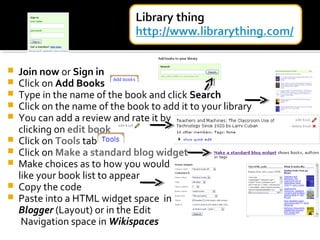
 Join now or Sign in
 Click on Add Books
 Type in the name of the book and click Search
 Click on the name of the book to add it to your library
 You can add a review and rate it by
clicking on edit book
 Click on Tools tab
 Click on Make a standard blog widget
 Make choices as to how you would
like your book list to appear
 Copy the code
 Paste into a HTML widget space in
Blogger (Layout) or in the Edit
Navigation space in Wikispaces
 Type in the news headings you
want to show (i.e New
Zealand)
 Type in a title
 Click Show Code
 Highlight and copy the code
 Paste into a HTML widget
space in Blogger (Layout) or in
the Edit Navigation space in
Wikispaces
 Upload any of your work to http://www.scribd.com/
 You will need to set up an account, once that is set up it is an easy process
to upload and then retrieve the code for inserting into blogs and wikis
http://www.scribd.com/doc/14769799/-Zoo-Activity-Ideas
My Zoo Activity Ideas
 Upload PowerPoints
to Slideshare
 These can be
inserted into wikis
and blogs
 http://jacquiscourses.blogspot.com/2008/07/upload-powerpoints-
Set up an account, upload
animated PowerPoints with
sounds, video, links, buttons
and transitions to SlideBoom.
Embed in blogs and wikis.
Students will need to critique
their PowerPoints before
uploading, remind them that
'less is more' when adding
effects to their slideshows.
Mixbook example
Dipity Example
Dipity is an online application
that allows you to make and
share interactive timelines.
There is a search feature to
look at other timelines under
a wide range topics i.e. History,
Literacy, Social Science etc.
These timelines can be
embedded into wikis, blogs
and webpages. This is an example of a timeline about Sir Edmund Hillary.
Voicethread is a collaborative space of group conversations.
The example below is created by a student called Zoe in America, she designed it around her
interest in Global Warming. Zoe's Global Warming Voicethread
A VoiceThread can be created using documents, videos and photos. Comments can be added by
registered users by text or voice.
They can be exported to your computer
as a widescreen movie and to wikis,
blogs and webpages. You can use a
variety of images: JPG, GIF, BMP, PNG;
docs: PPT, PPS, PDF, DOC, XLS; and
videos. If you've got a Flickr account, you
can import from those as well.
It has a 'doodle' feature which means you
can draw over the images to make a point
while you are recording your voice.
Classroom Application:
a way for children within the class to collaboratively present an investigation, book report
any writing genre (recounts, reports, explanations, descriptions, procedural etc) technology
Challenge or for children as in Zoe's example to invite experts outside of the classroom
environment to comment or answer questions
Slide example
 Create basic mindmaps
 Save online
 Others can edit it
 Can be embedded into wikis and blogs
http://jacquisharp.blogspot.com/20
08/06/bubblus-online-
collaborative.html
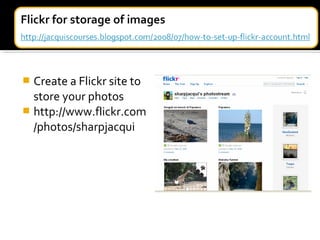
 Create a Flickr site to
store your photos
 http://www.flickr.com
/photos/sharpjacqui
 Click on Get Started –
Join
 Choose a User name
and Password
 Type in your first
Twitter
 Follow people by
typing in their user
name (mine is
sharpjacqui)
 Start following
Twitter is a bit like Facebook without
all the bell and whistles
You are limited to 140 characters
Use it as a Professional Learning Network
(PLN)
Ask questions, post great websites, offer
advice, ask for advice, learn from other
like-minded people!
http://www.k-
3teacherresources.com/teachers-guide-
to-twitter.html (K3 Teachers Resources)

Helpful Tools and Widgets

  • 1.
  • 3.
    Always make sureyou have the latest  Java http://java.com/en/download/manual.jsp  Flash player http://www.adobe.com/shockwave/download/dow  Adobe Shockwave Player http://get.adobe.com/shockwave/  Adobe Reader http://www.adobe.com/products/acrobat/readstep
  • 4.
     If youdo not have a Delicious Account go to http://jacquiscourses.blogspot.com/2008/10/how- and follow the instructions  If you do not have a ‘WeeMee’ go to http://jacquiscourses.blogspot.com/search/label/w and follow the instructions
  • 6.
     Join nowor Sign in  Click on Add Books  Type in the name of the book and click Search  Click on the name of the book to add it to your library  You can add a review and rate it by clicking on edit book  Click on Tools tab  Click on Make a standard blog widget  Make choices as to how you would like your book list to appear  Copy the code  Paste into a HTML widget space in Blogger (Layout) or in the Edit Navigation space in Wikispaces
  • 7.
     Type inthe news headings you want to show (i.e New Zealand)  Type in a title  Click Show Code  Highlight and copy the code  Paste into a HTML widget space in Blogger (Layout) or in the Edit Navigation space in Wikispaces
  • 8.
     Upload anyof your work to http://www.scribd.com/  You will need to set up an account, once that is set up it is an easy process to upload and then retrieve the code for inserting into blogs and wikis http://www.scribd.com/doc/14769799/-Zoo-Activity-Ideas My Zoo Activity Ideas
  • 9.
     Upload PowerPoints toSlideshare  These can be inserted into wikis and blogs  http://jacquiscourses.blogspot.com/2008/07/upload-powerpoints-
  • 10.
    Set up anaccount, upload animated PowerPoints with sounds, video, links, buttons and transitions to SlideBoom. Embed in blogs and wikis. Students will need to critique their PowerPoints before uploading, remind them that 'less is more' when adding effects to their slideshows.
  • 13.
  • 14.
    Dipity Example Dipity isan online application that allows you to make and share interactive timelines. There is a search feature to look at other timelines under a wide range topics i.e. History, Literacy, Social Science etc. These timelines can be embedded into wikis, blogs and webpages. This is an example of a timeline about Sir Edmund Hillary.
  • 15.
    Voicethread is acollaborative space of group conversations. The example below is created by a student called Zoe in America, she designed it around her interest in Global Warming. Zoe's Global Warming Voicethread A VoiceThread can be created using documents, videos and photos. Comments can be added by registered users by text or voice. They can be exported to your computer as a widescreen movie and to wikis, blogs and webpages. You can use a variety of images: JPG, GIF, BMP, PNG; docs: PPT, PPS, PDF, DOC, XLS; and videos. If you've got a Flickr account, you can import from those as well. It has a 'doodle' feature which means you can draw over the images to make a point while you are recording your voice. Classroom Application: a way for children within the class to collaboratively present an investigation, book report any writing genre (recounts, reports, explanations, descriptions, procedural etc) technology Challenge or for children as in Zoe's example to invite experts outside of the classroom environment to comment or answer questions
  • 16.
  • 17.
     Create basicmindmaps  Save online  Others can edit it  Can be embedded into wikis and blogs http://jacquisharp.blogspot.com/20 08/06/bubblus-online- collaborative.html
  • 18.
     Create aFlickr site to store your photos  http://www.flickr.com /photos/sharpjacqui
  • 19.
     Click onGet Started – Join  Choose a User name and Password  Type in your first Twitter  Follow people by typing in their user name (mine is sharpjacqui)  Start following Twitter is a bit like Facebook without all the bell and whistles You are limited to 140 characters Use it as a Professional Learning Network (PLN) Ask questions, post great websites, offer advice, ask for advice, learn from other like-minded people! http://www.k- 3teacherresources.com/teachers-guide- to-twitter.html (K3 Teachers Resources)