



“Using Weebly.com
         to Publish
       ePortfolios”
      Valerie R. Burton
       @MsBisOnline
            TCEA
      February 7, 2013
      Session # 133551
Let’s create a Weebly.com ePortfolio for yourself or your class that houses essays, photos, digital
stories, presentations, videos and much, much more.

                     Publish a site that you will be proud of for years to come.

Thursday, 02/07/2013 5:00PM - 6:30PM , Room 10B
Format PC Workshop
Duration 90-minute
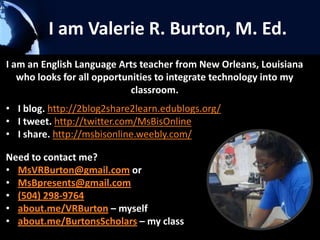
I am Valerie R. Burton, M. Ed.
I am an English Language Arts teacher from New Orleans, Louisiana
   who looks for all opportunities to integrate technology into my
                             classroom.
• I blog. http://2blog2share2learn.edublogs.org/
• I tweet. http://twitter.com/MsBisOnline
• I share. http://msbisonline.weebly.com/

Need to contact me?
• MsVRBurton@gmail.com or
• MsBpresents@gmail.com
• (504) 298-9764
• about.me/VRBurton – myself
• about.me/BurtonsScholars – my class
Looking for a way to create
      ePortfolios for you and your
               students?
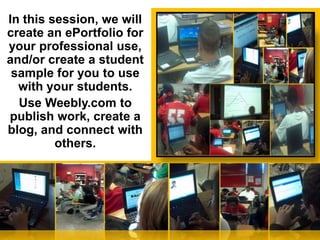
    In this session, we will create an
ePortfolio for your professional use, and
 create a student sample for you to use
 with your students. Use Weebly.com to
publish work, create a blog, and connect
                with others.

  Weebly.com for ePortfolios ~ Smore poster
          http://bit.ly/WeeblyMsB
Why just write with pen on
paper when you can post to
    your own website?
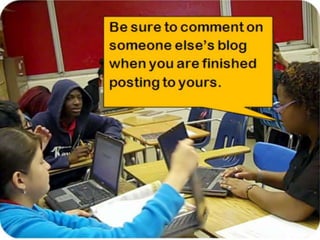
Have you
finished posting
  to your site?
Weebly for Educators
Weebly Educator is a free website builder for educators
and has multiple uses:
– Post assignments
– Post class information
– Import files
– Import videos
– Import pictures
– Create links to other websites
– Create digital student portfolios
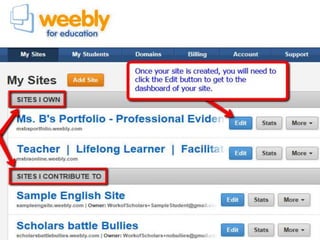
– Create classes and add students
– Collect assignments using the Digital Dropbox
•   gain an understanding of the importance of developing an ePortfolio.
•   gather ideas for developing your own ePortfolio.
•   see suggestions and examples of what to include in your ePortfolio.
•   explore framework for building professional portfolios for educators and
    students.

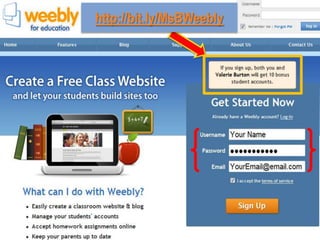
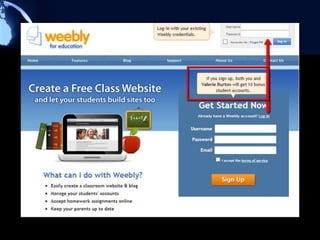
    1.   Create an account on Weebly.com
    2.   Adjust the themes to your preferences
    3.   Add pages
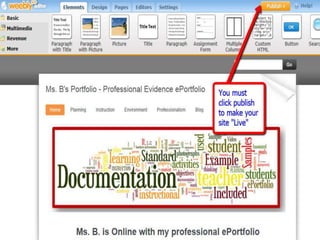
    4.   Publish your new ePortfolio website
VIP links
Referral code to use for 10 extra student accounts
• http://bit.ly/MsBWeebly - go here to create your account
Weebly's resources
• http://www.weebly.com/features.php
My Weebly sites
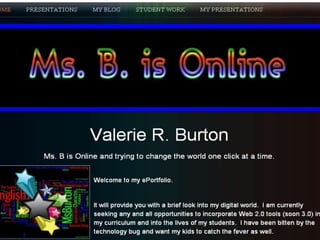
• My ePortfolios - http://MsBisOnline.weebly.com
• My sample student site -
   http://SampleEngSite.weebly.com
Presentation Slides for this TCEA convention
• http://bit.ly/MsBTCEA
http://bit.ly/MsBWeebly
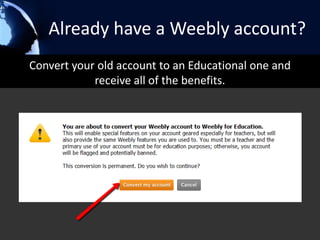
Already have a Weebly account?
Convert your old account to an Educational one and
            receive all of the benefits.
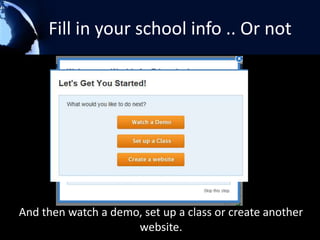
Fill in your school info .. Or not


And then watch a demo, set up a class or create another
                     website.
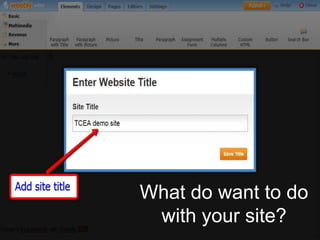
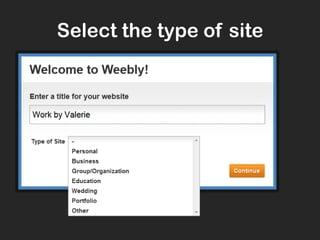
What do want to do
 with your site?
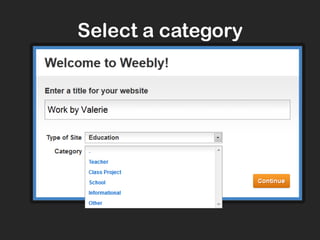
Select a category
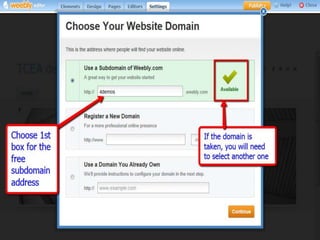
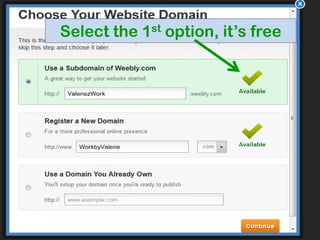
Select the 1st option, it’s free
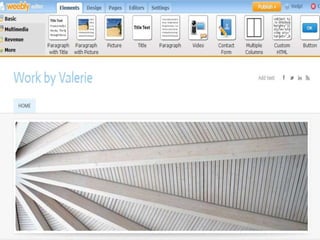
Your site has been
Voila!
         created that quickly.
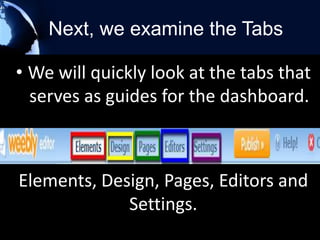
Next, we examine the Tabs

• We will quickly look at the tabs that
  serves as guides for the dashboard.


Elements, Design, Pages, Editors and
             Settings.
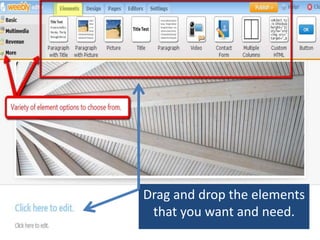
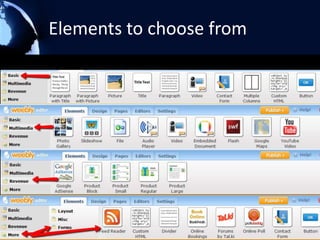
Drag and drop the elements
 that you want and need.
Elements to choose from
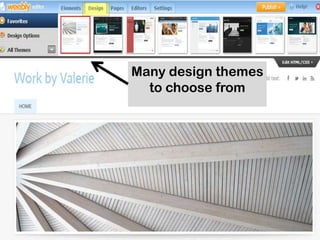
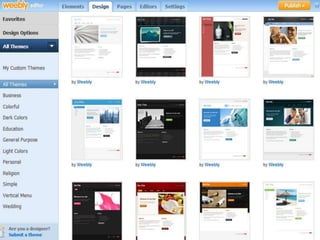
Many design themes
  to choose from
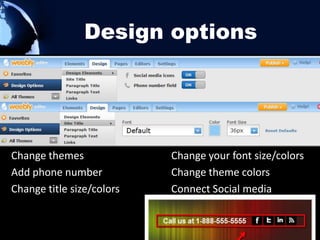
Design options


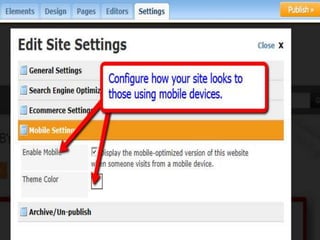
Change themes              Change your font size/colors
Add phone number           Change theme colors
Change title size/colors   Connect Social media
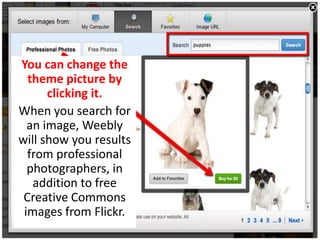
You can change the
  theme picture by
      clicking it.
When you search for
  an image, Weebly
will show you results
  from professional
  photographers, in
   addition to free
 Creative Commons
 images from Flickr.
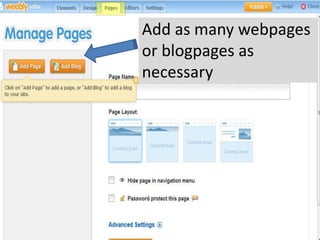
Add as many webpages
or blogpages as
necessary
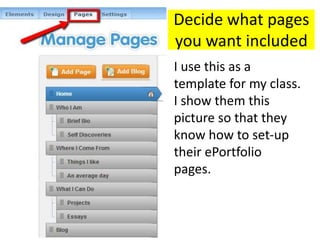
Decide what pages
you want included
I use this as a
template for my class.
I show them this
picture so that they
know how to set-up
their ePortfolio
pages.
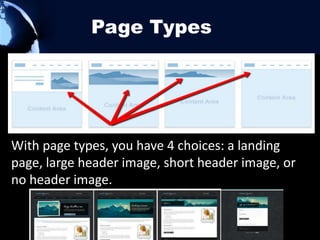
Page Types


With page types, you have 4 choices: a landing
page, large header image, short header image, or
no header image.
Sample pages

•   Awards/Scholarships
•   Coursework
•   Digital stories
•   Description of community activities
•   Goals
•   Links to relevant websites
•   Plans for career development
•   Resume
•   Videos
•   Special skills / knowledge, technical skills, etc.
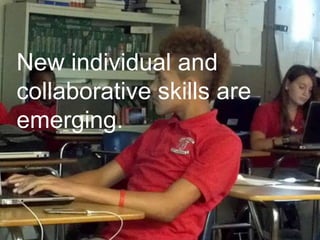
New individual and
collaborative skills
  are emerging.
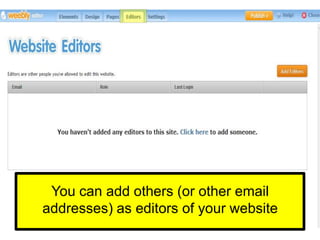
You can add others (or other email
addresses) as editors of your website
Weebly for Education is Perfect for
            You and Your Students
• Use it for creating classroom websites, student e-
  portfolios, and websites for assigned projects.
• Their drag & drop website editor is simple to use, and
  appropriate for use with students of all ages.
• Weebly enables your students to express themselves
  creatively using a variety of multimedia features, all within
  a protected environment that you control.
• No HTML or technical skills required!
• Weebly was named one of TIME's 50 Best Websites of the
  year.
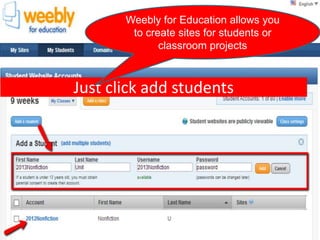
Weebly for Education allows you
        to create sites for students or
              classroom projects


Just click add students
Weebly is easy to manipulate

• Add / Edit text
• Change text fonts
• Create links
• Add PDFs and other documents
• Alter page layouts with multiple
  columns
• Upload Images – create a gallery
• Create a slideshow
Many, Many, Many Options
•   Add a calendar
•   Add a Google map
•   Add a Twitter feed
•   Add a search field
•   Create a contact form
•   Add an RSS feed
•   Create a forum
•   Add an email newsletter or form
•   Add a poll
•   Add other embeddable content
•   Edit HTML/CSS of a theme
Weebly.com for ePortfolios and easy
                            websites

–Class website – publish
 announcements, tips and reminders for
 parents and students
–Class ePortfolio – collect assignments and
 artifacts to be showed off and shared.
–Student ePortfolio - highlight
 classwork, community service
 activities, awards and recognitions.
http://www.weebly.com/
A quick How To video
How I use (or plan to use)…


         My Weebly sites
 http://4eportfolios.weebly.com
 http://MsBisOnline.weebly.com
http://SampleEngSite.weebly.com
Let’s get
                 readyyyyy to
                  publish!!!!


I have a Weebly ePortfolio /
website… Now What?
Well, here comes the fun part now!!!!
Here are some things that you can do
with your new site
Collaborative projects


Collaboration teams post
• a detailed outline of their project
• a log of the conversation and decision-making that
  went into constructing and executing the project
• a final presentation.
Each team should design its own assessment rubric
by editing a webpage to show all the features of an
excellent project.
Lexicon teams


* Each week, a team of students will edit a
page to collaboratively identify and define
key words and phrases from that week’s
readings and class discussion.
E-book teams
*Each week, a team of four students
works between meetings of class sessions
to update an enhanced e-book that
includes the notes, lexicon entries, and
mindmaps for that week, with graphics,
text, and live links.
* In addition, e-book teams develop a
webpage on best practices and
procedures.
Blog Reflections

*Students can be required to post a short (a few sentences
or a short paragraph) synopsis of each reading in the
student’s blog. Students can be requested to create
• a short dialog between the authors of each week’s texts
• list ways in which the subject of the texts could affect
   the student’s life or society
• reflect on the implications of the texts for life online in
   the future
• answer their own key questions from their own
   perspective
Real-time note-taking
       and backchannel
• Teams of four take notes using a real-time
    note-taking handing off to another team
    every half hour, publishing their notes to
    the class site after the end of the class
    session.
•   Students can use collaborative tools to
    engage in parallel, relevant online
    discussion in real time through the web,
    Facebook, Twitter, or Facebook.
VIP links
Referral code to use for 10 extra student accounts
• http://bit.ly/MsBWeebly - go here to create your account
Weebly's resources
• http://www.weebly.com/features.php
My Weebly sites
• My ePortfolios - http://MsBisOnline.weebly.com
• My sample student site -
   http://SampleEngSite.weebly.com
Presentation Slides for this TCEA convention
• http://bit.ly/MsBTCEA
Contact me if you need me
   I am an English Language Arts teacher from
     New Orleans, Louisiana who looks for all
   opportunities to integrate technology into my
                     classroom.
  I blog. http://2blog2share2learn.edublogs.org/
  I tweet. http://twitter.com/MsBisOnline
  I share. http://msbisonline.weebly.com/

  Need to contact me?
  MsVRBurton@gmail.com or
  MsBpresents@gmail.com
  (504) 298-9764
  about.me/VRBurton – myself
  about.me/BurtonsScholars – my class
How can I access
your handout and
 presentation if I
   want them?
Any Questions ? ? ?
Session Evaluation

• Please provide feedback on
  my awesome session through
  the convention mobile app or
  online survey at:
  www.tcea.org/surveys
• My session number (133551)
Thank you for coming
 and I hope that you
enjoyed the session.


Need to contact me?
MsVRBurton@gmail.com or
MsBpresents@gmail.com
(504) 298-9764
about.me/VRBurton – myself
about.me/BurtonsScholars – my class

Using Weebly to publish e-Portfolios - TCEA 2013

  • 1.
    “Using Weebly.com to Publish ePortfolios” Valerie R. Burton @MsBisOnline TCEA February 7, 2013 Session # 133551
  • 2.
    Let’s create aWeebly.com ePortfolio for yourself or your class that houses essays, photos, digital stories, presentations, videos and much, much more. Publish a site that you will be proud of for years to come. Thursday, 02/07/2013 5:00PM - 6:30PM , Room 10B Format PC Workshop Duration 90-minute
  • 3.
    I am ValerieR. Burton, M. Ed. I am an English Language Arts teacher from New Orleans, Louisiana who looks for all opportunities to integrate technology into my classroom. • I blog. http://2blog2share2learn.edublogs.org/ • I tweet. http://twitter.com/MsBisOnline • I share. http://msbisonline.weebly.com/ Need to contact me? • MsVRBurton@gmail.com or • MsBpresents@gmail.com • (504) 298-9764 • about.me/VRBurton – myself • about.me/BurtonsScholars – my class
  • 4.
    Looking for away to create ePortfolios for you and your students? In this session, we will create an ePortfolio for your professional use, and create a student sample for you to use with your students. Use Weebly.com to publish work, create a blog, and connect with others. Weebly.com for ePortfolios ~ Smore poster http://bit.ly/WeeblyMsB
  • 5.
    Why just writewith pen on paper when you can post to your own website?
  • 6.
  • 7.
    Weebly for Educators WeeblyEducator is a free website builder for educators and has multiple uses: – Post assignments – Post class information – Import files – Import videos – Import pictures – Create links to other websites – Create digital student portfolios – Create classes and add students – Collect assignments using the Digital Dropbox
  • 8.
    gain an understanding of the importance of developing an ePortfolio. • gather ideas for developing your own ePortfolio. • see suggestions and examples of what to include in your ePortfolio. • explore framework for building professional portfolios for educators and students. 1. Create an account on Weebly.com 2. Adjust the themes to your preferences 3. Add pages 4. Publish your new ePortfolio website
  • 9.
    VIP links Referral codeto use for 10 extra student accounts • http://bit.ly/MsBWeebly - go here to create your account Weebly's resources • http://www.weebly.com/features.php My Weebly sites • My ePortfolios - http://MsBisOnline.weebly.com • My sample student site - http://SampleEngSite.weebly.com Presentation Slides for this TCEA convention • http://bit.ly/MsBTCEA
  • 10.
  • 12.
    Already have aWeebly account? Convert your old account to an Educational one and receive all of the benefits.
  • 13.
    Fill in yourschool info .. Or not And then watch a demo, set up a class or create another website.
  • 14.
    What do wantto do with your site?
  • 15.
  • 17.
    Select the 1stoption, it’s free
  • 18.
    Your site hasbeen Voila! created that quickly.
  • 19.
    Next, we examinethe Tabs • We will quickly look at the tabs that serves as guides for the dashboard. Elements, Design, Pages, Editors and Settings.
  • 20.
    Drag and dropthe elements that you want and need.
  • 21.
  • 22.
    Many design themes to choose from
  • 23.
    Design options Change themes Change your font size/colors Add phone number Change theme colors Change title size/colors Connect Social media
  • 25.
    You can changethe theme picture by clicking it. When you search for an image, Weebly will show you results from professional photographers, in addition to free Creative Commons images from Flickr.
  • 26.
    Add as manywebpages or blogpages as necessary
  • 27.
    Decide what pages youwant included I use this as a template for my class. I show them this picture so that they know how to set-up their ePortfolio pages.
  • 28.
    Page Types With pagetypes, you have 4 choices: a landing page, large header image, short header image, or no header image.
  • 29.
    Sample pages • Awards/Scholarships • Coursework • Digital stories • Description of community activities • Goals • Links to relevant websites • Plans for career development • Resume • Videos • Special skills / knowledge, technical skills, etc.
  • 30.
  • 31.
    You can addothers (or other email addresses) as editors of your website
  • 38.
    Weebly for Educationis Perfect for You and Your Students • Use it for creating classroom websites, student e- portfolios, and websites for assigned projects. • Their drag & drop website editor is simple to use, and appropriate for use with students of all ages. • Weebly enables your students to express themselves creatively using a variety of multimedia features, all within a protected environment that you control. • No HTML or technical skills required! • Weebly was named one of TIME's 50 Best Websites of the year.
  • 39.
    Weebly for Educationallows you to create sites for students or classroom projects Just click add students
  • 40.
    Weebly is easyto manipulate • Add / Edit text • Change text fonts • Create links • Add PDFs and other documents • Alter page layouts with multiple columns • Upload Images – create a gallery • Create a slideshow
  • 41.
    Many, Many, ManyOptions • Add a calendar • Add a Google map • Add a Twitter feed • Add a search field • Create a contact form • Add an RSS feed • Create a forum • Add an email newsletter or form • Add a poll • Add other embeddable content • Edit HTML/CSS of a theme
  • 42.
    Weebly.com for ePortfoliosand easy websites –Class website – publish announcements, tips and reminders for parents and students –Class ePortfolio – collect assignments and artifacts to be showed off and shared. –Student ePortfolio - highlight classwork, community service activities, awards and recognitions.
  • 43.
  • 45.
    How I use(or plan to use)… My Weebly sites http://4eportfolios.weebly.com http://MsBisOnline.weebly.com http://SampleEngSite.weebly.com
  • 46.
    Let’s get readyyyyy to publish!!!! I have a Weebly ePortfolio / website… Now What? Well, here comes the fun part now!!!! Here are some things that you can do with your new site
  • 47.
    Collaborative projects Collaboration teamspost • a detailed outline of their project • a log of the conversation and decision-making that went into constructing and executing the project • a final presentation. Each team should design its own assessment rubric by editing a webpage to show all the features of an excellent project.
  • 48.
    Lexicon teams * Eachweek, a team of students will edit a page to collaboratively identify and define key words and phrases from that week’s readings and class discussion.
  • 49.
    E-book teams *Each week,a team of four students works between meetings of class sessions to update an enhanced e-book that includes the notes, lexicon entries, and mindmaps for that week, with graphics, text, and live links. * In addition, e-book teams develop a webpage on best practices and procedures.
  • 50.
    Blog Reflections *Students canbe required to post a short (a few sentences or a short paragraph) synopsis of each reading in the student’s blog. Students can be requested to create • a short dialog between the authors of each week’s texts • list ways in which the subject of the texts could affect the student’s life or society • reflect on the implications of the texts for life online in the future • answer their own key questions from their own perspective
  • 51.
    Real-time note-taking and backchannel • Teams of four take notes using a real-time note-taking handing off to another team every half hour, publishing their notes to the class site after the end of the class session. • Students can use collaborative tools to engage in parallel, relevant online discussion in real time through the web, Facebook, Twitter, or Facebook.
  • 52.
    VIP links Referral codeto use for 10 extra student accounts • http://bit.ly/MsBWeebly - go here to create your account Weebly's resources • http://www.weebly.com/features.php My Weebly sites • My ePortfolios - http://MsBisOnline.weebly.com • My sample student site - http://SampleEngSite.weebly.com Presentation Slides for this TCEA convention • http://bit.ly/MsBTCEA
  • 53.
    Contact me ifyou need me I am an English Language Arts teacher from New Orleans, Louisiana who looks for all opportunities to integrate technology into my classroom. I blog. http://2blog2share2learn.edublogs.org/ I tweet. http://twitter.com/MsBisOnline I share. http://msbisonline.weebly.com/ Need to contact me? MsVRBurton@gmail.com or MsBpresents@gmail.com (504) 298-9764 about.me/VRBurton – myself about.me/BurtonsScholars – my class
  • 54.
    How can Iaccess your handout and presentation if I want them?
  • 55.
  • 56.
    Session Evaluation • Pleaseprovide feedback on my awesome session through the convention mobile app or online survey at: www.tcea.org/surveys • My session number (133551)
  • 57.
    Thank you forcoming and I hope that you enjoyed the session. Need to contact me? MsVRBurton@gmail.com or MsBpresents@gmail.com (504) 298-9764 about.me/VRBurton – myself about.me/BurtonsScholars – my class