What is aComputer?
• A computer is an electronic device that
accepts data from the user, processes it,
produces results.displays them to the users,
and stores the results for future usage.
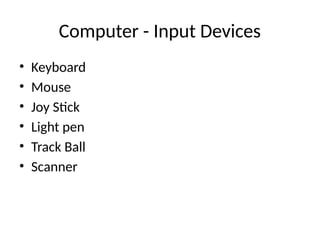
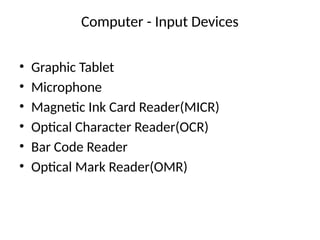
Computer - InputDevices
• Graphic Tablet
• Microphone
• Magnetic Ink Card Reader(MICR)
• Optical Character Reader(OCR)
• Bar Code Reader
• Optical Mark Reader(OMR)
5.
Computer - OutputDevices
• Following are some of the important output
devices used in a computer.
• Monitors
• Printer
6.
BASIC PARTS OFCOMPUTER
• MONITOR
• KEYBOARD
• MOUSE
• CPU
• PRINTER
• SCANNER
• SPEAKER
7.
MONITOR
• The monitorworks with a video card, located
inside the computer case, to display images
and text on the screen.
• Most monitors have control buttons that
allow you to change your monitor's display
settings, and some monitors also have built-in
speakers.
8.
KEYBOARD
• The keyboardis one of the main ways to
communicate with a computer. There are
many different types of keyboards, but most
are very similar and allow you to accomplish
the same basic tasks.
9.
MOUSE
• The mouseis another important tool for
communicating with computers. Commonly
known as a pointing device, it lets you point
to objects on the screen, click on them, and
move them.
Input Unit
• Thisunit contains devices with the help of
which we enter data into the computer.
• This unit creates a link between the user and
the computer.
• The input devices translate the information
into a form understandable by the computer.
12.
CPU (Central ProcessingUnit)
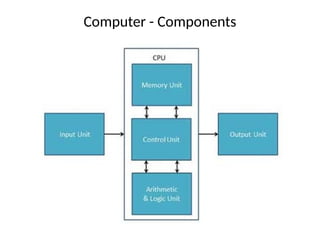
• CPU is considered as the brain of the computer.
• CPU performs all types of data processing
operations.
• It stores data, intermediate results, and
instructions (program).
• It controls the operation of all parts of the
computer.
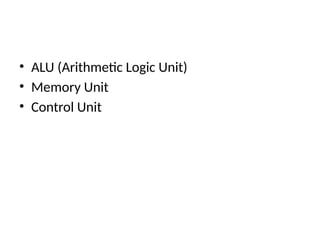
• CPU itself has the following three components .
Output Unit
• Theoutput unit consists of devices with the
help of which we get the information from the
computer.
• This unit is a link between the computer and
the users.
• Output devices translate the computer's
output into a form understandable by the
users.
15.
Memory or StorageUnit
• This unit can store instructions, data, and
intermediate results.
• This unit supplies information to other units
of the computer when needed.
• It is also known as internal storage unit or the
main memory or the primary storage or
Random Access Memory (RAM).
16.
ALU (Arithmetic LogicUnit)
• This unit consists of two subsections namely,
• Arithmetic Section
• Logic Section
17.
Arithmetic Section
• Functionof arithmetic section is to perform
arithmetic operations like addition,
subtraction, multiplication, and division. All
complex operations are done by making
repetitive use of the above operations.
18.
Logic Section
• Functionof logic section is to perform logic
operations such as comparing, selecting,
matching, and merging of data.
19.
Control Unit
• Thisunit controls the operations of all parts of
the computer but does not carry out any
actual data processing operations.
20.
Functions of Computers
•A computer performs the following functions.
1. Receiving Input
• Data is fed into computer through various
input devices like keyboard, mouse, digital
pens, etc. Input can also be fed through
devices like CD-ROM, pen drive, scanner, etc.
21.
2.Processing the information
•Operations on the input data are carried out
based on the instructions provided in the
programs.
22.
3.Storing the information
•After processing, the information gets stored
in the primary or secondary storage area.
23.
4.Producing output
• Theprocessed information and other details
are communicated to the outside world
through output devices like monitor, printer,
etc.
24.
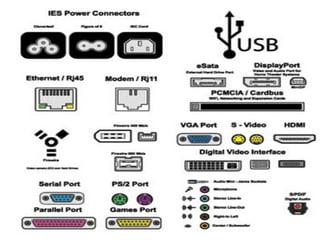
PORTS
• A portis a physical docking point using which
an external device can be connected to the
computer. It can also be programmatic
docking point through which information
flows from a program to the computer or over
the Internet.
25.
Characteristics of Ports
•A port has the following characteristics −
• External devices are connected to a computer
using cables and ports.
• Ports are slots on the motherboard into which
a cable of external device is plugged in.
• Examples of external devices attached via
ports are the mouse, keyboard, monitor,
microphone, speakers, etc.
27.
Let us nowdiscuss a few important types of
ports
• Serial Port
• Used for external modems and older
computer mouse
• Two versions: 9 pin, 25 pin model
• Data travels at 115 kilobits per second
28.
Parallel Port
• Usedfor scanners and printers
• Also called printer port
• 25 pin model
29.
PS/2 Port
• Usedfor old computer keyboard and mouse
• Also called mouse port
• Most of the old computers provide two PS/2
port, each for the mouse and keyboard
30.
Universal Serial Bus(or USB) Port
• It can connect all kinds of external USB devices
such as external hard disk, printer, scanner,
mouse, keyboard, etc.
• It was introduced in 1997.
• Most of the computers provide two USB ports as
minimum.
• Data travels at 12 megabits per seconds.
• USB compliant devices can get power from a USB
port.
31.
VGA Port
• Connectsmonitor to a computer's video card.
• It has 15 holes.
• Similar to the serial port connector. However,
serial port connector has pins, VGA port has
holes.
Firewire Port
• Transferslarge amount of data at very fast speed.
• Connects camcorders and video equipment to the
computer.
• Data travels at 400 to 800 megabits per seconds.
• Invented by Apple.
• It has three variants: 4-Pin FireWire 400 connector,
6-Pin FireWire 400 connector, and 9-Pin FireWire
800 connector.
Ethernet Port
• Connectsto a network and high speed
Internet.
• Connects the network cable to a computer.
• This port resides on an Ethernet Card.
• Data travels at 10 megabits to 1000 megabits
per seconds depending upon the network
bandwidth.
Digital Video Interface,DVI port
• Connects Flat panel LCD monitor to the
computer's high-end video graphic cards.
• Very popular among video card
manufacturers.